

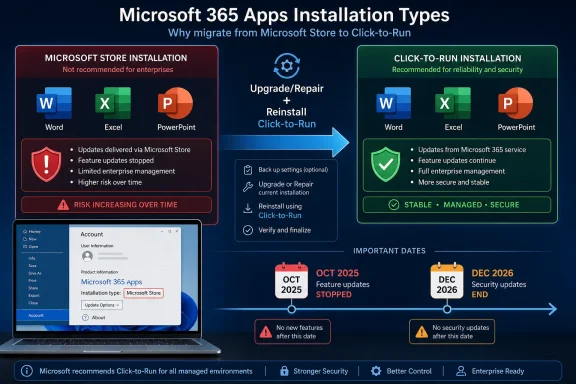
Microsoft is ending support for the Microsoft Store installation type of Microsoft 365 Apps, with feature updates already stopped in October 2025 and security updates scheduled to end in December 2026 for affected Windows users. The apps are not disappearing tomorrow, and Word will not suddenly refuse to open. But Microsoft is drawing a hard line under an Office distribution model that never really fit the way Microsoft 365 is now built, serviced, managed, and increasingly infused with Copilot-era cloud features.
The practical message is simple: if your Office apps say “Microsoft Store” under the account screen, you need to move to Click-to-Run. The larger story is more interesting. Microsoft spent years trying to make the Store a credible home for Windows software; now, for one of its most important Windows products, it is admitting that the Store package is the wrong plumbing.
The most awkward part of this transition is that Microsoft is not retiring an app most users can identify. It is retiring an installation type, which is exactly the kind of distinction that matters enormously to administrators and almost not at all to the person trying to finish a spreadsheet before lunch.
On the surface, Store-installed Microsoft 365 Apps and Click-to-Run Microsoft 365 Apps look effectively the same. Word is Word. Excel is Excel. PowerPoint still has the same ribbon, the same templates, and the same ability to make a meeting feel longer than it needed to be. The difference sits underneath the familiar interface, in the packaging, update mechanism, deployment controls, and management hooks.
That is why many affected users may have no idea they are affected. A person who installed Office through the Microsoft Store years ago may simply think they have “Office” or “Microsoft 365.” Microsoft’s deadline asks those users to care about a distinction Windows has generally trained them not to notice.
The company’s guidance is blunt: Store-install Microsoft 365 Apps must be upgraded to Click-to-Run to keep receiving new features and security updates. Feature updates stopped in October 2025. Security updates continue only until December 2026. After that, the Store installation type becomes the Office equivalent of a forgotten branch line: familiar, still possibly functional, but no longer where the trains are running.
For many categories of apps, that model made a certain kind of sense. Lightweight consumer apps, media apps, and self-contained utilities benefit from Store distribution. The Store gives users a central place to discover and update software, and it gives Microsoft a way to impose some order on an ecosystem that has historically treated installation as a free-for-all.
Office, however, is not a weather app or a streaming client. Microsoft 365 Apps are a sprawling productivity platform, a corporate dependency, a compliance surface, a macro runtime, a document compatibility engine, and now a delivery vehicle for AI-assisted features. The package may look like a set of desktop apps, but operationally it behaves more like infrastructure.
That distinction matters. Enterprises do not merely install Office; they stage it, configure it, channel it, defer it, audit it, activate it on shared devices, pin it to controlled versions, and integrate it into broader endpoint management. A Store package is a neat consumer abstraction. Microsoft 365 Apps are an enterprise organism.
Microsoft’s decision is therefore less a sudden reversal than a delayed admission. The Store model may be fine for many Windows apps, but Office has outgrown—or never fully fit—the assumptions behind Store-based servicing.
For home users, Click-to-Run mostly means Office installs and updates in the background without much ceremony. For administrators, it means something more consequential: update channels, deployment control, configuration through the Office Deployment Tool, integration with Microsoft Intune and Configuration Manager, and support for scenarios that Store installs were poorly suited to handle.
That is the real divide. Store installs tie Microsoft 365 Apps more closely to Windows update behavior and offer fewer knobs for organizations that need predictable control. Click-to-Run gives Microsoft and IT departments a dedicated Office servicing rail. In the Microsoft 365 era, that rail is where the action is.
The timing also lines up with Microsoft’s broader product strategy. Microsoft 365 is no longer just Word, Excel, Outlook, and PowerPoint on a subscription. It is a constantly changing bundle of desktop code, web services, identity controls, cloud storage, compliance layers, Teams integrations, and Copilot features. That model rewards a servicing system that can move quickly, selectively, and centrally.
Store-based Office could deliver familiar apps. Click-to-Run can deliver Microsoft 365 as Microsoft now defines it: a continually updated service with desktop endpoints. That difference is why the Store version is being sunset rather than rehabilitated.
Microsoft says the installer can detect the Store installation type, remove it, and reinstall the Click-to-Run version without requiring a new license. That matters, because the worst version of this story would have been one where users confused a packaging migration with a forced repurchase. This is not that. It is a servicing migration, not a new subscription demand.
Still, “mostly painless” is not the same as invisible. Users should save their work, close Office apps, and expect the reinstall to take some time. Anyone with custom add-ins, unusual templates, third-party integrations, or line-of-business macros should be more careful, because Office migrations have a long history of exposing assumptions nobody documented.
For IT departments, the shift is cleaner but broader. Managed deployments using the Office Deployment Tool through Intune or Configuration Manager can automatically detect and remove the Store installation type and install Click-to-Run. That is the kind of automation Microsoft wants admins using, and the kind Store-installed Office never fully embraced.
In that sense, the end of Store Office is housekeeping. Microsoft is reducing the number of Office servicing models it has to explain, support, and test. Administrators get a more standard endpoint estate. Microsoft gets fewer edge cases. Users get one less hidden distinction—after they survive the migration created by that distinction.
Office remains one of the most valuable attack surfaces on a Windows PC. Documents, spreadsheets, attachments, macros, embedded content, and collaboration workflows all make it a natural target. Even in a world where Microsoft has tightened macro behavior and pushed users toward cloud-backed protections, Office is still where a lot of risky files meet a lot of busy humans.
Running an unsupported Office installation type after security updates end is therefore not a harmless act of software nostalgia. It increases exposure in exactly the apps many users trust with business documents, tax records, contracts, resumes, schoolwork, and internal data. For enterprises, it can also create compliance and audit problems, especially in environments where supported software baselines are mandatory.
The December 2026 deadline gives users and admins time, but it should not be read as permission to wait until the last week. The right moment to migrate is before the deadline becomes operationally interesting. Once a security cutoff is close enough to appear in risk registers and vulnerability scans, the work is already late.
Microsoft’s messaging may sound like routine lifecycle cleanup. For security teams, it is a ticking exception list. Every Store-installed Office instance is a machine that needs to be found, migrated, or deliberately accounted for.
Click-to-Run gives Microsoft a better path for controlled feature rollout. It supports multiple update channels and lets organizations decide how quickly they want new Office builds. That matters when new features are not merely cosmetic toolbar changes but workflow-altering additions involving cloud content, enterprise data boundaries, and AI prompts.
The irony is hard to miss. Microsoft continues to talk about native Windows development, modern app frameworks, and a healthier Windows app ecosystem. Yet Office, the crown jewel of Windows productivity software, is being pulled away from the Store installation path and consolidated around Microsoft’s own dedicated deployment technology.
That does not mean the Microsoft Store is dead. It does mean the Store is not the universal answer to Windows software distribution. For simple apps, it can still be a useful storefront and update channel. For Microsoft 365 Apps, the Store has become a historical detour.
The more Microsoft 365 becomes a cloud-governed, AI-enhanced productivity layer, the less plausible it is that Office can be treated like an ordinary Store app. Office needs policy depth, deployment nuance, and servicing velocity. Click-to-Run is not elegant branding, but it is the system Microsoft trusts for that job.
The Store version of Microsoft 365 Apps was supposed to make Office feel more modern in the Windows ecosystem. Instead, it became another channel Microsoft had to support alongside the one enterprises actually use. When the cost of maintaining that channel exceeded the benefit, Microsoft chose consolidation.
That is not necessarily a failure. Mature platforms accumulate experiments, and not every experiment deserves indefinite life support. The problem is that Microsoft often hides these shifts behind lifecycle language that makes them sound smaller than they are. Users are not being asked to understand a product retirement; they are being asked to understand a distribution model retirement.
For Windows enthusiasts, this is familiar territory. Microsoft makes a strategic push, developers and users adapt unevenly, enterprises keep doing what works, and eventually the company trims the branch that never bore enough fruit. The Store installation type of Office is now one of those branches.
The end result may be better. But the path there illustrates why Windows software modernization is so difficult. Microsoft cannot simply declare a cleaner model into existence when its own flagship productivity suite needs something messier, deeper, and more controllable.
A home user can check manually in any Microsoft 365 app. That is fine for one PC. It is useless for a school lab, a small business fleet, or a hybrid organization with unmanaged remnants from years of hardware purchases and user-driven installs.
The machines most likely to be missed are the ones that always get missed: old laptops in drawers, shared reception PCs, lightly managed small-business desktops, home office machines, and devices where users installed Office themselves before IT standardized deployment. Those are also the machines where unsupported software tends to linger after everyone assumes the migration is complete.
Microsoft’s automatic replacement behavior through managed deployment helps, but only for devices that are actually under management and targeted correctly. The risk lives in the gap between Microsoft’s clean migration story and the messier reality of Windows estates. A managed tenant is not the same as a fully managed environment.
That is why administrators should treat this as an inventory exercise first and an installer exercise second. Find the Store installs. Confirm licensing. Test migration on representative devices. Then push the Click-to-Run deployment with enough time to handle exceptions before December 2026 turns from a distant date into a change-freeze problem.
The practical message is simple: if your Office apps say “Microsoft Store” under the account screen, you need to move to Click-to-Run. The larger story is more interesting. Microsoft spent years trying to make the Store a credible home for Windows software; now, for one of its most important Windows products, it is admitting that the Store package is the wrong plumbing.
 Microsoft Is Retiring a Version of Office Most Users Never Knew They Had
The most awkward part of this transition is that Microsoft is not retiring an app most users can identify. It is retiring an installation type, which is exactly the kind of distinction that matters enormously to administrators and almost not at all to the person trying to finish a spreadsheet before lunch.On the surface, Store-installed Microsoft 365 Apps and Click-to-Run Microsoft 365 Apps look effectively the same. Word is Word. Excel is Excel. PowerPoint still has the same ribbon, the same templates, and the same ability to make a meeting feel longer than it needed to be. The difference sits underneath the familiar interface, in the packaging, update mechanism, deployment controls, and management hooks.
That is why many affected users may have no idea they are affected. A person who installed Office through the Microsoft Store years ago may simply think they have “Office” or “Microsoft 365.” Microsoft’s deadline asks those users to care about a distinction Windows has generally trained them not to notice.
The company’s guidance is blunt: Store-install Microsoft 365 Apps must be upgraded to Click-to-Run to keep receiving new features and security updates. Feature updates stopped in October 2025. Security updates continue only until December 2026. After that, the Store installation type becomes the Office equivalent of a forgotten branch line: familiar, still possibly functional, but no longer where the trains are running.
The Store Was Supposed to Simplify Windows Software, Not Strand Office
The Microsoft Store installation type was born out of a broader Windows ambition. Microsoft wanted cleaner app packaging, safer installation, better sandboxing, and a more modern update pipeline than the old world of scattered EXE installers and registry sprawl. Appx and related packaging models were part of that vision, closely tied to the Universal Windows Platform era and Microsoft’s long campaign to make Windows software behave more like mobile software.For many categories of apps, that model made a certain kind of sense. Lightweight consumer apps, media apps, and self-contained utilities benefit from Store distribution. The Store gives users a central place to discover and update software, and it gives Microsoft a way to impose some order on an ecosystem that has historically treated installation as a free-for-all.
Office, however, is not a weather app or a streaming client. Microsoft 365 Apps are a sprawling productivity platform, a corporate dependency, a compliance surface, a macro runtime, a document compatibility engine, and now a delivery vehicle for AI-assisted features. The package may look like a set of desktop apps, but operationally it behaves more like infrastructure.
That distinction matters. Enterprises do not merely install Office; they stage it, configure it, channel it, defer it, audit it, activate it on shared devices, pin it to controlled versions, and integrate it into broader endpoint management. A Store package is a neat consumer abstraction. Microsoft 365 Apps are an enterprise organism.
Microsoft’s decision is therefore less a sudden reversal than a delayed admission. The Store model may be fine for many Windows apps, but Office has outgrown—or never fully fit—the assumptions behind Store-based servicing.
Click-to-Run Won Because Office Became a Service
Click-to-Run is not new, and it is not glamorous. It is one of those Microsoft technologies that quietly won because it solved a boring problem at industrial scale. It allows Office to be streamed, updated, repaired, configured, and serviced outside the old monolithic installer model.For home users, Click-to-Run mostly means Office installs and updates in the background without much ceremony. For administrators, it means something more consequential: update channels, deployment control, configuration through the Office Deployment Tool, integration with Microsoft Intune and Configuration Manager, and support for scenarios that Store installs were poorly suited to handle.
That is the real divide. Store installs tie Microsoft 365 Apps more closely to Windows update behavior and offer fewer knobs for organizations that need predictable control. Click-to-Run gives Microsoft and IT departments a dedicated Office servicing rail. In the Microsoft 365 era, that rail is where the action is.
The timing also lines up with Microsoft’s broader product strategy. Microsoft 365 is no longer just Word, Excel, Outlook, and PowerPoint on a subscription. It is a constantly changing bundle of desktop code, web services, identity controls, cloud storage, compliance layers, Teams integrations, and Copilot features. That model rewards a servicing system that can move quickly, selectively, and centrally.
Store-based Office could deliver familiar apps. Click-to-Run can deliver Microsoft 365 as Microsoft now defines it: a continually updated service with desktop endpoints. That difference is why the Store version is being sunset rather than rehabilitated.
This Is a Consumer Nuisance but an Enterprise Cleanup Operation
For individual users, the fix should be mostly painless. Open a Microsoft 365 app, go to File, then Account, and look near the About section. If the installation type says Click-to-Run, there is nothing to do. If it says Microsoft Store, the system needs to be migrated.Microsoft says the installer can detect the Store installation type, remove it, and reinstall the Click-to-Run version without requiring a new license. That matters, because the worst version of this story would have been one where users confused a packaging migration with a forced repurchase. This is not that. It is a servicing migration, not a new subscription demand.
Still, “mostly painless” is not the same as invisible. Users should save their work, close Office apps, and expect the reinstall to take some time. Anyone with custom add-ins, unusual templates, third-party integrations, or line-of-business macros should be more careful, because Office migrations have a long history of exposing assumptions nobody documented.
For IT departments, the shift is cleaner but broader. Managed deployments using the Office Deployment Tool through Intune or Configuration Manager can automatically detect and remove the Store installation type and install Click-to-Run. That is the kind of automation Microsoft wants admins using, and the kind Store-installed Office never fully embraced.
In that sense, the end of Store Office is housekeeping. Microsoft is reducing the number of Office servicing models it has to explain, support, and test. Administrators get a more standard endpoint estate. Microsoft gets fewer edge cases. Users get one less hidden distinction—after they survive the migration created by that distinction.
The Deadline Is Really About Security, Not Features
It is tempting to focus on October 2025, because that is when Store-installed Microsoft 365 Apps stopped getting feature updates. But for most users, the more important date is December 2026, when security updates end. Feature stagnation is annoying. Security stagnation is dangerous.Office remains one of the most valuable attack surfaces on a Windows PC. Documents, spreadsheets, attachments, macros, embedded content, and collaboration workflows all make it a natural target. Even in a world where Microsoft has tightened macro behavior and pushed users toward cloud-backed protections, Office is still where a lot of risky files meet a lot of busy humans.
Running an unsupported Office installation type after security updates end is therefore not a harmless act of software nostalgia. It increases exposure in exactly the apps many users trust with business documents, tax records, contracts, resumes, schoolwork, and internal data. For enterprises, it can also create compliance and audit problems, especially in environments where supported software baselines are mandatory.
The December 2026 deadline gives users and admins time, but it should not be read as permission to wait until the last week. The right moment to migrate is before the deadline becomes operationally interesting. Once a security cutoff is close enough to appear in risk registers and vulnerability scans, the work is already late.
Microsoft’s messaging may sound like routine lifecycle cleanup. For security teams, it is a ticking exception list. Every Store-installed Office instance is a machine that needs to be found, migrated, or deliberately accounted for.
Copilot Makes the Old Office Plumbing Look Even Older
Microsoft does not need to say “Copilot” for Copilot to be part of the story. The company’s productivity strategy is now built around AI-assisted work, and those features depend on rapid iteration across desktop apps, cloud services, identity, licensing, and policy. That is not the kind of world where a secondary, less manageable Office packaging model looks attractive.Click-to-Run gives Microsoft a better path for controlled feature rollout. It supports multiple update channels and lets organizations decide how quickly they want new Office builds. That matters when new features are not merely cosmetic toolbar changes but workflow-altering additions involving cloud content, enterprise data boundaries, and AI prompts.
The irony is hard to miss. Microsoft continues to talk about native Windows development, modern app frameworks, and a healthier Windows app ecosystem. Yet Office, the crown jewel of Windows productivity software, is being pulled away from the Store installation path and consolidated around Microsoft’s own dedicated deployment technology.
That does not mean the Microsoft Store is dead. It does mean the Store is not the universal answer to Windows software distribution. For simple apps, it can still be a useful storefront and update channel. For Microsoft 365 Apps, the Store has become a historical detour.
The more Microsoft 365 becomes a cloud-governed, AI-enhanced productivity layer, the less plausible it is that Office can be treated like an ordinary Store app. Office needs policy depth, deployment nuance, and servicing velocity. Click-to-Run is not elegant branding, but it is the system Microsoft trusts for that job.
Microsoft’s Quiet Deadline Says Plenty About the Store’s Limits
There is a broader Windows lesson here. Microsoft has spent more than a decade trying to rationalize Windows software distribution, and the results remain mixed. The company has improved the Store, loosened its policies, welcomed traditional desktop apps, and tried to make the storefront more relevant. But Windows remains Windows: a platform where legacy compatibility, enterprise management, and user habit routinely overpower architectural tidiness.The Store version of Microsoft 365 Apps was supposed to make Office feel more modern in the Windows ecosystem. Instead, it became another channel Microsoft had to support alongside the one enterprises actually use. When the cost of maintaining that channel exceeded the benefit, Microsoft chose consolidation.
That is not necessarily a failure. Mature platforms accumulate experiments, and not every experiment deserves indefinite life support. The problem is that Microsoft often hides these shifts behind lifecycle language that makes them sound smaller than they are. Users are not being asked to understand a product retirement; they are being asked to understand a distribution model retirement.
For Windows enthusiasts, this is familiar territory. Microsoft makes a strategic push, developers and users adapt unevenly, enterprises keep doing what works, and eventually the company trims the branch that never bore enough fruit. The Store installation type of Office is now one of those branches.
The end result may be better. But the path there illustrates why Windows software modernization is so difficult. Microsoft cannot simply declare a cleaner model into existence when its own flagship productivity suite needs something messier, deeper, and more controllable.
The Migration Is Simple Enough, but Discovery Is the Trap
The technical migration is not the hard part. Discovery is. Users and organizations first need to know which machines are running the Store installation type, and that is where hidden packaging choices become operational debt.A home user can check manually in any Microsoft 365 app. That is fine for one PC. It is useless for a school lab, a small business fleet, or a hybrid organization with unmanaged remnants from years of hardware purchases and user-driven installs.
The machines most likely to be missed are the ones that always get missed: old laptops in drawers, shared reception PCs, lightly managed small-business desktops, home office machines, and devices where users installed Office themselves before IT standardized deployment. Those are also the machines where unsupported software tends to linger after everyone assumes the migration is complete.
Microsoft’s automatic replacement behavior through managed deployment helps, but only for devices that are actually under management and targeted correctly. The risk lives in the gap between Microsoft’s clean migration story and the messier reality of Windows estates. A managed tenant is not the same as a fully managed environment.
That is why administrators should treat this as an inventory exercise first and an installer exercise second. Find the Store installs. Confirm licensing. Test migration on representative devices. Then push the Click-to-Run deployment with enough time to handle exceptions before December 2026 turns from a distant date into a change-freeze problem.
The WindowsForum Reader’s Checklist for a Deadline That Hides in Plain Sight
This is not a panic story, but it is a calendar story. The users who act early will barely remember the migration. The users who ignore it may find themselves explaining in late 2026 why a core productivity suite is still on a retired servicing path.- Open Word, Excel, PowerPoint, or Outlook and check File, Account, and the About area to see whether the installation type is Microsoft Store or Click-to-Run.
- Treat “Microsoft Store” as a migration flag, not as a sign that your license is invalid or that your documents are at risk.
- Move affected machines to Click-to-Run well before December 2026, because that is when security updates for the Store installation type are scheduled to end.
- Use managed deployment tools such as Intune, Configuration Manager, and the Office Deployment Tool if you are responsible for more than a handful of devices.
- Pay extra attention to shared PCs, old laptops, user-installed Office copies, and lightly managed systems, because those are the machines most likely to retain the Store installation type.
- Do not confuse this change with Windows 11 itself ending support for Microsoft 365 Apps; this is about the Office installation type, not the operating system’s ability to run Office.
References
- Primary source: Windows Latest
Published: Mon, 29 Jun 2026 23:27:26 GMT
Microsoft 365 apps downloaded via MS Store is losing support on Windows 11, verify if you're affected
Microsoft is retiring the Store versions of Microsoft 365 apps. Switch to the Click-to-Run installation now to keep getting security updates. www.windowslatest.com
- Official source: support.microsoft.com
End of support for the Microsoft Store installation type of Microsoft 365 Apps | Microsoft Support
Find out how you can upgrade the installation type of Microsoft 365 products on a PC from the Microsoft Store to Click-to-Run.support.microsoft.com - Official source: learn.microsoft.com
End of Support for the Microsoft Store installation type of Microsoft 365 Apps - Microsoft 365 Apps | Microsoft Learn
Support for the Microsoft Store installation type of Microsoft 365 Apps is ending. Feature updates will stop after October 2025, and security updates will end in December 2026.learn.microsoft.com - Related coverage: windowsforum.com
Microsoft Store Office Apps End of Support: Migrate to Click to Run | Windows Forum
Microsoft quietly confirmed a major servicing change in mid‑2025: the Microsoft Store installation type for Microsoft 365 (Office) apps is being retired...windowsforum.com - Related coverage: pcworld.com
The Microsoft Store versions of Office apps are being discontinued | PCWorld
If you're using Office apps installed from the Microsoft Store, you'll want to switch to the other type sooner than later.www.pcworld.com - Related coverage: tomshardware.com
Microsoft will force install the Copilot AI app for users with desktop versions of 365 apps like Word and Excel — coming October, with no way to opt out for personal users | Tom's Hardware
More bloatware added to Windows, courtesy of Microsoft 365.www.tomshardware.com
- Official source: microsoft.com
- Official source: cdn-dynmedia-1.microsoft.com
- Related coverage: windowscentral.com
No escape: Microsoft flatlines Office Online Server — it's now Microsoft 365 cloud or nothing | Windows Central
Microsoft has officially ended Office Online Server, leaving enterprises with one option: embrace the cloud or get left behind.www.windowscentral.com - Official source: techcommunity.microsoft.com
- Related coverage: hungerford.tech
- Related coverage: blog.admindroid.com
