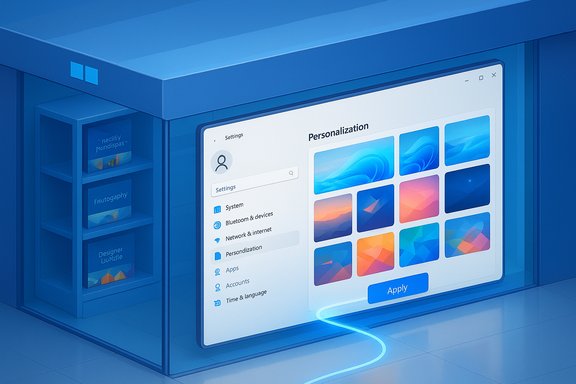
Microsoft is moving a long-familiar corner of Windows personalization into the Microsoft Store: the company has begun rolling out a new Themes (personalization) department inside the Microsoft Store on Windows, offering a curated catalogue of themes — more than 400 entries, including roughly 35 brand-new packs — that users can browse and apply with a single click.
Windows has supported user-facing themes — bundles of wallpapers, accent colors, sounds and cursor styles — for years, traditionally available both inside Settings and via a legacy Microsoft themes web page. That web-based collection has been gradually de-emphasized in favor of the Microsoft Store; Microsoft’s support and help materials have long pointed users to the Store to “Get more themes,” and community reporting has documented the company’s push to consolidate theme delivery into the Store. This consolidation is not new: over recent Windows releases Microsoft has steadily moved features and content into the Store to centralize discovery, manage updates, and apply Store-side vetting. The new Themes department is the latest, explicit step in that process: Microsoft’s Windows Experience Blog announced the department and highlighted its collection and curation goals.
However, the shift comes with trade-offs. Power users lose the simplicity of direct .themepack downloads and the ability to bulk-archive or distribute themes outside the Store ecosystem. Administrators must re-evaluate policy controls and distribution strategies for managed environments. The Store model also introduces monetization dynamics that could shift discoverability toward paid and promoted content if Microsoft and third parties prioritize commercial items.
Microsoft’s own messaging and technical documentation emphasize convenience, curation and integration; community feedback highlights usability gaps and the potential for reduced access to legacy content. Both perspectives are valid: the Store model improves safety and convenience for many users while complicating workflows that relied on the web-based theme archive. As the rollout continues, the most pragmatic approach for enthusiasts and administrators is to treat the Themes department as an additional channel rather than a one-for-one replacement until it proves it can match the discoverability, archival, and distribution capabilities that long-time Windows customizers have relied upon.
The Microsoft announcement is the official starting point for this shift; those who want to evaluate the new Themes department should start in the Microsoft Store, but long-time customizers should also act now to preserve any theme packs they value and test the effects for managed deployments before treating the Store as the exclusive source for personalization assets.
Source: Neowin https://www.neowin.net/news/microsoft-store-gets-a-dedicated-section-for-windows-personalization/
 Background
Windows has supported user-facing themes — bundles of wallpapers, accent colors, sounds and cursor styles — for years, traditionally available both inside Settings and via a legacy Microsoft themes web page. That web-based collection has been gradually de-emphasized in favor of the Microsoft Store; Microsoft’s support and help materials have long pointed users to the Store to “Get more themes,” and community reporting has documented the company’s push to consolidate theme delivery into the Store. This consolidation is not new: over recent Windows releases Microsoft has steadily moved features and content into the Store to centralize discovery, manage updates, and apply Store-side vetting. The new Themes department is the latest, explicit step in that process: Microsoft’s Windows Experience Blog announced the department and highlighted its collection and curation goals. What Microsoft announced — the essentials
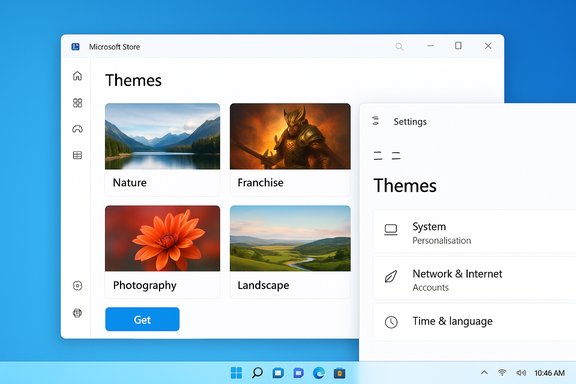
- The Microsoft Store now includes a dedicated Themes (or Personalization) department where users can discover curated and trending themes.
- Microsoft says the department hosts over 400 themes, with over 35 new themes added at launch. Themes range from official franchise packs (for example, Sea of Thieves) to photography collections and designer bundles.
- Applying a theme remains a straightforward action that integrates with Windows Settings; once downloaded from the Store a theme appears in Settings > Personalization > Themes for quick apply and management.
- Microsoft explicitly points users and creators toward the Store for seeking, downloading and publishing themes; a theme-publisher interest form and guidance are part of the rollout messaging.
Why this matters: benefits and the case Microsoft is making
Microsoft frames the change as a usability and discoverability improvement. Key benefits the company highlights (and that follow logically from Store features) include:- Centralized discovery — themes live alongside apps and other Store content, making exploration and promotions easier for mainstream users.
- Curated and trending collections — the Store can surface hand-picked or algorithmically recommended themes, aiding discovery of new creators and seasonal collections.
- One-click application and updates — Store delivery integrates with Windows themes in Settings so a downloaded theme is available immediately without manual unpacking.
- Platform vetting and safety — in theory, Store-hosted assets benefit from the Store’s packaging and review process, reducing reliance on external or untrusted download sources.
What’s changed for power users and long-time customizers
Not all personalization use-cases are served equally by a Store-first approach. Long-time Windows enthusiasts and administrators should take stock of practical differences and implications:Loss of simple direct downloads
The legacy Microsoft themes web pages allowed users to download .themepack files directly. Shifting to Store-first delivery removes that frictionless “save to disk” workflow for many users, which matters when you want to archive or distribute themes manually. Community threads and reporting from the past year have captured widespread concern about the retirement of the dedicated theme website in favor of the Store.Discoverability vs. noise
The Microsoft Store is a general-purpose marketplace. That helps mainstream discovery but can make narrow browsing — for example, finding older or niche free themes — harder. Several community reports and forum threads have already flagged filter and search shortcomings in the Store when it comes to theme browsing. These are genuine usability limitations that could impact power users.Enterprise and managed environments
For corporate and education deployments, administrators rely on Group Policy, Configuration Service Providers (CSP), and MDM to lock or expose personalization options. Moving content into the Store raises questions about control (which themes can be pushed, which are allowed, and how store-based discovery works behind managed firewalls). Administrators should confirm their policies for Store access and offline packaging if they depend on specific theming assets. Community documentation and policy references note existing CSP/GPO controls over Start, Spotlight and recommendations — but Store-hosted themes introduce a different distribution vector that requires planning.Security, privacy and platform governance — analysis and risks
Centralizing themes in the Microsoft Store brings security benefits but also raises subtle privacy and governance questions.Security upside
- Store vetting reduces the chance of malicious assets packaged as theme files; Store submission processes and packaging constraints (e.g., Store app containers and checks) make it harder to slip in executable code compared with ad hoc downloads. Microsoft has pointed users to the Store for themes and generally treats the Store as a safer ecosystem.
Privacy and personalization trade-offs
- Personalized recommendations and telemetry: Store recommendations and the Themes department’s curated lists may rely on account-level personalization signals. Windows includes privacy and personalization toggles (for example, controls for personalized experiences and recommendations), but users should review Store and Windows privacy settings to limit cross-service profiling if they prefer. The Settings path to control personalized experiences is available and has been documented in community guides.
- Data flows for dynamic themes: If a theme includes dynamic elements (e.g., live wallpapers, cloud-hosted image rotations), those elements may require network access or background app permissions. Users should check app permissions and review whether a theme downloads remote content. Microsoft’s example themes and third-party apps that provide dynamic wallpaper functionality are specifically called out in rollout messaging, so diligence is recommended.
Platform governance and monetization
- Paid themes and discoverability of free content: Moving content to the Store makes it easier for Microsoft and third parties to monetize premium theme packs. Community commentary warns that a Store-centric model can tilt discovery toward paid or promoted items, potentially reducing the visibility of high-quality free themes that previously lived on the legacy site. This is a realistic risk and has already been a point of friction in the community.
How to use the new Themes department (practical guide)
- Open the Microsoft Store app on Windows.
- Navigate to the new Themes (or Personalization) department on the Store home or search for “Windows themes.”
- Browse curated lists, trending themes, or featured franchise collections.
- Click Get (or the equivalent action) to download a theme. It will integrate with Settings automatically and appear in Settings > Personalization > Themes.
- Apply the theme, and, if needed, customize individual elements (background slideshow, accent color, sounds) from Settings.
Alternatives and workarounds
For users who dislike the Store-first model or need offline/theme-pack distribution, there are practical workarounds:- Archive .themepack files now: If you prefer having direct theme files, check the legacy themes repository or your own downloads and archive any favorites locally before content migrates or pages are removed. Community posts have encouraged mass-download and archiving while the web pages remain available.
- Third-party personalization apps: Tools such as Rainmeter (for widget-style desktop customization), Lively Wallpaper (for animated backgrounds), and TranslucentTB (taskbar customization) remain available and were explicitly referenced as complementary options by Microsoft in the announcement. These tools can bypass Store limitations for advanced users and creators.
- Create your own theme packs: Windows allows saving your current settings as a theme file (.deskthemepack) and sharing it. This remains a route for power users to distribute themes outside the Store. Microsoft’s Settings flow supports saving and sharing themes.
Impact for creators and publishers
The Microsoft blog post invites theme authors and publishers to contribute via a Theme Publisher Interest Form and positions the Store as the central marketplace for theme distribution. For creators, this has clear upsides and downsides:- Upsides:
- Access to Store discovery channels and promotional features.
- Easier integration with Windows update cycles and storefront merchandising.
- Potential monetization pathways and analytics.
- Downsides:
- Store submission requirements and review processes can be more onerous than uploading a simple theme pack to a web page.
- Greater competition and the risk that small or free creators are overshadowed by promoted, paid, or brand-backed packs.
For IT administrators and managed devices
Administrators planning deployments should evaluate and test the Store-based approach:- Confirm whether managed devices have Microsoft Store access, and whether Store content can be allowed or blocked by policy.
- Use MDM/CSP or Group Policy to control whether users can change themes or access the Store. Existing policies govern Start menu recommendations and personalization features; administrators should extend testing to Store-sourced themes to ensure desired lockdown behavior.
- If specific theme assets are required at scale, consider packaging them for offline distribution or hosting them in internal asset stores rather than relying on public Store availability. This avoids dependence on third-party Store indexing and ensures consistent experience across managed endpoints.
Community reaction and what's unresolved
Community discussion has been mixed. Enthusiasts appreciate the larger curated library and the convenience of in-Store application, but many express frustration over:- The removal/retirement of the simpler themes web pages and loss of bulk downloading convenience.
- The Store’s sometimes clumsy search and filtering for non-app content, which can make locating older or free themes difficult.
- Concerns about commercialization and discoverability of free community creations if promoted or paid content dominates the Store feeds.
Recommendations — what users should do now
- If you rely on specific .themepack files, download and archive them now for offline use. Community guidance has repeatedly emphasized proactive archiving while legacy pages stay accessible.
- Review and, if necessary, adjust your Windows and Store privacy settings to limit personalization signals used by Store recommendations. Windows provides toggles to control personalized experiences.
- Try the new Themes department to evaluate whether Store browsing improves your discovery of themes; use the opportunity to test free vs. promoted content and note any friction in search/filtering.
- Power users who want advanced customization should keep third-party tools (Rainmeter, Lively Wallpaper, TranslucentTB) in their toolkit and consider creating and sharing theme packs directly where appropriate.
Final analysis — strengths, weaknesses, and the road ahead
The move to a dedicated Themes department in the Microsoft Store is a logical extension of Microsoft’s Store-first strategy: it centralizes discovery, enables curation, and gives Microsoft more control over packaging and presentation. For mainstream users the experience will likely be smoother — themed bundles are easier to find, preview and apply.However, the shift comes with trade-offs. Power users lose the simplicity of direct .themepack downloads and the ability to bulk-archive or distribute themes outside the Store ecosystem. Administrators must re-evaluate policy controls and distribution strategies for managed environments. The Store model also introduces monetization dynamics that could shift discoverability toward paid and promoted content if Microsoft and third parties prioritize commercial items.
Microsoft’s own messaging and technical documentation emphasize convenience, curation and integration; community feedback highlights usability gaps and the potential for reduced access to legacy content. Both perspectives are valid: the Store model improves safety and convenience for many users while complicating workflows that relied on the web-based theme archive. As the rollout continues, the most pragmatic approach for enthusiasts and administrators is to treat the Themes department as an additional channel rather than a one-for-one replacement until it proves it can match the discoverability, archival, and distribution capabilities that long-time Windows customizers have relied upon.
The Microsoft announcement is the official starting point for this shift; those who want to evaluate the new Themes department should start in the Microsoft Store, but long-time customizers should also act now to preserve any theme packs they value and test the effects for managed deployments before treating the Store as the exclusive source for personalization assets.
Source: Neowin https://www.neowin.net/news/microsoft-store-gets-a-dedicated-section-for-windows-personalization/