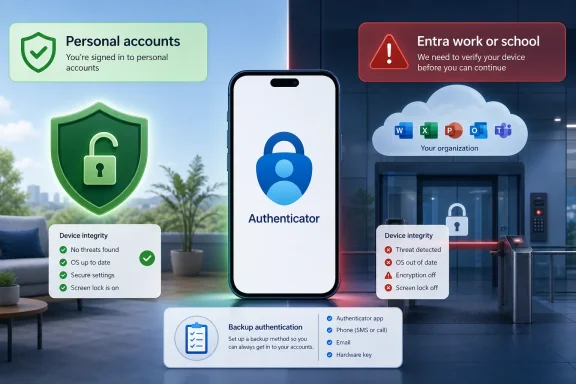
Microsoft Authenticator is now rolling out jailbreak and root detection for Microsoft Entra work and school accounts on Android and iOS, with affected users seeing warnings first and eventual blocks expected broadly by mid-2026. The practical answer is narrower than the alarm suggests: your personal two-factor codes are not the main target. The strategic answer is larger than Microsoft’s support prose admits: identity is becoming inseparable from device integrity, and the phone in your pocket is being treated as part of the corporate perimeter.
That distinction matters because Authenticator has become one of Microsoft’s quiet power centers. It is not just a code generator sitting beside Google Authenticator, Aegis, 1Password, or whatever else you use for six-digit tokens. In Microsoft’s enterprise stack, it is a broker of trust for Entra ID, Microsoft 365, Teams, Outlook, SharePoint, OneDrive for Business, Azure, Intune, and the growing universe of passwordless sign-ins.
The initial phrasing around the change was blunt enough to spook the right people for the wrong reasons. Microsoft’s public support language said jailbreak and root detection was being introduced for work or school accounts in Microsoft Authenticator, and that existing and new work or school accounts would be blocked if the app detected a jailbroken or rooted device. That is accurate as far as it goes, but it left a lot of daylight around what “accounts” means inside an app that many people use for both corporate credentials and random third-party two-factor codes.
Windows Latest reports that Microsoft has now clarified the scope through an admin-facing Microsoft 365 Enterprise portal update: the enforcement applies to Microsoft Entra credentials. That means the accounts tied to workplace, school, university, and enterprise identity flows are in the blast radius. A GitHub, Cloudflare, Facebook, Instagram, or Stripe token manually added to Authenticator by scanning a QR code is not, by itself, the thing Microsoft says it is trying to disable.
That is the clean version. The messier version is that modern identity rarely stays inside neat consumer and enterprise boxes. If a third-party service is accessed through “Sign in with Microsoft” using a company Entra account, the affected path is no longer a generic third-party time-based code; it is a corporate identity transaction. In that case, the user’s phone is not merely storing a token. It is participating in an enterprise authentication ceremony.
This is why the clarification helps, but does not entirely settle the anxiety. Microsoft is saying this is not a war on every Authenticator entry stored on a modified phone. It is, however, a clear statement that Entra-backed authentication should not depend on a mobile operating system Microsoft considers compromised, unverifiable, or outside its support model.
Rooted Android devices and jailbroken iPhones break that comfort. They may be owned by sophisticated users who know exactly what they are doing. They may also be compromised, misconfigured, running untrusted modules, bypassing platform security guarantees, or exposing secrets in ways the enterprise cannot observe.
Microsoft’s move is not surprising in that context. Entra ID is the front door for enormous amounts of corporate data, and Authenticator has become one of the hinges on that door. If the app can be manipulated on a rooted device, or if the device can undermine protections around notifications, app storage, passkeys, brokered sign-in, or local attestation, then the MFA prompt itself becomes less reassuring.
The unpopular part is that Microsoft is making a binary judgment at the app layer. There is no admin opt-out, according to the reported Microsoft 365 portal language. There is no friendly checkbox for the company that says, “We trust our rooted-device enthusiasts.” Microsoft is treating this as a security baseline, not a policy suggestion.
That posture is defensible from a risk-management perspective and abrasive from a user-autonomy perspective. Both things can be true. The same person who understands why a bank blocks rooted phones can still object when their employer’s required MFA app tells them their personally owned device is no longer acceptable for signing into email.
The first phase is warning. On iOS, users may see a message indicating the device is jailbroken. On Android, they may see a rooted-device warning. The point is not subtle: Authenticator is telling the user that work or school account functionality is living on borrowed time.
The second phase keeps the warning visible, including a persistent banner on the Authenticator home screen. This is the part that Microsoft will likely describe as a user-awareness measure and users will likely experience as a nag. But for IT departments, the nag is useful: it gives employees and students a runway to fix the device, move authentication to another phone, or contact support before the actual block arrives.
The final phase is the enforcement phase. At that point, affected users may be blocked from creating new credentials or using Authenticator to sign in with the Entra-backed work or school account. Depending on how the account and tenant are configured, the user may need to remove the jailbreak or root state, restore the device, enroll a different device, or work with an administrator to reset authentication methods.
The staggered schedule is a sign that Microsoft understands the support load this can create. MFA lockouts are not theoretical inconveniences. They can stop students from reaching coursework, employees from joining Teams meetings, contractors from accessing SharePoint folders, and administrators from responding to incidents.
That should calm people who use Authenticator as a general-purpose code vault. A manually added token for a social network, developer account, hosting provider, or SaaS tool should not suddenly stop working simply because the phone is rooted or jailbroken. Microsoft does not appear to be converting Authenticator into a universal device-integrity cop for every third-party secret stored inside it.
But there is a catch that reflects the modern identity stack. If the service is not using Authenticator merely as a token generator, but is instead relying on Microsoft as the identity provider, the transaction changes character. GitHub accessed with a personal TOTP code is one thing. GitHub Enterprise accessed through a company Microsoft sign-in is another.
This is the boundary users should actually care about. It is not “Microsoft app versus non-Microsoft app.” It is “generic token stored in Authenticator versus Entra credential mediated by Authenticator.” The app may look like one list of accounts, but Microsoft’s enforcement logic is distinguishing between passive code storage and corporate authentication flows.
That distinction also explains why some users will see nothing happen while others lose access to important work systems. Two people can both have Authenticator installed on rooted Android phones and have very different outcomes. The user with only consumer codes may continue as before. The user whose employer requires Microsoft Authenticator push approval for Entra ID may be on a deadline.
The trouble is that many affected devices are not corporate devices. They are personal phones pressed into service by workplace and school MFA requirements. Bring-your-own-device programs have always rested on an uneasy bargain: users supply the hardware, organizations supply the rules, and everyone pretends the boundary is cleaner than it is.
This Authenticator change makes the bargain explicit. If your personal phone is part of the authentication chain for work, Microsoft and your organization now get a practical veto over some of what you do with that phone. You can root it, jailbreak it, run a custom ROM, or experiment with alternate security models — but you may not be able to use it as the trusted device for Entra authentication.
That is going to rankle, especially among Android power users. Some rooted-device owners are not careless; they are often more technically literate than the average user. Some use custom ROMs to extend hardware life, remove unwanted vendor software, improve privacy, or gain control over devices abandoned by manufacturers. From their perspective, “modified” does not automatically mean “less secure.”
Microsoft is not adjudicating that debate in the user’s favor. The company is optimizing for a supportable, broadly enforceable security model across millions of enterprise accounts. It wants device integrity signals it can trust at scale, not forum arguments about whether a particular custom setup is safer than a stock phone with three years of carrier bloat and a lazy patch cadence.
Microsoft has little incentive to publish the exact checks it uses. If it describes the method too precisely, bypass developers get a roadmap. That is standard anti-tamper logic, and it is not unique to Microsoft. Banks, streaming apps, games, payment apps, and enterprise mobility tools have played this cat-and-mouse game for years.
But opacity shifts the burden to users and help desks. If Authenticator says a phone is rooted and the user says it is not, the administrator may not have much to inspect beyond the app’s verdict. The support path becomes painfully familiar: update the OS, update Authenticator, remove suspicious management profiles or modules, factory reset the device, use a different phone, or reset MFA methods.
That is workable in a managed corporate fleet. It is more chaotic in higher education, contractors, small businesses, and mixed BYOD environments where the “IT department” may be one person, a ticket queue, or a web page last updated in 2023. Students and workers will not care that the device-integrity model is conceptually sound if it locks them out five minutes before an exam, shift, payroll deadline, or production incident.
Microsoft can reduce the blast by communicating clearly inside the app and in admin portals. It cannot eliminate the friction because the friction is the product. The block is meant to say: this device is not acceptable for this authentication role.
Those are not the same thing. A device may be locked down in ways its owner considers robust and still fail a commercial integrity check. Another device may pass ordinary consumer expectations while being behind on patches or loaded with vendor software the owner does not trust. Security, in the real world, is partly technical architecture and partly institutional recognition.
Microsoft’s institutional recognition favors Apple’s and Google’s mainstream platform guarantees. That is not ideological so much as operational. Entra ID needs signals that can be consumed by enterprise policy, explained in documentation, defended to auditors, and supported by Microsoft’s own engineering and support organizations.
For privacy-focused Android users, that feels like a narrowing of acceptable computing. A user may choose a hardened Android distribution precisely because they distrust default data flows or vendor dependencies, only to find that enterprise identity systems treat that choice as suspicious. The result is an uncomfortable inversion: a device chosen for security may be blocked by a security product.
Microsoft could theoretically design a more nuanced model, but nuance is expensive. It would require evaluating alternate attestation chains, supporting edge cases, documenting exceptions, and giving administrators meaningful control without creating bypass routes. The simpler route is to draw the supported line around mainstream platform integrity and let everyone outside that line absorb the inconvenience.
The first task is discovery, even if discovery is imperfect. Administrators should assume they do not know how many employees, students, contractors, or privileged users rely on modified phones. BYOD inventories are often incomplete, and users may not volunteer that their device is rooted or jailbroken until an app breaks.
The second task is alternatives. Depending on the tenant’s policies and risk appetite, users may be able to register another device, use a hardware security key, adopt platform passkeys, use Windows Hello for Business, receive temporary access passes, or fall back to other allowed MFA methods. Those alternatives are not interchangeable. Some are more phishing-resistant than others, and some may be disallowed by policy for good reasons.
The third task is communication that avoids both panic and ambiguity. Telling users “Microsoft Authenticator is changing” is not enough. The message should say plainly that personal third-party codes are not the expected enforcement target, but Entra work and school sign-ins on rooted or jailbroken phones are. It should also tell users what to do before the final block, because “contact IT” is not a plan if the user needs the blocked app to contact IT.
Privileged accounts deserve special attention. If a global admin or incident responder is relying on a single rooted phone for Authenticator approval, that is not a quirky personal preference; it is an operational risk. The rollout is a useful excuse to audit break-glass accounts, temporary access procedures, and recovery paths before the next identity incident forces the issue.
If Authenticator stores ordinary TOTP codes for personal services, make sure those accounts have recovery codes saved somewhere safe. Export or migrate where the service allows it. Do not wait for any single app, vendor policy, or phone failure to remind you that two-factor authentication is only resilient if your recovery process is real.
If Authenticator is used for work or school sign-in, check whether the phone is rooted, jailbroken, running a custom ROM, previously modified, or otherwise likely to fail integrity checks. If the warning appears, treat it as a deadline rather than an annoyance. You may be able to keep the phone exactly as you like it, but you should not assume it can remain your Entra authenticator.
The cleanest path is often separation. Use a supported, unmodified device for work authentication, and keep experimental devices experimental. That may mean a company-issued phone, a spare device, a hardware key, or a supported platform credential, depending on what your organization allows.
The harder truth is that some users will not have a good option. Not every employer issues phones. Not every school has responsive IT. Not every user can casually buy a second device because an authentication policy changed. Microsoft’s security posture may be rational, but rational policies can still impose costs unevenly.
That is the promise of passkeys and platform authenticators. The private key stays on the device, protected by secure hardware and unlocked by local biometrics or a PIN. The server never receives a reusable password. A fake login page cannot simply capture a code and replay it in the same old way.
But the model depends on trust in the endpoint. If the endpoint is compromised, modified, or outside the expected integrity envelope, the beautiful cryptography becomes part of a messier local security story. That is why Microsoft is tightening Authenticator on rooted and jailbroken devices at the same time the industry is asking users to make phones and laptops the primary containers for identity.
This is the bargain behind modern authentication: fewer shared secrets, more reliance on hardware and platform integrity. It is better than passwords in many ways. It is also more exclusionary, because systems that cannot prove their integrity to the satisfaction of a vendor may be pushed out of the trusted circle.
Windows users should recognize the pattern. Windows 11’s hardware requirements, TPM emphasis, Secure Boot expectations, Windows Hello, Credential Guard, and enterprise device compliance all point in the same direction. The identity layer is being welded to the health of the device, and Microsoft is increasingly willing to make that weld visible to users.
That explains why Microsoft is not offering an opt-out. If Authenticator were merely a local code notebook, device integrity would be the user’s business. But when Authenticator participates in Entra sign-in, the organization and Microsoft both have a claim. The user’s phone becomes a security dependency for someone else’s data.
The decision also reveals Microsoft’s confidence in its enterprise leverage. Users may complain, but most organizations are not going to redesign their identity stack over rooted-phone support. Schools and businesses standardized on Microsoft 365 will absorb the policy, update their help pages, and tell users to bring a compliant device.
Competitors will watch this closely. If Microsoft takes the heat and the support burden proves manageable, similar hard lines will become easier for other identity providers, MDM vendors, and security apps to draw. The direction of travel is not toward more tolerance for modified endpoints in enterprise authentication. It is toward more attestation, more device health checks, and fewer exceptions.
That does not mean the enthusiast case is illegitimate. It means the enterprise market is not optimized for it. The rooted-device user wants control. The enterprise identity provider wants assurance. When those goals conflict, assurance usually wins.
Microsoft’s move will not end rooting, jailbreaking, custom ROMs, or the long argument over who really controls a device after it leaves the box. It will, however, make one boundary harder to ignore: if that device is used as a key to Microsoft’s enterprise cloud, Microsoft now expects it to look trustworthy by Microsoft’s rules. For Windows admins and users alike, the future of sign-in is not just passwordless; it is increasingly permissioned by the health, provenance, and conformity of the machine holding the credential.
That distinction matters because Authenticator has become one of Microsoft’s quiet power centers. It is not just a code generator sitting beside Google Authenticator, Aegis, 1Password, or whatever else you use for six-digit tokens. In Microsoft’s enterprise stack, it is a broker of trust for Entra ID, Microsoft 365, Teams, Outlook, SharePoint, OneDrive for Business, Azure, Intune, and the growing universe of passwordless sign-ins.
 Microsoft Narrows the Blast Radius After Widening the Alarm
The initial phrasing around the change was blunt enough to spook the right people for the wrong reasons. Microsoft’s public support language said jailbreak and root detection was being introduced for work or school accounts in Microsoft Authenticator, and that existing and new work or school accounts would be blocked if the app detected a jailbroken or rooted device. That is accurate as far as it goes, but it left a lot of daylight around what “accounts” means inside an app that many people use for both corporate credentials and random third-party two-factor codes.Windows Latest reports that Microsoft has now clarified the scope through an admin-facing Microsoft 365 Enterprise portal update: the enforcement applies to Microsoft Entra credentials. That means the accounts tied to workplace, school, university, and enterprise identity flows are in the blast radius. A GitHub, Cloudflare, Facebook, Instagram, or Stripe token manually added to Authenticator by scanning a QR code is not, by itself, the thing Microsoft says it is trying to disable.
That is the clean version. The messier version is that modern identity rarely stays inside neat consumer and enterprise boxes. If a third-party service is accessed through “Sign in with Microsoft” using a company Entra account, the affected path is no longer a generic third-party time-based code; it is a corporate identity transaction. In that case, the user’s phone is not merely storing a token. It is participating in an enterprise authentication ceremony.
This is why the clarification helps, but does not entirely settle the anxiety. Microsoft is saying this is not a war on every Authenticator entry stored on a modified phone. It is, however, a clear statement that Entra-backed authentication should not depend on a mobile operating system Microsoft considers compromised, unverifiable, or outside its support model.
The Phone Has Become the Security Boundary Microsoft Can Actually Enforce
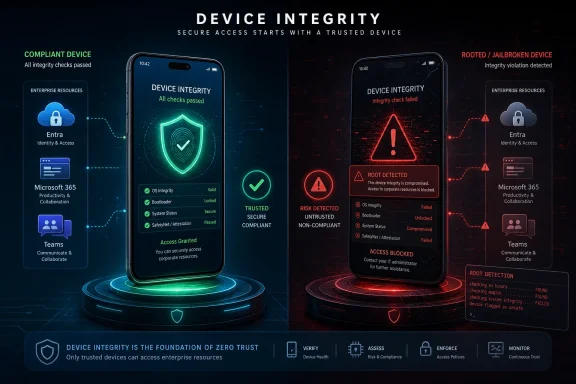
For years, corporate security teams talked about zero trust as if it were a philosophy. Increasingly, it is an implementation detail that shows up as a grayed-out button on a user’s phone. The user may think they are approving a push notification, but the enterprise sees a chain of assumptions: this app is genuine, this device has not been tampered with, this credential is bound to a trustworthy environment, and this sign-in is not being proxied or replayed by an attacker.Rooted Android devices and jailbroken iPhones break that comfort. They may be owned by sophisticated users who know exactly what they are doing. They may also be compromised, misconfigured, running untrusted modules, bypassing platform security guarantees, or exposing secrets in ways the enterprise cannot observe.
Microsoft’s move is not surprising in that context. Entra ID is the front door for enormous amounts of corporate data, and Authenticator has become one of the hinges on that door. If the app can be manipulated on a rooted device, or if the device can undermine protections around notifications, app storage, passkeys, brokered sign-in, or local attestation, then the MFA prompt itself becomes less reassuring.
The unpopular part is that Microsoft is making a binary judgment at the app layer. There is no admin opt-out, according to the reported Microsoft 365 portal language. There is no friendly checkbox for the company that says, “We trust our rooted-device enthusiasts.” Microsoft is treating this as a security baseline, not a policy suggestion.
That posture is defensible from a risk-management perspective and abrasive from a user-autonomy perspective. Both things can be true. The same person who understands why a bank blocks rooted phones can still object when their employer’s required MFA app tells them their personally owned device is no longer acceptable for signing into email.
The Rollout Is a Countdown, Not a Surprise Switch
The change was originally framed around a February 2026 rollout, with Android starting first and iOS following later. Windows Latest now reports that Microsoft expects the phased deployment to complete in the coming weeks, with a mid-2026 target and broader visibility by the end of July. That timing matters because the user experience is not supposed to be an instant lockout on day one.The first phase is warning. On iOS, users may see a message indicating the device is jailbroken. On Android, they may see a rooted-device warning. The point is not subtle: Authenticator is telling the user that work or school account functionality is living on borrowed time.
The second phase keeps the warning visible, including a persistent banner on the Authenticator home screen. This is the part that Microsoft will likely describe as a user-awareness measure and users will likely experience as a nag. But for IT departments, the nag is useful: it gives employees and students a runway to fix the device, move authentication to another phone, or contact support before the actual block arrives.
The final phase is the enforcement phase. At that point, affected users may be blocked from creating new credentials or using Authenticator to sign in with the Entra-backed work or school account. Depending on how the account and tenant are configured, the user may need to remove the jailbreak or root state, restore the device, enroll a different device, or work with an administrator to reset authentication methods.
The staggered schedule is a sign that Microsoft understands the support load this can create. MFA lockouts are not theoretical inconveniences. They can stop students from reaching coursework, employees from joining Teams meetings, contractors from accessing SharePoint folders, and administrators from responding to incidents.
The Third-Party Token Panic Misses the More Interesting Boundary
The most important clarification is also the easiest to misunderstand. Microsoft Authenticator can store ordinary one-time password codes for services that have nothing to do with Microsoft identity. Those are the familiar six-digit TOTP entries created when a site asks you to scan a QR code. According to Windows Latest’s testing and Microsoft’s newer clarification, those entries are not the enforcement target.That should calm people who use Authenticator as a general-purpose code vault. A manually added token for a social network, developer account, hosting provider, or SaaS tool should not suddenly stop working simply because the phone is rooted or jailbroken. Microsoft does not appear to be converting Authenticator into a universal device-integrity cop for every third-party secret stored inside it.
But there is a catch that reflects the modern identity stack. If the service is not using Authenticator merely as a token generator, but is instead relying on Microsoft as the identity provider, the transaction changes character. GitHub accessed with a personal TOTP code is one thing. GitHub Enterprise accessed through a company Microsoft sign-in is another.
This is the boundary users should actually care about. It is not “Microsoft app versus non-Microsoft app.” It is “generic token stored in Authenticator versus Entra credential mediated by Authenticator.” The app may look like one list of accounts, but Microsoft’s enforcement logic is distinguishing between passive code storage and corporate authentication flows.
That distinction also explains why some users will see nothing happen while others lose access to important work systems. Two people can both have Authenticator installed on rooted Android phones and have very different outcomes. The user with only consumer codes may continue as before. The user whose employer requires Microsoft Authenticator push approval for Entra ID may be on a deadline.
Enterprise Security Wins Here, But BYOD Pays the Bill
Microsoft’s reasoning is easy to understand if you start from the enterprise administrator’s chair. A rooted or jailbroken device can weaken the assumptions behind mobile authentication. It may allow deeper inspection of app data, interfere with integrity checks, hook system APIs, bypass platform protections, or run software that would not be allowed on a standard device. If that device is approving sign-ins to corporate resources, the organization inherits risk it may not even be able to measure.The trouble is that many affected devices are not corporate devices. They are personal phones pressed into service by workplace and school MFA requirements. Bring-your-own-device programs have always rested on an uneasy bargain: users supply the hardware, organizations supply the rules, and everyone pretends the boundary is cleaner than it is.
This Authenticator change makes the bargain explicit. If your personal phone is part of the authentication chain for work, Microsoft and your organization now get a practical veto over some of what you do with that phone. You can root it, jailbreak it, run a custom ROM, or experiment with alternate security models — but you may not be able to use it as the trusted device for Entra authentication.
That is going to rankle, especially among Android power users. Some rooted-device owners are not careless; they are often more technically literate than the average user. Some use custom ROMs to extend hardware life, remove unwanted vendor software, improve privacy, or gain control over devices abandoned by manufacturers. From their perspective, “modified” does not automatically mean “less secure.”
Microsoft is not adjudicating that debate in the user’s favor. The company is optimizing for a supportable, broadly enforceable security model across millions of enterprise accounts. It wants device integrity signals it can trust at scale, not forum arguments about whether a particular custom setup is safer than a stock phone with three years of carrier bloat and a lazy patch cadence.
False Positives Will Be the Support Story Microsoft Cannot Avoid
Any jailbreak or root detection system runs into a credibility problem the moment it flags a device the user believes is clean. That may happen because the device was previously modified and not fully restored. It may happen because a manufacturer build, missing platform service, emulator environment, beta OS, enterprise tool, or security product trips a detection heuristic. It may also happen because the detection method is intentionally opaque.Microsoft has little incentive to publish the exact checks it uses. If it describes the method too precisely, bypass developers get a roadmap. That is standard anti-tamper logic, and it is not unique to Microsoft. Banks, streaming apps, games, payment apps, and enterprise mobility tools have played this cat-and-mouse game for years.
But opacity shifts the burden to users and help desks. If Authenticator says a phone is rooted and the user says it is not, the administrator may not have much to inspect beyond the app’s verdict. The support path becomes painfully familiar: update the OS, update Authenticator, remove suspicious management profiles or modules, factory reset the device, use a different phone, or reset MFA methods.
That is workable in a managed corporate fleet. It is more chaotic in higher education, contractors, small businesses, and mixed BYOD environments where the “IT department” may be one person, a ticket queue, or a web page last updated in 2023. Students and workers will not care that the device-integrity model is conceptually sound if it locks them out five minutes before an exam, shift, payroll deadline, or production incident.
Microsoft can reduce the blast by communicating clearly inside the app and in admin portals. It cannot eliminate the friction because the friction is the product. The block is meant to say: this device is not acceptable for this authentication role.
The GrapheneOS Fight Shows Why “Rooted” Is a Cultural Word, Not Just a Technical One
The controversy around GrapheneOS and other non-mainstream Android environments illustrates the deeper problem. In enthusiast circles, “rooted” has a specific meaning: the user has privileged access and can modify the system beyond normal app boundaries. In enterprise risk systems, the word often becomes shorthand for a broader class of unsupported, unverifiable, bootloader-modified, or platform-integrity-failing states.Those are not the same thing. A device may be locked down in ways its owner considers robust and still fail a commercial integrity check. Another device may pass ordinary consumer expectations while being behind on patches or loaded with vendor software the owner does not trust. Security, in the real world, is partly technical architecture and partly institutional recognition.
Microsoft’s institutional recognition favors Apple’s and Google’s mainstream platform guarantees. That is not ideological so much as operational. Entra ID needs signals that can be consumed by enterprise policy, explained in documentation, defended to auditors, and supported by Microsoft’s own engineering and support organizations.
For privacy-focused Android users, that feels like a narrowing of acceptable computing. A user may choose a hardened Android distribution precisely because they distrust default data flows or vendor dependencies, only to find that enterprise identity systems treat that choice as suspicious. The result is an uncomfortable inversion: a device chosen for security may be blocked by a security product.
Microsoft could theoretically design a more nuanced model, but nuance is expensive. It would require evaluating alternate attestation chains, supporting edge cases, documenting exceptions, and giving administrators meaningful control without creating bypass routes. The simpler route is to draw the supported line around mainstream platform integrity and let everyone outside that line absorb the inconvenience.
Admins Should Treat This as an Identity Migration Drill
For IT teams, the wrong response is to wait for tickets. If Authenticator is a required method in the tenant, this change should be handled like a small identity migration, not a footnote. The users affected may be a minority, but they will be a highly visible minority when the warnings turn into blocks.The first task is discovery, even if discovery is imperfect. Administrators should assume they do not know how many employees, students, contractors, or privileged users rely on modified phones. BYOD inventories are often incomplete, and users may not volunteer that their device is rooted or jailbroken until an app breaks.
The second task is alternatives. Depending on the tenant’s policies and risk appetite, users may be able to register another device, use a hardware security key, adopt platform passkeys, use Windows Hello for Business, receive temporary access passes, or fall back to other allowed MFA methods. Those alternatives are not interchangeable. Some are more phishing-resistant than others, and some may be disallowed by policy for good reasons.
The third task is communication that avoids both panic and ambiguity. Telling users “Microsoft Authenticator is changing” is not enough. The message should say plainly that personal third-party codes are not the expected enforcement target, but Entra work and school sign-ins on rooted or jailbroken phones are. It should also tell users what to do before the final block, because “contact IT” is not a plan if the user needs the blocked app to contact IT.
Privileged accounts deserve special attention. If a global admin or incident responder is relying on a single rooted phone for Authenticator approval, that is not a quirky personal preference; it is an operational risk. The rollout is a useful excuse to audit break-glass accounts, temporary access procedures, and recovery paths before the next identity incident forces the issue.
Users Should Separate Their Code Vault From Their Work Badge
For individual users, the lesson is not simply “never root your phone.” That advice is tidy, but it misses the real operational point. The more useful lesson is to stop treating one mobile app as both a personal code vault and a work identity badge without understanding which entries are replaceable and which are governed by your organization.If Authenticator stores ordinary TOTP codes for personal services, make sure those accounts have recovery codes saved somewhere safe. Export or migrate where the service allows it. Do not wait for any single app, vendor policy, or phone failure to remind you that two-factor authentication is only resilient if your recovery process is real.
If Authenticator is used for work or school sign-in, check whether the phone is rooted, jailbroken, running a custom ROM, previously modified, or otherwise likely to fail integrity checks. If the warning appears, treat it as a deadline rather than an annoyance. You may be able to keep the phone exactly as you like it, but you should not assume it can remain your Entra authenticator.
The cleanest path is often separation. Use a supported, unmodified device for work authentication, and keep experimental devices experimental. That may mean a company-issued phone, a spare device, a hardware key, or a supported platform credential, depending on what your organization allows.
The harder truth is that some users will not have a good option. Not every employer issues phones. Not every school has responsive IT. Not every user can casually buy a second device because an authentication policy changed. Microsoft’s security posture may be rational, but rational policies can still impose costs unevenly.
Passwordless Security Keeps Moving Toward Hardware Trust
This Authenticator change sits inside a broader industry shift toward device-bound credentials, passkeys, attestation, and phishing-resistant authentication. Passwords are weak because they can be typed anywhere, stolen anywhere, and replayed anywhere. The replacement model increasingly asks not just “does the user know or approve this?” but “is the credential anchored to a device we trust?”That is the promise of passkeys and platform authenticators. The private key stays on the device, protected by secure hardware and unlocked by local biometrics or a PIN. The server never receives a reusable password. A fake login page cannot simply capture a code and replay it in the same old way.
But the model depends on trust in the endpoint. If the endpoint is compromised, modified, or outside the expected integrity envelope, the beautiful cryptography becomes part of a messier local security story. That is why Microsoft is tightening Authenticator on rooted and jailbroken devices at the same time the industry is asking users to make phones and laptops the primary containers for identity.
This is the bargain behind modern authentication: fewer shared secrets, more reliance on hardware and platform integrity. It is better than passwords in many ways. It is also more exclusionary, because systems that cannot prove their integrity to the satisfaction of a vendor may be pushed out of the trusted circle.
Windows users should recognize the pattern. Windows 11’s hardware requirements, TPM emphasis, Secure Boot expectations, Windows Hello, Credential Guard, and enterprise device compliance all point in the same direction. The identity layer is being welded to the health of the device, and Microsoft is increasingly willing to make that weld visible to users.
The Real Message Is That Authenticator Is No Longer Just an App
The consumer mental model of Authenticator is outdated. For many people, it is still “the app with the codes.” For Microsoft’s enterprise customers, it is part of an identity control plane. It brokers MFA prompts, participates in passwordless sign-in, holds credentials, reflects tenant policy, and now enforces a baseline view of mobile device trust.That explains why Microsoft is not offering an opt-out. If Authenticator were merely a local code notebook, device integrity would be the user’s business. But when Authenticator participates in Entra sign-in, the organization and Microsoft both have a claim. The user’s phone becomes a security dependency for someone else’s data.
The decision also reveals Microsoft’s confidence in its enterprise leverage. Users may complain, but most organizations are not going to redesign their identity stack over rooted-phone support. Schools and businesses standardized on Microsoft 365 will absorb the policy, update their help pages, and tell users to bring a compliant device.
Competitors will watch this closely. If Microsoft takes the heat and the support burden proves manageable, similar hard lines will become easier for other identity providers, MDM vendors, and security apps to draw. The direction of travel is not toward more tolerance for modified endpoints in enterprise authentication. It is toward more attestation, more device health checks, and fewer exceptions.
That does not mean the enthusiast case is illegitimate. It means the enterprise market is not optimized for it. The rooted-device user wants control. The enterprise identity provider wants assurance. When those goals conflict, assurance usually wins.
The July Deadline Turns a Niche Warning Into a Practical Checklist
Microsoft’s clarification should lower the temperature, but it should not lower the urgency for affected users and administrators. The important details are concrete enough now to act on.- Microsoft Authenticator’s jailbreak and root enforcement is aimed at Microsoft Entra work and school credentials, not ordinary personal TOTP codes stored for unrelated services.
- Users who approve sign-ins for Microsoft 365, Teams, Outlook work accounts, Azure, Intune, SharePoint, OneDrive for Business, school portals, or company Entra-backed apps are the people most likely to be affected.
- The rollout is phased, so warnings and persistent banners are meant to arrive before final blocking, with broad completion expected around mid-2026.
- Microsoft says the feature is enabled by default for customers and does not include an opt-out switch.
- A third-party service can still be affected if access flows through a work Microsoft Entra account rather than a standalone token saved in Authenticator.
- Users should register alternative authentication methods and save recovery options before the final block, not after they are already locked out.
Microsoft’s move will not end rooting, jailbreaking, custom ROMs, or the long argument over who really controls a device after it leaves the box. It will, however, make one boundary harder to ignore: if that device is used as a key to Microsoft’s enterprise cloud, Microsoft now expects it to look trustworthy by Microsoft’s rules. For Windows admins and users alike, the future of sign-in is not just passwordless; it is increasingly permissioned by the health, provenance, and conformity of the machine holding the credential.
References
- Primary source: Windows Latest
Published: Tue, 30 Jun 2026 02:12:04 GMT
Microsoft warns Authenticator now blocks rooted Android and jailbroken iOS, verify if you're affected
Microsoft warns Authenticator will block rooted Android and jailbroken iOS, verify if your phone is affected. www.windowslatest.com
- Official source: support.microsoft.com
Jailbreak/root detection in Microsoft Authenticator | Microsoft Support
If your mobile device OS has been jailbroken, rooted or otherwise tampered with, you may find that Microsoft Authenticator will no longer work. Learn what that means for you when trying to sign in.support.microsoft.com - Official source: learn.microsoft.com
authenticator not working on my phone due to the device being rooted - Microsoft Q&A
Hello, I am facing this issue where I can't use my work account on authenticator due to my device being rooted (which I know it's not), The thing is that I am using a Huawei Phone which does not support Google services, and I think that is somehow…learn.microsoft.com - Related coverage: techbooky.com
Microsoft Authenticator Blocks Rooted and Jailbroken Devices
Microsoft is rolling out a significant update to the Authenticator app that will detect and eventually block access from rootedwww.techbooky.com - Related coverage: techradar.com
Microsoft is introducing Entra passkeys to Windows – so tough luck if your device is jailbroken, as your credentials will soon be gone forever | TechRadar
Microsoft is making signing in easier and more securewww.techradar.com - Related coverage: jornada365.cloud