

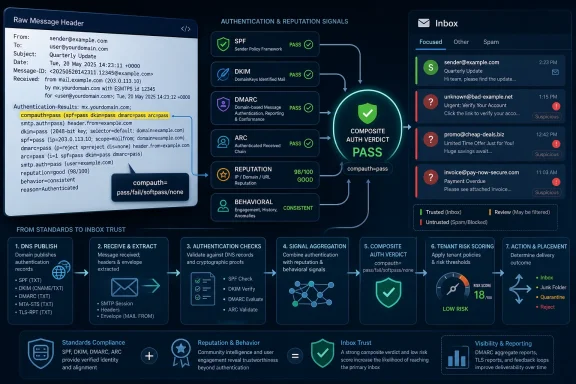
Microsoft Composite Authentication is the Exchange Online Protection verdict that Microsoft 365 stamps into inbound message headers as
For administrators who have spent the last decade treating SPF, DKIM, and DMARC as a three-part checklist,
The phrase composite authentication sounds like one more acronym in the swamp of email security, but it is best understood as Microsoft’s attempt to collapse several signals into a single operational verdict. Traditional authentication asks whether a sending server was authorized by SPF, whether a cryptographic DKIM signature validates, and whether one of those authenticated identifiers aligns with the visible From domain under DMARC. Composite authentication asks the harder question: given all of that, does this message still look like legitimate mail?
That distinction matters because phishing and business email compromise have adapted to the old tests. Attackers can register lookalike domains, warm up infrastructure, authenticate their own mail perfectly, and still impersonate a brand or executive in ways that pass the narrow letter of SPF, DKIM, and DMARC. Conversely, legitimate mail can break authentication when it passes through forwarding systems, mailing lists, gateways, or old appliances.
Microsoft’s answer is to evaluate explicit authentication alongside implicit trust signals. Those include sender history, recipient interaction patterns, reputation, tenant-specific spoof intelligence, accepted-domain relationships, and ARC validation in forwarding scenarios. The result is stamped into the
This is why administrators sometimes see a message that looks contradictory at first glance. The header might show
The minimum DMARC requirement was not exotic. Microsoft’s published high-volume sender baseline allowed
That is where some deliverability advice becomes too blunt. It is tempting to say Microsoft now treats
This is a subtle but important distinction for IT teams. The rulebook says one thing; the filter’s risk model may do another. A domain at
Microsoft Composite Authentication is not a replacement for DMARC. It is a receiver-side judgment layered on top of it. That judgment can be more forgiving than DMARC in some cases and harsher in others.
It can be more forgiving when a message fails traditional authentication for understandable reasons. Forwarded mail is the classic example. SPF often breaks because the forwarder, not the original sender, connects to the recipient’s server. DKIM can break if an intermediary modifies the body or headers. ARC was designed to let trusted intermediaries record what they saw before that breakage occurred, allowing Microsoft to override a downstream DMARC failure when the chain looks trustworthy.
It can be harsher when a message authenticates cleanly but still looks suspicious. A brand-new domain with no history, a sender-domain pair that resembles spoofing, a third-party platform that signs with its own domain instead of the customer’s, or a sudden campaign spike can all create risk beyond the binary SPF/DKIM/DMARC result. That is the territory where
For WindowsForum readers managing Microsoft 365 tenants, the lesson is not “ignore DMARC because Microsoft has a secret score.” The lesson is the opposite: get the standards so clean that the proprietary layer has fewer reasons to doubt you.
The codes administrators will see most often are enough to separate broad categories of failure.
Other codes need careful handling. Some summaries describe
That is why a header parser is helpful but not sufficient. The administrator still needs to read the whole authentication block. The values for
That is exactly where DMARC alignment becomes unforgiving. If the message says it is from
The fix is rarely glamorous. Configure custom return-path domains. Delegate DKIM signing correctly. Publish the vendor’s SPF include only when it is actually needed and safe. Avoid stacking SPF includes until the record approaches lookup limits. Separate marketing streams onto subdomains when appropriate. Rotate DKIM selectors. Remove abandoned selectors and stale vendor records.
This is boring work, but it is the work. A polished DMARC report dashboard cannot compensate for a vendor still signing as itself while impersonating your visible domain. Microsoft’s compauth verdict makes that failure harder to ignore because it shows up where users feel it: junk placement, quarantine, or outright rejection.
ARC lets intermediaries record upstream authentication results and seal them cryptographically. If Microsoft trusts the ARC sealer, Exchange Online Protection can accept that the message was legitimate before it was modified or forwarded. In Microsoft headers, that often shows up as
But ARC’s status is now more complicated than many deployment guides imply. In April 2026, an IETF draft proposed reclassifying ARC as Historic, arguing that the experiment’s lessons should be folded into DKIM2 rather than continuing to rely on ARC between disparate senders and receivers. That proposal is not the same thing as ARC disappearing from Microsoft 365 tomorrow. It is a draft, not a final operational shutdown notice.
The practical advice is therefore conservative. Do not rip out trusted ARC sealer configuration if it is solving real forwarding problems today. Do not build a new long-term architecture that assumes ARC will remain the permanent answer to every mailing list, gateway, and forwarding edge case. Treat ARC as useful operational scaffolding while the standards community works through DKIM2.
That is especially important for enterprises with mail gateways in front of Microsoft 365. If an on-premises or cloud security gateway modifies messages before they reach Exchange Online, it can accidentally destroy the authentication evidence Microsoft needs. ARC, Enhanced Filtering for Connectors, DKIM preservation, or re-signing strategies can all matter. The worst design is the one where every security layer assumes the next layer will magically understand what it broke.
That matters because DKIM replay and forwarding breakage are two of the pressure points in today’s authentication model. DKIM proves that a signed message was authorized by a domain at signing time, but it does not always prove that the message’s subsequent path is trustworthy. ARC tried to preserve intermediate observations. DKIM2 aims to learn from that deployment experience and create a stronger successor model.
For Microsoft 365 administrators, DKIM2 is not a weekend project yet. There is no broad enterprise migration checklist that replaces today’s SPF, DKIM, DMARC, ARC, and tenant anti-spoofing controls. But there is a strategic implication: domains with clean DKIM discipline will be better positioned than domains held together by old selectors, vendor defaults, and undocumented DNS changes.
The current work still pays forward. If your DKIM selectors are named randomly by long-forgotten vendors, if no one knows who owns the private keys, if multiple platforms can sign for the same organizational domain without governance, your future migration problem is already visible. DKIM2 may change the plumbing, but it will not reward neglect.
Still, most fixes for
Microsoft-specific controls matter most inside the tenant. Spoof intelligence insight, Tenant Allow/Block List entries, anti-phishing policies, trusted ARC sealers, and Enhanced Filtering for Connectors can all be legitimate tools. But they should not become a dumping ground for authentication debt. An allow entry can solve a false positive. It should not become the permanent substitute for fixing a vendor that cannot sign correctly.
There is a security angle here that deliverability teams sometimes underplay. A domain stuck forever at
The
For forwarding cases, look for ARC headers and whether Microsoft reports ARC as passing. For gateway cases, ask whether a scanner or relay modified the message body, rewrote links, added footers, or changed headers before Microsoft 365 evaluated it. For third-party platforms, compare the visible From domain with the return-path domain and DKIM signer. For internal or accepted-domain cases, check whether the message is being treated as spoofing your own tenant.
This is where the difference between a consumer help article and a real sysadmin workflow becomes obvious. You cannot diagnose compauth from a single pasted verdict. You need the full path, the DNS records at send time, the tenant policy, and the business owner of the sending system. Email authentication is not just a DNS problem; it is an asset inventory problem wearing a DNS mask.
Microsoft’s implicit signals are designed to catch precisely the cases where DNS says “authorized” but behavior says “risky.” Sudden spikes, low engagement, high complaint rates, recycled lists, spam traps, newly activated infrastructure, suspicious display-name patterns, and tenant-specific spoof history can all matter. Authentication gets you to the starting line. Reputation determines how far you run.
This is uncomfortable for organizations because reputation is harder to audit than DNS. You can query a TXT record and declare it fixed. You cannot instantly query trust. Trust accrues through stable sending, wanted mail, consistent identity, low abuse, and a lack of surprises.
That has direct implications for Microsoft-heavy environments. A help desk tool that sends a few hundred authenticated messages a month is not the same risk profile as a marketing platform that suddenly sends 200,000 messages from a domain Microsoft has rarely seen before. Both can be “DMARC compliant.” Only one may look safe.
A mature Microsoft 365 shop needs a mail-sending inventory. Every platform that sends as the organization should have an owner, an authentication method, a DKIM selector, a return-path strategy, a sending volume profile, and a retirement process. DNS changes should go through change control. DMARC aggregate reports should be reviewed as telemetry, not archived as compliance artifacts.
Subdomains are part of that governance. There is a strong case for separating high-volume marketing, transactional mail, corporate user mail, and experimental platforms onto different subdomains. That lets administrators enforce different policies, isolate reputation damage, and avoid giving every vendor access to the root organizational identity.
The payoff is not only fewer
compauth=pass, fail, softpass, or none, combining SPF, DKIM, DMARC, ARC, spoof intelligence, sender reputation, and behavioral signals before Outlook decides how suspicious a message looks. The important part is not that Microsoft invented another header field. It is that the header exposes the uncomfortable truth of modern email: standards compliance is necessary, but it is no longer the whole inboxing story.For administrators who have spent the last decade treating SPF, DKIM, and DMARC as a three-part checklist,
compauth=fail can feel like a rigged game. A message can show clean SPF, clean DKIM, even a DMARC pass, and still be judged suspicious by Microsoft’s mail stack. That does not mean the standards are useless. It means Microsoft is now enforcing what large mailbox providers have been signaling for years: authentication proves technical identity, but reputation and alignment decide trust.
 Microsoft’s Header Is a Warning Label for the Post-DMARC Era
The phrase composite authentication sounds like one more acronym in the swamp of email security, but it is best understood as Microsoft’s attempt to collapse several signals into a single operational verdict. Traditional authentication asks whether a sending server was authorized by SPF, whether a cryptographic DKIM signature validates, and whether one of those authenticated identifiers aligns with the visible From domain under DMARC. Composite authentication asks the harder question: given all of that, does this message still look like legitimate mail?That distinction matters because phishing and business email compromise have adapted to the old tests. Attackers can register lookalike domains, warm up infrastructure, authenticate their own mail perfectly, and still impersonate a brand or executive in ways that pass the narrow letter of SPF, DKIM, and DMARC. Conversely, legitimate mail can break authentication when it passes through forwarding systems, mailing lists, gateways, or old appliances.
Microsoft’s answer is to evaluate explicit authentication alongside implicit trust signals. Those include sender history, recipient interaction patterns, reputation, tenant-specific spoof intelligence, accepted-domain relationships, and ARC validation in forwarding scenarios. The result is stamped into the
Authentication-Results header as compauth, usually followed by a three-digit reason code.This is why administrators sometimes see a message that looks contradictory at first glance. The header might show
spf=pass, dkim=pass, and dmarc=pass, then later show compauth=fail reason=001. That is not Microsoft saying SPF and DKIM failed. It is Microsoft saying the message did not satisfy the broader trust model that Exchange Online Protection applies to inbound mail.The May 2025 Sender Rules Raised the Floor, Not the Ceiling
Microsoft’s May 5, 2025 enforcement date for high-volume senders to consumer Outlook properties changed the practical stakes. Senders delivering more than 5,000 messages per day to Outlook.com, Hotmail.com, Live.com, and related consumer destinations were pushed into the same authentication reality already forced by Gmail and Yahoo: SPF, DKIM, and DMARC were no longer optional hygiene.The minimum DMARC requirement was not exotic. Microsoft’s published high-volume sender baseline allowed
p=none as a starting point, provided the domain published DMARC and aligned properly through SPF or DKIM. But that minimum should not be confused with a long-term deliverability strategy. p=none tells receivers to monitor rather than enforce; it does not prove that the domain owner is prepared to reject abuse.That is where some deliverability advice becomes too blunt. It is tempting to say Microsoft now treats
p=none itself as a failure. The more accurate reading is that Microsoft’s systems can still penalize weak or incomplete authentication posture, especially when passive policy combines with other negative signals such as poor alignment, weak SPF mechanisms, sudden volume changes, unfamiliar infrastructure, or spoof-like patterns. In other words, p=none may satisfy a published minimum while still leaving the sender exposed to Microsoft’s implicit authentication machinery.This is a subtle but important distinction for IT teams. The rulebook says one thing; the filter’s risk model may do another. A domain at
p=none with pristine alignment, stable volume, strong reputation, and low complaint rates is in a very different position from a domain at p=none blasting through a newly connected marketing platform with vendor-branded DKIM and a generic return path.DMARC Passes Identity; CompAuth Judges Behavior
DMARC is an open standard with a narrow purpose. It checks whether the visible From domain aligns with either the SPF-authenticated envelope sender domain or the DKIM signing domain. If alignment and authentication succeed, DMARC passes. If neither aligned SPF nor aligned DKIM succeeds, DMARC fails, and the domain’s policy tells receivers whether to do nothing, quarantine, or reject.Microsoft Composite Authentication is not a replacement for DMARC. It is a receiver-side judgment layered on top of it. That judgment can be more forgiving than DMARC in some cases and harsher in others.
It can be more forgiving when a message fails traditional authentication for understandable reasons. Forwarded mail is the classic example. SPF often breaks because the forwarder, not the original sender, connects to the recipient’s server. DKIM can break if an intermediary modifies the body or headers. ARC was designed to let trusted intermediaries record what they saw before that breakage occurred, allowing Microsoft to override a downstream DMARC failure when the chain looks trustworthy.
It can be harsher when a message authenticates cleanly but still looks suspicious. A brand-new domain with no history, a sender-domain pair that resembles spoofing, a third-party platform that signs with its own domain instead of the customer’s, or a sudden campaign spike can all create risk beyond the binary SPF/DKIM/DMARC result. That is the territory where
compauth=fail becomes visible.For WindowsForum readers managing Microsoft 365 tenants, the lesson is not “ignore DMARC because Microsoft has a secret score.” The lesson is the opposite: get the standards so clean that the proprietary layer has fewer reasons to doubt you.
The Reason Codes Are Useful, but They Are Not a Universal Rosetta Stone
The three-digit reason code aftercompauth is the closest Microsoft gives administrators to a diagnostic breadcrumb. It is also where a lot of blog posts drift into overconfidence. The same code family can be summarized differently depending on whether the writer is focused on outbound deliverability, inbound tenant defense, or anti-spoofing operations.The codes administrators will see most often are enough to separate broad categories of failure.
reason=000 generally points to explicit authentication failure where DMARC failed and an enforcement policy such as quarantine or reject is in play. reason=001 indicates implicit authentication failure, commonly associated with missing or weak authentication posture, weak SPF policy, or signals that Microsoft does not trust despite the visible standards results. reason=130 is the familiar ARC override path, where a trusted ARC sealer helps a forwarded or modified message pass composite authentication.Other codes need careful handling. Some summaries describe
reason=010 as a generic spoof-intelligence failure, but Microsoft’s documentation is more specific in places, particularly around accepted domains and anti-spoofing policy behavior. reason=601 is also often mischaracterized as a generic third-party sender misalignment code, when in Microsoft’s header documentation it is tied to sending-domain and accepted-domain spoofing scenarios in an organization. The practical overlap is real: misaligned third-party senders can look spoof-like. But the code should be interpreted against the exact header, the tenant configuration, and the message route.That is why a header parser is helpful but not sufficient. The administrator still needs to read the whole authentication block. The values for
smtp.mailfrom, header.d, header.from, spf, dkim, dmarc, arc, and compauth tell the story together. Looking only at compauth=fail is like troubleshooting a Windows blue screen from the word “failed” and ignoring the stop code.The Third-Party Sender Problem Is Where Most Organizations Bleed
Most organizations do not fail authentication because their primary Microsoft 365 tenant cannot send mail. They fail because modern business mail is scattered across a dozen systems that all believe they are entitled to send as the company. Marketing automation, ticketing systems, invoicing platforms, HR tools, survey services, CRM workflows, webinar systems, and legacy applications all want to put the brand’s domain in the visible From field.That is exactly where DMARC alignment becomes unforgiving. If the message says it is from
example.com, but SPF authenticates a vendor-controlled bounce domain and DKIM signs with the vendor’s domain, the message may be technically authenticated while not being authenticated as example.com. To the recipient, that is indistinguishable from a spoof unless the vendor has been configured to align properly.The fix is rarely glamorous. Configure custom return-path domains. Delegate DKIM signing correctly. Publish the vendor’s SPF include only when it is actually needed and safe. Avoid stacking SPF includes until the record approaches lookup limits. Separate marketing streams onto subdomains when appropriate. Rotate DKIM selectors. Remove abandoned selectors and stale vendor records.
This is boring work, but it is the work. A polished DMARC report dashboard cannot compensate for a vendor still signing as itself while impersonating your visible domain. Microsoft’s compauth verdict makes that failure harder to ignore because it shows up where users feel it: junk placement, quarantine, or outright rejection.
ARC Was a Patch for Forwarding, and Even Its Future Is Now Conditional
Authenticated Received Chain has been one of the more practical answers to a structural flaw in email authentication. SPF assumes the connecting server matters. DKIM assumes the signed content survives. DMARC assumes one of those survives with alignment. Forwarding and mailing lists can break all three assumptions without malicious intent.ARC lets intermediaries record upstream authentication results and seal them cryptographically. If Microsoft trusts the ARC sealer, Exchange Online Protection can accept that the message was legitimate before it was modified or forwarded. In Microsoft headers, that often shows up as
compauth=pass reason=130.But ARC’s status is now more complicated than many deployment guides imply. In April 2026, an IETF draft proposed reclassifying ARC as Historic, arguing that the experiment’s lessons should be folded into DKIM2 rather than continuing to rely on ARC between disparate senders and receivers. That proposal is not the same thing as ARC disappearing from Microsoft 365 tomorrow. It is a draft, not a final operational shutdown notice.
The practical advice is therefore conservative. Do not rip out trusted ARC sealer configuration if it is solving real forwarding problems today. Do not build a new long-term architecture that assumes ARC will remain the permanent answer to every mailing list, gateway, and forwarding edge case. Treat ARC as useful operational scaffolding while the standards community works through DKIM2.
That is especially important for enterprises with mail gateways in front of Microsoft 365. If an on-premises or cloud security gateway modifies messages before they reach Exchange Online, it can accidentally destroy the authentication evidence Microsoft needs. ARC, Enhanced Filtering for Connectors, DKIM preservation, or re-signing strategies can all matter. The worst design is the one where every security layer assumes the next layer will magically understand what it broke.
DKIM2 Is the Signal That Email Authentication Is Still Moving
DKIM2 is still draft work, and administrators should resist vendor pitches that turn draft-stage standards into immediate procurement panic. The direction, however, is worth watching. The basic idea is to make chain-of-custody behavior more native, rather than bolting it on after the fact through ARC.That matters because DKIM replay and forwarding breakage are two of the pressure points in today’s authentication model. DKIM proves that a signed message was authorized by a domain at signing time, but it does not always prove that the message’s subsequent path is trustworthy. ARC tried to preserve intermediate observations. DKIM2 aims to learn from that deployment experience and create a stronger successor model.
For Microsoft 365 administrators, DKIM2 is not a weekend project yet. There is no broad enterprise migration checklist that replaces today’s SPF, DKIM, DMARC, ARC, and tenant anti-spoofing controls. But there is a strategic implication: domains with clean DKIM discipline will be better positioned than domains held together by old selectors, vendor defaults, and undocumented DNS changes.
The current work still pays forward. If your DKIM selectors are named randomly by long-forgotten vendors, if no one knows who owns the private keys, if multiple platforms can sign for the same organizational domain without governance, your future migration problem is already visible. DKIM2 may change the plumbing, but it will not reward neglect.
Microsoft’s Filter Is Proprietary, but the Operational Fixes Are Not
It is easy to resentcompauth because it is Microsoft-specific. Administrators like standards because standards are visible, testable, and portable. Proprietary filters feel opaque by design, and Microsoft’s mail filtering has never been famous for giving senders warm, detailed explanations.Still, most fixes for
compauth=fail are not proprietary tricks. They are the same controls that improve deliverability everywhere. Publish valid SPF, but do not treat SPF as the backbone of everything. Sign with DKIM for the domain users actually see. Align DMARC through either SPF or DKIM, preferably DKIM. Move from p=none toward p=quarantine and then p=reject once reports show legitimate senders are aligned. Clean up third-party senders. Stop letting every SaaS platform send as the root corporate domain.Microsoft-specific controls matter most inside the tenant. Spoof intelligence insight, Tenant Allow/Block List entries, anti-phishing policies, trusted ARC sealers, and Enhanced Filtering for Connectors can all be legitimate tools. But they should not become a dumping ground for authentication debt. An allow entry can solve a false positive. It should not become the permanent substitute for fixing a vendor that cannot sign correctly.
There is a security angle here that deliverability teams sometimes underplay. A domain stuck forever at
p=none is not merely less persuasive to Microsoft’s filters. It leaves impersonation paths open because the domain owner has not instructed receivers to quarantine or reject unauthenticated mail. The marketing team may see enforcement as an inboxing risk. The security team should see non-enforcement as an impersonation risk.Reading the Header Beats Guessing at the Filter
The first step in anycompauth=fail investigation is to get the raw message headers from the affected message. In Outlook desktop, that usually means opening the message in its own window and viewing Internet headers through message properties. In Microsoft 365 investigations, administrators may also rely on message trace, Explorer, quarantine details, and submitted samples.The
Authentication-Results line is the center of gravity. Search for compauth= and then read left and right. If SPF failed, note the connecting IP and the smtp.mailfrom domain. If DKIM passed, check header.d and make sure the signing domain aligns with the visible header.from domain. If DMARC failed, determine whether neither SPF nor DKIM aligned, or whether the policy and route created a more specific failure.For forwarding cases, look for ARC headers and whether Microsoft reports ARC as passing. For gateway cases, ask whether a scanner or relay modified the message body, rewrote links, added footers, or changed headers before Microsoft 365 evaluated it. For third-party platforms, compare the visible From domain with the return-path domain and DKIM signer. For internal or accepted-domain cases, check whether the message is being treated as spoofing your own tenant.
This is where the difference between a consumer help article and a real sysadmin workflow becomes obvious. You cannot diagnose compauth from a single pasted verdict. You need the full path, the DNS records at send time, the tenant policy, and the business owner of the sending system. Email authentication is not just a DNS problem; it is an asset inventory problem wearing a DNS mask.
The Sender Reputation Layer Is Where Clean DNS Stops Being Enough
A fully aligned message can still go to junk if the sender behaves like a spammer. That is not a bug in DMARC or a conspiracy by mailbox providers. It is the inevitable result of receivers defending user attention at planetary scale.Microsoft’s implicit signals are designed to catch precisely the cases where DNS says “authorized” but behavior says “risky.” Sudden spikes, low engagement, high complaint rates, recycled lists, spam traps, newly activated infrastructure, suspicious display-name patterns, and tenant-specific spoof history can all matter. Authentication gets you to the starting line. Reputation determines how far you run.
This is uncomfortable for organizations because reputation is harder to audit than DNS. You can query a TXT record and declare it fixed. You cannot instantly query trust. Trust accrues through stable sending, wanted mail, consistent identity, low abuse, and a lack of surprises.
That has direct implications for Microsoft-heavy environments. A help desk tool that sends a few hundred authenticated messages a month is not the same risk profile as a marketing platform that suddenly sends 200,000 messages from a domain Microsoft has rarely seen before. Both can be “DMARC compliant.” Only one may look safe.
The Real Migration Is From Checklist Compliance to Mail Governance
The most important change is organizational, not technical. Email authentication used to be something one administrator could “set up” and forget. That era is over. The modern sender estate changes whenever a department buys a SaaS tool, launches a campaign, changes CRM vendors, adds a regional domain, or connects a new support workflow.A mature Microsoft 365 shop needs a mail-sending inventory. Every platform that sends as the organization should have an owner, an authentication method, a DKIM selector, a return-path strategy, a sending volume profile, and a retirement process. DNS changes should go through change control. DMARC aggregate reports should be reviewed as telemetry, not archived as compliance artifacts.
Subdomains are part of that governance. There is a strong case for separating high-volume marketing, transactional mail, corporate user mail, and experimental platforms onto different subdomains. That lets administrators enforce different policies, isolate reputation damage, and avoid giving every vendor access to the root organizational identity.
The payoff is not only fewer
compauth=fail surprises. It is a cleaner security boundary. When a fake invoice campaign claims to be from the finance domain, receivers should have enough authenticated evidence to reject it. When a real invoice platform sends mail, it should not be borrowing a generic vendor identity and hoping Microsoft’s implicit model is feeling generous.The Header Line Is Small; the Message for Admins Is Not
The practical path through Microsoft’s composite authentication maze is clearer than the terminology suggests. The organizations that will suffer most are the ones that treatcompauth=fail as a Microsoft oddity instead of a symptom of weak identity governance.- Microsoft Composite Authentication is a Microsoft 365 verdict that combines SPF, DKIM, DMARC, ARC, reputation, history, and spoof-intelligence signals into the
compauthresult stamped in message headers. - A DMARC pass does not guarantee a Microsoft inbox placement win, because Exchange Online Protection can still distrust a message based on implicit signals or tenant-specific spoofing context.
- Microsoft’s May 2025 high-volume sender requirements made SPF, DKIM, and DMARC table stakes for consumer Outlook delivery, but a minimum
p=nonepolicy should be treated as a transitional state rather than a mature destination. - Most persistent failures come from third-party platforms that send with poor domain alignment, vendor-controlled DKIM, generic return paths, or undocumented DNS records.
- ARC remains operationally useful for forwarding and gateway scenarios in Microsoft 365, but the IETF’s 2026 draft activity around retiring ARC in favor of DKIM2 means administrators should avoid treating ARC as the permanent foundation.
- The durable fix is disciplined mail governance: aligned DKIM, controlled sender inventory, enforced DMARC policy, clean subdomain strategy, and tenant controls used for exceptions rather than as a substitute for authentication hygiene.
compauth verdict is annoying because it makes email authentication feel less deterministic than administrators want it to be. But that is also why it is useful. It exposes the gap between passing a protocol check and earning receiver trust. The next phase of email security will not be won by organizations that merely publish the right TXT records; it will be won by organizations that can prove, consistently and across every platform they use, that their domain identity is governed rather than borrowed.References
- Primary source: Security Boulevard
Published: Mon, 01 Jun 2026 08:03:45 GMT
compauth=fail: Microsoft Composite Authentication Explained - Security Boulevard
compauth=fail in your email headers means Microsoft’s composite authentication rejected your message. Learn what it is, what each reason code means, and exactly how to fix it.securityboulevard.com - Related coverage: ctm360.com
Mandatory Email Authentication: SPF, DKIM & DMARC | CTM360 | CTM360
Microsoft mandates SPF, DKIM, and DMARC for high-volume senders from May 5, 2025, to fight email spoofing and phishing threats (Microsoft Tech Community).www.ctm360.com - Related coverage: inboxally.com
What are Microsoft Outlook's 2025 bulk sender requirements? | InboxAlly Knowledge Base
Starting May 2025, Microsoft requires SPF, DKIM, DMARC, and one-click unsubscribe for Outlook.com, Hotmail, and Live.com senders.www.inboxally.com
- Related coverage: senderreputation.org
Microsoft Outlook Bulk Sender Enforcement 2026 | SenderReputation.org
Microsoft's bulk sender enforcement tightened in 2026. Complete guide to SPF, DKIM, DMARC, PTR, and SNDS for Outlook, Hotmail, and Live deliverability. senderreputation.org
- Official source: learn.microsoft.com
En-têtes de messages anti-courrier indésirable - Microsoft Defender for Office 365 | Microsoft Learn
Les administrateurs peuvent découvrir les champs d’en-tête ajoutés aux messages entrants par les fonctionnalités de sécurité intégrées pour toutes les boîtes aux lettres cloud et par Microsoft Defender pour Office 365. Ces champs d’en-tête fournissent des informations sur le message et la...learn.microsoft.com - Related coverage: dvgsystems.com
- Related coverage: assets.zyrosite.com
06042025 articles microsoft requires dmarc for bulk senders m6LZD4zLPXtQLoqn
PDF documentassets.zyrosite.com
- Related coverage: kuipertech.co.uk
