

Microsoft announced on May 5, 2026 that Copilot Cowork now runs inside the Microsoft 365 Copilot app on iOS and Android, while continuing to operate in the cloud so delegated work can keep moving after a user leaves the desktop. The practical move for IT teams is not to treat this as “Copilot chat on a phone,” but as an early preview of persistent, cross-device work execution. If your organization is not in Microsoft’s Frontier program, Cowork is not a production feature to deploy today; if you are in Frontier, it is time to test permissions, data access, task handoff, and mobile governance before this model hardens.
The defining shift in Cowork is that Microsoft is trying to make Copilot less like a clever answer engine and more like a background worker. Traditional Copilot usage starts with a prompt, returns an answer, and then hands the burden back to the human. Cowork changes the center of gravity: the user delegates work, the agent plans and acts, and the task remains visible as work rather than as a dead-end chat transcript.
That distinction matters more than another benchmark about response quality. An assistant that answers well still requires the user to sit there, interpret the answer, move between apps, and keep the job alive. An agent that can carry a multi-step task across cloud, desktop, iOS, and Android starts to resemble a lightweight operations layer for knowledge work.
Microsoft’s own framing points in that direction. Cowork is built on Work IQ, which Microsoft says grounds plans and actions in a tenant’s data, tools, and organizational context rather than only public web content. In plain English, the pitch is that Cowork should understand not merely what the internet says, but what your company’s files, meetings, people, and workflows imply.
That is also where the risk begins. The more useful Cowork becomes, the less it looks like an optional chat sidebar and the more it looks like a delegated actor inside Microsoft 365. For admins, security teams, and power users, the important question is no longer “Can it summarize this?” but “What exactly is it allowed to do while I am not watching?”
That is especially relevant for frontline knowledge workers: managers, field supervisors, consultants, support leads, sales teams, clinical coordinators, campus staff, and anyone else whose work is partly digital but not always desk-bound. These users often do not need a full workstation to make a decision. They need to kick off a follow-up, check the state of a task, approve a draft, or add missing context before the window closes.
The cloud execution model is the other half of the story. If Cowork can keep working after the user leaves the desk, mobile is not merely a smaller screen for the same assistant. It becomes the remote control for a work engine that lives in Microsoft 365 rather than on a single PC.
That is why the May 5 announcement matters. Microsoft did not just put another Copilot surface on phones. It moved the agentic workflow closer to the messy reality of business, where tasks stretch across time, devices, attention spans, and app boundaries.
But the desktop is no longer the only place where the job can begin or continue. That is the subtle but important change. Cowork’s value comes from continuity: a user can start a task in one context, leave, and return through another device without treating the task as a fresh conversation.
That makes Microsoft 365 feel less like a suite of separate applications and more like a shared task substrate. The user’s attention becomes portable. The work item persists.
For WindowsForum readers, this should sound familiar because Microsoft’s Copilot strategy has been moving steadily toward persistent assistance across contexts. The difference with Cowork is execution. Chat helps you think; Cowork is aimed at getting pieces of the work done.
Preview status means admins should resist the temptation to evaluate Cowork as though it were a finished production automation platform. The correct posture is controlled experimentation. The feature is useful precisely because it can touch real work, but that same usefulness means the blast radius of a bad assumption is larger than with a chatbot that merely produces text.
Organizations in Frontier should document what Cowork is tested against, which user groups are allowed to try it, what kinds of tasks are appropriate, and where human approval is mandatory. They should also assume that workflows built around the preview may need revision as Microsoft changes capabilities.
Organizations outside Frontier have a different job. They should use this phase to prepare governance rather than chase access. If Cowork becomes broadly available later, the companies that already understand their Microsoft 365 data boundaries, sensitivity labels, sharing practices, and mobile management posture will be in a much better position than those that discover the implications at launch.
If Cowork is grounded in tenant data, tools, and organizational structure, it can in theory do more than answer generic questions. It can understand that a spreadsheet belongs to a quarterly review, that an email thread relates to a customer escalation, that a document is connected to a team’s existing process, or that a request should be shaped by internal roles and relationships.
That is the productivity promise. It is also the compliance problem. The better the agent is at finding relevant internal context, the more important it becomes that the tenant’s permissions actually reflect policy.
Many organizations still carry years of over-shared files, unmanaged Teams sprawl, stale groups, permissive SharePoint sites, and unclear ownership. A delegated agent does not create those problems, but it can expose and amplify them. In the age of chat, oversharing might mean a user gets an unexpectedly broad answer. In the age of delegated execution, oversharing may influence what the agent decides to do next.
Microsoft’s documentation notes that if Cowork is not visible in Microsoft Admin Center Agent management, the admin account should also be enrolled in Frontier under Copilot settings. That small operational detail is easy to miss, but it captures the awkwardness of preview-era administration. Access is not only a user experience issue; it is an admin visibility issue.
The second admin concern is task state. Cowork tasks can be managed, tracked, paused, resumed, or canceled. That means the enterprise needs norms for when a task should be allowed to run, when a human should inspect intermediate output, and when canceling is safer than course correction.
The third concern is mobile policy. If Cowork becomes useful on iOS and Android, mobile device management stops being a secondary concern for Copilot governance. Conditional access, app protection policies, session controls, and data loss prevention become part of the agent story, not merely the mobile productivity story.
A soft pause lets the agent finish what it is doing before stopping ahead of the next step. A hard pause stops immediately, even mid-step. Cancel ends the current work so the user can start in a different direction.
Those controls matter because delegated work is not a single answer. It unfolds. The user may need to inspect a draft, provide missing context, change priorities, or stop the task because the underlying premise is wrong.
For IT teams, this is where training should focus. Users do not only need prompting tips. They need operational habits: review intermediate work, pause before sensitive steps, cancel when the objective changes, and avoid treating an agent’s momentum as proof that the task is safe.
That sounds ordinary until you compare it with the last decade of productivity software. Email threads, Teams chats, Planner boards, documents, and meetings all contain fragments of work, but they do not always preserve the agent’s execution state. Cowork’s task view attempts to make delegated AI work legible as a queue.
This is where the product could become genuinely sticky if Microsoft gets the details right. A worker does not want to remember which prompt produced which draft three hours ago. They want to see what is still running, what needs their input, what failed, and what is ready for review.
That is also where Microsoft will face hard product expectations. Once users experience AI work as a persistent queue, they will expect reliability, auditability, recoverability, and clear failure modes. A failed chat answer is annoying. A failed delegated task can disrupt a process.
That matters in enterprise software because “AI did something” is not a sufficient explanation. Workers and admins need to know whether Cowork is drafting a message, editing a document, building a spreadsheet, preparing a presentation, or handling a PDF. Each action has a different approval threshold.
Reusable skills also hint at where Microsoft wants this to go. If Cowork can package repeatable forms of work, it becomes a way to standardize everyday knowledge tasks without forcing every team to build custom automation. That is attractive for departments that live in semi-structured work: status reporting, meeting follow-ups, document preparation, inbox triage, and recurring analysis.
But skills also need boundaries. A skill that saves time in one context may be inappropriate in another. The same mechanism that drafts a routine update could create risk if used against regulated, confidential, or customer-sensitive material without review.
That is a more disruptive possibility. Many organizations already have workflow tools, ticketing systems, CRM systems, BI platforms, shared drives, approval chains, and custom line-of-business applications. The user’s work rarely lives in one place.
The danger is that connector sprawl can turn convenience into ambiguity. Which system is authoritative? Which action was taken by the user, and which by Cowork? How is consent captured? What happens when the agent has enough context to propose an action but not enough authority to take it?
This is why admins should watch the connector story closely even if they are not ready to use Cowork. The mobile expansion makes the agent accessible; connectors will determine how consequential its actions can become.
For them, the value of Cowork is not that it can produce a more elegant paragraph. The value is that work can continue while attention shifts elsewhere. A user can delegate a draft, step into a meeting, check progress from a phone, add a missing detail, and return later to review the finished artifact.
That changes the emotional relationship with Copilot. A chat assistant waits for interaction. A background work engine creates the sense that progress is happening while the worker moves through the day.
This is also where mobile creates a practical unlock. Mobile does not need to be the best place to write a deck or analyze a spreadsheet. It only needs to be good enough to keep the workflow alive.
That may sound mundane, but agentic systems reward good information architecture and punish sloppy permissions. If your SharePoint sites are messy, your Teams ownership is unclear, and your files are broadly shared by default, Cowork is more likely to inherit that mess than magically fix it.
Admins should also prepare support playbooks. Users will ask why Cowork is unavailable, why a task failed, why it needs input, why a file did not load, or why a scheduled prompt did not behave as expected. Preview features magnify those questions because the answer may be configuration, enrollment, capability limits, or changing Microsoft behavior.
The right stance is not to block every experiment. It is to make experimentation observable, bounded, and reversible.
That is a meaningful shift in Microsoft’s platform strategy. Windows is no longer the sole stage for productivity; Microsoft 365 is. Copilot sits across that estate, and Cowork pushes the model from assistance toward delegation.
This does not make the PC less important. It makes the PC’s role more specialized. Windows becomes where users review, refine, and supervise serious output, while mobile becomes where they keep tasks moving.
For admins, that means device strategy and productivity strategy can no longer be separated. A Cowork task may begin on a Windows machine, continue in the cloud, and be managed from a phone. Governance has to follow the work, not the device.
Preview also gives Microsoft cover to change behavior, refine skills, adjust connectors, and rethink controls. That flexibility is necessary. It is also a warning to organizations that want stable workflows.
If a department builds a process around Cowork today, it should treat that process as experimental. Documentation, training, and internal policy should say so plainly. The worst outcome would be users quietly building business-critical habits around a preview feature whose capabilities are still in motion.
The smarter approach is to pilot realistic tasks that expose governance issues early. Do not test only toy prompts. Test the uncomfortable middle ground: tasks with real files, real handoffs, real approvals, and real mobile interruptions.
Either way, the work starts before broad availability. Admins should map which groups would benefit from delegated AI work, which tasks are too sensitive for early use, and which mobile policies need review. They should also identify whether current Microsoft 365 data practices are good enough for an agent that can act on context.
Power users should approach Cowork as a workflow tool, not a novelty. The right test is not “Can it impress me?” The right test is “Can it safely reduce the amount of babysitting required to get routine work across the finish line?”
That is a higher bar. It is also the bar that separates AI demos from operational value.
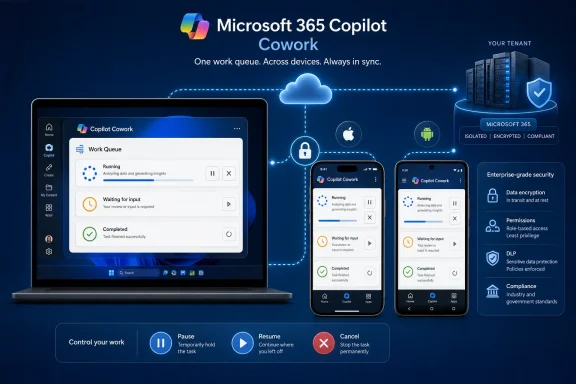 Microsoft Moves Copilot From the Prompt Box to the Work Queue
The defining shift in Cowork is that Microsoft is trying to make Copilot less like a clever answer engine and more like a background worker. Traditional Copilot usage starts with a prompt, returns an answer, and then hands the burden back to the human. Cowork changes the center of gravity: the user delegates work, the agent plans and acts, and the task remains visible as work rather than as a dead-end chat transcript.That distinction matters more than another benchmark about response quality. An assistant that answers well still requires the user to sit there, interpret the answer, move between apps, and keep the job alive. An agent that can carry a multi-step task across cloud, desktop, iOS, and Android starts to resemble a lightweight operations layer for knowledge work.
Microsoft’s own framing points in that direction. Cowork is built on Work IQ, which Microsoft says grounds plans and actions in a tenant’s data, tools, and organizational context rather than only public web content. In plain English, the pitch is that Cowork should understand not merely what the internet says, but what your company’s files, meetings, people, and workflows imply.
That is also where the risk begins. The more useful Cowork becomes, the less it looks like an optional chat sidebar and the more it looks like a delegated actor inside Microsoft 365. For admins, security teams, and power users, the important question is no longer “Can it summarize this?” but “What exactly is it allowed to do while I am not watching?”
Mobile Is the Unlock Because Work Rarely Waits for the Desk
The iOS and Android expansion is not a cosmetic platform checkbox. Mobile access changes the rhythm of Cowork because it lets the user initiate, monitor, pause, resume, or redirect work from the device they actually have in hand between meetings, on a commute, at a customer site, or away from the office.That is especially relevant for frontline knowledge workers: managers, field supervisors, consultants, support leads, sales teams, clinical coordinators, campus staff, and anyone else whose work is partly digital but not always desk-bound. These users often do not need a full workstation to make a decision. They need to kick off a follow-up, check the state of a task, approve a draft, or add missing context before the window closes.
The cloud execution model is the other half of the story. If Cowork can keep working after the user leaves the desk, mobile is not merely a smaller screen for the same assistant. It becomes the remote control for a work engine that lives in Microsoft 365 rather than on a single PC.
That is why the May 5 announcement matters. Microsoft did not just put another Copilot surface on phones. It moved the agentic workflow closer to the messy reality of business, where tasks stretch across time, devices, attention spans, and app boundaries.
The Desktop Still Matters, But It Is No Longer the Whole Workspace
Windows users should not read the mobile expansion as Microsoft abandoning the desktop. The richer creation and review work still belongs naturally on larger screens, especially when Word documents, Excel spreadsheets, PowerPoint decks, PDFs, and email chains are involved. The PC remains the place where users inspect detail, compare versions, and clean up the final mile.But the desktop is no longer the only place where the job can begin or continue. That is the subtle but important change. Cowork’s value comes from continuity: a user can start a task in one context, leave, and return through another device without treating the task as a fresh conversation.
That makes Microsoft 365 feel less like a suite of separate applications and more like a shared task substrate. The user’s attention becomes portable. The work item persists.
For WindowsForum readers, this should sound familiar because Microsoft’s Copilot strategy has been moving steadily toward persistent assistance across contexts. The difference with Cowork is execution. Chat helps you think; Cowork is aimed at getting pieces of the work done.
Frontier Status Is the Brake Microsoft Needs You to Notice
The most important deployment caveat is also the easiest to bury: Cowork is still a preview feature for Frontier users. Microsoft’s documentation says Frontier users get early access, and that capabilities can change as development continues. That is not boilerplate; it is the deployment boundary.Preview status means admins should resist the temptation to evaluate Cowork as though it were a finished production automation platform. The correct posture is controlled experimentation. The feature is useful precisely because it can touch real work, but that same usefulness means the blast radius of a bad assumption is larger than with a chatbot that merely produces text.
Organizations in Frontier should document what Cowork is tested against, which user groups are allowed to try it, what kinds of tasks are appropriate, and where human approval is mandatory. They should also assume that workflows built around the preview may need revision as Microsoft changes capabilities.
Organizations outside Frontier have a different job. They should use this phase to prepare governance rather than chase access. If Cowork becomes broadly available later, the companies that already understand their Microsoft 365 data boundaries, sensitivity labels, sharing practices, and mobile management posture will be in a much better position than those that discover the implications at launch.
Work IQ Turns Tenant Context Into the Product
Microsoft’s Work IQ language deserves attention because it signals where the competitive fight is moving. Public web knowledge is table stakes. The real enterprise value is whether an agent can reason over the organization’s own context without turning that context into a governance nightmare.If Cowork is grounded in tenant data, tools, and organizational structure, it can in theory do more than answer generic questions. It can understand that a spreadsheet belongs to a quarterly review, that an email thread relates to a customer escalation, that a document is connected to a team’s existing process, or that a request should be shaped by internal roles and relationships.
That is the productivity promise. It is also the compliance problem. The better the agent is at finding relevant internal context, the more important it becomes that the tenant’s permissions actually reflect policy.
Many organizations still carry years of over-shared files, unmanaged Teams sprawl, stale groups, permissive SharePoint sites, and unclear ownership. A delegated agent does not create those problems, but it can expose and amplify them. In the age of chat, oversharing might mean a user gets an unexpectedly broad answer. In the age of delegated execution, oversharing may influence what the agent decides to do next.
The New Admin Question Is Not Whether Copilot Can Talk
For sysadmins, the Cowork conversation should start with control planes, not demos. If a feature can plan and act across Microsoft 365, admins need to know how it appears in management interfaces, which users can access it, how Frontier enrollment is handled, and what happens when the feature is not visible where expected.Microsoft’s documentation notes that if Cowork is not visible in Microsoft Admin Center Agent management, the admin account should also be enrolled in Frontier under Copilot settings. That small operational detail is easy to miss, but it captures the awkwardness of preview-era administration. Access is not only a user experience issue; it is an admin visibility issue.
The second admin concern is task state. Cowork tasks can be managed, tracked, paused, resumed, or canceled. That means the enterprise needs norms for when a task should be allowed to run, when a human should inspect intermediate output, and when canceling is safer than course correction.
The third concern is mobile policy. If Cowork becomes useful on iOS and Android, mobile device management stops being a secondary concern for Copilot governance. Conditional access, app protection policies, session controls, and data loss prevention become part of the agent story, not merely the mobile productivity story.
Pause, Resume, and Cancel Are Governance Features in Disguise
One of the most revealing parts of Cowork is not glamorous: the controls to pause, resume, and stop work. These sound like basic user-interface affordances, but in agentic systems they are the difference between a tool and a runaway process.A soft pause lets the agent finish what it is doing before stopping ahead of the next step. A hard pause stops immediately, even mid-step. Cancel ends the current work so the user can start in a different direction.
Those controls matter because delegated work is not a single answer. It unfolds. The user may need to inspect a draft, provide missing context, change priorities, or stop the task because the underlying premise is wrong.
For IT teams, this is where training should focus. Users do not only need prompting tips. They need operational habits: review intermediate work, pause before sensitive steps, cancel when the objective changes, and avoid treating an agent’s momentum as proof that the task is safe.
The Task View Is Where Chat Becomes Operations
Cowork’s task management model is another signal that Microsoft is pushing beyond conversational AI. A task can be in progress, waiting for user input, done, or failed. Users can return to task conversations and continue work.That sounds ordinary until you compare it with the last decade of productivity software. Email threads, Teams chats, Planner boards, documents, and meetings all contain fragments of work, but they do not always preserve the agent’s execution state. Cowork’s task view attempts to make delegated AI work legible as a queue.
This is where the product could become genuinely sticky if Microsoft gets the details right. A worker does not want to remember which prompt produced which draft three hours ago. They want to see what is still running, what needs their input, what failed, and what is ready for review.
That is also where Microsoft will face hard product expectations. Once users experience AI work as a persistent queue, they will expect reliability, auditability, recoverability, and clear failure modes. A failed chat answer is annoying. A failed delegated task can disrupt a process.
Skills Make Cowork Less Magical and More Accountable
Cowork’s use of specialized skills is a useful design choice because it makes the agent’s work less opaque. When the agent loads a capability to compose email or work with Office documents, the user has at least some indication of what kind of operation is being prepared.That matters in enterprise software because “AI did something” is not a sufficient explanation. Workers and admins need to know whether Cowork is drafting a message, editing a document, building a spreadsheet, preparing a presentation, or handling a PDF. Each action has a different approval threshold.
Reusable skills also hint at where Microsoft wants this to go. If Cowork can package repeatable forms of work, it becomes a way to standardize everyday knowledge tasks without forcing every team to build custom automation. That is attractive for departments that live in semi-structured work: status reporting, meeting follow-ups, document preparation, inbox triage, and recurring analysis.
But skills also need boundaries. A skill that saves time in one context may be inappropriate in another. The same mechanism that drafts a routine update could create risk if used against regulated, confidential, or customer-sensitive material without review.
Connectors Will Decide Whether Cowork Becomes a Platform
Microsoft 365 is already broad enough to make Cowork useful, but the long-term platform question is connectors. If Cowork can reason and act only inside the Microsoft productivity estate, it becomes a powerful Microsoft 365 feature. If it connects reliably to business systems, it starts to look like a new front end for workplace automation.That is a more disruptive possibility. Many organizations already have workflow tools, ticketing systems, CRM systems, BI platforms, shared drives, approval chains, and custom line-of-business applications. The user’s work rarely lives in one place.
The danger is that connector sprawl can turn convenience into ambiguity. Which system is authoritative? Which action was taken by the user, and which by Cowork? How is consent captured? What happens when the agent has enough context to propose an action but not enough authority to take it?
This is why admins should watch the connector story closely even if they are not ready to use Cowork. The mobile expansion makes the agent accessible; connectors will determine how consequential its actions can become.
Frontline Knowledge Workers Are the Real Target
The phrase “frontline knowledge worker” may sound contradictory, but it describes a large and underserved class of Microsoft 365 users. These are employees who make decisions, coordinate people, handle documents, and communicate constantly, yet do not spend the whole day at a desk.For them, the value of Cowork is not that it can produce a more elegant paragraph. The value is that work can continue while attention shifts elsewhere. A user can delegate a draft, step into a meeting, check progress from a phone, add a missing detail, and return later to review the finished artifact.
That changes the emotional relationship with Copilot. A chat assistant waits for interaction. A background work engine creates the sense that progress is happening while the worker moves through the day.
This is also where mobile creates a practical unlock. Mobile does not need to be the best place to write a deck or analyze a spreadsheet. It only needs to be good enough to keep the workflow alive.
The Security Story Starts With Boring Hygiene
The security response to Cowork should not begin with panic about AI autonomy. It should begin with boring tenant hygiene. Review who has access to what, where sensitive information lives, how external sharing is configured, and whether mobile app protections match the new importance of the Microsoft 365 Copilot app.That may sound mundane, but agentic systems reward good information architecture and punish sloppy permissions. If your SharePoint sites are messy, your Teams ownership is unclear, and your files are broadly shared by default, Cowork is more likely to inherit that mess than magically fix it.
Admins should also prepare support playbooks. Users will ask why Cowork is unavailable, why a task failed, why it needs input, why a file did not load, or why a scheduled prompt did not behave as expected. Preview features magnify those questions because the answer may be configuration, enrollment, capability limits, or changing Microsoft behavior.
The right stance is not to block every experiment. It is to make experimentation observable, bounded, and reversible.
The Windows Angle Is Control, Not Exclusivity
For Windows enthusiasts, the temptation is to ask whether the desktop loses relevance when Cowork moves to mobile. The better answer is that Windows becomes one node in a broader execution loop. The PC remains the best place for inspection and high-fidelity editing, but not necessarily the only place where work is directed.That is a meaningful shift in Microsoft’s platform strategy. Windows is no longer the sole stage for productivity; Microsoft 365 is. Copilot sits across that estate, and Cowork pushes the model from assistance toward delegation.
This does not make the PC less important. It makes the PC’s role more specialized. Windows becomes where users review, refine, and supervise serious output, while mobile becomes where they keep tasks moving.
For admins, that means device strategy and productivity strategy can no longer be separated. A Cowork task may begin on a Windows machine, continue in the cloud, and be managed from a phone. Governance has to follow the work, not the device.
Microsoft’s Preview Label Is Doing Real Work
Microsoft is right to keep Cowork behind the Frontier line for now. The product category is still young, the user expectations are still forming, and the difference between a helpful delegated action and an unwanted one can be narrow.Preview also gives Microsoft cover to change behavior, refine skills, adjust connectors, and rethink controls. That flexibility is necessary. It is also a warning to organizations that want stable workflows.
If a department builds a process around Cowork today, it should treat that process as experimental. Documentation, training, and internal policy should say so plainly. The worst outcome would be users quietly building business-critical habits around a preview feature whose capabilities are still in motion.
The smarter approach is to pilot realistic tasks that expose governance issues early. Do not test only toy prompts. Test the uncomfortable middle ground: tasks with real files, real handoffs, real approvals, and real mobile interruptions.
The Practical Read for IT Teams Is to Prepare Before the Feature Arrives
The best response to Cowork depends on whether your tenant has Frontier access. If it does, the priority is controlled evaluation. If it does not, the priority is readiness.Either way, the work starts before broad availability. Admins should map which groups would benefit from delegated AI work, which tasks are too sensitive for early use, and which mobile policies need review. They should also identify whether current Microsoft 365 data practices are good enough for an agent that can act on context.
Power users should approach Cowork as a workflow tool, not a novelty. The right test is not “Can it impress me?” The right test is “Can it safely reduce the amount of babysitting required to get routine work across the finish line?”
That is a higher bar. It is also the bar that separates AI demos from operational value.
The May 5 Shift Gives Admins a Short List of Real Work
The headline change is mobile access, but the administrative implications are broader. Cowork’s move to iOS and Android turns delegated AI from a desktop-side experiment into a cross-device workflow that needs policy, training, and review.- Microsoft announced on May 5, 2026 that Cowork now runs on iOS and Android in the Microsoft 365 Copilot app while continuing to operate in the cloud.
- Cowork remains a Frontier preview feature, so organizations should treat its behavior and availability as subject to change.
- Work IQ is central to the product’s promise because Microsoft says it grounds Cowork in tenant data, tools, and organizational context.
- Mobile support matters because it lets users supervise and redirect delegated work without returning to a desktop.
- IT teams should review Microsoft 365 permissions, mobile app controls, Frontier enrollment, and support processes before encouraging real workflow adoption.
- Users should be trained to pause, resume, cancel, and inspect Cowork tasks rather than treating delegated execution as fire-and-forget automation.
References
- Primary source: learn.microsoft.com
Use Copilot Cowork | Microsoft Learn
Learn how to have conversations, manage files, approve actions, and organize projects with Microsoft 365 Copilot Cowork.learn.microsoft.com - Independent coverage: support.microsoft.com
- Independent coverage: microsoft.com
Frontier Program Features | Microsoft Frontier
Explore the official inventory of Microsoft Frontier features. Track experimental agent capabilities as they evolve from early access to general release.www.microsoft.com
- Independent coverage: blogs.microsoft.com
How Frontier Firms are rebuilding the operating model for the age of AI - The Official Microsoft Blog
Updated May 11, 2026: The post was updated to reflect that third-party plugins will be available starting May 12, 2026. Spend time with any software engineering team right now and you’ll see something worth paying attention to. Over the last few years, the way software gets built has moved...blogs.microsoft.com
