

Microsoft’s Copilot retreat reached a new inflection point this week after PCMag reported that Copilot executive Jacob Andreou briefly endorsed removing the assistant from Windows and Xbox surfaces where it “doesn’t live up to its promise.” The notable part is not that a Microsoft executive said the quiet bit out loud; it is that Microsoft has already begun acting as if the quiet bit is now policy. The company is not abandoning AI in Windows, but it is learning that an operating system cannot be treated like a billboard for a corporate platform bet. For users and IT departments, the real story is not Copilot’s disappearance — it is Microsoft’s belated recognition that trust is a feature, too.
For the last few years, Copilot has been less a product than a marching order. It arrived in Windows, Edge, Microsoft 365, Bing, Teams, developer tools, and eventually places where even enthusiastic users struggled to explain the workflow. A button here, a sidebar there, a prompt box in a utility that had spent decades being valuable precisely because it did one thing without ceremony.
Windows has always been a strange host for platform strategy because it is both a consumer product and infrastructure. Microsoft can experiment in Bing with relatively low consequence; if the experiment annoys people, they close the tab. Windows is different. It is the place people return to when the experiment fails, the substrate beneath payroll systems, school laptops, gaming rigs, field tablets, hospital workstations, and family PCs.
That is why Copilot’s overextension hit a nerve. The objection was not simply that Microsoft was adding AI. Plenty of users can imagine useful AI in Windows: troubleshooting a driver issue, summarizing an error log, explaining a cryptic setting, extracting text from a screenshot, or automating a tedious file operation. The objection was that Microsoft appeared to be inserting Copilot first and discovering the use case later.
Andreou’s reportedly deleted post matters because it reframes the argument from “AI skeptics are resisting the future” to “some integrations are bad product design.” That is a much more dangerous admission for Microsoft, but also a more useful one. It suggests the company may finally be distinguishing between Copilot as a strategic brand and AI as a capability that has to earn its placement.
A Copilot layer for Xbox could, in theory, make sense. It might help players find settings, manage captures, troubleshoot network issues, locate accessibility options, or resume a game after a long absence. But the sales pitch matters. If the feature feels like a companion designed around play, it has a chance. If it feels like the same Copilot badge shipped because every Microsoft surface had to display the family crest, it becomes a tax on the interface.
Asha Sharma’s move to wind down Copilot for Xbox therefore reads less like an anti-AI stance than a product reset. Xbox has bigger problems than whether a chatbot can explain a boss fight. Microsoft needs to rebuild confidence around its gaming strategy, pricing, first-party pipeline, PC gaming posture, and the increasingly blurred meaning of “Xbox” itself. In that context, Copilot was not a solution; it was a symbol of distraction.
That symbolism matters to Windows, too. Users can forgive experiments when they feel optional, clearly useful, and reversible. They become less forgiving when experiments arrive as defaults, occupy familiar interface space, or appear in simple tools whose entire value is speed and predictability. Notepad did not become iconic because it was powerful. It became iconic because it was immediate.
Instead, the Copilot icon carried the weight of a companywide campaign. In a tiny app famous for being the opposite of a campaign, that was jarring. The user did not see a narrowly scoped writing feature; the user saw Microsoft’s AI strategy pressing its face against the window of a utility that had worked fine for decades.
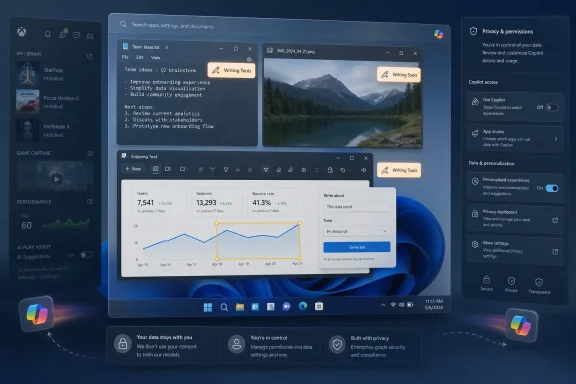
Microsoft’s recent change — replacing the generic Copilot branding in Notepad with clearer writing-oriented labeling — is therefore more than cosmetic. It is an admission that brands can become noise when they obscure the job being done. “Writing Tools” tells the user what happens next. “Copilot” tells the user what Microsoft wants them to think about.
That distinction is at the center of the current pullback. In Photos and Snipping Tool, Microsoft has removed “Ask Copilot” style entry points. In Notepad, the underlying AI capability is not necessarily gone, but the presentation has been toned down. The result is not a purge. It is a retreat from ambient branding toward contextual function.
For Windows veterans, this is familiar terrain. Microsoft has a long history of discovering that users resist assistants when they are framed as personalities, destinations, or corporate mascots. Clippy, Cortana, and now Copilot all landed in different eras, with different technical foundations, but each ran into the same operating-system truth: help is welcome when summoned, resented when staged.
A post saying “remove it where it is not good enough” is not heresy inside a mature product culture. It is basic hygiene. But in the middle of an AI land rush, even hygiene can sound like retreat.
That tension explains why Microsoft’s external language tends to favor phrases like “more intentional,” “where it’s most meaningful,” and “well-crafted experiences.” Those are safe words. They allow Microsoft to acknowledge overreach without saying the company overreached. They reassure investors that AI remains central while telling users that fewer buttons may be on the way.
The problem is that Windows users are very good at reading the space between Microsoft’s sentences. They remember when features were “recommended,” then unavoidable. They remember defaults that changed after updates. They remember OneDrive prompts, Edge nudges, Start menu recommendations, Microsoft account pressure, and the long tail of consumer upsell inside a paid operating system.
So when Copilot disappears from one corner and reappears under another name, users do not automatically see restraint. They may see camouflage. Microsoft’s challenge is not merely to remove bad entry points; it is to prove that removal is not just rebranding with softer lighting.
Those are Windows-shaped problems. They are not chatbot-shaped problems pasted onto Windows.
The distinction matters because operating systems are environments of trust. A useful AI feature in Windows should feel like an extension of the task the user is already performing. It should not require the user to mentally switch from “I am editing a note” to “I am now interacting with Microsoft’s cross-product AI brand.” The best interface for AI in Windows may often be no branded interface at all.
That idea runs counter to the way technology companies like to launch platforms. Platforms want identity, iconography, metrics, engagement, surface area, and habit formation. Operating systems want reliability, legibility, performance, and user control. Copilot’s first wave often felt like the platform side winning the argument inside Microsoft.
The current pullback suggests the operating-system side has regained some leverage. That is good news if it leads to fewer ornamental buttons and more features that solve concrete problems. It is less meaningful if Microsoft simply moves the same prompts into renamed menus while continuing to treat Windows as a distribution channel for AI subscriptions.
Microsoft knows this, which is why enterprise-facing AI tends to arrive with administrative controls, tenant boundaries, and documentation. But Windows itself spans managed and unmanaged contexts in messy ways. A business user may move between local files, cloud-synced documents, personal Microsoft accounts, work accounts, browser sessions, and third-party apps in the same day. If AI entry points appear inconsistently across that landscape, IT departments have to understand not just whether Copilot exists, but which Copilot, under which identity, with which data path.
Removing unnecessary consumer-facing entry points helps, but it does not answer the deeper enterprise question. The deeper question is whether Microsoft can make AI in Windows predictable enough to govern. That means clear defaults, durable policy settings, transparent data handling, and no surprise resurrections of features after monthly updates.
The Copilot pullback may actually help Microsoft sell AI to enterprises in the long run. A restrained AI surface is easier to defend than a maximalist one. CIOs are not allergic to productivity tools, but they are allergic to ambiguity. If Microsoft can say, credibly, that Copilot appears only where it has a defined workflow and an administrative model, the conversation changes.
The danger is that Microsoft’s consumer habits bleed into its enterprise reputation. Every unwanted button in a home edition screenshot becomes evidence in a boardroom argument that Microsoft cannot resist pushing. Every ambiguous rename invites another round of testing, documentation, and help desk scripts. Windows quality is not just crash rates and File Explorer speed; it is also the confidence that the desktop will not become a moving target for monetization experiments.
This is why the Notepad rename is instructive. “Writing Tools” lowers the temperature. It sounds like a feature, not a strategy. It allows the user to evaluate the function on its own terms: does it help me rewrite this paragraph, yes or no? That is a healthier product question than whether the user is ready to embrace Copilot as the future of computing.
Microsoft has already learned a version of this lesson in Office. Users do not necessarily want to “use AI” in the abstract; they want to make a slide deck less ugly, summarize a meeting, draft a formula, find a document, or rewrite an email without sounding like a hostage note. The closer the feature sits to a recognizable job, the less the brand has to shout.
Windows magnifies the issue because its built-in apps are cultural artifacts. Notepad, Paint, Photos, Calculator, File Explorer, and Snipping Tool are not just software components. They are muscle memory. When Microsoft alters them, it is not merely changing a UI; it is editing a shared expectation about what Windows is supposed to feel like.
That is why “less Copilot branding” may be more important than it sounds. The future of AI in Windows may depend on Microsoft being willing to make Copilot invisible when invisibility serves the user. That is not a retreat from AI. It is a retreat from vanity.
Recall was not the same thing as a Copilot button in Notepad, but it changed the emotional context around all AI features in Windows. Once users suspect that AI integration may involve broad visibility into their activity, every new assistant surface gets examined through a privacy lens. A harmless text tool becomes part of a larger pattern. A screenshot feature becomes a question about capture, retention, indexing, and consent.
This is where Microsoft’s “meaningful and well-crafted” language has to become operational. Meaningful cannot merely mean “the model can do something here.” It has to mean the user understands what is happening, why it is happening, where the data goes, and how to say no. Well-crafted cannot merely mean the icon looks nicer. It has to mean the feature respects the surrounding workflow.
The irony is that the most useful AI features may require the most trust. A truly capable Windows assistant would need context: apps, files, settings, logs, device state, permissions, user intent. Microsoft cannot earn that trust by sprinkling Copilot buttons through low-stakes utilities. It earns it by being boringly clear about boundaries.
Pulling Copilot out of marginal locations is a small but necessary step toward that boring clarity. It tells users that Microsoft is at least willing to concede that not every surface deserves an AI affordance. The next step is harder: proving that the surfaces that remain are there for the user, not the quarterly narrative.
That distinction should matter deeply to Microsoft. Enthusiasts have spent years asking for a more coherent Settings app, a faster File Explorer, better update controls, fewer ads, fewer account nags, better performance on existing hardware, and a cleaner separation between local and cloud experiences. When Copilot arrived everywhere before some of those basics felt settled, it became a symbol of misplaced priorities.
This is why Microsoft’s quality push and Copilot pullback belong in the same story. Users do not experience them as separate roadmap items. They experience Windows as one thing. If File Explorer is slow, search is inconsistent, the taskbar is less flexible than it used to be, and the Start menu contains promotional noise, then a new AI button does not read as innovation. It reads as evasion.
The company seems to understand at least part of this now. Recent Windows messaging has paired AI restraint with promises around performance, reliability, update experience, and interface craft. That pairing is politically wise because it tacitly admits that AI cannot compensate for a desktop that irritates people.
It also sets a standard Microsoft will be judged against. If Windows gets faster, calmer, and more predictable while AI becomes more contextual, users may soften. If Copilot merely retreats from the most embarrassing placements while the rest of the system remains noisy, the backlash will continue under a different name.
The next phase has to be about permission. Not just legal consent or a settings toggle buried three screens deep, but social permission: the feeling that a feature belongs where it appears. Users grant that kind of permission when software respects context, solves a real problem, and goes away when it is not needed.
A Copilot button in an app can fail that test even if the underlying model is impressive. The question is not “can AI summarize this?” but “is summarization part of the reason I opened this tool?” Sometimes the answer is yes. Often, in Windows’ smallest utilities, the answer is no.
This is where Andreou’s reported sentiment becomes the cleanest possible product principle. Remove Copilot from places where it does not live up to its promise. That should not be controversial. It should be the standard by which every AI integration is judged.
The hard part for Microsoft is that the promise is not the same in every place. In Word, the promise may be drafting and rewriting. In Excel, it may be analysis. In Windows Settings, it may be explanation and safe automation. In Snipping Tool, it may be optional handoff to an assistant — but not necessarily a permanent branded button. In Notepad, it may be a humble writing menu that some users never touch.
Source: PCMag Microsoft VP Backs Removing Copilot From Less Useful Corners of Windows
 Microsoft’s AI Ambition Finally Meets the Shape of Windows
For the last few years, Copilot has been less a product than a marching order. It arrived in Windows, Edge, Microsoft 365, Bing, Teams, developer tools, and eventually places where even enthusiastic users struggled to explain the workflow. A button here, a sidebar there, a prompt box in a utility that had spent decades being valuable precisely because it did one thing without ceremony.Windows has always been a strange host for platform strategy because it is both a consumer product and infrastructure. Microsoft can experiment in Bing with relatively low consequence; if the experiment annoys people, they close the tab. Windows is different. It is the place people return to when the experiment fails, the substrate beneath payroll systems, school laptops, gaming rigs, field tablets, hospital workstations, and family PCs.
That is why Copilot’s overextension hit a nerve. The objection was not simply that Microsoft was adding AI. Plenty of users can imagine useful AI in Windows: troubleshooting a driver issue, summarizing an error log, explaining a cryptic setting, extracting text from a screenshot, or automating a tedious file operation. The objection was that Microsoft appeared to be inserting Copilot first and discovering the use case later.
Andreou’s reportedly deleted post matters because it reframes the argument from “AI skeptics are resisting the future” to “some integrations are bad product design.” That is a much more dangerous admission for Microsoft, but also a more useful one. It suggests the company may finally be distinguishing between Copilot as a strategic brand and AI as a capability that has to earn its placement.
Xbox Shows the Limit of Corporate Gravity
The Xbox episode is revealing because gaming is where Microsoft’s top-down AI strategy ran into one of its least forgiving audiences. Console players are not against technology, automation, or assistance. They are against interruptions, friction, and features that appear to serve Microsoft’s narrative more than the player’s moment-to-moment experience.A Copilot layer for Xbox could, in theory, make sense. It might help players find settings, manage captures, troubleshoot network issues, locate accessibility options, or resume a game after a long absence. But the sales pitch matters. If the feature feels like a companion designed around play, it has a chance. If it feels like the same Copilot badge shipped because every Microsoft surface had to display the family crest, it becomes a tax on the interface.
Asha Sharma’s move to wind down Copilot for Xbox therefore reads less like an anti-AI stance than a product reset. Xbox has bigger problems than whether a chatbot can explain a boss fight. Microsoft needs to rebuild confidence around its gaming strategy, pricing, first-party pipeline, PC gaming posture, and the increasingly blurred meaning of “Xbox” itself. In that context, Copilot was not a solution; it was a symbol of distraction.
That symbolism matters to Windows, too. Users can forgive experiments when they feel optional, clearly useful, and reversible. They become less forgiving when experiments arrive as defaults, occupy familiar interface space, or appear in simple tools whose entire value is speed and predictability. Notepad did not become iconic because it was powerful. It became iconic because it was immediate.
The Notepad Lesson Is Bigger Than Notepad
The strange thing about Copilot in Notepad is that Microsoft had a plausible feature buried under an implausible presentation. Writing assistance in a text editor is not inherently absurd. People rewrite notes, clean up drafts, summarize text, and adjust tone all the time. If Microsoft had introduced a plainly labeled “Writing Tools” menu, many users might have shrugged, turned it off, or used it occasionally.Instead, the Copilot icon carried the weight of a companywide campaign. In a tiny app famous for being the opposite of a campaign, that was jarring. The user did not see a narrowly scoped writing feature; the user saw Microsoft’s AI strategy pressing its face against the window of a utility that had worked fine for decades.
Microsoft’s recent change — replacing the generic Copilot branding in Notepad with clearer writing-oriented labeling — is therefore more than cosmetic. It is an admission that brands can become noise when they obscure the job being done. “Writing Tools” tells the user what happens next. “Copilot” tells the user what Microsoft wants them to think about.
That distinction is at the center of the current pullback. In Photos and Snipping Tool, Microsoft has removed “Ask Copilot” style entry points. In Notepad, the underlying AI capability is not necessarily gone, but the presentation has been toned down. The result is not a purge. It is a retreat from ambient branding toward contextual function.
For Windows veterans, this is familiar terrain. Microsoft has a long history of discovering that users resist assistants when they are framed as personalities, destinations, or corporate mascots. Clippy, Cortana, and now Copilot all landed in different eras, with different technical foundations, but each ran into the same operating-system truth: help is welcome when summoned, resented when staged.
The Deleted Post Says More Than the Post Itself
Andreou’s deletion is almost as interesting as the sentiment. Publicly endorsing removal from underperforming surfaces is common sense from a product perspective, but it is awkward from a corporate messaging perspective. Microsoft has spent enormous money, executive attention, partner energy, and marketing oxygen convincing customers that Copilot is the organizing layer of its future.A post saying “remove it where it is not good enough” is not heresy inside a mature product culture. It is basic hygiene. But in the middle of an AI land rush, even hygiene can sound like retreat.
That tension explains why Microsoft’s external language tends to favor phrases like “more intentional,” “where it’s most meaningful,” and “well-crafted experiences.” Those are safe words. They allow Microsoft to acknowledge overreach without saying the company overreached. They reassure investors that AI remains central while telling users that fewer buttons may be on the way.
The problem is that Windows users are very good at reading the space between Microsoft’s sentences. They remember when features were “recommended,” then unavoidable. They remember defaults that changed after updates. They remember OneDrive prompts, Edge nudges, Start menu recommendations, Microsoft account pressure, and the long tail of consumer upsell inside a paid operating system.
So when Copilot disappears from one corner and reappears under another name, users do not automatically see restraint. They may see camouflage. Microsoft’s challenge is not merely to remove bad entry points; it is to prove that removal is not just rebranding with softer lighting.
AI Belongs in Windows Only When Windows Gets Better
There is a strong version of AI in Windows that even skeptics should take seriously. Imagine a system assistant that can inspect local configuration with explicit permission, explain why a printer is failing, compare two crash dumps, identify the app keeping a laptop awake, or generate a plain-English summary of what a driver update changed. Imagine File Explorer search that finally understands intent without sending private filenames into a black box by default. Imagine accessibility tooling that can describe images, simplify dense dialogs, and help users navigate unfamiliar software.Those are Windows-shaped problems. They are not chatbot-shaped problems pasted onto Windows.
The distinction matters because operating systems are environments of trust. A useful AI feature in Windows should feel like an extension of the task the user is already performing. It should not require the user to mentally switch from “I am editing a note” to “I am now interacting with Microsoft’s cross-product AI brand.” The best interface for AI in Windows may often be no branded interface at all.
That idea runs counter to the way technology companies like to launch platforms. Platforms want identity, iconography, metrics, engagement, surface area, and habit formation. Operating systems want reliability, legibility, performance, and user control. Copilot’s first wave often felt like the platform side winning the argument inside Microsoft.
The current pullback suggests the operating-system side has regained some leverage. That is good news if it leads to fewer ornamental buttons and more features that solve concrete problems. It is less meaningful if Microsoft simply moves the same prompts into renamed menus while continuing to treat Windows as a distribution channel for AI subscriptions.
Enterprise IT Will Judge the Controls, Not the Slogans
For sysadmins, the philosophical debate is secondary to manageability. Copilot in Windows raises practical questions about data exposure, policy control, licensing, user training, support burden, and compliance boundaries. A feature that is harmless on a personal laptop can become a governance headache across a regulated fleet.Microsoft knows this, which is why enterprise-facing AI tends to arrive with administrative controls, tenant boundaries, and documentation. But Windows itself spans managed and unmanaged contexts in messy ways. A business user may move between local files, cloud-synced documents, personal Microsoft accounts, work accounts, browser sessions, and third-party apps in the same day. If AI entry points appear inconsistently across that landscape, IT departments have to understand not just whether Copilot exists, but which Copilot, under which identity, with which data path.
Removing unnecessary consumer-facing entry points helps, but it does not answer the deeper enterprise question. The deeper question is whether Microsoft can make AI in Windows predictable enough to govern. That means clear defaults, durable policy settings, transparent data handling, and no surprise resurrections of features after monthly updates.
The Copilot pullback may actually help Microsoft sell AI to enterprises in the long run. A restrained AI surface is easier to defend than a maximalist one. CIOs are not allergic to productivity tools, but they are allergic to ambiguity. If Microsoft can say, credibly, that Copilot appears only where it has a defined workflow and an administrative model, the conversation changes.
The danger is that Microsoft’s consumer habits bleed into its enterprise reputation. Every unwanted button in a home edition screenshot becomes evidence in a boardroom argument that Microsoft cannot resist pushing. Every ambiguous rename invites another round of testing, documentation, and help desk scripts. Windows quality is not just crash rates and File Explorer speed; it is also the confidence that the desktop will not become a moving target for monetization experiments.
The Copilot Brand Has Become Too Heavy for Small Jobs
A brand can clarify a product family, but it can also make small features feel suspiciously large. Copilot now carries associations with subscriptions, cloud processing, Microsoft 365, Bing, enterprise licensing, generative AI hype, privacy worries, and the broader culture-war fatigue around AI. That is a lot to put on a button in Snipping Tool.This is why the Notepad rename is instructive. “Writing Tools” lowers the temperature. It sounds like a feature, not a strategy. It allows the user to evaluate the function on its own terms: does it help me rewrite this paragraph, yes or no? That is a healthier product question than whether the user is ready to embrace Copilot as the future of computing.
Microsoft has already learned a version of this lesson in Office. Users do not necessarily want to “use AI” in the abstract; they want to make a slide deck less ugly, summarize a meeting, draft a formula, find a document, or rewrite an email without sounding like a hostage note. The closer the feature sits to a recognizable job, the less the brand has to shout.
Windows magnifies the issue because its built-in apps are cultural artifacts. Notepad, Paint, Photos, Calculator, File Explorer, and Snipping Tool are not just software components. They are muscle memory. When Microsoft alters them, it is not merely changing a UI; it is editing a shared expectation about what Windows is supposed to feel like.
That is why “less Copilot branding” may be more important than it sounds. The future of AI in Windows may depend on Microsoft being willing to make Copilot invisible when invisibility serves the user. That is not a retreat from AI. It is a retreat from vanity.
The Recall Shadow Still Hangs Over the Room
Any discussion of AI in Windows now lives in the shadow of Recall. Even when Microsoft is not talking about Recall, users are. The feature’s rocky rollout and security concerns hardened a perception that Microsoft was moving faster than Windows trust could support.Recall was not the same thing as a Copilot button in Notepad, but it changed the emotional context around all AI features in Windows. Once users suspect that AI integration may involve broad visibility into their activity, every new assistant surface gets examined through a privacy lens. A harmless text tool becomes part of a larger pattern. A screenshot feature becomes a question about capture, retention, indexing, and consent.
This is where Microsoft’s “meaningful and well-crafted” language has to become operational. Meaningful cannot merely mean “the model can do something here.” It has to mean the user understands what is happening, why it is happening, where the data goes, and how to say no. Well-crafted cannot merely mean the icon looks nicer. It has to mean the feature respects the surrounding workflow.
The irony is that the most useful AI features may require the most trust. A truly capable Windows assistant would need context: apps, files, settings, logs, device state, permissions, user intent. Microsoft cannot earn that trust by sprinkling Copilot buttons through low-stakes utilities. It earns it by being boringly clear about boundaries.
Pulling Copilot out of marginal locations is a small but necessary step toward that boring clarity. It tells users that Microsoft is at least willing to concede that not every surface deserves an AI affordance. The next step is harder: proving that the surfaces that remain are there for the user, not the quarterly narrative.
Windows Users Are Not Anti-AI; They Are Anti-Clutter
The lazy interpretation of this backlash is that Windows users hate AI. Some do, of course. But the broader complaint is older and more specific: Windows users hate clutter that makes the system feel less like theirs.That distinction should matter deeply to Microsoft. Enthusiasts have spent years asking for a more coherent Settings app, a faster File Explorer, better update controls, fewer ads, fewer account nags, better performance on existing hardware, and a cleaner separation between local and cloud experiences. When Copilot arrived everywhere before some of those basics felt settled, it became a symbol of misplaced priorities.
This is why Microsoft’s quality push and Copilot pullback belong in the same story. Users do not experience them as separate roadmap items. They experience Windows as one thing. If File Explorer is slow, search is inconsistent, the taskbar is less flexible than it used to be, and the Start menu contains promotional noise, then a new AI button does not read as innovation. It reads as evasion.
The company seems to understand at least part of this now. Recent Windows messaging has paired AI restraint with promises around performance, reliability, update experience, and interface craft. That pairing is politically wise because it tacitly admits that AI cannot compensate for a desktop that irritates people.
It also sets a standard Microsoft will be judged against. If Windows gets faster, calmer, and more predictable while AI becomes more contextual, users may soften. If Copilot merely retreats from the most embarrassing placements while the rest of the system remains noisy, the backlash will continue under a different name.
Microsoft’s Real Pivot Is From Presence to Permission
The first phase of Copilot in Windows was about presence. Put it on the taskbar. Put it in apps. Put it on keyboards. Put it in marketing. Make the user aware that Microsoft has an AI assistant and that it is available everywhere.The next phase has to be about permission. Not just legal consent or a settings toggle buried three screens deep, but social permission: the feeling that a feature belongs where it appears. Users grant that kind of permission when software respects context, solves a real problem, and goes away when it is not needed.
A Copilot button in an app can fail that test even if the underlying model is impressive. The question is not “can AI summarize this?” but “is summarization part of the reason I opened this tool?” Sometimes the answer is yes. Often, in Windows’ smallest utilities, the answer is no.
This is where Andreou’s reported sentiment becomes the cleanest possible product principle. Remove Copilot from places where it does not live up to its promise. That should not be controversial. It should be the standard by which every AI integration is judged.
The hard part for Microsoft is that the promise is not the same in every place. In Word, the promise may be drafting and rewriting. In Excel, it may be analysis. In Windows Settings, it may be explanation and safe automation. In Snipping Tool, it may be optional handoff to an assistant — but not necessarily a permanent branded button. In Notepad, it may be a humble writing menu that some users never touch.
The Windows Desktop Gets a Chance to Breathe
The most concrete lesson from this episode is that Microsoft’s AI future in Windows will be stronger if the company accepts a smaller visible footprint. The company does not need to win by making every app look like Copilot. It needs to win by making Windows feel more capable without making it feel less familiar.- Microsoft has begun removing or reducing Copilot entry points in built-in Windows apps including Snipping Tool, Photos, Widgets, and Notepad.
- The Notepad change appears to be more of a branding and interface correction than a full removal of AI-assisted writing features.
- Xbox’s Copilot pullback shows that Microsoft is willing, at least in some divisions, to remove AI experiences that do not fit the product’s immediate priorities.
- The reported deletion of Jacob Andreou’s post suggests Microsoft is still balancing product realism against the corporate need to project confidence in Copilot.
- Enterprise customers will care less about the rhetoric of restraint than about durable controls, clear data boundaries, and predictable defaults.
- The best version of AI in Windows is likely to be contextual, quiet, and task-specific rather than a branded assistant appearing in every corner of the OS.
Source: PCMag Microsoft VP Backs Removing Copilot From Less Useful Corners of Windows
