

Microsoft’s consumer Copilot just moved from “helpful assistant” to “active executor” with Copilot Tasks — a research-preview feature that runs an AI agent in the background using its own cloud-based computer and browser to complete multi-step chores on your behalf.
Copilot’s evolution has followed a predictable arc: from chat-first helpers that answer questions and draft text to agentic systems that take action across apps and web pages. Microsoft frames Copilot Tasks as the next chapter in that progression — “a to‑do list that does itself” — and is rolling the capability out as a limited research preview to gather real‑world feedback before a broader launch.
This shift mirrors moves across the industry. OpenAI’s ChatGPT has an Agent mode for paid subscribers that can browse, use connectors, and run scheduled tasks; Google added an “Auto Browse” agent inside Chrome for Gemini Pro/Ultra users that can navigate sites and attempt bookings and purchases (with explicit user confirmation for final steps). The competitive landscape is now defined by several variants of the same promise: natural‑language instructions that produce completed outcomes rather than just suggestions.
This “computer‑use” approach — where the agent literally operates a browser and interacts with page elements — is functionally similar to earlier Copilot Studio capabilities and to competitor offerings such as OpenAI’s Operator and Google’s Auto Browse. Operating through a browser makes the agent flexible with services that lack APIs, but it also introduces the familiar fragility of UI automation: changes to page layouts, anti-bot measures, and multi‑factor authentication flows can break or complicate tasks.
At the same time, agentic convenience amplifies risks that have long shadowed AI: data handling opacity, prompt‑injection and web‑based attacks, brittle UI automation, and the thorny legal and financial questions created when a machine acts on a human’s behalf. The preview’s success will hinge on Microsoft’s transparency about data practices, robust consent and permission models, clear audit trails, and practical limits that keep humans firmly in control of consequential actions.
For now, Copilot Tasks is worth watching — and testing cautiously. If Microsoft nails the balance between automation and control, consumer agentic AI will shift from novelty to utility. If it doesn’t, the inevitable mistakes and privacy questions could slow adoption and invite tighter regulation. The research preview is only the beginning; the real story will be written in how Microsoft responds to those early user experiences.
Source: Thurrott.com Microsoft Brings Agentic AI to its Consumer Chatbot With New Copilot Tasks
 Background
Copilot’s evolution has followed a predictable arc: from chat-first helpers that answer questions and draft text to agentic systems that take action across apps and web pages. Microsoft frames Copilot Tasks as the next chapter in that progression — “a to‑do list that does itself” — and is rolling the capability out as a limited research preview to gather real‑world feedback before a broader launch.This shift mirrors moves across the industry. OpenAI’s ChatGPT has an Agent mode for paid subscribers that can browse, use connectors, and run scheduled tasks; Google added an “Auto Browse” agent inside Chrome for Gemini Pro/Ultra users that can navigate sites and attempt bookings and purchases (with explicit user confirmation for final steps). The competitive landscape is now defined by several variants of the same promise: natural‑language instructions that produce completed outcomes rather than just suggestions.
What Copilot Tasks is — and what it isn’t
The pitch in one line
Copilot Tasks is an agentic extension of the Copilot consumer chatbot that plans and executes workflows autonomously using Microsoft’s cloud infrastructure, then reports back to you. It supports one‑off jobs and recurring schedules, and it’s built to coordinate across email, calendars, documents, and web services without requiring manual scripting or developer tools.Key characteristics
- Background execution: The agent uses Microsoft’s own compute and a browser instance in the cloud to perform actions, rather than relying on your local device to drive those interactions.
- Natural language orchestration: You describe the goal, Copilot plans the steps, executes them, and returns a summary of what it did.
- Recurring and scheduled tasks: Tasks can run once, on a cadence, or at a scheduled time — useful for monitoring listings, compiling daily briefings, or routine inbox triage.
- Consent gates for risky actions: Copilot is designed to ask for user consent before meaningful actions like spending money or sending messages on your behalf, and you can pause, review, or cancel tasks.
How it works (a practical look)
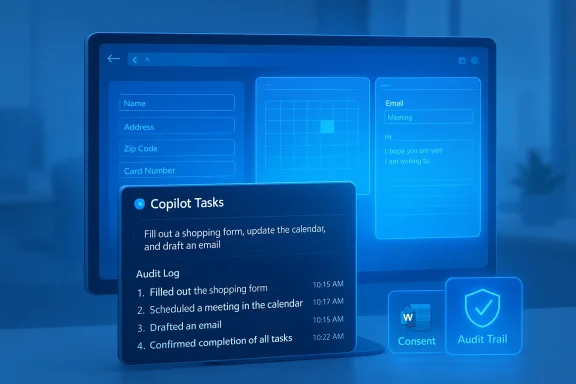
Copilot Tasks combines orchestration logic, a cloud browser, and connectors into a single flow. When you instruct Copilot, it decomposes your goal into steps, opens sites or apps in a managed browser, fills forms, drafts messages, and coordinates calendar slots or bookings as needed. The system then generates an audit-style report describing each action it took. Microsoft positions that behavior as an evolution of existing Copilot features (Actions, Studio) and as an outward-facing consumer counterpart to Azure/enterprise agent frameworks.This “computer‑use” approach — where the agent literally operates a browser and interacts with page elements — is functionally similar to earlier Copilot Studio capabilities and to competitor offerings such as OpenAI’s Operator and Google’s Auto Browse. Operating through a browser makes the agent flexible with services that lack APIs, but it also introduces the familiar fragility of UI automation: changes to page layouts, anti-bot measures, and multi‑factor authentication flows can break or complicate tasks.
Practical use cases Microsoft highlights
Microsoft’s preview documentation and early reporting outline several everyday scenarios where Copilot Tasks could save time:- Recurring email management: Surface urgent messages, draft replies, unsubscribe from promotions, and prepare a daily or weekly briefing.
- Apartment and real‑estate monitoring: Watch listings, automatically schedule showings, and report back on options that fit your filters.
- Event planning: Find venues, compare availability, book vendors, and send invitations while collecting RSVPs.
- Shopping and deal tracking: Monitor price drops, compare options, and present the best deals or stop at a confirmation point before payment.
- Document transformation: Convert emails, attachments, and images into presentations or generate study plans and tailored resumes for job listings.
Security, privacy, and control: the central tradeoffs
Agentic systems introduce convenience, but they also raise a distinct set of security and privacy questions. Microsoft has baked consent flows and controls into Copilot Tasks — for example, requesting explicit permission for purchases or outgoing messages — but the model still requires access to sensitive data and services to function effectively. That reality creates a concentration of trust and risk that both users and platform operators must manage.Data flow and cloud processing
Copilot Tasks runs in the cloud with browser sessions that handle the real interactions. Industry coverage of comparable features (notably Google’s Auto Browse) has highlighted that page contents visited by an agent are typically streamed to and processed by a provider’s cloud models, and that some activity may be logged to user accounts for short periods or for telemetry. Those facts mean site content and form data are handled outside the user’s device and may be subject to provider logging and policy. Microsoft’s materials emphasize control but do not yet publish a granular data‑handling spec for Tasks in the preview. Readers should treat claims about “private local execution” cautiously until Microsoft publishes detailed security and privacy documentation.Attack surface: automation plus the web
Agentic browsing increases the platform attack surface in several ways:- Prompt‑injection and malicious pages: An agent can be led to follow instructions embedded in pages it visits, a known risk for any model that consumes web content.
- Account compromise risk: To complete bookings or send messages, agents may need authenticated sessions. If credential handling or token binding is imperfect, that dependency could be abused.
- Automation errors: Mistakes in form fields, wrong recipients, partial payments, or double bookings become higher‑stakes when actions are executed without careful human oversight. Microsoft’s consent gates are important, but they cannot eliminate all error modes.
Regulatory and legal exposure
Autonomous task execution can create complicated liability and compliance questions. For example, a bot that books travel or pays invoices on behalf of a user interacts with contractual terms, consumer protection laws, and potentially tax or procurement rules. Enterprises are already wrestling with governance around agent use in Azure and M365 Copilot; the consumer rollout of a powerful agent raises questions about dispute resolution, refunds for mistaken purchases, and cross‑jurisdictional data controls that Microsoft will need to address in product policy and terms.Usability and product limitations to watch
Early reporting indicates Copilot Tasks is powerful in concept but will face limitations in practice during the preview phase.Fragile interfaces and web blockers
Because the agent often relies on page UIs, sites can and do block automated agents, or they can present dynamic, JavaScript‑heavy experiences that are hard to automate reliably. Some vendors may detect and block cloud browser sessions or require reCAPTCHA and additional human verification flows, which interrupts automation. Microsoft and others are aware of these problems from existing “computer use” features, and robust error detection and fallback strategies will be necessary to make routine tasks reliable.Scope and complexity
Not every scheduling or purchase flow is straightforward. Complex transactions — negotiating with human agents, applying specific coupons, or filling forms behind paywalled or highly dynamic UIs — will likely require human intervention. Microsoft’s messaging that Copilot will “figure out how to make it happen” is an aspirational product narrative; users should expect a mix of fully automated successes and tasks that need follow‑ups or approvals.Cost and monetization
Copilot Tasks is launching as a research preview to a restricted cohort. It’s reasonable to expect Microsoft to eventually bundle Tasks into paid consumer tiers or attach it to Microsoft 365 subscriptions, similar to how agentic features from competitors have landed behind paid plans. That outcome would match the industry pattern where advanced automation features are monetized to offset cloud compute and moderation costs. Microsoft has not committed to final pricing or packaging during the preview.Governance and enterprise lessons that apply to consumers
Microsoft has been blunt about agent governance in its Azure and enterprise Copilot documentation: administrators should be able to control agent access and surface the right agent at the right time. Those governance lessons are transferable to consumer contexts as well.- Permission models matter: Fine‑grained consent for specific actions and token scoping reduces risk. Consumers should expect clear UI controls that show what accounts and permissions a task will use.
- Audit trails and explainability: Copilot Tasks’ audit reports are a positive — users get a record of what was done. Making those logs easily accessible and exportable will be important for triage and dispute resolution.
- Opt‑out and memory controls: Copilot has been adding memory and personalization features. Consumers should be able to remove tasks, clear agent memories, and opt out of persistent personalization — features Microsoft has discussed previously in other Copilot contexts.
Trust‑building measures Microsoft should publish (and what to look for in the preview)
If Microsoft wants broad consumer adoption, it should make several technical and policy details transparent during or soon after the preview.- A detailed data handling whitepaper that explains what page and form data the cloud browser logs, retention periods, and whether site content is used for model training. Transparent defaults and opt‑in choices would build trust.
- Technical measures against prompt injection and a public description of the mitigation strategies used when agents consume webpages. Vendors have published research and mitigations for this class of attack — consumers deserve similar clarity.
- Permission and token lifecycle documentation describing how Copilot accesses authenticated services, how long tokens persist, and whether users can restrict which apps/sites a task can access.
- A recovery and dispute process for mistaken orders, privacy breaches, or automation errors, including contact points and refund/rollback mechanisms.
Competitive context: how Copilot Tasks stacks up
Copilot Tasks arrives into a market where different vendors are experimenting with agentic tradeoffs.- OpenAI / ChatGPT Agent mode: Focuses on powerful, configurable agents for paid users, with scheduling and app integrations, and a clear paywall to manage resource usage. It emphasizes developer‑facing agent construction alongside consumer scheduling.
- Google / Gemini Auto Browse: Embeds the agent into Chrome and ties it tightly to Google services (Gmail, Calendar, Maps, Shopping), which gives it deep integration advantages but raises conspicuous data‑handling concerns since it uses users’ Google accounts.
- Microsoft / Copilot Tasks: Leverages Microsoft’s breadth across Windows, Microsoft 365, and Azure to present a consumer agent that can operate across mail, calendar, Office files, and web services while using Microsoft’s cloud browser approach. Its advantage is ecosystem reach; the risks are the same as other agents: correctness, transparency, and privacy.
Real‑world scenarios: promise and likely pitfalls
To ground the analysis, consider two concrete user scenarios that highlight both promise and risk.Scenario A — The busy parent: planning a birthday party
You ask Copilot to plan a small birthday party for Saturday afternoon in two weeks, including venue, catering, and invitations. Copilot scouts venues, compares availability, drafts invitations, reserves a table, and composes a payment link for a deposit — then asks for confirmation before submitting payment.- Promise: This could save hours of logistics and calendar coordination, especially if Copilot handles RSVP tracking and follow‑ups.
- Pitfall: If a vendor’s booking flow requires identity verification or uses a site that blocks automated sessions, the task could stall. If Copilot misselects options (wrong date, incorrect headcount), the result could be an awkward real‑world outcome requiring human resolution. Transparent confirmations and easy undo are essential.
Scenario B — Job applications and resume tailoring
You instruct Copilot to watch job boards, match roles to your profile, and submit tailored resumes. Copilot collects job descriptions, rewrites your resume, and prepares tailored cover letters — then flags opportunities for your approval before submission.- Promise: Automating repetitive tailoring tasks would be a huge productivity boost and could surface more matched roles.
- Pitfall: Automated applications raise concerns about authorization, data minimization (sharing your resume with external job boards), and the risk of applying to roles that are a poor fit. Users need granular control over which postings Copilot can apply to and what personal data it may transmit.
Recommendations for consumers and power users
- Start small and test: Use Copilot Tasks for low‑risk, reversible tasks first (price monitoring, draft generation, reminders) before enabling bookings or payments.
- Monitor consents and permissions: Carefully review any consent prompt for what accounts and data the agent will access. Revoke tokens or permissions you no longer trust.
- Keep manual confirmation on critical flows: If you must spend money or share highly sensitive data, require an explicit manual confirmation step. That’s the safest default for now.
- Audit the task history: Use the activity report to verify what the agent did and to troubleshoot errors. Save or export logs if you anticipate disputes.
What to watch during the preview and beyond
The research preview is the right move: Microsoft benefits from real user patterns to harden error handling, consent flows, and fraud prevention. During the preview, watch for:- Transparency updates: Will Microsoft publish a detailed security and privacy whitepaper for Copilot Tasks? That document should explain data retention, telemetry, and training uses.
- Reliability metrics: Are there public indicators of success rates for common flows (bookings completed without intervention, false positive consent prompts, broken automations)?
- Monetization and limits: Will Copilot Tasks remain free, or will it be gated behind premium subscriptions or Microsoft 365 tiers? Watch product messaging and subscription pages after the preview.
- Policy on site blocking and allowlisting: Will websites be able to block or allow Copilot’s cloud browser sessions; will site owners have a way to opt out? The interplay between agent utility and web operator policies will be consequential.
Conclusion
Copilot Tasks is a significant step toward mainstreaming agentic AI for everyday consumers: it promises to convert idle instructions into completed outcomes and to make recurring, multi‑step chores vanish into the cloud. Microsoft’s ecosystem scale — Windows, Office, Outlook, and Azure — gives it the reach to make those promises sticky and useful.At the same time, agentic convenience amplifies risks that have long shadowed AI: data handling opacity, prompt‑injection and web‑based attacks, brittle UI automation, and the thorny legal and financial questions created when a machine acts on a human’s behalf. The preview’s success will hinge on Microsoft’s transparency about data practices, robust consent and permission models, clear audit trails, and practical limits that keep humans firmly in control of consequential actions.
For now, Copilot Tasks is worth watching — and testing cautiously. If Microsoft nails the balance between automation and control, consumer agentic AI will shift from novelty to utility. If it doesn’t, the inevitable mistakes and privacy questions could slow adoption and invite tighter regulation. The research preview is only the beginning; the real story will be written in how Microsoft responds to those early user experiences.
Source: Thurrott.com Microsoft Brings Agentic AI to its Consumer Chatbot With New Copilot Tasks
