

Microsoft’s latest push to make voice a first‑class way to interact with PCs signals a deliberate pivot: Windows is being reframed not just as an operating system, but as a conversational, context‑aware assistant platform that expects users to speak, show and — in carefully permissioned cases — let the machine act on their behalf.
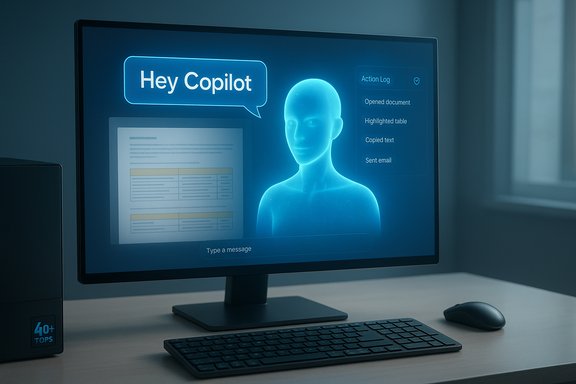
Microsoft has been iterating on voice and accessibility tools in Windows for years, from early speech recognition systems to the modern Voice Access and Copilot ecosystems. The recent wave of changes elevates voice from an accessibility add‑on to a mainstream input alongside keyboard, mouse, pen and touch. That shift is anchored in three interlocking features: an opt‑in wake‑word for Copilot (“Hey, Copilot”), Copilot Vision (screen‑aware assistance), and experimental Copilot Actions (agentic automations that can perform multi‑step tasks with explicit, revocable permissions).
Microsoft frames this moment as part of a broader aim to make every Windows 11 device capable of “AI‑native” experiences, and it has paired software updates with a hardware tier — Copilot+ PCs — that specify an on‑device Neural Processing Unit (NPU) baseline (commonly described in partner materials as roughly 40+ TOPS) for the richest, lowest‑latency experiences. This hardware gating promises on‑device acceleration for wake‑word detection, low‑latency speech smoothing, and some forms of local inference, while heavier reasoning and multi‑turn language tasks are generally routed to cloud services.
On the product timeline, Microsoft rolled an opt‑in “Hey, Copilot” wake‑word preview to Windows Insiders in mid‑May 2025 and has been rolling broader Copilot voice and vision upgrades through staged Windows updates and feature flights since then. Microsoft's official documentation and support pages show Voice Access as a mature accessibility feature available in Windows 11 (22H2 and later), with Microsoft formally replacing older Windows Speech Recognition (WSR) in favor of Voice Access starting in September 2024.
This voice‑first direction is promising and practical, but it is not without tradeoffs. Users and IT teams should treat these features as powerful tools that must be governed, audited and tested incrementally. The hardware gating that delivers the smoothest experience will accelerate at the premium end, but broad success depends on Microsoft demonstrating that voice interfaces are not only convenient, but safe, private and auditable in real‑world deployments.
Source: TechHQ https://techhq.com/news/microsoft-hopes-voice-control-is-the-new-way-to-use-our-computers/
 Background / Overview
Microsoft has been iterating on voice and accessibility tools in Windows for years, from early speech recognition systems to the modern Voice Access and Copilot ecosystems. The recent wave of changes elevates voice from an accessibility add‑on to a mainstream input alongside keyboard, mouse, pen and touch. That shift is anchored in three interlocking features: an opt‑in wake‑word for Copilot (“Hey, Copilot”), Copilot Vision (screen‑aware assistance), and experimental Copilot Actions (agentic automations that can perform multi‑step tasks with explicit, revocable permissions).Microsoft frames this moment as part of a broader aim to make every Windows 11 device capable of “AI‑native” experiences, and it has paired software updates with a hardware tier — Copilot+ PCs — that specify an on‑device Neural Processing Unit (NPU) baseline (commonly described in partner materials as roughly 40+ TOPS) for the richest, lowest‑latency experiences. This hardware gating promises on‑device acceleration for wake‑word detection, low‑latency speech smoothing, and some forms of local inference, while heavier reasoning and multi‑turn language tasks are generally routed to cloud services.
On the product timeline, Microsoft rolled an opt‑in “Hey, Copilot” wake‑word preview to Windows Insiders in mid‑May 2025 and has been rolling broader Copilot voice and vision upgrades through staged Windows updates and feature flights since then. Microsoft's official documentation and support pages show Voice Access as a mature accessibility feature available in Windows 11 (22H2 and later), with Microsoft formally replacing older Windows Speech Recognition (WSR) in favor of Voice Access starting in September 2024.
What Microsoft is shipping: the new voice toolkit
Copilot Voice: “Hey, Copilot” and the hands‑free wake word
- The new Copilot wake word is opt‑in and designed to listen only when the Copilot app (or the user’s chosen settings) permits it.
- A lightweight on‑device “spotter” detects the wake phrase and buffers only a short transient audio snippet to decide whether a session should begin; full transcription and reasoning typically occur in cloud services unless the device has the Copilot+ on‑device inference hardware.
Voice Access: the accessibility foundation becomes conversational
Voice Access, built into Windows 11, has evolved from rigid command lists into a more forgiving natural language interface for system navigation and text authoring. Microsoft has added features such as fluid dictation, grid‑overlays for precise pointer placement, and “natural language commanding” that tolerates filler words, synonyms and casual phrasing. These improvements are critical for accessibility and lower the bar for mainstream adoption beyond users with motor impairments.Copilot Vision and typed‑plus‑spoken multimodality
Copilot Vision gives the assistant permissioned, session‑bound access to on‑screen content so it can read documents, extract tables, point to interface elements, and provide step‑by‑step guidance. Microsoft has also added typed interaction for Vision, giving users in noisy or privacy‑sensitive environments a text path to the same capabilities. This multimodal flexibility is central to Microsoft’s claim that PCs should “see and hear” as part of everyday productivity.Copilot Actions: agents with guardrails
Copilot Actions moves Copilot beyond suggestion into limited execution. In experimental modes, Copilot can carry out multi‑step tasks — booking reservations, filling forms, or manipulating local files — but under constrained, explicitly granted permissions and visible logs. Microsoft emphasizes least‑privilege access, revocable permissions, and enterprise governance controls as part of the design. These guardrails are essential; agentic features open new attack surfaces and liability vectors for both consumers and enterprises.Why Microsoft is betting on voice now
There are three strategic drivers:- Product differentiation and engagement — voice makes prompts richer and often longer, which drives higher Copilot engagement according to Microsoft’s internal metrics. Voice removes friction for complex, context‑heavy tasks.
- Accessibility and inclusivity — system‑level voice control is transformative for users with mobility challenges and offers parity with other major OS vendors that already support powerful voice features.
- Hardware and economic positioning — by tying the best experiences to Copilot+ hardware Microsoft creates a value premium for devices with NPUs, positioning partners to sell higher‑spec Windows 11 laptops and handhelds. This also reduces cloud compute costs for Microsoft when on‑device inference is possible.
Technical mechanics: how the voice stack works today
Local “spotter” + cloud processing hybrid
- Wake‑word detection runs locally on a lightweight model (the “spotter”), which keeps a short audio buffer only long enough to detect the phrase and then discard it unless the user consents to start a session. This pattern is validated by Microsoft documentation and engineering notes.
- After activation, transcription and LLM reasoning typically occur in the cloud for most devices; Copilot+ PCs with a high‑performance NPU can offload more tasks locally to reduce latency and preserve privacy.
On‑device models and NPUs
Microsoft’s Copilot+ spec requires an NPU baseline (commonly cited as 40+ TOPS in partner materials) to unlock the lowest‑latency experiences such as local punctuation smoothing, instant UI highlights, and certain forms of recall. This is an industry trend: on‑device accelerators are essential for real‑time multimodal AI on personal devices.Permissions, consent and session scoping
All screen sharing and agentic actions are session‑based and opt‑in, with visible UI indicators and the ability to revoke or audit actions. Microsoft’s public guidance stresses opt‑ins and enterprise policy controls, but the complexity of real deployments will test the clarity and discoverability of those controls.Practical benefits users should expect
- Faster, hands‑free queries for complex tasks like summarizing long emails, drafting replies, searching multiple files, or getting step‑by‑step instructions while you work. Voice lowers friction for multi‑turn prompts.
- Real accessibility gains: users with motor impairments can more fully control a PC without specialized hardware, and natural language commanding reduces the learning curve for new users.
- Multimodal workflows: combine spoken instructions, typed follow‑ups and screen captures to iterate with Copilot more fluidly than with standalone chat boxes.
The security, privacy and governance tradeoffs
Voice‑first computing amplifies both utility and risk. The following are the most pressing concerns and the mitigations Microsoft has described — plus gaps that still demand caution.1) Cloud transit and data exposure
Even with on‑device spotters, full‑session audio and content frequently cross to cloud services for transcription and LLM processing. That means voice requests can become part of cloud logs, subject to provider policies and potentially to enterprise data loss prevention (DLP) or regulatory oversight. Enterprises should insist on clear policies, logging and retention options before enabling broad voice features.2) False activations and malicious audio
Wake words introduce a risk of false positives and injection attacks (e.g., recorded or synthesized audio played to the device). Microsoft mitigations include opt‑in wake words, requiring an unlocked device for wake activation in many scenarios, and local spotters, but determined attackers or poorly configured deployments could expose sensitive actions. Enterprises will want to pair voice features with policy‑driven controls and multi‑factor confirmations for privileged actions.3) Agentic actions create audit and liability needs
When Copilot can act — send emails, order goods, or modify files — every action must be auditable and reversible. Microsoft’s Copilot Actions include permission scoping and logs, but administrators will need granular governance (who can authorize actions, when, and under what conditions) and retention of logs for forensic needs. Failure to do so could create compliance and legal exposure.4) Privacy expectations vs. usability
There’s an inherent tension between usability (always‑available, reactive assistants) and privacy (minimizing continuous listening and data exfiltration). Microsoft’s hybrid model is a reasonable compromise, but transparency and user control are the ultimate deciders of trust. Documentation and defaults must make it easy for users and admins to understand what is local, what is sent to the cloud, and how long data is stored.Enterprise adoption: readiness and recommended controls
Enterprises should treat voice and agentic features as a platform risk surface and proceed with a staged, policy‑first rollout.- Pilot with high‑trust user groups — accessibility teams, knowledge workers who already use Copilot features — and collect telemetry on accuracy, false activations and agent behavior.
- Define policy controls that restrict which users or OUs can enable voice features, and require admin approval for agent connectors that access corporate systems.
- Enforce logging and DLP on any voice session that touches corporate data, and ensure retention and audit trails are available for compliance.
- Educate users about visible indicators, revoking sessions, and how to check activity logs; user awareness reduces accidental exposure.
- Prefer Copilot+ hardware for latency‑sensitive deployments where on‑device processing reduces cloud exposure and improves UX predictability.
Where Microsoft’s approach wins — and where it still needs to prove itself
Strengths
- Integrated accessibility improvements make meaningful progress for users who rely on voice control. Voice Access’s natural language commanding and on‑device dictation smoothing are concrete wins.
- Hybrid architecture (local spotter + cloud reasoning) balances privacy and capability and is a practical compromise that other vendors have also adopted.
- Hardware acceleration strategy helps deliver genuinely low‑latency multimodal features where they matter, improving the perceived quality of voice UX on premium devices.
Risks and open questions
- Transparency and defaults. Users must be able to understand and control when voice is listening and what is sent to the cloud. Defaults that favor convenience over privacy will erode trust.
- False activations and adversarial audio. Wake‑word reliability must improve to avoid accidental activations that could trigger agentic actions. Robust anti‑spoofing and optional push‑to‑talk modes are still crucial.
- Fragmentation via Copilot+ gating. Tying the best experiences to higher‑end NPUs creates a two‑tier ecosystem. While understandable technically, it risks leaving budget devices with a degraded subset of the promised capabilities. Enterprises must plan procurement with feature maps in mind.
How this compares to Apple and Google
- Apple has long emphasized local processing and privacy in on‑device speech models and offers powerful desktop voice control on macOS. Microsoft’s hybrid design and NPU‑gating follow a similar path of combining local performance with cloud scale, but Microsoft’s tighter OS‑level agent integration is more ambitious in scope.
- Google is integrating Gemini into broader OS and assistant contexts, with strong cloud integration; Google’s strength is cloud LLM scale, while Microsoft stresses a hybrid on‑device + cloud balance and enterprise governance tied to Azure identity and policy tooling. Microsoft’s enterprise heritage gives it an advantage in governance and manageability, but both rivals are racing toward multimodal, voice‑first interactions.
Recommendations for everyday users
- Keep Copilot voice features opt‑in until you’ve reviewed the privacy settings and understand what gets sent to the cloud. Look for the visible microphone UI and session indicators before assuming the assistant is off.
- Use typed Copilot Vision when in public or noisy environments where you don’t want on‑device audio processing to occur. Text input to Vision preserves privacy and reduces accidental data leaks.
- For sensitive actions (payments, HR or legal requests), require additional confirmation and avoid agentic automations until you can verify logs and permission scopes. Treat Copilot Actions like any other delegated automation: start small, audit often, and revoke permissions quickly if behavior is unexpected.
The verifier’s checklist: what to ask before enabling voice‑first features
- Does the organization have a policy that defines which users can enable Copilot voice and Actions?
- Are logs retained and auditable for actions Copilot performs on behalf of users?
- Is there clarity on what audio or screen content is processed locally versus sent to the cloud?
- Are there anti‑spoofing and push‑to‑talk options to reduce false activations?
- If deploying to many endpoints, has procurement accounted for the Copilot+ hardware requirements for low‑latency experiences?
Conclusion
Microsoft’s bet that voice will become a “new way” to use our computers is no longer a product tease — it’s a full strategic posture. By giving voice a wake word, making Vision multimodal, and cautiously introducing agentic automations, Microsoft aims to transform PC interaction from click‑and‑type sequences into spoken, contextual workflows. The result could be a major productivity and accessibility uplift if the company maintains transparent defaults, strong enterprise governance, and reliable anti‑spoofing protections.This voice‑first direction is promising and practical, but it is not without tradeoffs. Users and IT teams should treat these features as powerful tools that must be governed, audited and tested incrementally. The hardware gating that delivers the smoothest experience will accelerate at the premium end, but broad success depends on Microsoft demonstrating that voice interfaces are not only convenient, but safe, private and auditable in real‑world deployments.
Source: TechHQ https://techhq.com/news/microsoft-hopes-voice-control-is-the-new-way-to-use-our-computers/
