

Microsoft Edge 150 should enter a short staged deployment where IT still needs to replace Sidebar/App Tower dependencies or validate Workspaces behavior, but the available evidence does not support declaring the release universally “safe” or “unsafe.” The practical decision is narrower: identify affected workflows, test them under production policies, provide replacements, and then continue deployment on the organization’s normal servicing schedule.
Microsoft Edge 150.0.4078.48 entered the Stable Channel on July 2, 2026, followed by 150.0.4078.83 on July 17, according to Microsoft’s Stable Channel release notes. Stable updates roll out progressively, so confirm the build installed on each pilot device rather than assuming every device updated on the publication date.
The relevant feature changes are:
WindowsForum members have already framed the Sidebar change as more than cosmetic. Reports on the retirement noted that the ability to add apps is disappearing while Copilot remains, creating a targeted workflow problem rather than removal of the entire side pane. That distinction should guide testing: find procedures that depend on App Tower entries, not every feature displayed beside a webpage.
The lesson also matches earlier WindowsForum coverage of Edge 137 feature removals and the longer aftermath of Internet Explorer retirement. A browser may continue loading sites successfully while documented shortcuts, collaboration patterns, or managed access paths stop working as employees expect.
For example, an App Tower entry used to open the help-desk portal could become a managed Favorite labeled IT Support, with matching instructions in the service catalog. A shared Workspace containing onboarding resources could become a maintained intranet page whose ownership and editing permissions are explicit.
Avoid promising feature parity. A Favorite preserves a destination, not necessarily the compact side-pane experience users associated with an app. A shared link repository can preserve team-curated destinations, but it does not recreate live Workspace collaboration.
Do not automatically delete every setting containing words such as “sidebar,” “pane,” “Copilot,” or “Workspace.” The supplied retirement information establishes that Copilot and the side pane remain, but it does not prove that every policy associated with those experiences survives unchanged.
Use this rule:
Microsoft’s Edge Workspaces guidance describes the applicable product and administration model. The supplied migration facts establish these practical cases:
WindowsForum’s report on the preview warning for Collections retirement illustrates why this inventory matters. Users described being offered a blunt move to Favorites that could preserve pages while losing richer context such as images and notes. Workspaces are a different feature, but the administrative lesson is applicable: preserving URLs is not always the same as preserving how people organized and used them.
This guide does not establish supported target-version or rollback controls for Edge 150. If deployment encounters an unrelated browser defect, consult current Microsoft Edge servicing documentation and the organization’s support channel rather than treating downgrade as the default response to planned feature retirement.
For App Tower users, explain:
Proceed after App Tower-dependent workflows have replacements, Workspace behavior has been tested under the real Sync configuration, and affected users have exact new instructions. If those tasks remain incomplete, use a short staged deployment to finish them rather than making a universal safety claim or designing a permanent hold around retired features.
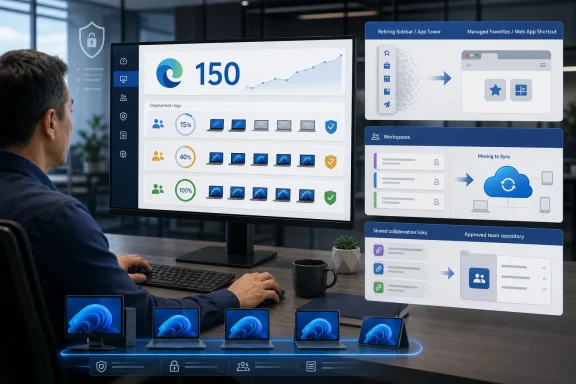 Why Edge 150 Requires an Admin Review
Microsoft Edge 150.0.4078.48 entered the Stable Channel on July 2, 2026, followed by 150.0.4078.83 on July 17, according to Microsoft’s Stable Channel release notes. Stable updates roll out progressively, so confirm the build installed on each pilot device rather than assuming every device updated on the publication date.The relevant feature changes are:
- The Sidebar app list, also called the App Tower, is being retired.
- Users can no longer add new apps to that surface.
- Currently pinned App Tower apps will be removed in a future update.
- Microsoft says configured Sidebar app policies will no longer be applied.
- Copilot and the side pane remain available.
- Workspaces data is moving from OneDrive and SharePoint storage to Edge Sync.
- Workspace sharing and collaboration are being removed.
WindowsForum members have already framed the Sidebar change as more than cosmetic. Reports on the retirement noted that the ability to add apps is disappearing while Copilot remains, creating a targeted workflow problem rather than removal of the entire side pane. That distinction should guide testing: find procedures that depend on App Tower entries, not every feature displayed beside a webpage.
The lesson also matches earlier WindowsForum coverage of Edge 137 feature removals and the longer aftermath of Internet Explorer retirement. A browser may continue loading sites successfully while documented shortcuts, collaboration patterns, or managed access paths stop working as employees expect.
Should You Upgrade Now or Stage Edge 150?
Continue the normal deployment when a representative pilot confirms all of the following:- No required business process depends on an App Tower app remaining pinned.
- Users have an approved alternative path to each affected service.
- Teams do not depend on Workspace sharing or collaboration.
- Workspace behavior has been tested with the organization’s actual Edge Sync configuration.
- Help-desk staff know which experience is being retired.
- A department launches an internal dashboard, ticketing service, communications tool, or other required resource from the App Tower.
- Documentation instructs employees to select a particular sidebar app.
- Teams use shared Workspaces as curated sets of live tabs.
- Edge Sync is disabled while users expect newly created Workspaces to follow them across devices.
- The organization has not identified which management settings were intended to configure App Tower apps.
Run This Audit Before Broad Deployment
Use a pilot group containing ordinary users, frequent Workspace users, and at least one device receiving the same production management configuration as the wider organization.- Record the complete Edge version.
Open Settings and more > Help and feedback > About Microsoft Edge, or enteredge://settings/help. Record the full version on each test device because progressive deployment can leave devices on different maintenance builds. - Capture the effective browser policies.
Enteredge://policy, select Reload policies if recent changes are missing, and export or record the displayed results. Capture both device-level and profile-level entries where shown. - Apply this documentation limitation.
Useedge://policyto inspect what the device actually receives, but do not infer exact App Tower policy names or deployment mechanics from this guide. Without the applicable Microsoft policy documentation and the organization’s management records, an audit should not assume how a setting was delivered. - Identify App Tower management dependencies.
Review the policies and management profiles your organization uses to configure App Tower apps. Ask the Edge administration team what business result each relevant configuration was designed to produce. - Inventory user-visible entries.
Ask pilot users to list every pinned App Tower item they use during a normal week. Record the service owner, purpose, audience, frequency of use, authentication requirements, and the consequences if the entry disappears. - Map each dependency to a replacement.
Do not settle for “use a bookmark.” Select a replacement that fits the original need, such as a managed Favorite, intranet link, approved installed web app, Start menu shortcut, or service catalog entry. - Inventory Workspace use.
Determine who creates Workspaces, who opens them on multiple devices, and who shares them. Record whether each Workspace is personal, team-curated, or tied to a formal operating procedure. - Check the effective Edge Sync state.
Inspect the production configuration and the user’s effective browser state. Under Workspaces V2, existing V1 Workspaces still migrate when Sync is disabled, but newly created V2 Workspaces remain local to the device. - Test on a second managed device.
Create or modify a V2 Workspace, then check whether the expected tabs appear on another device using the same account and production configuration. When Sync is disabled, expect a newly created V2 Workspace to remain on its original device. - Test the replacement launch paths.
Confirm that affected users can find and open each replacement, authenticate successfully, and complete the same business task without relying on the App Tower. - Record the deployment decision.
Document unresolved dependencies, approved replacements, Workspace migration results, user communications, support ownership, and the date for the next deployment-ring review.
Use a Concrete Replacement Mapping Template
Create one row for every affected App Tower entry or shared Workspace:| Field | Required entry |
|---|---|
| Current experience | App Tower app, personal Workspace, or shared Workspace |
| Business purpose | Task the user must complete |
| Owner | Department or service owner |
| Affected users | Groups, locations, or roles |
| Current access instructions | Exact steps employees follow today |
| Replacement | Managed Favorite, intranet page, installed web app, shortcut, or shared repository |
| New access instructions | Exact replacement steps |
| Authentication test | Pass, fail, or further action required |
| Data/content action | Links copied, ownership reassigned, or no action |
| Communication owner | Team sending the change notice |
| Validation status | Not tested, pilot passed, or blocked |
| Completion date | Date dependency was removed |
Avoid promising feature parity. A Favorite preserves a destination, not necessarily the compact side-pane experience users associated with an app. A shared link repository can preserve team-curated destinations, but it does not recreate live Workspace collaboration.
Which Policies Need Attention?
Treat configurations intended to populate or govern App Tower apps as retirement dependencies. Microsoft’s supported point is direct: configured Sidebar app policies will no longer be applied. Therefore, validate the resulting user experience rather than assuming an existing configuration will preserve the retired surface.Do not automatically delete every setting containing words such as “sidebar,” “pane,” “Copilot,” or “Workspace.” The supplied retirement information establishes that Copilot and the side pane remain, but it does not prove that every policy associated with those experiences survives unchanged.
Use this rule:
- If a setting was intended to configure an App Tower app, place it in the retirement-remediation list.
- If it controls another Edge experience, retain it for separate testing against current Microsoft policy documentation.
- If its purpose is unknown, ask the configuration owner before changing it.
- If an extension or application has a purpose beyond App Tower placement, test that independent function separately.
What Happens to Existing Workspaces?
The Workspaces V2 rollout began progressively in Stable Edge 145 and continues through Edge 150. Version number alone therefore does not prove that every profile has completed migration. Verify the behavior on the actual profile.Microsoft’s Edge Workspaces guidance describes the applicable product and administration model. The supplied migration facts establish these practical cases:
- Personal, single-device use: A user who treats a Workspace as a personal saved tab set may experience relatively little disruption.
- Personal, multi-device use with Sync enabled: Test whether migrated and newly created Workspaces appear on the expected devices.
- Sync disabled: Existing V1 Workspaces still migrate, but newly created V2 Workspaces remain local to each device.
- Shared team use: A replacement is required because sharing and collaboration are being removed.
WindowsForum’s report on the preview warning for Collections retirement illustrates why this inventory matters. Users described being offered a blunt move to Favorites that could preserve pages while losing richer context such as images and notes. Workspaces are a different feature, but the administrative lesson is applicable: preserving URLs is not always the same as preserving how people organized and used them.
Verification and Troubleshooting
After the pilot receives Edge 150:- Confirm the installed build at
edge://settings/help. - Reload
edge://policyand compare the result with the predeployment capture. - Ask affected users to open every approved replacement.
- Verify that authentication and required business actions succeed.
- Open personal Workspaces and confirm expected content.
- Test a newly created Workspace on a second device.
- Confirm that former shared-Workspace users can reach the replacement repository.
- Review help-desk tickets for missing apps, links, tabs, or collaboration access.
This guide does not establish supported target-version or rollback controls for Edge 150. If deployment encounters an unrelated browser defect, consult current Microsoft Edge servicing documentation and the organization’s support channel rather than treating downgrade as the default response to planned feature retirement.
User Communication Checklist
Send separate notices to affected audiences.For App Tower users, explain:
- New apps can no longer be added.
- Existing pinned apps will be removed in a future update.
- Which business resources are affected.
- The exact new path to each resource.
- Workspace data is moving to Edge Sync.
- Sharing and collaboration are ending.
- Newly created V2 Workspaces remain device-local when Sync is disabled.
- Team-owned destinations must move to an approved shared location.
Frequently Asked Questions
Does Edge 150 remove the entire sidebar?
No. Microsoft is retiring the Sidebar app list, also known as the App Tower. Copilot and the side pane remain available.Will existing pinned sidebar apps disappear immediately?
Microsoft says users can no longer add new apps and that pinned App Tower apps will be removed in a future update. Because deployment is staged, test effective behavior on managed pilot devices.Do Workspaces migrate if Edge Sync is disabled?
Yes. Existing V1 Workspaces still migrate, but newly created V2 Workspaces remain local to each device and do not synchronize across devices.Can IT preserve Workspace sharing by delaying Edge 150?
A short deployment stage can provide time to record links, select a shared repository, and rewrite instructions. It is not a durable preservation strategy because Workspaces V2 removes sharing and collaboration, and its progressive rollout began before Edge 150.Does a successful pilot prove Edge 150 is safe everywhere?
No. It proves only that the tested feature dependencies and workflows behaved as expected for that pilot. Continue normal application, security, and compatibility validation under the organization’s established browser-servicing process.Proceed after App Tower-dependent workflows have replacements, Workspace behavior has been tested under the real Sync configuration, and affected users have exact new instructions. If those tasks remain incomplete, use a short staged deployment to finish them rather than making a universal safety claim or designing a permanent hold around retired features.
References
- Primary source: learn.microsoft.com
Retirement of Sidebar App List in Microsoft Edge 149 - Microsoft Q&A
We’re simplifying Microsoft Edge by retiring the sidebar app list. Starting with Edge version 149, the sidebar app list will no longer be available. Effective immediately, new apps can no longer be added to the sidebar, and any apps currently pinned in…learn.microsoft.com - Independent coverage: support.microsoft.com
Streamline access to your favorite sites and apps with Sidebar in Microsoft Edge | Microsoft Support
Learn how to move your Microsoft Edge sidebar to your Windows 10 desktop to access apps and sites from anywhere on your device.support.microsoft.com - Primary source: WindowsForum
Microsoft Edge Collections Retirement: Migration and Backup Guide | Windows Forum
Microsoft Edge is showing an in‑product warning in preview builds that Collections is being retired, and that message forces a blunt choice: move pages to...windowsforum.com