

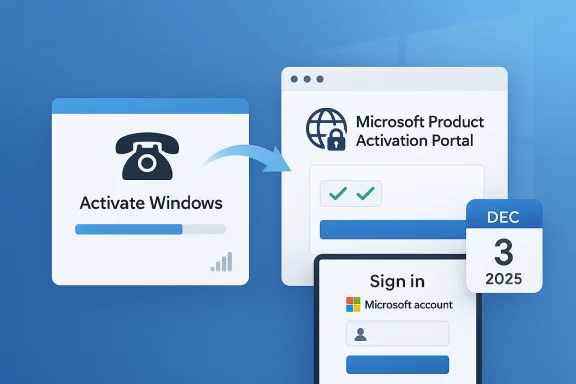
Microsoft has quietly closed one of the last old-school routes into Windows licensing, and the move says a lot about where the company wants activation to go next. According to Microsoft’s own support material, beginning December 3, 2025, the traditional telephone-based product activation automation process was moved online, with users redirected to the Microsoft Support Product Activation Portal instead of completing the process over a voice call. The company says the new workflow is more secure, reliable, and user-friendly, and it explicitly frames the change as a fraud-prevention measure. The practical result is that Windows can still be activated without the PC itself being online, but the activation workflow now depends on a second internet-connected device and a Microsoft account to complete the portal step.
For years, phone activation was Microsoft’s safety valve for the moments when online activation was inconvenient, unavailable, or simply broken. It mattered most for hardware swaps, older perpetual licenses, and machines living in air-gapped or tightly controlled environments where connecting the Windows PC to the internet was not an option. The flow was clunky, but it worked: users would launch the activation wizard, receive an installation ID, call a regional number, and enter the confirmation ID they were given back.
That old design made sense in a world where broadband was not universal and where Microsoft still treated boxed software as a product you could license and renew through a mostly offline process. Over time, however, Windows became increasingly tied to digital licenses, Microsoft accounts, device hardware, and cloud-backed verification. Microsoft’s current activation guidance emphasizes digital licensing and account-linked recovery paths far more than it does legacy voice automation.
The December 3, 2025 change is important because it does not merely retire a niche support channel. It effectively moves the last anonymous, voice-driven activation workflow into a browser-based identity flow. Microsoft’s Product Activation Portal now sits at the center of that experience, and the support page says it supports both connected and non-connected devices while still allowing offline activation capabilities to remain in place for users who need them. In other words, the device you are activating may still be offline, but the process is no longer offline in the traditional sense.
That distinction matters because Microsoft is not just changing a number to call. It is changing the trust model. The portal introduces sign-in, CAPTCHA checks, and account-based access before activation can proceed, which makes the process easier for Microsoft to govern and harder to abuse. The support article also makes clear that the account used to access the portal is not tied to the license itself; it is used to validate secure portal access.
The shift fits a much broader Microsoft pattern. Windows has spent the last several years becoming more service-like, more identity-driven, and more tightly integrated with cloud workflows. That makes legacy telephony feel increasingly like a relic rather than a parallel system. The company appears to have decided that the cost of preserving the old phone tree outweighed the value of keeping it alive.
That is a big philosophical change. The old process was largely anonymous apart from the product information you entered. The new process is authenticated and centrally mediated. Microsoft is making legitimacy part of the activation experience rather than just a downstream administrative detail.
The company’s support wording also suggests this was not a temporary service hiccup. Microsoft explicitly says the telephone automation process moved online on December 3, 2025, and it presents the portal as the new normal for perpetual product activation. That leaves very little room to interpret the current phone behavior as anything other than an intentional retirement.
That creates a classic Microsoft transition problem: documentation lags behavior, while behavior lags the visible UI. The result is a support experience that appears live on the surface but is already functionally retired underneath. That kind of mismatch always feels messier than it probably is internally.
A few implications follow from that design:
It also lets Microsoft align activation with the rest of its identity stack. The company’s broader support guidance increasingly assumes Microsoft accounts, digital licenses, and cloud verification as the default state of Windows ownership. In that environment, a phone line is not just old-fashioned; it is operationally awkward.
The anti-fraud argument is also believable because activation has always been a licensing control point. If Microsoft can reduce manual pathways, it reduces room for scripted abuse, mass activation attempts, and support-channel manipulation. That makes the portal not just a convenience change but a policy change.
For Microsoft, that probably means fewer support costs, fewer regional inconsistencies, and fewer chances for the activation experience to fracture by country or product line. It is a classic platform simplification play: remove one older, parallel mechanism and normalize the whole process around a web front end.
The reliability angle is also real. A portal can be updated instantly if Microsoft changes policy, adds product coverage, or adjusts security requirements. A phone tree cannot do that nearly as gracefully. In practical terms, the portal is easier to keep alive than a global robot operator.
Key reasons the change makes sense from Microsoft’s perspective:
That does not eliminate offline activation, but it does weaken the pure offline story. The process is now functionally “offline on the target device, online elsewhere.” For some organizations, that is good enough. For others, it is a meaningful policy change.
There is also a subtle operational problem here: the new method depends on internet access somewhere in the activation chain. That means organizations that used the phone process precisely because they wanted to minimize external dependencies have lost a clean fallback. The device may remain disconnected, but the workflow no longer does.
That gap matters because older systems often rely on phone activation as the only practical route when online activation is impossible. Windows 7 users, for example, may still look at the support page and assume the old path remains intact. But the real-world experience reported by users and coverage is that the call now ends in a redirect to the portal.
If you depend on this flow, the actionable takeaway is clear:
This is not unique to Microsoft, but it is especially noticeable here because activation is one of those rare tasks users only deal with when something has already gone wrong. When a support page is ambiguous, frustration rises quickly because the user is already under time pressure.
Microsoft’s support portal suggests that “Activate by Telephone” may still appear as a method, but the portal is the real replacement path. That tells us the documentation is partly describing an inherited workflow and partly describing a new one. It is a transition document, not a clean replacement.
This also explains why some external coverage initially framed the change as the end of offline activation, while Microsoft’s own wording was more nuanced. The company is not eliminating every offline scenario. It is eliminating the old phone-based method that used to serve as the offline-friendly option.
Important distinctions to keep in mind:
The new portal may actually be easier for many consumers once they get used to it. A browser, a second device, and a Microsoft account are familiar tools. The problem is that this feels like a removal, not an upgrade, because the old path was so simple in concept. You could just call.
Still, there is a consumer upside. A web portal can be clearer than a voice menu, especially for users who hate navigating automated phone trees. The portal may also reduce the chance of a failed call or a misunderstood prompt.
Microsoft says the portal supports a broad set of perpetual products and includes both connected and non-connected device scenarios. That helps, but it does not erase the requirement for web access somewhere in the chain. Enterprises that valued the old phone model as a genuinely self-contained fallback will need to rethink their assumptions.
This is especially relevant for:
That puts Microsoft in a position similar to other major platform vendors that increasingly prefer authenticated digital workflows over anonymous legacy channels. The logic is simple: the more controlled the entry point, the easier it is to enforce policy and measure behavior. In a market where trust and compliance matter, that is appealing to vendors and unsettling to some users.
It also hints at a broader de-anonymization of product ownership. Microsoft is not saying you must tie every license to a personal account, but it is clearly making account access the path of least resistance. Once that becomes the norm, anonymous activation becomes the exception.
At the same time, there is a risk in over-centralizing activation. If a user or organization values offline resilience more than convenience, pushing everything into an online portal can be a drawback. Microsoft may be fine with that trade-off because its core market is large enough to absorb the dissatisfaction. Smaller vendors might not be so lucky.
The market lesson is that “convenient” for the vendor is not always convenient for the user. Microsoft is optimizing for scale and governance, not for nostalgia or edge-case purity.
Removing that last direct voice route makes Windows feel a little less like a boxed product and a little more like a service with rules enforced from the center. That may sound subtle, but it changes the emotional contract between Microsoft and the user.
The move also lands in an era where many Windows users already feel the platform has become more opinionated. Between account prompts, cloud sign-in pressure, update enforcement, and service-driven features, Microsoft keeps asking users to accept more connectedness. Activation is now part of that same story.
That tension is why this story resonates. It is not because people love calling automated systems. It is because the removal of the old path reminds everyone that Microsoft still decides which fallback options survive. The company may preserve offline activation in a technical sense, but it is clearly redefining what offline means.
Microsoft is also likely to keep pushing Windows toward more cloud-mediated administration, not less. Activation, updates, identity, support, and licensing are all converging into one governed system. The phone line was one of the last visible relics of a pre-cloud era, and once it went, the direction of travel became even clearer.
Microsoft has not ended Windows activation. It has ended the comforting fiction that you could still solve it with nothing more than a phone call. That is a subtle change on paper and a meaningful one in practice, and it tells us exactly where the company believes the future of Windows licensing now lives: online, authenticated, and centrally managed.
Source: Fudzilla.com Microsoft explains why it hung up Windows phone activation – Fudzilla.com
 Background
For years, phone activation was Microsoft’s safety valve for the moments when online activation was inconvenient, unavailable, or simply broken. It mattered most for hardware swaps, older perpetual licenses, and machines living in air-gapped or tightly controlled environments where connecting the Windows PC to the internet was not an option. The flow was clunky, but it worked: users would launch the activation wizard, receive an installation ID, call a regional number, and enter the confirmation ID they were given back.That old design made sense in a world where broadband was not universal and where Microsoft still treated boxed software as a product you could license and renew through a mostly offline process. Over time, however, Windows became increasingly tied to digital licenses, Microsoft accounts, device hardware, and cloud-backed verification. Microsoft’s current activation guidance emphasizes digital licensing and account-linked recovery paths far more than it does legacy voice automation.
The December 3, 2025 change is important because it does not merely retire a niche support channel. It effectively moves the last anonymous, voice-driven activation workflow into a browser-based identity flow. Microsoft’s Product Activation Portal now sits at the center of that experience, and the support page says it supports both connected and non-connected devices while still allowing offline activation capabilities to remain in place for users who need them. In other words, the device you are activating may still be offline, but the process is no longer offline in the traditional sense.
That distinction matters because Microsoft is not just changing a number to call. It is changing the trust model. The portal introduces sign-in, CAPTCHA checks, and account-based access before activation can proceed, which makes the process easier for Microsoft to govern and harder to abuse. The support article also makes clear that the account used to access the portal is not tied to the license itself; it is used to validate secure portal access.
The shift fits a much broader Microsoft pattern. Windows has spent the last several years becoming more service-like, more identity-driven, and more tightly integrated with cloud workflows. That makes legacy telephony feel increasingly like a relic rather than a parallel system. The company appears to have decided that the cost of preserving the old phone tree outweighed the value of keeping it alive.
What Microsoft Actually Changed
The most visible change is simple: the old automated phone path no longer completes activation the way it used to. Microsoft’s support page now tells users to go online to the Product Activation Portal, even when the on-screen flow still references “Activate by Telephone”. In practice, the call has become a dead end that redirects users into a web workflow.The new flow
Instead of handing an installation ID to an automated voice system and receiving a confirmation ID over the phone, users now use a browser-based portal. Microsoft says the portal supports a wide range of perpetual products and can work for both connected and non-connected devices, but the final step still requires an internet-connected device and a Microsoft account session to proceed.That is a big philosophical change. The old process was largely anonymous apart from the product information you entered. The new process is authenticated and centrally mediated. Microsoft is making legitimacy part of the activation experience rather than just a downstream administrative detail.
The company’s support wording also suggests this was not a temporary service hiccup. Microsoft explicitly says the telephone automation process moved online on December 3, 2025, and it presents the portal as the new normal for perpetual product activation. That leaves very little room to interpret the current phone behavior as anything other than an intentional retirement.
Why the phone number still appears
One source of confusion is that Microsoft’s documentation and some Windows dialogs still reference telephone activation. That makes the old path look supported even though the operational backend no longer behaves that way. The support article effectively explains the mismatch by telling users to follow the telephone path only as a prompt to use the online portal instead.That creates a classic Microsoft transition problem: documentation lags behavior, while behavior lags the visible UI. The result is a support experience that appears live on the surface but is already functionally retired underneath. That kind of mismatch always feels messier than it probably is internally.
A few implications follow from that design:
- The phone tree is now a redirect, not a real activation path.
- The portal is the primary interface Microsoft wants people to use.
- The old number survives as a reference point, not a working endpoint.
- Users on older products can still complete activation, but not by dialing in directly.
- Microsoft has pushed the human-free portion of the process into the browser.
Why Microsoft Did It
Microsoft’s stated reason is straightforward: the portal is “more secure, reliable, and user-friendly,” and it helps prevent fraud. That is the official answer, and it is not hard to see why the company prefers it. A web portal is easier to patch, easier to instrument, and easier to control than a global voice menu that must handle every region, every script variation, and every edge case.Security and fraud control
Phone systems are inherently more brittle than authenticated web flows. They are slower, they are harder to update uniformly, and they are more difficult to link to modern fraud controls. Microsoft can monitor browser sessions, gate access with CAPTCHA, and ask for identity verification before any activation request is processed. That gives the company much more leverage over abuse patterns than a legacy voice tree ever could.It also lets Microsoft align activation with the rest of its identity stack. The company’s broader support guidance increasingly assumes Microsoft accounts, digital licenses, and cloud verification as the default state of Windows ownership. In that environment, a phone line is not just old-fashioned; it is operationally awkward.
The anti-fraud argument is also believable because activation has always been a licensing control point. If Microsoft can reduce manual pathways, it reduces room for scripted abuse, mass activation attempts, and support-channel manipulation. That makes the portal not just a convenience change but a policy change.
Reliability and support economics
Voice systems are expensive to maintain at scale. They require local routing, language coverage, number management, recordings, and legacy logic that is often harder to modernize than it looks. A web portal centralizes all of that into one controlled surface.For Microsoft, that probably means fewer support costs, fewer regional inconsistencies, and fewer chances for the activation experience to fracture by country or product line. It is a classic platform simplification play: remove one older, parallel mechanism and normalize the whole process around a web front end.
The reliability angle is also real. A portal can be updated instantly if Microsoft changes policy, adds product coverage, or adjusts security requirements. A phone tree cannot do that nearly as gracefully. In practical terms, the portal is easier to keep alive than a global robot operator.
Key reasons the change makes sense from Microsoft’s perspective:
- Fraud resistance is easier to enforce in a controlled portal.
- Identity checks can be layered into the activation flow.
- Support costs likely fall when a global voice system is retired.
- Policy changes can be rolled out faster through the web.
- User guidance becomes more consistent across product lines.
What It Means for Offline Users
The most important nuance is that Microsoft says offline activation capabilities remain supported. That sounds reassuring, and in one sense it is. It means the PC you are activating does not necessarily need to go online. But the old completely self-contained phone activation path is gone, so users now need a second device with internet access to access the portal and complete the process.Air-gapped and restricted environments
For hobbyists, field machines, labs, and regulated environments, this is not a trivial adjustment. If the Windows device itself cannot connect to the internet, the burden shifts to the person managing the activation. They now need a browser on another system, a Microsoft account, and access to the portal.That does not eliminate offline activation, but it does weaken the pure offline story. The process is now functionally “offline on the target device, online elsewhere.” For some organizations, that is good enough. For others, it is a meaningful policy change.
There is also a subtle operational problem here: the new method depends on internet access somewhere in the activation chain. That means organizations that used the phone process precisely because they wanted to minimize external dependencies have lost a clean fallback. The device may remain disconnected, but the workflow no longer does.
What this means for older Windows versions
Microsoft’s support page still references telephone activation for older products, including Windows 7, Windows 8.1, Windows 10, and Windows 11, even though the operational behavior has changed in the live phone system. That inconsistency is one of the strangest aspects of the story. On paper, the documentation still suggests continuity. In practice, callers are being told to go online.That gap matters because older systems often rely on phone activation as the only practical route when online activation is impossible. Windows 7 users, for example, may still look at the support page and assume the old path remains intact. But the real-world experience reported by users and coverage is that the call now ends in a redirect to the portal.
If you depend on this flow, the actionable takeaway is clear:
- Do not assume the phone number will complete activation.
- Expect to use a second device with internet access.
- Be ready to sign in with a Microsoft account.
- Treat the call as a pointer to the portal, not a solution by itself.
- Verify your product-specific activation path before you need it.
The Documentation Mismatch
One of the messiest parts of this story is that Microsoft’s paperwork still lags the operational change. The support page for Windows activation still mentions telephone activation, and another page continues to describe by-phone troubleshooting paths for certain activation errors. Yet the actual phone system no longer performs the task the old way.Why this confusion persists
Large support ecosystems often preserve old instructions long after the backend changes. That happens because documentation teams, localization cycles, product engineering, and support operations do not all move in lockstep. The result is a visible contradiction: the page says one thing, the number says another, and the user experiences a third.This is not unique to Microsoft, but it is especially noticeable here because activation is one of those rare tasks users only deal with when something has already gone wrong. When a support page is ambiguous, frustration rises quickly because the user is already under time pressure.
Microsoft’s support portal suggests that “Activate by Telephone” may still appear as a method, but the portal is the real replacement path. That tells us the documentation is partly describing an inherited workflow and partly describing a new one. It is a transition document, not a clean replacement.
Support language versus operational reality
The support article’s phrasing matters. Microsoft says the telephone automation process was moved online, not that activation itself was removed. That allows the company to preserve the appearance of continuity while changing the mechanism underneath. It is a careful wording choice, and careful wording is often where major policy shifts hide.This also explains why some external coverage initially framed the change as the end of offline activation, while Microsoft’s own wording was more nuanced. The company is not eliminating every offline scenario. It is eliminating the old phone-based method that used to serve as the offline-friendly option.
Important distinctions to keep in mind:
- Activation is not gone.
- Telephone automation is gone as a direct completion path.
- Offline device activation still exists in some form.
- The portal now mediates the workflow.
- Documentation has not fully caught up to behavior.
Enterprise and Consumer Impact
The effect of this change is not evenly distributed. Consumers will mostly experience inconvenience and confusion. Enterprises, especially those with locked-down or regulated environments, will experience a more meaningful process change.Consumer experience
For home users, this is mainly about frustration. If a PC fails activation after a hardware change or a reinstall, the old reflex was to call Microsoft and solve it with a few prompts. Now that pathway leads to a browser. That is not catastrophic, but it is less direct.The new portal may actually be easier for many consumers once they get used to it. A browser, a second device, and a Microsoft account are familiar tools. The problem is that this feels like a removal, not an upgrade, because the old path was so simple in concept. You could just call.
Still, there is a consumer upside. A web portal can be clearer than a voice menu, especially for users who hate navigating automated phone trees. The portal may also reduce the chance of a failed call or a misunderstood prompt.
Enterprise experience
For IT departments, the change is more significant because it touches process design. Organizations that maintained offline workflows for compliance, imaging, or field deployment now need to document the new portal-based path. That may require updates to runbooks, help desk scripts, and provisioning guides.Microsoft says the portal supports a broad set of perpetual products and includes both connected and non-connected device scenarios. That helps, but it does not erase the requirement for web access somewhere in the chain. Enterprises that valued the old phone model as a genuinely self-contained fallback will need to rethink their assumptions.
This is especially relevant for:
- Regulated labs
- Defense or government environments
- Industrial systems
- Disaster-recovery imaging workflows
- Remote deployments with limited connectivity
Competitive and Market Implications
This change also reveals something about Microsoft’s broader market strategy. The company is increasingly treating Windows licensing like a managed identity service rather than a standalone software transaction. That is not just about activation. It is about the entire posture of Windows as a cloud-tethered platform.The move toward managed identity
Microsoft has spent years steering users toward accounts, digital entitlements, and connected support flows. Activation is now another piece of that system. Once the company centralizes identity verification, it can connect licensing, fraud detection, product telemetry, and support routing in a more unified way.That puts Microsoft in a position similar to other major platform vendors that increasingly prefer authenticated digital workflows over anonymous legacy channels. The logic is simple: the more controlled the entry point, the easier it is to enforce policy and measure behavior. In a market where trust and compliance matter, that is appealing to vendors and unsettling to some users.
It also hints at a broader de-anonymization of product ownership. Microsoft is not saying you must tie every license to a personal account, but it is clearly making account access the path of least resistance. Once that becomes the norm, anonymous activation becomes the exception.
What rivals can learn from this
Competitors will watch this closely because activation and licensing are one of the few places where user friction directly reveals a platform’s philosophy. Microsoft is signaling that it is willing to trade some legacy flexibility for tighter control, lower fraud, and simpler support operations. Other vendors with software licensing challenges may see this as a model worth copying.At the same time, there is a risk in over-centralizing activation. If a user or organization values offline resilience more than convenience, pushing everything into an online portal can be a drawback. Microsoft may be fine with that trade-off because its core market is large enough to absorb the dissatisfaction. Smaller vendors might not be so lucky.
The market lesson is that “convenient” for the vendor is not always convenient for the user. Microsoft is optimizing for scale and governance, not for nostalgia or edge-case purity.
Why the Change Feels Bigger Than It Looks
On paper, this is a narrow support-policy update. In practice, it is one more example of Microsoft trimming away legacy user autonomy in favor of controlled, web-mediated workflows. That is why the story has gotten attention well beyond the activation niche.The symbolism matters
Phone activation was old, but it was also reassuring. It represented a kind of offline fallback that felt independent of cloud reliability and browser access. Even people who never used it understood what it meant: if all else failed, there was a number to call.Removing that last direct voice route makes Windows feel a little less like a boxed product and a little more like a service with rules enforced from the center. That may sound subtle, but it changes the emotional contract between Microsoft and the user.
The move also lands in an era where many Windows users already feel the platform has become more opinionated. Between account prompts, cloud sign-in pressure, update enforcement, and service-driven features, Microsoft keeps asking users to accept more connectedness. Activation is now part of that same story.
The practical symbolism
There is also a pragmatic reading: old systems are harder to secure, harder to maintain, and harder to justify when a modern alternative exists. Microsoft is almost certainly right that a web portal is easier to operate than a global automated phone tree. But “easier to operate” is not the same as “better for every user.”That tension is why this story resonates. It is not because people love calling automated systems. It is because the removal of the old path reminds everyone that Microsoft still decides which fallback options survive. The company may preserve offline activation in a technical sense, but it is clearly redefining what offline means.
Strengths and Opportunities
Microsoft’s new activation model has a number of clear advantages, especially if the company executes the portal well and keeps the documentation aligned with reality. The portal can be updated faster than a phone system, integrated more tightly with fraud controls, and made more consistent across product lines. It also gives Microsoft a cleaner way to handle perpetual-license support without maintaining a legacy voice infrastructure that has long since outlived its original design.- Stronger fraud prevention through authenticated portal access
- Better reliability than a global voice tree
- Cleaner support workflows for Microsoft and its partners
- More consistent activation across product categories
- Potentially faster troubleshooting for users familiar with web flows
- Lower operational complexity for Microsoft’s support teams
- Easier future expansion if Microsoft adds more products or regions
Risks and Concerns
The downside is that Microsoft has removed a legacy fallback that some users and organizations still relied on, even if only occasionally. The biggest risk is not technical failure so much as support erosion: users may discover at the worst possible moment that the phone path no longer behaves the way the documentation suggests. That creates confusion, especially for older products and regulated environments that depend on predictable offline procedures.- Documentation mismatch may mislead users into expecting phone activation to work directly
- Air-gapped workflows are less self-contained than before
- Microsoft account dependency may be unwelcome in some environments
- Accessibility concerns could arise for users who relied on phone support as a simpler route
- Legacy product friction may grow for Windows 7, Windows 8.1, and older perpetual licenses
- Support ambiguity could create delays for help desks and IT teams
- Over-centralization may reduce resilience if portal access is disrupted
Looking Ahead
The next question is not whether Microsoft will reverse course, because that is unlikely. The real question is whether the company will clean up the transition before too many users get trapped between old instructions and new behavior. If Microsoft keeps the support pages current and makes the portal easy to use, the backlash should fade into routine annoyance. If not, this will remain one of those small changes that feels much bigger than its billing code suggests.Microsoft is also likely to keep pushing Windows toward more cloud-mediated administration, not less. Activation, updates, identity, support, and licensing are all converging into one governed system. The phone line was one of the last visible relics of a pre-cloud era, and once it went, the direction of travel became even clearer.
- Watch for a broader cleanup of activation documentation
- Expect more account-centered licensing workflows
- Monitor whether Microsoft expands portal support for older products
- Check how enterprise admins adapt offline procedures
- See whether Microsoft clarifies the role of true offline activation
- Look for further consolidation of legacy support channels
- Pay attention to whether regional support numbers are retired elsewhere
Microsoft has not ended Windows activation. It has ended the comforting fiction that you could still solve it with nothing more than a phone call. That is a subtle change on paper and a meaningful one in practice, and it tells us exactly where the company believes the future of Windows licensing now lives: online, authenticated, and centrally managed.
Source: Fudzilla.com Microsoft explains why it hung up Windows phone activation – Fudzilla.com
Last edited:
