Microsoft plans to bring Facilitator, its AI note-taking agent for in-person meetings, to Teams Rooms on Android in August 2026, giving Teams Rooms Pro customers one-tap access to live notes, decisions, and action items from room consoles and shared meeting displays. This is not merely another Copilot checkbox on the Microsoft 365 Roadmap. It is Microsoft extending the meeting record into the physical room, where many of the most consequential workplace conversations still happen without a transcript, a recap, or an accountable action list. The promise is convenience; the real story is governance.
For years, the dividing line between a “real” Teams meeting and an office conversation was not the people in the room, but the infrastructure around them. Scheduled Teams calls generated chat threads, recaps, transcripts, attendance records, Loop-based notes, and—if Copilot or Facilitator was enabled—AI-generated summaries. The hallway huddle, project-room discussion, and whiteboard session usually produced something much messier: a photo of a board, a half-remembered decision, or a message afterward asking, “Who was taking notes?”
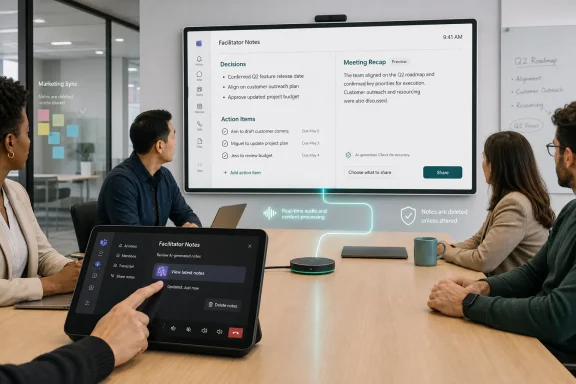
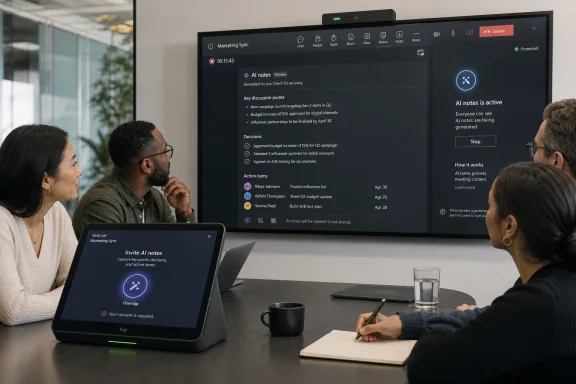
Roadmap ID 560700 is Microsoft’s attempt to erase that distinction for organizations invested in Teams Rooms on Android. The feature allows users to invite Facilitator from the room console with a tap, after which the agent captures real-time notes, decisions, and action items for an in-person meeting. Notes can appear on the front-of-room display or touch board, and if participants choose to share them, they become available through meeting recap.
The deployment target matters. Teams Rooms on Android is not the boutique edge of Microsoft’s meeting-room strategy; it is a major part of the practical device estate for huddle rooms, small conference rooms, and lower-cost collaboration spaces. By pushing Facilitator there, Microsoft is not just enhancing a premium boardroom experience. It is trying to make AI note-taking a normal part of everyday office work.
The licensing boundary is equally telling. Microsoft says the capability is available with Teams Rooms Pro, which keeps the feature on the paid, managed side of the room-device business. That makes sense technically and commercially: room AI is only useful if the device estate is manageable, updateable, and governed. It also reinforces the broader direction of Microsoft 365: the most useful Copilot-adjacent features increasingly live behind layered licensing, not inside the base Teams experience.
Meetings fail to produce durable outcomes because note-taking is a social tax. Someone has to volunteer, listen, summarize, avoid bias, capture decisions, assign actions, and then distribute the result. In hybrid meetings, software can at least infer that a structured event is happening because the call exists. In a physical room, the system needs a deliberate start signal. Microsoft’s answer is to make that signal visible on the console and accessible enough that a group can use it without opening laptops.
That design is important because it shifts AI note-taking from a personal productivity trick to a shared room function. The assistant is no longer “my Copilot summarizing the meeting for me.” It becomes an entity introduced into the room, visible to participants, producing notes on a shared display. That visibility may reduce some of the creepiness of ambient workplace AI, but it also raises the bar for consent, expectation-setting, and record handling.
Microsoft’s documentation around Facilitator in Teams Rooms already treats the room as a special case. For ad hoc meetings, a person in the room must start the experience from Teams on a mobile phone within the same organization. External or federated users cannot simply walk in and initiate offline note-taking. That requirement sounds like friction, but it is also a governance boundary: someone accountable inside the tenant triggers the meeting record.
The roadmap language adds another significant assurance: notes are deleted if no one selects them, and no data remains in the room. That sentence is doing a lot of work. It attempts to calm the obvious fear that a meeting-room device is becoming a passive recorder. But it also points to the central operational question for administrators: where does the record live once someone does select and share it?
In current Teams meeting scenarios, AI-generated notes are typically tied to Loop components and meeting recap experiences. Microsoft’s room documentation describes Facilitator notes as meeting transcript data and explains that notes can be accessed after a meeting through recap. That matters because transcripts and meeting notes are not ephemeral convenience artifacts in regulated organizations. They may be discoverable, retainable, protected by sensitivity labels, or subject to deletion rules.
The Android room feature, as described in the roadmap item, has a slightly different rhythm. During the meeting, notes can appear on the front-of-room display or touch board. Afterward, they become available via recap when shared. If nobody selects them, they are deleted. Microsoft is trying to solve two conflicting problems at once: people want a useful AI scribe for a conversation that was never formally scheduled, but organizations do not necessarily want every casual room discussion preserved forever.
That tension is healthy. The worst version of meeting AI would be a silent archive of every workplace utterance. The better version is a deliberate capture tool that makes preservation an explicit user action. Microsoft appears to be aiming for the latter, though admins will need to validate the final behavior in their own tenants when the feature reaches general availability.
The key distinction is that “no data remains in the room” does not mean “no data exists anywhere.” It means the room device is not the repository. Once shared, notes belong to Microsoft 365’s cloud information architecture, with all the benefits and complications that entails. For IT pros, that is the difference between wiping a conference-room panel and managing records across Teams, OneDrive, Loop, Purview, and recap.
Teams Rooms on Android devices are attractive because they reduce the operational drag of room computing. They are often easier to deploy, update, and standardize across smaller spaces. But that simplicity has sometimes come with trade-offs in advanced meeting features. Bringing Facilitator to Android rooms says Microsoft wants its AI meeting layer to follow users into the rooms they actually occupy, not just the expensive rooms with the most elaborate AV setups.
The timing also fits a broader change in office work. Hybrid work did not eliminate in-person meetings; it made them more uneven. Some teams now meet physically less often, which can make the few in-room sessions more important. A design review, escalation meeting, or quarterly planning session may happen around a physical table precisely because it requires speed, trust, and shared context. Those are also the meetings where losing the decision trail hurts.
The room display changes the social dynamic. When notes appear live on a front-of-room screen or touch board, participants can correct them while the conversation is still happening. That is better than discovering after the fact that the AI misunderstood a decision or assigned an action item to the wrong person. It also makes the AI’s interpretation part of the meeting itself, which may subtly change how people speak, summarize, and confirm decisions.
That may be a feature, not a bug. Good human note-takers often improve meetings by forcing clarity: “So, is that a decision?” or “Who owns the next step?” A visible AI note stream could create a similar discipline. The danger is that participants may begin optimizing for the machine’s summary rather than the substance of the discussion.
That is a much heavier responsibility than launching a call. In a normal Teams meeting, participants join from personal devices and see meeting controls inside their own client. In a room, some participants may not have a laptop open. Some may be visitors. Some may not understand what Facilitator is doing. The room itself must communicate the state of capture clearly enough that nobody is surprised later.
Microsoft’s current design language emphasizes visible activation, room display indicators, and user selection before notes persist. Those choices are necessary, but they will not remove the need for organizational norms. Companies will need to decide whether Facilitator can be used in HR conversations, legal discussions, executive sessions, customer meetings, incident reviews, or union-related settings. The answer may vary by jurisdiction, industry, and internal culture.
There is also the practical matter of attribution. Microsoft has already documented limitations around identifying speakers in room scenarios, with some participants appearing as generic speakers unless voice recognition and enrollment conditions are met. For action items, generic attribution can be worse than no attribution at all. “Speaker 2 will follow up” is not an operational plan.
That means the best use of Facilitator may not be passive transcription. It may be live validation. Teams that use the display to review the AI’s decisions and actions before ending the meeting will get better results than teams that treat recap as magic. The agent can draft the record, but the room still has to agree on it.
But the privacy question does not end at the device boundary. For administrators, the more important questions are about tenant storage, retention, access, auditability, and lifecycle. If notes are shared into recap, who can see them? Are they treated like transcript-derived artifacts? How do retention policies apply? What happens when the initiating user leaves the company? Can eDiscovery find them? Can sensitivity labels protect them? Can admins disable the feature for certain rooms?
Some of those answers exist in Microsoft’s broader Facilitator and Teams Rooms documentation, while others may depend on final general availability behavior. The prudent assumption is that AI notes will inherit the complexity of the Microsoft 365 substrate. That is good news if an organization has mature Purview policies and disciplined Teams governance. It is less comforting for tenants where meeting recordings, Loop files, and chat retention already form a confusing compliance maze.
The human privacy issue is even harder. In-person meetings have historically carried a different expectation than recorded calls. People may speak more informally in a room, interrupt more often, sketch ideas that are not ready for documentation, or float options that should not be mistaken for decisions. An AI note-taker changes that texture. It can make meetings more accountable, but also more cautious.
The responsible rollout pattern is therefore not “enable it everywhere and let users discover it.” It is room-by-room, policy-by-policy, with clear signage and training. The moment an AI agent can be summoned from a conference-room console, the organization needs a shared understanding of when that is appropriate.
That shift is subtle but important. The first wave of workplace AI asked users to request help: summarize this document, draft this email, explain this spreadsheet. The next wave tries to infer the recurring moments where knowledge work leaks value and place an agent there by default. Meetings are the obvious target because they produce decisions, obligations, and context, but often fail to produce clean records.
Facilitator is Microsoft’s answer to that leakage. It listens for outcomes, tracks actions, and turns conversation into structured artifacts. In Teams Rooms, it also has access to a physical setting where the cost of note-taking is especially visible. Nobody wants to be the person typing while everyone else debates. Nobody wants to reconstruct a decision two days later from memory.
The strategic risk for Microsoft is that users may not distinguish between “AI helped us remember” and “AI became the official record.” Once the notes exist in recap, they acquire authority. A flawed summary can become the version people forward, search, and act on. The more seamless Microsoft makes the capture experience, the more important it becomes to preserve moments of human correction.
That is why the live display may be the most important part of the feature. If the AI’s notes are visible during the meeting, the group can challenge them. If they only appear afterward, the AI becomes a stenographer with editorial power and no live accountability.
For Teams Rooms Pro customers, the first inventory question is simple: which Android rooms are candidates for AI note-taking? The answer should not automatically be “all of them.” A brainstorming room, engineering project room, training space, and executive boardroom may have very different risk profiles. Some rooms may benefit enormously. Others may need the feature disabled or limited until policies catch up.
The second question is user education. If starting Facilitator requires a tap on the console and possibly a mobile-device flow, employees need to understand not only how to use it, but what happens afterward. The most dangerous enterprise features are the ones that are easy to start and poorly understood once data is created.
The third question is records management. Organizations already struggling with Teams meeting recordings and transcripts should not assume AI notes will make the problem simpler. They may make the meeting record more useful, but also more numerous and more searchable. That can be a compliance advantage if managed deliberately. It can be a liability if left to default behavior.
Microsoft’s selling point is productivity. The admin’s job is to translate that into controlled productivity: useful notes, visible consent, appropriate retention, and predictable access.
The feature is especially compelling for small rooms and informal meetings. Those are the places where organizations rarely assign a formal note-taker, yet real work gets decided. If Facilitator can capture a clean enough outline of the discussion, identify action items, and let participants validate them before leaving the room, it could improve follow-through more than another dashboard or productivity score.
It may also help hybrid equity in a different way. Many hybrid tools focus on helping remote participants see and hear the room. AI notes for room discussions help preserve what happened when not everyone could be there—or when the meeting was never formal enough to invite the broader team. That can reduce information asymmetry, provided the notes are shared intentionally and not treated as a substitute for including people who should have been present.
The caveat is that AI note-taking works best when meetings are explicit. If participants mumble decisions, avoid naming owners, or treat every suggestion as a maybe, Facilitator will not magically create accountability. It will reflect the ambiguity in the room, sometimes with unwarranted confidence. The best teams will learn to close meetings by reviewing the AI’s captured decisions and action items, just as they would with a human scribe.
That shift will create pressure. Managers will want action items captured. Project teams will want recaps. Compliance teams will want boundaries. Employees will want assurance that casual conversations are not being silently archived. Microsoft’s product design can help, but it cannot settle those trade-offs for every organization.
The strongest implementation pattern will be deliberate and visible. Rooms where Facilitator is enabled should make the capture state obvious. Meetings using it should end with a quick review of the generated decisions and actions. Policies should define which conversations are inappropriate for AI notes. Retention and access rules should be understood before the first sensitive meeting uses the feature.
This is where Teams Rooms Pro becomes more than a license badge. The value is not only access to a feature, but the ability to manage a room estate where AI functions are part of the collaboration infrastructure. Microsoft is implicitly asking customers to treat meeting rooms like endpoints in the information-governance chain. That is the right framing.
 Microsoft Moves the Meeting Record Into the Room
For years, the dividing line between a “real” Teams meeting and an office conversation was not the people in the room, but the infrastructure around them. Scheduled Teams calls generated chat threads, recaps, transcripts, attendance records, Loop-based notes, and—if Copilot or Facilitator was enabled—AI-generated summaries. The hallway huddle, project-room discussion, and whiteboard session usually produced something much messier: a photo of a board, a half-remembered decision, or a message afterward asking, “Who was taking notes?”Roadmap ID 560700 is Microsoft’s attempt to erase that distinction for organizations invested in Teams Rooms on Android. The feature allows users to invite Facilitator from the room console with a tap, after which the agent captures real-time notes, decisions, and action items for an in-person meeting. Notes can appear on the front-of-room display or touch board, and if participants choose to share them, they become available through meeting recap.
The deployment target matters. Teams Rooms on Android is not the boutique edge of Microsoft’s meeting-room strategy; it is a major part of the practical device estate for huddle rooms, small conference rooms, and lower-cost collaboration spaces. By pushing Facilitator there, Microsoft is not just enhancing a premium boardroom experience. It is trying to make AI note-taking a normal part of everyday office work.
The licensing boundary is equally telling. Microsoft says the capability is available with Teams Rooms Pro, which keeps the feature on the paid, managed side of the room-device business. That makes sense technically and commercially: room AI is only useful if the device estate is manageable, updateable, and governed. It also reinforces the broader direction of Microsoft 365: the most useful Copilot-adjacent features increasingly live behind layered licensing, not inside the base Teams experience.
The One-Tap Agent Is Really a Policy Decision
The phrase “invite Facilitator with one tap” sounds like a usability detail. In practice, it is the whole product strategy compressed into a button.Meetings fail to produce durable outcomes because note-taking is a social tax. Someone has to volunteer, listen, summarize, avoid bias, capture decisions, assign actions, and then distribute the result. In hybrid meetings, software can at least infer that a structured event is happening because the call exists. In a physical room, the system needs a deliberate start signal. Microsoft’s answer is to make that signal visible on the console and accessible enough that a group can use it without opening laptops.
That design is important because it shifts AI note-taking from a personal productivity trick to a shared room function. The assistant is no longer “my Copilot summarizing the meeting for me.” It becomes an entity introduced into the room, visible to participants, producing notes on a shared display. That visibility may reduce some of the creepiness of ambient workplace AI, but it also raises the bar for consent, expectation-setting, and record handling.
Microsoft’s documentation around Facilitator in Teams Rooms already treats the room as a special case. For ad hoc meetings, a person in the room must start the experience from Teams on a mobile phone within the same organization. External or federated users cannot simply walk in and initiate offline note-taking. That requirement sounds like friction, but it is also a governance boundary: someone accountable inside the tenant triggers the meeting record.
The roadmap language adds another significant assurance: notes are deleted if no one selects them, and no data remains in the room. That sentence is doing a lot of work. It attempts to calm the obvious fear that a meeting-room device is becoming a passive recorder. But it also points to the central operational question for administrators: where does the record live once someone does select and share it?
Microsoft’s AI Meeting Stack Is Becoming a Chain of Custody
Facilitator is not a standalone feature bolted onto a conference-room appliance. It sits inside Microsoft’s expanding meeting-intelligence stack, alongside Teams recap, Loop notes, transcription, Copilot, Planner integration, and Teams Rooms device management. That architecture is the reason the feature is useful—and the reason IT departments should treat it as a data-governance project rather than a room-device toggle.In current Teams meeting scenarios, AI-generated notes are typically tied to Loop components and meeting recap experiences. Microsoft’s room documentation describes Facilitator notes as meeting transcript data and explains that notes can be accessed after a meeting through recap. That matters because transcripts and meeting notes are not ephemeral convenience artifacts in regulated organizations. They may be discoverable, retainable, protected by sensitivity labels, or subject to deletion rules.
The Android room feature, as described in the roadmap item, has a slightly different rhythm. During the meeting, notes can appear on the front-of-room display or touch board. Afterward, they become available via recap when shared. If nobody selects them, they are deleted. Microsoft is trying to solve two conflicting problems at once: people want a useful AI scribe for a conversation that was never formally scheduled, but organizations do not necessarily want every casual room discussion preserved forever.
That tension is healthy. The worst version of meeting AI would be a silent archive of every workplace utterance. The better version is a deliberate capture tool that makes preservation an explicit user action. Microsoft appears to be aiming for the latter, though admins will need to validate the final behavior in their own tenants when the feature reaches general availability.
The key distinction is that “no data remains in the room” does not mean “no data exists anywhere.” It means the room device is not the repository. Once shared, notes belong to Microsoft 365’s cloud information architecture, with all the benefits and complications that entails. For IT pros, that is the difference between wiping a conference-room panel and managing records across Teams, OneDrive, Loop, Purview, and recap.
Android Rooms Are the Practical Battlefield
Microsoft has long had a two-track Teams Rooms world: Windows-based rooms, often associated with more traditional conference setups, and Android-based rooms, common in simpler, appliance-like deployments. Feature parity between the two has not always arrived at the same time. That history is why the Android target in this roadmap item is more than a platform footnote.Teams Rooms on Android devices are attractive because they reduce the operational drag of room computing. They are often easier to deploy, update, and standardize across smaller spaces. But that simplicity has sometimes come with trade-offs in advanced meeting features. Bringing Facilitator to Android rooms says Microsoft wants its AI meeting layer to follow users into the rooms they actually occupy, not just the expensive rooms with the most elaborate AV setups.
The timing also fits a broader change in office work. Hybrid work did not eliminate in-person meetings; it made them more uneven. Some teams now meet physically less often, which can make the few in-room sessions more important. A design review, escalation meeting, or quarterly planning session may happen around a physical table precisely because it requires speed, trust, and shared context. Those are also the meetings where losing the decision trail hurts.
The room display changes the social dynamic. When notes appear live on a front-of-room screen or touch board, participants can correct them while the conversation is still happening. That is better than discovering after the fact that the AI misunderstood a decision or assigned an action item to the wrong person. It also makes the AI’s interpretation part of the meeting itself, which may subtly change how people speak, summarize, and confirm decisions.
That may be a feature, not a bug. Good human note-takers often improve meetings by forcing clarity: “So, is that a decision?” or “Who owns the next step?” A visible AI note stream could create a similar discipline. The danger is that participants may begin optimizing for the machine’s summary rather than the substance of the discussion.
The Room Console Becomes a Trust Surface
A Teams Rooms console used to be mostly a control surface: join, hang up, mute, share, adjust layout. With Facilitator, it becomes a trust surface. The console tells the room whether an AI agent is present, whether transcription is active, and whether the output is being retained.That is a much heavier responsibility than launching a call. In a normal Teams meeting, participants join from personal devices and see meeting controls inside their own client. In a room, some participants may not have a laptop open. Some may be visitors. Some may not understand what Facilitator is doing. The room itself must communicate the state of capture clearly enough that nobody is surprised later.
Microsoft’s current design language emphasizes visible activation, room display indicators, and user selection before notes persist. Those choices are necessary, but they will not remove the need for organizational norms. Companies will need to decide whether Facilitator can be used in HR conversations, legal discussions, executive sessions, customer meetings, incident reviews, or union-related settings. The answer may vary by jurisdiction, industry, and internal culture.
There is also the practical matter of attribution. Microsoft has already documented limitations around identifying speakers in room scenarios, with some participants appearing as generic speakers unless voice recognition and enrollment conditions are met. For action items, generic attribution can be worse than no attribution at all. “Speaker 2 will follow up” is not an operational plan.
That means the best use of Facilitator may not be passive transcription. It may be live validation. Teams that use the display to review the AI’s decisions and actions before ending the meeting will get better results than teams that treat recap as magic. The agent can draft the record, but the room still has to agree on it.
The Privacy Pitch Is Necessary, But Not Sufficient
Microsoft’s roadmap note includes the reassuring phrase: no data remains in the room. That is a sensible promise because meeting-room devices are shared, semi-public infrastructure. Nobody wants residual notes from a budget discussion appearing for the next group using the room.But the privacy question does not end at the device boundary. For administrators, the more important questions are about tenant storage, retention, access, auditability, and lifecycle. If notes are shared into recap, who can see them? Are they treated like transcript-derived artifacts? How do retention policies apply? What happens when the initiating user leaves the company? Can eDiscovery find them? Can sensitivity labels protect them? Can admins disable the feature for certain rooms?
Some of those answers exist in Microsoft’s broader Facilitator and Teams Rooms documentation, while others may depend on final general availability behavior. The prudent assumption is that AI notes will inherit the complexity of the Microsoft 365 substrate. That is good news if an organization has mature Purview policies and disciplined Teams governance. It is less comforting for tenants where meeting recordings, Loop files, and chat retention already form a confusing compliance maze.
The human privacy issue is even harder. In-person meetings have historically carried a different expectation than recorded calls. People may speak more informally in a room, interrupt more often, sketch ideas that are not ready for documentation, or float options that should not be mistaken for decisions. An AI note-taker changes that texture. It can make meetings more accountable, but also more cautious.
The responsible rollout pattern is therefore not “enable it everywhere and let users discover it.” It is room-by-room, policy-by-policy, with clear signage and training. The moment an AI agent can be summoned from a conference-room console, the organization needs a shared understanding of when that is appropriate.
The Feature Is Small; the Strategy Is Not
Viewed narrowly, Roadmap ID 560700 is a useful Teams Rooms enhancement scheduled for general availability in August 2026. Viewed strategically, it is another step in Microsoft’s effort to make Copilot-era AI less dependent on individual prompting and more embedded in the workflow fabric.That shift is subtle but important. The first wave of workplace AI asked users to request help: summarize this document, draft this email, explain this spreadsheet. The next wave tries to infer the recurring moments where knowledge work leaks value and place an agent there by default. Meetings are the obvious target because they produce decisions, obligations, and context, but often fail to produce clean records.
Facilitator is Microsoft’s answer to that leakage. It listens for outcomes, tracks actions, and turns conversation into structured artifacts. In Teams Rooms, it also has access to a physical setting where the cost of note-taking is especially visible. Nobody wants to be the person typing while everyone else debates. Nobody wants to reconstruct a decision two days later from memory.
The strategic risk for Microsoft is that users may not distinguish between “AI helped us remember” and “AI became the official record.” Once the notes exist in recap, they acquire authority. A flawed summary can become the version people forward, search, and act on. The more seamless Microsoft makes the capture experience, the more important it becomes to preserve moments of human correction.
That is why the live display may be the most important part of the feature. If the AI’s notes are visible during the meeting, the group can challenge them. If they only appear afterward, the AI becomes a stenographer with editorial power and no live accountability.
Admins Should Treat August 2026 as a Governance Deadline
The roadmap date gives organizations time to prepare, and they should use it. Teams Rooms features often arrive as part of a larger device, client, and service choreography. A general availability month is not the same as every device in every tenant behaving identically on day one. Hardware certification, app versions, room licensing, management settings, and tenant policies all matter.For Teams Rooms Pro customers, the first inventory question is simple: which Android rooms are candidates for AI note-taking? The answer should not automatically be “all of them.” A brainstorming room, engineering project room, training space, and executive boardroom may have very different risk profiles. Some rooms may benefit enormously. Others may need the feature disabled or limited until policies catch up.
The second question is user education. If starting Facilitator requires a tap on the console and possibly a mobile-device flow, employees need to understand not only how to use it, but what happens afterward. The most dangerous enterprise features are the ones that are easy to start and poorly understood once data is created.
The third question is records management. Organizations already struggling with Teams meeting recordings and transcripts should not assume AI notes will make the problem simpler. They may make the meeting record more useful, but also more numerous and more searchable. That can be a compliance advantage if managed deliberately. It can be a liability if left to default behavior.
Microsoft’s selling point is productivity. The admin’s job is to translate that into controlled productivity: useful notes, visible consent, appropriate retention, and predictable access.
The Practical Wins Are Real, If the Room Does Its Part
It would be easy to view this feature only through the lens of compliance anxiety. That would miss why it will probably be popular. Anyone who has sat through a fast-moving in-person meeting knows the value of a neutral draft summary. Even imperfect AI notes can reduce the post-meeting fog that turns decisions into folklore.The feature is especially compelling for small rooms and informal meetings. Those are the places where organizations rarely assign a formal note-taker, yet real work gets decided. If Facilitator can capture a clean enough outline of the discussion, identify action items, and let participants validate them before leaving the room, it could improve follow-through more than another dashboard or productivity score.
It may also help hybrid equity in a different way. Many hybrid tools focus on helping remote participants see and hear the room. AI notes for room discussions help preserve what happened when not everyone could be there—or when the meeting was never formal enough to invite the broader team. That can reduce information asymmetry, provided the notes are shared intentionally and not treated as a substitute for including people who should have been present.
The caveat is that AI note-taking works best when meetings are explicit. If participants mumble decisions, avoid naming owners, or treat every suggestion as a maybe, Facilitator will not magically create accountability. It will reflect the ambiguity in the room, sometimes with unwarranted confidence. The best teams will learn to close meetings by reviewing the AI’s captured decisions and action items, just as they would with a human scribe.
The Android Room Rollout Turns AI Notes From Novelty Into Infrastructure
Microsoft’s August 2026 target gives IT teams a concrete window, but the real deadline is cultural rather than technical. Once AI note-taking is available from ordinary room consoles, employees will begin to expect it. The absence of a meeting record may start to feel like a choice rather than a limitation.That shift will create pressure. Managers will want action items captured. Project teams will want recaps. Compliance teams will want boundaries. Employees will want assurance that casual conversations are not being silently archived. Microsoft’s product design can help, but it cannot settle those trade-offs for every organization.
The strongest implementation pattern will be deliberate and visible. Rooms where Facilitator is enabled should make the capture state obvious. Meetings using it should end with a quick review of the generated decisions and actions. Policies should define which conversations are inappropriate for AI notes. Retention and access rules should be understood before the first sensitive meeting uses the feature.
This is where Teams Rooms Pro becomes more than a license badge. The value is not only access to a feature, but the ability to manage a room estate where AI functions are part of the collaboration infrastructure. Microsoft is implicitly asking customers to treat meeting rooms like endpoints in the information-governance chain. That is the right framing.
The Room Scribe Arrives With Strings Attached
Microsoft’s Teams Rooms on Android update is most useful when seen as both a productivity feature and a governance event. The concrete points are straightforward, but their implications reach across IT, compliance, and workplace culture.- Microsoft plans general availability for Facilitator-powered in-person meeting notes on Teams Rooms on Android in August 2026.
- The feature is tied to Teams Rooms Pro and is listed for Worldwide, GCC, and GCC High cloud environments.
- Users will be able to invite Facilitator from the room console, with notes visible on the front-of-room display or touch board during the meeting.
- Shared notes can appear later through meeting recap, while unselected notes are described as deleted so that no data remains in the room.
- Administrators should review room eligibility, retention behavior, user training, and policies for sensitive meetings before enabling the feature broadly.
- The best results will come from teams that validate the AI’s decisions and action items before leaving the room.
References
- Primary source: Microsoft 365 Roadmap
Published: 2026-07-01T23:03:18.2442931Z
Microsoft 365 Roadmap | Microsoft 365
The Microsoft 365 Roadmap lists updates that are currently planned for applicable subscribers. Check here for more information on the status of new features and updates.www.microsoft.com
- Official source: learn.microsoft.com
Facilitator in Teams Rooms - Microsoft Teams | Microsoft Learn
This user guide provides comprehensive setup instructions and information on using the Facilitator agent within Teams Rooms. The AI-powered Facilitator agent or app lets meeting participants hold unscheduled meetings and use Facilitator to transcribe the entire meeting conversation and create...learn.microsoft.com - Official source: support.microsoft.com
Facilitator in Microsoft Teams meetings | Microsoft Support
AI-generated notes automate note-taking during Teams meetings to capture the discussion in real-time with action items and follow-up tasks.support.microsoft.com - Official source: techcommunity.microsoft.com
- Related coverage: thegrahamwalsh.com
Microsoft Teams Rooms on Android – Teams Facilitator Agent Overview
Here's an overview Microsoft Teams Facilitator agent on Microsoft Teams Rooms on Android, available now.www.thegrahamwalsh.com - Related coverage: scansource.com