

Microsoft on July 8, 2026 detailed two Copilot-era enterprise AI moves: private-preview ROI tracking for agents in Microsoft Foundry and a worldwide Microsoft Forms Copilot rollout for customers with Microsoft 365 Copilot commercial licenses, aimed at tying automation costs to business outcomes while bringing chat-guided survey work into Office workflows. The first announcement is for the people being asked to fund AI agents; the second is for the employees now being asked to use Copilot inside routine business applications. Together, they show Microsoft trying to close the gap between AI as a demo and AI as an accountable operating expense. The company is no longer only selling the promise that agents can do work; it is starting to build the dashboards and product surfaces that force organizations to ask whether that work is worth paying for.
The most important part of Microsoft’s latest AI announcements is not that Copilot can help improve a survey or that Foundry can show another chart. It is that Microsoft is acknowledging, in product form, the uncomfortable enterprise question that has followed every large AI rollout: what did the organization actually get back?
As reported by Redmondmag.com from Microsoft’s announcements, ROI for agents in Microsoft Foundry is designed to connect an agent’s operating costs with business outcomes. That language matters because many AI measurement regimes still stop at engineering telemetry: token usage, latency, errors, throughput, and model performance. Those figures are necessary, but they do not answer the budget owner’s question.
Microsoft’s pitch is that an AI agent should be evaluated less like a flashy chatbot and more like a software worker with a cost center. If it completes tasks, saves time, and does so efficiently enough, it can be defended. If it burns compute while producing weak results, the problem should be visible before enthusiasm becomes sunk cost.
That framing also explains why the Microsoft Forms update belongs in the same story. Forms is not a developer platform or a frontier AI lab surface; it is a mundane productivity application used for surveys, quizzes, feedback forms, internal polls, training checks, and lightweight data collection. By putting a Microsoft 365 Copilot chat experience directly into that workflow, Microsoft is pushing agent-like assistance into the places where ordinary employees perform repetitive knowledge work.
The two announcements sit on opposite ends of the enterprise AI pipeline. Foundry is about building, evaluating, and justifying agents. Forms is about using Copilot to accelerate a familiar business process. The strategic link is accountability: Microsoft wants AI to be embedded broadly enough to matter, but measured tightly enough to survive finance, compliance, and IT review.
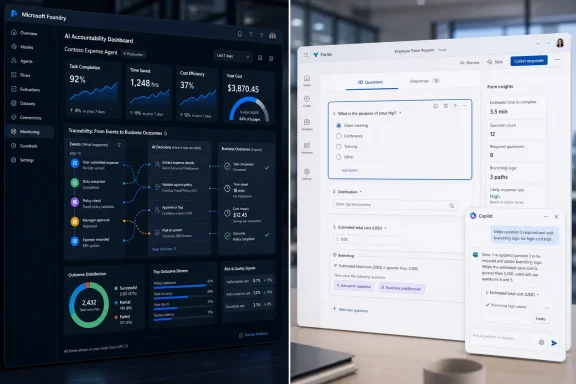
According to Microsoft’s description, ROI for agents “translates the cost of running an agent into the business value it creates.” The capability tracks metrics such as task completion rates, time saved, and cost efficiency, then displays operational costs and business results together in the Foundry portal or through an API. That combination is the point: the metric has to be visible both to platform operators and to the business systems that consume performance data.
For developers, this extends the usual lifecycle of agent testing. An agent may pass evaluations, return reasonable answers, and stay within technical tolerances, yet still fail to create enough value to justify deployment. A support triage agent that correctly classifies tickets but saves little human time may look good in a model benchmark and bad in a budget review.
For IT leaders, the new capability is a concession that AI governance cannot rely on vibes. Many organizations have moved from “try Copilot” pilots to agent experiments that touch line-of-business workflows. Once those systems begin consuming paid infrastructure and employee attention, the question becomes less “does it work?” and more “does it work often enough, cheaply enough, and in the right places?”
Microsoft says organizations can compare different agent versions, monitor daily trends, and examine individual traces associated with poor results. That is an important operational loop. If one agent version costs more but saves more time, the tradeoff may be defensible. If a newer version degrades task completion while appearing more polished in conversation, the trace-level evidence may prevent a bad deployment from becoming institutionalized.
The trace investigation piece is especially important because agent failures are rarely as simple as a single bad answer. They can arise from tool-calling errors, poor retrieval grounding, unclear instructions, malformed business logic, weak handoffs, or an agent that technically completes a step while failing the business goal. ROI data without traceability would tell teams that something is wrong; trace-level inspection gives them a path to find out why.
That distinction matters because AI investment decisions are already happening. CIOs, CFOs, business unit leaders, and platform teams are being asked to decide whether agent development is a strategic program, an experimental sideline, or an expensive distraction. A private preview tool cannot yet settle those debates across the market, but it does show how Microsoft expects them to be framed.
It also places Microsoft Foundry more explicitly in the role of agent operations platform. Redmondmag.com notes that ROI for agents builds on Foundry’s tracing, evaluation, and monitoring capabilities. Those are the ingredients required for serious production oversight: the ability to observe what happened, assess whether it met a target, and watch behavior over time.
The missing layer has been business translation. A model can be monitored for response quality. A system can be traced for execution flow. But business leaders need to understand whether the agent helped close cases faster, reduce manual steps, improve turnaround time, or lower cost per completed task. ROI for agents is Microsoft’s attempt to make that translation legible.
The difficulty, however, is that “time saved” and “business value” are not purely technical measures. They depend on baselines, process design, labor assumptions, adoption rates, and the degree to which employees actually use or trust the agent. Microsoft can provide the measurement surface, but organizations will still need to define what counts as value.
That is where many AI deployments will either mature or stall. If teams configure ROI tracking around shallow proxy metrics, they may simply produce prettier dashboards for weak automation. If they connect the data to real process outcomes, the feature could become one of the more consequential additions to Microsoft’s agent stack.
An AI agent is not just a chatbot with better branding. In Microsoft’s enterprise framing, an agent can be built to pursue tasks, invoke tools, operate across systems, and produce measurable work. That makes it more useful than a prompt box, but also more expensive and riskier to leave unmeasured.
The key phrase in Microsoft’s description is the connection between “operating costs” and “business outcomes.” Operating costs can include the expense of running the agent, though Microsoft’s announcement as summarized by Redmondmag.com does not enumerate every cost category. Business outcomes are even more contextual: a completed HR workflow, a resolved service request, a processed intake form, or a reduction in manual review time could all count if the organization defines them that way.
This is where version comparison becomes more than a developer convenience. Organizations can compare different agent versions, which means ROI is not treated as a one-time justification but as an iterative benchmark. A new prompt, model configuration, tool chain, or workflow design can be assessed against the prior version.
Daily trend monitoring also introduces a production discipline that many AI pilots lack. Agents can drift in usefulness when upstream data changes, user behavior shifts, forms are redesigned, APIs behave differently, or business rules evolve. A daily trend line can expose whether yesterday’s promising automation is quietly becoming today’s noisy cost.
The ability to examine individual traces tied to poor results closes the loop. Without traces, ROI metrics can become executive theater. With traces, developers and operations teams can connect an observed business failure to the sequence of agent actions that likely caused it.
That does not make ROI measurement simple. It makes the ambiguity visible enough to manage.
Opening the chat pane grounds Copilot in the current form. That grounding is the product move to watch. Instead of asking users to copy form text into a separate Copilot window and explain the context manually, Microsoft is embedding the assistant into the object being edited.
Once grounded in the form, Copilot can review questions, recommend structural changes, edit settings, and analyze submitted responses. In plain terms, it is being positioned as both an editor and an analyst. It can help build the instrument and then help interpret the data that instrument collects.
The examples Microsoft provided are practical rather than theatrical. Users can ask Copilot to identify missing questions, reorganize sections, or flag settings that conflict with a survey’s intended purpose. Copilot can also make bulk changes, such as replacing a placeholder throughout a form or marking multiple questions as required.
That is the kind of work that often determines whether productivity AI is adopted. Employees do not always need a system to invent a strategy; they need it to remove friction from a task they already have to finish by 4 p.m. A form with inconsistent wording, missing required fields, confusing sections, and poorly configured settings is not a glamorous business problem, but it is a common one.
Microsoft is also adding support for basic branching logic, custom thank-you messages, closing dates, and follow-up questions about survey results. Those capabilities push Copilot beyond drafting into configuration and interpretation. The assistant is not merely generating text; it is helping shape the behavior and lifecycle of the form.
Microsoft’s most aggressive Copilot integrations continue to land first where the company can tie them to commercial identity, enterprise licensing, and workplace data boundaries. Forms may look simple, but forms and quizzes can contain sensitive internal feedback, customer information, employee responses, assessment data, and operational signals. Embedding Copilot into that workflow is easier to justify in a managed commercial tenant than in a broader consumer context.
The distinction also highlights how Microsoft’s Copilot brand now covers very different product realities. A consumer subscriber and a Microsoft 365 Copilot commercial customer may both think they “have Copilot,” but they do not necessarily receive the same features, at the same time, in the same applications. Forms is now another example of that divergence.
For IT departments, this licensing line means communication matters. Users may read about a new Forms Copilot capability and assume it applies to every Copilot-branded account. Help desks and adoption teams will need to make clear that the new experience is tied to Microsoft 365 Copilot commercial licensing, while consumer Copilot subscribers remain on the previous Forms experience for now.
That may seem like a minor support note, but Copilot confusion has become a recurring enterprise problem. The same name appears across Windows, Microsoft 365, Edge, consumer subscriptions, commercial plans, and developer platforms. Every feature announcement adds another small gap between what users think Copilot can do and what their license, tenant, app, or rollout ring actually supports.
That informality is precisely why Copilot could help. Poorly structured forms produce poor data. Ambiguous questions create bad answers. Missing required fields force follow-up work. Bad branching logic can route respondents around important questions. Closing dates and thank-you messages may look cosmetic, but they affect participation, expectation-setting, and process hygiene.
Microsoft’s promise of “clear insights and actionable takeaways” from analysis features should therefore be read in context. Copilot may help users spot patterns in submitted responses, but the quality of the insight still depends on the quality of the questions, the structure of the survey, the sample of respondents, and the user’s review. Microsoft itself notes, according to Redmondmag.com, that users should continue reviewing branching configurations before distributing a form.
That caution is more than boilerplate. Branching logic is one of the easiest places for a form to fail silently. A single misconfigured path can prevent a group of respondents from seeing a required question, distort response analysis, or create inconsistent data across sections.
Copilot’s ability to flag settings that conflict with a survey’s intended purpose could reduce those failures, but it does not eliminate the owner’s responsibility. If a survey is being used for compliance attestation, HR feedback, customer research, or training validation, the person publishing it still needs to verify that the form asks the right people the right questions in the right order.
The same applies to bulk edits. Replacing a placeholder throughout a form or marking multiple questions as required can save time, but a fast global change can also propagate a bad assumption. Productivity gains are real only if review discipline keeps pace.
That does not mean every Forms user needs to become an AI auditor. It does mean organizations need norms for how Copilot-assisted artifacts are reviewed before they become business inputs. A Copilot-edited survey can influence decisions just as surely as a Copilot-generated report or a Copilot-written email.
The governance burden is different from traditional software governance because the work is distributed. A centralized development team may build agents in Foundry, but thousands of employees may use Copilot inside Microsoft 365 apps. The organization can put strong controls around the former and still discover that the latter is where data quality quietly changes.
Microsoft’s strategy depends on making Copilot feel native. The lower-right button in Forms is not an accident; it is a cue that assistance is always nearby. That convenience is useful, but it also normalizes AI participation in ordinary business documents and workflows.
The more native Copilot becomes, the less users will treat its output as special. That is both the adoption goal and the risk. When AI assistance becomes part of the furniture, organizations need lightweight review habits that do not depend on novelty or fear.
For Forms, the habit is straightforward: review the structure, verify settings, test branching, inspect required fields, and sanity-check analysis before using it to make decisions. For Foundry agents, the habit is more technical: monitor trends, compare versions, inspect traces, and connect observed performance to business outcomes. The pattern is the same in both cases: AI output needs operational review, not ceremonial approval.
ROI for agents is Microsoft’s attempt to give those groups a common measurement surface. If the feature can show task completion rates, time saved, cost efficiency, operational cost, and business results together, it can turn agent evaluation into a more concrete internal debate. That does not guarantee consensus, but it gives stakeholders something better than anecdotes.
The ability to justify investment is explicitly part of Microsoft’s stated purpose for the information. So is prioritizing what to improve next. Those two goals sit in productive tension. A dashboard that only justifies spending becomes marketing; a dashboard that only exposes defects becomes a blocker. The useful version does both.
For developers, the improvement path may involve changing prompts, revising tool access, improving evaluations, or splitting a broad agent into narrower tasks. For business owners, it may involve redefining the workflow, changing handoff points, or choosing a different success metric. For IT, it may involve deciding which agents deserve production hardening and which should remain experiments.
The daily trend capability could become especially important after deployment. Many AI projects look best at launch, when attention is high and use cases are curated. Over time, real users bring edge cases, messy inputs, changing expectations, and inconsistent adoption. A daily ROI trend can show whether the agent is becoming more valuable through iteration or less valuable through drift.
Still, organizations should be careful not to let “ROI” become a false precision machine. Time saved is notoriously difficult to measure. A task that takes five fewer minutes may not return five productive minutes to the business if the employee’s workflow is fragmented. Cost efficiency may look strong in one department and weak in another because the process baseline differs.
The value of Microsoft’s feature, then, is not that it will magically settle every ROI argument. It is that it moves the argument closer to evidence.
That is a powerful combination. If Microsoft can show that agents built in its platform create measurable value, and if Copilot surfaces in productivity apps keep expanding the range of AI-assisted tasks, the company strengthens both the developer and end-user sides of its ecosystem. Foundry becomes where agents are engineered; Microsoft 365 becomes where AI-assisted work is normalized.
It is also a defensive move. Enterprise customers are under pressure to rationalize AI spending. If they cannot measure value inside Microsoft’s stack, they may look to third-party observability, governance, or automation platforms. By adding ROI for agents to Foundry, Microsoft is trying to keep the measurement layer close to the execution layer.
The API access is important for that reason. Displaying data in the Foundry portal serves platform teams, but exposing it through an API suggests Microsoft expects organizations to integrate ROI data into broader reporting, governance, or business intelligence systems. AI value measurement cannot live only in the developer console if the audience includes executives and process owners.
The Forms update plays a different role in the same strategy. It increases the surface area where Microsoft 365 Copilot can demonstrate utility. If users can build cleaner surveys, make faster edits, configure basic branching, set closing dates, write custom thank-you messages, and analyze responses with fewer manual steps, Microsoft gets a practical adoption story.
The strongest version of that story is not “Copilot wrote a form.” It is “Copilot reduced the work required to create a usable form and helped interpret the responses.” That distinction matters because enterprise productivity is rarely about replacing an entire job. It is about shaving friction from dozens of recurring tasks.
Admins and IT leaders are going to be asked whether AI agents are worth operationalizing. They will need to distinguish promising demos from production candidates and production candidates from durable business systems. ROI for agents is meant to help, but it will only be useful if teams define success before they stare at the dashboard.
The Forms rollout creates a smaller but more immediate admin task. Organizations with Microsoft 365 Copilot commercial licenses should expect users to encounter the new Copilot button in Forms as the worldwide rollout reaches them. Training materials, internal guidance, and support scripts should be updated accordingly.
There is also a policy question. If an organization allows Copilot-assisted form creation, does it require review for certain kinds of forms? Are HR surveys treated differently from event RSVPs? Should branching logic be tested by a second person before distribution? Should Copilot-generated analysis be labeled or verified before being sent to leadership?
Those questions may sound bureaucratic, but they are the practical edge of AI adoption. Microsoft is making AI assistance easier to invoke. Organizations need to make review expectations easier to follow.
Forms gives Microsoft a clean productivity example because the workflow is bounded. A user creates or opens a form or quiz, invokes Copilot from the lower-right corner, asks for review or changes, and potentially analyzes responses. The before-and-after comparison is easier to understand than in sprawling knowledge work.
Foundry agents are more complex. They may cross systems, invoke tools, handle exceptions, and operate inside business workflows with many human and machine participants. Measuring their value requires more instrumentation and more organizational maturity.
Yet the product logic is similar. In both cases, Microsoft is trying to reduce the distance between intention and execution. In Forms, a user’s intention might be “make this survey clearer and show me what the responses mean.” In Foundry, an organization’s intention might be “automate this workflow and prove the automation is worth its cost.”
The danger is that users and leaders overtrust the abstraction. A Copilot pane can make form design feel conversationally simple even when survey methodology remains hard. An ROI dashboard can make agent value look numerically settled even when the underlying assumptions are contested. Microsoft is giving customers tools, not absolution.
That is why the most mature organizations will treat these announcements as prompts to improve process, not excuses to remove judgment. Copilot can review a form, but someone still owns the form. Foundry can surface ROI indicators, but someone still owns the business case.
The broader lesson is that AI adoption is entering its accounting phase. Microsoft is still expanding Copilot into more workflows, but it is also preparing customers to defend, compare, monitor, and tune what those workflows produce. That is a healthier conversation than the one enterprise AI began with.
Microsoft’s July 8 announcements do not prove that every agent will pay for itself or that every Copilot-assisted form will produce better data. They do show that the company understands the next barrier to AI adoption is not merely model quality or user enthusiasm, but evidence. If Microsoft can make value measurement credible in Foundry and make everyday Copilot assistance useful in apps like Forms, the enterprise AI story moves from experimentation toward management discipline; if it cannot, customers will be left with more buttons, more dashboards, and the same old question of what the software actually did for the business.
 Microsoft Is Moving AI From Magic Trick to Management Problem
The most important part of Microsoft’s latest AI announcements is not that Copilot can help improve a survey or that Foundry can show another chart. It is that Microsoft is acknowledging, in product form, the uncomfortable enterprise question that has followed every large AI rollout: what did the organization actually get back?As reported by Redmondmag.com from Microsoft’s announcements, ROI for agents in Microsoft Foundry is designed to connect an agent’s operating costs with business outcomes. That language matters because many AI measurement regimes still stop at engineering telemetry: token usage, latency, errors, throughput, and model performance. Those figures are necessary, but they do not answer the budget owner’s question.
Microsoft’s pitch is that an AI agent should be evaluated less like a flashy chatbot and more like a software worker with a cost center. If it completes tasks, saves time, and does so efficiently enough, it can be defended. If it burns compute while producing weak results, the problem should be visible before enthusiasm becomes sunk cost.
That framing also explains why the Microsoft Forms update belongs in the same story. Forms is not a developer platform or a frontier AI lab surface; it is a mundane productivity application used for surveys, quizzes, feedback forms, internal polls, training checks, and lightweight data collection. By putting a Microsoft 365 Copilot chat experience directly into that workflow, Microsoft is pushing agent-like assistance into the places where ordinary employees perform repetitive knowledge work.
The two announcements sit on opposite ends of the enterprise AI pipeline. Foundry is about building, evaluating, and justifying agents. Forms is about using Copilot to accelerate a familiar business process. The strategic link is accountability: Microsoft wants AI to be embedded broadly enough to matter, but measured tightly enough to survive finance, compliance, and IT review.
Foundry Gets the Metric Microsoft’s AI Stack Was Missing
Microsoft introduced ROI for agents at Build 2026 in June, and Redmondmag.com reports that the capability is now available in private preview. Microsoft has not announced when it will become broadly available. That limited availability is significant because the feature is not merely another user-facing Copilot enhancement; it sits closer to the governance layer of Microsoft’s enterprise AI platform.According to Microsoft’s description, ROI for agents “translates the cost of running an agent into the business value it creates.” The capability tracks metrics such as task completion rates, time saved, and cost efficiency, then displays operational costs and business results together in the Foundry portal or through an API. That combination is the point: the metric has to be visible both to platform operators and to the business systems that consume performance data.
For developers, this extends the usual lifecycle of agent testing. An agent may pass evaluations, return reasonable answers, and stay within technical tolerances, yet still fail to create enough value to justify deployment. A support triage agent that correctly classifies tickets but saves little human time may look good in a model benchmark and bad in a budget review.
For IT leaders, the new capability is a concession that AI governance cannot rely on vibes. Many organizations have moved from “try Copilot” pilots to agent experiments that touch line-of-business workflows. Once those systems begin consuming paid infrastructure and employee attention, the question becomes less “does it work?” and more “does it work often enough, cheaply enough, and in the right places?”
Microsoft says organizations can compare different agent versions, monitor daily trends, and examine individual traces associated with poor results. That is an important operational loop. If one agent version costs more but saves more time, the tradeoff may be defensible. If a newer version degrades task completion while appearing more polished in conversation, the trace-level evidence may prevent a bad deployment from becoming institutionalized.
The trace investigation piece is especially important because agent failures are rarely as simple as a single bad answer. They can arise from tool-calling errors, poor retrieval grounding, unclear instructions, malformed business logic, weak handoffs, or an agent that technically completes a step while failing the business goal. ROI data without traceability would tell teams that something is wrong; trace-level inspection gives them a path to find out why.
The Private Preview Label Is a Warning as Much as a Promise
The private preview status of ROI for agents should temper expectations. Microsoft is clearly signaling direction, but not yet offering a broadly available enterprise standard for agent ROI measurement. In practical terms, that means most organizations should treat this as a coming capability to watch rather than an immediate governance foundation to standardize on.That distinction matters because AI investment decisions are already happening. CIOs, CFOs, business unit leaders, and platform teams are being asked to decide whether agent development is a strategic program, an experimental sideline, or an expensive distraction. A private preview tool cannot yet settle those debates across the market, but it does show how Microsoft expects them to be framed.
It also places Microsoft Foundry more explicitly in the role of agent operations platform. Redmondmag.com notes that ROI for agents builds on Foundry’s tracing, evaluation, and monitoring capabilities. Those are the ingredients required for serious production oversight: the ability to observe what happened, assess whether it met a target, and watch behavior over time.
The missing layer has been business translation. A model can be monitored for response quality. A system can be traced for execution flow. But business leaders need to understand whether the agent helped close cases faster, reduce manual steps, improve turnaround time, or lower cost per completed task. ROI for agents is Microsoft’s attempt to make that translation legible.
The difficulty, however, is that “time saved” and “business value” are not purely technical measures. They depend on baselines, process design, labor assumptions, adoption rates, and the degree to which employees actually use or trust the agent. Microsoft can provide the measurement surface, but organizations will still need to define what counts as value.
That is where many AI deployments will either mature or stall. If teams configure ROI tracking around shallow proxy metrics, they may simply produce prettier dashboards for weak automation. If they connect the data to real process outcomes, the feature could become one of the more consequential additions to Microsoft’s agent stack.
The New AI Question Is Not Whether an Agent Responds, but Whether It Earns Its Keep
Microsoft’s emphasis on task completion rates, time saved, and cost efficiency reflects a broader shift in enterprise AI. The first wave of generative AI adoption rewarded experimentation: draft this, summarize that, build a prototype, show a demo. The next wave is less forgiving because it runs into procurement cycles, platform budgets, security review, and the everyday skepticism of managers responsible for output.An AI agent is not just a chatbot with better branding. In Microsoft’s enterprise framing, an agent can be built to pursue tasks, invoke tools, operate across systems, and produce measurable work. That makes it more useful than a prompt box, but also more expensive and riskier to leave unmeasured.
The key phrase in Microsoft’s description is the connection between “operating costs” and “business outcomes.” Operating costs can include the expense of running the agent, though Microsoft’s announcement as summarized by Redmondmag.com does not enumerate every cost category. Business outcomes are even more contextual: a completed HR workflow, a resolved service request, a processed intake form, or a reduction in manual review time could all count if the organization defines them that way.
This is where version comparison becomes more than a developer convenience. Organizations can compare different agent versions, which means ROI is not treated as a one-time justification but as an iterative benchmark. A new prompt, model configuration, tool chain, or workflow design can be assessed against the prior version.
Daily trend monitoring also introduces a production discipline that many AI pilots lack. Agents can drift in usefulness when upstream data changes, user behavior shifts, forms are redesigned, APIs behave differently, or business rules evolve. A daily trend line can expose whether yesterday’s promising automation is quietly becoming today’s noisy cost.
The ability to examine individual traces tied to poor results closes the loop. Without traces, ROI metrics can become executive theater. With traces, developers and operations teams can connect an observed business failure to the sequence of agent actions that likely caused it.
That does not make ROI measurement simple. It makes the ambiguity visible enough to manage.
Microsoft Forms Becomes the Everyday Test Case for Agentic Assistance
If Foundry’s ROI feature is about proving value to leadership, the Microsoft Forms update is about creating value in a place users already understand. Microsoft is adding what it called “seamless integration with a Microsoft 365 Copilot chat experience” to Forms. Users will see a Copilot button in the lower-right corner when creating or opening a form or quiz.Opening the chat pane grounds Copilot in the current form. That grounding is the product move to watch. Instead of asking users to copy form text into a separate Copilot window and explain the context manually, Microsoft is embedding the assistant into the object being edited.
Once grounded in the form, Copilot can review questions, recommend structural changes, edit settings, and analyze submitted responses. In plain terms, it is being positioned as both an editor and an analyst. It can help build the instrument and then help interpret the data that instrument collects.
The examples Microsoft provided are practical rather than theatrical. Users can ask Copilot to identify missing questions, reorganize sections, or flag settings that conflict with a survey’s intended purpose. Copilot can also make bulk changes, such as replacing a placeholder throughout a form or marking multiple questions as required.
That is the kind of work that often determines whether productivity AI is adopted. Employees do not always need a system to invent a strategy; they need it to remove friction from a task they already have to finish by 4 p.m. A form with inconsistent wording, missing required fields, confusing sections, and poorly configured settings is not a glamorous business problem, but it is a common one.
Microsoft is also adding support for basic branching logic, custom thank-you messages, closing dates, and follow-up questions about survey results. Those capabilities push Copilot beyond drafting into configuration and interpretation. The assistant is not merely generating text; it is helping shape the behavior and lifecycle of the form.
The Forms Rollout Draws a Commercial Line
The new Copilot experience in Forms is rolling out worldwide to customers with Microsoft 365 Copilot commercial licenses. Consumer Copilot subscribers will continue using the previous Forms experience for now, according to Microsoft. That split is unsurprising, but it is revealing.Microsoft’s most aggressive Copilot integrations continue to land first where the company can tie them to commercial identity, enterprise licensing, and workplace data boundaries. Forms may look simple, but forms and quizzes can contain sensitive internal feedback, customer information, employee responses, assessment data, and operational signals. Embedding Copilot into that workflow is easier to justify in a managed commercial tenant than in a broader consumer context.
The distinction also highlights how Microsoft’s Copilot brand now covers very different product realities. A consumer subscriber and a Microsoft 365 Copilot commercial customer may both think they “have Copilot,” but they do not necessarily receive the same features, at the same time, in the same applications. Forms is now another example of that divergence.
| Area | Microsoft 365 Copilot commercial customers | Consumer Copilot subscribers |
|---|---|---|
| Forms Copilot experience | New Copilot chat experience in Forms | Previous Forms experience for now |
| Rollout scope | Worldwide | Not included in this update |
| Entry point | Copilot button in the lower-right corner when creating or opening a form or quiz | Existing experience remains |
| Supported workflow | Review, restructure, edit settings, analyze responses, and make bulk changes | Existing Forms capabilities only |
| Licensing status | Eligible with Microsoft 365 Copilot commercial licenses | No access to the new Forms update for now |
That may seem like a minor support note, but Copilot confusion has become a recurring enterprise problem. The same name appears across Windows, Microsoft 365, Edge, consumer subscriptions, commercial plans, and developer platforms. Every feature announcement adds another small gap between what users think Copilot can do and what their license, tenant, app, or rollout ring actually supports.
Survey Work Is Low-Code, but It Is Not Low-Risk
The Forms update is easy to underestimate because surveys and quizzes feel lightweight. In many organizations, however, Microsoft Forms sits close to business processes that lack formal application development support. Teams use it when they need a fast intake form, a training quiz, an event registration workflow, a customer pulse survey, or an internal feedback mechanism.That informality is precisely why Copilot could help. Poorly structured forms produce poor data. Ambiguous questions create bad answers. Missing required fields force follow-up work. Bad branching logic can route respondents around important questions. Closing dates and thank-you messages may look cosmetic, but they affect participation, expectation-setting, and process hygiene.
Microsoft’s promise of “clear insights and actionable takeaways” from analysis features should therefore be read in context. Copilot may help users spot patterns in submitted responses, but the quality of the insight still depends on the quality of the questions, the structure of the survey, the sample of respondents, and the user’s review. Microsoft itself notes, according to Redmondmag.com, that users should continue reviewing branching configurations before distributing a form.
That caution is more than boilerplate. Branching logic is one of the easiest places for a form to fail silently. A single misconfigured path can prevent a group of respondents from seeing a required question, distort response analysis, or create inconsistent data across sections.
Copilot’s ability to flag settings that conflict with a survey’s intended purpose could reduce those failures, but it does not eliminate the owner’s responsibility. If a survey is being used for compliance attestation, HR feedback, customer research, or training validation, the person publishing it still needs to verify that the form asks the right people the right questions in the right order.
The same applies to bulk edits. Replacing a placeholder throughout a form or marking multiple questions as required can save time, but a fast global change can also propagate a bad assumption. Productivity gains are real only if review discipline keeps pace.
The Quiet Governance Challenge Is Spreading From Developers to Office Users
Foundry ROI tracking and Forms Copilot may appear to serve different audiences, but they create a shared governance problem. Developers and IT leaders need to measure agent performance. Business users need to understand when Copilot is making helpful changes and when it is merely making plausible ones.That does not mean every Forms user needs to become an AI auditor. It does mean organizations need norms for how Copilot-assisted artifacts are reviewed before they become business inputs. A Copilot-edited survey can influence decisions just as surely as a Copilot-generated report or a Copilot-written email.
The governance burden is different from traditional software governance because the work is distributed. A centralized development team may build agents in Foundry, but thousands of employees may use Copilot inside Microsoft 365 apps. The organization can put strong controls around the former and still discover that the latter is where data quality quietly changes.
Microsoft’s strategy depends on making Copilot feel native. The lower-right button in Forms is not an accident; it is a cue that assistance is always nearby. That convenience is useful, but it also normalizes AI participation in ordinary business documents and workflows.
The more native Copilot becomes, the less users will treat its output as special. That is both the adoption goal and the risk. When AI assistance becomes part of the furniture, organizations need lightweight review habits that do not depend on novelty or fear.
For Forms, the habit is straightforward: review the structure, verify settings, test branching, inspect required fields, and sanity-check analysis before using it to make decisions. For Foundry agents, the habit is more technical: monitor trends, compare versions, inspect traces, and connect observed performance to business outcomes. The pattern is the same in both cases: AI output needs operational review, not ceremonial approval.
Foundry’s ROI Layer Could Change the Internal Politics of AI
Enterprise AI programs often fail politically before they fail technically. A pilot team sees promise, a finance team sees cost, a security team sees exposure, and a business unit sees disruption. Without shared metrics, each group argues from a different reality.ROI for agents is Microsoft’s attempt to give those groups a common measurement surface. If the feature can show task completion rates, time saved, cost efficiency, operational cost, and business results together, it can turn agent evaluation into a more concrete internal debate. That does not guarantee consensus, but it gives stakeholders something better than anecdotes.
The ability to justify investment is explicitly part of Microsoft’s stated purpose for the information. So is prioritizing what to improve next. Those two goals sit in productive tension. A dashboard that only justifies spending becomes marketing; a dashboard that only exposes defects becomes a blocker. The useful version does both.
For developers, the improvement path may involve changing prompts, revising tool access, improving evaluations, or splitting a broad agent into narrower tasks. For business owners, it may involve redefining the workflow, changing handoff points, or choosing a different success metric. For IT, it may involve deciding which agents deserve production hardening and which should remain experiments.
The daily trend capability could become especially important after deployment. Many AI projects look best at launch, when attention is high and use cases are curated. Over time, real users bring edge cases, messy inputs, changing expectations, and inconsistent adoption. A daily ROI trend can show whether the agent is becoming more valuable through iteration or less valuable through drift.
Still, organizations should be careful not to let “ROI” become a false precision machine. Time saved is notoriously difficult to measure. A task that takes five fewer minutes may not return five productive minutes to the business if the employee’s workflow is fragmented. Cost efficiency may look strong in one department and weak in another because the process baseline differs.
The value of Microsoft’s feature, then, is not that it will magically settle every ROI argument. It is that it moves the argument closer to evidence.
Microsoft Is Building Both the Factory and the Receipt
The larger strategic picture is that Microsoft is building the AI factory and the receipt printer at the same time. Foundry gives developers and organizations a place to build, evaluate, monitor, and now measure the business return of agents. Microsoft 365 apps like Forms give employees places to encounter Copilot in daily work.That is a powerful combination. If Microsoft can show that agents built in its platform create measurable value, and if Copilot surfaces in productivity apps keep expanding the range of AI-assisted tasks, the company strengthens both the developer and end-user sides of its ecosystem. Foundry becomes where agents are engineered; Microsoft 365 becomes where AI-assisted work is normalized.
It is also a defensive move. Enterprise customers are under pressure to rationalize AI spending. If they cannot measure value inside Microsoft’s stack, they may look to third-party observability, governance, or automation platforms. By adding ROI for agents to Foundry, Microsoft is trying to keep the measurement layer close to the execution layer.
The API access is important for that reason. Displaying data in the Foundry portal serves platform teams, but exposing it through an API suggests Microsoft expects organizations to integrate ROI data into broader reporting, governance, or business intelligence systems. AI value measurement cannot live only in the developer console if the audience includes executives and process owners.
The Forms update plays a different role in the same strategy. It increases the surface area where Microsoft 365 Copilot can demonstrate utility. If users can build cleaner surveys, make faster edits, configure basic branching, set closing dates, write custom thank-you messages, and analyze responses with fewer manual steps, Microsoft gets a practical adoption story.
The strongest version of that story is not “Copilot wrote a form.” It is “Copilot reduced the work required to create a usable form and helped interpret the responses.” That distinction matters because enterprise productivity is rarely about replacing an entire job. It is about shaving friction from dozens of recurring tasks.
The Admin Burden Moves From Enablement to Proof
For the last several years, much of the Microsoft 365 Copilot conversation has centered on readiness: licensing, data access, permissions, sensitivity labels, user training, prompt guidance, and adoption. Those concerns remain. But the Foundry announcement points to a different phase, where the main burden is proof.Admins and IT leaders are going to be asked whether AI agents are worth operationalizing. They will need to distinguish promising demos from production candidates and production candidates from durable business systems. ROI for agents is meant to help, but it will only be useful if teams define success before they stare at the dashboard.
The Forms rollout creates a smaller but more immediate admin task. Organizations with Microsoft 365 Copilot commercial licenses should expect users to encounter the new Copilot button in Forms as the worldwide rollout reaches them. Training materials, internal guidance, and support scripts should be updated accordingly.
There is also a policy question. If an organization allows Copilot-assisted form creation, does it require review for certain kinds of forms? Are HR surveys treated differently from event RSVPs? Should branching logic be tested by a second person before distribution? Should Copilot-generated analysis be labeled or verified before being sent to leadership?
Those questions may sound bureaucratic, but they are the practical edge of AI adoption. Microsoft is making AI assistance easier to invoke. Organizations need to make review expectations easier to follow.
Action checklist for admins
- Identify which users have Microsoft 365 Copilot commercial licenses and should expect the new Forms Copilot experience.
- Update internal help-desk guidance to explain that consumer Copilot subscribers remain on the previous Forms experience for now.
- Train Forms users to review Copilot-assisted branching logic, required fields, settings, and bulk edits before distributing a form or quiz.
- For agent projects in Microsoft Foundry, define business outcome metrics before using ROI data to justify production deployment.
- Use version comparison, daily trend monitoring, and trace investigation as part of the agent release process where ROI for agents is available.
- Plan how ROI data from the Foundry portal or API would feed broader reporting for IT, finance, and business stakeholders.
Where the Two Announcements Converge
The common thread between Foundry ROI and Forms Copilot is Microsoft’s effort to make AI both more pervasive and more accountable. That is not an easy balance. The more deeply Copilot is embedded into applications, the more difficult it becomes to isolate its contribution. The more organizations demand ROI, the more they must decide what they actually value.Forms gives Microsoft a clean productivity example because the workflow is bounded. A user creates or opens a form or quiz, invokes Copilot from the lower-right corner, asks for review or changes, and potentially analyzes responses. The before-and-after comparison is easier to understand than in sprawling knowledge work.
Foundry agents are more complex. They may cross systems, invoke tools, handle exceptions, and operate inside business workflows with many human and machine participants. Measuring their value requires more instrumentation and more organizational maturity.
Yet the product logic is similar. In both cases, Microsoft is trying to reduce the distance between intention and execution. In Forms, a user’s intention might be “make this survey clearer and show me what the responses mean.” In Foundry, an organization’s intention might be “automate this workflow and prove the automation is worth its cost.”
The danger is that users and leaders overtrust the abstraction. A Copilot pane can make form design feel conversationally simple even when survey methodology remains hard. An ROI dashboard can make agent value look numerically settled even when the underlying assumptions are contested. Microsoft is giving customers tools, not absolution.
That is why the most mature organizations will treat these announcements as prompts to improve process, not excuses to remove judgment. Copilot can review a form, but someone still owns the form. Foundry can surface ROI indicators, but someone still owns the business case.
The Most Concrete Signals to Watch
The next phase of Microsoft’s AI push will be judged less by how impressive the demos look and more by whether customers can operationalize the work. In this announcement, the practical signals are unusually clear because Microsoft is telling both builders and users where it wants them to look.- ROI for agents in Microsoft Foundry is available in private preview, with no announced broad availability date.
- The feature is designed to connect an agent’s operating costs with business outcomes, including task completion rates, time saved, and cost efficiency.
- Organizations can compare agent versions, monitor daily trends, and examine traces tied to poor results.
- The new Microsoft Forms Copilot experience is rolling out worldwide to customers with Microsoft 365 Copilot commercial licenses.
- Consumer Copilot subscribers will continue using the previous Forms experience for now.
- Forms users should still review branching configurations and other Copilot-assisted changes before distributing a form.
The broader lesson is that AI adoption is entering its accounting phase. Microsoft is still expanding Copilot into more workflows, but it is also preparing customers to defend, compare, monitor, and tune what those workflows produce. That is a healthier conversation than the one enterprise AI began with.
Microsoft’s July 8 announcements do not prove that every agent will pay for itself or that every Copilot-assisted form will produce better data. They do show that the company understands the next barrier to AI adoption is not merely model quality or user enthusiasm, but evidence. If Microsoft can make value measurement credible in Foundry and make everyday Copilot assistance useful in apps like Forms, the enterprise AI story moves from experimentation toward management discipline; if it cannot, customers will be left with more buttons, more dashboards, and the same old question of what the software actually did for the business.
References
- Primary source: redmondmag.com
Published: Wed, 08 Jul 2026 16:06:15 GMT
Microsoft Adds ROI Tracking for AI Agents, Expands Copilot in Forms -- Redmondmag.com
Microsoft is rolling out new capabilities aimed at showing orgswhether artificial intelligence agents deliver measurable value while expanding how employees use Copilot to create and analyze surveys.redmondmag.com
