

Microsoft’s Ignite 2025 laid out a clear, ambitious blueprint for an “agentic” enterprise: a new control plane called Agent 365, expanded Copilot voice and agent capabilities across Windows and Microsoft 365, a cloud-first option for running enterprise agents with Windows 365 for Agents, and a suite of data-platform enhancements — notably a preview workload called Fabric IQ — intended to let agents reason over business entities and operational systems. These announcements push Microsoft from conversational helpers toward identity-bound, auditable software agents that can plan, act and be governed like human employees, and they mark the vendor’s bet that enterprises will treat agents as first-class production services rather than experiments.
Microsoft’s messaging at Ignite made the strategic shift explicit: AI is no longer merely an augmentation layer for apps; it’s becoming an operational fabric that spans Windows, Microsoft 365 and Azure. The company framed this as enabling “frontier firms” — early adopters that embed AI across processes, decision-making and customer interaction — and gave partners and IT leaders both the tooling and the governance constructs they’ll need to scale agent deployments. The shift stitches together Copilot Studio, Azure AI Foundry and a governance-first control plane to manage agent lifecycle, identity and telemetry.
This article summarizes the announcements, verifies key technical claims against Microsoft and independent reporting, analyzes the upside and the risks for IT and partner teams, and offers practical guidance for evaluating and piloting agentic features in production.
Notable features highlighted:
Azure also expanded its tools layer with new Logic Apps connectors as MCP tools, API Management integrations to publish custom MCP tools internally, and enhanced agent runtime protections for containerized and confidential compute scenarios. These platform improvements make it easier to stitch enterprise systems into an agent’s toolset.
Other Fabric updates at Ignite include:
Conclusion
Microsoft’s Ignite 2025 set a clear course: agents will become first‑class operational entities across Windows, Microsoft 365 and Azure, with a governance and data fabric layered underneath to enable enterprise adoption. The coverage and early previews demonstrate thoughtful architecture — agent identities, MCP, Agent 365, cloud runtimes and Fabric IQ — but the business value will depend on disciplined pilots, rigorous governance and a careful cost/benefit calculus. Organizations that move now to pilot, instrument and govern agents will be best positioned to reap productivity gains while avoiding the operational pitfalls of unmanaged agent sprawl.
Source: CRN Magazine Microsoft Ignite 2025: The Biggest News In AI, Agents, Data
 Background
Microsoft’s messaging at Ignite made the strategic shift explicit: AI is no longer merely an augmentation layer for apps; it’s becoming an operational fabric that spans Windows, Microsoft 365 and Azure. The company framed this as enabling “frontier firms” — early adopters that embed AI across processes, decision-making and customer interaction — and gave partners and IT leaders both the tooling and the governance constructs they’ll need to scale agent deployments. The shift stitches together Copilot Studio, Azure AI Foundry and a governance-first control plane to manage agent lifecycle, identity and telemetry.This article summarizes the announcements, verifies key technical claims against Microsoft and independent reporting, analyzes the upside and the risks for IT and partner teams, and offers practical guidance for evaluating and piloting agentic features in production.
What Microsoft announced at Ignite 2025 — the quick tour
- Agent 365 (A365): A centralized control plane and registry for enterprise agents that offers discovery, inventory, access control, real‑time monitoring, and security playbooks for agents across Microsoft and third‑party ecosystems. The feature is being surfaced first to early access members through Microsoft’s Frontier program.
- Copilot voice and Teams upgrades: Expanded voice activation for Copilot (the “Hey, Copilot” wake word and additional vocal commands in Microsoft 365 Copilot) and new Teams features including Teams Mode for Copilot, facilitator agents for meetings, and MCP-based channel agents that can interact with third‑party apps (Jira, Asana, CRMs). These are being rolled out in stages across Insider, preview and GA channels.
- Windows 365 for Agents: A private preview for a Cloud PC offering tuned for enterprise agent workloads — sandboxed cloud desktops designed to run agent processes with policy, auditing and scalable compute. Microsoft positions this as a way to host agent runtime safely away from user endpoints while maintaining compliance controls.
- Windows agent UX and APIs: Taskbar‑based Ask Copilot experiences, a dedicated Agent Workspace for contained agent execution, Model Context Protocol (MCP) support on Windows for standardized agent-to-app integration, and Windows AI APIs for image and video processing (including SDXL and Video Super-Resolution endpoints).
- Azure Copilot (limited preview): An agentic interface that orchestrates specialized agents across the cloud lifecycle — from app modernization and observability to cost optimization — with built‑in governance and the ability to act on behalf of users under policy.
- Fabric and data platform: Fabric IQ enters preview as a workload designed to unify data under a semantic model of business entities to make it easier for agents to reason over operational systems; Fabric also added Mirroring connectors for Dataverse and SAP and introduced AI-powered transforms to the data transformation layer.
Agent 365: a governance-first control plane
What it is and why it matters
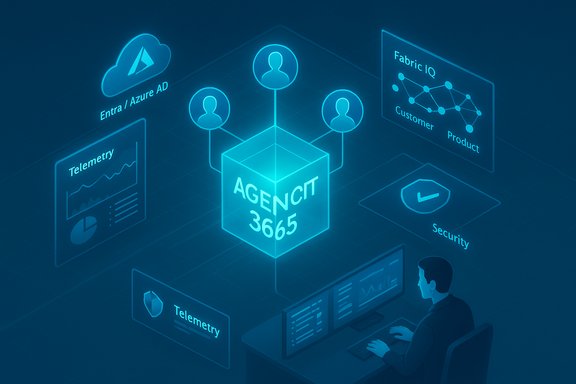
Agent 365 is Microsoft’s attempt to give enterprises a single-pane control plane for the coming sprawl of agents: a registry and operations dashboard that inventories agents, enforces identity and least-privilege access, monitors behavior in real time, and surfaces security events. The design treats agents as managed principals in an organization — discoverable, licensable and auditable — rather than ephemeral scripts. Independent reporting confirms the concept and early Frontier availability. Key capabilities Microsoft emphasizes:- Central registry for all tenant agents and lifecycle actions.
- Agent identities tied to Entra/Azure AD so agents can be included in access reviews and conditional access policies.
- Real-time telemetry, behavior monitoring and threat detection for agents.
- Integration points with Copilot Studio, Foundry, third-party vendors and open-source frameworks to deploy and govern agents.
Verification and context
Multiple outlets (Reuters, The Verge) reported on Agent 365 and emphasized its governance focus; Microsoft’s internal materials discussed an IDC projection and a need to manage billions of potential agents, which underlines the rationale for a registry-style control plane. Treat the IDC projection as vendor‑referenced industry data; it signals scale, but organizations should verify vendor claims against their own usage models.What IT teams should pilot first
- Create an internal agent catalog and owner map — treat each agent like a service with an owner and runbook.
- Pilot Agent 365 in monitor-only mode to validate telemetry, provenance and alerting workflows before enabling any autonomous execution policies.
- Integrate agent identities into existing access reviews and conditional access rules so agents are covered by the same lifecycle processes as human accounts.
Copilot upgrades and the rise of voice‑first productivity
“Hey, Copilot” and vocal commands
Microsoft has been rolling a wake‑word experience for Copilot that lets users say “Hey, Copilot” to invoke voice conversation on Windows. The feature uses an on‑device wake‑word spotter with a short audio buffer; voice processing still requires cloud connectivity for full responses. The Windows Insider blog and subsequent reporting document the opt‑in rollout and privacy safeguards (local detection, no persistent local recordings). Microsoft also announced new voice commands inside the broader Microsoft 365 Copilot product — including vocal triage of inboxes, meeting catch‑ups and one-tap phone prompts to summarize and reply to email — with staged availability across preview programs and GA timelines reported for some features later this year. Test availability often depends on membership in Microsoft’s Frontier or Insider programs.Teams Mode, facilitator agents and MCP in Teams
Teams Mode for Microsoft 365 Copilot (public preview) aims to convert one‑to‑one Copilot chats into group contexts inside Teams. Microsoft also made a facilitator meeting agent generally available to take notes and manage meeting actions. Of greater long‑term significance is MCP support in Teams channels: channel agents can now access external MCP servers to call third‑party apps and tools (Jira, Asana, Salesforce), enabling agents to find blockers or propose mitigation plans for project launches without leaving Teams. Independent reporting and Microsoft documentation confirm MCP-based integrations are entering public preview.Practical implications for knowledge workers
- Short-term productivity gains are real: meeting facilitation, automated summaries and triage reduce cognitive load.
- Voice adds accessibility and speed; the tradeoffs are battery and potential ambient-listening concerns (Microsoft’s local spotter mitigates some privacy risks).
- The real productivity delta depends on agent accuracy, context fidelity (Graph data quality) and trust models implemented by IT.
Windows 365 for Agents and the Cloud PC strategy
What Windows 365 for Agents delivers
Windows 365 for Agents provides an auditable, policy‑controlled Cloud PC runtime optimized for agent workloads. The vision is straightforward: run agent processes in scaled Cloud PCs (Windows or Linux images) that are isolated from employee endpoints, enabling centralized governance, persistent compute and compliance controls. Microsoft positions this as a preferred environment for agent vendors and ISVs as they build enterprise-grade agent products.Notable features highlighted:
- Agent Workspace sandboxing and distinct agent identities.
- Compatibility with Copilot Studio and Azure Foundry runtimes.
- Migration APIs and Reserve Cloud PCs for availability scenarios.
- Partnerships with early agent vendors testing the platform.
Verification and support
Independent coverage and Microsoft documentation confirm that Cloud PCs are being expanded to support agent-centric workloads and that Windows 365 Link and Cloud PC features (reservation, host pools, migration APIs) are being updated in line with an agent-first roadmap. However, some product names and timelines in early slide decks (for example, agent license SKU names or exact GA months) can vary between Microsoft briefings; IT teams should validate any licensing references in admin portals and official Microsoft Learn pages.When to consider Cloud PC agents
- Regulatory or compliance environments that require strict separation between automation runtime and employee devices.
- High‑volume agent workloads that benefit from centralized compute and managed scaling.
- Scenarios where audit trails and short‑lived credentials are contractual or required by policy.
Windows agent UX, MCP and developer APIs
Agent workspace and Model Context Protocol (MCP)
Microsoft is bringing the Model Context Protocol to Windows to standardize how agents discover and call “MCP servers” — whether local apps, cloud services or connectors — and introduced an Agent workspace to host agents securely on devices and Cloud PCs. Agent connectors and a dedicated agent workspace are designed to give agents a contained, auditable environment where they can act with a distinct identity and defined scopes. This is a notable attempt to reduce credential leakage and to enforce least-privilege design for agents.New Windows AI APIs
Microsoft previewed Windows AI APIs such as:- A Stable Diffusion XL (SDXL) API for high‑quality image generation,
- A Video Super‑Resolution (VSR) API to upscale low‑res streams,
- An app content search API for in‑app search experiences (private preview),
- Windows ML as a unified execution layer for CPUs, GPUs and NPUs.
Azure Copilot: agentic cloud management
Azure Copilot (limited preview) is a new agentic interface that orchestrates specialist agents across cloud lifecycle tasks: modernization, observability, resiliency, and diagnostics. It can reason about a multi-step plan and either propose actions or execute them (subject to tenant governance), produce PowerShell recipes to apply cost savings, or walk teams through migration plans. This expands Copilot from conversational assistance into an operational orchestration layer for Azure management.Azure also expanded its tools layer with new Logic Apps connectors as MCP tools, API Management integrations to publish custom MCP tools internally, and enhanced agent runtime protections for containerized and confidential compute scenarios. These platform improvements make it easier to stitch enterprise systems into an agent’s toolset.
Fabric IQ and data platform updates
What Fabric IQ aims to do
Fabric IQ is a preview workload for Microsoft Fabric intended to unify data and operational systems under a semantic model of business entities (customers, products, orders) so that agents can reason consistently across systems without heavy ETL transformations. Fabric IQ is described as a force multiplier for existing data estates — not a replacement — facilitating agent context, entity relationships and cross-system reasoning.Other Fabric updates at Ignite include:
- Mirroring for Dataverse and SAP to provide access without full ETL jobs.
- Shortcuts to SharePoint/OneDrive to bring unstructured productivity data into OneLake without copying.
- AI-powered transforms (sentiment, entity extraction, PII obfuscation) in the transformation layer.
- A preview of a dbt job integration for SQL-native dbt workflows inside Fabric.
Verification and caveats
While Fabric IQ’s conceptual goals are clear, the preview nature means enterprise teams should validate entity models and data lineage in pilot workspaces. Fabric is evolving rapidly; IT teams must test how Fabric IQ interacts with governance layers (Purview, CMK) and whether the semantic model fits their operational taxonomy. Where public documentation is still maturing, treat early performance and scale claims as subject to confirmation in your workload.Strengths: what Microsoft gets right
- Governance-first positioning. Tying agents to Entra identities and introducing a control plane acknowledges the governance, audit and compliance realities that will determine enterprise adoption. Agent 365’s registry model and telemetry surfaces are a pragmatic response to anticipated agent sprawl.
- Platform completeness. Microsoft is building across endpoints, cloud and data — Copilot Studio for authoring, Azure Foundry for runtime, Agent 365 for governance, Fabric for data context and Windows/Cloud PCs for execution — which reduces integration friction for customers already invested in the Microsoft stack.
- Interoperability focus. The Model Context Protocol and Agent2Agent patterns aim to avoid vendor silos and allow third‑party toolchains and open‑source agent frameworks to integrate. Standardizing tool access is essential to long-term composability.
- Device and privacy tradeoffs. Local wake‑word detection (“Hey, Copilot”) and on‑device spotters mitigate some privacy concerns and enable lower-latency interactions for Copilot features.
Risks and unanswered questions
- Licensing and cost model ambiguity. The emergence of agent‑specific license references and new SKU names (internal references to “A365” or “Agent 365”) raises questions about per-agent cost models, bundling and how enterprises will predictably budget agent fleets. Early reporting points to administrative flows assigning agent licenses, but precise pricing and licensing boundaries should be validated in contract discussions. Treat early pricing signals as tentative.
- Operational risk from autonomous actions. Agents with the ability to act (create tickets, send emails, change infra) increase blast radius. Microsoft’s human‑in‑the‑loop and read/suggest modes are safety valves, but organizations must update runbooks, change control and incident response to include agents. Pilot in limited, low-risk domains first.
- Data and model provenance. Agents that synthesize or act on business data must preserve lineage, classification and retention semantics. Fabric IQ and Purview integrations are promising, but enterprises must validate PII handling, retention policies and audit trails in pilots. Some Fabric features (mirroring, AI‑driven transforms) are in preview and should be tested under realistic data volumes.
- Security surface area. New connectors, MCP endpoints and agent identities multiply attack surfaces. The promise of agent telemetry and Defender/Purview integration reduces risk, but security teams will need to incorporate agent signals into SIEM/SOAR playbooks, threat modeling and supply-chain assessments for third‑party agents.
- Vendor lock-in and interoperability. Microsoft promotes MCP and open integrations, but organizations using multi-cloud or polyglot stacks should validate interoperability between Microsoft agent runtimes and non-Microsoft orchestrators. Proof-of-concept cross-vendor workflows are advised.
Actionable guidance for IT, security and partner teams
For IT and security leaders
- Treat agents as production services: add them to access reviews, incident playbooks and audit policies now.
- Start with monitor-only pilots in Agent 365 and Copilot Studio to validate telemetry, provenance and alert fidelity.
- Define policy guardrails for agent actions (read-only, suggest-only, limited-write) and require owner approvals for any autonomous execution capability.
For data and analytics teams
- Pilot Fabric IQ on a bounded entity model (customer, order) and test how mirroring and AI transforms preserve PII and lineage.
- Validate the dbt integration and build CI/CD pipelines for agent training and model updates.
For partners and ISVs
- Become a “Customer Zero” by internalizing Copilot and Agent 365 tooling to build operational experience and case studies — Microsoft recommends this path for partners to build expertise.
- Build MCP-compatible connectors and test cross‑tenant scenarios to prove multi-tenant resilience and governance.
Final assessment
Microsoft Ignite 2025 was less about single features and more about packaging an ecosystem that treats AI agents as identity-bound services with lifecycle, governance and scale. The announcements materially reduce the integration work required to bring agentic workflows into regulated enterprises: Agent 365 addresses governance/sprawl, Windows 365 for Agents gives a managed runtime, and Fabric IQ adds a semantic layer for agent reasoning. Independent reporting from outlets such as Reuters and The Verge corroborates the core product thrust and the governance-first messaging. That said, the shift introduces real operational complexity. Licensing models, cost forecasting, security playbooks and data governance must be rethought. The safe path is deliberate: pilot small, instrument everything, validate lineage and keep humans in the loop for high‑risk actions. For Microsoft customers and partners, the window to internalize these tools and define guardrails is now — the earliest adopters will shape both vendor integrations and enterprise best practices for the agent era.Conclusion
Microsoft’s Ignite 2025 set a clear course: agents will become first‑class operational entities across Windows, Microsoft 365 and Azure, with a governance and data fabric layered underneath to enable enterprise adoption. The coverage and early previews demonstrate thoughtful architecture — agent identities, MCP, Agent 365, cloud runtimes and Fabric IQ — but the business value will depend on disciplined pilots, rigorous governance and a careful cost/benefit calculus. Organizations that move now to pilot, instrument and govern agents will be best positioned to reap productivity gains while avoiding the operational pitfalls of unmanaged agent sprawl.
Source: CRN Magazine Microsoft Ignite 2025: The Biggest News In AI, Agents, Data
