

Microsoft’s MDASH agentic code scanner should not begin with your most consequential production repository. Security teams should treat the July 2026 Microsoft Security Exposure Management entry as a controlled evaluation opportunity: start with a narrowly scoped, non-critical service, compare validated findings with the scanners already in the pipeline, and expand only after governance and remediation capacity prove adequate.
That caution matters because Microsoft’s own rollout language is not yet consistent. Although MDASH has been characterized as entering public preview, Microsoft Learn currently labels the July 2026 release “private preview,” while Microsoft’s June messaging described an expanded preview for eligible organizations. Until Microsoft publishes unambiguous eligibility, enrollment, pricing, regional availability, and language support, administrators should not plan around universal tenant access.
Microsoft’s July 2026 Security Exposure Management release notes place Codename MDASH inside the Microsoft Defender portal workflow. Teams can initiate scans through Defender CLI or a GitHub connector, review findings in the portal, and use those results to prioritize code-security risks.
The operational model is clear enough. The availability model is not.
Microsoft’s May 12 announcement said MDASH was being tested by a limited group of private-preview customers. The company described it as a multi-model system orchestrating more than 100 specialized agents, intended to discover, debate, validate, and prove potential vulnerabilities rather than simply match code against static rules.
By June, Microsoft was discussing an expanded preview for eligible organizations. The July release notes now expose MDASH as a Security Exposure Management feature, but their current wording still says private preview. That conflict could reflect staged deployment, documentation lag, tenant-specific enablement, or loose use of the term preview. Microsoft has not provided enough detail to determine which explanation applies.
For IT decision-makers, the distinction affects budgeting and project timing. A genuine public preview usually implies a broadly discoverable feature with documented prerequisites, while a private or expanded preview may depend on tenant approval, account-team involvement, or capacity limits. Security leaders should verify that MDASH is actually available in their tenant before assigning engineers, changing pipeline architecture, or promising coverage to auditors.
Microsoft Security Exposure Management itself is accessed through the Defender portal and is available with qualifying licenses that include Microsoft 365 E5, Defender for Endpoint, Microsoft Defender for Cloud, and Microsoft 365 Business Premium. Microsoft has not published a separate MDASH preview price in the July release note, however, and an underlying qualifying license should not be interpreted as proof that every licensed tenant can immediately use the scanner.
The important enterprise question is what that system must inspect to achieve those results. Source code can reveal proprietary algorithms, authentication flows, internal service boundaries, undocumented protocols, hard-coded infrastructure assumptions, and historical mistakes. Even when a scanner is read-only, granting it repository access is a significant data-governance event.
Microsoft’s current MDASH material does not provide enough public detail about source-code privacy and model data handling for a production deployment decision. Teams still need concrete answers covering what code is uploaded or indexed, where processing occurs, how long artifacts are retained, whether prompts or findings are logged, which models receive repository content, and whether customer code can be used to improve any model or service.
Those questions should be resolved through the organization’s contractual and compliance channels, not inferred from the Microsoft Defender brand. A service can be integrated into a familiar security portal while still introducing a new processing path for highly sensitive intellectual property.
Repository authorization deserves equal scrutiny. A GitHub connector should not automatically inherit organization-wide visibility simply because broad access makes onboarding easier. The evaluation should use a dedicated identity, least-privilege permissions, an approved repository list, and a documented process for revoking access when the test ends.
Defender CLI offers another route, but it does not eliminate governance requirements. Security teams must still establish what content leaves the build environment, which credentials the command-line workflow uses, where results are stored, and who can retrieve them through the Defender portal.
That last condition is easy to underestimate. A deeper scanner can make security posture appear worse simply by finding more work than the engineering organization can absorb. If a pilot generates a large backlog without funding, ownership, or release capacity, the result is not risk reduction—it is a more detailed inventory of unresolved risk.
Before broad adoption, an organization needs to decide who validates an MDASH finding, who assigns it, how disputed results are handled, and what evidence is required to close it. It also needs a policy for vulnerabilities found in shared components, abandoned services, third-party code, and branches that are no longer actively maintained.
Security teams should resist creating a Defender-only queue that developers rarely visit. If MDASH findings cannot move reliably into the tools where code owners plan work, the portal risks becoming a reporting destination rather than a remediation system.
Access to the findings also needs careful handling. A validated vulnerability report may contain enough detail to guide exploitation, particularly when it identifies reachable code paths or explains why a weakness is actionable. Defender portal permissions should therefore reflect the sensitivity of the scanned repositories, rather than granting every security reader equal visibility by default.
This is where remediation capacity becomes an eligibility requirement. A team is not ready to scan its crown-jewel repositories merely because it can connect them. It is ready when it has developers available to investigate findings, security engineers capable of adjudicating difficult cases, and release processes that can deploy fixes without leaving confirmed weaknesses exposed indefinitely.
That description does not establish that MDASH is the same service as Defender for Cloud agentless code scanning. Administrators should not assume that enabling one feature activates the other, that they inspect code in the same way, or that their licensing and data-handling terms are interchangeable.
The distinction matters during procurement and control mapping. Conventional code scanning, dependency analysis, cloud posture management, and agentic vulnerability research may overlap, but they answer different questions and may create different findings. MDASH should initially be treated as an additional discovery layer whose output must be compared with existing pipeline controls—not as an immediate replacement for them.
Microsoft’s claim that MDASH can achieve greater depth and accuracy than traditional static analysis is the product proposition, not yet a customer-specific result. Each organization needs its own evidence drawn from representative code, verified findings, duplicate rates, developer effort, and remediation outcomes.
Expansion can then proceed incrementally—from one non-critical service to a small group of actively maintained repositories, and only later to business-critical code. Each step should preserve repository-level authorization and an explicit rollback path.
Microsoft still needs to clarify whether MDASH is public, private, or selectively expanded preview; which tenants qualify; how enrollment works; whether separate charges will apply; where scans are processed; which languages are supported; and how customer source code interacts with the models behind the service. Those are not minor documentation gaps for teams considering production repositories.
MDASH may ultimately uncover defects that established scanners miss, and Microsoft’s use of more than 100 specialized agents makes it one of the more ambitious additions to the Defender ecosystem. For now, the right production decision is governed expansion: prove incremental security value on low-consequence code first, then grant access to more important repositories only when Microsoft’s service terms and the organization’s own remediation machinery can support the risk.
That caution matters because Microsoft’s own rollout language is not yet consistent. Although MDASH has been characterized as entering public preview, Microsoft Learn currently labels the July 2026 release “private preview,” while Microsoft’s June messaging described an expanded preview for eligible organizations. Until Microsoft publishes unambiguous eligibility, enrollment, pricing, regional availability, and language support, administrators should not plan around universal tenant access.
 The Preview Label Is More Than Semantics
Microsoft’s July 2026 Security Exposure Management release notes place Codename MDASH inside the Microsoft Defender portal workflow. Teams can initiate scans through Defender CLI or a GitHub connector, review findings in the portal, and use those results to prioritize code-security risks.The operational model is clear enough. The availability model is not.
Microsoft’s May 12 announcement said MDASH was being tested by a limited group of private-preview customers. The company described it as a multi-model system orchestrating more than 100 specialized agents, intended to discover, debate, validate, and prove potential vulnerabilities rather than simply match code against static rules.
By June, Microsoft was discussing an expanded preview for eligible organizations. The July release notes now expose MDASH as a Security Exposure Management feature, but their current wording still says private preview. That conflict could reflect staged deployment, documentation lag, tenant-specific enablement, or loose use of the term preview. Microsoft has not provided enough detail to determine which explanation applies.
For IT decision-makers, the distinction affects budgeting and project timing. A genuine public preview usually implies a broadly discoverable feature with documented prerequisites, while a private or expanded preview may depend on tenant approval, account-team involvement, or capacity limits. Security leaders should verify that MDASH is actually available in their tenant before assigning engineers, changing pipeline architecture, or promising coverage to auditors.
Microsoft Security Exposure Management itself is accessed through the Defender portal and is available with qualifying licenses that include Microsoft 365 E5, Defender for Endpoint, Microsoft Defender for Cloud, and Microsoft 365 Business Premium. Microsoft has not published a separate MDASH preview price in the July release note, however, and an underlying qualifying license should not be interpreted as proof that every licensed tenant can immediately use the scanner.
Production Code Requires a Governance Decision
The impressive part of MDASH is its proposed depth. Microsoft says its multi-model agentic design can reason about vulnerabilities more accurately than traditional static analysis, and its earlier announcement presented the system as a coordinated pipeline rather than a single AI model issuing speculative warnings.The important enterprise question is what that system must inspect to achieve those results. Source code can reveal proprietary algorithms, authentication flows, internal service boundaries, undocumented protocols, hard-coded infrastructure assumptions, and historical mistakes. Even when a scanner is read-only, granting it repository access is a significant data-governance event.
Microsoft’s current MDASH material does not provide enough public detail about source-code privacy and model data handling for a production deployment decision. Teams still need concrete answers covering what code is uploaded or indexed, where processing occurs, how long artifacts are retained, whether prompts or findings are logged, which models receive repository content, and whether customer code can be used to improve any model or service.
Those questions should be resolved through the organization’s contractual and compliance channels, not inferred from the Microsoft Defender brand. A service can be integrated into a familiar security portal while still introducing a new processing path for highly sensitive intellectual property.
Repository authorization deserves equal scrutiny. A GitHub connector should not automatically inherit organization-wide visibility simply because broad access makes onboarding easier. The evaluation should use a dedicated identity, least-privilege permissions, an approved repository list, and a documented process for revoking access when the test ends.
Defender CLI offers another route, but it does not eliminate governance requirements. Security teams must still establish what content leaves the build environment, which credentials the command-line workflow uses, where results are stored, and who can retrieve them through the Defender portal.
A Five-Gate Pilot Keeps the Scanner Contained
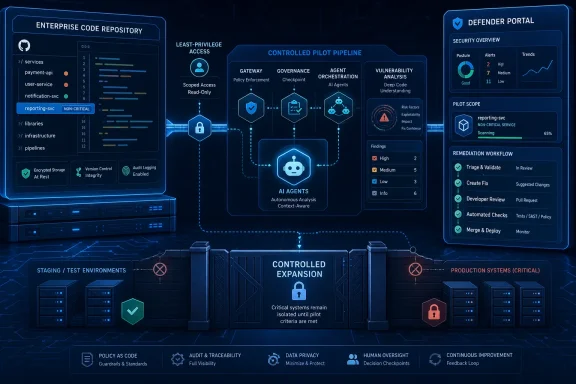
A useful MDASH evaluation should be designed as a security control test, not an AI demonstration. The following gates provide a practical adoption framework without assuming capabilities Microsoft has not documented publicly.- Select one non-critical service whose owners understand its architecture and can review findings promptly. Avoid identity systems, signing infrastructure, payment components, organization-wide libraries, and repositories containing unusually sensitive intellectual property during the first test.
- Limit the scan identity to the selected repository and only the branches required for evaluation. Do not grant blanket GitHub organization access, write permissions, or visibility into unrelated repositories unless Microsoft documents a technical requirement and the exception receives approval.
- Record the existing baseline before running MDASH. Capture the findings already produced by static application security testing, dependency scanning, secret scanning, manual review, and any other controls used by that repository so MDASH can be judged on incremental value.
- Route every MDASH result through a named triage owner and the existing development workflow. Findings should become reproducible engineering work with evidence, severity review, ownership, and closure criteria—not an isolated queue visible only to the security operations center.
- Expand scope only after the pilot demonstrates useful validated findings at a manageable review cost. A scanner that finds important defects but overwhelms developers, duplicates existing alerts, or cannot explain its conclusions is not yet ready for broader production access.
That last condition is easy to underestimate. A deeper scanner can make security posture appear worse simply by finding more work than the engineering organization can absorb. If a pilot generates a large backlog without funding, ownership, or release capacity, the result is not risk reduction—it is a more detailed inventory of unresolved risk.
Defender Visibility Does Not Complete the Developer Loop
Reviewing MDASH findings in the Microsoft Defender portal may help security teams compare code risks with wider exposure information. It does not automatically create an effective remediation process for developers working in GitHub, issue trackers, pull requests, and CI/CD systems.Before broad adoption, an organization needs to decide who validates an MDASH finding, who assigns it, how disputed results are handled, and what evidence is required to close it. It also needs a policy for vulnerabilities found in shared components, abandoned services, third-party code, and branches that are no longer actively maintained.
Security teams should resist creating a Defender-only queue that developers rarely visit. If MDASH findings cannot move reliably into the tools where code owners plan work, the portal risks becoming a reporting destination rather than a remediation system.
Access to the findings also needs careful handling. A validated vulnerability report may contain enough detail to guide exploitation, particularly when it identifies reachable code paths or explains why a weakness is actionable. Defender portal permissions should therefore reflect the sensitivity of the scanned repositories, rather than granting every security reader equal visibility by default.
This is where remediation capacity becomes an eligibility requirement. A team is not ready to scan its crown-jewel repositories merely because it can connect them. It is ready when it has developers available to investigate findings, security engineers capable of adjudicating difficult cases, and release processes that can deploy fixes without leaving confirmed weaknesses exposed indefinitely.
MDASH Should Not Be Confused With Every Other Code Scanner
Microsoft’s expanding Defender portfolio makes product boundaries important. MDASH is described as an agentic vulnerability-discovery system integrated with Microsoft Security Exposure Management, with scans initiated through Defender CLI or a GitHub connector and findings reviewed in the Defender portal.That description does not establish that MDASH is the same service as Defender for Cloud agentless code scanning. Administrators should not assume that enabling one feature activates the other, that they inspect code in the same way, or that their licensing and data-handling terms are interchangeable.
The distinction matters during procurement and control mapping. Conventional code scanning, dependency analysis, cloud posture management, and agentic vulnerability research may overlap, but they answer different questions and may create different findings. MDASH should initially be treated as an additional discovery layer whose output must be compared with existing pipeline controls—not as an immediate replacement for them.
Microsoft’s claim that MDASH can achieve greater depth and accuracy than traditional static analysis is the product proposition, not yet a customer-specific result. Each organization needs its own evidence drawn from representative code, verified findings, duplicate rates, developer effort, and remediation outcomes.
The Expansion Threshold Must Be Evidence-Based
A successful pilot should end with a written decision rather than a general impression that the technology is promising. The review should identify which findings were unique, which were already known, which were false or unverifiable, how much engineering time triage consumed, and whether access and data-handling controls met organizational requirements.Expansion can then proceed incrementally—from one non-critical service to a small group of actively maintained repositories, and only later to business-critical code. Each step should preserve repository-level authorization and an explicit rollback path.
Microsoft still needs to clarify whether MDASH is public, private, or selectively expanded preview; which tenants qualify; how enrollment works; whether separate charges will apply; where scans are processed; which languages are supported; and how customer source code interacts with the models behind the service. Those are not minor documentation gaps for teams considering production repositories.
MDASH may ultimately uncover defects that established scanners miss, and Microsoft’s use of more than 100 specialized agents makes it one of the more ambitious additions to the Defender ecosystem. For now, the right production decision is governed expansion: prove incremental security value on low-consequence code first, then grant access to more important repositories only when Microsoft’s service terms and the organization’s own remediation machinery can support the risk.
References
- Primary source: learn.microsoft.com
Release notes - Microsoft Security Exposure Management | Microsoft Learn
This page is updated frequently with the latest updates in Microsoft Security Exposure Management.learn.microsoft.com - Independent coverage: microsoft.com
Defense at AI speed: Microsoft’s new multi-model agentic security system tops leading industry benchmark | Microsoft Security Blog
Today Microsoft is announcing a major step forward in AI-powered cyber defense: a new multi-model agentic scanning harness (codenamed MDASH).www.microsoft.com - Independent coverage: news.microsoft.com
마이크로소프트, AI 기반 에이전틱 보안 시스템 ‘MDASH’ 공개 - Source Asia
 news.microsoft.com
- Independent coverage: techcommunity.microsoft.com
- Primary source: WindowsForum
Microsoft MDASH Preview Adds AI Vulnerability Scans to Defender CLI | Windows Forum
Microsoft is reportedly preparing an AI-assisted vulnerability discovery service called Project Perception, but there is no evidence that it produced the...windowsforum.com