

Microsoft has paused the general-availability rollout of two minimized meeting views for Teams, after testing Expanded view and Compact view earlier this year for meetings whose main window had been minimized. The change, disclosed in a July 7, 2026 Microsoft 365 Message Center update and spotted by Neowin, freezes what looked like one of Teams’ more plainly useful multitasking upgrades. The feature was not a grand AI reinvention, a compliance dashboard, or another admin-facing control; it was a small meeting-window idea aimed at making Teams less hostile to real work. That is precisely why the pause matters.
The unfinished feature says something larger about Microsoft Teams in 2026. Teams is now too central to business communication for even small interface experiments to be treated as harmless decoration. A minimized meeting window that keeps reactions, hand-raising, settings, and a few participant videos close at hand sounds simple, but it sits inside a product where Microsoft is already under scrutiny for workplace-presence features that critics framed as turning Teams into a “lapdog for your boss.” In that environment, even the helpful changes arrive under the shadow of governance, telemetry, privacy expectations, and the grim reality that preview features are promises only until Microsoft decides they are not.
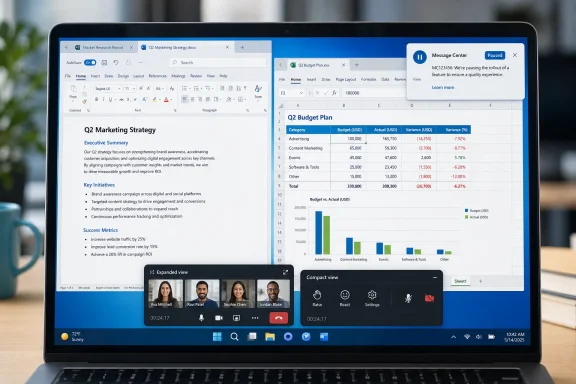
The paused Teams feature had a clean premise: when a user minimized an active meeting, Teams would not simply disappear into the taskbar or leave the user hunting for meeting controls. Instead, it would offer a small, purpose-built meeting surface with shortcuts for common actions such as raising a hand or sharing a reaction.
Microsoft had been testing two variants. Expanded view would show up to four participant videos, preserving some visual context from the meeting even when the main meeting window was out of the way. Compact view would focus more tightly on quick actions and settings, making the minimized meeting less like a mini-gallery and more like a control strip.
That distinction matters because Teams meetings often live in the margins of work. People minimize meetings to check a document, answer a chat, review a spreadsheet, respond to a ticket, compare notes, or search for the thing someone is currently discussing. In those moments, the user is still in the meeting, but Teams often forces a trade-off between staying visually present and doing the work the meeting exists to coordinate.
The minimized views were a practical answer to that problem. They did not require users to learn a new workflow or buy into a new productivity philosophy. They simply recognized that a meeting window is not always the center of the screen, even when the meeting is still central to the work.
Windows Central framed the pause as users losing out on a great feature before it shipped, and that is a fair reading. Unlike many Teams changes, this one was easy to understand without a roadmap glossary. It made multitasking less clumsy. It gave users a way to keep meeting context without surrendering the entire desktop.
Microsoft’s own Message Center update was terse: “Updated July 7, 2026: We have paused release to GA at this time. We will communicate via Message center when we are ready to proceed. Thank you for your patience.” The language is notable for what it does not say. There is no explanation of a bug, no public design concern, no admin-readiness warning, and no revised release date.
That leaves the feature in a familiar Microsoft limbo. It is not publicly dead. It is not shipping. It is not explained. For users, that distinction is mostly academic.
For years, Teams has accumulated capabilities faster than many organizations can absorb them. It is chat, meetings, calling, channels, files, apps, webinars, presence, search, policy enforcement, and increasingly an interface for Microsoft’s broader workplace strategy. Each new feature arrives with its own toggles, defaults, documentation, and expectations.
The minimized views were different because they did not ask users to expand their conception of Teams. They tried to make an existing behavior less painful. People already minimize meetings. They already need quick access to mute, reactions, hand-raising, settings, and a little visual context. Microsoft’s test appeared to meet users where they were rather than drag them toward another layer of platform ambition.
That is why the pause lands differently from a delayed enterprise admin feature. If a backend policy control slips, most users never know. If a meeting-window improvement disappears, the cost is felt in the everyday choreography of work: the second monitor shuffle, the frantic alt-tab, the awkward pause before raising a hand, the accidental loss of visual cues when the meeting is minimized.
It is also the kind of change that can make Teams feel lighter. Microsoft has spent years adding weight to Teams, much of it necessary for enterprise customers. But a minimized view is a rare example of subtractive design: less screen occupation, less window management, less friction.
The fact that such a feature can be paused without explanation is a reminder that Teams’ product surface is now governed by more than user convenience. Even small features must satisfy reliability, accessibility, privacy, enterprise control, performance, and internal release standards. That is not unreasonable. But it means the distance between “tested” and “available” is longer than the average user assumes.
Expanded view was the more visually ambitious option. By showing up to four participant videos, it would have kept a sliver of the meeting alive even when the user moved on to another task. That is useful in small meetings, interviews, teaching sessions, support calls, and leadership discussions where body language or turn-taking still matters.
Compact view was arguably the more broadly useful option. A small interface centered on quick actions and settings addresses the most common minimized-meeting problem: users want to keep working without losing access to the controls that let them participate. In a busy meeting, the ability to raise a hand or react quickly is not decorative. It is part of how remote work avoids becoming a sequence of people interrupting one another.
Together, the two views suggested Microsoft understood that minimized meetings are not one scenario. Sometimes users want a small window that still feels like a meeting. Sometimes they want the least intrusive control surface possible. Offering both would have been a sensible compromise between presence and productivity.
That may also be why the feature became harder to ship. Two views mean more design states, more edge cases, more policy implications, more accessibility testing, and more user-education burden. The difference between a small useful control and a confusing floating widget can be narrow, especially in an application already crowded with meeting options.
Still, none of that changes the user-facing loss. Teams meetings remain a place where the main window often demands more attention than the meeting itself deserves. The minimized views promised a more proportional interface. Their pause keeps the old imbalance in place.
Windows Central’s account makes the same point: preview features can change significantly before release or be canceled, and Microsoft may need to work out issues before shipping a Teams change. That is the rational product-management view. Software companies test things, discover problems, and adjust.
But Teams is not a lab toy. It is a daily operating layer for organizations that have standardized on Microsoft 365. When Microsoft previews an interface change and points customers toward a rollout window, admins and power users start forming expectations. Training teams may mention it. Help desks may prepare for it. Users who saw the feature discussed may ask when it is coming.
The minimized views were meant to start rolling out in May 2026. By July 7, 2026, the public status had shifted to a paused general-availability release. That gap is not catastrophic, but it is enough to show that the original timing did not hold.
The more important issue is the absence of a stated reason. If Microsoft had said the feature was delayed for accessibility improvements, performance tuning, admin controls, or user feedback, customers could evaluate the trade-off. Instead, the company has left observers to infer that something about the feature, its readiness, or its rollout no longer met the bar.
That lack of explanation may be normal for Message Center updates, but it is not especially satisfying. In a product as widely deployed as Teams, silence creates its own narrative. Users assume the feature broke something. Admins assume there was a governance issue. Critics assume Microsoft is still trying to reconcile fast iteration with enterprise-grade communication.
The truth may be more mundane than any of that. The minimized views may have hit a quality issue, conflicted with another meeting-interface change, or required more polish than the schedule allowed. But without a public reason, the pause becomes another example of the preview-feature bargain: customers get early visibility, but not always meaningful accountability.
May 2026 — The minimized views were meant to start rolling out.
July 7, 2026 — Microsoft updated the Microsoft 365 Message Center to say release to general availability had been paused.
That controversy is not the same story as minimized meeting views. One concerns meeting-window ergonomics; the other concerns workplace visibility and managerial oversight. But they belong to the same product environment, and that environment shapes how every Teams feature is received.
Teams is no longer just where work conversations happen. It is increasingly where work status is inferred, displayed, governed, and acted upon. Presence indicators, meeting behavior, location signals, calendar context, and admin policies all converge inside the same communication platform. That makes convenience features harder to separate from surveillance concerns, even when the feature itself is benign.
Microsoft reportedly responded to the workplace-location backlash by delaying that rollout, changing the name of the option, and adding better privacy controls. That sequence is revealing. It shows that Teams features can move through public controversy, pause, rebranding, and privacy redesign before reaching customers in a more acceptable form.
Windows Central suggested the minimized views may follow a similar journey: they may return with altered controls, a new name, or in the same form at a later date. That is speculation grounded in Microsoft’s recent Teams behavior, not a confirmed roadmap. But it is plausible because Microsoft has already demonstrated a willingness to slow Teams features when the surrounding design, naming, or privacy posture becomes sensitive.
The difference is that the minimized views do not obviously raise the same privacy stakes. They are primarily about meeting usability. Yet even usability features can intersect with policy. A minimized meeting surface might affect what content remains visible, how participant video appears, how controls behave across displays, or how users understand their meeting state while multitasking.
In enterprise software, “small” rarely means simple. A floating or minimized meeting widget has to behave correctly on locked-down corporate devices, multi-monitor setups, remote desktops, virtualized environments, and systems using assistive technologies. It has to respect meeting policies and user expectations. It has to avoid creating accidental exposure of participant video or controls in contexts where the main window would otherwise be hidden.
Microsoft has not said any of those issues caused the pause. But the broader Teams context makes them worth considering. The company is trying to move fast in a product where the cost of being wrong is no longer just annoyance. It can be reputational.
That sense can be useful. Microsoft wants customers to know what is coming. Admins need advance warning. Journalists and IT communities help translate vague product language into practical expectations. But visibility is not the same as commitment.
The minimized views demonstrate the distinction. Microsoft tested them earlier this year. They had names. They had differentiated behavior. They were expected to begin rolling out in May 2026. Then Microsoft paused the release to general availability.
From a software-development perspective, that is normal. From a user-expectation perspective, it feels like a feature being taken away before people had the chance to use it. Both interpretations can be true.
The problem is especially sharp for Teams because Microsoft ships changes at high volume. A monthly blog post of changes signals momentum, but it also trains customers to expect constant churn. When useful items vanish or stall, users become more skeptical of the whole pipeline.
For admins, the right posture is cautious preparation rather than eager adoption. Note the feature, understand the user benefit, consider policy implications, but avoid training materials or support workflows that assume availability. In Teams, a feature is real when it reaches the tenant in a supported state, not when it appears in a preview note.
That caution is not cynicism. It is operational hygiene. Microsoft’s cloud cadence rewards organizations that can adapt quickly, but it punishes those that treat every announced improvement as a fixed deployment event.
A meeting window is rarely the only thing happening on a user’s desktop. During a call, people review slides, take notes, update documents, answer side-channel questions, check calendars, copy links, approve requests, and search for files. The meeting competes with the work it generates.
When the meeting is full-size, Teams provides context and controls but consumes space. When it is minimized, the user gains space but loses immediacy. The paused feature was an attempt to soften that binary choice.
Expanded view would have helped users who still needed to see faces. Compact view would have helped users who mostly needed controls. Both recognized that remote meetings are not always immersive events; they are often background coordination layers.
That is why this pause feels less like a missed novelty and more like a missed correction. Teams has long been criticized for feeling heavier than it needs to be. A good minimized view would make the application feel more respectful of the rest of the desktop.
It would also acknowledge the reality of single-screen users. Not everyone has a dual-monitor setup. On laptops, especially, meeting windows can dominate the workspace. A minimized control surface could make Teams meetings more manageable for people working on smaller screens, in travel environments, or on shared workstations.
Microsoft has not said the feature is gone. But delays have a cost even when the eventual outcome is positive. Every month without this kind of improvement is another month in which users rely on awkward window management and inconsistent habits.
The first concern is user confusion. If Teams offers multiple minimized states, users need to understand what is still active. Are they muted? Is video on? Are reactions available? Can others still see them? A compact interface must make meeting state unmistakable, because ambiguity in meetings causes real workplace friction.
The second concern is privacy by accident. A minimized window showing up to four participant videos could be useful, but it also means meeting visuals may remain visible in a smaller, perhaps less expected location on the desktop. In shared spaces, screen sharing, support sessions, or recordings of a desktop, that could matter. Again, Microsoft has not said this was a cause of the pause, but it is the kind of issue enterprise software teams must test.
The third concern is policy consistency. Teams meetings can be governed by organizational controls. A minimized interface cannot become a loophole or a confusing exception. If an admin disables or constrains certain meeting capabilities, the minimized view has to reflect that cleanly.
The fourth concern is support burden. When a user says “my Teams meeting is minimized,” the help desk needs to know what interface the user is seeing. Two minimized views may be powerful, but they also create more permutations. Expanded view, Compact view, full meeting window, pop-out behavior, operating system window controls, and device-specific quirks all become part of the troubleshooting map.
None of these concerns mean Microsoft should abandon the feature. They mean Microsoft has reason to be careful. The best version of minimized Teams views would not merely be attractive; it would be boringly reliable.
That is the enterprise bar. A feature that works beautifully for 90 percent of users and confuses or exposes information for the remaining 10 percent can become a support problem at Microsoft 365 scale. Teams’ size magnifies every edge case.
That matters because Teams is not a niche app used by enthusiasts who enjoy discovering new interface behavior. It is a default workplace tool. Many users do not want to think about Teams at all; they want it to get out of the way.
The minimized views were compelling because they fit that desire. They were not asking users to spend more time in Teams. They were helping users spend less screen space on Teams while remaining present enough to participate. That is the kind of improvement a mature communication platform should prioritize.
Instead, the broader Teams conversation has been pulled toward features that raise questions about managerial visibility and workplace monitoring. The Wi-Fi-connected workplace-location feature is the obvious example from the source material. Microsoft changed its rollout, name, and privacy controls after criticism, which suggests the company understands the sensitivity.
But the contrast is damaging. The feature users might have welcomed is paused. The feature critics framed as boss-friendly surveillance became one of the most talked-about Teams additions of the year. That is not a great narrative for Microsoft, even if the product reality is more nuanced.
To be fair, Microsoft is not uniquely guilty of this. Every major workplace platform is wrestling with the same tension: collaboration tools are also management tools, and the data exhaust of digital work is tempting to organizations. The difference is that Teams sits inside Microsoft 365, where identity, calendar, devices, files, meetings, and administration already converge.
That convergence gives Microsoft enormous power to streamline work. It also means every Teams feature is judged against a question the company cannot avoid: is this helping the worker, helping the organization, or helping the organization watch the worker?
The minimized views had a refreshingly worker-centered answer. Their pause leaves a gap.
There is no public explanation from Microsoft for why the development was paused. That is the key boundary. Anything beyond that is interpretation.
Windows Central’s interpretation is user-focused: the feature looked useful, it would have made multitasking easier, and it may still return later with altered controls, a new name, or in the same form. That is a reasonable reading because the feature’s purpose was visible and practical.
A stricter enterprise reading is more cautious. Microsoft does not pause general availability for no reason, but the reason could be anything from a small quality issue to a larger design reconsideration. Without details, admins should not infer that the feature is unsafe, canceled, or controversial. They should infer only that it is not ready to ship.
The most important disagreement is therefore not between outlets. It is between expectation and reality. The expected May 2026 rollout suggested a near-term release. The July 7 Message Center update reset that expectation without replacing it.
That is frustrating, but not unusual. Microsoft 365 is full of features that move through preview, staged rollout, pause, revision, and eventual delivery. The difference is that Teams features are highly visible because meetings are highly visible. When something changes there, users notice.
The press also notices because Teams has become a proxy for Microsoft’s workplace priorities. A delayed minimized view is not just a delayed minimized view; it becomes evidence in a larger argument about whether Microsoft is making Teams more humane or more managerial.
Expanded view should be visually useful without becoming a second full meeting window. Showing up to four participant videos is enough to preserve context, but the interface should not sprawl into another attention sink. The whole point is to let the user work elsewhere.
Compact view should be brutally clear. If it focuses on quick actions and settings, those controls need to be obvious, accessible, and predictable. A compact meeting surface that hides critical state or changes behavior between meetings would defeat its own purpose.
Both views should make privacy state unmistakable. Users should not have to guess whether video, microphone, or presence-related signals are active. In a product already facing sensitivity around workplace-location visibility, Microsoft cannot afford ambiguity in meeting-state design.
Microsoft should also explain the feature better when it returns. Not with marketing excess, but with plain language for users and admins: what the minimized views do, what they do not do, whether admins can control them, and how they behave with existing meeting policies.
The company should be especially careful with naming. Expanded view and Compact view are clear enough, but Microsoft’s recent decision to rename the controversial workplace-location option shows that naming can become part of the trust problem. A name should describe the user benefit, not bury the behavior.
Most of all, Microsoft should not let the feature become another overloaded Teams widget. The minimized meeting view should be a small act of restraint. Teams has enough places for complexity to live.
The trust impact is larger. Microsoft wants customers to follow its roadmap, read its Message Center updates, and prepare for continuous change. But continuous change only works when customers can distinguish between a likely release, a tentative experiment, and a feature that may vanish into the pipeline.
This is especially important for communication tools because users form habits quickly. If a new meeting interface is coming, people want to know whether to expect it. If it is delayed, they want to know whether the delay is short, strategic, or indefinite.
Microsoft’s Message Center language does the minimum. It tells customers the release is paused and that Microsoft will communicate later. That may be sufficient for compliance with its own communication process, but it does not do much to preserve confidence.
The company does not need to disclose every internal bug or design dispute. But it could be more specific about the category of delay. Is this about quality? User feedback? Accessibility? Admin controls? Rollout sequencing? Even a broad reason would help customers calibrate their expectations.
Absent that, the pause reinforces the sense that Teams changes arrive from a black box. Some ship. Some slip. Some are renamed after criticism. Some are omitted from roundups. Users experience the product as a stream of decisions made elsewhere.
That is not ideal for a platform that mediates so much daily work. Trust in Teams is not only about uptime and security. It is also about whether users and admins believe Microsoft understands the rhythms of their day.
That means the desktop interface is no longer a fixed artifact installed once and left alone. It is a moving target shaped by service-side rollout, tenant configuration, preview testing, admin policy, and Microsoft’s shifting priorities. The minimized views fit that model perfectly: visible enough to excite users, controlled enough to disappear before general availability.
For individual users, the lesson is not to ignore upcoming features. It is to treat them as provisional. If Microsoft says something is being tested or staged, assume it may change. If a feature would improve your workflow, hope for it, but do not depend on it until it lands.
For power users, the pause is a reminder to keep workflow hacks flexible. Window-management tools, second-screen habits, meeting notes, and shortcut routines should not assume a specific Teams interface unless that interface is already present and stable in your environment.
For organizations, the lesson is sharper. Microsoft’s communication cadence is necessary but not sufficient. Admins need their own internal process for translating Microsoft 365 updates into user-facing guidance. Not every roadmap item deserves an announcement. Not every preview deserves training. Not every delay deserves alarm.
That kind of filtering is now part of the job. Microsoft ships too quickly, and Teams matters too much, for organizations to forward every upcoming change directly to users without context.
But there is also a danger in underreading it. A paused Teams feature is a signal about what Microsoft can and cannot confidently ship inside one of its most important workplace products. When the delayed feature is this obviously useful, the signal becomes harder to ignore.
The best outcome is simple: Microsoft finishes the work, explains the delay in broad terms, and ships minimized meeting views that are stable, accessible, privacy-clear, and easy to understand. If the controls need to change, change them. If the name needs to change, rename it. If the release needs more time, say so plainly.
What Microsoft should avoid is letting a user-centered improvement disappear while more controversial workplace-management capabilities define the Teams conversation. The company does not need every Teams release to be dramatic. It needs more releases that make the product feel less like infrastructure and more like a tool.
The minimized views were promising because they acknowledged that users do not live inside meetings; they move through them while doing other work. A communication platform should support that reality. Teams often behaves as if the meeting is the main event. In many workplaces, the meeting is just one window among many.
The unfinished feature says something larger about Microsoft Teams in 2026. Teams is now too central to business communication for even small interface experiments to be treated as harmless decoration. A minimized meeting window that keeps reactions, hand-raising, settings, and a few participant videos close at hand sounds simple, but it sits inside a product where Microsoft is already under scrutiny for workplace-presence features that critics framed as turning Teams into a “lapdog for your boss.” In that environment, even the helpful changes arrive under the shadow of governance, telemetry, privacy expectations, and the grim reality that preview features are promises only until Microsoft decides they are not.
 Microsoft Pauses the Kind of Teams Feature Users Actually Notice
The paused Teams feature had a clean premise: when a user minimized an active meeting, Teams would not simply disappear into the taskbar or leave the user hunting for meeting controls. Instead, it would offer a small, purpose-built meeting surface with shortcuts for common actions such as raising a hand or sharing a reaction.Microsoft had been testing two variants. Expanded view would show up to four participant videos, preserving some visual context from the meeting even when the main meeting window was out of the way. Compact view would focus more tightly on quick actions and settings, making the minimized meeting less like a mini-gallery and more like a control strip.
That distinction matters because Teams meetings often live in the margins of work. People minimize meetings to check a document, answer a chat, review a spreadsheet, respond to a ticket, compare notes, or search for the thing someone is currently discussing. In those moments, the user is still in the meeting, but Teams often forces a trade-off between staying visually present and doing the work the meeting exists to coordinate.
The minimized views were a practical answer to that problem. They did not require users to learn a new workflow or buy into a new productivity philosophy. They simply recognized that a meeting window is not always the center of the screen, even when the meeting is still central to the work.
Windows Central framed the pause as users losing out on a great feature before it shipped, and that is a fair reading. Unlike many Teams changes, this one was easy to understand without a roadmap glossary. It made multitasking less clumsy. It gave users a way to keep meeting context without surrendering the entire desktop.
Microsoft’s own Message Center update was terse: “Updated July 7, 2026: We have paused release to GA at this time. We will communicate via Message center when we are ready to proceed. Thank you for your patience.” The language is notable for what it does not say. There is no explanation of a bug, no public design concern, no admin-readiness warning, and no revised release date.
That leaves the feature in a familiar Microsoft limbo. It is not publicly dead. It is not shipping. It is not explained. For users, that distinction is mostly academic.
A Small Window Exposes a Big Teams Problem
The irony is that minimized meeting views are the kind of change Teams badly needs. Teams has become a communication platform with so many moving parts that Microsoft has to collect its changes into a monthly blog post. That cadence is impressive from a product-delivery perspective, but exhausting from a user-experience perspective.For years, Teams has accumulated capabilities faster than many organizations can absorb them. It is chat, meetings, calling, channels, files, apps, webinars, presence, search, policy enforcement, and increasingly an interface for Microsoft’s broader workplace strategy. Each new feature arrives with its own toggles, defaults, documentation, and expectations.
The minimized views were different because they did not ask users to expand their conception of Teams. They tried to make an existing behavior less painful. People already minimize meetings. They already need quick access to mute, reactions, hand-raising, settings, and a little visual context. Microsoft’s test appeared to meet users where they were rather than drag them toward another layer of platform ambition.
That is why the pause lands differently from a delayed enterprise admin feature. If a backend policy control slips, most users never know. If a meeting-window improvement disappears, the cost is felt in the everyday choreography of work: the second monitor shuffle, the frantic alt-tab, the awkward pause before raising a hand, the accidental loss of visual cues when the meeting is minimized.
It is also the kind of change that can make Teams feel lighter. Microsoft has spent years adding weight to Teams, much of it necessary for enterprise customers. But a minimized view is a rare example of subtractive design: less screen occupation, less window management, less friction.
The fact that such a feature can be paused without explanation is a reminder that Teams’ product surface is now governed by more than user convenience. Even small features must satisfy reliability, accessibility, privacy, enterprise control, performance, and internal release standards. That is not unreasonable. But it means the distance between “tested” and “available” is longer than the average user assumes.
Expanded View and Compact View Solved Different Meeting Problems
The two minimized views were not redundant skins. They represented two different theories of what a minimized meeting should be.| Minimized view | Main purpose | Meeting content shown | Control emphasis | Best fit |
|---|---|---|---|---|
| Expanded view | Preserve meeting context while minimized | Up to four participant videos | Shortcuts plus visible participants | Users who still need visual cues while multitasking |
| Compact view | Keep meeting actions close without taking space | Focused on quick actions and settings | Quick actions and settings | Users who want minimal screen use while staying in control |
Compact view was arguably the more broadly useful option. A small interface centered on quick actions and settings addresses the most common minimized-meeting problem: users want to keep working without losing access to the controls that let them participate. In a busy meeting, the ability to raise a hand or react quickly is not decorative. It is part of how remote work avoids becoming a sequence of people interrupting one another.
Together, the two views suggested Microsoft understood that minimized meetings are not one scenario. Sometimes users want a small window that still feels like a meeting. Sometimes they want the least intrusive control surface possible. Offering both would have been a sensible compromise between presence and productivity.
That may also be why the feature became harder to ship. Two views mean more design states, more edge cases, more policy implications, more accessibility testing, and more user-education burden. The difference between a small useful control and a confusing floating widget can be narrow, especially in an application already crowded with meeting options.
Still, none of that changes the user-facing loss. Teams meetings remain a place where the main window often demands more attention than the meeting itself deserves. The minimized views promised a more proportional interface. Their pause keeps the old imbalance in place.
The Message Center Says “Paused,” Not “Canceled” — But That Still Matters
Microsoft’s wording is careful. The release to general availability has been paused “at this time,” and Microsoft says it will communicate through Message Center when it is ready to proceed. That phrasing leaves room for the feature to return unchanged, return redesigned, return renamed, or quietly remain in the pipeline for an extended period.Windows Central’s account makes the same point: preview features can change significantly before release or be canceled, and Microsoft may need to work out issues before shipping a Teams change. That is the rational product-management view. Software companies test things, discover problems, and adjust.
But Teams is not a lab toy. It is a daily operating layer for organizations that have standardized on Microsoft 365. When Microsoft previews an interface change and points customers toward a rollout window, admins and power users start forming expectations. Training teams may mention it. Help desks may prepare for it. Users who saw the feature discussed may ask when it is coming.
The minimized views were meant to start rolling out in May 2026. By July 7, 2026, the public status had shifted to a paused general-availability release. That gap is not catastrophic, but it is enough to show that the original timing did not hold.
The more important issue is the absence of a stated reason. If Microsoft had said the feature was delayed for accessibility improvements, performance tuning, admin controls, or user feedback, customers could evaluate the trade-off. Instead, the company has left observers to infer that something about the feature, its readiness, or its rollout no longer met the bar.
That lack of explanation may be normal for Message Center updates, but it is not especially satisfying. In a product as widely deployed as Teams, silence creates its own narrative. Users assume the feature broke something. Admins assume there was a governance issue. Critics assume Microsoft is still trying to reconcile fast iteration with enterprise-grade communication.
The truth may be more mundane than any of that. The minimized views may have hit a quality issue, conflicted with another meeting-interface change, or required more polish than the schedule allowed. But without a public reason, the pause becomes another example of the preview-feature bargain: customers get early visibility, but not always meaningful accountability.
Timeline
Earlier this year — Microsoft began testing two minimized views in Teams: Expanded view and Compact view.May 2026 — The minimized views were meant to start rolling out.
July 7, 2026 — Microsoft updated the Microsoft 365 Message Center to say release to general availability had been paused.
The Shadow of the Workplace-Location Controversy
The pause also arrives in a Teams year already defined by a more controversial feature: workplace location visibility tied to Wi-Fi networks at work. According to the source coverage, Teams now has a feature that lets a boss see where a user is if that user is connected to Wi-Fi networks at work. That feature drew criticism sharp enough that Microsoft was accused of making Teams a “lapdog for your boss.”That controversy is not the same story as minimized meeting views. One concerns meeting-window ergonomics; the other concerns workplace visibility and managerial oversight. But they belong to the same product environment, and that environment shapes how every Teams feature is received.
Teams is no longer just where work conversations happen. It is increasingly where work status is inferred, displayed, governed, and acted upon. Presence indicators, meeting behavior, location signals, calendar context, and admin policies all converge inside the same communication platform. That makes convenience features harder to separate from surveillance concerns, even when the feature itself is benign.
Microsoft reportedly responded to the workplace-location backlash by delaying that rollout, changing the name of the option, and adding better privacy controls. That sequence is revealing. It shows that Teams features can move through public controversy, pause, rebranding, and privacy redesign before reaching customers in a more acceptable form.
Windows Central suggested the minimized views may follow a similar journey: they may return with altered controls, a new name, or in the same form at a later date. That is speculation grounded in Microsoft’s recent Teams behavior, not a confirmed roadmap. But it is plausible because Microsoft has already demonstrated a willingness to slow Teams features when the surrounding design, naming, or privacy posture becomes sensitive.
The difference is that the minimized views do not obviously raise the same privacy stakes. They are primarily about meeting usability. Yet even usability features can intersect with policy. A minimized meeting surface might affect what content remains visible, how participant video appears, how controls behave across displays, or how users understand their meeting state while multitasking.
In enterprise software, “small” rarely means simple. A floating or minimized meeting widget has to behave correctly on locked-down corporate devices, multi-monitor setups, remote desktops, virtualized environments, and systems using assistive technologies. It has to respect meeting policies and user expectations. It has to avoid creating accidental exposure of participant video or controls in contexts where the main window would otherwise be hidden.
Microsoft has not said any of those issues caused the pause. But the broader Teams context makes them worth considering. The company is trying to move fast in a product where the cost of being wrong is no longer just annoyance. It can be reputational.
Preview Features Are Not Product Promises
The most practical lesson for Windows users and IT departments is blunt: do not build plans around Teams preview features until Microsoft actually ships them. That sounds obvious, but it conflicts with how modern Microsoft 365 communication works. Roadmap items, Message Center posts, preview screenshots, and coverage by outlets such as Windows Central and Neowin all create a sense of inevitability.That sense can be useful. Microsoft wants customers to know what is coming. Admins need advance warning. Journalists and IT communities help translate vague product language into practical expectations. But visibility is not the same as commitment.
The minimized views demonstrate the distinction. Microsoft tested them earlier this year. They had names. They had differentiated behavior. They were expected to begin rolling out in May 2026. Then Microsoft paused the release to general availability.
From a software-development perspective, that is normal. From a user-expectation perspective, it feels like a feature being taken away before people had the chance to use it. Both interpretations can be true.
The problem is especially sharp for Teams because Microsoft ships changes at high volume. A monthly blog post of changes signals momentum, but it also trains customers to expect constant churn. When useful items vanish or stall, users become more skeptical of the whole pipeline.
For admins, the right posture is cautious preparation rather than eager adoption. Note the feature, understand the user benefit, consider policy implications, but avoid training materials or support workflows that assume availability. In Teams, a feature is real when it reaches the tenant in a supported state, not when it appears in a preview note.
That caution is not cynicism. It is operational hygiene. Microsoft’s cloud cadence rewards organizations that can adapt quickly, but it punishes those that treat every announced improvement as a fixed deployment event.
Why This Particular Delay Will Frustrate Users
Some delayed features are abstract. This one is not. Anyone who has spent a day in Teams meetings understands the problem the minimized views were trying to solve.A meeting window is rarely the only thing happening on a user’s desktop. During a call, people review slides, take notes, update documents, answer side-channel questions, check calendars, copy links, approve requests, and search for files. The meeting competes with the work it generates.
When the meeting is full-size, Teams provides context and controls but consumes space. When it is minimized, the user gains space but loses immediacy. The paused feature was an attempt to soften that binary choice.
Expanded view would have helped users who still needed to see faces. Compact view would have helped users who mostly needed controls. Both recognized that remote meetings are not always immersive events; they are often background coordination layers.
That is why this pause feels less like a missed novelty and more like a missed correction. Teams has long been criticized for feeling heavier than it needs to be. A good minimized view would make the application feel more respectful of the rest of the desktop.
It would also acknowledge the reality of single-screen users. Not everyone has a dual-monitor setup. On laptops, especially, meeting windows can dominate the workspace. A minimized control surface could make Teams meetings more manageable for people working on smaller screens, in travel environments, or on shared workstations.
Microsoft has not said the feature is gone. But delays have a cost even when the eventual outcome is positive. Every month without this kind of improvement is another month in which users rely on awkward window management and inconsistent habits.
Where Enterprise IT Sees Risk Instead of Convenience
For IT departments, a minimized meeting view is not only a user-experience feature. It is another surface that must behave predictably across policies, devices, and support scenarios.The first concern is user confusion. If Teams offers multiple minimized states, users need to understand what is still active. Are they muted? Is video on? Are reactions available? Can others still see them? A compact interface must make meeting state unmistakable, because ambiguity in meetings causes real workplace friction.
The second concern is privacy by accident. A minimized window showing up to four participant videos could be useful, but it also means meeting visuals may remain visible in a smaller, perhaps less expected location on the desktop. In shared spaces, screen sharing, support sessions, or recordings of a desktop, that could matter. Again, Microsoft has not said this was a cause of the pause, but it is the kind of issue enterprise software teams must test.
The third concern is policy consistency. Teams meetings can be governed by organizational controls. A minimized interface cannot become a loophole or a confusing exception. If an admin disables or constrains certain meeting capabilities, the minimized view has to reflect that cleanly.
The fourth concern is support burden. When a user says “my Teams meeting is minimized,” the help desk needs to know what interface the user is seeing. Two minimized views may be powerful, but they also create more permutations. Expanded view, Compact view, full meeting window, pop-out behavior, operating system window controls, and device-specific quirks all become part of the troubleshooting map.
None of these concerns mean Microsoft should abandon the feature. They mean Microsoft has reason to be careful. The best version of minimized Teams views would not merely be attractive; it would be boringly reliable.
That is the enterprise bar. A feature that works beautifully for 90 percent of users and confuses or exposes information for the remaining 10 percent can become a support problem at Microsoft 365 scale. Teams’ size magnifies every edge case.
Action checklist for admins
- Treat the minimized Teams views as paused, not scheduled, until Microsoft posts a new Message Center update.
- Avoid promising Expanded view or Compact view in user training materials until general availability resumes.
- Watch for changes to the feature name, controls, or release timing if Microsoft reintroduces it.
- Prepare help-desk language that explains the difference between tested Teams features and shipped Teams features.
- Review meeting-window and privacy expectations with users, especially in organizations sensitive to workplace visibility and screen exposure.
Microsoft’s Teams Cadence Is Starting to Work Against It
Microsoft’s monthly Teams-change rhythm is a double-edged sword. On one hand, it gives customers a regular accounting of what is new. On the other, it reinforces the sense that Teams is always changing, always being tuned, and never quite stable.That matters because Teams is not a niche app used by enthusiasts who enjoy discovering new interface behavior. It is a default workplace tool. Many users do not want to think about Teams at all; they want it to get out of the way.
The minimized views were compelling because they fit that desire. They were not asking users to spend more time in Teams. They were helping users spend less screen space on Teams while remaining present enough to participate. That is the kind of improvement a mature communication platform should prioritize.
Instead, the broader Teams conversation has been pulled toward features that raise questions about managerial visibility and workplace monitoring. The Wi-Fi-connected workplace-location feature is the obvious example from the source material. Microsoft changed its rollout, name, and privacy controls after criticism, which suggests the company understands the sensitivity.
But the contrast is damaging. The feature users might have welcomed is paused. The feature critics framed as boss-friendly surveillance became one of the most talked-about Teams additions of the year. That is not a great narrative for Microsoft, even if the product reality is more nuanced.
To be fair, Microsoft is not uniquely guilty of this. Every major workplace platform is wrestling with the same tension: collaboration tools are also management tools, and the data exhaust of digital work is tempting to organizations. The difference is that Teams sits inside Microsoft 365, where identity, calendar, devices, files, meetings, and administration already converge.
That convergence gives Microsoft enormous power to streamline work. It also means every Teams feature is judged against a question the company cannot avoid: is this helping the worker, helping the organization, or helping the organization watch the worker?
The minimized views had a refreshingly worker-centered answer. Their pause leaves a gap.
The Reporting Shows Agreement on the Facts, Not the Reason
The public record, as reflected in the source material, is straightforward. Windows Central reported that Microsoft began testing the two minimized views earlier this year and that development has been paused. Neowin spotted the paused status. Microsoft’s Message Center update dated July 7, 2026 said the release to general availability had been paused and that Microsoft would communicate when ready to proceed.There is no public explanation from Microsoft for why the development was paused. That is the key boundary. Anything beyond that is interpretation.
Windows Central’s interpretation is user-focused: the feature looked useful, it would have made multitasking easier, and it may still return later with altered controls, a new name, or in the same form. That is a reasonable reading because the feature’s purpose was visible and practical.
A stricter enterprise reading is more cautious. Microsoft does not pause general availability for no reason, but the reason could be anything from a small quality issue to a larger design reconsideration. Without details, admins should not infer that the feature is unsafe, canceled, or controversial. They should infer only that it is not ready to ship.
The most important disagreement is therefore not between outlets. It is between expectation and reality. The expected May 2026 rollout suggested a near-term release. The July 7 Message Center update reset that expectation without replacing it.
That is frustrating, but not unusual. Microsoft 365 is full of features that move through preview, staged rollout, pause, revision, and eventual delivery. The difference is that Teams features are highly visible because meetings are highly visible. When something changes there, users notice.
The press also notices because Teams has become a proxy for Microsoft’s workplace priorities. A delayed minimized view is not just a delayed minimized view; it becomes evidence in a larger argument about whether Microsoft is making Teams more humane or more managerial.
What Microsoft Should Fix Before Bringing It Back
If Microsoft does bring Expanded view and Compact view back, the company should resist the urge to overcomplicate them. The appeal of the feature is its simplicity. A minimized meeting should answer three questions instantly: am I still connected, what is my current participation state, and what can I do quickly?Expanded view should be visually useful without becoming a second full meeting window. Showing up to four participant videos is enough to preserve context, but the interface should not sprawl into another attention sink. The whole point is to let the user work elsewhere.
Compact view should be brutally clear. If it focuses on quick actions and settings, those controls need to be obvious, accessible, and predictable. A compact meeting surface that hides critical state or changes behavior between meetings would defeat its own purpose.
Both views should make privacy state unmistakable. Users should not have to guess whether video, microphone, or presence-related signals are active. In a product already facing sensitivity around workplace-location visibility, Microsoft cannot afford ambiguity in meeting-state design.
Microsoft should also explain the feature better when it returns. Not with marketing excess, but with plain language for users and admins: what the minimized views do, what they do not do, whether admins can control them, and how they behave with existing meeting policies.
The company should be especially careful with naming. Expanded view and Compact view are clear enough, but Microsoft’s recent decision to rename the controversial workplace-location option shows that naming can become part of the trust problem. A name should describe the user benefit, not bury the behavior.
Most of all, Microsoft should not let the feature become another overloaded Teams widget. The minimized meeting view should be a small act of restraint. Teams has enough places for complexity to live.
The Real Cost Is Trust in the Roadmap
The practical impact of this pause is modest today. Users do not lose a feature they already depended on in general availability. Admins do not have to roll back a deployment. Microsoft has not announced cancellation.The trust impact is larger. Microsoft wants customers to follow its roadmap, read its Message Center updates, and prepare for continuous change. But continuous change only works when customers can distinguish between a likely release, a tentative experiment, and a feature that may vanish into the pipeline.
This is especially important for communication tools because users form habits quickly. If a new meeting interface is coming, people want to know whether to expect it. If it is delayed, they want to know whether the delay is short, strategic, or indefinite.
Microsoft’s Message Center language does the minimum. It tells customers the release is paused and that Microsoft will communicate later. That may be sufficient for compliance with its own communication process, but it does not do much to preserve confidence.
The company does not need to disclose every internal bug or design dispute. But it could be more specific about the category of delay. Is this about quality? User feedback? Accessibility? Admin controls? Rollout sequencing? Even a broad reason would help customers calibrate their expectations.
Absent that, the pause reinforces the sense that Teams changes arrive from a black box. Some ship. Some slip. Some are renamed after criticism. Some are omitted from roundups. Users experience the product as a stream of decisions made elsewhere.
That is not ideal for a platform that mediates so much daily work. Trust in Teams is not only about uptime and security. It is also about whether users and admins believe Microsoft understands the rhythms of their day.
For Windows Users, This Is Another Lesson in Cloud-Era Patience
Windows users have grown used to the idea that the operating system changes underneath them. Microsoft 365 extends that feeling into the applications where work happens. Teams, in particular, is a cloud-era product wearing the clothes of a desktop app.That means the desktop interface is no longer a fixed artifact installed once and left alone. It is a moving target shaped by service-side rollout, tenant configuration, preview testing, admin policy, and Microsoft’s shifting priorities. The minimized views fit that model perfectly: visible enough to excite users, controlled enough to disappear before general availability.
For individual users, the lesson is not to ignore upcoming features. It is to treat them as provisional. If Microsoft says something is being tested or staged, assume it may change. If a feature would improve your workflow, hope for it, but do not depend on it until it lands.
For power users, the pause is a reminder to keep workflow hacks flexible. Window-management tools, second-screen habits, meeting notes, and shortcut routines should not assume a specific Teams interface unless that interface is already present and stable in your environment.
For organizations, the lesson is sharper. Microsoft’s communication cadence is necessary but not sufficient. Admins need their own internal process for translating Microsoft 365 updates into user-facing guidance. Not every roadmap item deserves an announcement. Not every preview deserves training. Not every delay deserves alarm.
That kind of filtering is now part of the job. Microsoft ships too quickly, and Teams matters too much, for organizations to forward every upcoming change directly to users without context.
The Useful Feature Is Still the One Microsoft Should Ship
There is a danger in overreading a pause. Microsoft has not said Expanded view and Compact view are dead. It has not said the minimized meeting idea failed. It has not said the feature was pulled for privacy reasons, technical reasons, or user-feedback reasons.But there is also a danger in underreading it. A paused Teams feature is a signal about what Microsoft can and cannot confidently ship inside one of its most important workplace products. When the delayed feature is this obviously useful, the signal becomes harder to ignore.
The best outcome is simple: Microsoft finishes the work, explains the delay in broad terms, and ships minimized meeting views that are stable, accessible, privacy-clear, and easy to understand. If the controls need to change, change them. If the name needs to change, rename it. If the release needs more time, say so plainly.
What Microsoft should avoid is letting a user-centered improvement disappear while more controversial workplace-management capabilities define the Teams conversation. The company does not need every Teams release to be dramatic. It needs more releases that make the product feel less like infrastructure and more like a tool.
The minimized views were promising because they acknowledged that users do not live inside meetings; they move through them while doing other work. A communication platform should support that reality. Teams often behaves as if the meeting is the main event. In many workplaces, the meeting is just one window among many.
What This Pause Really Tells Teams Shops
The concrete lesson is not that Microsoft has mishandled Teams or that preview features are useless. It is that Teams has reached a level of importance where even small interface changes deserve adult supervision. Organizations should welcome useful refinements, but they should also build enough discipline to survive Microsoft’s changing release plans.- Microsoft has paused the general-availability release of the Teams minimized views as of the July 7, 2026 Message Center update.
- Expanded view and Compact view were designed for different minimized-meeting needs, not merely different visual styles.
- The feature was expected to begin rolling out in May 2026, but Microsoft has not provided a new date.
- Microsoft has not publicly explained why the minimized views were paused.
- Teams admins should avoid training users on the feature until Microsoft resumes the rollout.
- The pause lands in a year when Teams is already under scrutiny for workplace-location visibility and privacy controls.
References
- Primary source: Windows Central
Published: Wed, 08 Jul 2026 15:34:21 GMT
Microsoft Teams removal shows why we shouldn't get too excited about preview features | Windows Central
Microsoft has paused development on new minimized views that would have made multitasking easier.www.windowscentral.com
