

Microsoft Planner Agent is now generally available worldwide for users with a Microsoft 365 Copilot license, rolling out in mid-to-late June 2026 as a Copilot-based way to create, edit, review, and organize Planner work without opening the Planner app directly. That sounds like another incremental Microsoft 365 feature drop, but it is more consequential than the usual productivity-suite plumbing. Microsoft is not merely adding AI to task management; it is trying to make Copilot the place where work is translated into commitments. The wager is that the office assistant of the future will not just summarize meetings or draft emails, but quietly reshape the systems that tell everyone what happens next.
The original pitch for Microsoft 365 Copilot was easy to understand: it would sit beside Word, Excel, PowerPoint, Outlook, and Teams, giving workers a conversational interface to familiar tools. The first wave often felt like a smarter autocomplete layer stretched across the suite. It could write, summarize, polish, and occasionally hallucinate with enough confidence to make managers reach for governance documents.
Planner Agent points to a different phase. It is not mainly about generating text; it is about taking action against a shared system of record. A user can ask Copilot to create tasks, change task names, update status, set due dates, adjust priorities, and review what is already inside a plan. That moves Copilot from the document layer into the operational layer.
For Microsoft, this is the difference between an AI that helps you talk about work and an AI that helps define the work itself. The company has spent the last year framing agents as the next stage of business software, and Planner is a natural proving ground because tasks are small, structured, and repetitive. They are also politically sensitive. A wrong paragraph in a draft can be corrected before anyone sees it; a wrong assignment in a project plan can create real confusion by lunchtime.
That is why Planner Agent matters even if it does not look dramatic on a product roadmap. The feature is Microsoft’s attempt to normalize AI as a participant in day-to-day coordination. Once employees accept that Copilot can turn a conversation, document, spreadsheet, or presentation into actionable work, the boundary between “assistant” and “workflow engine” starts to blur.
That makes it a good target for Copilot because the pain is obvious. In many organizations, the actual work is discussed in Teams, buried in meeting notes, described in Word documents, tracked in Excel, and then manually re-entered into Planner by whoever lost the meeting lottery. The task board becomes useful only if someone keeps it current, and keeping it current is precisely the kind of clerical maintenance that knowledge workers tend to postpone.
Planner Agent tries to collapse that gap. If a project plan already exists in a deck, a launch checklist already lives in a spreadsheet, or a set of deliverables is scattered across a Word document, Copilot can use that file context to produce structured tasks. The user still has to review the output, but the blank-board problem becomes less severe.
That is the right kind of AI integration: not a magical “run my business” promise, but a practical reduction in friction. Microsoft’s strongest Copilot scenarios tend to be the ones that begin with existing Microsoft 365 artifacts. The company owns the document, the meeting transcript, the chat history, the permissions model, and now the task surface. Planner Agent is valuable because it sits at the intersection of all of those things.
The danger is that Microsoft will oversell this as autonomous project management. It is not that. It is a conversational front end for structured planning, with enough context to be useful and enough potential for mistakes to require adult supervision.
Large Microsoft 365 tenants are messy places. Plans proliferate across departments, Teams, project groups, test environments, abandoned initiatives, and shadow-IT experiments. A conversational agent that can update tasks is only useful if users can reliably target the right workspace. Otherwise, a natural language request becomes a risk multiplier.
The plan picker acknowledges that Copilot needs guardrails inside ordinary workflows, not just in admin documentation. Users should not have to craft perfect prompts to avoid touching the wrong plan. They need visible context, searchable names, and a moment of confirmation before the agent acts.
This is where Microsoft’s consumer-friendly Copilot branding collides with enterprise reality. In a personal app, “just ask” is an appealing design principle. In a business tenant, “just ask” has to be paired with identity, permissions, auditability, and unambiguous target selection. The plan picker is not glamorous, but it is the kind of boring control that makes agentic features survivable.
It also hints at the next UX problem Microsoft must solve across Copilot. As more agents become available inside the same chat surface, users will need to know not only what they are asking, but which system they are asking Copilot to manipulate. The more Copilot can do, the more the interface must explain what it is about to do.
Generative AI is probabilistic. It can infer structure, summarize intent, and produce plausible task lists, but plausibility is not the same as correctness. A project plan is not a blog outline. It contains names, dates, priorities, dependencies, and implied accountability.
Draft mode creates a staging area between suggestion and commitment. That matters because the cost of an AI mistake rises sharply when output moves from a private chat response into a collaborative system. Once a task is visible to a team, it can trigger assumptions, notifications, follow-up questions, and managerial expectations.
This is the right design pattern for enterprise AI. Let the model accelerate the first pass, but force a human checkpoint before the result becomes operational truth. Microsoft has not always been consistent about this distinction in its Copilot messaging, which often leans on the language of empowerment and delegation. Planner Agent’s draft behavior is more sober: Copilot can propose, but a person should still commit.
The question is whether users will treat draft review seriously. Anyone who has watched people approve cookie banners, security prompts, or app permissions knows that review steps can become muscle memory. Microsoft can provide the staging area, but organizations will need norms around when to accept, edit, or reject AI-generated project work.
Most task boards decay into lists of verbs: write, review, update, schedule, test, send. The larger objective often lives elsewhere, in a strategy document, meeting recording, quarterly planning deck, or manager’s head. When the connection between tasks and outcomes is weak, Planner becomes another administrative surface rather than a management tool.
Grouping work around goals is Microsoft’s attempt to bring more hierarchy into everyday planning without forcing users into full project-management software. It gives teams a way to connect daily assignments to larger outcomes. That is especially relevant when Copilot is generating tasks from files, because the model can help translate a broad objective into smaller units of work.
Still, this feature will only be as useful as the discipline around it. If every bucket becomes a vague aspiration, nothing improves. If goals are concrete enough to guide prioritization, Planner becomes more than a checklist. It becomes a lightweight map of how work is supposed to produce results.
That is the deeper promise of Planner Agent. The agent is not valuable because typing into Copilot is inherently better than clicking around Planner. It is valuable if it helps teams preserve the thread between intent, documents, conversations, and execution.
In most organizations, projects do not fail because nobody has access to a task tool. They fail because the task tool is not where the conversation happened. A meeting produces decisions, a Teams chat produces follow-up items, a PowerPoint deck produces launch dependencies, and then someone has to convert all of that into a structured plan. The conversion step is where work leaks.
Microsoft’s advantage is distribution. Planner does not need to beat every specialized planning tool feature-for-feature if it becomes the default destination for tasks created from Microsoft 365 activity. Copilot gives Microsoft a plausible way to route work into Planner from the places where employees already spend their day.
This is the same strategic pattern Microsoft has used across Teams, SharePoint, OneDrive, and Office. Integration beats elegance at enterprise scale. If Planner Agent makes task capture frictionless enough, many organizations will tolerate Planner’s limits because the alternative requires yet another app, another login, another governance model, and another source of truth.
That does not mean specialist tools are doomed. Mature engineering, product, design, and operations teams will still need richer workflows, dependencies, automations, reporting, and integrations. But Microsoft does not need to win the high end to make Planner Agent important. It only needs to capture the enormous middle of office work that currently lives between email follow-ups and half-maintained spreadsheets.
Planner Agent inherits Microsoft 365 permissions, but inherited permissions are not a complete governance strategy. If users can turn documents into plans, admins need to understand what files are being used as context, where the resulting tasks land, and how sensitive information might be exposed through task names, descriptions, or assignments. A confidential launch plan can become a less confidential task board if the organization’s information architecture is sloppy.
The ability to turn Word, Excel, and PowerPoint files into plans is powerful because Microsoft 365 content is already permissioned and searchable. It is risky for the same reason. Many tenants contain years of overshared documents, stale groups, and Teams workspaces whose membership no longer reflects business reality. Copilot features tend to reveal the consequences of that neglect.
This is where Microsoft’s “AI transformation” story runs into the unglamorous backlog of tenant hygiene. Before organizations celebrate agents that act across files and plans, they should revisit group ownership, guest access, sensitivity labels, lifecycle policies, and naming conventions. Planner Agent may be easy for users to launch, but safe usage depends on foundations that many tenants still treat as optional.
The feature also raises audit expectations. If Copilot changes a due date or updates a task status, organizations will want clarity about what happened, who requested it, and whether the agent or the user is represented in logs. Agentic systems do not remove accountability; they make accountability more important.
That makes Planner Agent a better sales argument. If Copilot can reduce the overhead of project coordination, meeting follow-ups, and plan maintenance, the value story becomes less abstract. A manager who spends less time translating discussions into task boards can understand the pitch quickly.
But the same clarity cuts both ways. Users without Microsoft 365 Copilot licenses do not get the full Planner Agent experience. As Microsoft moves more functional workflow capabilities behind Copilot licensing, organizations will increasingly face a two-tier productivity environment: users who can ask agents to act across Microsoft 365, and users who must continue doing the manual work.
That distinction may be acceptable for executives, project leads, and knowledge workers who live inside Microsoft 365 all day. It may be harder to justify for frontline workers, occasional collaborators, contractors, or departments with tight budgets. The more Microsoft attaches meaningful workflow features to Copilot, the more license assignment becomes a business architecture decision rather than an IT procurement chore.
This is also why Microsoft’s agent strategy will be judged less by demos than by adoption patterns. If Planner Agent becomes a daily habit for licensed users, it strengthens the case for broader Copilot deployment. If it becomes another clever feature used mainly in launch videos, customers will keep asking whether the Copilot tax is worth paying.
Planner Agent is not, by itself, an employee surveillance feature. It creates and updates tasks. It organizes plans. It helps turn files and conversations into structured work. But it sits inside the same Microsoft 365 universe where activity signals, Teams presence, meeting data, and productivity analytics have already made workers sensitive to how collaboration tools are used.
That context matters. A task agent can make work more visible, and visibility is not politically neutral. If every conversation can become tasks, every missed deadline can be tracked, and every plan can be summarized, managers gain a clearer operational picture. That can help teams coordinate, but it can also intensify the feeling that software is constantly converting human work into metrics.
Microsoft’s challenge is to sell Planner Agent as empowerment without pretending that workplace power dynamics do not exist. The company can design draft modes, permissions, and admin controls, but organizations decide whether these tools are used to reduce drudgery or increase pressure. The same feature that helps a project lead capture follow-ups can help a bad manager flood a team with AI-generated assignments.
For WindowsForum’s IT-pro audience, that means rollout messaging matters. Users should understand what Planner Agent can do, what it cannot do, and how AI-generated tasks become official. Admins should not let the first encounter be a mysterious Copilot-created plan appearing in a shared workspace.
The risk is sprawl. If every app gets an agent, every agent gets a different capability set, and every capability lands behind slightly different licensing and admin controls, the experience can become confusing fast. Microsoft’s historic strength is bundling; its historic weakness is naming, layering, and administrative complexity. Copilot is already showing signs of both.
Planner Agent succeeds if it feels like a natural extension of work users already do. It fails if users have to remember whether they are in Copilot Chat, Planner, Teams, Loop, SharePoint, or another entry point, and whether the agent can act on the plan they have in mind. The plan picker helps, but the larger UX challenge remains.
There is also a quality bar. AI-generated tasks need to be specific enough to save time, but not so overconfident that they create cleanup work. Status updates need to hit the right task. Summaries need to reflect actual plan state. The feature does not need perfection, but it needs predictability. In enterprise software, a slightly slower manual process often beats a faster process that users do not trust.
This is the paradox of agentic AI in Microsoft 365. The more useful it becomes, the more consequential its errors become. Planner Agent is useful precisely because it can touch shared work. That is also why Microsoft had to ship it with review steps and better targeting.
For admins and team leads, the immediate work is less about marveling at AI and more about deciding where it belongs. Planner Agent should be introduced as a workflow tool, not a novelty. Teams should know when an AI-generated plan is a draft, who approves it, and which plans are appropriate targets for Copilot-driven updates.
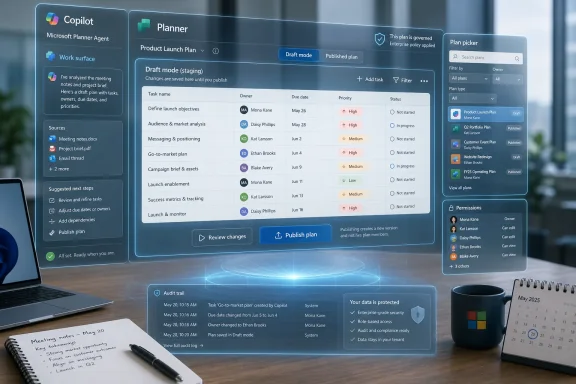 Microsoft Is Turning Copilot From a Text Box Into a Work Surface
The original pitch for Microsoft 365 Copilot was easy to understand: it would sit beside Word, Excel, PowerPoint, Outlook, and Teams, giving workers a conversational interface to familiar tools. The first wave often felt like a smarter autocomplete layer stretched across the suite. It could write, summarize, polish, and occasionally hallucinate with enough confidence to make managers reach for governance documents.Planner Agent points to a different phase. It is not mainly about generating text; it is about taking action against a shared system of record. A user can ask Copilot to create tasks, change task names, update status, set due dates, adjust priorities, and review what is already inside a plan. That moves Copilot from the document layer into the operational layer.
For Microsoft, this is the difference between an AI that helps you talk about work and an AI that helps define the work itself. The company has spent the last year framing agents as the next stage of business software, and Planner is a natural proving ground because tasks are small, structured, and repetitive. They are also politically sensitive. A wrong paragraph in a draft can be corrected before anyone sees it; a wrong assignment in a project plan can create real confusion by lunchtime.
That is why Planner Agent matters even if it does not look dramatic on a product roadmap. The feature is Microsoft’s attempt to normalize AI as a participant in day-to-day coordination. Once employees accept that Copilot can turn a conversation, document, spreadsheet, or presentation into actionable work, the boundary between “assistant” and “workflow engine” starts to blur.
Planner Was Always the Right Place to Test Agentic Office Work
Planner occupies a strange middle ground in Microsoft 365. It is simpler than Project, more collaborative than To Do, and more structured than a pile of Teams messages. It is used by departments that need lightweight coordination but do not want the overhead of full project management discipline.That makes it a good target for Copilot because the pain is obvious. In many organizations, the actual work is discussed in Teams, buried in meeting notes, described in Word documents, tracked in Excel, and then manually re-entered into Planner by whoever lost the meeting lottery. The task board becomes useful only if someone keeps it current, and keeping it current is precisely the kind of clerical maintenance that knowledge workers tend to postpone.
Planner Agent tries to collapse that gap. If a project plan already exists in a deck, a launch checklist already lives in a spreadsheet, or a set of deliverables is scattered across a Word document, Copilot can use that file context to produce structured tasks. The user still has to review the output, but the blank-board problem becomes less severe.
That is the right kind of AI integration: not a magical “run my business” promise, but a practical reduction in friction. Microsoft’s strongest Copilot scenarios tend to be the ones that begin with existing Microsoft 365 artifacts. The company owns the document, the meeting transcript, the chat history, the permissions model, and now the task surface. Planner Agent is valuable because it sits at the intersection of all of those things.
The danger is that Microsoft will oversell this as autonomous project management. It is not that. It is a conversational front end for structured planning, with enough context to be useful and enough potential for mistakes to require adult supervision.
The Plan Picker Is a Small Feature With Enterprise-Sized Implications
The general availability release adds a plan picker, which lets users search and filter plans by name before asking Copilot to make changes. On paper, this is a usability enhancement. In practice, it is one of the features that determines whether Planner Agent is safe enough for real companies.Large Microsoft 365 tenants are messy places. Plans proliferate across departments, Teams, project groups, test environments, abandoned initiatives, and shadow-IT experiments. A conversational agent that can update tasks is only useful if users can reliably target the right workspace. Otherwise, a natural language request becomes a risk multiplier.
The plan picker acknowledges that Copilot needs guardrails inside ordinary workflows, not just in admin documentation. Users should not have to craft perfect prompts to avoid touching the wrong plan. They need visible context, searchable names, and a moment of confirmation before the agent acts.
This is where Microsoft’s consumer-friendly Copilot branding collides with enterprise reality. In a personal app, “just ask” is an appealing design principle. In a business tenant, “just ask” has to be paired with identity, permissions, auditability, and unambiguous target selection. The plan picker is not glamorous, but it is the kind of boring control that makes agentic features survivable.
It also hints at the next UX problem Microsoft must solve across Copilot. As more agents become available inside the same chat surface, users will need to know not only what they are asking, but which system they are asking Copilot to manipulate. The more Copilot can do, the more the interface must explain what it is about to do.
Draft Mode Is Microsoft Admitting That AI Work Needs a Staging Area
The most important safety feature in this release may be draft mode. AI-generated plans and tasks are created as drafts by default, giving users a review step before content is saved into Planner. That is not just a convenience; it is an implicit admission about how AI belongs in shared work systems.Generative AI is probabilistic. It can infer structure, summarize intent, and produce plausible task lists, but plausibility is not the same as correctness. A project plan is not a blog outline. It contains names, dates, priorities, dependencies, and implied accountability.
Draft mode creates a staging area between suggestion and commitment. That matters because the cost of an AI mistake rises sharply when output moves from a private chat response into a collaborative system. Once a task is visible to a team, it can trigger assumptions, notifications, follow-up questions, and managerial expectations.
This is the right design pattern for enterprise AI. Let the model accelerate the first pass, but force a human checkpoint before the result becomes operational truth. Microsoft has not always been consistent about this distinction in its Copilot messaging, which often leans on the language of empowerment and delegation. Planner Agent’s draft behavior is more sober: Copilot can propose, but a person should still commit.
The question is whether users will treat draft review seriously. Anyone who has watched people approve cookie banners, security prompts, or app permissions knows that review steps can become muscle memory. Microsoft can provide the staging area, but organizations will need norms around when to accept, edit, or reject AI-generated project work.
The Goals Bucket Tries to Make Planner Less Like a Chore List
Planner Agent also introduces a goals bucket, allowing tasks to be grouped around broader objectives. That may sound like a modest taxonomy change, but it speaks to a longstanding weakness in lightweight task tools. They are good at recording activity and less good at explaining why the activity matters.Most task boards decay into lists of verbs: write, review, update, schedule, test, send. The larger objective often lives elsewhere, in a strategy document, meeting recording, quarterly planning deck, or manager’s head. When the connection between tasks and outcomes is weak, Planner becomes another administrative surface rather than a management tool.
Grouping work around goals is Microsoft’s attempt to bring more hierarchy into everyday planning without forcing users into full project-management software. It gives teams a way to connect daily assignments to larger outcomes. That is especially relevant when Copilot is generating tasks from files, because the model can help translate a broad objective into smaller units of work.
Still, this feature will only be as useful as the discipline around it. If every bucket becomes a vague aspiration, nothing improves. If goals are concrete enough to guide prioritization, Planner becomes more than a checklist. It becomes a lightweight map of how work is supposed to produce results.
That is the deeper promise of Planner Agent. The agent is not valuable because typing into Copilot is inherently better than clicking around Planner. It is valuable if it helps teams preserve the thread between intent, documents, conversations, and execution.
The Real Competition Is Not Asana or Trello, but App Switching
It is tempting to view Planner Agent as Microsoft’s answer to dedicated project-management tools. That is only partly true. The bigger competition is inertia: the habit of leaving work trapped wherever it first appeared.In most organizations, projects do not fail because nobody has access to a task tool. They fail because the task tool is not where the conversation happened. A meeting produces decisions, a Teams chat produces follow-up items, a PowerPoint deck produces launch dependencies, and then someone has to convert all of that into a structured plan. The conversion step is where work leaks.
Microsoft’s advantage is distribution. Planner does not need to beat every specialized planning tool feature-for-feature if it becomes the default destination for tasks created from Microsoft 365 activity. Copilot gives Microsoft a plausible way to route work into Planner from the places where employees already spend their day.
This is the same strategic pattern Microsoft has used across Teams, SharePoint, OneDrive, and Office. Integration beats elegance at enterprise scale. If Planner Agent makes task capture frictionless enough, many organizations will tolerate Planner’s limits because the alternative requires yet another app, another login, another governance model, and another source of truth.
That does not mean specialist tools are doomed. Mature engineering, product, design, and operations teams will still need richer workflows, dependencies, automations, reporting, and integrations. But Microsoft does not need to win the high end to make Planner Agent important. It only needs to capture the enormous middle of office work that currently lives between email follow-ups and half-maintained spreadsheets.
Admins Will See a Feature Rollout and a Governance Problem
For IT administrators, the phrase “generally available for all users with a Microsoft 365 Copilot license” is both a product milestone and a governance prompt. The feature is not landing in a vacuum. It arrives amid a broader Microsoft push to make Copilot agents available across Microsoft 365, with admins increasingly responsible for deciding who can use which agents, against which data, and under what controls.Planner Agent inherits Microsoft 365 permissions, but inherited permissions are not a complete governance strategy. If users can turn documents into plans, admins need to understand what files are being used as context, where the resulting tasks land, and how sensitive information might be exposed through task names, descriptions, or assignments. A confidential launch plan can become a less confidential task board if the organization’s information architecture is sloppy.
The ability to turn Word, Excel, and PowerPoint files into plans is powerful because Microsoft 365 content is already permissioned and searchable. It is risky for the same reason. Many tenants contain years of overshared documents, stale groups, and Teams workspaces whose membership no longer reflects business reality. Copilot features tend to reveal the consequences of that neglect.
This is where Microsoft’s “AI transformation” story runs into the unglamorous backlog of tenant hygiene. Before organizations celebrate agents that act across files and plans, they should revisit group ownership, guest access, sensitivity labels, lifecycle policies, and naming conventions. Planner Agent may be easy for users to launch, but safe usage depends on foundations that many tenants still treat as optional.
The feature also raises audit expectations. If Copilot changes a due date or updates a task status, organizations will want clarity about what happened, who requested it, and whether the agent or the user is represented in logs. Agentic systems do not remove accountability; they make accountability more important.
Copilot’s Value Proposition Is Becoming More Concrete and More Expensive
Planner Agent also sharpens the licensing conversation around Microsoft 365 Copilot. Microsoft has spent years asking customers to pay a premium for AI features that can be difficult to quantify. Summaries and drafts are useful, but their value can feel subjective. Task creation, plan updates, and workflow coordination are easier to map to time saved.That makes Planner Agent a better sales argument. If Copilot can reduce the overhead of project coordination, meeting follow-ups, and plan maintenance, the value story becomes less abstract. A manager who spends less time translating discussions into task boards can understand the pitch quickly.
But the same clarity cuts both ways. Users without Microsoft 365 Copilot licenses do not get the full Planner Agent experience. As Microsoft moves more functional workflow capabilities behind Copilot licensing, organizations will increasingly face a two-tier productivity environment: users who can ask agents to act across Microsoft 365, and users who must continue doing the manual work.
That distinction may be acceptable for executives, project leads, and knowledge workers who live inside Microsoft 365 all day. It may be harder to justify for frontline workers, occasional collaborators, contractors, or departments with tight budgets. The more Microsoft attaches meaningful workflow features to Copilot, the more license assignment becomes a business architecture decision rather than an IT procurement chore.
This is also why Microsoft’s agent strategy will be judged less by demos than by adoption patterns. If Planner Agent becomes a daily habit for licensed users, it strengthens the case for broader Copilot deployment. If it becomes another clever feature used mainly in launch videos, customers will keep asking whether the Copilot tax is worth paying.
The Employee Trust Problem Is Never Far Away
Any feature that lets AI interact with workplace systems enters a trust environment that is already strained. Employees have watched productivity software evolve from collaboration tools into telemetry-rich management platforms. They have also seen AI marketed as both assistant and evaluator, often with blurry lines between helping workers and measuring them.Planner Agent is not, by itself, an employee surveillance feature. It creates and updates tasks. It organizes plans. It helps turn files and conversations into structured work. But it sits inside the same Microsoft 365 universe where activity signals, Teams presence, meeting data, and productivity analytics have already made workers sensitive to how collaboration tools are used.
That context matters. A task agent can make work more visible, and visibility is not politically neutral. If every conversation can become tasks, every missed deadline can be tracked, and every plan can be summarized, managers gain a clearer operational picture. That can help teams coordinate, but it can also intensify the feeling that software is constantly converting human work into metrics.
Microsoft’s challenge is to sell Planner Agent as empowerment without pretending that workplace power dynamics do not exist. The company can design draft modes, permissions, and admin controls, but organizations decide whether these tools are used to reduce drudgery or increase pressure. The same feature that helps a project lead capture follow-ups can help a bad manager flood a team with AI-generated assignments.
For WindowsForum’s IT-pro audience, that means rollout messaging matters. Users should understand what Planner Agent can do, what it cannot do, and how AI-generated tasks become official. Admins should not let the first encounter be a mysterious Copilot-created plan appearing in a shared workspace.
The June Rollout Is a Test of Microsoft’s Agent Story
Microsoft has been building toward this moment. Copilot started as a branded assistant, expanded into app-specific experiences, and is now becoming a container for agents that can act across Microsoft 365. Planner Agent is one more piece of that shift, alongside other Microsoft efforts to bring agents into files, chats, meetings, and business processes.The risk is sprawl. If every app gets an agent, every agent gets a different capability set, and every capability lands behind slightly different licensing and admin controls, the experience can become confusing fast. Microsoft’s historic strength is bundling; its historic weakness is naming, layering, and administrative complexity. Copilot is already showing signs of both.
Planner Agent succeeds if it feels like a natural extension of work users already do. It fails if users have to remember whether they are in Copilot Chat, Planner, Teams, Loop, SharePoint, or another entry point, and whether the agent can act on the plan they have in mind. The plan picker helps, but the larger UX challenge remains.
There is also a quality bar. AI-generated tasks need to be specific enough to save time, but not so overconfident that they create cleanup work. Status updates need to hit the right task. Summaries need to reflect actual plan state. The feature does not need perfection, but it needs predictability. In enterprise software, a slightly slower manual process often beats a faster process that users do not trust.
This is the paradox of agentic AI in Microsoft 365. The more useful it becomes, the more consequential its errors become. Planner Agent is useful precisely because it can touch shared work. That is also why Microsoft had to ship it with review steps and better targeting.
The Planner Agent Rollout Gives IT a Concrete Place to Start
Planner Agent is not the whole Copilot story, but it gives organizations a practical test case for whether Microsoft’s agents can improve work without creating chaos. The best deployments will start with bounded scenarios: recurring project meetings, departmental task boards, launch planning, and document-to-plan conversion. The worst deployments will simply turn it on and wait for users to discover the edge cases.For admins and team leads, the immediate work is less about marveling at AI and more about deciding where it belongs. Planner Agent should be introduced as a workflow tool, not a novelty. Teams should know when an AI-generated plan is a draft, who approves it, and which plans are appropriate targets for Copilot-driven updates.
- Planner Agent is now a generally available Microsoft 365 Copilot feature, not a preview experiment limited to early adopters.
- The most useful scenarios are likely to be task updates, meeting follow-ups, and turning existing Office files into structured plans.
- Draft mode is the key safety valve because it keeps AI-generated tasks from becoming shared commitments without review.
- The plan picker matters because enterprise tenants often contain many similarly named or stale plans.
- Admins should treat the rollout as a permissions, governance, and user-education issue rather than a simple productivity enhancement.
- The feature makes Microsoft 365 Copilot more concrete by moving it from content generation toward operational work management.
References
- Primary source: Windows Report
Published: 2026-06-16T05:24:07.763665
Microsoft Planner Agent Is Now Available for All Microsoft 365 Copilot Users
Microsoft Planner Agent is now generally available for Microsoft 365 Copilot users, adding AI task updates, goals, and draft plans. windowsreport.com
- Official source: support.microsoft.com
Access Planner Agent | Microsoft Support
Planner Agent works alongside your team to help you get work done faster. It can create your plan based on goals, execute tasks, and act on feedback.support.microsoft.com - Official source: blogs.microsoft.com
Introducing the First Frontier Suite built on Intelligence + Trust - The Official Microsoft Blog
Today Microsoft is announcing: Wave 3 of Microsoft 365 Copilot Expanded model diversity with Claude and next-gen OpenAI models available today General availability of Agent 365 on May 1 for $15 per user General availability of the new Microsoft 365 E7: The Frontier Suite on May 1 for $99 per...blogs.microsoft.com - Official source: learn.microsoft.com
Turn off or restrict access to Planner Agent and Planner Agent chat in Planner - Microsoft Planner | Microsoft Learn
This document walks you through the process of turning off the Planner Agent and Planner Agent chat feature for your organization through our PowerShell suitelearn.microsoft.com - Official source: microsoft.com
Your request has been blocked. This could be due to several reasons.
www.microsoft.com
- Official source: techcommunity.microsoft.com
Planner Agent brings work management directly into Microsoft 365 Copilot | Microsoft Community Hub
Learn how Planner Agent brings work across Microsoft 365 into one place, so you can see what matters and take action. techcommunity.microsoft.com
- Related coverage: blog-en.topedia.com
Planner Agent in Microsoft 365 Copilot reaches general availability | Topedia Blog
Microsoft will release the Planner Agent to general availability, enabling all Microsoft 365 Copilot users to create and manage tasks and plans within Copilot experiences. The agent is automatically preinstalled for eligible users, with no option to restrict the availability to specific users.blog-en.topedia.com - Related coverage: windowscentral.com
Microsoft 365 is paywalling most of Copilot in its Office apps | Windows Central
Commercial customers will soon need a Microsoft 365 Copilot license to use Copilot Chat in Word, Excel, PowerPoint, and OneNote.www.windowscentral.com - Related coverage: levelupm365.com
Microsoft 365 Roadmap Updates June 2026 – Level Up M365
What’s shipping, what’s changing, and what admins should prepare for. Photo credit: Copilot TL;DR (Executive Summary)Why This Month MattersCopilot / AI ExperiencesSharePoint List Support in Agent B…levelupm365.com - Related coverage: techradar.com
Microsoft has unleashed Copilot AI agents on OneDrive, so have fun with that | TechRadar
OneDrive .agent files can access up to 20 different files, Microsoft sayswww.techradar.com - Related coverage: tomsguide.com
Biggest Microsoft Build 2026 announcements — agentic AI, RTX Spark Dev Box, GitHub Copilot app, new MAI models, and more | Tom's Guide
All the big news from Microsoft's AI-focused eventwww.tomsguide.com - Official source: cdn-dynmedia-1.microsoft.com
