Microsoft Wants Copilot to Stop Being the Helpful Intern
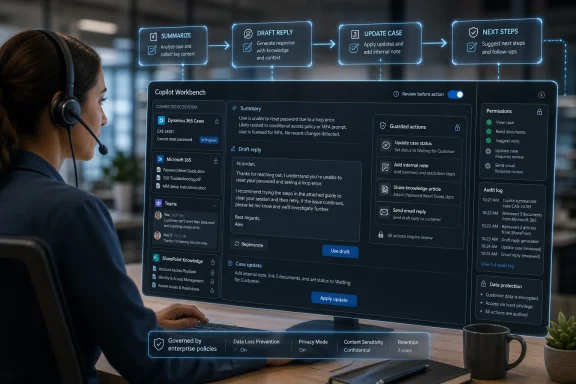
For the last two years, Microsoft’s Copilot story has often lived in the land of summaries, drafts, and politely phrased suggestions. That was useful, sometimes impressive, and frequently hard to measure. Service Agent’s general availability marks a sharper turn: Microsoft is no longer just selling Copilot as a way to read the enterprise faster, but as a way to operate the enterprise from inside a conversation.
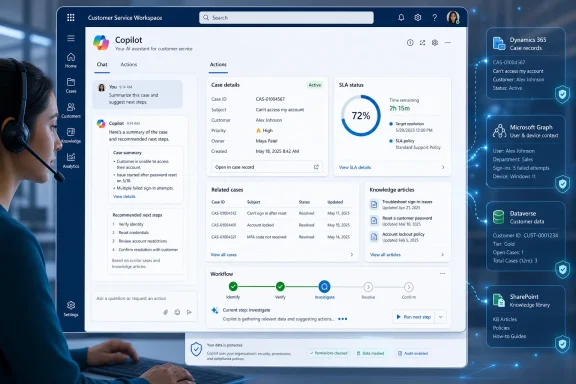
In customer service, that distinction is not academic. A representative does not simply need to know what happened in a case; they need to update the case, write the note, draft the response, check the SLA, find the prior interaction, understand the customer’s account, and move the work to the next step. If an AI assistant can summarize all of that but still leaves the human to tab through Dynamics, Outlook, Teams, SharePoint, and a knowledge base, it is helpful but not transformative.
That is the argument behind Service Agent. Microsoft is packaging service-specific intelligence around Dynamics 365 Customer Service and Microsoft 365 Copilot, then wiring it to Model Context Protocol tools that can perform concrete service actions. The pitch is that customer service teams should not have to choose between a conversational assistant and a transaction system; the conversation should become the place where the transaction happens.
There is an obvious risk in that pitch. Customer service is full of regulated data, angry customers, time-sensitive escalation paths, contractual commitments, and internal policies that are often more complicated than the software workflows meant to enforce them. But it is also exactly the kind of repetitive, context-heavy work where a well-grounded assistant can be more than a novelty.
General Availability Turns a Preview Into a Workflow Bet
Microsoft’s public preview of Service Agent arrived in March 2026 with a narrower, though still meaningful, set of capabilities. It could reason across Dynamics 365 and Microsoft 365, summarize cases and interactions, prioritize work, and surface knowledge from Dataverse and SharePoint. It could also help update cases, add notes, and create child cases from a unified Copilot experience.
The general availability release expands that into a more assertive product. Microsoft says Service Agent now includes more than 70 new MCP tools and more than 20 core product enhancements, with a service-oriented MCP server acting as the backbone. The point of that plumbing is to let Copilot move beyond “here is what I found” and into “here is what I can do next.”
That is why the release should be read as part of a broader shift in Microsoft’s AI platform strategy. Copilot is increasingly becoming a shell around business applications, while MCP-style tooling becomes the bridge between language models and the systems of record beneath them. Dynamics 365 supplies the service data. Microsoft Graph supplies the work context. Dataverse and SharePoint supply structured records and knowledge. Copilot supplies the conversational surface.
The important phrase in Microsoft’s announcement is not “AI-powered.” It is “without leaving the conversation.” That is the product strategy in miniature: reduce the number of places a service representative must look, click, copy, paste, and reconcile. If Microsoft can make that real, it has something more durable than a demo.
The Chat Window Is Becoming a Business Application
The most visible change in the general availability release is Microsoft’s emphasis on app-in-chat experiences. Service Agent is not confined to text responses. It can present interactive grids, forms, cards, charts, persistent widgets, uploaded files, image understanding, generated images, and even create Word, Excel, and PowerPoint files from inside the Copilot flow.
That sounds like feature sprawl until you consider the service desk. A representative looking at a case often needs structured information, not a paragraph. They may need a list of related cases, a form to update fields, a chart showing SLA exposure, or a card summarizing customer entitlement. A purely text-based assistant becomes clumsy when the job requires comparison, selection, review, and confirmation.
Microsoft’s answer is to let Copilot dynamically generate richer UI elements inside the chat. This is a subtle but important design move. It acknowledges that chat is a useful command surface but a poor universal interface. The future Microsoft is sketching is not one where every business workflow becomes a paragraph exchange; it is one where chat becomes the container for task-specific mini-apps.
For Windows and Microsoft 365 admins, that should sound familiar. Microsoft has spent decades turning Office, SharePoint, Teams, Power Platform, and Dynamics into overlapping places where work can begin. Service Agent is another attempt to collapse those surfaces, but this time the unifying layer is not a portal or a ribbon. It is Copilot.
The danger is that the chat window becomes the new overloaded dashboard. If every workflow, file, chart, and form is pushed into Copilot, the interface could become as noisy as the systems it is trying to simplify. The success of this design will depend less on whether Microsoft can generate widgets and more on whether those widgets appear only when they genuinely reduce friction.
The Real Product Is Grounding, Not the Model
Microsoft describes Service Agent as grounded in both Dynamics 365 and Microsoft 365 through Work IQ, with existing permissions respected. That is the heart of the product. The model matters, but the enterprise value is in whether the agent knows which customer, which case, which mailbox thread, which SharePoint document, which queue, and which role-based boundary apply at the moment of use.
Customer service exposes the weakness of generic AI assistants. A plausible answer is not good enough when the question is whether a customer is entitled to a replacement, whether an SLA is about to breach, or whether an issue belongs to billing, engineering, or field service. The assistant must be grounded in authoritative systems and must show enough provenance that a human can trust the next step.
This is why Microsoft’s emphasis on Dataverse, SharePoint, Microsoft Graph, and Dynamics 365 matters. Service organizations already have knowledge scattered across those places. The product promise is that Service Agent can synthesize the right bits without forcing representatives to become part-time enterprise search specialists.
But grounding is not magic. Permission trimming, source quality, stale knowledge articles, misfiled cases, and messy CRM fields will all shape the quality of the output. Service Agent may reduce the pain of fragmented information, but it cannot erase the governance debt that created the fragmentation in the first place.
That may be the uncomfortable truth for organizations rushing to deploy it. Copilot can make good knowledge more accessible, but it can also make bad knowledge more confidently available. The richer the action layer becomes, the more important it is that the underlying data is clean, current, and governed.
Microsoft Is Selling Speed, but Admins Will Hear Control
The announcement leans heavily on productivity: faster ramp-up for new representatives, less time searching, fewer manual updates, better case hygiene, and more consistent service outcomes. Those are reasonable ambitions. Customer service teams are expensive to train, hard to retain, and often measured by unforgiving operational metrics.
Yet the more interesting part for IT is the control model. Microsoft says Service Agent includes granular, reversible controls by role, app module, and queue, with the ability to roll out alongside existing experiences. That is not a footnote. It is the difference between a plausible enterprise deployment and a product that gets trapped in pilot purgatory.
Service desks are not homogeneous. A tier-one representative handling password resets should not have the same AI action surface as a senior case owner handling a contractual escalation. A queue serving healthcare, finance, or government customers may need different constraints from one serving retail returns. Supervisors may need monitoring and coaching signals that frontline agents should not see in the same form.
Role-aware controls also matter because action-capable agents change the risk profile. A summarization error is bad. An erroneous case update, customer email, resolution note, or escalation action can be worse. Microsoft’s reversible-control language is an acknowledgment that organizations will want to stage this carefully.
The practical path will likely be conservative. Many customers will begin by enabling Service Agent for summaries, knowledge retrieval, and low-risk case actions, then gradually expand into more sensitive workflows once confidence, audit practices, and support processes mature. The irony of agentic AI is that the organizations most likely to benefit are also the ones that must move most deliberately.
MCP Gives Microsoft a Standardized Way to Make Copilot Useful
The inclusion of MCP tools is more than a technical detail. Model Context Protocol has become a convenient shorthand for connecting AI assistants to tools, systems, and data sources in a more standardized way. In Microsoft’s hands, MCP becomes a mechanism for turning Copilot from a language interface into a service workflow orchestrator.
For Dynamics 365 Customer Service, that means tools that can retrieve case context, draft or send communications, suggest next steps, update records, resolve incidents, and connect with Dataverse-backed business data. Microsoft’s announcement says the GA release includes more than 70 new service-focused MCP tools, suggesting that the company is not treating this as a thin integration layer. It is building a catalog of service operations.
That catalog matters because service workflows are repetitive but varied. A representative may need to summarize a timeline, draft a response, create a child case, check related activities, locate a knowledge article, or prepare a handoff. Each action is small. Together, they define the rhythm of the job.
MCP also gives Microsoft a story for extensibility. Organizations can tailor Service Agent with custom tools, environment configuration, and role-based controls. In theory, that lets companies adapt the agent to their own support models rather than waiting for Microsoft to cover every edge case.
The risk is that customization becomes the new integration backlog. Every enterprise wants its workflows reflected faithfully; every enterprise also has brittle processes that are not as standardized as leaders believe. MCP tools can expose those workflows to Copilot, but they do not automatically simplify them. A poorly designed tool surface can make an AI assistant more powerful and more confusing at the same time.
The Licensing Story Keeps Copilot in Enterprise Territory
Service Agent is available now, but it is not simply a free switch for every Microsoft 365 tenant. Customers need a Dynamics 365 Customer Service Enterprise or Premium license for access to case data, knowledge, and service workflows. A Microsoft 365 Copilot license unlocks the fully integrated experience across case context, Microsoft 365 data, and AI actions.
That licensing model tells us where Microsoft sees the money. Service Agent is not positioned as a lightweight help desk add-on. It is an enterprise service capability layered on top of Microsoft’s premium CRM and Copilot stack. The customers most likely to adopt it early are already invested in Dynamics 365, Microsoft 365 Copilot, Teams, Outlook, SharePoint, and Power Platform.
For those customers, the economics may be easier to justify than for general knowledge-worker Copilot deployments. Customer service has measurable operational benchmarks: average handle time, first-contact resolution, backlog, SLA compliance, escalation rates, post-interaction admin time, training duration, and quality scores. If Service Agent materially improves any of those, the ROI conversation becomes more concrete.
But Microsoft will still face scrutiny. Many enterprises are already trying to determine where Copilot licenses deliver durable value and where they simply add cost to existing seats. Service Agent gives Microsoft a more domain-specific answer, but it also raises expectations. A general assistant can be forgiven for occasional vagueness. A service agent embedded in customer workflows will be judged by outcomes.
That is where the GA label cuts both ways. General availability signals readiness, supportability, and a product Microsoft wants customers to deploy. It also moves the burden from “interesting preview” to “prove it in production.”
The Human Representative Is Still the Accountability Layer
Microsoft’s language around Service Agent is careful. The product helps representatives investigate, navigate, draft, update, and act. It is not being described as a wholesale replacement for service staff. That distinction matters, not because automation pressure is imaginary, but because the immediate product is aimed at assisted service work rather than fully autonomous resolution.
In practice, the human representative remains the accountability layer. They understand tone, customer history, exceptions, internal politics, and the difference between what a policy says and how the organization actually handles a high-value account. Service Agent can surface context and recommend actions, but the representative must still decide whether the action makes sense.
That does not mean the role stays unchanged. If Copilot handles more search, summarization, drafting, and record maintenance, service representatives may spend more of their time on judgment, empathy, escalation, and exception handling. That is the optimistic version. The less charitable version is that organizations may use AI assistance to raise throughput expectations without reducing complexity.
Supervisors will also see the job change. Microsoft points to quality, coaching, SLA, queue visibility, workforce context, and monitoring capabilities. Those features could help leaders intervene earlier and coach more consistently. They could also make the service desk more instrumented, with AI-derived signals feeding performance management in ways employees may not fully understand.
That is a governance issue as much as a product issue. Service organizations should be clear about what Service Agent is allowed to do, what it merely suggests, how actions are audited, and how AI-generated coaching or quality signals are reviewed. The more invisible the assistant becomes in daily work, the more visible the rules around it need to be.
Windows Shops Should See the Bigger Microsoft Pattern
For WindowsForum readers, the Service Agent announcement is not only a Dynamics 365 story. It is another data point in Microsoft’s broader effort to make Copilot the connective tissue across the Microsoft estate. Windows, Microsoft 365, Dynamics 365, Power Platform, Teams, Outlook, SharePoint, and Dataverse are increasingly being arranged around AI-assisted workflows.
That has strategic advantages for Microsoft. The more useful Copilot becomes inside business processes, the harder it is for customers to evaluate it as a standalone chatbot. It becomes part of the productivity suite, part of the CRM, part of the admin model, part of the data governance layer, and part of the daily interface. That is classic Microsoft platform gravity, updated for the AI era.
It also has practical implications for IT. Copilot deployments are no longer just about enabling a license and publishing a policy. They require identity hygiene, permission reviews, data classification, retention strategy, knowledge management, audit readiness, and business-process ownership. Service Agent makes those requirements more concrete because it touches customer-facing workflows.
Admins should pay particular attention to where data crosses boundaries. Microsoft’s story is that Service Agent respects existing permissions, but permission structures in real tenants are often inherited, overbroad, or historically accidental. If a representative can see a file, an AI assistant grounded in that file may be able to use it. That is not a new security problem, but Copilot makes old permission problems easier to discover and potentially easier to misuse.
The lesson is not to avoid Service Agent. It is to treat deployment as an operational project, not a feature toggle. The organizations that get the most value will likely be the ones that pair AI rollout with cleanup of knowledge sources, CRM hygiene, role design, and supervisor training.
The Service Desk Is Where Copilot Has to Earn Its Badge
The most concrete promise of Service Agent is reduced friction. A representative should be able to ask what is happening with a customer, see the relevant context, get a grounded answer, draft a response, update the case, and continue working without jumping between half a dozen surfaces. That is a compelling vision because it attacks the daily annoyance of service work rather than chasing abstract AI spectacle.
But the service desk is also unforgiving. If Copilot produces a weak meeting summary, a user may shrug and edit it. If Service Agent recommends the wrong next step on a sensitive case, misses a critical customer entitlement, or drafts a response that misstates policy, the consequences are immediate. Customer service has a lower tolerance for hallucinated confidence than many office workflows.
That is why Microsoft’s product direction must be matched by deployment discipline. Service Agent should be evaluated not just on whether it can generate impressive responses, but whether it reliably improves measurable service outcomes. The right test is not “does it answer questions?” It is “does it help representatives resolve cases faster, with fewer errors, better records, and more consistent customer experiences?”
Microsoft’s strongest argument is that customer service work already lives in the systems Service Agent can reach. Dynamics 365 holds the case. Microsoft 365 holds the surrounding context. SharePoint and Dataverse hold knowledge. Teams and Outlook hold the collaboration trail. The inefficiency is not that the information does not exist; it is that humans must stitch it together under time pressure.
If Service Agent can do that stitching reliably, it becomes a credible example of enterprise AI moving from novelty to infrastructure. If it cannot, it becomes another assistant that dazzles in a demo and gets quietly ignored by busy people with real queues to clear.
The GA Release Gives IT a Shorter List of Excuses
Service Agent’s arrival at general availability does not remove the hard parts of AI adoption, but it does make the buying decision more concrete. The product now has a clearer action model, a defined licensing path, admin provisioning through Microsoft 365, and a service-specific tool layer. That gives IT leaders something they can pilot against real processes rather than abstract productivity promises.
The immediate deployment conversation should be practical. Which queues are suitable for early rollout? Which representatives should test the agent first? Which actions should remain suggestion-only? Which knowledge sources are authoritative? Which case updates need review? Which metrics will determine whether the deployment expands?
Microsoft has given service organizations a stronger tool, but not an excuse to skip governance. The best deployments will likely start with constrained use cases and expand as confidence grows. The worst will mistake “generally available” for “universally ready.”
Redmond’s Customer Service Copilot Now Has to Survive the Queue
Service Agent’s GA release is important because it moves Microsoft’s service AI from useful assistant toward operational agent, but the practical impact will depend on rollout discipline and data quality.
- Service Agent is now generally available in Microsoft 365 Copilot for organizations using Dynamics 365 Customer Service, with the full integrated experience requiring both Dynamics 365 Customer Service and Microsoft 365 Copilot licensing.
- The release expands the product from summarization and knowledge retrieval into action-oriented workflows powered by more than 70 service-focused MCP tools.
- Microsoft is pushing beyond text chat by adding interactive app-in-chat experiences such as forms, grids, cards, charts, widgets, file handling, and document creation.
- The product’s value will depend heavily on Microsoft 365 permissions, Dynamics data hygiene, SharePoint knowledge quality, and the organization’s ability to define safe action boundaries.
- Admins should treat Service Agent as a staged operational deployment, not a simple Copilot feature toggle.
- The strongest business case will come from measurable improvements in case handling, service consistency, representative ramp-up, and post-interaction administrative work.
Service Agent is one of Microsoft’s clearest attempts yet to prove that Copilot can become the working surface for a real business function rather than a clever overlay on existing apps. The opportunity is substantial: customer service is full of repetitive context assembly, procedural follow-through, and expensive handoffs that AI can plausibly improve. The catch is equally substantial: once Copilot can act, not just answer, trust becomes an operational dependency. Microsoft has moved the product into general availability; now customers have to decide how much of the service desk they are ready to let the conversation run.
References
- Service Agent Reaches General Availability in Microsoft 365 Copilot Microsoft · 2026-06-30T18:42:07.519454
- devblogs.microsoft.com devblogs.microsoft.com
- learn.microsoft.com learn.microsoft.com