

Microsoft added a Microsoft Purview compliance portal roadmap item on July 1, 2026, promising a July 2026 general availability feature that lets administrators set a fixed number of days when assigning users or security groups to Purview role groups. The change sounds almost comically small: a time box on an admin assignment. But in compliance tooling, where eDiscovery, DLP, insider risk, audit, and data governance privileges often live one click away from sensitive evidence, small controls can carry outsized consequences. Microsoft is not reinventing privileged access here; it is admitting that Purview’s own role model needs a built-in expiration date.
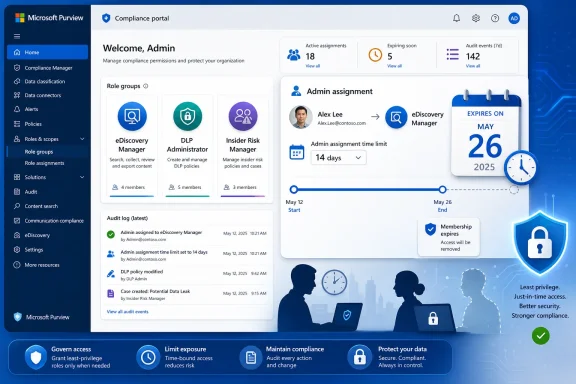
The new capability is officially described as an “Admin assignment time limit” for the Microsoft Purview compliance portal. In plain terms, when an administrator assigns a user or security group to a Purview role group, they will be able to define the duration of that assignment in days. The feature is listed as in development, targeted for general availability in July 2026, and planned across Worldwide, GCC, GCC High, and DoD cloud environments.
That breadth matters. Microsoft is not treating this as a niche commercial-tenant convenience. Purview is heavily used in regulated environments, and the roadmap explicitly includes the government clouds where role hygiene, separation of duties, and audit defensibility are often procurement requirements rather than internal preferences.
The timing is also notable. The roadmap item was created and last updated on July 1, 2026, with general availability still marked for July 2026. That suggests a near-term rollout rather than a distant design note. As always with the Microsoft 365 roadmap, dates can slip, and tenants may see staged availability rather than a single global switch. But the signal is clear enough: Purview role group membership is getting a native time boundary.
The feature’s real audience is not the admin who carefully removes every temporary permission after a support call. It is the organization that believes it has that discipline until an audit, incident review, or discovery dispute proves otherwise. Temporary access has a way of becoming permanent when the only enforcement mechanism is a calendar reminder and someone’s good intentions.
Microsoft’s own model separates roles, role groups, members, administrative units, and Microsoft Entra roles. That architecture is powerful, but it is also easy to underestimate. A role grants permission to perform tasks; a role group bundles those roles into a job function; a member assignment turns the abstract model into actual administrative access.
The dangerous part is that Purview often mediates access to the records organizations care most about when something goes wrong. Legal holds, communications searches, insider investigations, retention labels, audit signals, and sensitive information classifications are not just settings. They are the evidence trail. A stale assignment in this system is not equivalent to leaving someone in a Teams owner group after a project closes.
That is why a day-limit field is more than UI polish. It changes the default lifecycle of a privileged assignment from “until someone remembers” to “until the system stops honoring it.” Security people have spent years trying to make standing privilege socially unacceptable. Microsoft is now applying that principle to one of the places where standing privilege has been easiest to rationalize.
But Purview’s own documentation has long contained a caveat that administrators learn the hard way: direct user assignments to Purview role groups are not managed like Entra role activations. PIM can help when the assignment path runs through eligible group membership, but Purview role groups remain their own permission plane. The compliance portal is related to Entra ID, but it is not merely a skin over Entra ID.
That distinction is why this roadmap item is interesting. Microsoft is not simply telling customers to use PIM better. It is adding an expiration mechanic at the point where Purview role group membership is assigned. That is a product-level concession that temporary compliance access deserves first-class handling inside the compliance admin experience itself.
There is a practical reason for that. In real organizations, Purview permissions are often granted under pressure. A legal team needs a reviewer added to an eDiscovery matter. A security analyst needs DLP investigation access during an incident. An external consultant needs to validate a retention configuration. A regional compliance lead needs scoped access during a remediation window.
Those are all legitimate access requests. They are also exactly the requests that produce permission residue. The person who grants access is not always the person who later owns cleanup, and the business event that justified access may close without triggering a technical removal step.
Purview is especially vulnerable to this pattern because compliance work is episodic. eDiscovery and investigations flare up, then go quiet. DLP tuning may need broader access during rollout and narrower access after stabilization. Insider risk programs may involve a small rotating group of reviewers. Retention projects often bring together records managers, legal counsel, IT, and outside specialists for a defined window.
In that context, a fixed assignment limit is a control against organizational forgetfulness. It does not require an admin to predict every future state perfectly. It simply lets the admin say, “This person or group needs this role group for 14 days,” and make expiration part of the original grant.
That matters because removal is politically and operationally harder than assignment. Adding someone during an urgent matter feels like enabling the business. Removing them later can feel like blocking work, especially if the original owner has moved on or the use case is fuzzy. Expiry dates reverse that psychology. Access becomes exceptional by design, and renewal becomes the deliberate act.
The strongest version of this feature would make the expiration visible in the role group membership view, expose it in audit logs, and support clear reporting before assignments lapse. Microsoft’s roadmap text does not specify those details. But even the core idea moves Purview closer to a world in which privileged compliance access has a lifecycle, not just a membership list.
For public sector and defense-adjacent organizations, the ability to constrain administrative assignments by time can support least-privilege reviews, contractor access windows, incident response processes, and separation-of-duty expectations. It will not replace formal access certification. It will not satisfy every control family by itself. But it gives administrators a technical artifact that lines up with a familiar governance question: why did this person have this access, and for how long?
That question gets harder in compliance systems because the data involved can be unusually sensitive. A user with the right Purview role may not be administering a mailbox server or resetting passwords. They may be searching communications, reviewing content, managing policies that decide what is retained, or accessing case material tied to litigation and internal investigations.
Temporary assignment limits also help reduce the awkwardness of emergency access in regulated environments. During an incident, organizations often need to move faster than their normal access-review cadence allows. A time-bound grant lets the admin satisfy the immediate need while reducing the risk that emergency access becomes an unreviewed standing entitlement.
The feature will be especially useful if it works consistently for both users and security groups. Group-based access is the saner model in most enterprises, but it can also hide risk when membership and role assignment lifetimes are managed in different places. A group added to a Purview role group for 30 days is cleaner than a group added indefinitely with the assumption that someone else will prune the members.
That precedence issue is important. If a user has a powerful Entra role, a time-limited Purview role group assignment may not meaningfully constrain their effective access to some capabilities. Conversely, an admin may believe they have cleaned up a Purview-specific assignment while the user still retains equivalent or broader authority through Entra.
The new feature therefore solves one class of problem: stale Purview role group membership. It does not solve effective permission analysis across the Microsoft 365 estate. Admins will still need to understand where Purview role groups end and Entra roles begin. They will also need to understand how administrative units scope access, where scoping is ignored, and which workloads still require separate permission management.
This is not a reason to dismiss the feature. It is a reason to deploy it with eyes open. The best administrative controls are not the ones that pretend the system is simple. They are the ones that reduce risk in one layer while making the remaining complexity more visible.
Microsoft could strengthen the rollout by pairing assignment limits with richer effective-access views. A Purview role group page that says “this membership expires in 10 days” is useful. A user-centric view that says “this person’s Purview access expires in 10 days, but their Entra Compliance Administrator role remains active indefinitely” would be much more valuable.
A portal that surfaces more solutions becomes a stronger administrative hub. A stronger administrative hub becomes a more attractive target. As Purview absorbs more data security posture management, AI governance, and cross-estate data catalog functions, its role groups become keys to increasingly valuable rooms.
This is the broader context behind the admin assignment time limit. Microsoft is not merely adding a guardrail to an old compliance center. It is refining access management in a portal that now claims a central role in how organizations classify, protect, investigate, and govern data. The more Purview becomes the place where sensitive data governance happens, the less acceptable it is for its role assignments to behave like static distribution lists.
The shift also reflects a larger Microsoft pattern. Across Microsoft 365 and Azure, the company has been trying to pull customers toward least privilege, just-in-time access, scoped administration, and central auditability. But Microsoft’s estate is too sprawling for one control plane to fix everything at once. So we see incremental controls land inside individual portals where customers actually perform the work.
That incrementalism can be frustrating. Admins would prefer a single, coherent permission model with consistent expiration, approval, logging, and reporting across every Microsoft cloud surface. Instead, they get Entra PIM here, Purview role groups there, Defender roles somewhere else, and workload-specific exceptions lurking in the background. But a native expiry field in Purview is still progress because it meets administrators where the risky assignment is made.
Those distinctions matter. An optional field that admins rarely use will be a modest convenience. A configurable policy that lets organizations require expirations for selected role groups would be a much stronger governance feature. A system that warns both the assignee and the role manager before access expires would reduce help desk churn. A clean audit trail showing the original assignment duration, expiration, and any renewals would make the feature more useful in compliance reviews.
The security group behavior is another area to watch. The roadmap says the feature applies when assigning users and security groups to role groups. If a group assignment expires, that could elegantly remove temporary project teams from Purview access. But if the group itself is managed elsewhere without corresponding membership hygiene, organizations may still need PIM for Groups or access reviews to control who sits inside the group during the active window.
PowerShell and API parity will also matter. Many larger tenants do not treat portal clicks as the source of truth for role administration. They automate access through runbooks, identity governance workflows, ticketing systems, or custom approval processes. If the time limit is portal-only at launch, it may help smaller and midmarket environments first while leaving mature enterprises waiting for automation hooks.
Microsoft’s release notes and Learn documentation will need to answer these questions quickly. Admins should not assume that “assignment time limit” means full privileged access management for Purview. It likely means exactly what the roadmap says: a fixed duration in days at assignment time. The value will depend on how much policy, reporting, notification, and automation Microsoft builds around that simple primitive.
Administrators should start by inventorying Purview role groups, especially those tied to eDiscovery, insider risk, DLP, communication compliance, audit, retention, and organization management. The goal is not only to count members. It is to understand why each user or group is there, whether the access is still needed, whether it should be scoped through administrative units, and whether a corresponding Entra role grants broader rights anyway.
This is also a good moment to separate emergency access patterns from routine administration. Some accounts need permanent assignment because they are tied to clearly defined compliance operations. Others need eligible or temporary access because their work is episodic. The new Purview limit should be reserved for the second category, not used as a substitute for designing the first category properly.
Organizations that already use PIM should decide how the Purview feature fits rather than treating it as a rival. PIM for Groups may remain the best way to give users just-in-time activation into a security group that is assigned to a role group. The new Purview assignment limit may be better for time-boxing the group’s relationship to Purview itself, especially during projects, investigations, and outside counsel engagements.
The most mature pattern will probably combine both. A security group can be assigned to a Purview role group for a defined number of days, while individual users activate membership in that group through PIM for limited sessions. That creates two clocks: one governing the project’s access window, and one governing the user’s active use of that access. It is not simple, but it matches how high-trust compliance work actually happens.
That is why notification and observability will define the admin experience. Microsoft should surface expiring assignments prominently in the Purview portal and, ideally, through reporting that can be exported or queried. Role managers need to see which assignments expire this week. Assignees need to know when their access is going away. Auditors need to know who extended access, when, and why.
The audit angle is particularly important because Purview is itself part of many organizations’ compliance evidence chain. If a temporary grant is used for an eDiscovery matter, the organization may later need to explain not only what the user did, but why the user had access in the first place. A duration field is helpful; a duration field backed by clear logs is defensible.
There is also a supportability dimension. If an expired assignment simply disappears, admins may have to reconstruct history from audit records. If it remains visible as expired, the portal can become a better operational ledger. The latter approach is usually preferable for compliance administration, where historical access context is often as important as current access state.
Microsoft has not published these implementation details in the roadmap entry. That is normal for a roadmap item, but it leaves admins with a familiar Microsoft 365 uncertainty: the headline feature may arrive before the surrounding management story is complete. Early adopters should test behavior in low-risk role groups before relying on it for critical legal or security workflows.
Instead of “Should we remember to remove this later?” the conversation becomes “How long should this access last?” That is a better question. It forces the requester to connect privilege to a business event, not a personal status. It gives the approver a way to say yes without granting an indefinite entitlement. It gives auditors a cleaner story when they ask why access existed.
The feature also acknowledges that compliance roles are not purely technical. They often involve legal, HR, risk, privacy, records management, and outside experts. These users may not live inside the same identity governance workflows as IT administrators. Giving Purview role assignments their own expiration mechanic helps bridge the gap between enterprise identity theory and the practical sprawl of compliance operations.
There is a risk, of course, that organizations will treat expiration as a magic shield. A 90-day assignment to a powerful role group is still powerful for 90 days. A security group with sloppy membership remains sloppy even if the group’s Purview assignment expires later. An Entra role that overrides Purview scoping can still defeat the admin’s intent.
But controls do not need to be perfect to be useful. The history of Microsoft 365 administration is full of features that began as small guardrails and later became expected hygiene. MFA registration campaigns, access reviews, PIM activation, sensitivity labels, conditional access templates, and admin unit scoping all followed some version of this path. Expiring Purview role group assignments could become one more baseline expectation: if the access is temporary, the assignment should say so.
 Microsoft Puts an Expiry Date on Compliance Power
The new capability is officially described as an “Admin assignment time limit” for the Microsoft Purview compliance portal. In plain terms, when an administrator assigns a user or security group to a Purview role group, they will be able to define the duration of that assignment in days. The feature is listed as in development, targeted for general availability in July 2026, and planned across Worldwide, GCC, GCC High, and DoD cloud environments.That breadth matters. Microsoft is not treating this as a niche commercial-tenant convenience. Purview is heavily used in regulated environments, and the roadmap explicitly includes the government clouds where role hygiene, separation of duties, and audit defensibility are often procurement requirements rather than internal preferences.
The timing is also notable. The roadmap item was created and last updated on July 1, 2026, with general availability still marked for July 2026. That suggests a near-term rollout rather than a distant design note. As always with the Microsoft 365 roadmap, dates can slip, and tenants may see staged availability rather than a single global switch. But the signal is clear enough: Purview role group membership is getting a native time boundary.
The feature’s real audience is not the admin who carefully removes every temporary permission after a support call. It is the organization that believes it has that discipline until an audit, incident review, or discovery dispute proves otherwise. Temporary access has a way of becoming permanent when the only enforcement mechanism is a calendar reminder and someone’s good intentions.
Purview’s Role Groups Sit Too Close to the Evidence Room
Purview permissions are not ordinary productivity-app settings. Role groups in the Purview portal grant access to the administrative surfaces that govern compliance and risk workflows across Microsoft 365 and, increasingly, broader data estates. Depending on the role group, a user may be able to work with eDiscovery cases, inspect sensitive content, manage data loss prevention policy, administer retention, review insider risk signals, or oversee compliance posture.Microsoft’s own model separates roles, role groups, members, administrative units, and Microsoft Entra roles. That architecture is powerful, but it is also easy to underestimate. A role grants permission to perform tasks; a role group bundles those roles into a job function; a member assignment turns the abstract model into actual administrative access.
The dangerous part is that Purview often mediates access to the records organizations care most about when something goes wrong. Legal holds, communications searches, insider investigations, retention labels, audit signals, and sensitive information classifications are not just settings. They are the evidence trail. A stale assignment in this system is not equivalent to leaving someone in a Teams owner group after a project closes.
That is why a day-limit field is more than UI polish. It changes the default lifecycle of a privileged assignment from “until someone remembers” to “until the system stops honoring it.” Security people have spent years trying to make standing privilege socially unacceptable. Microsoft is now applying that principle to one of the places where standing privilege has been easiest to rationalize.
The Old Workaround Was PIM, but PIM Was Never the Whole Answer
Microsoft already supports just-in-time access patterns through Microsoft Entra Privileged Identity Management, especially for Entra roles and eligible group membership. Purview can work with security groups assigned to role groups, and organizations can use PIM for Groups to let users activate membership only when needed. That remains a strong pattern, particularly for mature tenants with identity governance already wired into their operating model.But Purview’s own documentation has long contained a caveat that administrators learn the hard way: direct user assignments to Purview role groups are not managed like Entra role activations. PIM can help when the assignment path runs through eligible group membership, but Purview role groups remain their own permission plane. The compliance portal is related to Entra ID, but it is not merely a skin over Entra ID.
That distinction is why this roadmap item is interesting. Microsoft is not simply telling customers to use PIM better. It is adding an expiration mechanic at the point where Purview role group membership is assigned. That is a product-level concession that temporary compliance access deserves first-class handling inside the compliance admin experience itself.
There is a practical reason for that. In real organizations, Purview permissions are often granted under pressure. A legal team needs a reviewer added to an eDiscovery matter. A security analyst needs DLP investigation access during an incident. An external consultant needs to validate a retention configuration. A regional compliance lead needs scoped access during a remediation window.
Those are all legitimate access requests. They are also exactly the requests that produce permission residue. The person who grants access is not always the person who later owns cleanup, and the business event that justified access may close without triggering a technical removal step.
Microsoft’s Small Control Closes a Very Human Failure Mode
Most identity failures are not cinematic compromises; they are administrative sediment. Someone joins a role group for a migration, an investigation, a regulatory response, or a vendor engagement. The work ends. The membership remains. Months later, the user has access no one can explain without excavating old tickets.Purview is especially vulnerable to this pattern because compliance work is episodic. eDiscovery and investigations flare up, then go quiet. DLP tuning may need broader access during rollout and narrower access after stabilization. Insider risk programs may involve a small rotating group of reviewers. Retention projects often bring together records managers, legal counsel, IT, and outside specialists for a defined window.
In that context, a fixed assignment limit is a control against organizational forgetfulness. It does not require an admin to predict every future state perfectly. It simply lets the admin say, “This person or group needs this role group for 14 days,” and make expiration part of the original grant.
That matters because removal is politically and operationally harder than assignment. Adding someone during an urgent matter feels like enabling the business. Removing them later can feel like blocking work, especially if the original owner has moved on or the use case is fuzzy. Expiry dates reverse that psychology. Access becomes exceptional by design, and renewal becomes the deliberate act.
The strongest version of this feature would make the expiration visible in the role group membership view, expose it in audit logs, and support clear reporting before assignments lapse. Microsoft’s roadmap text does not specify those details. But even the core idea moves Purview closer to a world in which privileged compliance access has a lifecycle, not just a membership list.
Government Clouds Turn a Convenience Feature Into a Governance Signal
The roadmap’s inclusion of GCC, GCC High, and DoD is not just a checkbox. Those environments often force Microsoft to confront whether a feature is merely helpful or operationally necessary. If temporary role assignment limits are arriving there too, Microsoft appears to be positioning the control as part of the baseline Purview administration model.For public sector and defense-adjacent organizations, the ability to constrain administrative assignments by time can support least-privilege reviews, contractor access windows, incident response processes, and separation-of-duty expectations. It will not replace formal access certification. It will not satisfy every control family by itself. But it gives administrators a technical artifact that lines up with a familiar governance question: why did this person have this access, and for how long?
That question gets harder in compliance systems because the data involved can be unusually sensitive. A user with the right Purview role may not be administering a mailbox server or resetting passwords. They may be searching communications, reviewing content, managing policies that decide what is retained, or accessing case material tied to litigation and internal investigations.
Temporary assignment limits also help reduce the awkwardness of emergency access in regulated environments. During an incident, organizations often need to move faster than their normal access-review cadence allows. A time-bound grant lets the admin satisfy the immediate need while reducing the risk that emergency access becomes an unreviewed standing entitlement.
The feature will be especially useful if it works consistently for both users and security groups. Group-based access is the saner model in most enterprises, but it can also hide risk when membership and role assignment lifetimes are managed in different places. A group added to a Purview role group for 30 days is cleaner than a group added indefinitely with the assumption that someone else will prune the members.
The Security Boundary Is Still Messier Than the Checkbox Suggests
Time-limited Purview assignments will not magically simplify Microsoft’s permission stack. The Purview portal sits alongside Microsoft Entra roles, administrative units, workload-specific permissions, and older compliance surfaces that have evolved over many years. Microsoft’s documentation already warns that Entra role assignments can take precedence over scoped Purview role group assignments in overlapping areas, producing broader effective access than an administrator might expect.That precedence issue is important. If a user has a powerful Entra role, a time-limited Purview role group assignment may not meaningfully constrain their effective access to some capabilities. Conversely, an admin may believe they have cleaned up a Purview-specific assignment while the user still retains equivalent or broader authority through Entra.
The new feature therefore solves one class of problem: stale Purview role group membership. It does not solve effective permission analysis across the Microsoft 365 estate. Admins will still need to understand where Purview role groups end and Entra roles begin. They will also need to understand how administrative units scope access, where scoping is ignored, and which workloads still require separate permission management.
This is not a reason to dismiss the feature. It is a reason to deploy it with eyes open. The best administrative controls are not the ones that pretend the system is simple. They are the ones that reduce risk in one layer while making the remaining complexity more visible.
Microsoft could strengthen the rollout by pairing assignment limits with richer effective-access views. A Purview role group page that says “this membership expires in 10 days” is useful. A user-centric view that says “this person’s Purview access expires in 10 days, but their Entra Compliance Administrator role remains active indefinitely” would be much more valuable.
The Compliance Portal Is Becoming an Identity Surface
Purview has spent the past few years expanding from a collection of compliance tools into a broader governance and data security platform. The unified portal experience brings risk and compliance, data governance, data security, and AI-related controls into a common entry point. That consolidation makes permissions more important, not less.A portal that surfaces more solutions becomes a stronger administrative hub. A stronger administrative hub becomes a more attractive target. As Purview absorbs more data security posture management, AI governance, and cross-estate data catalog functions, its role groups become keys to increasingly valuable rooms.
This is the broader context behind the admin assignment time limit. Microsoft is not merely adding a guardrail to an old compliance center. It is refining access management in a portal that now claims a central role in how organizations classify, protect, investigate, and govern data. The more Purview becomes the place where sensitive data governance happens, the less acceptable it is for its role assignments to behave like static distribution lists.
The shift also reflects a larger Microsoft pattern. Across Microsoft 365 and Azure, the company has been trying to pull customers toward least privilege, just-in-time access, scoped administration, and central auditability. But Microsoft’s estate is too sprawling for one control plane to fix everything at once. So we see incremental controls land inside individual portals where customers actually perform the work.
That incrementalism can be frustrating. Admins would prefer a single, coherent permission model with consistent expiration, approval, logging, and reporting across every Microsoft cloud surface. Instead, they get Entra PIM here, Purview role groups there, Defender roles somewhere else, and workload-specific exceptions lurking in the background. But a native expiry field in Purview is still progress because it meets administrators where the risky assignment is made.
The Feature Will Succeed or Fail in the Details Microsoft Has Not Published Yet
The roadmap item tells us the “what,” not the “how.” It does not say whether the limit will be mandatory or optional. It does not state whether tenants can set a default maximum duration. It does not describe notification behavior before expiration. It does not clarify whether expired assignments are removed from the role group, disabled in place, or retained as historical entries.Those distinctions matter. An optional field that admins rarely use will be a modest convenience. A configurable policy that lets organizations require expirations for selected role groups would be a much stronger governance feature. A system that warns both the assignee and the role manager before access expires would reduce help desk churn. A clean audit trail showing the original assignment duration, expiration, and any renewals would make the feature more useful in compliance reviews.
The security group behavior is another area to watch. The roadmap says the feature applies when assigning users and security groups to role groups. If a group assignment expires, that could elegantly remove temporary project teams from Purview access. But if the group itself is managed elsewhere without corresponding membership hygiene, organizations may still need PIM for Groups or access reviews to control who sits inside the group during the active window.
PowerShell and API parity will also matter. Many larger tenants do not treat portal clicks as the source of truth for role administration. They automate access through runbooks, identity governance workflows, ticketing systems, or custom approval processes. If the time limit is portal-only at launch, it may help smaller and midmarket environments first while leaving mature enterprises waiting for automation hooks.
Microsoft’s release notes and Learn documentation will need to answer these questions quickly. Admins should not assume that “assignment time limit” means full privileged access management for Purview. It likely means exactly what the roadmap says: a fixed duration in days at assignment time. The value will depend on how much policy, reporting, notification, and automation Microsoft builds around that simple primitive.
Admins Should Prepare by Cleaning the Role Groups They Already Have
The worst way to adopt this feature will be to wait for the button and then start assigning expirations to a messy estate. Time limits are most useful when the current state is known. If a tenant already has years of accumulated Purview role group memberships, the arrival of expiration dates is a good forcing function for a review.Administrators should start by inventorying Purview role groups, especially those tied to eDiscovery, insider risk, DLP, communication compliance, audit, retention, and organization management. The goal is not only to count members. It is to understand why each user or group is there, whether the access is still needed, whether it should be scoped through administrative units, and whether a corresponding Entra role grants broader rights anyway.
This is also a good moment to separate emergency access patterns from routine administration. Some accounts need permanent assignment because they are tied to clearly defined compliance operations. Others need eligible or temporary access because their work is episodic. The new Purview limit should be reserved for the second category, not used as a substitute for designing the first category properly.
Organizations that already use PIM should decide how the Purview feature fits rather than treating it as a rival. PIM for Groups may remain the best way to give users just-in-time activation into a security group that is assigned to a role group. The new Purview assignment limit may be better for time-boxing the group’s relationship to Purview itself, especially during projects, investigations, and outside counsel engagements.
The most mature pattern will probably combine both. A security group can be assigned to a Purview role group for a defined number of days, while individual users activate membership in that group through PIM for limited sessions. That creates two clocks: one governing the project’s access window, and one governing the user’s active use of that access. It is not simple, but it matches how high-trust compliance work actually happens.
The Expiring Role Group Is Only as Good as the Audit Trail Around It
For WindowsForum’s sysadmin audience, the operational question is not whether time-limited access is good. It is whether the feature can be monitored, proven, and recovered from when it surprises someone. Expiring access sounds elegant until the general counsel cannot open a case review the morning before a hearing, or an incident responder loses access during containment because the original grant was too short.That is why notification and observability will define the admin experience. Microsoft should surface expiring assignments prominently in the Purview portal and, ideally, through reporting that can be exported or queried. Role managers need to see which assignments expire this week. Assignees need to know when their access is going away. Auditors need to know who extended access, when, and why.
The audit angle is particularly important because Purview is itself part of many organizations’ compliance evidence chain. If a temporary grant is used for an eDiscovery matter, the organization may later need to explain not only what the user did, but why the user had access in the first place. A duration field is helpful; a duration field backed by clear logs is defensible.
There is also a supportability dimension. If an expired assignment simply disappears, admins may have to reconstruct history from audit records. If it remains visible as expired, the portal can become a better operational ledger. The latter approach is usually preferable for compliance administration, where historical access context is often as important as current access state.
Microsoft has not published these implementation details in the roadmap entry. That is normal for a roadmap item, but it leaves admins with a familiar Microsoft 365 uncertainty: the headline feature may arrive before the surrounding management story is complete. Early adopters should test behavior in low-risk role groups before relying on it for critical legal or security workflows.
The Real Win Is Making Temporary Access Feel Temporary
The most important thing about this Purview change is cultural. Security teams have spent years telling administrators to avoid permanent privilege, but product interfaces have often made permanent privilege the path of least resistance. When the assignment dialog itself asks for a number of days, it changes the conversation.Instead of “Should we remember to remove this later?” the conversation becomes “How long should this access last?” That is a better question. It forces the requester to connect privilege to a business event, not a personal status. It gives the approver a way to say yes without granting an indefinite entitlement. It gives auditors a cleaner story when they ask why access existed.
The feature also acknowledges that compliance roles are not purely technical. They often involve legal, HR, risk, privacy, records management, and outside experts. These users may not live inside the same identity governance workflows as IT administrators. Giving Purview role assignments their own expiration mechanic helps bridge the gap between enterprise identity theory and the practical sprawl of compliance operations.
There is a risk, of course, that organizations will treat expiration as a magic shield. A 90-day assignment to a powerful role group is still powerful for 90 days. A security group with sloppy membership remains sloppy even if the group’s Purview assignment expires later. An Entra role that overrides Purview scoping can still defeat the admin’s intent.
But controls do not need to be perfect to be useful. The history of Microsoft 365 administration is full of features that began as small guardrails and later became expected hygiene. MFA registration campaigns, access reviews, PIM activation, sensitivity labels, conditional access templates, and admin unit scoping all followed some version of this path. Expiring Purview role group assignments could become one more baseline expectation: if the access is temporary, the assignment should say so.
The July Purview Clock Gives Admins a New Test of Discipline
Before this feature lands broadly, administrators should decide how they will use it rather than improvising after it appears in the portal. The control is simple, but the operating model around it should be deliberate.- Organizations should review existing Purview role group memberships before assigning expiration dates to new access.
- Temporary access for eDiscovery, insider risk, DLP investigations, retention projects, and outside consultants should receive defined durations by default.
- Security group assignments should be evaluated carefully because the group’s Purview access window and the group’s internal membership lifecycle are separate controls.
- Tenants using Microsoft Entra PIM should decide whether Purview assignment limits complement group activation rather than replace it.
- Administrators should verify how expired assignments appear in the portal, audit logs, reports, PowerShell, and any access governance workflow before relying on the feature for critical processes.
- Entra roles and Purview role groups should be reviewed together because broader Entra permissions may still override or outlive a time-limited Purview assignment.
References
- Primary source: Microsoft 365 Roadmap
Published: 2026-07-01T23:03:18.2442931Z
Microsoft 365 Roadmap | Microsoft 365
The Microsoft 365 Roadmap lists updates that are currently planned for applicable subscribers. Check here for more information on the status of new features and updates.www.microsoft.com
- Official source: learn.microsoft.com
Permissions in the Microsoft Purview portal | Microsoft Learn
Learn about managing role group and role permissions for users who perform tasks in the Microsoft Purview portal.learn.microsoft.com - Official source: adoption.microsoft.com
Microsoft Purview – Microsoft Adoption
Microsoft Purview unifies data security, governance, and compliance solutions for the era of AI.adoption.microsoft.com - Related coverage: heinzad.github.io
- Related coverage: knowledge.forscie.com
Microsoft Purview Insider Risk Management: Role-Based Access & Just-in-Time Permissions
Use Microsoft Purview and Azure PIM to manage insider risk with scoped roles, just-in-time access, and audit-ready permissions.knowledge.forscie.com
- Related coverage: blog-en.topedia.com
Purview is now assigning workload admin roles in Microsoft Entra | Topedia Blog
Microsoft has started assigning the new Purview workload admin roles in Microsoft Entra, triggering PIM assignment notifications for administrators.blog-en.topedia.com
- Related coverage: valto.co.uk
- Related coverage: licensingschool.co.uk
- Related coverage: sharepointinterface.com
Helping Your New Intranet Reach Airspeed Velocity
SharePoint; Intranets; Guidancesharepointinterface.com
