

Microsoft has started general availability rollout of a Microsoft Purview DLP action that can block external access to sensitive SharePoint Online and OneDrive for Business files by domain or individual email address.
According to Microsoft’s updated Message Center notice, worldwide rollout begins in mid-July 2026 and is expected to finish by the end of July. The feature was previously available in public preview and is tied to Microsoft 365 Roadmap ID 557191.
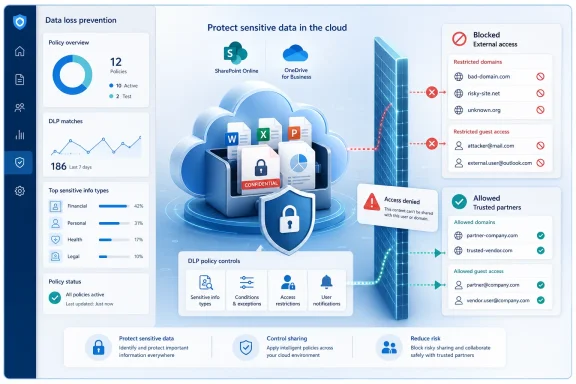
Existing SharePoint and OneDrive DLP policies can broadly block external users from accessing sensitive content. The new Block access for specific external domains or users option instead lets administrators target particular partner domains or guest SMTP addresses while leaving other external collaboration paths open.
The action is configured in a Purview DLP policy under Restrict access or encrypt the content in Microsoft 365 locations, with SharePoint Online and/or OneDrive for Business in scope. Rules can be based on the normal DLP signals, such as sensitive information types or sensitivity labels, then apply access restrictions to named domains and users.
A blocked guest will see an access-denied message and cannot open or download the affected file. Microsoft says the policy can also be applied to files that already exist, not merely new shares.
Microsoft recommends identifying regulated or sensitive content that needs these narrower restrictions, informing helpdesk teams and partners of the change, and updating internal DLP documentation. Test policies in simulation mode where possible, particularly where guest access is business-critical.
The setting is not enabled automatically, so tenants will see no change until an administrator adds it to a Purview DLP rule.
According to Microsoft’s updated Message Center notice, worldwide rollout begins in mid-July 2026 and is expected to finish by the end of July. The feature was previously available in public preview and is tied to Microsoft 365 Roadmap ID 557191.
 More precise than blocking all guests
Existing SharePoint and OneDrive DLP policies can broadly block external users from accessing sensitive content. The new Block access for specific external domains or users option instead lets administrators target particular partner domains or guest SMTP addresses while leaving other external collaboration paths open.The action is configured in a Purview DLP policy under Restrict access or encrypt the content in Microsoft 365 locations, with SharePoint Online and/or OneDrive for Business in scope. Rules can be based on the normal DLP signals, such as sensitive information types or sensitivity labels, then apply access restrictions to named domains and users.
A blocked guest will see an access-denied message and cannot open or download the affected file. Microsoft says the policy can also be applied to files that already exist, not merely new shares.
Important behavior and limitations
Microsoft’s Purview documentation describes some policy behavior admins should test before enabling this in production:- Rules can include domain or user allow entries, but a block wins if the same user or domain appears in both lists.
- Internal users cannot be targeted by this specific action; use a broader block action if internal access must be denied.
- User notifications and self-service overrides are not supported for this action, though alerting is supported.
- The preview documentation notes that image files are not protected by this suboption and that certain blocked actions can produce multiple audit records.
What admins should do
Review DLP policies that currently block every external recipient or rely on broad SharePoint sharing controls. Organizations working with multiple suppliers, customers, or contractors can use the new action to deny access to high-risk domains or individual guests without shutting down every external share.Microsoft recommends identifying regulated or sensitive content that needs these narrower restrictions, informing helpdesk teams and partners of the change, and updating internal DLP documentation. Test policies in simulation mode where possible, particularly where guest access is business-critical.
The setting is not enabled automatically, so tenants will see no change until an administrator adds it to a Purview DLP rule.
References
- Primary source: Microsoft 365 Roadmap
Published: 2026-07-14T22:41:38.6349466Z
Microsoft 365 Roadmap | Microsoft 365
The Microsoft 365 Roadmap lists updates that are currently planned for applicable subscribers. Check here for more information on the status of new features and updates.www.microsoft.com
- Official source: learn.microsoft.com
Data Loss Prevention policy reference | Microsoft Learn
DLP policy component and configuration reference. This article provides a detailed anatomy of a DLP policy.learn.microsoft.com - Official source: support.microsoft.com
External or guest sharing in OneDrive, SharePoint, and Lists | Microsoft Support
External or guest sharing in OneDrive, SharePoint, and Listssupport.microsoft.com - Official source: techcommunity.microsoft.com
- Related coverage: knowledge.broadcom.com

DLP DIM policy block upload to external O365
DLP DIM policy block upload to external O365
knowledge.broadcom.com
