

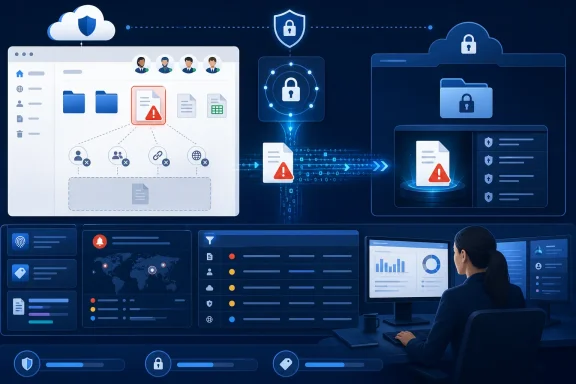
Microsoft is rolling out a File Quarantine action for Microsoft Purview Data Loss Prevention policies covering SharePoint Online and OneDrive for Business, giving compliance teams a substantially stronger response than simply blocking access or external sharing. When a matching DLP rule fires, Microsoft 365 can remove the file from its original location, strip existing permissions and sharing links, move the content into a restricted SharePoint quarantine site, and leave behind a configurable text placeholder. Roadmap ID 557190 entered preview in March 2026 and is listed for worldwide general availability during July 2026, although Microsoft’s supporting documentation still reflects elements of the preview experience, making careful tenant validation essential during the rollout.
Microsoft Purview Data Loss Prevention has long given organizations a way to identify sensitive information across Microsoft 365 and control what users can do with it. Policies can look for built-in or custom sensitive information types, sensitivity labels, trainable classifiers, document properties, sharing conditions, and combinations of contextual signals.
For SharePoint and OneDrive, traditional enforcement has generally focused on restricting access. A DLP rule might block external users, block most users while retaining access for the content owner and administrators, display a policy tip, send an alert, or record the event for investigation.
Those controls remain useful, but they do not always solve the underlying problem. A document containing merger plans, regulated personal information, credentials, unannounced financial results, or sensitive investigation material may be stored in a location where it should never have existed. Leaving that file in place—even with reduced permissions—can create operational, legal, and governance concerns.
A sensitive file can be exposed through inherited permissions, old sharing links, synchronization, search visibility, automation, downstream workflows, or accidental permission changes. Moving it into an administrator-controlled site reduces the number of systems and users that can continue interacting with it.
Because Microsoft 365 capabilities deploy progressively, “general availability” does not necessarily mean every eligible tenant receives the control on the same day. Administrators should verify the File quarantine settings page, policy action choices, licensing, and actual enforcement behavior in their own tenant before treating the feature as production-ready.
Microsoft recommends a dedicated site accessible only to personnel responsible for compliance investigation and quarantine administration. That site becomes a concentrated repository of potentially sensitive material, so its permissions, retention configuration, monitoring, and administrative membership require greater scrutiny than those of a typical departmental workspace.
This provides more reliable tracking than a filename-based process because users can rename documents, and unrelated files can share the same name in different libraries or folders. Even so, administrators should preserve DLP alerts and audit records because those records supply the operational context needed to locate, understand, and potentially restore an item.
That may be entirely appropriate for routine cases. A spreadsheet containing customer account numbers in a properly secured finance site, for example, may only need external sharing disabled rather than physical relocation.
By moving the file, Purview reduces immediate exposure and forces a controlled review before normal business access can resume. The action effectively turns a DLP match into a containment event.
For that reason, quarantine should not become the default response for every sensitive information match. It is better positioned as a high-severity action for narrowly defined content and contexts where the cost of continued exposure outweighs the cost of interrupting work.
A useful message should explain that an organizational data protection policy moved the file, identify the responsible support or compliance team, and describe the approved escalation process. It should not reveal sensitive policy logic or suggest that the user has necessarily committed misconduct.
For example, an organization might tell users that the document was transferred to a secure review location because it matched a data protection policy and that they should contact the compliance operations team with the file name and business justification.
The tombstone should therefore serve three purposes:
Power Automate flows, indexing processes, approval systems, line-of-business integrations, and scripts could all react to the replacement item. Testing must include these dependencies rather than focusing solely on what appears in the SharePoint browser interface.
Combining signals generally creates a more defensible policy than relying on a single common pattern. A lone credit-card-number detector, for example, may match test data, training content, receipts, templates, or properly authorized business records.
A stronger rule can account for:
Administrators should consider policies that combine content detection with location scope. This allows quarantine to focus on misplaced sensitive data instead of treating every instance of sensitive data as inherently invalid.
This safeguard reduces the chance that a broadly scoped policy will suddenly move an enormous volume of historical content. It also means the feature should not be mistaken for an automatic cleanup mechanism for every pre-existing SharePoint and OneDrive repository.
On-demand classification can create an important exception when a file receives a qualifying classification result for the first time. The classification process itself does not directly perform quarantine, but the resulting signal can cause the DLP policy to act when the file becomes newly eligible.
Administrators should apply least-privilege access and review every account with site ownership or administrative capability. Access through broad groups, nested membership, legacy permissions, or standing privileged accounts can undermine the purpose of removing files from ordinary user reach.
The site also needs an explicit lifecycle plan. Quarantine cannot become an indefinite dumping ground in which highly sensitive files accumulate without ownership, review, retention, or disposal decisions.
Configuration and management are associated with privileged roles such as Compliance Administrator, Security Administrator, or Compliance Data Administrator. Personnel investigating the actual content may also require data classification viewing permissions, depending on the organization’s operating model and the tools used during review.
Possession of a technical role should not automatically grant routine access to quarantined documents. Organizations should separate policy administration, site administration, investigation, and approval duties where staffing and regulatory requirements allow.
This context allows an investigator to answer several essential questions:
A practical triage process should distinguish among true violations, valid business use in an incorrect location, classification mistakes, test documents, false positives, and malicious behavior. Each category requires a different response, and not every file should be restored.
The quarantine site’s operational procedures should document who can inspect content, which tools they may use, how decisions are recorded, and when legal, privacy, security, or human-resources teams must be involved.
This has significant consequences. If a document had a long version history, complex unique permissions, carefully configured links, or business-critical metadata relationships, restoration may not produce an exact replica of its former state.
The file owner or administrator must reconfigure appropriate sharing after review. That can be beneficial because it prevents the original exposure from being recreated automatically, but it increases administrative effort and the chance of business interruption.
Other DLP rules can still apply. Administrators should therefore treat restoration as an explicit exception decision and document why the file was approved, rather than assuming all future DLP protection has been disabled.
Quarantine can also support policies around trade secrets, acquisition materials, source code, authentication secrets, legal investigations, executive communications, and unreleased financial results. These use cases demand high-confidence detection and tightly limited administrative access.
Microsoft documents a tenant processing ceiling of up to 200,000 quarantine items in a 24-hour period, with excess items potentially processed later. Few organizations should approach that number during normal operation; doing so would likely indicate an excessively broad policy, a bulk data event, or a serious exposure incident.
This structure reduces the risk that one administrator can create an aggressive rule, gain access to quarantined material, and restore or delete files without oversight. Privileged Identity Management, access reviews, audit monitoring, and time-limited elevation can further reduce standing access.
Unlike a policy tip that warns before an action or a block-with-override control that allows justification, quarantine is designed for decisive containment. Organizations should reserve it for situations where allowing the user to proceed would defeat the policy’s purpose.
Support desks also need access to a documented escalation route. They should not attempt to “fix” the issue by recreating the document, renaming it, uploading another copy, or changing permissions without consulting the compliance team.
Quarantine should be accompanied by practical guidance about where the information belongs. The most effective outcome is not merely removing a file; it is helping the user continue the legitimate task in a safer location.
The new SharePoint and OneDrive action works on cloud-hosted documents and moves them into a SharePoint quarantine site. It is not simply the cloud interface for endpoint auto-quarantine, and the two controls can apply at different points in a document’s lifecycle.
Purview’s advantage is that the action sits directly inside the organization’s DLP policy model. This can simplify governance for teams already using Purview conditions, sensitive information types, labels, alerts, and Activity Explorer.
Quarantine should complement rather than replace those controls. A file-level emergency action cannot compensate for an overly permissive site, uncontrolled guest access, poor identity hygiene, or a lack of approved repositories for sensitive work.
The pilot should also measure alert delivery, Activity Explorer visibility, support messaging, administrator access, restoration time, and the behavior of Office desktop applications.
Organizations should monitor whether Microsoft updates restoration capabilities, version handling, permission preservation, processing limits, role requirements, and service-level behavior after the rollout completes.
APIs or automation hooks could also help organizations connect quarantine cases to ticketing systems, security orchestration platforms, legal workflows, and data-owner approval processes. Any such automation would need strong safeguards because an automated restore mechanism could undermine containment.
The longer-term question is whether Microsoft can deliver consistent quarantine semantics across endpoints, SharePoint, OneDrive, third-party cloud applications, and on-premises repositories. Consistency would simplify administration, but differences in storage architecture and permissions will continue to complicate recovery.
Microsoft Purview’s File Quarantine action gives SharePoint and OneDrive administrators something more decisive than another sharing restriction: the ability to remove dangerously placed content from circulation while preserving it for controlled investigation. That makes it one of the most consequential additions to Microsoft 365 DLP enforcement in recent years, but also one that can disrupt users, erase sharing context, and create a substantial manual review burden when deployed carelessly. Organizations that pair narrow, high-confidence policies with a hardened quarantine site, clear user communication, disciplined investigation procedures, and tested restoration runbooks will gain a valuable containment layer; those that treat quarantine as a universal answer to sensitive data are likely to exchange exposure risk for operational chaos.
 Background
Microsoft Purview Data Loss Prevention has long given organizations a way to identify sensitive information across Microsoft 365 and control what users can do with it. Policies can look for built-in or custom sensitive information types, sensitivity labels, trainable classifiers, document properties, sharing conditions, and combinations of contextual signals.For SharePoint and OneDrive, traditional enforcement has generally focused on restricting access. A DLP rule might block external users, block most users while retaining access for the content owner and administrators, display a policy tip, send an alert, or record the event for investigation.
Those controls remain useful, but they do not always solve the underlying problem. A document containing merger plans, regulated personal information, credentials, unannounced financial results, or sensitive investigation material may be stored in a location where it should never have existed. Leaving that file in place—even with reduced permissions—can create operational, legal, and governance concerns.
From access control to content isolation
File Quarantine changes the enforcement model from restricting a file where it sits to removing the file from the business location altogether. This distinction matters because access permissions are only one part of a document’s risk profile.A sensitive file can be exposed through inherited permissions, old sharing links, synchronization, search visibility, automation, downstream workflows, or accidental permission changes. Moving it into an administrator-controlled site reduces the number of systems and users that can continue interacting with it.
Roadmap and rollout status
Microsoft created roadmap item 557190 on March 12, 2026, with preview availability targeted for March. The roadmap was updated on July 21 and now lists the feature as rolling out, with worldwide general availability scheduled for July 2026 in Standard Multi-Tenant cloud environments.Because Microsoft 365 capabilities deploy progressively, “general availability” does not necessarily mean every eligible tenant receives the control on the same day. Administrators should verify the File quarantine settings page, policy action choices, licensing, and actual enforcement behavior in their own tenant before treating the feature as production-ready.
What the File Quarantine Action Actually Does
The new action is the most restrictive Purview DLP response currently available for files hosted in SharePoint and OneDrive. It does not merely deny a particular sharing operation; it changes the location and security context of the document.The enforcement sequence
When an eligible file matches a DLP rule configured to quarantine content, Microsoft describes a multi-stage process:- Existing permissions and sharing links are removed from the file.
- A Microsoft 365 system account moves the file into the configured SharePoint quarantine site.
- The original folder structure is represented within the quarantine destination to assist investigation.
- A tombstone text file replaces the original item in SharePoint or OneDrive.
- Purview records the event and exposes relevant details through DLP alerts, audit data, and Activity Explorer.
The quarantine destination
The destination must be a SharePoint site in the same tenant. Administrators cannot use a OneDrive account as the quarantine repository, nor should they select a SharePoint site that also hosts ordinary collaboration content.Microsoft recommends a dedicated site accessible only to personnel responsible for compliance investigation and quarantine administration. That site becomes a concentrated repository of potentially sensitive material, so its permissions, retention configuration, monitoring, and administrative membership require greater scrutiny than those of a typical departmental workspace.
Document identity and tracking
SharePoint and OneDrive identify documents through internal document identifiers rather than relying only on file names. Purview uses that identity to follow files through quarantine and restoration.This provides more reliable tracking than a filename-based process because users can rename documents, and unrelated files can share the same name in different libraries or folders. Even so, administrators should preserve DLP alerts and audit records because those records supply the operational context needed to locate, understand, and potentially restore an item.
Why Quarantine Is Stronger Than Blocking
A block rule and a quarantine rule may appear similar to an affected user: in both cases, the user loses the ability to work with the content normally. Under the surface, however, they address different levels of risk.Blocking leaves the document in place
Traditional DLP blocking can prevent external access or substantially restrict access to a file. The document nevertheless remains in its original library or OneDrive folder, connected to the surrounding site, metadata, workflow, and organizational context.That may be entirely appropriate for routine cases. A spreadsheet containing customer account numbers in a properly secured finance site, for example, may only need external sharing disabled rather than physical relocation.
Quarantine treats the location itself as unsafe
Quarantine is intended for cases where the original location is unacceptable. The content might have been uploaded to a broadly accessible project site, placed in a user’s OneDrive without authorization, or stored in a library connected to applications and workflows that should not process it.By moving the file, Purview reduces immediate exposure and forces a controlled review before normal business access can resume. The action effectively turns a DLP match into a containment event.
A deliberate break in collaboration
The stronger response also creates more disruption. Co-authoring stops, links cease to work, synchronized copies may no longer behave as users expect, and processes that reference the original document can fail.For that reason, quarantine should not become the default response for every sensitive information match. It is better positioned as a high-severity action for narrowly defined content and contexts where the cost of continued exposure outweighs the cost of interrupting work.
Tombstone Files and the User Experience
Purview does not leave the original location completely empty. It creates a text file—commonly described as a tombstone—that tells the affected user the original document has been moved.What the placeholder contains
The tombstone uses the original filename with a text extension and contains an administrator-defined message. It also identifies the relative path of the quarantined content, while avoiding disclosure of the full confidential quarantine site path.A useful message should explain that an organizational data protection policy moved the file, identify the responsible support or compliance team, and describe the approved escalation process. It should not reveal sensitive policy logic or suggest that the user has necessarily committed misconduct.
For example, an organization might tell users that the document was transferred to a secure review location because it matched a data protection policy and that they should contact the compliance operations team with the file name and business justification.
Why communication quality matters
A vague placeholder such as “File blocked” will generate confusion and support tickets. An accusatory message can also create unnecessary tension, particularly when false positives, inherited labels, copied templates, or legitimate business documents trigger the rule.The tombstone should therefore serve three purposes:
- It should confirm that the document was intentionally moved rather than deleted or lost.
- It should identify a clear route for review and recovery.
- It should avoid exposing the quarantine repository or internal detection criteria.
- It should use neutral language that does not presume malicious intent.
Effects on applications and workflows
Replacing a Word, Excel, PowerPoint, PDF, archive, or other supported document with a text file can affect more than the person who uploaded it. Applications that expect a particular extension, content type, identifier, or metadata structure may encounter errors.Power Automate flows, indexing processes, approval systems, line-of-business integrations, and scripts could all react to the replacement item. Testing must include these dependencies rather than focusing solely on what appears in the SharePoint browser interface.
Policy Design and Detection Logic
The technical ability to quarantine a document is only as reliable as the DLP rule that invokes it. Overly broad conditions could remove large numbers of legitimate files, while weak conditions could miss the data that most needs protection.Conditions that can support quarantine
Organizations can construct DLP rules around signals such as sensitive information types, sensitivity labels, and other supported classification conditions. A rule might require a document to contain financial identifiers and carry a Highly Confidential label before quarantine is triggered.Combining signals generally creates a more defensible policy than relying on a single common pattern. A lone credit-card-number detector, for example, may match test data, training content, receipts, templates, or properly authorized business records.
A stronger rule can account for:
- The confidence and quantity of sensitive information detected in the file.
- An existing sensitivity label or classification applied to the content.
- The SharePoint sites or OneDrive accounts where the document appears.
- The type of regulated or confidential data involved.
- Approved exclusions for validated repositories, service accounts, or business processes.
Scope is as important as content
A document may be safe in one site and unacceptable in another. Payroll data inside a carefully governed human-resources repository presents a different risk from the same data uploaded to an open project site.Administrators should consider policies that combine content detection with location scope. This allows quarantine to focus on misplaced sensitive data instead of treating every instance of sensitive data as inherently invalid.
New and modified files
Microsoft states that quarantine enforcement applies to files created or modified after the quarantine-enabled policy is turned on. Existing files that predate activation are not automatically swept into quarantine merely because the new action was enabled.This safeguard reduces the chance that a broadly scoped policy will suddenly move an enormous volume of historical content. It also means the feature should not be mistaken for an automatic cleanup mechanism for every pre-existing SharePoint and OneDrive repository.
On-demand classification can create an important exception when a file receives a qualifying classification result for the first time. The classification process itself does not directly perform quarantine, but the resulting signal can cause the DLP policy to act when the file becomes newly eligible.
Configuration and Deployment
Microsoft requires administrators to establish the quarantine destination and replacement message before the action becomes available in a DLP policy. The setup sequence encourages organizations to define the operational destination before activating enforcement.Preparing the SharePoint site
The quarantine site should be created specifically for this function. Any SharePoint template may technically be suitable, but the site should not host active departmental documents, communications, or collaboration workloads.Administrators should apply least-privilege access and review every account with site ownership or administrative capability. Access through broad groups, nested membership, legacy permissions, or standing privileged accounts can undermine the purpose of removing files from ordinary user reach.
The site also needs an explicit lifecycle plan. Quarantine cannot become an indefinite dumping ground in which highly sensitive files accumulate without ownership, review, retention, or disposal decisions.
Configuring Purview
The basic configuration process involves the following sequence:- Open the Microsoft Purview portal and navigate to Data Loss Prevention settings.
- Select the File quarantine configuration.
- Choose the dedicated SharePoint site from the tenant-provided site list.
- Enter the replacement-file message that users will see.
- Save the settings and confirm that the quarantine action becomes available in policy creation.
- Build or modify a DLP policy covering the required SharePoint and OneDrive locations.
- Select the enforcement option that blocks everyone and moves the matching file to quarantine.
- Configure alerts, severity, notification behavior, conditions, exceptions, and deployment mode.
- Validate the policy in a controlled test scope before expanding it.
Licensing and administrative roles
Microsoft’s supporting guidance identifies the capability as requiring eligible E5 licensing. Organizations should confirm entitlements against their specific Microsoft 365 agreements because licensing descriptions, bundles, trials, and add-ons can vary.Configuration and management are associated with privileged roles such as Compliance Administrator, Security Administrator, or Compliance Data Administrator. Personnel investigating the actual content may also require data classification viewing permissions, depending on the organization’s operating model and the tools used during review.
Possession of a technical role should not automatically grant routine access to quarantined documents. Organizations should separate policy administration, site administration, investigation, and approval duties where staffing and regulatory requirements allow.
Investigation, Alerts, and Auditability
A quarantine event is not the end of the process. It is the beginning of an investigation that must determine why the match occurred and what should happen to the document.Information available to investigators
DLP alerts can include the file owner, original file path, and quarantine location. Corresponding rule-match events appear in Activity Explorer, while audit records help reconstruct the movement and support manual restoration.This context allows an investigator to answer several essential questions:
- What policy and rule caused the quarantine?
- What sensitive information or classification signal was detected?
- Who owned or last modified the document?
- Where was it stored before enforcement?
- Was it shared, downloaded, synchronized, or otherwise exposed?
- Is the file legitimate, misplaced, incorrectly classified, or potentially malicious?
Establishing a triage workflow
Organizations should assign ownership and response targets before enabling quarantine. High-confidence exposure of regulated data may demand immediate investigation, while a low-impact internal classification mismatch could follow a slower review queue.A practical triage process should distinguish among true violations, valid business use in an incorrect location, classification mistakes, test documents, false positives, and malicious behavior. Each category requires a different response, and not every file should be restored.
Evidence preservation
Investigators should avoid casually opening, downloading, renaming, or moving files without considering audit and evidence requirements. A quarantined document may become relevant to an insider-risk case, legal hold, regulatory inquiry, or security incident.The quarantine site’s operational procedures should document who can inspect content, which tools they may use, how decisions are recorded, and when legal, privacy, security, or human-resources teams must be involved.
Restoration Is Intentionally Manual
Microsoft does not currently provide an automated restore control in the Purview portal for this feature. Administrators must locate the quarantined file, identify its original location, move it back, and remove the tombstone.What is not restored
Restoration does not reconstruct the complete pre-quarantine state. Microsoft notes that original sharing permissions and links are not preserved, and only the latest file version returns through the quarantine-and-restore cycle.This has significant consequences. If a document had a long version history, complex unique permissions, carefully configured links, or business-critical metadata relationships, restoration may not produce an exact replica of its former state.
The file owner or administrator must reconfigure appropriate sharing after review. That can be beneficial because it prevents the original exposure from being recreated automatically, but it increases administrative effort and the chance of business interruption.
Preventing quarantine loops
After restoration, the same DLP rule does not quarantine that document again, even if the file is later modified or the rule changes. Microsoft designed this behavior to prevent a restored file from immediately cycling back into quarantine.Other DLP rules can still apply. Administrators should therefore treat restoration as an explicit exception decision and document why the file was approved, rather than assuming all future DLP protection has been disabled.
A controlled restoration runbook
A mature restoration procedure should require the investigator to:- Confirm the file’s identity and original path.
- Review the policy match and determine whether it was valid.
- Obtain business, compliance, or data-owner approval when required.
- Decide whether the file may return to the original site or needs a more secure destination.
- Move only the approved version out of quarantine.
- Remove the tombstone after confirming successful placement.
- Rebuild permissions according to least-privilege principles.
- Record the decision, approver, justification, and final location.
Enterprise Impact
Large organizations gain a powerful containment tool, but they also inherit a new high-sensitivity operational service. The value will depend on whether governance processes mature alongside the technical rollout.Compliance and regulated data
Financial institutions, healthcare organizations, government agencies, legal practices, and companies handling payment or identity data can use quarantine when highly regulated content appears outside approved repositories. Immediate removal may reduce the window in which unauthorized users can continue accessing or sharing the file.Quarantine can also support policies around trade secrets, acquisition materials, source code, authentication secrets, legal investigations, executive communications, and unreleased financial results. These use cases demand high-confidence detection and tightly limited administrative access.
Operational staffing
Manual restoration makes alert volume a capacity-planning issue. If a policy quarantines hundreds or thousands of files per day, investigators must review them, answer user inquiries, coordinate approvals, and potentially rebuild permissions.Microsoft documents a tenant processing ceiling of up to 200,000 quarantine items in a 24-hour period, with excess items potentially processed later. Few organizations should approach that number during normal operation; doing so would likely indicate an excessively broad policy, a bulk data event, or a serious exposure incident.
Separation of duties
A well-designed enterprise deployment may divide responsibilities among several groups. Purview administrators can define policies, SharePoint administrators can secure the destination, compliance investigators can review alerts, and data owners can approve final disposition.This structure reduces the risk that one administrator can create an aggressive rule, gain access to quarantined material, and restore or delete files without oversight. Privileged Identity Management, access reviews, audit monitoring, and time-limited elevation can further reduce standing access.
Consumer and End-User Impact
Although Microsoft Purview is an enterprise compliance platform, the people who feel quarantine most directly are ordinary Microsoft 365 users. Their document may disappear from a familiar folder and be replaced by a text message without warning.Productivity interruption
The user loses access immediately, including when they are the owner. Collaborators may encounter broken links, Office applications may report that the expected file is unavailable, and automated processes may fail.Unlike a policy tip that warns before an action or a block-with-override control that allows justification, quarantine is designed for decisive containment. Organizations should reserve it for situations where allowing the user to proceed would defeat the policy’s purpose.
Support and education
Employees need to understand that quarantine is not the same as deletion, ransomware, a OneDrive synchronization failure, or a SharePoint outage. Training should explain why files can be moved, who can review them, and how users can provide a legitimate business justification.Support desks also need access to a documented escalation route. They should not attempt to “fix” the issue by recreating the document, renaming it, uploading another copy, or changing permissions without consulting the compliance team.
Avoiding a blame-first culture
Sensitive data frequently appears in the wrong place because of confusing site structures, inherited habits, copied documents, or inadequate approved storage—not deliberate wrongdoing. A punitive user experience may encourage employees to hide mistakes or move work to unapproved tools.Quarantine should be accompanied by practical guidance about where the information belongs. The most effective outcome is not merely removing a file; it is helping the user continue the legitimate task in a safer location.
Relationship to Other Microsoft Quarantine Controls
The name “quarantine” already appears in several Microsoft security and compliance products. Administrators must distinguish them to avoid incorrect assumptions about location, scope, and recovery.Endpoint DLP auto-quarantine
Endpoint DLP can quarantine files involved in restricted application activity on Windows or macOS. That process moves the local file into a protected folder on the device and can leave a replacement text file behind.The new SharePoint and OneDrive action works on cloud-hosted documents and moves them into a SharePoint quarantine site. It is not simply the cloud interface for endpoint auto-quarantine, and the two controls can apply at different points in a document’s lifecycle.
Defender for Cloud Apps
Microsoft Defender for Cloud Apps also has file-governance and quarantine capabilities. Organizations that already use those controls should compare policy ownership, alert handling, supported scenarios, licensing, and restoration workflows before adopting an overlapping Purview configuration.Purview’s advantage is that the action sits directly inside the organization’s DLP policy model. This can simplify governance for teams already using Purview conditions, sensitive information types, labels, alerts, and Activity Explorer.
SharePoint access restrictions
SharePoint site access restriction, unmanaged-device controls, sensitivity labels, and external-sharing policies operate at different layers. They can prevent unauthorized access without physically moving each matching document.Quarantine should complement rather than replace those controls. A file-level emergency action cannot compensate for an overly permissive site, uncontrolled guest access, poor identity hygiene, or a lack of approved repositories for sensitive work.
Strengths and Opportunities
File Quarantine closes a notable enforcement gap between detecting dangerous content and fully isolating it. Its most valuable characteristics are straightforward:- It removes the file from an inappropriate collaboration location instead of leaving it behind with modified access.
- It revokes access from everyone, including the owner, when the situation demands complete containment.
- It preserves the document for investigation rather than immediately deleting potential evidence or legitimate business data.
- It leaves a configurable placeholder that can direct users toward an approved review process.
- It integrates with Purview alerts, Activity Explorer, audit data, and the broader Microsoft security investigation ecosystem.
- It lets organizations reuse existing DLP conditions, sensitive information types, and sensitivity labels.
- It automatically excludes the designated quarantine site from normal DLP rule evaluation, reducing circular enforcement risks.
- It encourages security teams to treat serious data exposure as an incident requiring disposition rather than a one-time blocked action.
Risks and Concerns
The power to remove documents automatically carries substantial operational and governance risk. Organizations should not enable quarantine broadly simply because the option appears in the portal.- False positives can interrupt critical work and remove documents from users who have legitimate access requirements.
- Manual restoration can create a large case backlog if policy conditions are not carefully tuned.
- Original sharing permissions, links, and earlier file versions are not preserved through restoration.
- The quarantine site becomes a concentrated store of highly sensitive information and therefore an attractive target.
- Replacing documents with text files can break applications, workflows, synchronization assumptions, and scripted processes.
- Existing content is not automatically remediated unless a qualifying new or modified event brings it into scope.
- The same rule does not re-quarantine a restored file, so restoration decisions must be tracked as meaningful exceptions.
- Progressive Microsoft 365 rollout can produce differences between roadmap status, documentation labels, tenant interfaces, and observed behavior.
- E5 licensing and privileged administrative requirements may limit adoption or require additional governance planning.
- High-volume events may exceed operational review capacity even when the cloud service can process the files.
Recommended Rollout Strategy
The safest implementation is gradual, measurable, and reversible at the policy level. Organizations should build confidence in detection before allowing automated movement of production files.Start with policy intent
Each rule should begin with a concise statement describing what data must be protected, where it is prohibited, why quarantine is necessary, and who owns the resulting investigation. If that statement cannot distinguish quarantine from ordinary blocking, the stronger action may not be justified.Use a controlled pilot
Start with a test site and a small OneDrive population containing representative files, labels, permissions, sharing links, version histories, and workflows. Test true positives, near matches, false positives, renamed files, duplicate filenames, synchronized content, and files modified after policy activation.The pilot should also measure alert delivery, Activity Explorer visibility, support messaging, administrator access, restoration time, and the behavior of Office desktop applications.
Expand by risk tier
A sensible deployment order could be:- High-confidence secrets or credentials in locations where they are never permitted.
- Highly confidential labeled files outside approved repositories.
- Regulated identifiers combined with strong contextual or classification signals.
- Selected high-risk SharePoint sites and OneDrive populations.
- Broader scenarios only after false-positive rates and investigation capacity are understood.
What to Watch Next
The immediate issue is the completion of the July 2026 worldwide rollout. Administrators should watch for the File quarantine settings page, the action inside the DLP policy wizard, and any tenant-specific messages about licensing or availability.Documentation alignment
Microsoft’s roadmap lists the feature as rolling out toward general availability, while some supporting pages continue to describe it as preview. That mismatch is common during service transitions but matters for change management and support expectations.Organizations should monitor whether Microsoft updates restoration capabilities, version handling, permission preservation, processing limits, role requirements, and service-level behavior after the rollout completes.
Automation and case management
Manual restore is the most obvious area for future improvement. A structured Purview workflow with approval, disposition, restoration, reason codes, and permission handling would make the feature easier to operate at enterprise scale.APIs or automation hooks could also help organizations connect quarantine cases to ticketing systems, security orchestration platforms, legal workflows, and data-owner approval processes. Any such automation would need strong safeguards because an automated restore mechanism could undermine containment.
Broader data security convergence
Microsoft continues to draw DLP, classification, insider-risk signals, Defender investigations, and data security posture management into a more unified operational model. File Quarantine fits that direction by converting a classification match into immediate cloud-content containment.The longer-term question is whether Microsoft can deliver consistent quarantine semantics across endpoints, SharePoint, OneDrive, third-party cloud applications, and on-premises repositories. Consistency would simplify administration, but differences in storage architecture and permissions will continue to complicate recovery.
Microsoft Purview’s File Quarantine action gives SharePoint and OneDrive administrators something more decisive than another sharing restriction: the ability to remove dangerously placed content from circulation while preserving it for controlled investigation. That makes it one of the most consequential additions to Microsoft 365 DLP enforcement in recent years, but also one that can disrupt users, erase sharing context, and create a substantial manual review burden when deployed carelessly. Organizations that pair narrow, high-confidence policies with a hardened quarantine site, clear user communication, disciplined investigation procedures, and tested restoration runbooks will gain a valuable containment layer; those that treat quarantine as a universal answer to sensitive data are likely to exchange exposure risk for operational chaos.