
Microsoft is rolling out a Microsoft Purview sensitivity-label change in 2026 that makes labeled Word, Excel, and PowerPoint files ineligible for all Microsoft connected experiences that analyze content, including Microsoft 365 Copilot, when the label uses the existing content-analysis blocking setting. The important part is not that Microsoft invented a new privacy switch. It is that an old, obscure one is being promoted from partial brake to hard stop.
That tells us something about where Microsoft’s AI strategy has reached its next stress point. Copilot is no longer merely a productivity feature being sold into the enterprise; it is now a governance surface that has to respect the same classification machinery IT departments have spent years wiring into Microsoft 365. The result is a small administrative change with outsized political meaning: Microsoft is conceding that “Copilot can see what users can see” is not a sufficient answer for every regulated document, every executive spreadsheet, or every nervous legal department.
The change revolves around a Microsoft Purview sensitivity-label setting known in PowerShell as
Microsoft’s update expands that behavior across Word, Excel, and PowerPoint so that the setting blocks all connected experiences that analyze file content, rather than only a subset. Once the update reaches a tenant, existing labels configured with that setting inherit the broader enforcement automatically. No new label design is required, which is both a convenience and a potential surprise.
That automatic inheritance is the sharp edge. A compliance team that originally used the setting to constrain a narrower class of Office services may discover that it now disables a wider set of cloud-powered features for labeled documents. A security team that wanted exactly this behavior may cheer. A business unit that just paid for Copilot seats may be less amused when sensitive decks stop participating in the AI workflow.
This is how enterprise AI governance is likely to look in practice: not a dramatic “AI on” or “AI off” switch, but a set of older compliance controls being reinterpreted for systems that can summarize, transform, and infer from company data at scale.
The more practical enterprise problem is runtime access. If a user asks Copilot to summarize a confidential strategy document, extract figures from a spreadsheet, or draft talking points from a PowerPoint deck, Copilot needs to analyze that content in order to be useful. Even if the content stays within Microsoft’s enterprise cloud boundaries, the act of sending it to a connected service for analysis may be unacceptable for certain categories of data.
That distinction matters because many regulated organizations do not frame privacy risk only as “will this train a model?” They frame it as “which service processed this file, under what policy, for what purpose, and with what auditability?” A bank’s merger model, a hospital’s patient-related workbook, or a law firm’s litigation strategy deck can trigger restrictions long before anyone reaches the question of model training.
Microsoft’s expanded label behavior gives administrators a more legible answer. If a document carries a label configured to block content analysis, Copilot and other connected experiences that need to inspect the file cannot process it. The user’s permissions still matter, but the label now expresses an additional rule: this content may be readable by a person, yet unavailable to AI-backed or cloud-backed analysis features.
That is a subtle but major shift in the policy model. Access control says who can open a file. Sensitivity labeling increasingly says what kinds of systems are allowed to reason over it.
Copilot changes the stakes because it aggregates those expectations into a single, highly visible AI assistant. A feature like PowerPoint Designer may analyze a slide to suggest layouts; Copilot may analyze a deck to produce an executive summary, rewrite an argument, or answer questions about business strategy. The underlying category — cloud-backed content analysis — is similar, but the perceived risk is different.
That is why the label-setting expansion feels like a governance catch-up. Microsoft is mapping the enterprise AI era onto the controls administrators already know: Purview, sensitivity labels, data loss prevention, audit logs, and conditional access patterns. The company would rather do that than invent a parallel AI policy universe, because parallel policy systems are where compliance programs go to die.
But the legacy is visible in the wording. “Prevent some connected experiences that analyze content” is not a phrase designed for a board presentation about AI risk. It sounds like a checkbox from the Office privacy era, because it is. Microsoft’s update makes the control more powerful, but the control still carries the naming baggage of a product line that evolved faster than its administrative vocabulary.
It also creates a classic Microsoft 365 problem: the label configuration becomes more consequential without the label name necessarily changing. A document marked “Confidential” yesterday and a document marked “Confidential” after the rollout may look identical to users, while behaving differently when Copilot, translation, recommended labeling, or another content-analysis feature tries to interact with it.
That gap between visible label and changed behavior is where help desks will feel the update. Users rarely understand whether a failed feature is caused by licensing, network policy, app version, tenant configuration, sensitivity labels, or service rollout timing. They know only that Copilot could summarize one file and not another. If the app does not explain the policy reason clearly, the administrative win becomes a support burden.
The obvious mitigation is not to panic-disable the setting, but to audit label usage before the broader enforcement lands everywhere. Many organizations have accumulated sensitivity labels in layers: a pilot label here, a compliance label there, a label created for encryption, a label created for marking, a label created for DLP. The same label can mean different things to different teams.
The Copilot era punishes that ambiguity. Labels that once served mainly as visual markings or encryption triggers now determine whether AI-backed services can touch the file at all. That makes label taxonomy a business architecture issue, not just a compliance hygiene task.
A blanket tenant-wide disablement of connected experiences is blunt. It can protect broadly, but it also degrades Office in ways users experience as arbitrary loss of functionality. A label-based control is more precise because it lets ordinary documents benefit from cloud-backed intelligence while shielding files that carry higher sensitivity. That is the architecture Microsoft is now strengthening.
The cost is that precision requires discipline. Documents must be labeled correctly. Labels must map to real data-handling rules. Users need to understand when to apply a restrictive label, and automated labeling needs to be tuned well enough not to overclassify half the tenant into AI-inaccessible sludge.
Overclassification is not a theoretical problem. If every second spreadsheet becomes “Highly Confidential” because the organization is afraid of under-protecting data, Copilot becomes less useful, and users begin routing around the system. If labels are too permissive, Copilot can process content that executives, counsel, or regulators expected to be shielded. The middle path is administratively demanding.
That is why Microsoft’s move is best read as enabling governance rather than providing it. The switch can enforce the line, but customers still have to decide where the line belongs.
Purview is Microsoft’s answer to that fear. Sensitivity labels, DLP policies, audit capabilities, retention controls, and information protection settings are supposed to make Copilot safe enough for real enterprise deployment. The latest label expansion reinforces that the company sees Purview not as an optional compliance add-on, but as the operating system for AI governance inside Microsoft 365.
That is good news for organizations already mature in Purview. They can fold Copilot controls into an existing classification and compliance program. For them, the update reduces the number of awkward exceptions and makes the label behavior easier to explain: if this file has the blocking label, content-analysis services do not get it.
It is less comforting for tenants that bought Copilot before cleaning up permissions, labels, SharePoint sprawl, and overshared Teams sites. Copilot does not create those governance problems, but it reveals them with a mercilessly helpful interface. A user asking a chatbot for “everything we know about Project X” is not fundamentally different from a user searching SharePoint; it is just faster, more persuasive, and more likely to synthesize what it finds.
The expanded label setting addresses one slice of that problem: files whose labels say they should not be analyzed. It does not fix bad permissions. It does not classify forgotten documents. It does not redesign a decade of SharePoint chaos. But it gives administrators a stronger lever for the content they have already identified as sensitive.
This matters because Copilot is supposed to feel ambient. Microsoft is embedding AI into the places where knowledge workers already spend their day, not asking them to visit a separate security-reviewed portal for every task. When a label blocks Copilot inside that familiar workflow, the interruption needs to feel intentional rather than accidental.
Administrators should expect a new class of support tickets. Some will be legitimate: labels applied too broadly, older client versions behaving inconsistently, mobile and desktop rollout differences, or business processes that require a less restrictive label. Others will be policy disputes masquerading as technical incidents: “Copilot is broken” may really mean “my document is correctly classified.”
The politics of that distinction should not be underestimated. When AI features are expensive and executive-sponsored, any control that blocks them will face pressure. Compliance teams will need more than a Microsoft message-center notice; they will need documented rationale, examples, and escalation paths for when a sensitive file genuinely needs AI processing.
In other words, the governance work begins after the toggle works.
But cleaner is not the same as complete. A Word document protected from Copilot analysis is still part of a wider ecosystem. It may sit in SharePoint, be attached to email, appear in Teams, get exported to PDF, or be copied into another file with a different label. The sensitivity label is powerful only where it is preserved, understood, and enforced.
There is also the problem of collaboration. A law firm may want Copilot to help draft a generic contract template, but not analyze a privileged client memo. A hospital may want AI assistance on policy documents, but not patient-identifiable materials. A bank may want Copilot in routine reporting, but not in unreleased earnings workbooks. Label-based blocking enables that nuance, but only if the organization invests in the classification logic.
The strongest compliance posture will pair this setting with broader controls: least-privilege permissions, DLP policies, retention rules, audit review, endpoint protections, and user education. Copilot governance is not a single feature. It is the sum of all the places where data can be found, opened, copied, summarized, and recontextualized.
Microsoft’s update helps because it turns one of those places — Office content analysis — into a clearer enforcement point. It does not absolve customers from designing the rest of the system.
That negative space is not a failure of AI. It is what makes AI deployable in institutions that have secrets, duties, and regulators. A useful corporate assistant must know not only how to answer, but when the organization has decided that no answer should be generated from a certain source.
Microsoft has sometimes talked about Copilot as inheriting Microsoft 365 permissions, which is true but incomplete. Permission inheritance tells Copilot not to show a user what the user could not access anyway. Sensitivity-label blocking adds a different principle: even authorized access does not always imply authorization for machine analysis.
That distinction will become more important as AI agents become more capable. A summarizing assistant is one thing. An agent that drafts, files, compares, extracts, triggers workflows, or negotiates between systems increases the consequences of letting software reason over sensitive content. The more autonomous the tool, the more important it becomes to define zones where it is not allowed to operate.
This update is one of those zones being drawn in Microsoft 365.
Testing should include the Office apps users actually run: Windows desktop, Mac, web where applicable, and mobile clients if they are in scope. Microsoft 365 rollouts rarely land everywhere at once in a way that maps neatly to an internal change calendar. A tenant can be half in the future for long enough to confuse both users and support staff.
Communication should be specific. Telling users that “Copilot may be unavailable for some labeled files” is better than silence, but not by much. A better message explains which labels block content analysis, why those labels exist, and what users should do if a file is mislabeled or if they believe AI processing is necessary for a legitimate business reason.
The policy owner also matters. If the Copilot team, the compliance team, and the Office engineering team inside an enterprise all think someone else owns label behavior, the organization will discover the ownership gap through tickets. Sensitivity labels now sit at the intersection of productivity, privacy, legal risk, and AI adoption. That means they need accountable governance, not just a configuration page and a PowerShell command.
Microsoft has made the enforcement stronger. Customers now have to make the intent clearer.
This is why a sensitivity-label setting buried in Purview deserves attention. It translates an abstract trust promise into a concrete file-level outcome. A labeled document either can be sent to content-analysis services, or it cannot. That binary may be frustrating in edge cases, but it is exactly the kind of boundary enterprises need when policies have to survive audits, incidents, and executive scrutiny.
There is a product lesson here for Microsoft, too. The company cannot sell Copilot as both ubiquitous and harmless. The more deeply AI is integrated into Office, the more visible the exceptions must become. A trustworthy assistant is not one that is available everywhere; it is one that respects the places where it is deliberately absent.
That absence will sometimes feel like friction. But in enterprise software, well-designed friction is often the difference between adoption and rejection.
That tells us something about where Microsoft’s AI strategy has reached its next stress point. Copilot is no longer merely a productivity feature being sold into the enterprise; it is now a governance surface that has to respect the same classification machinery IT departments have spent years wiring into Microsoft 365. The result is a small administrative change with outsized political meaning: Microsoft is conceding that “Copilot can see what users can see” is not a sufficient answer for every regulated document, every executive spreadsheet, or every nervous legal department.
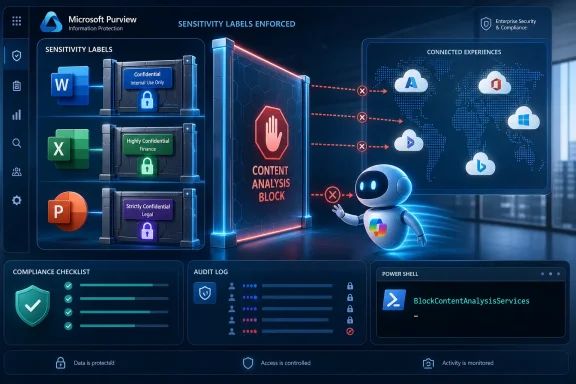 Microsoft Turns a Label Knob Into an AI Boundary
The change revolves around a Microsoft Purview sensitivity-label setting known in PowerShell as BlockContentAnalysisServices, surfaced in documentation as “Prevent some connected experiences that analyze content.” Until now, the phrase “some connected experiences” did a lot of work. The setting could restrict certain Office cloud-backed features, but it did not create the clean, easily explained boundary that many administrators wanted when Copilot entered the room.Microsoft’s update expands that behavior across Word, Excel, and PowerPoint so that the setting blocks all connected experiences that analyze file content, rather than only a subset. Once the update reaches a tenant, existing labels configured with that setting inherit the broader enforcement automatically. No new label design is required, which is both a convenience and a potential surprise.
That automatic inheritance is the sharp edge. A compliance team that originally used the setting to constrain a narrower class of Office services may discover that it now disables a wider set of cloud-powered features for labeled documents. A security team that wanted exactly this behavior may cheer. A business unit that just paid for Copilot seats may be less amused when sensitive decks stop participating in the AI workflow.
This is how enterprise AI governance is likely to look in practice: not a dramatic “AI on” or “AI off” switch, but a set of older compliance controls being reinterpreted for systems that can summarize, transform, and infer from company data at scale.
The Copilot Debate Moves From Training Data to Runtime Access
For much of the public conversation around AI in Office, the anxiety has centered on whether customer data is used to train models. Microsoft has repeatedly positioned enterprise Copilot around contractual and architectural assurances that customer prompts and business data are not used to train foundation models in the way consumer AI skeptics often imagine. That remains important, but it was never the whole governance story.The more practical enterprise problem is runtime access. If a user asks Copilot to summarize a confidential strategy document, extract figures from a spreadsheet, or draft talking points from a PowerPoint deck, Copilot needs to analyze that content in order to be useful. Even if the content stays within Microsoft’s enterprise cloud boundaries, the act of sending it to a connected service for analysis may be unacceptable for certain categories of data.
That distinction matters because many regulated organizations do not frame privacy risk only as “will this train a model?” They frame it as “which service processed this file, under what policy, for what purpose, and with what auditability?” A bank’s merger model, a hospital’s patient-related workbook, or a law firm’s litigation strategy deck can trigger restrictions long before anyone reaches the question of model training.
Microsoft’s expanded label behavior gives administrators a more legible answer. If a document carries a label configured to block content analysis, Copilot and other connected experiences that need to inspect the file cannot process it. The user’s permissions still matter, but the label now expresses an additional rule: this content may be readable by a person, yet unavailable to AI-backed or cloud-backed analysis features.
That is a subtle but major shift in the policy model. Access control says who can open a file. Sensitivity labeling increasingly says what kinds of systems are allowed to reason over it.
The Old Office Privacy Model Was Not Built for This Moment
Microsoft 365 has long depended on connected experiences. Spellchecking, translation, design suggestions, accessibility help, data insights, and other conveniences have blurred the boundary between local document editing and cloud service processing for years. In that older model, “content analysis” usually meant a feature made Office feel smarter.Copilot changes the stakes because it aggregates those expectations into a single, highly visible AI assistant. A feature like PowerPoint Designer may analyze a slide to suggest layouts; Copilot may analyze a deck to produce an executive summary, rewrite an argument, or answer questions about business strategy. The underlying category — cloud-backed content analysis — is similar, but the perceived risk is different.
That is why the label-setting expansion feels like a governance catch-up. Microsoft is mapping the enterprise AI era onto the controls administrators already know: Purview, sensitivity labels, data loss prevention, audit logs, and conditional access patterns. The company would rather do that than invent a parallel AI policy universe, because parallel policy systems are where compliance programs go to die.
But the legacy is visible in the wording. “Prevent some connected experiences that analyze content” is not a phrase designed for a board presentation about AI risk. It sounds like a checkbox from the Office privacy era, because it is. Microsoft’s update makes the control more powerful, but the control still carries the naming baggage of a product line that evolved faster than its administrative vocabulary.
Automatic Enforcement Is a Feature Until It Breaks a Workflow
Microsoft’s decision to apply the broadened behavior automatically to existing labels is administratively elegant. In large tenants, labels are hard to change, harder to communicate, and harder still to test across every app, platform, and business workflow. If the intended policy is “this labeled content must not be analyzed by Microsoft connected experiences,” then automatic enforcement avoids months of manual cleanup.It also creates a classic Microsoft 365 problem: the label configuration becomes more consequential without the label name necessarily changing. A document marked “Confidential” yesterday and a document marked “Confidential” after the rollout may look identical to users, while behaving differently when Copilot, translation, recommended labeling, or another content-analysis feature tries to interact with it.
That gap between visible label and changed behavior is where help desks will feel the update. Users rarely understand whether a failed feature is caused by licensing, network policy, app version, tenant configuration, sensitivity labels, or service rollout timing. They know only that Copilot could summarize one file and not another. If the app does not explain the policy reason clearly, the administrative win becomes a support burden.
The obvious mitigation is not to panic-disable the setting, but to audit label usage before the broader enforcement lands everywhere. Many organizations have accumulated sensitivity labels in layers: a pilot label here, a compliance label there, a label created for encryption, a label created for marking, a label created for DLP. The same label can mean different things to different teams.
The Copilot era punishes that ambiguity. Labels that once served mainly as visual markings or encryption triggers now determine whether AI-backed services can touch the file at all. That makes label taxonomy a business architecture issue, not just a compliance hygiene task.
The Trade-Off Is Not Privacy Versus Productivity, But Precision Versus Convenience
It is tempting to cast this update as a victory for privacy over AI. That is too neat. In the enterprise, the real trade-off is between precision and convenience.A blanket tenant-wide disablement of connected experiences is blunt. It can protect broadly, but it also degrades Office in ways users experience as arbitrary loss of functionality. A label-based control is more precise because it lets ordinary documents benefit from cloud-backed intelligence while shielding files that carry higher sensitivity. That is the architecture Microsoft is now strengthening.
The cost is that precision requires discipline. Documents must be labeled correctly. Labels must map to real data-handling rules. Users need to understand when to apply a restrictive label, and automated labeling needs to be tuned well enough not to overclassify half the tenant into AI-inaccessible sludge.
Overclassification is not a theoretical problem. If every second spreadsheet becomes “Highly Confidential” because the organization is afraid of under-protecting data, Copilot becomes less useful, and users begin routing around the system. If labels are too permissive, Copilot can process content that executives, counsel, or regulators expected to be shielded. The middle path is administratively demanding.
That is why Microsoft’s move is best read as enabling governance rather than providing it. The switch can enforce the line, but customers still have to decide where the line belongs.
Copilot’s Enterprise Promise Now Depends on Purview Competence
Microsoft has marketed Copilot as a productivity layer across the Microsoft 365 graph: email, files, chats, meetings, calendars, and business context coming together in a natural-language interface. That pitch works only if customers believe the governance layer can keep up. Otherwise, Copilot looks less like an assistant and more like a beautifully licensed data exposure machine.Purview is Microsoft’s answer to that fear. Sensitivity labels, DLP policies, audit capabilities, retention controls, and information protection settings are supposed to make Copilot safe enough for real enterprise deployment. The latest label expansion reinforces that the company sees Purview not as an optional compliance add-on, but as the operating system for AI governance inside Microsoft 365.
That is good news for organizations already mature in Purview. They can fold Copilot controls into an existing classification and compliance program. For them, the update reduces the number of awkward exceptions and makes the label behavior easier to explain: if this file has the blocking label, content-analysis services do not get it.
It is less comforting for tenants that bought Copilot before cleaning up permissions, labels, SharePoint sprawl, and overshared Teams sites. Copilot does not create those governance problems, but it reveals them with a mercilessly helpful interface. A user asking a chatbot for “everything we know about Project X” is not fundamentally different from a user searching SharePoint; it is just faster, more persuasive, and more likely to synthesize what it finds.
The expanded label setting addresses one slice of that problem: files whose labels say they should not be analyzed. It does not fix bad permissions. It does not classify forgotten documents. It does not redesign a decade of SharePoint chaos. But it gives administrators a stronger lever for the content they have already identified as sensitive.
The User Experience Will Decide Whether the Policy Survives Contact
Security controls live or die by user comprehension. If Word or PowerPoint simply refuses a Copilot action with a vague error, users will treat the policy as broken software. If the app clearly indicates that the file’s sensitivity label prevents cloud content analysis, users are more likely to understand the boundary, even if they dislike it.This matters because Copilot is supposed to feel ambient. Microsoft is embedding AI into the places where knowledge workers already spend their day, not asking them to visit a separate security-reviewed portal for every task. When a label blocks Copilot inside that familiar workflow, the interruption needs to feel intentional rather than accidental.
Administrators should expect a new class of support tickets. Some will be legitimate: labels applied too broadly, older client versions behaving inconsistently, mobile and desktop rollout differences, or business processes that require a less restrictive label. Others will be policy disputes masquerading as technical incidents: “Copilot is broken” may really mean “my document is correctly classified.”
The politics of that distinction should not be underestimated. When AI features are expensive and executive-sponsored, any control that blocks them will face pressure. Compliance teams will need more than a Microsoft message-center notice; they will need documented rationale, examples, and escalation paths for when a sensitive file genuinely needs AI processing.
In other words, the governance work begins after the toggle works.
Regulated Industries Get a Cleaner Story, Not a Free Pass
Healthcare, finance, legal, government, and defense-adjacent organizations are the obvious audience for this update. These sectors often need to show that certain data classes are prevented from flowing into services that perform automated analysis. The expanded label behavior gives them a cleaner story inside Office documents.But cleaner is not the same as complete. A Word document protected from Copilot analysis is still part of a wider ecosystem. It may sit in SharePoint, be attached to email, appear in Teams, get exported to PDF, or be copied into another file with a different label. The sensitivity label is powerful only where it is preserved, understood, and enforced.
There is also the problem of collaboration. A law firm may want Copilot to help draft a generic contract template, but not analyze a privileged client memo. A hospital may want AI assistance on policy documents, but not patient-identifiable materials. A bank may want Copilot in routine reporting, but not in unreleased earnings workbooks. Label-based blocking enables that nuance, but only if the organization invests in the classification logic.
The strongest compliance posture will pair this setting with broader controls: least-privilege permissions, DLP policies, retention rules, audit review, endpoint protections, and user education. Copilot governance is not a single feature. It is the sum of all the places where data can be found, opened, copied, summarized, and recontextualized.
Microsoft’s update helps because it turns one of those places — Office content analysis — into a clearer enforcement point. It does not absolve customers from designing the rest of the system.
Microsoft Is Learning That AI Needs Negative Space
The most interesting part of this change is philosophical. AI product design usually celebrates access: more context, more documents, more signals, more helpful answers. Enterprise governance demands negative space — areas the assistant cannot enter, documents it cannot summarize, patterns it cannot infer from, even when a human user might technically be able to open them.That negative space is not a failure of AI. It is what makes AI deployable in institutions that have secrets, duties, and regulators. A useful corporate assistant must know not only how to answer, but when the organization has decided that no answer should be generated from a certain source.
Microsoft has sometimes talked about Copilot as inheriting Microsoft 365 permissions, which is true but incomplete. Permission inheritance tells Copilot not to show a user what the user could not access anyway. Sensitivity-label blocking adds a different principle: even authorized access does not always imply authorization for machine analysis.
That distinction will become more important as AI agents become more capable. A summarizing assistant is one thing. An agent that drafts, files, compares, extracts, triggers workflows, or negotiates between systems increases the consequences of letting software reason over sensitive content. The more autonomous the tool, the more important it becomes to define zones where it is not allowed to operate.
This update is one of those zones being drawn in Microsoft 365.
The Admin Work Starts Before the Rollout Finishes
The practical advice for IT teams is straightforward, but not small. Organizations should inventory which sensitivity labels currently use the content-analysis blocking setting and identify the business processes attached to those labels. The question is not merely “which labels are configured?” but “which documents will become less AI-capable once enforcement broadens?”Testing should include the Office apps users actually run: Windows desktop, Mac, web where applicable, and mobile clients if they are in scope. Microsoft 365 rollouts rarely land everywhere at once in a way that maps neatly to an internal change calendar. A tenant can be half in the future for long enough to confuse both users and support staff.
Communication should be specific. Telling users that “Copilot may be unavailable for some labeled files” is better than silence, but not by much. A better message explains which labels block content analysis, why those labels exist, and what users should do if a file is mislabeled or if they believe AI processing is necessary for a legitimate business reason.
The policy owner also matters. If the Copilot team, the compliance team, and the Office engineering team inside an enterprise all think someone else owns label behavior, the organization will discover the ownership gap through tickets. Sensitivity labels now sit at the intersection of productivity, privacy, legal risk, and AI adoption. That means they need accountable governance, not just a configuration page and a PowerShell command.
Microsoft has made the enforcement stronger. Customers now have to make the intent clearer.
The Fine Print Becomes the Product
The broad lesson is that Copilot’s future in Office will be decided less by demos than by administrative fine print. The exciting part of AI is that it can read a document and help you work with it. The dangerous part is also that it can read a document and help you work with it.This is why a sensitivity-label setting buried in Purview deserves attention. It translates an abstract trust promise into a concrete file-level outcome. A labeled document either can be sent to content-analysis services, or it cannot. That binary may be frustrating in edge cases, but it is exactly the kind of boundary enterprises need when policies have to survive audits, incidents, and executive scrutiny.
There is a product lesson here for Microsoft, too. The company cannot sell Copilot as both ubiquitous and harmless. The more deeply AI is integrated into Office, the more visible the exceptions must become. A trustworthy assistant is not one that is available everywhere; it is one that respects the places where it is deliberately absent.
That absence will sometimes feel like friction. But in enterprise software, well-designed friction is often the difference between adoption and rejection.
The Copilot Control That Will Expose Your Labeling Debt
Before treating this as a simple win, administrators should look hard at what the update will reveal. The setting will not merely block Copilot from sensitive files; it will expose whether the organization’s definition of “sensitive” is coherent enough to automate.- Organizations with existing labels that use the content-analysis blocking setting should assume those labels will have broader impact in Word, Excel, and PowerPoint as the rollout completes.
- Users may lose access to Copilot and other cloud-backed analysis features for labeled files even though they can still open and edit the documents.
- Compliance teams should audit labels before enforcement reaches their tenant, because automatic application can turn yesterday’s partial restriction into tomorrow’s hard block.
- The update strengthens privacy and regulatory positioning, but it does not replace permissions cleanup, DLP design, retention policy, or SharePoint governance.
- The most successful deployments will explain the behavior in business language, not as a mysterious Copilot failure or an Office bug.
- Overly broad labeling can reduce Copilot’s value, while overly weak labeling can undermine the very governance case that makes Copilot acceptable.
References
- Primary source: cyberpress.org
Published: Mon, 22 Jun 2026 13:02:47 GMT
- Official source: learn.microsoft.com
Manage Sensitivity Labels in Office Apps | Microsoft Learn
Learn how to configure and manage sensitivity labels in Office apps for desktop, mobile, and the web to help classify and protect your organization's data.learn.microsoft.com - Official source: support.microsoft.com
Connected experiences in Microsoft 365 | Microsoft Support
Some Microsoft 365 features are backed by cloud-based services. Learn about connected experiences that analyze your content and download online content.support.microsoft.com - Related coverage: linkedin.com
Microsoft Purview expands sensitivity label setting to block all content analysis | Yash Mudaliar posted on the topic | LinkedIn
🏷️We knew that Microsoft Purview can prevent content analysis by connected experiences using a new sensitivity label setting or Double Key Encryption (part of Roadmap ID 398991). 📢 Microsoft is now expanding the setting “Prevent some connected experiences that analyze content” so that it now...www.linkedin.com
- Official source: techcommunity.microsoft.com
- Related coverage: copilotconsulting.com
Microsoft Purview and Copilot | Copilot Consulting
Microsoft Purview is the compliance backbone for every Microsoft 365 Copilot deployment. Without Purview, you have no visibility into what Copilot is accessi...www.copilotconsulting.com
- Related coverage: labs.cloudsecurityalliance.org
CSA research note M365 Copilot CVE 2026 24299 20260505 csa styled
PDF documentlabs.cloudsecurityalliance.org
- Related coverage: dataandmore.com
- Official source: slmmicrosoftrijk.nl
- Related coverage: ddazcdn01.z8.web.core.windows.net
- Related coverage: ppc.land
