

Microsoft is rolling out a significant investigation upgrade for the Data Security Triage Agent in Microsoft Purview Insider Risk Management, giving analysts clearer summaries of user risk and activity patterns rather than leaving them to reconstruct an incident from thousands of isolated events. Listed under Microsoft 365 Roadmap ID 557683, the enhancement reached preview in March 2026 and began general availability in June, with the roadmap still marked as rolling out worldwide as of July 20. The change is less about adding another alert-generating algorithm and more about improving the decisive middle stage of insider-risk response: understanding why an alert matters, what behavior formed the pattern, and whether the evidence justifies escalation.
Microsoft Purview Insider Risk Management, commonly abbreviated as IRM, is designed to identify potentially harmful activity performed by people who already have legitimate access to organizational systems. That broad category includes deliberate intellectual-property theft, accidental data disclosure, policy violations, unauthorized collection of sensitive material, and suspicious actions by an account that may have been compromised.
Traditional perimeter security assumes that the dangerous actor is outside the organization. Insider-risk systems must solve a harder problem because many of the underlying actions—opening documents, downloading files, sending email, copying data, or accessing SharePoint—are also routine parts of legitimate work.
Modern insider-risk analysis tries to connect those events. A departing employee downloading an unusually large collection of confidential files, compressing the material, copying it to removable storage, and then deleting local traces presents a different risk profile from an employee downloading the same number of files as part of an approved migration.
That distinction is why context has become as important as detection. Security teams do not merely need more alerts; they need reliable explanations of how multiple signals fit together.
Policies may focus on scenarios such as data theft by departing employees, data leaks, security-policy violations, risky browser behavior, or unauthorized access to sensitive records. The service then assigns risk to relevant activities and generates alerts when policy conditions and thresholds are met.
IRM is therefore not intended to declare that a person is malicious. It identifies activity requiring review, leaving the organization responsible for investigation, interpretation, and any employment or legal decision.
The feature applies to the web-based Microsoft Purview experience in Worldwide Standard Multi-Tenant cloud environments. Microsoft lists both Preview and General Availability release rings, reflecting the staged path from the March 2026 preview to the June 2026 general-availability target.
Administrators should consequently avoid assuming that every eligible tenant has the same interface or capabilities at the same moment. Documentation, screenshots, and portal labels may also evolve while deployment continues.
Microsoft’s current documentation describes categorizations such as Needs attention and Less urgent. The goal is to manage the alert queue according to risk and investigative value rather than expecting analysts to work through every alert strictly by creation time.
It also evaluates recorded user activity beyond the specific indicators included in the triggering policy. That broader scope can expose patterns that a policy-centric view might miss, such as a sequence spanning SharePoint downloads, local file collection, browser uploads, and cleanup activity.
This wider analysis does not make the underlying policy irrelevant. Policies still determine what is monitored, how risk is scored, which users are in scope, and when alerts are generated. The agent adds a contextual layer that helps analysts understand what may have happened around the alert.
That behavior matters for responsible use of generative AI in security. A concise answer is only valuable when investigators can distinguish observed evidence from inference, missing data, and uncertain interpretation.
The agent may surface information including:
A summary that merely says a user downloaded 500 files offers limited investigative value. A pattern summary explaining that the user downloaded sensitive engineering documents from three SharePoint sites, renamed and compressed the files, copied them to USB storage, and performed the activity shortly before a recorded departure date provides a much more actionable starting point.
Consider several examples:
Pattern summaries may counter this tendency by assembling multiple risk factors before the analyst commits to an explanation. They can also help expose alternative hypotheses, such as account compromise, an approved business process, poor policy configuration, or a departing employee’s legitimate handover work.
The benefit depends on summary quality. If the agent overemphasizes dramatic but weakly connected events, it could reinforce bias rather than reduce it.
Instead, the summaries function as an analytical map. They should show investigators where to begin and which relationships require validation.
The pattern summary becomes most useful when it links directly to the relevant activity slice. Analysts should be able to move from a narrative claim—such as unusual external sharing—to the events that establish the files, recipients, times, and applicable labels.
That relationship between narrative and evidence will determine whether the enhancement becomes a trusted investigative tool or merely another AI-generated panel that analysts ignore.
The enhanced user-risk summaries are intended to bring those contextual differences closer to the front of the investigation.
This should not mean that senior personnel automatically receive harsher treatment. It means that the potential impact of compromised credentials or unauthorized activity may be greater, warranting faster and more specialized review.
Organizations must handle this context carefully. Human-resources information can improve detection, yet it also raises privacy, labor-relations, and access-control concerns. Only personnel with a legitimate investigative role should be able to connect pseudonymized activity to an identifiable employee.
The enhanced summaries are valuable precisely because they can help connect those stages into a coherent pattern.
Poorly managed Windows endpoints create blind spots. Devices that are not onboarded, rarely connect, use inconsistent identity information, or lack the required policy configuration may leave an incomplete trail.
Administrators should verify:
Pattern narratives can help analysts identify these multi-stage sequences without manually stitching together separate event tables. This is especially relevant in hybrid environments where employees work across Windows devices, browser sessions, Microsoft 365 applications, virtual desktops, and third-party cloud services.
The potential productivity improvement is substantial, but it will vary according to policy quality and investigative maturity.
This can improve several operational metrics:
The tradeoff is that smaller teams may also have fewer resources to validate agent quality or maintain sophisticated policy tuning. A managed summary can create false confidence if the organization has not established independent review and escalation standards.
For those users, the development reflects a broader shift toward automated interpretation of workplace activity.
Organizations should explain what categories of activity are monitored, why monitoring occurs, who can access alerts, and how employees can raise concerns. Secretive deployments can undermine trust even when they are legally permissible.
Employers should preserve a clear line between:
Those protections are meaningful, but they do not eliminate the customer’s governance responsibilities.
This separation helps prevent a single administrator from quietly expanding surveillance scope and then investigating the resulting alerts without oversight. Global administrators also do not automatically receive unrestricted access to all insider-risk information merely by holding the broad tenant role.
A mature deployment should distinguish among:
Organizations should therefore avoid presenting pseudonymization as a complete privacy solution. The system still processes activity associated with individual users, and its outputs can influence consequential decisions.
Microsoft already provides a mechanism for analysts to indicate that an agent categorization is incorrect in supported experiences. Enterprises should treat that feedback as operational data, tracking where summaries repeatedly fail, omit context, or overstate risk.
Licensing and billing requirements must also be reviewed against current Microsoft terms. Insider Risk Management, Security Copilot-related capabilities, advanced indicators, and pay-as-you-go features may have different entitlements, and availability can depend on the tenant’s subscription configuration.
A test might involve downloading labeled files from an approved SharePoint site, copying them to a controlled USB device, uploading them to an authorized test destination, and then reviewing the generated narrative. The organization can compare the known sequence with the agent’s summary and determine which events were captured, omitted, or misinterpreted.
Testing should avoid real sensitive content whenever possible. Synthetic files carrying representative labels and information types can often validate the workflow without creating unnecessary exposure.
This strategy gives Microsoft a natural advantage in organizations already standardized on Microsoft 365, Windows, Entra, Defender, and Purview.
If that telemetry is connected effectively, the agent can analyze the relationship between a user, a device, a sensitive document, an external destination, and a sequence of actions. The result can be more valuable than an isolated endpoint or network alert.
The limitation is ecosystem dependence. Organizations using multiple operating systems, non-Microsoft collaboration platforms, unmanaged devices, or fragmented identity systems may find that the narrative is only as complete as the data Microsoft can ingest.
That model could materially improve productivity. It could also make the security team dependent on an analytical layer whose mistakes are easier to read than raw telemetry and therefore easier to trust.
Microsoft may also continue consolidating the classic and agent-assisted alert experiences. A unified queue that exposes agent summaries, user context, and alert details without forcing analysts to switch dashboards could make the enhanced pattern narratives more central to daily operations.
Organizations should watch their own quality indicators as closely as Microsoft’s release notes. Useful metrics include agent disagreements, false-positive rates, escalation rates, time to triage, missing-data frequency, and the percentage of summaries that materially change an analyst’s initial conclusion.
That could include richer content analysis, broader correlations with Defender XDR, more automated evidence grouping, and improved remediation recommendations. The opportunity is an end-to-end workflow; the risk is an end-to-end chain of automated assumptions.
Teams should schedule formal tuning after enough enhanced alerts have been reviewed. Otherwise, the organization may gain a better description of the same underlying noise without achieving a meaningful improvement in security outcomes.
Microsoft’s latest Purview enhancement points toward a future in which insider-risk analysts begin with machine-generated behavioral narratives rather than raw alert queues. If the Data Security Triage Agent can accurately connect user context, sensitive information, endpoint actions, and multi-stage activity while remaining transparent about missing evidence, it could substantially improve both speed and decision quality. The decisive factor, however, will remain human governance: organizations must verify the evidence, protect employee privacy, separate security signals from conclusions about intent, and ensure that a more persuasive summary never becomes a shortcut around a fair and complete investigation.
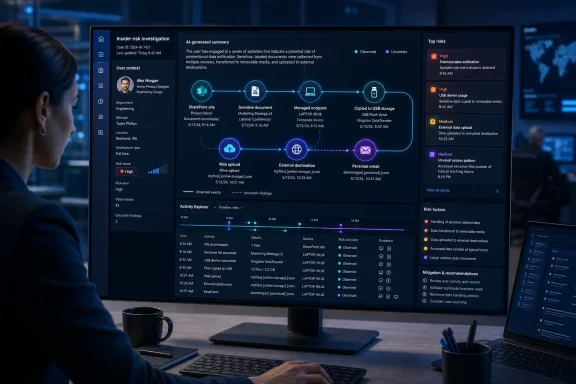 Background
Microsoft Purview Insider Risk Management, commonly abbreviated as IRM, is designed to identify potentially harmful activity performed by people who already have legitimate access to organizational systems. That broad category includes deliberate intellectual-property theft, accidental data disclosure, policy violations, unauthorized collection of sensitive material, and suspicious actions by an account that may have been compromised.Traditional perimeter security assumes that the dangerous actor is outside the organization. Insider-risk systems must solve a harder problem because many of the underlying actions—opening documents, downloading files, sending email, copying data, or accessing SharePoint—are also routine parts of legitimate work.
From isolated alerts to behavioral context
Earlier generations of compliance monitoring relied heavily on rules and individual events. A large download, an external file share, or a USB copy could trigger an alert, but the investigator still had to determine whether it represented ordinary business activity or part of a more concerning sequence.Modern insider-risk analysis tries to connect those events. A departing employee downloading an unusually large collection of confidential files, compressing the material, copying it to removable storage, and then deleting local traces presents a different risk profile from an employee downloading the same number of files as part of an approved migration.
That distinction is why context has become as important as detection. Security teams do not merely need more alerts; they need reliable explanations of how multiple signals fit together.
Purview’s policy-driven model
Insider Risk Management lets organizations create policies based on predefined templates, selected users or groups, triggering events, risk indicators, detection windows, and content priorities. Depending on configuration, signals can come from Microsoft 365 services, managed Windows endpoints, security products, human-resources connectors, cloud applications, and custom insider-risk indicators.Policies may focus on scenarios such as data theft by departing employees, data leaks, security-policy violations, risky browser behavior, or unauthorized access to sensitive records. The service then assigns risk to relevant activities and generates alerts when policy conditions and thresholds are met.
IRM is therefore not intended to declare that a person is malicious. It identifies activity requiring review, leaving the organization responsible for investigation, interpretation, and any employment or legal decision.
What Microsoft Is Rolling Out
The roadmap entry describes enhancements to the Data Security Triage Agent’s user-risk and Activity Explorer pattern summaries. These summaries are intended to improve investigation accuracy, provide more useful context, and support better decisions when analysts review potentially risky activity.The feature applies to the web-based Microsoft Purview experience in Worldwide Standard Multi-Tenant cloud environments. Microsoft lists both Preview and General Availability release rings, reflecting the staged path from the March 2026 preview to the June 2026 general-availability target.
A staged deployment rather than a single release day
Although general availability is dated June 2026, the roadmap remained in the “Rolling out” state on July 20. That is normal for Microsoft 365 cloud deployments, where features frequently move through service rings, regions, and tenant groups over several weeks.Administrators should consequently avoid assuming that every eligible tenant has the same interface or capabilities at the same moment. Documentation, screenshots, and portal labels may also evolve while deployment continues.
The practical objective
At its core, the enhancement is intended to answer questions analysts routinely face:- Which activities form a meaningful pattern rather than a collection of unrelated events?
- What sensitive data, files, devices, and destinations are involved?
- How unusual is the behavior for this user or peer context?
- Did the activity unfold as a recognizable sequence, such as collection followed by exfiltration?
- Which evidence should an investigator examine first?
- Does the alert warrant escalation, or is it likely to be benign?
How the Data Security Triage Agent Works
The Triage Agent operates within the Insider Risk Management alert workflow. When enabled, it evaluates alerts and presents prioritized results through the Purview interface, helping analysts focus on items that appear to need attention while separating less urgent activity.Microsoft’s current documentation describes categorizations such as Needs attention and Less urgent. The goal is to manage the alert queue according to risk and investigative value rather than expecting analysts to work through every alert strictly by creation time.
Analysis beyond the triggering policy event
One of the agent’s most consequential characteristics is that it can analyze a broader activity history than the narrow set of events that originally triggered an alert. Microsoft says the agent can examine up to the most recent 30,000 activity events associated with the user referenced by an alert.It also evaluates recorded user activity beyond the specific indicators included in the triggering policy. That broader scope can expose patterns that a policy-centric view might miss, such as a sequence spanning SharePoint downloads, local file collection, browser uploads, and cleanup activity.
This wider analysis does not make the underlying policy irrelevant. Policies still determine what is monitored, how risk is scored, which users are in scope, and when alerts are generated. The agent adds a contextual layer that helps analysts understand what may have happened around the alert.
Evidence-backed summaries
The agent’s summaries are built from available activity-log details. When a particular fact cannot be established, Microsoft’s design allows the interface to indicate that the information was not found rather than silently filling the gap.That behavior matters for responsible use of generative AI in security. A concise answer is only valuable when investigators can distinguish observed evidence from inference, missing data, and uncertain interpretation.
The agent may surface information including:
- The potentially risky activity and its timeframe.
- The sensitive information types, classifiers, or sensitivity labels involved.
- The affected files and relevant actions.
- The device and client IP address when those details are available.
- The scope and volume of related events.
- Contextual signals that contributed to the risk assessment.
- A filtered path into Activity Explorer for examining supporting telemetry.
Why Pattern Summaries Matter
The problem with many security consoles is not a lack of data. It is the opposite: analysts face an abundance of technically accurate events that require substantial effort to interpret.A summary that merely says a user downloaded 500 files offers limited investigative value. A pattern summary explaining that the user downloaded sensitive engineering documents from three SharePoint sites, renamed and compressed the files, copied them to USB storage, and performed the activity shortly before a recorded departure date provides a much more actionable starting point.
Sequences reveal intent and impact
No automated system can reliably determine human intent from telemetry alone. Nevertheless, the order, timing, and combination of activities can strengthen or weaken a risk hypothesis.Consider several examples:
- A user downloads a file and immediately uploads it to an approved customer portal as part of a documented workflow.
- A user downloads hundreds of sensitive files, archives them, and sends the archive to a personal web service.
- A user copies source code to removable media after receiving a termination notice.
- A compromised account accesses unfamiliar repositories and shares files externally from an unusual network location.
- An administrator exports records during an authorized audit and stores them in an approved encrypted location.
Better summaries can reduce investigative drift
Analysts often begin an investigation with an incomplete theory based on the first visible alert. That theory can shape which events they inspect and which evidence they overlook.Pattern summaries may counter this tendency by assembling multiple risk factors before the analyst commits to an explanation. They can also help expose alternative hypotheses, such as account compromise, an approved business process, poor policy configuration, or a departing employee’s legitimate handover work.
The benefit depends on summary quality. If the agent overemphasizes dramatic but weakly connected events, it could reinforce bias rather than reduce it.
Changes to the Investigation Workflow
The enhanced summaries fit into a larger Purview workflow that moves from policy detection to alert triage, detailed investigation, case creation, and remediation. They are not a replacement for Activity Explorer, user timelines, content review, case notes, forensic evidence, or human interviews.Instead, the summaries function as an analytical map. They should show investigators where to begin and which relationships require validation.
A recommended review sequence
Organizations adopting the enhanced experience should define a repeatable process rather than allowing every analyst to interpret agent output differently.- Review the agent categorization and pattern narrative. Identify the claimed risk, timeframe, affected data, and main behavioral sequence.
- Open the filtered Activity Explorer evidence. Confirm that the underlying events support the summary and that timestamps, actions, devices, and destinations align.
- Examine user and organizational context. Review role, department, prior alerts, last working date, approved applications, and any high-impact user designation.
- Assess the data itself where authorized. Determine whether the files contain sensitive information and whether preview or content-review controls are appropriate.
- Consider benign and compromise-related explanations. Check for approved projects, migrations, support cases, automation, shared accounts, or signs of credential theft.
- Document the reasoning. Record why the alert was dismissed, monitored, escalated, or converted into a case.
- Feed the outcome back into policy tuning. Adjust indicators, thresholds, exclusions, scope, and operational guidance when repeated false positives reveal a configuration problem.
Activity Explorer remains the evidence layer
Activity Explorer provides a timeline of potentially risky behavior and supports filtering across categories such as access, collection, deletion, exfiltration, obfuscation, defense evasion, privilege escalation, security activity, communication risk, user-compromise risk, and AI usage.The pattern summary becomes most useful when it links directly to the relevant activity slice. Analysts should be able to move from a narrative claim—such as unusual external sharing—to the events that establish the files, recipients, times, and applicable labels.
That relationship between narrative and evidence will determine whether the enhancement becomes a trusted investigative tool or merely another AI-generated panel that analysts ignore.
The Role of User-Risk Context
A technically identical event can carry different risk depending on the user, job function, current business process, and data involved. A software developer downloading a source repository may be normal; the same action by an employee with no development responsibility could be unusual.The enhanced user-risk summaries are intended to bring those contextual differences closer to the front of the investigation.
High-impact users and sensitive roles
Some employees can create disproportionate organizational harm because they have access to privileged systems, trade secrets, financial records, health data, merger documents, authentication material, or critical infrastructure. Purview can highlight contextual factors associated with high-impact users when the organization configures the relevant settings.This should not mean that senior personnel automatically receive harsher treatment. It means that the potential impact of compromised credentials or unauthorized activity may be greater, warranting faster and more specialized review.
Departure and organizational context
A user’s last working date can materially change the interpretation of bulk data collection. Departing employees may legitimately download files for handover, but departure is also a recognized period of increased intellectual-property risk.Organizations must handle this context carefully. Human-resources information can improve detection, yet it also raises privacy, labor-relations, and access-control concerns. Only personnel with a legitimate investigative role should be able to connect pseudonymized activity to an identifiable employee.
Windows Endpoint and Microsoft 365 Implications
WindowsForum readers will recognize that insider-risk investigations often cross the boundary between cloud services and endpoint activity. A document may originate in SharePoint or OneDrive, move through a managed Windows PC, and leave the organization through USB storage, printing, a browser upload, a network share, or an unsanctioned application.The enhanced summaries are valuable precisely because they can help connect those stages into a coherent pattern.
Endpoint telemetry quality matters
Purview cannot summarize activity that the organization has not configured, licensed, or collected. Endpoint visibility depends on properly onboarded devices, supported audit and security integrations, selected indicators, and policies that reflect the organization’s real data flows.Poorly managed Windows endpoints create blind spots. Devices that are not onboarded, rarely connect, use inconsistent identity information, or lack the required policy configuration may leave an incomplete trail.
Administrators should verify:
- Managed Windows devices are correctly onboarded to the required Microsoft security services.
- Audit and endpoint events are arriving consistently.
- Device identities can be correlated with users.
- Removable-media, printing, browser, network-share, and file-copy indicators are enabled only where appropriate.
- Sensitivity labels and information types reflect actual business data.
- Approved applications, domains, and workflows are documented to reduce false positives.
Cloud-to-device sequences
A particularly useful investigation pattern is the movement of data from Microsoft 365 storage to an endpoint and then to an external destination. A single SharePoint download may appear harmless, while the follow-on copy to removable storage changes the risk calculation.Pattern narratives can help analysts identify these multi-stage sequences without manually stitching together separate event tables. This is especially relevant in hybrid environments where employees work across Windows devices, browser sessions, Microsoft 365 applications, virtual desktops, and third-party cloud services.
Enterprise Impact
Large enterprises often have the telemetry to detect insider risk but lack the analyst capacity to review every alert promptly. The enhanced Triage Agent addresses this operational bottleneck by prioritizing alerts and compressing large event histories into more manageable narratives.The potential productivity improvement is substantial, but it will vary according to policy quality and investigative maturity.
Security operations efficiency
A good pattern summary can reduce the time an analyst spends on initial orientation. Rather than opening numerous tabs to establish basic facts, the analyst can begin with a proposed narrative and validate it against the evidence.This can improve several operational metrics:
- Time from alert creation to first meaningful review.
- Time required to dismiss clear false positives.
- Time required to identify high-risk data and destinations.
- Consistency between analysts evaluating similar behavior.
- Quality of escalation notes passed to legal, human resources, or incident-response teams.
- Detection of activity sequences that cross multiple services.
Smaller teams gain leverage
Organizations with limited compliance staff may benefit even more because they cannot dedicate large teams to manual alert reconstruction. Automated prioritization can help them concentrate scarce expertise on the most consequential cases.The tradeoff is that smaller teams may also have fewer resources to validate agent quality or maintain sophisticated policy tuning. A managed summary can create false confidence if the organization has not established independent review and escalation standards.
Employee and Consumer Impact
Purview Insider Risk Management is an enterprise service rather than a consumer Windows feature, so home users will not suddenly see an insider-risk dashboard on their PCs. The direct impact falls on people who use organizational accounts, managed devices, Microsoft 365 services, and corporate data.For those users, the development reflects a broader shift toward automated interpretation of workplace activity.
More capable monitoring requires clearer governance
Employees may reasonably distinguish between security controls that protect corporate data and systems that appear to judge behavior or performance. Microsoft positions IRM as a privacy-designed risk-management system, but each customer controls policy scope, indicators, permissions, and investigative procedures.Organizations should explain what categories of activity are monitored, why monitoring occurs, who can access alerts, and how employees can raise concerns. Secretive deployments can undermine trust even when they are legally permissible.
A security alert is not proof of misconduct
An employee can trigger risk signals through accidental sharing, misunderstood policy, unusual but authorized work, compromised credentials, or poorly tuned thresholds. Pattern summaries may make alerts sound more coherent and persuasive, increasing the danger that managers treat an automated narrative as a finding of fact.Employers should preserve a clear line between:
- Detection of potentially risky activity.
- Technical validation of the evidence.
- Assessment of business authorization.
- Determination of user intent.
- Employment, disciplinary, or legal action.
Privacy, Permissions, and Accountability
Microsoft emphasizes that Insider Risk Management is built with privacy by design. Users are pseudonymized by default, and Purview provides role-based access controls and audit logs intended to limit and record access to user-level information.Those protections are meaningful, but they do not eliminate the customer’s governance responsibilities.
Separation of duties
Purview supports role groups that can separate policy administration from alert investigation. For example, personnel who configure policies do not necessarily need access to identifiable alert details, while investigators may not need permission to change global monitoring settings.This separation helps prevent a single administrator from quietly expanding surveillance scope and then investigating the resulting alerts without oversight. Global administrators also do not automatically receive unrestricted access to all insider-risk information merely by holding the broad tenant role.
A mature deployment should distinguish among:
- Policy administrators who configure indicators and scope.
- Analysts who triage alerts.
- Investigators who examine cases and user-level evidence.
- Auditors who review administrative and investigative actions.
- Legal, privacy, and human-resources stakeholders who authorize sensitive escalations.
Pseudonymization is not anonymity
Pseudonymized identifiers reduce casual exposure of employee identities during early review. They do not make the data anonymous, because authorized personnel can reveal or correlate an identity when an investigation requires it.Organizations should therefore avoid presenting pseudonymization as a complete privacy solution. The system still processes activity associated with individual users, and its outputs can influence consequential decisions.
Auditability must include the agent
The enhanced summaries create another layer that organizations should evaluate during case review. Investigators need to know what the agent concluded, which evidence supported the conclusion, what information was unavailable, and whether a human accepted or rejected the categorization.Microsoft already provides a mechanism for analysts to indicate that an agent categorization is incorrect in supported experiences. Enterprises should treat that feedback as operational data, tracking where summaries repeatedly fail, omit context, or overstate risk.
Deployment and Operational Readiness
Because the roadmap item is still rolling out, administrators should prepare for uneven availability and interface changes. The first task is to confirm whether the enhanced summaries appear in the tenant, not merely whether Microsoft’s general-availability month has passed.Licensing and billing requirements must also be reviewed against current Microsoft terms. Insider Risk Management, Security Copilot-related capabilities, advanced indicators, and pay-as-you-go features may have different entitlements, and availability can depend on the tenant’s subscription configuration.
A practical readiness checklist
Before relying on the enhancements in production investigations, organizations should complete several checks:- Confirm that Microsoft 365 auditing is enabled and delivering expected events.
- Verify that analysts and investigators have only the permissions required for their duties.
- Review policy scopes, triggering events, thresholds, exclusions, and priority content.
- Validate endpoint and cloud-app connectors used by relevant policies.
- Test whether summaries accurately describe known benign and simulated risky scenarios.
- Confirm that Activity Explorer evidence matches the narrative.
- Establish procedures for missing, contradictory, or incorrectly categorized information.
- Document when analysts must escalate to a case, legal review, or incident response.
- Train investigators to recognize account compromise as an alternative to malicious insider activity.
- Review employee notices, works-council obligations, privacy assessments, and applicable local law.
Test with controlled scenarios
Organizations should not evaluate the enhancement solely against live employee alerts. Controlled tests provide a safer way to measure whether the agent identifies meaningful patterns.A test might involve downloading labeled files from an approved SharePoint site, copying them to a controlled USB device, uploading them to an authorized test destination, and then reviewing the generated narrative. The organization can compare the known sequence with the agent’s summary and determine which events were captured, omitted, or misinterpreted.
Testing should avoid real sensitive content whenever possible. Synthetic files carrying representative labels and information types can often validate the workflow without creating unnecessary exposure.
Competitive and Strategic Implications
Microsoft is turning Purview from a collection of compliance controls into a more integrated data-security investigation platform. The Triage Agent sits alongside DLP alert triage, Security Copilot, Data Security Investigations, data-security posture capabilities, eDiscovery, and broader Microsoft security integrations.This strategy gives Microsoft a natural advantage in organizations already standardized on Microsoft 365, Windows, Entra, Defender, and Purview.
The value of an integrated telemetry graph
Competing insider-risk products may provide strong behavioral analytics, endpoint control, or specialized investigation capabilities. Microsoft’s differentiator is the volume of first-party context available across identities, files, labels, email, collaboration, cloud storage, and managed Windows endpoints.If that telemetry is connected effectively, the agent can analyze the relationship between a user, a device, a sensitive document, an external destination, and a sequence of actions. The result can be more valuable than an isolated endpoint or network alert.
The limitation is ecosystem dependence. Organizations using multiple operating systems, non-Microsoft collaboration platforms, unmanaged devices, or fragmented identity systems may find that the narrative is only as complete as the data Microsoft can ingest.
Agents are becoming the new security interface
Security products have spent years adding dashboards, filters, and increasingly complex event views. AI agents represent a different interaction model: the system reviews the queue, proposes priorities, summarizes patterns, and guides the analyst toward evidence.That model could materially improve productivity. It could also make the security team dependent on an analytical layer whose mistakes are easier to read than raw telemetry and therefore easier to trust.
Strengths and Opportunities
The enhanced Data Security Triage Agent has several clear advantages when deployed with strong policies and governance:- It can reduce alert-review time by distilling large user-activity histories into focused narratives.
- It can identify cross-service behavioral patterns that are difficult to recognize in isolated event lists.
- It can improve consistency by giving analysts a common starting point for similar investigations.
- It can connect summaries to supporting activity, allowing investigators to validate conclusions in Activity Explorer.
- It can prioritize urgent work so limited security teams spend more time on consequential cases.
- It can expose policy gaps when recurring summaries reveal unexpected workflows, blind spots, or false-positive patterns.
- It can improve case handoffs by producing clearer context for incident response, legal, privacy, and human-resources teams.
- It can support proactive security improvements when organizations use completed investigations to refine controls and employee guidance.
Risks and Concerns
The same capabilities introduce operational, ethical, and technical risks:- Automation bias may cause analysts to accept a polished narrative without validating the underlying evidence.
- Incomplete telemetry may produce incomplete or misleading summaries, especially across unmanaged devices and third-party services.
- Poorly designed policies may amplify false positives rather than improve security.
- Legitimate unusual work may resemble malicious collection or exfiltration, particularly during migrations, audits, litigation, and employee departures.
- Employee trust may suffer if monitoring scope and investigative safeguards are unclear.
- Role sprawl could expose sensitive user-level information to more personnel than necessary.
- A compromised account may be mistaken for a malicious employee, leading the investigation in the wrong direction.
- Licensing and usage costs may complicate adoption, especially when advanced Purview or Copilot capabilities require additional entitlement.
- Regional legal requirements may restrict monitoring or automated profiling, even when the technology is available in the tenant.
- Summaries may become part of consequential employment decisions despite Microsoft’s warning that customers must conduct their own full investigation.
What to Watch Next
The most immediate question is when the rollout will reach every eligible Worldwide Standard Multi-Tenant environment. Administrators should monitor the Microsoft 365 message center, Purview interface, service documentation, and tenant-specific release status rather than relying only on the June 2026 general-availability date.Microsoft may also continue consolidating the classic and agent-assisted alert experiences. A unified queue that exposes agent summaries, user context, and alert details without forcing analysts to switch dashboards could make the enhanced pattern narratives more central to daily operations.
Quality and transparency
The feature’s long-term value will depend on whether investigators can consistently trace summaries back to evidence. Microsoft should continue improving the visibility of supporting events, confidence, missing information, scope limitations, and reasons behind categorization.Organizations should watch their own quality indicators as closely as Microsoft’s release notes. Useful metrics include agent disagreements, false-positive rates, escalation rates, time to triage, missing-data frequency, and the percentage of summaries that materially change an analyst’s initial conclusion.
Integration with broader investigations
Purview increasingly allows risky activity identified in Insider Risk Management to feed deeper Data Security Investigations and other security workflows. Future development is likely to make the transition from alert summary to full incident investigation more direct.That could include richer content analysis, broader correlations with Defender XDR, more automated evidence grouping, and improved remediation recommendations. The opportunity is an end-to-end workflow; the risk is an end-to-end chain of automated assumptions.
Policy tuning after deployment
The enhancement should trigger a policy review rather than being treated as a cosmetic portal update. Better narratives may reveal that a policy includes too many users, ignores critical indicators, scores normal workflows too aggressively, or lacks visibility into common exfiltration paths.Teams should schedule formal tuning after enough enhanced alerts have been reviewed. Otherwise, the organization may gain a better description of the same underlying noise without achieving a meaningful improvement in security outcomes.
Microsoft’s latest Purview enhancement points toward a future in which insider-risk analysts begin with machine-generated behavioral narratives rather than raw alert queues. If the Data Security Triage Agent can accurately connect user context, sensitive information, endpoint actions, and multi-stage activity while remaining transparent about missing evidence, it could substantially improve both speed and decision quality. The decisive factor, however, will remain human governance: organizations must verify the evidence, protect employee privacy, separate security signals from conclusions about intent, and ensure that a more persuasive summary never becomes a shortcut around a fair and complete investigation.
References
- Primary source: Microsoft 365 Roadmap
Published: 2026-07-20T22:37:15.9046041Z
Microsoft 365 Roadmap | Microsoft 365
The Microsoft 365 Roadmap lists updates that are currently planned for applicable subscribers. Check here for more information on the status of new features and updates.www.microsoft.com
- Official source: learn.microsoft.com
Microsoft Security Copilot agents in Microsoft Purview (preview) | Microsoft Learn
Learn about Security Copilot agents in Microsoft Purviewlearn.microsoft.com - Official source: techcommunity.microsoft.com
- Official source: download.microsoft.com
