

On July 7, 2026, Connected World reported that Microsoft is pitching AI assistants for freight rail through CSX and Brazil’s Rumo, using Copilot Studio, Microsoft Foundry, Azure AI, and SharePoint to turn shipment, procedure, and operations data into faster customer and frontline decisions. The case studies are not really about chatbots, even if chat is the interface. They are about whether railroads can finally make use of the operational data they have been collecting for decades without burying workers and customers under another portal, dashboard, or binder. That makes freight rail a useful test case for enterprise AI because the industry has little patience for theatrical demos and a very low tolerance for operational fantasy.
Connected World frames freight rail as the “invisible backbone” of the economy, quoting Microsoft industry advisor V Krishnan on the sector’s central role in moving goods. Microsoft’s own customer stories for CSX and Rumo supply the harder operational claims: more than 1,000 CSX customers used the assistant in its first 45 days, while Rumo says an AI app cut procedure lookup time from roughly four minutes to three seconds. The numbers are vendor-reported, and they deserve the usual caution that comes with customer-success material. But the pattern is still important: the most credible industrial AI stories are not replacing railroaders with robots; they are removing the lag between a person, a rule, a shipment, and a decision.
Freight rail is a poor setting for vague AI evangelism because the business is brutally physical. A train is not a spreadsheet with wheels; it is a moving chain of assets, crews, dispatching constraints, customer commitments, weather exposure, safety rules, and regulatory obligations. When that chain fails, the effects ripple outward into factories, ports, farms, warehouses, retailers, and energy markets.
That is why the most interesting part of Microsoft’s rail pitch is not the phrase generative AI. It is the humbler claim that railroads already have oceans of data and still struggle to get the right fact to the right person at the right moment. Sensors, telemetry systems, inspection records, customer portals, maintenance logs, track data, and procedural manuals all create information, but information does not become operational intelligence simply because it exists.
This is the same problem Windows admins know from their own estates. Logs are plentiful. Alerts are plentiful. Dashboards are plentiful. What is scarce is context, trust, and a workflow that lets a human decide faster without losing accountability.
In that sense, freight rail is not an exotic vertical market story. It is the enterprise IT story with heavier consequences. The old model assumed that if you connected enough systems and trained enough users, the organization would become data-driven. The emerging model assumes the data layer is too complex for ordinary human navigation and needs an intermediary that can translate natural-language intent into controlled access, retrieval, and action.
What is newer is Microsoft’s attempt to make Copilot Studio and Foundry the front door to that intelligence. In the CSX case, the customer-facing assistant was designed to help users track freight, manage shipments, and access rail logistics services through natural language rather than forcing them to know where each piece of information lives. Microsoft’s customer story says Copilot Studio handled the assistant-building layer while Foundry helped connect real-time data across backend systems.
That detail matters because enterprise AI usually fails at the seams. A model can summarize a manual, but a railroad does not run on manuals alone. It runs on live shipment status, customer entitlements, system permissions, operating procedures, maintenance states, and exceptions that may change minute by minute.
For IT departments, the implication is obvious: the model is rarely the whole architecture. Identity, connectors, content hygiene, data governance, observability, latency, escalation paths, and auditability are the parts that determine whether an assistant becomes a production tool or an expensive novelty.
Microsoft is advantaged here because many enterprises already live inside its identity, productivity, and cloud stack. Entra ID, SharePoint, Teams, Power Platform, Azure AI, and Microsoft 365 give Redmond a plausible story about meeting industrial users where their documents and workflows already sit. The danger is that this same convenience can tempt organizations into treating access to data as equivalent to readiness for AI.
It is not. A messy SharePoint library connected to a polished assistant is still a messy library. An outdated procedure surfaced instantly is still an outdated procedure. A permission model that is too broad becomes more dangerous when a conversational interface makes discovery easier.
Microsoft says the CSX assistant saw more than 1,000 customers and more than 4,000 conversations in its first 45 days. Those figures do not prove transformational impact by themselves, but they do suggest a useful adoption signal. In enterprise AI, usage is not everything, but lack of usage is fatal.
The reason customer service works as a starting point is that it exposes value without immediately handing AI the most dangerous operational levers. A shipment-tracking assistant can improve experience, deflect routine queries, and reduce friction while still leaving humans and backend systems in charge of consequential decisions. It is a pragmatic wedge into a larger modernization agenda.
That is also why Microsoft’s framing is shrewd. CSX did not need to sell customers on “AI transformation” as an abstract concept. It needed to let them ask for a shipment and get an answer. In the real world, low-friction beats high-concept almost every time.
The broader lesson for WindowsForum readers is that successful AI deployments often look disappointingly mundane from the outside. They answer boring questions quickly. They reduce context switching. They collapse five clicks and a login into one natural-language request. That is not as flashy as autonomous agents negotiating supply chains, but it is much closer to something a CIO can defend.
Rumo built RUTI Maquinista using Copilot Studio, Azure AI, and SharePoint. Microsoft says the app provides real-time validated information, uses corporate access controls, and allows drivers to retrieve procedures from company mobile devices. The reported result is striking: lookup time fell from about four minutes to about three seconds, with roughly four kilograms of printed material eliminated per operator and return on investment claimed in under two months.
That three-second figure is the kind of statistic vendors love, and readers should treat it as a reported outcome rather than independent measurement. Still, even if the real-world average is messier, the direction is meaningful. Frontline work is full of moments where the cost is not that information does not exist; the cost is that finding it interrupts the job.
There is also a sustainability angle, but the operational angle is more important. Paper manuals are not just heavy; they are slow to update, hard to search, and easy to fragment across versions. In safety-sensitive environments, the difference between “somewhere in the binder” and “validated answer on a managed device” can matter.
This is where AI stops being a novelty and starts resembling infrastructure. It is not replacing judgment. It is changing the time budget around judgment. A train operator who no longer spends minutes hunting a procedure has more attention available for the situation in front of them.
Human-in-the-loop means nothing unless the system defines what the human is responsible for, what the AI is allowed to retrieve or recommend, how confidence is communicated, what happens when the system cannot answer, and how the organization audits outcomes. A worker staring at a confident hallucination is not meaningfully “in the loop.” A worker with verified source grounding, clear escalation, and accountable procedures is.
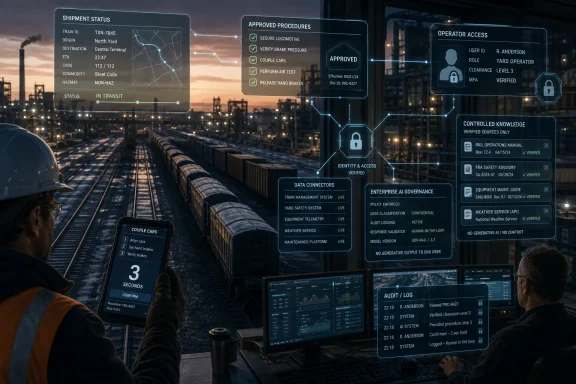
The Rumo example is therefore interesting because Microsoft describes a controlled knowledge environment rather than a general-purpose chatbot dropped into the cab. The assistant is useful precisely because it is constrained. It deals with approved procedures, authenticated users, managed devices, and validated information.
That constraint is not a weakness. It is the product.
The enterprise AI gold rush has sometimes implied that the highest-value systems will be the most autonomous. In rail, manufacturing, utilities, healthcare, and other regulated or safety-sensitive sectors, the opposite may be true for years. The most valuable systems may be those that are narrowly scoped, deeply integrated, and boringly reliable.
For IT pros, this should sound familiar. The best automation is not the script that can do anything. It is the script that does one dangerous thing safely, predictably, reversibly, and with logs.
AI assistants make those questions unavoidable. A traditional portal can hide complexity behind tabs and permissions. A conversational interface invites users to ask broader questions, combine concepts, and expect the system to resolve ambiguity. That is powerful, but it also increases the blast radius of bad data and sloppy access control.
If a customer asks where a shipment is, the assistant must know not only the shipment status but whether that customer is authorized to see it. If a train operator asks for a procedure, the assistant must know which procedure is current for that geography, asset, role, and operating condition. If a maintenance planner asks for equipment history, the system must distinguish signal from stale records.
This is why Microsoft’s rail examples are really identity and knowledge-management stories wearing AI clothing. Copilot Studio is the conversational layer, but Entra-style identity, SharePoint governance, backend integration, and Azure-hosted models form the scaffolding. Without that scaffolding, the assistant becomes a liability.
There is an uncomfortable truth here for organizations rushing toward AI: the assistant will reveal the quality of the enterprise beneath it. If permissions are chaotic, AI will expose that chaos. If documentation is stale, AI will accelerate stale advice. If backend systems disagree, AI will force the organization to confront which source of truth actually wins.
That is attractive because many organizations already have the Microsoft footprint. It lowers procurement friction and gives IT departments a familiar security and compliance vocabulary. It also lets business units prototype quickly, sometimes faster than central IT would prefer.
The risk is sprawl. Copilot Studio makes it easier to build agents, and low-code tools make it easier for departments to solve their own problems. But every agent still needs lifecycle management. Someone has to know what it can access, what it costs, what model it uses, what data it stores, how prompts and responses are logged, when knowledge sources refresh, and who is accountable when answers are wrong.
This is not theoretical. The difference between an impressive pilot and a maintainable production system is often dull operational discipline. Naming conventions, environment separation, data-loss-prevention policies, connector governance, monitoring, testing, and change management may decide whether AI becomes infrastructure or shadow IT with a friendlier interface.
Microsoft’s advantage in the enterprise is that it can package these concerns inside platforms many admins already know. Microsoft’s challenge is that customers may assume the platform has solved more governance than it actually has. The rail examples are promising because they appear bounded and operationally specific. They should not be read as permission to wire a general assistant into everything and hope policy catches up.
That is not a small prize. Railroads are network businesses, and network businesses are sensitive to delay, uncertainty, and coordination cost. A few minutes lost at one point can compound elsewhere. A customer who cannot get timely shipment information may create more calls, more exceptions, and more manual work. A worker who cannot quickly locate a current procedure loses time and attention.
The CSX and Rumo examples also show why return on investment in AI may be clearest when the use case has a visible pre-AI baseline. Four minutes to three seconds is legible. Printed manuals to managed digital access is legible. Thousands of conversations in 45 days is legible. These are better metrics than vague claims about “unlocking intelligence.”
That does not mean the ROI claims should be swallowed whole. Microsoft and its customers are selecting favorable stories, and readers should assume the messy costs of integration, governance, training, licensing, support, and content cleanup are not fully visible in the headline numbers. But the direction of travel is plausible because the pain points are real.
The uncomfortable corollary is that organizations with weak process discipline may get less value from the same tools. AI does not magically create a clean operating model. It magnifies the one you have.
Predictive maintenance is an obvious example. Rail assets already generate data that can point toward failure risk. AI can help detect patterns humans might miss, but the operational decision is not merely statistical. Taking equipment out of service has cost and network implications. Leaving it in service has safety implications. Someone must be accountable for the threshold.
Traffic optimization raises similar questions. A model may suggest a better schedule or routing decision, but rail networks are full of constraints that are local, negotiated, temporary, or only partly digitized. Weather, crew availability, maintenance windows, port congestion, and customer priority all interact. An AI recommendation is only useful if it understands enough context and exposes its reasoning well enough for dispatchers and planners to trust it.
This is where the difference between decision support and automation matters. The rail examples Microsoft is promoting sit mostly on the decision-support side. That is the right place to start. The industry will likely expand AI’s role only where systems prove reliable, auditable, and compatible with the hard-earned operational culture of railroading.
There is a lesson here for every industrial sector. The path to autonomy runs through trust, and trust is built through narrower systems that work under pressure.
Connected World frames freight rail as the “invisible backbone” of the economy, quoting Microsoft industry advisor V Krishnan on the sector’s central role in moving goods. Microsoft’s own customer stories for CSX and Rumo supply the harder operational claims: more than 1,000 CSX customers used the assistant in its first 45 days, while Rumo says an AI app cut procedure lookup time from roughly four minutes to three seconds. The numbers are vendor-reported, and they deserve the usual caution that comes with customer-success material. But the pattern is still important: the most credible industrial AI stories are not replacing railroaders with robots; they are removing the lag between a person, a rule, a shipment, and a decision.
 Rail Is Where AI Hype Meets Steel, Weather, and Consequence
Freight rail is a poor setting for vague AI evangelism because the business is brutally physical. A train is not a spreadsheet with wheels; it is a moving chain of assets, crews, dispatching constraints, customer commitments, weather exposure, safety rules, and regulatory obligations. When that chain fails, the effects ripple outward into factories, ports, farms, warehouses, retailers, and energy markets.That is why the most interesting part of Microsoft’s rail pitch is not the phrase generative AI. It is the humbler claim that railroads already have oceans of data and still struggle to get the right fact to the right person at the right moment. Sensors, telemetry systems, inspection records, customer portals, maintenance logs, track data, and procedural manuals all create information, but information does not become operational intelligence simply because it exists.
This is the same problem Windows admins know from their own estates. Logs are plentiful. Alerts are plentiful. Dashboards are plentiful. What is scarce is context, trust, and a workflow that lets a human decide faster without losing accountability.
In that sense, freight rail is not an exotic vertical market story. It is the enterprise IT story with heavier consequences. The old model assumed that if you connected enough systems and trained enough users, the organization would become data-driven. The emerging model assumes the data layer is too complex for ordinary human navigation and needs an intermediary that can translate natural-language intent into controlled access, retrieval, and action.
Microsoft’s Real Product Is the Interface Between Silos
Connected World’s article leans on a familiar Microsoft argument: AI will help operators identify patterns, predict failures, optimize schedules, and improve traffic flow. Those are big ambitions, and they are not new. Railroads have used optimization software, predictive analytics, and network planning tools for years.What is newer is Microsoft’s attempt to make Copilot Studio and Foundry the front door to that intelligence. In the CSX case, the customer-facing assistant was designed to help users track freight, manage shipments, and access rail logistics services through natural language rather than forcing them to know where each piece of information lives. Microsoft’s customer story says Copilot Studio handled the assistant-building layer while Foundry helped connect real-time data across backend systems.
That detail matters because enterprise AI usually fails at the seams. A model can summarize a manual, but a railroad does not run on manuals alone. It runs on live shipment status, customer entitlements, system permissions, operating procedures, maintenance states, and exceptions that may change minute by minute.
For IT departments, the implication is obvious: the model is rarely the whole architecture. Identity, connectors, content hygiene, data governance, observability, latency, escalation paths, and auditability are the parts that determine whether an assistant becomes a production tool or an expensive novelty.
Microsoft is advantaged here because many enterprises already live inside its identity, productivity, and cloud stack. Entra ID, SharePoint, Teams, Power Platform, Azure AI, and Microsoft 365 give Redmond a plausible story about meeting industrial users where their documents and workflows already sit. The danger is that this same convenience can tempt organizations into treating access to data as equivalent to readiness for AI.
It is not. A messy SharePoint library connected to a polished assistant is still a messy library. An outdated procedure surfaced instantly is still an outdated procedure. A permission model that is too broad becomes more dangerous when a conversational interface makes discovery easier.
CSX Shows Why Customer Service Is the Safe On-Ramp
CSX is the cleaner of the two examples because it starts with a bounded business problem. Customers want to know where freight is, how to manage shipments, and how to interact with rail logistics services without spelunking through multiple systems. That is an obvious target for an assistant because the customer’s intent is usually direct, repetitive, and measurable.Microsoft says the CSX assistant saw more than 1,000 customers and more than 4,000 conversations in its first 45 days. Those figures do not prove transformational impact by themselves, but they do suggest a useful adoption signal. In enterprise AI, usage is not everything, but lack of usage is fatal.
The reason customer service works as a starting point is that it exposes value without immediately handing AI the most dangerous operational levers. A shipment-tracking assistant can improve experience, deflect routine queries, and reduce friction while still leaving humans and backend systems in charge of consequential decisions. It is a pragmatic wedge into a larger modernization agenda.
That is also why Microsoft’s framing is shrewd. CSX did not need to sell customers on “AI transformation” as an abstract concept. It needed to let them ask for a shipment and get an answer. In the real world, low-friction beats high-concept almost every time.
The broader lesson for WindowsForum readers is that successful AI deployments often look disappointingly mundane from the outside. They answer boring questions quickly. They reduce context switching. They collapse five clicks and a login into one natural-language request. That is not as flashy as autonomous agents negotiating supply chains, but it is much closer to something a CIO can defend.
Rumo’s Three-Second Lookup Is the More Important Story
Rumo’s case is more compelling because it moves from customer convenience to frontline operations. According to Microsoft’s customer story, the Brazilian rail operator had more than 1,700 train operators who needed secure, current access to operational information. The old model involved printed manuals, slow lookup, and the familiar risk that static documentation would lag behind reality.Rumo built RUTI Maquinista using Copilot Studio, Azure AI, and SharePoint. Microsoft says the app provides real-time validated information, uses corporate access controls, and allows drivers to retrieve procedures from company mobile devices. The reported result is striking: lookup time fell from about four minutes to about three seconds, with roughly four kilograms of printed material eliminated per operator and return on investment claimed in under two months.
That three-second figure is the kind of statistic vendors love, and readers should treat it as a reported outcome rather than independent measurement. Still, even if the real-world average is messier, the direction is meaningful. Frontline work is full of moments where the cost is not that information does not exist; the cost is that finding it interrupts the job.
There is also a sustainability angle, but the operational angle is more important. Paper manuals are not just heavy; they are slow to update, hard to search, and easy to fragment across versions. In safety-sensitive environments, the difference between “somewhere in the binder” and “validated answer on a managed device” can matter.
This is where AI stops being a novelty and starts resembling infrastructure. It is not replacing judgment. It is changing the time budget around judgment. A train operator who no longer spends minutes hunting a procedure has more attention available for the situation in front of them.
The Human-in-the-Loop Line Is Doing a Lot of Work
Both Connected World and Microsoft emphasize that humans remain in the loop. That phrase is now so common in AI marketing that it risks becoming wallpaper. But in rail, it cannot be hand-waved away.Human-in-the-loop means nothing unless the system defines what the human is responsible for, what the AI is allowed to retrieve or recommend, how confidence is communicated, what happens when the system cannot answer, and how the organization audits outcomes. A worker staring at a confident hallucination is not meaningfully “in the loop.” A worker with verified source grounding, clear escalation, and accountable procedures is.
The Rumo example is therefore interesting because Microsoft describes a controlled knowledge environment rather than a general-purpose chatbot dropped into the cab. The assistant is useful precisely because it is constrained. It deals with approved procedures, authenticated users, managed devices, and validated information.
That constraint is not a weakness. It is the product.
The enterprise AI gold rush has sometimes implied that the highest-value systems will be the most autonomous. In rail, manufacturing, utilities, healthcare, and other regulated or safety-sensitive sectors, the opposite may be true for years. The most valuable systems may be those that are narrowly scoped, deeply integrated, and boringly reliable.
For IT pros, this should sound familiar. The best automation is not the script that can do anything. It is the script that does one dangerous thing safely, predictably, reversibly, and with logs.
The Data Problem Is Also a Governance Problem
The rail industry’s data challenge is usually described as fragmentation, but fragmentation is only part of it. The harder problem is governance: who owns the data, who validates it, who can see it, how quickly it updates, and what happens when two systems disagree.AI assistants make those questions unavoidable. A traditional portal can hide complexity behind tabs and permissions. A conversational interface invites users to ask broader questions, combine concepts, and expect the system to resolve ambiguity. That is powerful, but it also increases the blast radius of bad data and sloppy access control.
If a customer asks where a shipment is, the assistant must know not only the shipment status but whether that customer is authorized to see it. If a train operator asks for a procedure, the assistant must know which procedure is current for that geography, asset, role, and operating condition. If a maintenance planner asks for equipment history, the system must distinguish signal from stale records.
This is why Microsoft’s rail examples are really identity and knowledge-management stories wearing AI clothing. Copilot Studio is the conversational layer, but Entra-style identity, SharePoint governance, backend integration, and Azure-hosted models form the scaffolding. Without that scaffolding, the assistant becomes a liability.
There is an uncomfortable truth here for organizations rushing toward AI: the assistant will reveal the quality of the enterprise beneath it. If permissions are chaotic, AI will expose that chaos. If documentation is stale, AI will accelerate stale advice. If backend systems disagree, AI will force the organization to confront which source of truth actually wins.
Windows Shops Should Watch the Pattern, Not Just the Product Names
For Windows-heavy environments, Microsoft’s rail pitch is a preview of how Redmond wants enterprise AI to spread. It will not arrive only as a standalone chatbot. It will arrive as a layer across SharePoint, Power Platform, Azure AI Foundry, Teams, Dynamics, customer portals, and custom line-of-business systems.That is attractive because many organizations already have the Microsoft footprint. It lowers procurement friction and gives IT departments a familiar security and compliance vocabulary. It also lets business units prototype quickly, sometimes faster than central IT would prefer.
The risk is sprawl. Copilot Studio makes it easier to build agents, and low-code tools make it easier for departments to solve their own problems. But every agent still needs lifecycle management. Someone has to know what it can access, what it costs, what model it uses, what data it stores, how prompts and responses are logged, when knowledge sources refresh, and who is accountable when answers are wrong.
This is not theoretical. The difference between an impressive pilot and a maintainable production system is often dull operational discipline. Naming conventions, environment separation, data-loss-prevention policies, connector governance, monitoring, testing, and change management may decide whether AI becomes infrastructure or shadow IT with a friendlier interface.
Microsoft’s advantage in the enterprise is that it can package these concerns inside platforms many admins already know. Microsoft’s challenge is that customers may assume the platform has solved more governance than it actually has. The rail examples are promising because they appear bounded and operationally specific. They should not be read as permission to wire a general assistant into everything and hope policy catches up.
The Economics Are Smaller and More Convincing Than the Slogans
AI’s largest claimed economic benefits are often so sweeping that they become hard to believe. Entire industries will be transformed. Productivity will surge. Agents will automate workflows end to end. Freight rail offers a more credible frame: seconds saved repeatedly, paper removed from the field, routine customer questions handled faster, and operational knowledge made easier to reach.That is not a small prize. Railroads are network businesses, and network businesses are sensitive to delay, uncertainty, and coordination cost. A few minutes lost at one point can compound elsewhere. A customer who cannot get timely shipment information may create more calls, more exceptions, and more manual work. A worker who cannot quickly locate a current procedure loses time and attention.
The CSX and Rumo examples also show why return on investment in AI may be clearest when the use case has a visible pre-AI baseline. Four minutes to three seconds is legible. Printed manuals to managed digital access is legible. Thousands of conversations in 45 days is legible. These are better metrics than vague claims about “unlocking intelligence.”
That does not mean the ROI claims should be swallowed whole. Microsoft and its customers are selecting favorable stories, and readers should assume the messy costs of integration, governance, training, licensing, support, and content cleanup are not fully visible in the headline numbers. But the direction of travel is plausible because the pain points are real.
The uncomfortable corollary is that organizations with weak process discipline may get less value from the same tools. AI does not magically create a clean operating model. It magnifies the one you have.
The Safety Case Will Decide How Far This Goes
The next frontier for rail AI will not be whether assistants can answer questions. It will be whether operators, unions, regulators, insurers, and customers trust them near decisions that affect safety, service reliability, and liability. That is a much higher bar than customer self-service.Predictive maintenance is an obvious example. Rail assets already generate data that can point toward failure risk. AI can help detect patterns humans might miss, but the operational decision is not merely statistical. Taking equipment out of service has cost and network implications. Leaving it in service has safety implications. Someone must be accountable for the threshold.
Traffic optimization raises similar questions. A model may suggest a better schedule or routing decision, but rail networks are full of constraints that are local, negotiated, temporary, or only partly digitized. Weather, crew availability, maintenance windows, port congestion, and customer priority all interact. An AI recommendation is only useful if it understands enough context and exposes its reasoning well enough for dispatchers and planners to trust it.
This is where the difference between decision support and automation matters. The rail examples Microsoft is promoting sit mostly on the decision-support side. That is the right place to start. The industry will likely expand AI’s role only where systems prove reliable, auditable, and compatible with the hard-earned operational culture of railroading.
There is a lesson here for every industrial sector. The path to autonomy runs through trust, and trust is built through narrower systems that work under pressure.
The Rail Copilot Playbook Is Narrow, Practical, and Harder Than It Looks
The concrete lesson from CSX and Rumo is not that every railroad needs a chatbot. It is that AI becomes useful when it is attached to a real workflow, grounded in governed data, and measured against a known operational bottleneck. That is a more disciplined story than the usual agentic AI sales pitch, and it is more likely to survive contact with production.- CSX used Microsoft Copilot Studio and Microsoft Foundry to create a customer-facing assistant for shipment tracking and rail logistics access.
- Microsoft says the CSX assistant handled more than 4,000 conversations with over 1,000 customers during its first 45 days.
- Rumo used Copilot Studio, Azure AI, and SharePoint for RUTI Maquinista, a frontline app for more than 1,700 train operators.
- Microsoft reports that Rumo reduced procedure lookup time from roughly four minutes to three seconds and eliminated about four kilograms of paper per operator.
- The most important design choice in both cases is not the chat interface but the controlled connection between identity, approved knowledge, backend systems, and human decision-making.
- The main risk for other enterprises is assuming that AI can compensate for stale content, weak permissions, unclear ownership, or disconnected systems.
References
- Primary source: Connected World
Published: 2026-07-07T16:50:08.671908
Loading…
connectedworld.com