

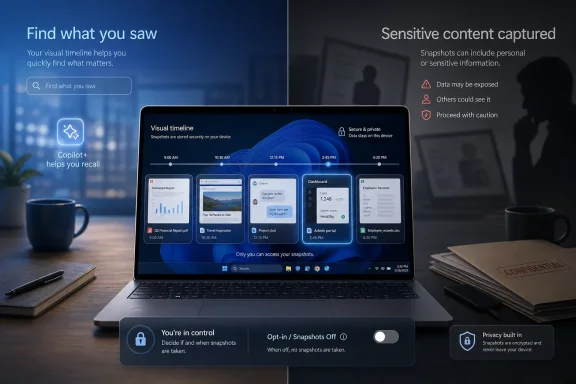
Microsoft’s Recall feature, now available to Windows 11 Copilot+ PC users who opt in, periodically saves snapshots of on-screen activity locally so AI can make past apps, documents, and webpages searchable from a visual timeline. That is not malware, and it is not secretly beaming your desktop to Redmond. But the distinction will not reassure everyone, because Recall changes the default mental model of a personal computer. The PC has long been a place where your actions disappear unless you save, log, sync, or publish them; Recall turns that fading workspace into an indexed memory.
Recall was introduced as one of the headline experiences for Copilot+ PCs, Microsoft’s new class of Windows machines built around neural processing units and local AI workloads. The pitch was simple enough to be seductive: stop hunting through browser history, file names, chat threads, and half-remembered windows, and instead ask your PC to find the thing you saw.
That promise is not trivial. Anyone who has lost a key passage in a PDF, a configuration screen in an admin console, or a product page viewed three days ago understands the value of a machine that remembers context rather than just filenames. Recall is Microsoft’s attempt to make the PC behave less like a filing cabinet and more like a visual memory system.
The implementation, however, is where the argument begins. Recall works by saving snapshots of the active screen every few seconds when content changes, then using on-device models to analyze and index what appears in those images. The result is a searchable timeline of your recent computer life.
Microsoft’s defenders are right about one important thing: local processing matters. Keeping snapshots on the device, encrypting them, requiring Windows Hello authentication, and letting users filter apps and websites are meaningful safeguards. But privacy is not only about where data is processed. It is also about whether the data should exist in the first place.
That is why Recall triggers a stronger reaction than conventional telemetry. Windows has collected diagnostics for years, and many users have made an uneasy peace with that. A rolling archive of screen images feels different because it collapses boundaries between apps, identities, and contexts. It does not care whether something was in a browser tab, a remote desktop window, a password manager, a video call, or a document preview.
Microsoft has tried to narrow that risk with sensitive-information filtering, private browsing exclusions in supported browsers, app and website filters, and controls to pause or delete snapshots. Those controls are welcome, but they are still controls layered on top of a system whose basic job is to preserve what used to be transient.
This is the heart of the Recall controversy. The feature is not frightening because it is hard to understand. It is frightening because it is extremely easy to understand: Windows can keep pictures of what you were doing.
That matters. An opt-in Recall is categorically different from an always-on Recall. Users should not have to discover after the fact that their operating system has been building a searchable visual archive of their activity.
But opt-in is not a magic word. Modern setup flows are dense, impatient rituals. People click through device configuration while trying to get to their desktop, restore their files, install apps, and start working. If a feature is presented as useful, safe, and recommended, many users will accept it without building a mental model of what they have agreed to.
For enterprise IT, the problem is sharper. A consumer can decide that Recall is worth the trade. A school, hospital, law firm, newsroom, finance department, or government contractor has to ask whose data might appear in snapshots, what obligations attach to that data, and how it could be exposed during litigation, incident response, employee monitoring disputes, or device compromise.
Microsoft can say, accurately, that Recall is optional. Administrators will still ask whether optional is good enough.
That is a much better architecture than a cloud service silently ingesting your screen. It also fits the broader Copilot+ PC strategy: use local NPUs to make Windows feel smarter without making every interaction a round trip to a data center.
But local storage changes the threat model; it does not eliminate it. A database of snapshots on a laptop is still a database of snapshots on a laptop. If an attacker obtains access to the device, compromises the user session, abuses legitimate credentials, or finds a weakness in how Recall data is protected, the prize is unusually rich.
This is why security professionals tend to be less impressed by “it stays on your device” than marketing teams expect. Local secrets are still secrets. In fact, they are often the secrets attackers most want, because they reflect real user behavior rather than sanitized telemetry.
The feature also creates a secondary risk: users may forget Recall is there. A person who knows a meeting is being recorded behaves differently. A person who forgets the desktop is being indexed may expose information they would never intentionally save.
Phones do have screen-capture risks, but they are different risks. Accessibility permissions can be abused by malicious or overreaching apps. Screen recording permissions can expose sensitive content. Some apps try to work around screenshot restrictions, and users should be suspicious of tools that promise to “unlock” screenshots everywhere.
That does not make smartphones irrelevant to the debate. It shows that screen visibility has become a contested security boundary across platforms. Once an app or system service can see the screen, it can potentially infer far more than a user intended to share.
Still, conflating Recall with every mobile screenshot trick weakens the argument. The real Windows story is strong enough without exaggeration: Microsoft built an OS-level memory feature whose usefulness depends on capturing a broad visual record of user activity. That deserves scrutiny on its own terms.
If you do not own a Copilot+ PC, you may not see Recall controls at all. That absence is not necessarily a sign that Microsoft has hidden the feature from you. Recall depends on hardware and Windows support that older PCs generally lack.
Administrators have more work to do than consumers. They need policy controls, deployment baselines, user education, and clear rules for machines that handle regulated or confidential data. The question is not merely whether Recall can be disabled. It is whether organizations can prove it stays disabled where policy requires that.
This is where Microsoft’s enterprise credibility is tested. Windows is not just a consumer platform; it is the operating system of hospitals, factories, classrooms, trading desks, call centers, and government offices. A feature that may be delightful on a personal laptop can be unacceptable on a managed endpoint.
It is also an obvious AI idea. Large language models and multimodal systems are most valuable when they have context. A PC that knows what you saw, when you saw it, and how it related to other activity can answer questions that ordinary file search cannot.
That is why Recall should not be dismissed as a bizarre one-off mistake. It is a preview of where personal computing is heading. Microsoft, Apple, Google, and every AI platform vendor are all circling the same premise: your devices will be more helpful if they retain more context about your life.
The fight, then, is not whether computers will gain memory. They will. The fight is over whether that memory is narrow, transparent, revocable, and user-controlled — or broad, confusing, sticky, and normalized through setup screens.
That is where data protection law becomes more than an abstract concern. In regulated environments, organizations must know what personal data they collect, why they collect it, how long they keep it, who can access it, and how it can be deleted. Recall complicates those answers because it can turn incidental viewing into stored records.
Microsoft’s local-first design may reduce some compliance concerns, especially compared with cloud ingestion. But it does not make the data vanish from legal analysis. If a snapshot exists, it may be discoverable, breach-relevant, policy-relevant, or subject to retention rules.
The irony is that Recall’s best consumer feature — remembering what you forgot — is its hardest enterprise problem. Businesses spend enormous effort defining what should be retained and what should not. Recall begins from the opposite instinct: preserve first, search later.
The more useful question is whether Recall is governable. Can a user understand it in one minute? Can an administrator disable it across a fleet and verify compliance? Can sensitive apps reliably keep themselves out of snapshots? Can users delete history in a way that is both effective and understandable? Can Microsoft maintain the architecture without later nudging users toward broader capture?
Those are practical questions, not philosophical ones. They are also the questions that will determine whether AI memory becomes a trusted platform feature or another reason users distrust operating-system upgrades.
Microsoft has learned, painfully, that AI features cannot be shipped like visual refreshes. A Start menu change annoys people. A screenshot memory system changes the security posture of the machine. That demands a higher bar.
For WindowsForum readers, the sensible posture is deliberate configuration. Know whether your PC supports Recall. Know whether snapshots are enabled. Know what is excluded. Know how to delete the archive. If you manage systems for others, decide the policy before users discover the feature on their own.
 Microsoft Built a Memory Machine, Then Had to Teach It Restraint
Recall was introduced as one of the headline experiences for Copilot+ PCs, Microsoft’s new class of Windows machines built around neural processing units and local AI workloads. The pitch was simple enough to be seductive: stop hunting through browser history, file names, chat threads, and half-remembered windows, and instead ask your PC to find the thing you saw.That promise is not trivial. Anyone who has lost a key passage in a PDF, a configuration screen in an admin console, or a product page viewed three days ago understands the value of a machine that remembers context rather than just filenames. Recall is Microsoft’s attempt to make the PC behave less like a filing cabinet and more like a visual memory system.
The implementation, however, is where the argument begins. Recall works by saving snapshots of the active screen every few seconds when content changes, then using on-device models to analyze and index what appears in those images. The result is a searchable timeline of your recent computer life.
Microsoft’s defenders are right about one important thing: local processing matters. Keeping snapshots on the device, encrypting them, requiring Windows Hello authentication, and letting users filter apps and websites are meaningful safeguards. But privacy is not only about where data is processed. It is also about whether the data should exist in the first place.
The Screenshot Is the Most Dangerous File Format on Your PC
A screenshot is deceptively crude. It is just pixels, not a database export or a password vault. But pixels are often where the most sensitive parts of digital life briefly appear before disappearing: bank balances, one-time codes, medical portals, private messages, source code, admin dashboards, legal documents, customer records, and internal chats.That is why Recall triggers a stronger reaction than conventional telemetry. Windows has collected diagnostics for years, and many users have made an uneasy peace with that. A rolling archive of screen images feels different because it collapses boundaries between apps, identities, and contexts. It does not care whether something was in a browser tab, a remote desktop window, a password manager, a video call, or a document preview.
Microsoft has tried to narrow that risk with sensitive-information filtering, private browsing exclusions in supported browsers, app and website filters, and controls to pause or delete snapshots. Those controls are welcome, but they are still controls layered on top of a system whose basic job is to preserve what used to be transient.
This is the heart of the Recall controversy. The feature is not frightening because it is hard to understand. It is frightening because it is extremely easy to understand: Windows can keep pictures of what you were doing.
Opt-In Solves the Product Scandal, Not the Trust Problem
Microsoft’s first Recall rollout plan in 2024 was battered by criticism from security researchers, privacy advocates, journalists, and regulators. The company responded by delaying the feature, reworking the security architecture, and making snapshot saving opt-in rather than automatic. By the time Recall reached broader Copilot+ PC availability in 2025, it was a more cautious product than the one Microsoft originally showed.That matters. An opt-in Recall is categorically different from an always-on Recall. Users should not have to discover after the fact that their operating system has been building a searchable visual archive of their activity.
But opt-in is not a magic word. Modern setup flows are dense, impatient rituals. People click through device configuration while trying to get to their desktop, restore their files, install apps, and start working. If a feature is presented as useful, safe, and recommended, many users will accept it without building a mental model of what they have agreed to.
For enterprise IT, the problem is sharper. A consumer can decide that Recall is worth the trade. A school, hospital, law firm, newsroom, finance department, or government contractor has to ask whose data might appear in snapshots, what obligations attach to that data, and how it could be exposed during litigation, incident response, employee monitoring disputes, or device compromise.
Microsoft can say, accurately, that Recall is optional. Administrators will still ask whether optional is good enough.
The Local-AI Defense Has a Hole in the Middle
Microsoft’s strongest argument for Recall is that it represents the privacy-preserving version of AI memory. Instead of sending your activity to a cloud model, the PC itself performs the analysis. Snapshots stay local. Access is gated through Windows Hello. Data is encrypted and scoped to the signed-in user.That is a much better architecture than a cloud service silently ingesting your screen. It also fits the broader Copilot+ PC strategy: use local NPUs to make Windows feel smarter without making every interaction a round trip to a data center.
But local storage changes the threat model; it does not eliminate it. A database of snapshots on a laptop is still a database of snapshots on a laptop. If an attacker obtains access to the device, compromises the user session, abuses legitimate credentials, or finds a weakness in how Recall data is protected, the prize is unusually rich.
This is why security professionals tend to be less impressed by “it stays on your device” than marketing teams expect. Local secrets are still secrets. In fact, they are often the secrets attackers most want, because they reflect real user behavior rather than sanitized telemetry.
The feature also creates a secondary risk: users may forget Recall is there. A person who knows a meeting is being recorded behaves differently. A person who forgets the desktop is being indexed may expose information they would never intentionally save.
The Smartphone Panic Is Mostly a Different Story
The viral framing around phones and PCs “taking screenshots every few seconds” muddies the issue. Microsoft Recall is a specific Windows feature for Copilot+ PCs. Apple does not currently ship an iPhone equivalent that continuously screenshots the entire screen for AI recall, and Android does not have a default Recall clone built into the operating system in the same way.Phones do have screen-capture risks, but they are different risks. Accessibility permissions can be abused by malicious or overreaching apps. Screen recording permissions can expose sensitive content. Some apps try to work around screenshot restrictions, and users should be suspicious of tools that promise to “unlock” screenshots everywhere.
That does not make smartphones irrelevant to the debate. It shows that screen visibility has become a contested security boundary across platforms. Once an app or system service can see the screen, it can potentially infer far more than a user intended to share.
Still, conflating Recall with every mobile screenshot trick weakens the argument. The real Windows story is strong enough without exaggeration: Microsoft built an OS-level memory feature whose usefulness depends on capturing a broad visual record of user activity. That deserves scrutiny on its own terms.
The Off Switch Is Real, and Users Should Know Where It Lives
For Windows 11 users on supported Copilot+ PCs, Recall controls live in Settings under Privacy & security, in the Recall & snapshots area. The central control is the option to save snapshots. Turn that off, and Windows should stop saving new Recall snapshots. Users can also delete existing snapshots, pause capture, and manage filters for apps and websites.If you do not own a Copilot+ PC, you may not see Recall controls at all. That absence is not necessarily a sign that Microsoft has hidden the feature from you. Recall depends on hardware and Windows support that older PCs generally lack.
Administrators have more work to do than consumers. They need policy controls, deployment baselines, user education, and clear rules for machines that handle regulated or confidential data. The question is not merely whether Recall can be disabled. It is whether organizations can prove it stays disabled where policy requires that.
This is where Microsoft’s enterprise credibility is tested. Windows is not just a consumer platform; it is the operating system of hospitals, factories, classrooms, trading desks, call centers, and government offices. A feature that may be delightful on a personal laptop can be unacceptable on a managed endpoint.
Convenience Keeps Winning Because Memory Is Useful
The uncomfortable truth is that Recall exists because the underlying problem is real. Modern computing is fragmented across browser tabs, Teams chats, cloud documents, PDFs, admin portals, password prompts, SaaS dashboards, and search boxes that often do not search the thing you actually remember. A visual memory layer is an obvious product idea.It is also an obvious AI idea. Large language models and multimodal systems are most valuable when they have context. A PC that knows what you saw, when you saw it, and how it related to other activity can answer questions that ordinary file search cannot.
That is why Recall should not be dismissed as a bizarre one-off mistake. It is a preview of where personal computing is heading. Microsoft, Apple, Google, and every AI platform vendor are all circling the same premise: your devices will be more helpful if they retain more context about your life.
The fight, then, is not whether computers will gain memory. They will. The fight is over whether that memory is narrow, transparent, revocable, and user-controlled — or broad, confusing, sticky, and normalized through setup screens.
Regulators Will Care About Whose Screen It Is
Recall also raises a question that product demos tend to avoid: the screen may belong to you, but the information on it often belongs to someone else. A customer’s address, a patient’s test result, a student record, an employee complaint, a confidential source’s message, or a client contract can appear on your display without that person having any say in whether it is captured into an AI-searchable archive.That is where data protection law becomes more than an abstract concern. In regulated environments, organizations must know what personal data they collect, why they collect it, how long they keep it, who can access it, and how it can be deleted. Recall complicates those answers because it can turn incidental viewing into stored records.
Microsoft’s local-first design may reduce some compliance concerns, especially compared with cloud ingestion. But it does not make the data vanish from legal analysis. If a snapshot exists, it may be discoverable, breach-relevant, policy-relevant, or subject to retention rules.
The irony is that Recall’s best consumer feature — remembering what you forgot — is its hardest enterprise problem. Businesses spend enormous effort defining what should be retained and what should not. Recall begins from the opposite instinct: preserve first, search later.
The Real Test Is Not Whether Recall Is Safe, but Whether It Is Governable
Security debates often collapse into binaries: safe or unsafe, private or invasive, enabled or disabled. Recall does not fit neatly into that frame. It is safer than it was when first announced, more controllable than critics sometimes imply, and still risky enough that many users and administrators will reasonably reject it.The more useful question is whether Recall is governable. Can a user understand it in one minute? Can an administrator disable it across a fleet and verify compliance? Can sensitive apps reliably keep themselves out of snapshots? Can users delete history in a way that is both effective and understandable? Can Microsoft maintain the architecture without later nudging users toward broader capture?
Those are practical questions, not philosophical ones. They are also the questions that will determine whether AI memory becomes a trusted platform feature or another reason users distrust operating-system upgrades.
Microsoft has learned, painfully, that AI features cannot be shipped like visual refreshes. A Start menu change annoys people. A screenshot memory system changes the security posture of the machine. That demands a higher bar.
The Recall Era Rewards the Users Who Check the Switches
The practical lesson is not to panic and not to shrug. Recall is neither a virus nor a harmless toy. It is a powerful local AI feature that should be treated like microphone access, location history, browser sync, clipboard sharing, and password storage: useful in the right context, unacceptable in the wrong one.For WindowsForum readers, the sensible posture is deliberate configuration. Know whether your PC supports Recall. Know whether snapshots are enabled. Know what is excluded. Know how to delete the archive. If you manage systems for others, decide the policy before users discover the feature on their own.
- Recall is available only on supported Windows 11 Copilot+ PCs, and snapshot saving is designed to require user opt-in.
- Recall saves screen snapshots locally and uses on-device AI to make past activity searchable from a visual timeline.
- Turning off snapshot saving in Settings under Privacy & security stops new Recall capture, while separate controls allow users to delete stored snapshots.
- The biggest risk is not that Microsoft is secretly watching every screen, but that a rich local archive of sensitive screen content may exist at all.
- Smartphone screenshot risks are real, but they usually involve app permissions, accessibility abuse, or screen recording rather than a Microsoft Recall-style OS memory feature.
- Organizations handling regulated, confidential, or third-party data should treat Recall as a governance issue, not merely a user preference.
References
- Primary source: Zee News
Published: 2026-06-12T07:28:07.798739
Seriously? Your phone and PC are taking screenshots every few seconds – Here's how to switch this feature OFF | Technology News | Zee News
Microsoft Recall feature: The feature was designed to solve one of the most frustrating problems we encounter daily - finding something we know we have seen before. zeenews.india.com
- Official source: support.microsoft.com
Retrace your steps with Recall | Microsoft Support
Retrace your steps with Recallsupport.microsoft.com - Related coverage: pcworld.com
Windows Recall retreat: Screenshots will be opt-in | PCWorld
A new blog post tries to assuage the privacy and security concerns around Recall on Copilot+ PCs.www.pcworld.com - Related coverage: tomshardware.com
Microsoft backtracks on new Recall feature — enhancing Recall's security and making it an opt-in decision | Tom's Hardware
Lock it down, the public said of Recall, and Microsoft listened.www.tomshardware.com - Related coverage: hp.com
- Related coverage: tomsguide.com
Microsoft is hiding Windows 11's 'eyes' — here's how to find Copilot Vision (and fully delete it) | Tom's Guide
Microsoft’s new AI can "see" your screen to fix errors and summarize docs. Here's how to master Copilot Vision or disable it entirely to protect your privacy.www.tomsguide.com
