

Microsoft launched Remote MCP Server Support for Microsoft 365 Copilot Work IQ APIs in June 2026 for worldwide standard multi-tenant customers, giving developers a Work IQ endpoint that lets agents securely connect to remote Model Context Protocol servers and invoke external tools beyond their local runtime. The feature sounds like plumbing, and in one sense it is. But it is also a signal that Microsoft’s agent strategy is moving from “Copilot can answer questions about your work” to “Copilot can coordinate work across systems.” That shift is where the useful future of enterprise AI begins—and where the governance headaches start to compound.
For most users, Microsoft 365 Copilot has been sold as an assistant that lives inside familiar work surfaces: Word, Outlook, Teams, Excel, PowerPoint, and the Copilot Chat experience. It summarizes meetings, drafts emails, searches files, rewrites prose, and tries to make sense of the sprawl that Microsoft 365 itself helped create. That is valuable, but it is still largely a conversation with your tenant.
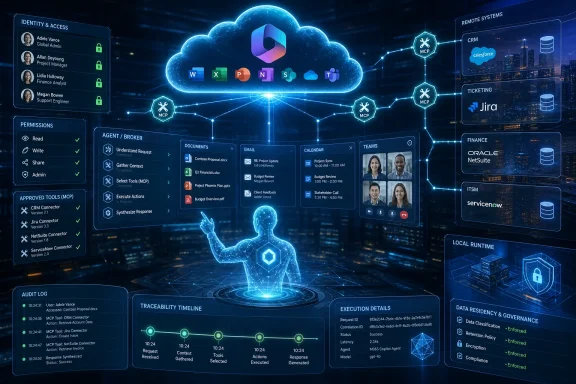
Remote MCP support changes the posture. It gives agents a standardized way to call tools, query systems, and act through services that are not simply sitting inside the local Copilot runtime. The agent becomes less like a smart search box and more like a broker between Microsoft 365 context and the rest of the software estate.
That is the real story behind Roadmap ID 559020. Microsoft is not merely adding another developer-facing endpoint to a crowded extensibility portfolio. It is giving Work IQ a more distributed nervous system, one that can reach remote MCP servers and pull outside capabilities into the flow of Microsoft 365 agent orchestration.
The phrase “Work IQ” has always carried a bit of marketing fog. In practice, it is Microsoft’s name for the contextual intelligence layer that understands people, files, meetings, mail, chats, organizational relationships, and permissions across Microsoft 365. When exposed through APIs and MCP, that context stops being only Copilot’s advantage and becomes infrastructure that developers can build against.
MCP offers a more standardized pattern. An MCP client can discover and invoke tools exposed by an MCP server, while the server handles the interface to whatever system actually performs the work. In human terms, the agent no longer has to be hand-wired to every service. It can speak a common protocol to servers that advertise what they can do.
That matters because agents are not useful when they merely generate text about a task. They become useful when they can gather the right context, choose an appropriate tool, execute a step, observe the result, and continue the workflow. The industry’s shift from “AI chat” to “AI agents” depends on that loop becoming reliable enough to trust.
Microsoft’s Work IQ APIs sit squarely in that transition. The company already owns an enormous amount of enterprise context through Microsoft Graph and Microsoft 365. MCP support gives that context and adjacent actions a more portable agent interface, while remote server support expands the boundary beyond tools running on the developer’s machine or inside a narrow local environment.
Remote MCP support through the Work IQ endpoint means an agent can connect to services that live elsewhere and still operate within the Microsoft 365 Copilot development model. That opens the door to agents that use Microsoft 365 context while invoking specialized external tools: a procurement system, an incident-management backend, a customer database, a compliance workflow, a code-analysis service, or an internal line-of-business API.
The distinction matters for sysadmins and architects because this is where AI tooling collides with network reality. Local integration is easy to romanticize. Production integration means certificates, identity, authorization scopes, logging, rate limits, data residency, service ownership, and change control. Remote MCP makes the agent more useful precisely because it makes the trust boundary more interesting.
It also makes Microsoft’s agent platform more credible. A Copilot agent that can only work inside Microsoft’s own garden is a productivity feature. A Copilot agent that can securely reason over Microsoft 365 context and invoke remote business tools starts to look like an enterprise automation layer. That is a much bigger ambition.
That is why Microsoft’s Work IQ positioning leans on permission-aware access and governance controls. The company knows the enterprise sale depends on a crucial promise: agents should not become a shortcut around the security model that governs human users. If a user cannot access a file, an agent acting on that user’s behalf should not magically retrieve it. If a workflow requires consent, auditing, or administrative approval, the agent layer needs to preserve those constraints rather than sidestep them.
The same principle applies to external tools. Once agents can invoke remote MCP servers, the relevant question is not simply “Can this agent do more?” It is “Whose authority is being used, what data is being sent, what action is being taken, and where is the evidence afterward?” Microsoft’s pitch is that Work IQ brings the organization’s existing Microsoft 365 governance posture into the agent era.
That promise will be tested in implementation. Microsoft 365 tenants are not clean-room environments. They are full of legacy permissions, overshared SharePoint sites, stale Teams, unmanaged guest access, mailboxes with years of sensitive material, and business processes that were never designed for machine-speed orchestration. Work IQ can respect permissions and still surface the messy consequences of permissions that were too broad in the first place.
That future requires a control plane. If every department builds its own agent with its own tool access, enterprises will quickly inherit a shadow automation problem that looks suspiciously like shadow IT with better prose. Remote MCP support is powerful because it makes tool access easier to standardize, but it also increases the pressure to govern who can publish, approve, monitor, and revoke those tools.
This is where Microsoft has an advantage over smaller AI vendors. It can wrap the new agent model in familiar enterprise concepts: Entra identity, tenant controls, admin center experiences, audit logs, compliance boundaries, and licensing levers. That does not guarantee simplicity, but it gives IT departments a language they already understand.
Still, there is a tension Microsoft cannot fully eliminate. The more capable agents become, the more they resemble automated employees with delegated authority. Enterprises have spent decades learning how to manage users and applications. Managing semi-autonomous agents that call remote tools using business context is a newer and stranger discipline.
That does not make integration effortless. Someone still has to design the server, define tool behavior, handle authentication, secure secrets, validate inputs, manage failure modes, and document the contract. But MCP gives developers a more predictable place to put that work. The tool becomes something agents can discover and invoke, rather than a pile of custom glue attached to a single prompt flow.
Remote MCP also helps separate responsibilities. The team that owns a business system can expose an approved MCP server, while agent builders consume it without needing direct database access or undocumented API workarounds. That is a healthier model than giving every AI project its own backdoor into production systems.
The likely result is a new internal platform pattern. Larger organizations will not want every team publishing arbitrary MCP endpoints into the Copilot ecosystem. They will want curated tool catalogs, review gates, test harnesses, approved schemas, and reusable servers for common business functions. In other words, they will rediscover API management under a new agent-friendly name.
Remote MCP expands the attack surface because every reachable tool becomes part of the agent’s operational world. A vulnerable MCP server, a poorly described tool, an overprivileged service principal, or a permissive approval model can turn a clever assistant into a compliance incident. The agent does not need evil intent to cause damage. It only needs ambiguous instructions and excessive authority.
That is why the boring controls matter most. Admin approval, least-privilege scopes, explicit tool descriptions, tenant-level policies, logging, monitoring, and revocation are not bureaucratic overhead. They are the difference between a useful automation fabric and a distributed risk engine.
Security-minded WindowsForum readers should also watch for prompt-injection implications. When agents read emails, documents, tickets, or web content and then decide which tools to call, malicious or merely careless text can become operational input. A document that tells an agent to ignore prior instructions should not be able to trigger a destructive external action. That problem is not unique to Microsoft, but Microsoft’s reach makes its handling of the issue especially consequential.
Admins will need an inventory. They will need to know which remote MCP servers exist, who owns them, which agents can call them, what identities they use, what data they receive, and what systems they can change. They will also need to know whether the server is Microsoft-provided, partner-provided, or built internally, because the operational risk differs across those categories.
Change management becomes important as well. If an MCP server changes a tool description, adds a new action, alters a schema, or modifies authorization behavior, agents that depend on it may behave differently. Traditional API versioning concerns do not vanish because the caller is an AI agent. If anything, they become more important because the agent may choose tools dynamically based on descriptions and context.
There is also a documentation challenge. Human administrators can inspect a connector configuration and understand what it is supposed to do. Agent-accessible tools need descriptions that are precise enough for machine selection and clear enough for human review. Vague tool names and broad permissions are a bad combination.
That is the magic Microsoft is chasing. Work IQ supplies the Microsoft 365 context. Remote MCP servers supply the external capabilities. Copilot becomes the orchestrator that turns a fuzzy business request into a sequence of grounded steps.
But invisibility has a downside. When an agent gets something wrong, users need to understand what happened. Did it retrieve stale data? Did it lack permission? Did a remote tool fail? Did the model choose the wrong action? Did a business system reject the request? A polished chat surface can make complex failures look like simple confusion.
This is where enterprise AI products need to mature beyond the demo. Users and admins need traceability. The assistant should be able to explain which tools it used, what data it relied on, what actions it took, and where human approval entered the loop. Without that, trust will degrade quickly, especially in workflows involving money, customers, security, or regulated data.
But Microsoft’s implementation still strengthens Microsoft’s platform gravity. Work IQ is valuable because it sits on Microsoft 365 context, and that context is richest for organizations already deep in the Microsoft stack. Remote MCP may let external tools participate, but Copilot remains the interface, Work IQ remains the intelligence layer, and Microsoft remains the governance and billing center.
That is not necessarily bad. Enterprises often prefer a dominant control plane to a chaotic pile of best-of-breed AI experiments. If Microsoft can make Copilot agents secure, observable, and useful across business systems, many customers will happily accept the gravitational pull.
The risk is that open protocol support becomes a funnel into a closed operational model. Developers may speak MCP at the boundary, but the practical experience—administration, discovery, policy, telemetry, licensing, and user access—will be shaped by Microsoft’s ecosystem. The protocol may be open while the enterprise workflow becomes increasingly Microsoft-centered.
A remote MCP-enabled workflow might involve a user, an agent, a service, and several backend systems. It may run interactively or as part of a larger process. It may benefit people who never directly open Copilot. If pricing is too opaque, admins will hesitate. If metering is too unpredictable, finance teams will object. If licensing boundaries are too subtle, architects will design conservatively.
Microsoft has lived this movie before with Power Platform, Azure consumption, and security add-ons. The capability gets attention first; the bill gets attention later. For Work IQ APIs and remote MCP support, transparent metering and usable cost controls will be essential if Microsoft wants this to become everyday infrastructure rather than a premium experiment.
This is especially true for developers building reusable internal tools. If every tool invocation has cost implications that are hard to forecast, teams will limit use cases to high-value workflows. That may be rational, but it will slow the kind of broad ecosystem Microsoft wants.
Remote MCP support sits on the cloud and developer side of that equation. Windows-side MCP support and Copilot experiences sit closer to the user and device. Together, they point toward a future where an agent on a Windows PC can reason across local state, Microsoft 365 work context, and remote business tools through standardized interfaces.
That is powerful, but it also revives old management questions. Which agents can access device capabilities? Which tools can be invoked from a user session? How do organizations separate personal, corporate, and developer contexts on the same machine? What happens when a local assistant reaches into cloud work data and then calls a remote service?
The managed endpoint is not going away in the AI era. It is becoming more important. If agents become operational intermediaries, then the PC, identity provider, browser, productivity suite, and cloud policy stack all become parts of the same trust chain.
Enterprise AI failures are often not model failures in the narrow sense. They are integration failures, data-quality failures, governance failures, and expectation failures. An agent can be technically correct and operationally useless if it cannot access the right system. It can be fluent and dangerous if it accesses too much. It can be efficient and untrusted if no one can audit its actions.
Remote MCP support gives Microsoft a stronger answer to the integration problem. It does not automatically solve the trust problem. That will depend on the controls around server registration, tool approval, runtime visibility, permission enforcement, and human-in-the-loop design.
The organizations that succeed with this will treat agents as software systems, not magical employees. They will test them, stage them, monitor them, version their tools, document failure modes, and define what they are not allowed to do. The organizations that skip those steps will rediscover why automation without governance has always been risky.
That does not mean every tenant should rush to wire up remote tools. The smarter move is to start with low-risk, high-friction workflows where Microsoft 365 context and external system access clearly belong together. IT service management, knowledge retrieval, customer preparation, project reporting, and internal request triage are natural candidates because they already span multiple systems and involve substantial manual context gathering.
The second move is to establish governance before enthusiasm outruns policy. Decide who can publish MCP servers. Decide how tools are reviewed. Decide what logging is required. Decide which actions require explicit user confirmation. Decide how to disable a tool quickly when something goes wrong.
The third move is to avoid pretending that AI changes the fundamentals. Identity still matters. Permissions still matter. Network boundaries still matter. Auditability still matters. The agent layer makes those disciplines more urgent, not less.
 Microsoft Is Turning Copilot From a Chatbot Into an Operating Layer
For most users, Microsoft 365 Copilot has been sold as an assistant that lives inside familiar work surfaces: Word, Outlook, Teams, Excel, PowerPoint, and the Copilot Chat experience. It summarizes meetings, drafts emails, searches files, rewrites prose, and tries to make sense of the sprawl that Microsoft 365 itself helped create. That is valuable, but it is still largely a conversation with your tenant.Remote MCP support changes the posture. It gives agents a standardized way to call tools, query systems, and act through services that are not simply sitting inside the local Copilot runtime. The agent becomes less like a smart search box and more like a broker between Microsoft 365 context and the rest of the software estate.
That is the real story behind Roadmap ID 559020. Microsoft is not merely adding another developer-facing endpoint to a crowded extensibility portfolio. It is giving Work IQ a more distributed nervous system, one that can reach remote MCP servers and pull outside capabilities into the flow of Microsoft 365 agent orchestration.
The phrase “Work IQ” has always carried a bit of marketing fog. In practice, it is Microsoft’s name for the contextual intelligence layer that understands people, files, meetings, mail, chats, organizational relationships, and permissions across Microsoft 365. When exposed through APIs and MCP, that context stops being only Copilot’s advantage and becomes infrastructure that developers can build against.
MCP Gives the Agent Boom a Common Socket
The Model Context Protocol has become one of the more important pieces of connective tissue in the current agent wave because it attacks a boring but brutal problem: every useful agent needs tools, and every tool integration used to look like a one-off engineering project. Without a common protocol, each AI surface needed its own connector model, authentication assumptions, schema descriptions, and runtime behavior. That does not scale in an enterprise where the average workflow crosses Microsoft 365, CRM, ticketing, HR, ERP, cloud services, internal APIs, and a dozen half-documented business applications.MCP offers a more standardized pattern. An MCP client can discover and invoke tools exposed by an MCP server, while the server handles the interface to whatever system actually performs the work. In human terms, the agent no longer has to be hand-wired to every service. It can speak a common protocol to servers that advertise what they can do.
That matters because agents are not useful when they merely generate text about a task. They become useful when they can gather the right context, choose an appropriate tool, execute a step, observe the result, and continue the workflow. The industry’s shift from “AI chat” to “AI agents” depends on that loop becoming reliable enough to trust.
Microsoft’s Work IQ APIs sit squarely in that transition. The company already owns an enormous amount of enterprise context through Microsoft Graph and Microsoft 365. MCP support gives that context and adjacent actions a more portable agent interface, while remote server support expands the boundary beyond tools running on the developer’s machine or inside a narrow local environment.
Remote Support Is the Part That Makes This Enterprise-Shaped
Local MCP servers are useful for developers, demos, and tightly scoped workflows. They are also inherently limited. Enterprise systems are distributed, access-controlled, logged, hosted, segmented, and often managed by teams that are not sitting anywhere near the person building the agent. If MCP is going to matter beyond laptop experiments, remote MCP servers are not a luxury. They are the architecture.Remote MCP support through the Work IQ endpoint means an agent can connect to services that live elsewhere and still operate within the Microsoft 365 Copilot development model. That opens the door to agents that use Microsoft 365 context while invoking specialized external tools: a procurement system, an incident-management backend, a customer database, a compliance workflow, a code-analysis service, or an internal line-of-business API.
The distinction matters for sysadmins and architects because this is where AI tooling collides with network reality. Local integration is easy to romanticize. Production integration means certificates, identity, authorization scopes, logging, rate limits, data residency, service ownership, and change control. Remote MCP makes the agent more useful precisely because it makes the trust boundary more interesting.
It also makes Microsoft’s agent platform more credible. A Copilot agent that can only work inside Microsoft’s own garden is a productivity feature. A Copilot agent that can securely reason over Microsoft 365 context and invoke remote business tools starts to look like an enterprise automation layer. That is a much bigger ambition.
Work IQ Is Microsoft Graph With an Agent Accent
Microsoft Graph already gave developers a programmable view into Microsoft 365 data and relationships. Work IQ does not erase Graph so much as reframe the problem for agentic workloads. Agents do not simply need endpoints; they need context, permissions, tool descriptions, and actions that can be composed dynamically.That is why Microsoft’s Work IQ positioning leans on permission-aware access and governance controls. The company knows the enterprise sale depends on a crucial promise: agents should not become a shortcut around the security model that governs human users. If a user cannot access a file, an agent acting on that user’s behalf should not magically retrieve it. If a workflow requires consent, auditing, or administrative approval, the agent layer needs to preserve those constraints rather than sidestep them.
The same principle applies to external tools. Once agents can invoke remote MCP servers, the relevant question is not simply “Can this agent do more?” It is “Whose authority is being used, what data is being sent, what action is being taken, and where is the evidence afterward?” Microsoft’s pitch is that Work IQ brings the organization’s existing Microsoft 365 governance posture into the agent era.
That promise will be tested in implementation. Microsoft 365 tenants are not clean-room environments. They are full of legacy permissions, overshared SharePoint sites, stale Teams, unmanaged guest access, mailboxes with years of sensitive material, and business processes that were never designed for machine-speed orchestration. Work IQ can respect permissions and still surface the messy consequences of permissions that were too broad in the first place.
The Feature Lands at the Exact Moment Agents Need Adult Supervision
The timing is not accidental. Microsoft has spent the past two years pushing Copilot from app feature to platform, while the broader market has embraced agents as the next layer above SaaS. Copilot Studio, Microsoft 365 Copilot, GitHub Copilot, Azure AI Foundry, Windows AI features, and the company’s broader agent tooling all point toward the same thesis: the future interface to software is not a dashboard, but an assistant that can use dashboards, APIs, and services on your behalf.That future requires a control plane. If every department builds its own agent with its own tool access, enterprises will quickly inherit a shadow automation problem that looks suspiciously like shadow IT with better prose. Remote MCP support is powerful because it makes tool access easier to standardize, but it also increases the pressure to govern who can publish, approve, monitor, and revoke those tools.
This is where Microsoft has an advantage over smaller AI vendors. It can wrap the new agent model in familiar enterprise concepts: Entra identity, tenant controls, admin center experiences, audit logs, compliance boundaries, and licensing levers. That does not guarantee simplicity, but it gives IT departments a language they already understand.
Still, there is a tension Microsoft cannot fully eliminate. The more capable agents become, the more they resemble automated employees with delegated authority. Enterprises have spent decades learning how to manage users and applications. Managing semi-autonomous agents that call remote tools using business context is a newer and stranger discipline.
The Developer Win Is Fewer Custom Connectors and More Reusable Tools
For developers, the appeal is straightforward. If a remote MCP server can expose a set of tools in a way that Copilot-oriented agents understand, teams can stop rebuilding the same brittle integration patterns for every surface. A tool that checks order status, opens a support ticket, queries an inventory system, or runs a compliance check can be made available through a protocol rather than buried inside one bespoke chatbot.That does not make integration effortless. Someone still has to design the server, define tool behavior, handle authentication, secure secrets, validate inputs, manage failure modes, and document the contract. But MCP gives developers a more predictable place to put that work. The tool becomes something agents can discover and invoke, rather than a pile of custom glue attached to a single prompt flow.
Remote MCP also helps separate responsibilities. The team that owns a business system can expose an approved MCP server, while agent builders consume it without needing direct database access or undocumented API workarounds. That is a healthier model than giving every AI project its own backdoor into production systems.
The likely result is a new internal platform pattern. Larger organizations will not want every team publishing arbitrary MCP endpoints into the Copilot ecosystem. They will want curated tool catalogs, review gates, test harnesses, approved schemas, and reusable servers for common business functions. In other words, they will rediscover API management under a new agent-friendly name.
The Security Story Is Strongest When It Is Boring
The phrase “securely invoke external tools” is doing a lot of work. In the AI-agent context, security is not only about transport encryption or OAuth. It is about preventing an agent from taking inappropriate action because it misunderstood context, accepted malicious instructions, called the wrong tool, or passed sensitive data to a system that should not have received it.Remote MCP expands the attack surface because every reachable tool becomes part of the agent’s operational world. A vulnerable MCP server, a poorly described tool, an overprivileged service principal, or a permissive approval model can turn a clever assistant into a compliance incident. The agent does not need evil intent to cause damage. It only needs ambiguous instructions and excessive authority.
That is why the boring controls matter most. Admin approval, least-privilege scopes, explicit tool descriptions, tenant-level policies, logging, monitoring, and revocation are not bureaucratic overhead. They are the difference between a useful automation fabric and a distributed risk engine.
Security-minded WindowsForum readers should also watch for prompt-injection implications. When agents read emails, documents, tickets, or web content and then decide which tools to call, malicious or merely careless text can become operational input. A document that tells an agent to ignore prior instructions should not be able to trigger a destructive external action. That problem is not unique to Microsoft, but Microsoft’s reach makes its handling of the issue especially consequential.
Admins Will Need to Treat MCP Servers Like Privileged Infrastructure
The practical takeaway for IT is that MCP servers are not just developer toys. In a Microsoft 365 Copilot environment, a remote MCP server may become a bridge between user context and business action. That makes it closer to privileged middleware than a plugin.Admins will need an inventory. They will need to know which remote MCP servers exist, who owns them, which agents can call them, what identities they use, what data they receive, and what systems they can change. They will also need to know whether the server is Microsoft-provided, partner-provided, or built internally, because the operational risk differs across those categories.
Change management becomes important as well. If an MCP server changes a tool description, adds a new action, alters a schema, or modifies authorization behavior, agents that depend on it may behave differently. Traditional API versioning concerns do not vanish because the caller is an AI agent. If anything, they become more important because the agent may choose tools dynamically based on descriptions and context.
There is also a documentation challenge. Human administrators can inspect a connector configuration and understand what it is supposed to do. Agent-accessible tools need descriptions that are precise enough for machine selection and clear enough for human review. Vague tool names and broad permissions are a bad combination.
The User Experience Will Hide the Complexity Until It Doesn’t
For end users, the best version of this feature will be invisible. A worker asks an agent to prepare for a customer renewal. The agent summarizes recent Teams discussions, checks the account’s support history through a remote service, pulls contract status from a business system, drafts an agenda, and flags open issues. The user experiences one assistant, not five integrations.That is the magic Microsoft is chasing. Work IQ supplies the Microsoft 365 context. Remote MCP servers supply the external capabilities. Copilot becomes the orchestrator that turns a fuzzy business request into a sequence of grounded steps.
But invisibility has a downside. When an agent gets something wrong, users need to understand what happened. Did it retrieve stale data? Did it lack permission? Did a remote tool fail? Did the model choose the wrong action? Did a business system reject the request? A polished chat surface can make complex failures look like simple confusion.
This is where enterprise AI products need to mature beyond the demo. Users and admins need traceability. The assistant should be able to explain which tools it used, what data it relied on, what actions it took, and where human approval entered the loop. Without that, trust will degrade quickly, especially in workflows involving money, customers, security, or regulated data.
Microsoft’s Platform Bet Is Also a Lock-In Bet
There is an open-standard story here, and it is real. MCP is not a Microsoft invention, and supporting it gives developers a path that is less proprietary than a purely Microsoft-specific plugin architecture. That matters in a market where nobody wants to rebuild every integration for every AI assistant.But Microsoft’s implementation still strengthens Microsoft’s platform gravity. Work IQ is valuable because it sits on Microsoft 365 context, and that context is richest for organizations already deep in the Microsoft stack. Remote MCP may let external tools participate, but Copilot remains the interface, Work IQ remains the intelligence layer, and Microsoft remains the governance and billing center.
That is not necessarily bad. Enterprises often prefer a dominant control plane to a chaotic pile of best-of-breed AI experiments. If Microsoft can make Copilot agents secure, observable, and useful across business systems, many customers will happily accept the gravitational pull.
The risk is that open protocol support becomes a funnel into a closed operational model. Developers may speak MCP at the boundary, but the practical experience—administration, discovery, policy, telemetry, licensing, and user access—will be shaped by Microsoft’s ecosystem. The protocol may be open while the enterprise workflow becomes increasingly Microsoft-centered.
Licensing and Consumption Will Shape Adoption as Much as Capability
Technical features do not decide enterprise adoption by themselves. Licensing does. Microsoft’s Work IQ API story includes a consumption model tied to Copilot Credits, and the company has indicated that API access at general availability is not simply the same thing as assigning every user a Microsoft 365 Copilot license. That distinction matters because agent architectures do not always map cleanly to per-seat productivity licensing.A remote MCP-enabled workflow might involve a user, an agent, a service, and several backend systems. It may run interactively or as part of a larger process. It may benefit people who never directly open Copilot. If pricing is too opaque, admins will hesitate. If metering is too unpredictable, finance teams will object. If licensing boundaries are too subtle, architects will design conservatively.
Microsoft has lived this movie before with Power Platform, Azure consumption, and security add-ons. The capability gets attention first; the bill gets attention later. For Work IQ APIs and remote MCP support, transparent metering and usable cost controls will be essential if Microsoft wants this to become everyday infrastructure rather than a premium experiment.
This is especially true for developers building reusable internal tools. If every tool invocation has cost implications that are hard to forecast, teams will limit use cases to high-value workflows. That may be rational, but it will slow the kind of broad ecosystem Microsoft wants.
The Windows Angle Is the Return of the Managed Endpoint
At first glance, this is a Microsoft 365 developer feature, not a Windows story. But WindowsForum readers should recognize the broader pattern. Microsoft is rebuilding the endpoint-to-cloud relationship around AI agents, and Windows is likely to become one of the places where those agents meet local context, device settings, apps, and user workflows.Remote MCP support sits on the cloud and developer side of that equation. Windows-side MCP support and Copilot experiences sit closer to the user and device. Together, they point toward a future where an agent on a Windows PC can reason across local state, Microsoft 365 work context, and remote business tools through standardized interfaces.
That is powerful, but it also revives old management questions. Which agents can access device capabilities? Which tools can be invoked from a user session? How do organizations separate personal, corporate, and developer contexts on the same machine? What happens when a local assistant reaches into cloud work data and then calls a remote service?
The managed endpoint is not going away in the AI era. It is becoming more important. If agents become operational intermediaries, then the PC, identity provider, browser, productivity suite, and cloud policy stack all become parts of the same trust chain.
The Real Test Is Not Whether It Works in a Demo
Microsoft’s demos will almost certainly look impressive. A Copilot agent will gather context, call a remote service, produce a tidy answer, and perhaps take an action with a reassuring confirmation step. That is the easy part. The hard part is whether the same system behaves well inside a messy tenant, across thousands of users, dozens of business systems, and years of accumulated permission debt.Enterprise AI failures are often not model failures in the narrow sense. They are integration failures, data-quality failures, governance failures, and expectation failures. An agent can be technically correct and operationally useless if it cannot access the right system. It can be fluent and dangerous if it accesses too much. It can be efficient and untrusted if no one can audit its actions.
Remote MCP support gives Microsoft a stronger answer to the integration problem. It does not automatically solve the trust problem. That will depend on the controls around server registration, tool approval, runtime visibility, permission enforcement, and human-in-the-loop design.
The organizations that succeed with this will treat agents as software systems, not magical employees. They will test them, stage them, monitor them, version their tools, document failure modes, and define what they are not allowed to do. The organizations that skip those steps will rediscover why automation without governance has always been risky.
The June Launch Draws a Line Under Copilot’s Next Phase
Microsoft’s June 2026 general availability date gives this feature a concrete place in the Copilot timeline. Work IQ APIs are no longer just a preview concept for developers willing to tolerate sharp edges. Remote MCP server support arriving under general availability tells customers that Microsoft sees this as part of the production agent platform.That does not mean every tenant should rush to wire up remote tools. The smarter move is to start with low-risk, high-friction workflows where Microsoft 365 context and external system access clearly belong together. IT service management, knowledge retrieval, customer preparation, project reporting, and internal request triage are natural candidates because they already span multiple systems and involve substantial manual context gathering.
The second move is to establish governance before enthusiasm outruns policy. Decide who can publish MCP servers. Decide how tools are reviewed. Decide what logging is required. Decide which actions require explicit user confirmation. Decide how to disable a tool quickly when something goes wrong.
The third move is to avoid pretending that AI changes the fundamentals. Identity still matters. Permissions still matter. Network boundaries still matter. Auditability still matters. The agent layer makes those disciplines more urgent, not less.
The Practical Map for a Remote-MCP Copilot World
The feature is small enough to fit in a roadmap entry and large enough to reshape how enterprises think about Copilot extensibility. The important point is not that Microsoft added another acronym to the stack. It is that the company is giving agents a standardized way to leave the chat box, carry governed work context, and interact with remote systems.- Microsoft 365 Copilot Work IQ APIs gained general availability support in June 2026 for connecting agents to remote MCP servers through the Work IQ endpoint.
- Remote MCP support matters because production enterprise tools rarely live inside a local agent runtime or a developer workstation.
- The feature makes Copilot agents more useful by letting them combine Microsoft 365 context with external services, but it also expands the governance and security surface.
- Administrators should treat MCP servers as managed, privileged integration infrastructure rather than casual plugins.
- Developers should expect reusable tool servers, review workflows, and cost controls to matter as much as prompt design.
- The strongest early use cases will be workflows where Microsoft 365 context and external system action already collide in everyday work.
References
- Primary source: Microsoft 365 Roadmap
Published: 2026-06-29T23:02:39.0286478Z
Microsoft 365 Roadmap | Microsoft 365
The Microsoft 365 Roadmap lists updates that are currently planned for applicable subscribers. Check here for more information on the status of new features and updates.www.microsoft.com
- Official source: learn.microsoft.com
Work IQ MCP overview | Microsoft Learn
Learn how to use Work IQ through the Model Context Protocol (MCP) to give AI agents tool-based access to Microsoft 365 data.learn.microsoft.com - Official source: devblogs.microsoft.com
Work IQ: Production‑ready intelligence for every agent - Microsoft 365 Developer Blog
Work IQ provides a workplace intelligence layer that enables agents to access and reason over organizational data, context, and tools, continuously building a semantic understanding across Microsoft 365 and external systems with built-in, permission-aware governance.devblogs.microsoft.com - Official source: support.microsoft.com
Refer to specific files and more in Microsoft 365 Copilot | Microsoft Support
Learn how Context IQ can help you find the information, people, and conversations you need more efficiently, making it easier to get your work done in Microsoft 365 Copilot.support.microsoft.com - Official source: github.com
GitHub - microsoft/work-iq: MCP Server and CLI for accessing Work IQ · GitHub
MCP Server and CLI for accessing Work IQ. Contribute to microsoft/work-iq development by creating an account on GitHub. github.com
- Official source: techcommunity.microsoft.com
- Related coverage: windowscentral.com
"Agents are only as good as the context we give them": Microsoft IQ connects AI agents to your workspace data and the web | Windows Central
The newly unveiled Microsoft IQ data stack and Scout assistant turn generic AI into a personalized workplace tool.www.windowscentral.com - Related coverage: techradar.com
Microsoft reveals Agent 365 - the new and (hopefully) easy way to get a handle on all these new AI agents at work | TechRadar
Say hello to Agent 365www.techradar.com
