

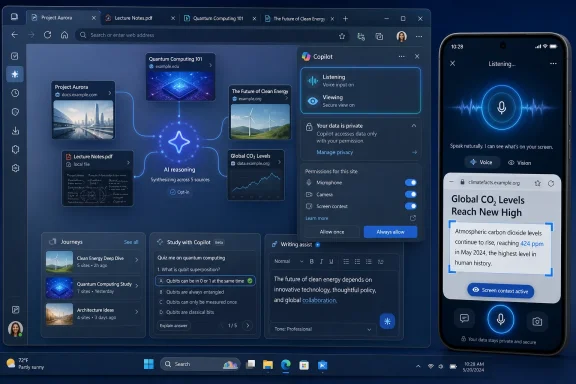
Microsoft said on May 13, 2026, that it is retiring Copilot Mode in Microsoft Edge and moving its AI browsing features directly into Edge on desktop and mobile, including multi-tab reasoning, screen-aware voice assistance, Journeys, quizzes, podcasts, and writing help. The change is less a retreat than a graduation ceremony for a product Microsoft no longer wants users to treat as experimental. Edge is being repositioned from “the browser with an AI mode” into “the browser where AI is part of the default grammar.” That distinction matters, because it shifts the burden from users choosing an AI layer to administrators and privacy-conscious users deciding how much of the browser’s context they are willing to expose.
Copilot Mode launched in July 2025 as an opt-in experiment for Edge on Windows and Mac. Its pitch was straightforward: the browser had become a pile of tabs, and Copilot could make sense of that pile. Less than a year later, Microsoft is retiring the named mode while keeping many of the behaviors that made it controversial, useful, or both.
This is classic Microsoft platform strategy. A feature begins life as a toggle, a preview, or a branded experiment, then migrates into the main product once the company decides the workflow is mature enough to normalize. The Copilot Mode label may be going away, but the idea behind it is now more deeply embedded in Edge than before.
The important sentence in Microsoft’s announcement is not that Copilot Mode is being retired. It is that the “favorite Copilot experiences” are now available directly in Edge across desktop and, for the first time in several cases, mobile. In other words, Microsoft is not abandoning AI browsing. It is removing the sense that AI browsing is a special state.
That will be welcomed by users who actually liked Copilot Mode but found the setup clunky. It will irritate users who saw the mode as a useful boundary: something they could leave off and ignore. The product question is whether Microsoft can make AI assistance feel like a browser feature rather than another recurring episode in the long-running drama of Edge trying too hard.
This is the clearest argument for AI in the browser. Search engines answer queries; browsers hold context. If Copilot can look across the pages a user has already selected, it has a better chance of producing something useful than a chatbot starting cold from a blank prompt.
But that advantage also defines the risk. A browser is not just a window onto the public web. It is where people view bank statements, health portals, admin dashboards, internal documentation, payroll systems, private email, legal drafts, and corporate SaaS apps. The more useful Copilot becomes, the more sensitive the context it wants.
Microsoft is emphasizing permission and visual cues. Copilot should only read across tabs, use browsing history, or view the screen when the user allows it, and Edge is supposed to show when Copilot is listening, viewing, or acting. That is the right language, but seasoned Windows users have heard enough “you are in control” messaging to know that the implementation details matter more than the slogan.
The test will be whether permissions are understandable, reversible, and granular. “Let Copilot help me compare these three travel tabs” is a very different request from “let Copilot use my browsing history and past chats to personalize future answers.” The former feels like a task. The latter feels like a relationship.
That is a compelling feature if you live in research loops. Anyone who has spent days comparing laptops, planning travel, debugging a strange Windows error, or learning a new framework knows the pain of reconstructing yesterday’s path. Journeys already tried to solve part of that by grouping browsing history into topic cards with summaries and suggested next steps. Bringing that idea to mobile makes sense because mobile browsing is where half-finished research often goes to die.
Still, “memory” is not just a feature name. It is a policy surface. If Copilot remembers what you read, what you asked, what you compared, and what you abandoned, Edge becomes less like a neutral browser and more like a personal data system with an AI interface.
For consumers, the trade-off may be acceptable if the controls are clear and the benefits are obvious. For businesses, it is more complicated. Administrators will want to know how this interacts with Microsoft accounts, work profiles, enterprise data boundaries, compliance obligations, and existing Edge management policies. A browser that can summarize open tabs is useful. A browser that might accidentally blend personal browsing history, work research, and AI personalization is an audit conversation waiting to happen.
Microsoft’s challenge is that trust is cumulative, while annoyance is immediate. If the first experience is helpful, users may forgive the data ask. If the first experience feels intrusive, Edge’s long memory will be remembered for the wrong reason.
Microsoft is bringing Vision and Voice to the Edge mobile app, allowing users to share what is on screen with Copilot and ask questions verbally. This puts Edge in the same broader category as Google Gemini Live and ChatGPT’s voice-and-vision experiences, but with one important difference: the browser already knows what you are doing. You do not need to screenshot, upload, describe, or paste as much context.
That could make mobile Edge genuinely more useful. Imagine looking at a dense insurance document, a confusing checkout page, a foreign-language restaurant menu, or a technical article while walking through a problem out loud. The friction reduction is real.
But mobile also raises the stakes. Screen sharing is one of the most sensitive permissions a user can grant. A desktop user may be more aware of windows and tabs; a phone user may move rapidly between messaging apps, payment pages, photos, maps, and private content. Clear indicators are not a nice-to-have here. They are the difference between assistive computing and ambient surveillance anxiety.
Microsoft says users will see visual cues when Copilot is active. Good. Now it needs to make those cues boringly obvious, impossible to miss, and easy to stop. In AI interfaces, a subtle indicator is often a bad indicator.
This is not a small shift. Browsers have traditionally displayed content; extensions and web apps transformed it. Microsoft is now building transformation into the browser itself. A student does not just read a page. Edge turns it into a study object.
The same logic applies to AI-generated podcasts. Ask Edge to make a podcast from research open in a tab, and it can turn that material into an audio summary. The feature is available in English markets and requires a Microsoft account to generate a podcast, with extended usage for Microsoft 365 subscribers.
This is where the browser starts to resemble an operating environment for attention. Read when you can read. Listen when you cannot. Quiz yourself when you need retention. Rewrite when you need polish. The web page becomes less a destination and more an input.
There is value in that, especially for accessibility and learning. There is also a quality problem. AI-generated summaries, quizzes, and podcasts are only as trustworthy as their interpretation of the source material. A bad summary of a hotel page is annoying. A bad summary of a medical, legal, financial, or technical document can be consequential.
Microsoft does not need these tools to be perfect for them to be popular. It needs them to be convenient. That is precisely why users should treat them as accelerators rather than authorities.
Spell check became invisible infrastructure because it lived inside the act of writing. Grammar suggestions followed the same path. AI rewriting tools are now trying to make the same jump from dedicated app to ambient utility.
For Edge, that means Microsoft can compete not only with Chrome, Safari, Firefox, and AI-first browsers, but also with writing products that live as extensions. If Edge can rewrite an email, polish a forum post, adjust tone in a form field, or draft text in a web app without requiring another install, it has a practical advantage.
The concern is not that users will receive suggestions. It is that browser-level writing assistance can appear in sensitive places: internal ticketing systems, HR portals, legal forms, patient messages, admin consoles, and private communities. Enterprises will need predictable policy controls, and users will need confidence that the blue dot is not quietly turning every text box into a training prompt.
The best version of this feature is humble. It appears when asked, explains what it is changing, and gets out of the way. The worst version becomes another nudge layer in a browser already full of nudge layers.
AI gives Microsoft a new reason to argue that Edge is not merely Chrome with Microsoft branding. If Copilot can compare tabs, remember projects, generate podcasts, quiz students, and assist writing across the web, Edge has features that are not easily reduced to rendering speed or extension compatibility.
That is why retiring Copilot Mode is strategically interesting. A separate mode makes AI feel optional and experimental. Built-in Copilot features make AI part of Edge’s identity. Microsoft wants users to think of the browser not as a passive container but as an agentic workspace.
Competitors are moving in the same direction. Google has Gemini, OpenAI has been circling browser-like workflows, Perplexity has pushed AI-native browsing, and smaller players have tried to build browsers around summarization, search, and agentic tasks. Microsoft’s advantage is distribution. Edge ships with Windows, integrates with Microsoft accounts, and can be managed in enterprise environments.
Its disadvantage is also distribution. Because Edge is already bundled and promoted aggressively, every new AI feature arrives with suspicion. Microsoft is not introducing Copilot into a trust vacuum. It is introducing it into a user base that has lived through years of prompts, defaults, banners, and “recommended” settings.
The risks are not imaginary. A user could open confidential tabs and ask for a summary. A support technician could have internal admin pages visible while using screen-aware assistance. A browser history feature could surface projects that include sensitive topics. A writing assistant could touch text in a regulated workflow.
Microsoft’s best defense is to make the permission boundaries explicit and manageable. Per-feature toggles, tenant-level policy controls, account separation, logging options, and clear documentation will matter more than the marketing demo. If Copilot in Edge becomes a black box, cautious organizations will disable what they can and tell users to avoid the rest.
There is also the question of licensing. Some features are broadly available in Copilot markets, while others have geographic, language, account, or subscription constraints. Browse with Copilot, the renamed path for certain action-oriented capabilities previously tied to Copilot Actions, is limited to Microsoft 365 Premium subscribers in the United States on Edge desktop. Podcasts require a Microsoft account to generate, with extended usage for Microsoft 365 Personal, Family, and Premium subscribers.
That patchwork is understandable for a rollout, but it complicates support. Help desks will field questions from users who see a feature at home but not at work, on desktop but not mobile, in one region but not another, or under one account but not a different profile. AI features are becoming product entitlements, not just browser settings.
That phrasing is necessary, but not sufficient. Permission dialogs are often legal artifacts masquerading as user experience. The meaningful question is whether an ordinary user can understand the scope of what is being granted and whether a power user can constrain it precisely.
A strong implementation would let users grant Copilot access to selected tabs rather than all tabs, current page rather than browsing history, one session rather than ongoing memory, and voice without persistent personalization. It would also make revocation simple. If turning something off requires spelunking through settings, the permission was never truly user-friendly.
Microsoft also needs to avoid collapsing different kinds of context into one generic “personalization” bucket. Open tabs, browsing history, past chats, screen sharing, writing fields, and account identity are different data surfaces. Treating them as separate permissions is more honest and more useful.
The company has learned some of these lessons in enterprise security, where data boundaries and labels matter. Consumer AI interfaces need the same seriousness. A browser is too intimate a tool for vague consent.
This is the central bargain of AI browsing. Context is the product. Without context, Copilot is just another chat box. With context, it becomes a layer over your digital life.
That is why Microsoft’s retirement of Copilot Mode is more than a branding cleanup. It marks the point where AI browsing stops being a side experiment and starts becoming normal product behavior. The question is whether users will accept that normalization because the features save time, or resist it because the browser already knows too much.
There is a version of Edge’s future that looks genuinely better than today’s tab chaos. You research a problem, Copilot tracks the relevant pages, summarizes trade-offs, quizzes you on unfamiliar material, generates an audio recap, and helps draft the final email. That is not science fiction. It is a reasonable near-term workflow.
There is another version where Edge becomes yet another place where Microsoft asks users to sign in, personalize, enable, share, remember, and subscribe. The difference between those futures is restraint.
Source: PCMag Microsoft Edge Drops Copilot Mode, Brings More AI to Browser
 Microsoft Buries the Mode and Keeps the Machine
Copilot Mode launched in July 2025 as an opt-in experiment for Edge on Windows and Mac. Its pitch was straightforward: the browser had become a pile of tabs, and Copilot could make sense of that pile. Less than a year later, Microsoft is retiring the named mode while keeping many of the behaviors that made it controversial, useful, or both.This is classic Microsoft platform strategy. A feature begins life as a toggle, a preview, or a branded experiment, then migrates into the main product once the company decides the workflow is mature enough to normalize. The Copilot Mode label may be going away, but the idea behind it is now more deeply embedded in Edge than before.
The important sentence in Microsoft’s announcement is not that Copilot Mode is being retired. It is that the “favorite Copilot experiences” are now available directly in Edge across desktop and, for the first time in several cases, mobile. In other words, Microsoft is not abandoning AI browsing. It is removing the sense that AI browsing is a special state.
That will be welcomed by users who actually liked Copilot Mode but found the setup clunky. It will irritate users who saw the mode as a useful boundary: something they could leave off and ignore. The product question is whether Microsoft can make AI assistance feel like a browser feature rather than another recurring episode in the long-running drama of Edge trying too hard.
The Browser Is Becoming a Context Engine
The flagship capability is Copilot’s ability to reason across multiple open tabs. Instead of asking the assistant to summarize one page, users can ask it to compare several hotel bookings, product pages, research sources, or travel options open in the current browsing session. Microsoft’s preferred example is trip planning, but the feature is just as relevant to procurement research, policy review, shopping, academic work, and the daily sysadmin ritual of comparing five nearly identical support articles.This is the clearest argument for AI in the browser. Search engines answer queries; browsers hold context. If Copilot can look across the pages a user has already selected, it has a better chance of producing something useful than a chatbot starting cold from a blank prompt.
But that advantage also defines the risk. A browser is not just a window onto the public web. It is where people view bank statements, health portals, admin dashboards, internal documentation, payroll systems, private email, legal drafts, and corporate SaaS apps. The more useful Copilot becomes, the more sensitive the context it wants.
Microsoft is emphasizing permission and visual cues. Copilot should only read across tabs, use browsing history, or view the screen when the user allows it, and Edge is supposed to show when Copilot is listening, viewing, or acting. That is the right language, but seasoned Windows users have heard enough “you are in control” messaging to know that the implementation details matter more than the slogan.
The test will be whether permissions are understandable, reversible, and granular. “Let Copilot help me compare these three travel tabs” is a very different request from “let Copilot use my browsing history and past chats to personalize future answers.” The former feels like a task. The latter feels like a relationship.
Long-Term Memory Moves the Fight From Convenience to Trust
The new Edge update also brings long-term memory into the browser experience. Copilot can use previous conversations and, with permission, browsing history to make answers more relevant. Microsoft frames this as continuity: picking up research where you left off, remembering prior context, and reducing tab-hopping.That is a compelling feature if you live in research loops. Anyone who has spent days comparing laptops, planning travel, debugging a strange Windows error, or learning a new framework knows the pain of reconstructing yesterday’s path. Journeys already tried to solve part of that by grouping browsing history into topic cards with summaries and suggested next steps. Bringing that idea to mobile makes sense because mobile browsing is where half-finished research often goes to die.
Still, “memory” is not just a feature name. It is a policy surface. If Copilot remembers what you read, what you asked, what you compared, and what you abandoned, Edge becomes less like a neutral browser and more like a personal data system with an AI interface.
For consumers, the trade-off may be acceptable if the controls are clear and the benefits are obvious. For businesses, it is more complicated. Administrators will want to know how this interacts with Microsoft accounts, work profiles, enterprise data boundaries, compliance obligations, and existing Edge management policies. A browser that can summarize open tabs is useful. A browser that might accidentally blend personal browsing history, work research, and AI personalization is an audit conversation waiting to happen.
Microsoft’s challenge is that trust is cumulative, while annoyance is immediate. If the first experience is helpful, users may forgive the data ask. If the first experience feels intrusive, Edge’s long memory will be remembered for the wrong reason.
Mobile Is Where Copilot Stops Being a Sidebar
The mobile expansion is more significant than it looks. On desktop, Copilot can live as a pane, a button, or a new tab experience. On mobile, screen space is scarce, typing is slower, and switching tabs is more painful. That makes the argument for voice and screen-aware assistance much stronger.Microsoft is bringing Vision and Voice to the Edge mobile app, allowing users to share what is on screen with Copilot and ask questions verbally. This puts Edge in the same broader category as Google Gemini Live and ChatGPT’s voice-and-vision experiences, but with one important difference: the browser already knows what you are doing. You do not need to screenshot, upload, describe, or paste as much context.
That could make mobile Edge genuinely more useful. Imagine looking at a dense insurance document, a confusing checkout page, a foreign-language restaurant menu, or a technical article while walking through a problem out loud. The friction reduction is real.
But mobile also raises the stakes. Screen sharing is one of the most sensitive permissions a user can grant. A desktop user may be more aware of windows and tabs; a phone user may move rapidly between messaging apps, payment pages, photos, maps, and private content. Clear indicators are not a nice-to-have here. They are the difference between assistive computing and ambient surveillance anxiety.
Microsoft says users will see visual cues when Copilot is active. Good. Now it needs to make those cues boringly obvious, impossible to miss, and easy to stop. In AI interfaces, a subtle indicator is often a bad indicator.
Study Tools and Podcasts Turn Edge Into a Content Processor
Beyond tab comparison and memory, Edge is gaining tools that treat webpages as raw material. Study and Learn mode can turn a page into guided study sessions, quizzes, and flashcards. Users can ask Copilot to quiz them on a topic, and the browser will generate questions from the material at hand.This is not a small shift. Browsers have traditionally displayed content; extensions and web apps transformed it. Microsoft is now building transformation into the browser itself. A student does not just read a page. Edge turns it into a study object.
The same logic applies to AI-generated podcasts. Ask Edge to make a podcast from research open in a tab, and it can turn that material into an audio summary. The feature is available in English markets and requires a Microsoft account to generate a podcast, with extended usage for Microsoft 365 subscribers.
This is where the browser starts to resemble an operating environment for attention. Read when you can read. Listen when you cannot. Quiz yourself when you need retention. Rewrite when you need polish. The web page becomes less a destination and more an input.
There is value in that, especially for accessibility and learning. There is also a quality problem. AI-generated summaries, quizzes, and podcasts are only as trustworthy as their interpretation of the source material. A bad summary of a hotel page is annoying. A bad summary of a medical, legal, financial, or technical document can be consequential.
Microsoft does not need these tools to be perfect for them to be popular. It needs them to be convenient. That is precisely why users should treat them as accelerators rather than authorities.
Writing Assistance Is the Quietest Feature and Maybe the Stickiest
The new Writing assistant may prove to be one of the most widely used additions because it appears where people already type. Microsoft describes it as help for drafts, clarity, and tone, surfaced through a blue dot next to text fields. That sounds less dramatic than multi-tab reasoning, but it is closer to the daily behavior of millions of users.Spell check became invisible infrastructure because it lived inside the act of writing. Grammar suggestions followed the same path. AI rewriting tools are now trying to make the same jump from dedicated app to ambient utility.
For Edge, that means Microsoft can compete not only with Chrome, Safari, Firefox, and AI-first browsers, but also with writing products that live as extensions. If Edge can rewrite an email, polish a forum post, adjust tone in a form field, or draft text in a web app without requiring another install, it has a practical advantage.
The concern is not that users will receive suggestions. It is that browser-level writing assistance can appear in sensitive places: internal ticketing systems, HR portals, legal forms, patient messages, admin consoles, and private communities. Enterprises will need predictable policy controls, and users will need confidence that the blue dot is not quietly turning every text box into a training prompt.
The best version of this feature is humble. It appears when asked, explains what it is changing, and gets out of the way. The worst version becomes another nudge layer in a browser already full of nudge layers.
Edge’s AI Push Is Also a Browser War Strategy
Microsoft’s AI browser strategy cannot be separated from Edge’s market position. Edge has technical strengths: Chromium compatibility, vertical tabs, sleeping tabs, strong PDF handling, enterprise management, and deep Windows integration. Yet for many users, it remains the browser they meet during Windows setup before installing something else.AI gives Microsoft a new reason to argue that Edge is not merely Chrome with Microsoft branding. If Copilot can compare tabs, remember projects, generate podcasts, quiz students, and assist writing across the web, Edge has features that are not easily reduced to rendering speed or extension compatibility.
That is why retiring Copilot Mode is strategically interesting. A separate mode makes AI feel optional and experimental. Built-in Copilot features make AI part of Edge’s identity. Microsoft wants users to think of the browser not as a passive container but as an agentic workspace.
Competitors are moving in the same direction. Google has Gemini, OpenAI has been circling browser-like workflows, Perplexity has pushed AI-native browsing, and smaller players have tried to build browsers around summarization, search, and agentic tasks. Microsoft’s advantage is distribution. Edge ships with Windows, integrates with Microsoft accounts, and can be managed in enterprise environments.
Its disadvantage is also distribution. Because Edge is already bundled and promoted aggressively, every new AI feature arrives with suspicion. Microsoft is not introducing Copilot into a trust vacuum. It is introducing it into a user base that has lived through years of prompts, defaults, banners, and “recommended” settings.
The Enterprise Story Is Permission, Policy, and Blast Radius
For IT administrators, the practical question is not whether multi-tab AI sounds impressive. It is who can use it, where the data goes, what policy controls exist, and how the feature behaves across personal and work contexts. Edge is widely deployed in managed Windows environments precisely because it can be controlled. Copilot features will need to fit that model.The risks are not imaginary. A user could open confidential tabs and ask for a summary. A support technician could have internal admin pages visible while using screen-aware assistance. A browser history feature could surface projects that include sensitive topics. A writing assistant could touch text in a regulated workflow.
Microsoft’s best defense is to make the permission boundaries explicit and manageable. Per-feature toggles, tenant-level policy controls, account separation, logging options, and clear documentation will matter more than the marketing demo. If Copilot in Edge becomes a black box, cautious organizations will disable what they can and tell users to avoid the rest.
There is also the question of licensing. Some features are broadly available in Copilot markets, while others have geographic, language, account, or subscription constraints. Browse with Copilot, the renamed path for certain action-oriented capabilities previously tied to Copilot Actions, is limited to Microsoft 365 Premium subscribers in the United States on Edge desktop. Podcasts require a Microsoft account to generate, with extended usage for Microsoft 365 Personal, Family, and Premium subscribers.
That patchwork is understandable for a rollout, but it complicates support. Help desks will field questions from users who see a feature at home but not at work, on desktop but not mobile, in one region but not another, or under one account but not a different profile. AI features are becoming product entitlements, not just browser settings.
The Privacy Promise Will Be Judged in the UI
Microsoft’s announcement repeatedly leans on permission. Copilot can reason across tabs with your permission. Journeys organizes browsing history with your permission. Voice and Vision share the screen with your permission. Copilot can use browsing history for better answers with your permission.That phrasing is necessary, but not sufficient. Permission dialogs are often legal artifacts masquerading as user experience. The meaningful question is whether an ordinary user can understand the scope of what is being granted and whether a power user can constrain it precisely.
A strong implementation would let users grant Copilot access to selected tabs rather than all tabs, current page rather than browsing history, one session rather than ongoing memory, and voice without persistent personalization. It would also make revocation simple. If turning something off requires spelunking through settings, the permission was never truly user-friendly.
Microsoft also needs to avoid collapsing different kinds of context into one generic “personalization” bucket. Open tabs, browsing history, past chats, screen sharing, writing fields, and account identity are different data surfaces. Treating them as separate permissions is more honest and more useful.
The company has learned some of these lessons in enterprise security, where data boundaries and labels matter. Consumer AI interfaces need the same seriousness. A browser is too intimate a tool for vague consent.
The Useful Browser Is Also the Nosy Browser
The uncomfortable truth is that the features most likely to make Copilot in Edge useful are the same features that make it feel intrusive. A chatbot that cannot see your tabs is less helpful. A browser assistant that cannot remember your research is less continuous. A mobile AI that cannot view your screen is less capable. A writing assistant that does not appear where you type is less convenient.This is the central bargain of AI browsing. Context is the product. Without context, Copilot is just another chat box. With context, it becomes a layer over your digital life.
That is why Microsoft’s retirement of Copilot Mode is more than a branding cleanup. It marks the point where AI browsing stops being a side experiment and starts becoming normal product behavior. The question is whether users will accept that normalization because the features save time, or resist it because the browser already knows too much.
There is a version of Edge’s future that looks genuinely better than today’s tab chaos. You research a problem, Copilot tracks the relevant pages, summarizes trade-offs, quizzes you on unfamiliar material, generates an audio recap, and helps draft the final email. That is not science fiction. It is a reasonable near-term workflow.
There is another version where Edge becomes yet another place where Microsoft asks users to sign in, personalize, enable, share, remember, and subscribe. The difference between those futures is restraint.
The Copilot Mode Era Ends With a Bigger Copilot Footprint
Microsoft’s move leaves users and administrators with a handful of concrete realities to watch as the rollout reaches more devices and accounts.- Copilot Mode is being retired, but its core browsing ideas are being folded directly into Edge rather than removed.
- Multi-tab reasoning is now the centerpiece feature because it gives Copilot access to the context that ordinary chatbots usually lack.
- Mobile Edge is becoming a more serious AI surface through screen sharing, voice interaction, Journeys, and the redesigned new tab experience.
- Long-term memory and browsing-history personalization may be useful, but they will require more careful permission choices than one-off page summaries.
- Study tools, podcasts, and writing assistance turn Edge from a page viewer into a content processor, which raises both productivity and accuracy concerns.
- Enterprise adoption will depend less on the demos and more on policy controls, account separation, data handling, and clear user indicators.
Source: PCMag Microsoft Edge Drops Copilot Mode, Brings More AI to Browser
