

Microsoft launched Scout on June 2, 2026, at its Build developer conference, introducing an always-on Microsoft 365 personal assistant built on OpenClaw technology for early Frontier customers in the United States. The launch matters because Microsoft is no longer merely putting chat windows beside Office documents; it is testing whether a persistent agent can be trusted to work across the messy perimeter of modern enterprise life. Scout is a bet that the next productivity platform will not be a smarter prompt box, but a semi-autonomous coworker with an identity, a memory, and a security file. It is also a test of whether Microsoft can domesticate the very agentic chaos it recently warned customers not to run on ordinary machines.
Scout arrives with a contradiction baked into its origin story. Earlier this year, OpenClaw was the thing enterprise security teams were told to keep at arm’s length: a fast-moving open-source agent framework with broad access, persistent credentials, and a talent for turning “helpful automation” into a new class of runtime risk. Now Microsoft is wrapping that same basic technology in the language of governance, identity, audit trails, and Microsoft 365 integration.
That is not necessarily hypocrisy. It is closer to the oldest Microsoft move in the book: take a developer phenomenon that is too useful to ignore, put it behind enterprise controls, and make it legible to procurement. Windows did this to the PC, Azure did it to cloud sprawl, and Microsoft 365 did it to office work that had already escaped into browsers and SaaS tools.
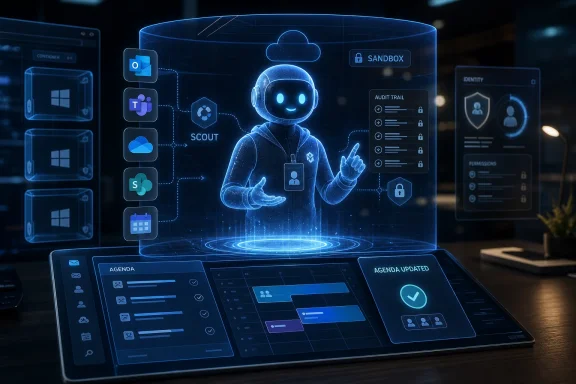
The sharper point is that Scout is not being sold as Copilot with better manners. Copilot has generally lived inside applications, waiting for the user to ask it to summarize a thread, draft a document, or analyze a spreadsheet. Scout is meant to observe, infer, and act across Outlook, Teams, OneDrive, SharePoint, the desktop, and the web.
That difference sounds subtle until it lands inside an organization. A chatbot answers questions. An agent rearranges the calendar, prepares the agenda, surfaces the transcript action item someone forgot, and may eventually call you or another service to finish the job. The security model for the first is content filtering. The security model for the second is closer to employee onboarding.
The company’s description of Scout as an “Autopilot” is revealing. The term suggests a class of agents that are not merely invoked but assigned. They have a persistent identity, can operate continuously, and are expected to notice things that the user has not explicitly asked about. The assistant becomes part of the workflow fabric rather than a feature inside a window.
For Microsoft 365 customers, that means the center of gravity shifts from the app to the graph. Scout’s value depends less on whether Word can draft a paragraph and more on whether Microsoft can combine calendar state, meeting context, document permissions, Teams transcripts, identity policies, and user preferences into something that behaves like a competent aide. This is exactly where Microsoft has an advantage over most AI startups: it already sits on the work graph.
But that advantage is also why the stakes are higher. If a consumer assistant hallucinates a dinner reservation, the damage is annoying. If an enterprise assistant misreads a legal review, sends a document to the wrong group, or books travel against a policy exception, it becomes an incident. The more Scout acts like a colleague, the more it inherits the blast radius of a colleague with excessive permissions and questionable judgment.
That is why Microsoft’s earlier security posture around OpenClaw mattered. The company reportedly treated the framework as something that should not run casually on standard personal or enterprise workstations. That warning was not anti-open-source theater; it reflected a real architectural problem. Agent runtimes blend natural-language instructions, third-party content, tool calls, and valid user credentials in ways that conventional endpoint security was not designed to reason about.
Scout is Microsoft’s attempt to preserve the magic while removing the recklessness. The company says it runs OpenClaw in a sandboxed cloud environment and treats the framework as untrusted, rather than letting it directly touch Microsoft 365 data. That framing is important: Microsoft is not asking IT admins to believe that the agent is safe because the model is smart. It is saying the agent is safer because the surrounding system assumes it may behave badly.
That is the right instinct. The history of enterprise computing is a history of useful things becoming acceptable only after they are constrained. Macros needed policy. Browsers needed sandboxes. Mobile apps needed permissions. AI agents need all of that and a new layer of behavioral governance on top.
A personal agent with a persistent identity cannot be managed like a document editor. It needs permissions, revocation, logging, policy boundaries, and lifecycle management. It needs to be discoverable by administrators and comprehensible to compliance teams. It needs to leave evidence when it acts, because sooner or later someone will ask why a meeting was moved, why a file was opened, or why a message was drafted.
Microsoft’s “policy conformance system” points in that direction. If each check produces an audit trail, Scout becomes something closer to a managed actor inside the tenant. That matters because agent failures will not always look like traditional malware. They may look like a legitimate assistant doing the wrong thing for reasons that require reconstruction after the fact.
This is where Microsoft’s security baggage cuts both ways. The company has had enough high-profile security scrutiny that customers will not accept a vague promise that AI agents are enterprise-ready. But Microsoft also has the installed base, identity infrastructure, and compliance surface to turn agent governance into a default expectation. If Scout succeeds, it will be because Microsoft makes autonomous assistance feel administratively boring.
For years, Windows has been repositioned around cloud services, subscriptions, and Copilot branding. But agents that can act on the desktop create a fresh reason for the operating system to matter. If the agent is going to click, read, automate, invoke local tools, or interact with business software that never fully moved to the cloud, the OS becomes the containment layer.
That is especially relevant for IT pros who remember the messy history of desktop automation. Scripts, macros, browser extensions, RPA bots, and user-session automation all promised efficiency, and all created governance headaches. AI agents multiply those headaches because they do not merely execute predefined steps; they interpret goals.
Windows execution containers are Microsoft’s attempt to make that interpretation less terrifying. If developers and administrators can run agents inside boundaries enforced by Windows itself, the platform becomes more than a host for AI branding. It becomes a security boundary in the agent economy.
That staged rollout is prudent. It also tells us Microsoft knows this category is not ready for conventional mass deployment. The company can claim momentum, seed the developer and enterprise feedback loop, and avoid pretending that always-on agents are as settled as spellcheck.
The GitHub Copilot subscription requirement is also telling. Microsoft is initially aiming Scout at customers already accustomed to AI-assisted work and developer-adjacent experimentation. That audience is more tolerant of preview rough edges and more likely to build custom skills, which Microsoft clearly sees as central to the product’s long-term value.
The risk is that “Frontier” becomes a familiar holding pen for features that are exciting in demos and complicated in production. Microsoft has no shortage of AI features that sound transformative until they meet tenant policy, legal review, and the lived reality of office work. Scout will need to prove it is not just another experiment with a better noun.
That is where lock-in becomes intimate. The more a user trains Scout, the more switching costs move from documents and file formats into behavior. The assistant’s value is not just in the data it can access, but in the pattern of preferences and corrections accumulated over time.
This is a familiar platform move dressed in new clothes. Microsoft has long benefited from organizations standardizing on Office file formats, Exchange calendars, Teams workflows, SharePoint permissions, and Entra identity. Scout adds another layer: a personal operational model of how work gets done.
For users, that may be genuinely useful. Many workers do not need another chat window; they need something to notice the calendar conflict before it becomes a problem, turn the meeting transcript into follow-through, and remove the low-grade administrative drag that makes knowledge work feel like clerical work. For employers, the appeal is productivity. For Microsoft, the prize is becoming the place where the user’s work habits are encoded.
A human assistant knows when a calendar entry is politically sensitive, when a draft should not be sent, when an executive’s “sure” does not mean approval, and when a meeting conflict is really a hierarchy problem. An AI assistant may learn some of this through feedback, but it will still operate through systems, permissions, and probabilistic inference. That gap is where enterprise incidents will live.
There is also the question of how much autonomy users actually want. People often say they want automation until the automation makes a decision that changes their day. A recommendation to leave early because traffic is bad is helpful. A rescheduled meeting, a drafted message, or a silently prepared agenda can be helpful too, but each step increases the need for visibility and correction.
Microsoft’s challenge is not simply to make Scout capable. It must make Scout interruptible, inspectable, and blame-aware. The user needs to know what the assistant did, why it did it, what evidence it used, and how to undo it. Without that, autonomy becomes just another form of notification anxiety.
Microsoft’s decision to contribute directly to OpenClaw rather than simply fork it is strategically interesting. Forking would have given Microsoft control but risked isolating it from the energy of the open-source project. Contributing upstream lets Microsoft benefit from the framework’s momentum while shaping the parts that matter to enterprise adoption.
That is not pure altruism. Open-source gravity can be a distribution advantage, especially when developers are already building skills, plugins, and workflows around a shared agent framework. If Microsoft can make the enterprise-safe version the most credible deployment path, it can turn open-source enthusiasm into Microsoft 365 stickiness.
Google’s challenge is different. It has the browser, Android, Gmail, Docs, and Workspace, plus enormous AI research capacity. But Microsoft has the enterprise desktop, the Office default, Azure, GitHub, and a long relationship with IT administration. Scout is Microsoft pressing that advantage before someone else defines what “personal agent at work” means.
The old AI pitch was that software would help users create. The new pitch is that software will help users operate. That difference matters. Creation tools can be judged by output quality. Operational tools must be judged by reliability, accountability, and the cost of mistakes.
This is why Scout is more consequential than another Copilot feature. A better drafting assistant can save time. A persistent agent can change who, or what, is trusted to coordinate work. Once an assistant has a name, a memory, a set of permissions, and a role in the daily rhythm of a company, it becomes part of the organization’s operating model.
Microsoft seems to understand this, at least architecturally. The company is not presenting Scout as a toy that happens to connect to Outlook. It is presenting it as a managed agent category, with security, policy, and identity built into the pitch from the beginning. That does not guarantee success, but it shows the company has learned from the backlash to less-governed AI rollouts.
IT teams should expect agent identity to become a first-class management concern. If an assistant can act across systems, then it needs least-privilege access, conditional access logic, logging, retention policies, and a clear owner. Treating an agent as a magical extension of the user account will not be good enough.
Security teams should also assume that agent behavior will be harder to classify than conventional malware. A bad outcome may come from prompt injection, ambiguous instructions, poisoned context, overbroad permissions, or a legitimate automation chain that no one expected to combine in that way. The response cannot rely solely on blocking known bad binaries.
The governance challenge will be cultural as much as technical. Organizations will need to decide which categories of work an agent may perform autonomously, which require approval, and which should remain human-only. Those choices will vary by industry, role, and risk tolerance, which means Microsoft’s policy tooling will need to be flexible without becoming incomprehensible.
Microsoft’s bet with Scout is that the enterprise will accept autonomy if it arrives wearing the uniform of identity, compliance, and auditability. That may be right, but the next phase will be won less by the assistant that sounds most human and more by the one that behaves predictably when the work gets ambiguous, political, or risky. If Microsoft can make that boring enough for IT and useful enough for workers, Scout may become the moment Copilot stopped being a sidebar and started becoming infrastructure.
 Microsoft Turns the OpenClaw Problem Into a Product Strategy
Scout arrives with a contradiction baked into its origin story. Earlier this year, OpenClaw was the thing enterprise security teams were told to keep at arm’s length: a fast-moving open-source agent framework with broad access, persistent credentials, and a talent for turning “helpful automation” into a new class of runtime risk. Now Microsoft is wrapping that same basic technology in the language of governance, identity, audit trails, and Microsoft 365 integration.That is not necessarily hypocrisy. It is closer to the oldest Microsoft move in the book: take a developer phenomenon that is too useful to ignore, put it behind enterprise controls, and make it legible to procurement. Windows did this to the PC, Azure did it to cloud sprawl, and Microsoft 365 did it to office work that had already escaped into browsers and SaaS tools.
The sharper point is that Scout is not being sold as Copilot with better manners. Copilot has generally lived inside applications, waiting for the user to ask it to summarize a thread, draft a document, or analyze a spreadsheet. Scout is meant to observe, infer, and act across Outlook, Teams, OneDrive, SharePoint, the desktop, and the web.
That difference sounds subtle until it lands inside an organization. A chatbot answers questions. An agent rearranges the calendar, prepares the agenda, surfaces the transcript action item someone forgot, and may eventually call you or another service to finish the job. The security model for the first is content filtering. The security model for the second is closer to employee onboarding.
The Assistant Is No Longer a Sidebar
Microsoft has spent the Copilot era trying to make AI feel ambient without letting it become too autonomous. The Copilot button appears in Windows, Edge, Office, Teams, and GitHub workflows, but much of the interaction still resembles a supervised transaction: the user asks, the model responds, the user decides. Scout pushes past that boundary.The company’s description of Scout as an “Autopilot” is revealing. The term suggests a class of agents that are not merely invoked but assigned. They have a persistent identity, can operate continuously, and are expected to notice things that the user has not explicitly asked about. The assistant becomes part of the workflow fabric rather than a feature inside a window.
For Microsoft 365 customers, that means the center of gravity shifts from the app to the graph. Scout’s value depends less on whether Word can draft a paragraph and more on whether Microsoft can combine calendar state, meeting context, document permissions, Teams transcripts, identity policies, and user preferences into something that behaves like a competent aide. This is exactly where Microsoft has an advantage over most AI startups: it already sits on the work graph.
But that advantage is also why the stakes are higher. If a consumer assistant hallucinates a dinner reservation, the damage is annoying. If an enterprise assistant misreads a legal review, sends a document to the wrong group, or books travel against a policy exception, it becomes an incident. The more Scout acts like a colleague, the more it inherits the blast radius of a colleague with excessive permissions and questionable judgment.
OpenClaw Was the Warning Shot
OpenClaw’s rise exposed the hunger for agents that do more than chat. Developers and early adopters were willing to give an assistant access to email, files, browsers, APIs, and local tools because the reward was obvious: a machine that could execute the tedious multi-step work that fills the day. The danger was equally obvious: once an agent can use credentials, browse content, and execute instructions, the line between workflow automation and untrusted code becomes dangerously thin.That is why Microsoft’s earlier security posture around OpenClaw mattered. The company reportedly treated the framework as something that should not run casually on standard personal or enterprise workstations. That warning was not anti-open-source theater; it reflected a real architectural problem. Agent runtimes blend natural-language instructions, third-party content, tool calls, and valid user credentials in ways that conventional endpoint security was not designed to reason about.
Scout is Microsoft’s attempt to preserve the magic while removing the recklessness. The company says it runs OpenClaw in a sandboxed cloud environment and treats the framework as untrusted, rather than letting it directly touch Microsoft 365 data. That framing is important: Microsoft is not asking IT admins to believe that the agent is safe because the model is smart. It is saying the agent is safer because the surrounding system assumes it may behave badly.
That is the right instinct. The history of enterprise computing is a history of useful things becoming acceptable only after they are constrained. Macros needed policy. Browsers needed sandboxes. Mobile apps needed permissions. AI agents need all of that and a new layer of behavioral governance on top.
Microsoft’s Real Product Is the Control Plane
The most interesting part of Scout may not be Scout itself. It may be the security and management stack Microsoft is trying to normalize around agents: Agent 365, Purview, Defender, audit trails, policy conformance checks, and Windows execution containers. The assistant gets the keynote applause, but the control plane is what enterprises will actually buy.A personal agent with a persistent identity cannot be managed like a document editor. It needs permissions, revocation, logging, policy boundaries, and lifecycle management. It needs to be discoverable by administrators and comprehensible to compliance teams. It needs to leave evidence when it acts, because sooner or later someone will ask why a meeting was moved, why a file was opened, or why a message was drafted.
Microsoft’s “policy conformance system” points in that direction. If each check produces an audit trail, Scout becomes something closer to a managed actor inside the tenant. That matters because agent failures will not always look like traditional malware. They may look like a legitimate assistant doing the wrong thing for reasons that require reconstruction after the fact.
This is where Microsoft’s security baggage cuts both ways. The company has had enough high-profile security scrutiny that customers will not accept a vague promise that AI agents are enterprise-ready. But Microsoft also has the installed base, identity infrastructure, and compliance surface to turn agent governance into a default expectation. If Scout succeeds, it will be because Microsoft makes autonomous assistance feel administratively boring.
Windows Gets Pulled Back Into the AI Story
Scout is launching as a Microsoft 365 assistant, but the Windows angle should not be overlooked. Microsoft also announced Windows execution containers designed to run AI agents inside operating system-enforced boundaries rather than unmanaged user sessions. That is a significant signal about where the company thinks agentic computing is headed.For years, Windows has been repositioned around cloud services, subscriptions, and Copilot branding. But agents that can act on the desktop create a fresh reason for the operating system to matter. If the agent is going to click, read, automate, invoke local tools, or interact with business software that never fully moved to the cloud, the OS becomes the containment layer.
That is especially relevant for IT pros who remember the messy history of desktop automation. Scripts, macros, browser extensions, RPA bots, and user-session automation all promised efficiency, and all created governance headaches. AI agents multiply those headaches because they do not merely execute predefined steps; they interpret goals.
Windows execution containers are Microsoft’s attempt to make that interpretation less terrifying. If developers and administrators can run agents inside boundaries enforced by Windows itself, the platform becomes more than a host for AI branding. It becomes a security boundary in the agent economy.
The Frontier Label Is Doing Real Work
Scout’s availability through Microsoft’s Frontier program is not a footnote. It is a disclaimer with a distribution channel attached. The product is available today, but not in the sense that Exchange admins should expect it to appear quietly across every tenant tomorrow morning. The desktop preview is rolling out first to U.S. Frontier customers, with a broader cloud version planned later.That staged rollout is prudent. It also tells us Microsoft knows this category is not ready for conventional mass deployment. The company can claim momentum, seed the developer and enterprise feedback loop, and avoid pretending that always-on agents are as settled as spellcheck.
The GitHub Copilot subscription requirement is also telling. Microsoft is initially aiming Scout at customers already accustomed to AI-assisted work and developer-adjacent experimentation. That audience is more tolerant of preview rough edges and more likely to build custom skills, which Microsoft clearly sees as central to the product’s long-term value.
The risk is that “Frontier” becomes a familiar holding pen for features that are exciting in demos and complicated in production. Microsoft has no shortage of AI features that sound transformative until they meet tenant policy, legal review, and the lived reality of office work. Scout will need to prove it is not just another experiment with a better noun.
The Stickiest Assistant Is the One You Train Yourself
Microsoft’s pitch for Scout includes prepackaged skills for calendars and meeting agendas, but the more consequential idea is user-built customization. A generic assistant can summarize meetings. A personal assistant becomes valuable when it learns how you prefer agendas structured, which conflicts are real conflicts, which stakeholders need early warning, and which recurring tasks are safe to automate.That is where lock-in becomes intimate. The more a user trains Scout, the more switching costs move from documents and file formats into behavior. The assistant’s value is not just in the data it can access, but in the pattern of preferences and corrections accumulated over time.
This is a familiar platform move dressed in new clothes. Microsoft has long benefited from organizations standardizing on Office file formats, Exchange calendars, Teams workflows, SharePoint permissions, and Entra identity. Scout adds another layer: a personal operational model of how work gets done.
For users, that may be genuinely useful. Many workers do not need another chat window; they need something to notice the calendar conflict before it becomes a problem, turn the meeting transcript into follow-through, and remove the low-grade administrative drag that makes knowledge work feel like clerical work. For employers, the appeal is productivity. For Microsoft, the prize is becoming the place where the user’s work habits are encoded.
The Human Colleague Metaphor Cuts Both Ways
Microsoft wants Scout to feel less like a bot and more like a colleague. That is an attractive metaphor because it suggests initiative, context, and trust. It is also dangerous because colleagues are governed by norms that software does not automatically understand.A human assistant knows when a calendar entry is politically sensitive, when a draft should not be sent, when an executive’s “sure” does not mean approval, and when a meeting conflict is really a hierarchy problem. An AI assistant may learn some of this through feedback, but it will still operate through systems, permissions, and probabilistic inference. That gap is where enterprise incidents will live.
There is also the question of how much autonomy users actually want. People often say they want automation until the automation makes a decision that changes their day. A recommendation to leave early because traffic is bad is helpful. A rescheduled meeting, a drafted message, or a silently prepared agenda can be helpful too, but each step increases the need for visibility and correction.
Microsoft’s challenge is not simply to make Scout capable. It must make Scout interruptible, inspectable, and blame-aware. The user needs to know what the assistant did, why it did it, what evidence it used, and how to undo it. Without that, autonomy becomes just another form of notification anxiety.
Google’s Shadow Makes the Timing Impossible to Ignore
Scout also lands in a competitive moment. Google has been pushing its own agentic assistant vision into Workspace, and the industry is clearly converging on a post-chatbot productivity model. The question is not whether office suites will get agents; it is whose graph, whose identity system, and whose policy layer will define them.Microsoft’s decision to contribute directly to OpenClaw rather than simply fork it is strategically interesting. Forking would have given Microsoft control but risked isolating it from the energy of the open-source project. Contributing upstream lets Microsoft benefit from the framework’s momentum while shaping the parts that matter to enterprise adoption.
That is not pure altruism. Open-source gravity can be a distribution advantage, especially when developers are already building skills, plugins, and workflows around a shared agent framework. If Microsoft can make the enterprise-safe version the most credible deployment path, it can turn open-source enthusiasm into Microsoft 365 stickiness.
Google’s challenge is different. It has the browser, Android, Gmail, Docs, and Workspace, plus enormous AI research capacity. But Microsoft has the enterprise desktop, the Office default, Azure, GitHub, and a long relationship with IT administration. Scout is Microsoft pressing that advantage before someone else defines what “personal agent at work” means.
The Build Keynote Was Really About Trusting the Machine to Act
Scout was not the only AI announcement at Build. Microsoft’s broader push included Windows execution containers, agent tooling, developer hardware, and other experimental projects that point toward a world where AI agents are not confined to chat tabs. But Scout is the cleanest expression of the strategy because it sits directly where work happens.The old AI pitch was that software would help users create. The new pitch is that software will help users operate. That difference matters. Creation tools can be judged by output quality. Operational tools must be judged by reliability, accountability, and the cost of mistakes.
This is why Scout is more consequential than another Copilot feature. A better drafting assistant can save time. A persistent agent can change who, or what, is trusted to coordinate work. Once an assistant has a name, a memory, a set of permissions, and a role in the daily rhythm of a company, it becomes part of the organization’s operating model.
Microsoft seems to understand this, at least architecturally. The company is not presenting Scout as a toy that happens to connect to Outlook. It is presenting it as a managed agent category, with security, policy, and identity built into the pitch from the beginning. That does not guarantee success, but it shows the company has learned from the backlash to less-governed AI rollouts.
The Fine Print Is Where IT Should Start Reading
For WindowsForum’s core audience, the practical lesson is not to panic and not to cheer too quickly. Scout is early, limited, and wrapped in Microsoft’s preview machinery. But it previews the administrative questions that are about to become normal.IT teams should expect agent identity to become a first-class management concern. If an assistant can act across systems, then it needs least-privilege access, conditional access logic, logging, retention policies, and a clear owner. Treating an agent as a magical extension of the user account will not be good enough.
Security teams should also assume that agent behavior will be harder to classify than conventional malware. A bad outcome may come from prompt injection, ambiguous instructions, poisoned context, overbroad permissions, or a legitimate automation chain that no one expected to combine in that way. The response cannot rely solely on blocking known bad binaries.
The governance challenge will be cultural as much as technical. Organizations will need to decide which categories of work an agent may perform autonomously, which require approval, and which should remain human-only. Those choices will vary by industry, role, and risk tolerance, which means Microsoft’s policy tooling will need to be flexible without becoming incomprehensible.
The Scout Era Starts With Permission Slips, Not Magic
Scout is easiest to understand as the first visible version of Microsoft’s agent workplace, not as a finished assistant everyone should deploy tomorrow. The early details point to a product whose value will depend on boundaries as much as intelligence.- Scout is Microsoft’s first serious attempt to turn OpenClaw-style autonomy into a managed Microsoft 365 product rather than a developer experiment.
- The assistant differs from Copilot because it is designed to operate persistently across apps, services, desktop contexts, and web workflows.
- Microsoft’s security pitch depends on treating OpenClaw as untrusted, isolating it in the cloud, and surrounding it with audit trails, policy checks, Defender, Purview, and Agent 365.
- Windows execution containers show that Microsoft expects agent containment to become an operating-system problem, not merely a cloud policy problem.
- The Frontier rollout and GitHub Copilot requirement suggest Microsoft is deliberately starting with customers more willing to tolerate preview risk and build custom skills.
- The long-term lock-in may come less from Microsoft’s default skills than from the personal workflows users teach Scout over time.
Microsoft’s bet with Scout is that the enterprise will accept autonomy if it arrives wearing the uniform of identity, compliance, and auditability. That may be right, but the next phase will be won less by the assistant that sounds most human and more by the one that behaves predictably when the work gets ambiguous, political, or risky. If Microsoft can make that boring enough for IT and useful enough for workers, Scout may become the moment Copilot stopped being a sidebar and started becoming infrastructure.
References
- Primary source: Technobezz
Published: 2026-06-02T21:35:12.470056

Microsoft Launches Scout Personal Assistant Built on OpenClaw Technology
Microsoft launches Scout, an autonomous AI assistant built on OpenClaw, operating across cloud and desktop with persistent identity. www.technobezz.com
- Related coverage: techbuzz.ai
- Related coverage: tech.yahoo.com
Microsoft launches Scout, an OpenClaw-inspired personal assistant
Launched at Build, Microsoft Scout is a new AI assistant meant to bring the power and flexibility of OpenClaw into the Microsoft 365 system.tech.yahoo.com
- Related coverage: techcrunch.com

Microsoft is working on yet another OpenClaw-like agent | TechCrunch
The new features would be geared toward enterprise customers, with better security controls than the famously risky open source OpenClaw agent. techcrunch.com
- Related coverage: geekwire.com
Microsoft’s OpenClaw team takes on the personal assistant challenge
A small team inside Microsoft led by Corporate Vice President Omar Shahine is building "Project Lobster," an OpenClaw-based agent designed to work around the clock on behalf of knowledge workers within the Microsoft 365 ecosystem. The project already has more than 3,000 daily users inside the... www.geekwire.com
- Related coverage: malwarebytes.com

Beware of fake OpenClaw installers, even if Bing points you to GitHub
Bing search results pointed victims to GitHub repositories claiming to host OpenClaw installers, but in reality they installed malware. www.malwarebytes.com
- Related coverage: pcworld.com

Microsoft’s Scout AI agent is aimed directly at your workplace
Unlike Gemini Spark, which aims to be a 24/7 AI agent for everyone, Microsoft is aiming its always-on Scout agent directly at the workplace. www.pcworld.com
- Official source: microsoft.com

Running OpenClaw safely: identity, isolation, and runtime risk | Microsoft Security Blog
Self-hosted agents execute code with durable credentials and process untrusted input. This creates dual supply chain risk, where skills and external instructions converge in the same runtime. As OpenClaw-like systems enter enterprises, governance and runtime isolation become critical.www.microsoft.com - Related coverage: techradar.com
The hidden risks behind Microsoft’s OpenClaw
The hidden exposure behind OpenClaw and why Microsoft urges isolation before deploymentwww.techradar.com
- Related coverage: windowscentral.com
Microsoft 365 is getting helpers that do your tasks — assuming you trust them
Microsoft just made a new hire to bring OpenClaw and personal AI agents to Microsoft 365 to bolster productivity. www.windowscentral.com
- Official source: news.microsoft.com

Microsoft Build Live
The home for real-time coverage of the news as it is announced from Microsoft Build, June 2-3, 2026. news.microsoft.com
- Related coverage: thurrott.com

Build 2026: Microsoft Unveils New 'Scout' Personal Work Agent Powered by OpenClaw
Microsoft Scout is a new type of always-on AI agent that Microsoft refers to as "Autopilots." Scout is powered by OpenClaw, and it's available today via Microsoft's Frontier program. www.thurrott.com
- Related coverage: newsbytesapp.com

Scout AI assistant is Microsoft's own version of OpenClaw
Microsoft Scout, built on OpenClaw, is an AI personal assistant seamlessly integrated into Microsoft 365 apps to streamline tasks like scheduling and email management. www.newsbytesapp.com
- Related coverage: decrypt.co

Microsoft Turns OpenClaw Into an Enterprise AI Agent With Scout - Decrypt
Tech people will say everyone's already using OpenClaw. They're right. But Microsoft is the one with 1.4 billion Windows users to adopt it. decrypt.co
- Related coverage: labs.cloudsecurityalliance.org
- Related coverage: techxplore.com
