

Microsoft added Microsoft 365 Roadmap ID 566698 on June 26, 2026, saying SharePoint’s neutral-themed interface will expand to page editing and property pane experiences for web users in July 2026 across commercial and government clouds. The change sounds modest, almost cosmetic, but it lands on one of SharePoint’s most consequential surfaces: the place where intranet pages are actually built. Microsoft is not merely repainting SharePoint; it is trying to make the editing environment feel like part of the same product family as the rest of modern Microsoft 365. For admins and page authors, that means less visual friction, but also another reminder that SharePoint’s future is being standardized around Microsoft’s own design system.
SharePoint’s visual refresh has already been visible in the broader navigation and discovery experience, where Microsoft has been pushing a cleaner, more neutral palette and a simpler app frame. Extending that treatment into page editing and property panes is a different kind of move. The public-facing surfaces are where users consume content; the editing surfaces are where organizations encode workflows, hierarchy, governance, and taste.
That distinction matters because SharePoint’s authoring environment is where many users decide whether the product feels modern or merely old software wearing a new header. Page editing is a daily tool for communications teams, HR departments, project managers, and departmental site owners who may not think of themselves as developers. If the experience feels visually inconsistent or cluttered, SharePoint’s reputation suffers even when the underlying platform is capable.
The property pane is especially important. It is the narrow control surface where authors configure web parts, layout choices, metadata, links, imagery, targeting, and sometimes custom SharePoint Framework components. It is easy to dismiss it as a side panel, but for many authors it is the cockpit.
Microsoft’s language around consistency, accessibility, and a modern editing experience is therefore doing more work than the roadmap blurb suggests. The company is acknowledging that SharePoint’s editing model has to feel coherent if it is going to support the next phase of intranet publishing, AI-assisted page creation, and low-code business site building.
The old SharePoint problem was never simply ugliness. It was the collision between Microsoft’s interface, an organization’s brand, individual site owner creativity, third-party components, and years of accumulated design decisions. A page could be modern, technically responsive, and still feel patched together.
A neutral editing interface attempts to reduce that noise. If Microsoft can make the editor, panels, controls, and canvas feel calmer and more predictable, authors may spend less time decoding the product and more time shaping content. That is the theory, and it is a reasonable one.
But neutrality also imposes discipline. It signals that Microsoft wants the SharePoint shell to be less of a canvas for arbitrary expression and more of a stable workspace. For organizations that have leaned heavily on customized visual treatments, that may be mostly good news for usability and governance, but less exciting for those who want every surface to carry a strong brand identity.
That is why this roadmap item should interest developers as much as site owners. A refresh that reaches property panes affects the expectations for component theming, control spacing, color contrast, and interaction patterns. Even if Microsoft does not break APIs, it can still change what “native-looking” means.
For SharePoint Framework developers, the practical lesson is familiar: components that follow Microsoft’s current Fluent UI and theming guidance are likely to age better than hand-styled controls. Components that assume older colors, fixed backgrounds, or custom panel behavior may stand out more sharply as Microsoft’s own surfaces become more uniform. The problem may not be functional breakage; it may be visual debt.
That kind of debt is easy to underestimate. Enterprises often tolerate slightly odd-looking customizations because they solve business problems. But as the platform around them modernizes, those customizations can become the visual equivalent of a yellowing fax machine in a renovated office.
That does not mean the refresh automatically solves every accessibility problem. Real accessibility depends on implementation details: focus visibility, labeling, tab order, color contrast, responsive behavior, and how custom web parts behave inside the updated environment. A neutral theme can help, but it is not a substitute for disciplined engineering.
Still, SharePoint has a particular accessibility burden because it is a publishing system for the entire organization. If the editor is confusing, inaccessible, or inconsistent, the downstream content often inherits that mess. Better authoring surfaces can lead to better pages, especially when non-specialist users are responsible for internal communications.
This is also where Microsoft’s platform interests and customer interests align. Microsoft wants SharePoint to be the publishing and knowledge layer for Microsoft 365. Customers want fewer inaccessible intranet pages, fewer support tickets, and fewer authors who avoid the tool because it feels hostile.
In that context, the neutral-themed page editor is not an isolated UI tweak. It is part of a campaign to make SharePoint feel less like a collection of historical layers and more like a coherent Microsoft 365 application. The company is trying to make the product legible again.
That effort is overdue. SharePoint has spent much of its life as both a platform and a punchline: powerful enough to run intranets, document systems, portals, and business workflows, but complicated enough that many users approach it with dread. Microsoft’s current strategy appears to be making SharePoint less visibly SharePoint-like, at least in the old sense.
The risk is that modernization becomes another layer rather than a simplification. If the refreshed surfaces coexist awkwardly with older pages, legacy customizations, inconsistent web parts, and tenant-level rollout differences, users may experience the transition as yet another SharePoint split-brain moment. Microsoft’s job is not just to ship the new look; it has to make the seams disappear.
For GCC High and DoD tenants, the inclusion of the update in the same roadmap item suggests Microsoft sees the refresh as core product modernization rather than a preview-era embellishment. That matters for organizations that have historically watched commercial tenants receive collaboration features first while sovereign and regulated environments waited.
Still, admins should treat the date as a planning signal, not a guarantee of simultaneous arrival in every tenant. Microsoft 365 rollouts often arrive in waves, and “general availability” is not the same thing as “visible to every user at 9 a.m. on the first day of the month.” Targeted Release tenants may see changes earlier, and standard release tenants may experience staggered deployment.
The operational impact is manageable, but it is not zero. Communications teams and tenant admins should be prepared for authors to notice the change first, especially those who spend time editing pages and configuring web parts. The more customized the environment, the more important it becomes to preview the experience before it arrives broadly.
Small changes to spacing, contrast, labels, panel behavior, and control hierarchy can either reduce friction or interrupt established habits. Microsoft’s challenge is to modernize without making experienced authors feel as though familiar tools have moved for no reason. In productivity software, visual polish is only successful when it preserves task flow.
For occasional authors, the update may be more welcome. A calmer, more consistent editor can lower the intimidation factor for people who publish announcements, project pages, department updates, or policy content only a few times a month. SharePoint has always depended on these semi-technical authors, and they are often the least tolerant of inconsistent UI.
That is why this roadmap item deserves more attention than its low-drama description invites. SharePoint succeeds or fails in the hands of people who are not SharePoint specialists. If Microsoft can make authoring feel less like configuration and more like composition, the platform gains credibility.
This is especially true for components using older Fluent UI patterns, hard-coded colors, or bespoke spacing. As Microsoft moves SharePoint toward neutral application theming, the safest path is to rely on supported theme tokens and current component libraries wherever possible. The less a customization assumes about the surrounding chrome, the better it will survive.
The bigger issue is not aesthetics for aesthetics’ sake. Visual mismatch can create usability problems. Controls that appear disabled when they are not, backgrounds that fail contrast expectations, and panels that do not visually align with the host experience can all increase author error.
For organizations with large SPFx portfolios, this update is an excuse to audit. Not every component needs redesign, but the most-used authoring and configuration surfaces should be tested in Targeted Release as soon as the change appears. Waiting until page authors complain is the traditional SharePoint governance model, but it is not a good one.
This is one of the underrated truths of enterprise AI: the interface still matters. A model can draft content, suggest structure, or help assemble a page, but users need to review, adjust, approve, and publish inside a comprehensible environment. If the editing canvas feels chaotic, AI assistance can amplify uncertainty instead of reducing work.
A neutral-themed editor gives Microsoft a more controlled stage for those features. It lets the company introduce AI panels, suggestions, and contextual actions without piling them onto an already noisy interface. In that sense, the visual refresh is infrastructure for future features.
There is also a trust dimension. Enterprise users are more likely to accept AI-assisted publishing when the surrounding workflow feels governed and familiar. Microsoft is trying to make SharePoint look less like an inherited intranet tool and more like a modern content system with AI built into the flow.
But admins still have work to do. They should watch Message Center posts, Targeted Release behavior, and any Microsoft documentation updates that clarify whether the change affects custom web parts, property pane controls, page templates, or tenant branding. The change may be visual, but support teams will be asked about it in practical terms.
The best preparation is simple: identify a small group of active page authors, make sure some are in Targeted Release where appropriate, and ask them to test common editing tasks. That includes creating a page, editing existing pages, configuring common web parts, changing layouts, editing metadata, and checking custom components. Screenshots in internal training material may need updates if the visual changes are noticeable.
The larger lesson is that SharePoint change management should not focus only on reader-facing redesigns. Authors are a user population too, and often a more influential one. If they lose confidence in the editing experience, the intranet becomes stale.
That is not a reason to resist the refresh. It is a reason to inventory what matters. SharePoint environments often accumulate visual inconsistency because no one owns the full authoring experience. Communications owns the homepage, IT owns the tenant, departments own their sites, vendors own customizations, and users own the complaints.
A neutral editor will not fix that governance problem, but it may make it harder to ignore. If Microsoft’s surfaces become more consistent while organizational content remains chaotic, the blame shifts. The platform will look less like the obstacle and more like the mirror.
That may be uncomfortable, but it is healthy. SharePoint’s biggest enemy has never been a lack of features. It has been the gap between what the platform can support and what organizations are willing to govern.
The more important question is what follows. Once editing and property panes are aligned with the neutral visual refresh, Microsoft can more easily standardize adjacent experiences: templates, AI authoring panels, web part configuration, page analytics, and site building tools. The editor becomes a foundation.
That is why this update should not be filed away as a mere theme change. It is part of Microsoft’s effort to make SharePoint’s creation experience feel coherent enough for the next decade of Microsoft 365. The company knows that users will not embrace AI-assisted intranet building if the underlying authoring environment feels like an archaeological dig.
For WindowsForum readers who administer Microsoft 365 environments, the practical message is to watch the rollout, test the authoring path, and pay attention to customizations. The visual layer is becoming more standardized, and that standardization will reward tenants that have kept close to Microsoft’s supported patterns.
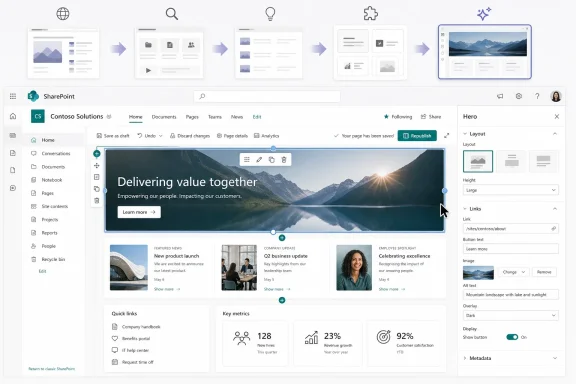 Microsoft Moves the Refresh From the Lobby Into the Workshop
SharePoint’s visual refresh has already been visible in the broader navigation and discovery experience, where Microsoft has been pushing a cleaner, more neutral palette and a simpler app frame. Extending that treatment into page editing and property panes is a different kind of move. The public-facing surfaces are where users consume content; the editing surfaces are where organizations encode workflows, hierarchy, governance, and taste.That distinction matters because SharePoint’s authoring environment is where many users decide whether the product feels modern or merely old software wearing a new header. Page editing is a daily tool for communications teams, HR departments, project managers, and departmental site owners who may not think of themselves as developers. If the experience feels visually inconsistent or cluttered, SharePoint’s reputation suffers even when the underlying platform is capable.
The property pane is especially important. It is the narrow control surface where authors configure web parts, layout choices, metadata, links, imagery, targeting, and sometimes custom SharePoint Framework components. It is easy to dismiss it as a side panel, but for many authors it is the cockpit.
Microsoft’s language around consistency, accessibility, and a modern editing experience is therefore doing more work than the roadmap blurb suggests. The company is acknowledging that SharePoint’s editing model has to feel coherent if it is going to support the next phase of intranet publishing, AI-assisted page creation, and low-code business site building.
Neutral Theming Is a Design Policy, Not a Paint Color
The phrase “neutral-themed SharePoint UI” may sound like a beige compromise, but Microsoft’s direction is more strategic than that. Neutral UI in Microsoft’s design vocabulary generally means the application chrome recedes so content, brand colors, and task-specific controls can carry the user’s attention. In SharePoint, that is a delicate balance because customer branding is one of the product’s core promises.The old SharePoint problem was never simply ugliness. It was the collision between Microsoft’s interface, an organization’s brand, individual site owner creativity, third-party components, and years of accumulated design decisions. A page could be modern, technically responsive, and still feel patched together.
A neutral editing interface attempts to reduce that noise. If Microsoft can make the editor, panels, controls, and canvas feel calmer and more predictable, authors may spend less time decoding the product and more time shaping content. That is the theory, and it is a reasonable one.
But neutrality also imposes discipline. It signals that Microsoft wants the SharePoint shell to be less of a canvas for arbitrary expression and more of a stable workspace. For organizations that have leaned heavily on customized visual treatments, that may be mostly good news for usability and governance, but less exciting for those who want every surface to carry a strong brand identity.
The Property Pane Is Where Consistency Usually Breaks
SharePoint’s modern page model depends heavily on web parts, and web parts depend heavily on configuration. The property pane is where that configuration happens, and it is also where inconsistencies become obvious. A Microsoft-authored web part, a custom SharePoint Framework web part, and a third-party control may all expose settings in subtly different ways.That is why this roadmap item should interest developers as much as site owners. A refresh that reaches property panes affects the expectations for component theming, control spacing, color contrast, and interaction patterns. Even if Microsoft does not break APIs, it can still change what “native-looking” means.
For SharePoint Framework developers, the practical lesson is familiar: components that follow Microsoft’s current Fluent UI and theming guidance are likely to age better than hand-styled controls. Components that assume older colors, fixed backgrounds, or custom panel behavior may stand out more sharply as Microsoft’s own surfaces become more uniform. The problem may not be functional breakage; it may be visual debt.
That kind of debt is easy to underestimate. Enterprises often tolerate slightly odd-looking customizations because they solve business problems. But as the platform around them modernizes, those customizations can become the visual equivalent of a yellowing fax machine in a renovated office.
Accessibility Gives Microsoft Its Strongest Argument
Microsoft’s best case for neutralizing SharePoint’s editing surfaces is accessibility. Page editing is full of nested controls, toolbars, panels, section boundaries, drag handles, focus states, and configuration options. A more consistent palette and control language can improve contrast, reduce distraction, and make keyboard or screen-reader navigation more predictable.That does not mean the refresh automatically solves every accessibility problem. Real accessibility depends on implementation details: focus visibility, labeling, tab order, color contrast, responsive behavior, and how custom web parts behave inside the updated environment. A neutral theme can help, but it is not a substitute for disciplined engineering.
Still, SharePoint has a particular accessibility burden because it is a publishing system for the entire organization. If the editor is confusing, inaccessible, or inconsistent, the downstream content often inherits that mess. Better authoring surfaces can lead to better pages, especially when non-specialist users are responsible for internal communications.
This is also where Microsoft’s platform interests and customer interests align. Microsoft wants SharePoint to be the publishing and knowledge layer for Microsoft 365. Customers want fewer inaccessible intranet pages, fewer support tickets, and fewer authors who avoid the tool because it feels hostile.
The Timing Fits SharePoint’s Bigger 2026 Reset
The July 2026 general availability target puts this update inside a broader SharePoint reset. Microsoft has been repositioning SharePoint around discovery, publishing, building, and AI-assisted work. The new SharePoint experience, the refreshed app bar, the Discover experience, and Copilot-assisted page creation all point in the same direction.In that context, the neutral-themed page editor is not an isolated UI tweak. It is part of a campaign to make SharePoint feel less like a collection of historical layers and more like a coherent Microsoft 365 application. The company is trying to make the product legible again.
That effort is overdue. SharePoint has spent much of its life as both a platform and a punchline: powerful enough to run intranets, document systems, portals, and business workflows, but complicated enough that many users approach it with dread. Microsoft’s current strategy appears to be making SharePoint less visibly SharePoint-like, at least in the old sense.
The risk is that modernization becomes another layer rather than a simplification. If the refreshed surfaces coexist awkwardly with older pages, legacy customizations, inconsistent web parts, and tenant-level rollout differences, users may experience the transition as yet another SharePoint split-brain moment. Microsoft’s job is not just to ship the new look; it has to make the seams disappear.
Government Clouds Are Not an Afterthought This Time
The roadmap entry lists Worldwide, GCC, GCC High, and DoD cloud instances. That is notable because SharePoint changes often matter most in the organizations least able to absorb surprise: government agencies, regulated industries, and large enterprises with formal change-management processes. A visual refresh in a property pane may not sound like a compliance event, but it can affect training material, screenshots, accessibility validation, and user support.For GCC High and DoD tenants, the inclusion of the update in the same roadmap item suggests Microsoft sees the refresh as core product modernization rather than a preview-era embellishment. That matters for organizations that have historically watched commercial tenants receive collaboration features first while sovereign and regulated environments waited.
Still, admins should treat the date as a planning signal, not a guarantee of simultaneous arrival in every tenant. Microsoft 365 rollouts often arrive in waves, and “general availability” is not the same thing as “visible to every user at 9 a.m. on the first day of the month.” Targeted Release tenants may see changes earlier, and standard release tenants may experience staggered deployment.
The operational impact is manageable, but it is not zero. Communications teams and tenant admins should be prepared for authors to notice the change first, especially those who spend time editing pages and configuring web parts. The more customized the environment, the more important it becomes to preview the experience before it arrives broadly.
Page Authors Will Feel the Change Before Readers Do
Most SharePoint readers will not care that the property pane has been rethemed. They may never see it. Page authors, however, will notice immediately because editing is muscle memory.Small changes to spacing, contrast, labels, panel behavior, and control hierarchy can either reduce friction or interrupt established habits. Microsoft’s challenge is to modernize without making experienced authors feel as though familiar tools have moved for no reason. In productivity software, visual polish is only successful when it preserves task flow.
For occasional authors, the update may be more welcome. A calmer, more consistent editor can lower the intimidation factor for people who publish announcements, project pages, department updates, or policy content only a few times a month. SharePoint has always depended on these semi-technical authors, and they are often the least tolerant of inconsistent UI.
That is why this roadmap item deserves more attention than its low-drama description invites. SharePoint succeeds or fails in the hands of people who are not SharePoint specialists. If Microsoft can make authoring feel less like configuration and more like composition, the platform gains credibility.
Developers Should Read This as a Warning About Visual Drift
Custom SharePoint Framework solutions are not explicitly the subject of Roadmap ID 566698, but developers should read between the lines. When Microsoft refreshes core editing surfaces and property panes, anything that lives inside or alongside those surfaces will be judged against the new baseline. A custom control that looked acceptable yesterday may look out of place tomorrow.This is especially true for components using older Fluent UI patterns, hard-coded colors, or bespoke spacing. As Microsoft moves SharePoint toward neutral application theming, the safest path is to rely on supported theme tokens and current component libraries wherever possible. The less a customization assumes about the surrounding chrome, the better it will survive.
The bigger issue is not aesthetics for aesthetics’ sake. Visual mismatch can create usability problems. Controls that appear disabled when they are not, backgrounds that fail contrast expectations, and panels that do not visually align with the host experience can all increase author error.
For organizations with large SPFx portfolios, this update is an excuse to audit. Not every component needs redesign, but the most-used authoring and configuration surfaces should be tested in Targeted Release as soon as the change appears. Waiting until page authors complain is the traditional SharePoint governance model, but it is not a good one.
Microsoft’s AI Ambitions Need a Cleaner Canvas
The refresh also fits Microsoft’s AI agenda. SharePoint page creation and editing are becoming more deeply connected to Copilot-powered authoring, content grounding, metadata, and knowledge workflows. AI-generated or AI-assisted pages will not feel trustworthy if they appear inside a dated or inconsistent editing shell.This is one of the underrated truths of enterprise AI: the interface still matters. A model can draft content, suggest structure, or help assemble a page, but users need to review, adjust, approve, and publish inside a comprehensible environment. If the editing canvas feels chaotic, AI assistance can amplify uncertainty instead of reducing work.
A neutral-themed editor gives Microsoft a more controlled stage for those features. It lets the company introduce AI panels, suggestions, and contextual actions without piling them onto an already noisy interface. In that sense, the visual refresh is infrastructure for future features.
There is also a trust dimension. Enterprise users are more likely to accept AI-assisted publishing when the surrounding workflow feels governed and familiar. Microsoft is trying to make SharePoint look less like an inherited intranet tool and more like a modern content system with AI built into the flow.
Admins Should Prepare the Human Layer, Not Just the Tenant
There is no indication from the roadmap description that admins will need to configure anything for this specific visual update. It is listed as an in-development change for SharePoint on the web, with General Availability and Targeted Release rings. That implies a service-side rollout rather than a feature that every organization must manually deploy.But admins still have work to do. They should watch Message Center posts, Targeted Release behavior, and any Microsoft documentation updates that clarify whether the change affects custom web parts, property pane controls, page templates, or tenant branding. The change may be visual, but support teams will be asked about it in practical terms.
The best preparation is simple: identify a small group of active page authors, make sure some are in Targeted Release where appropriate, and ask them to test common editing tasks. That includes creating a page, editing existing pages, configuring common web parts, changing layouts, editing metadata, and checking custom components. Screenshots in internal training material may need updates if the visual changes are noticeable.
The larger lesson is that SharePoint change management should not focus only on reader-facing redesigns. Authors are a user population too, and often a more influential one. If they lose confidence in the editing experience, the intranet becomes stale.
The Refresh Will Expose Old SharePoint Compromises
Every SharePoint modernization wave exposes the compromises organizations made to get work done. Custom themes, legacy pages, older web parts, embedded scripts, third-party solutions, and one-off design choices may all coexist in a tenant that has evolved for years. A cleaner Microsoft UI can make those compromises more visible.That is not a reason to resist the refresh. It is a reason to inventory what matters. SharePoint environments often accumulate visual inconsistency because no one owns the full authoring experience. Communications owns the homepage, IT owns the tenant, departments own their sites, vendors own customizations, and users own the complaints.
A neutral editor will not fix that governance problem, but it may make it harder to ignore. If Microsoft’s surfaces become more consistent while organizational content remains chaotic, the blame shifts. The platform will look less like the obstacle and more like the mirror.
That may be uncomfortable, but it is healthy. SharePoint’s biggest enemy has never been a lack of features. It has been the gap between what the platform can support and what organizations are willing to govern.
The July Date Is a Milestone, Not the Finish Line
The roadmap says General Availability is planned for July 2026, but SharePoint rollouts are rarely a single dramatic moment. Targeted Release customers may see pieces first, government clouds may follow their own deployment rhythms, and Microsoft may adjust timing if testing or feedback demands it. The roadmap entry is a commitment of direction, not a timestamped appointment.The more important question is what follows. Once editing and property panes are aligned with the neutral visual refresh, Microsoft can more easily standardize adjacent experiences: templates, AI authoring panels, web part configuration, page analytics, and site building tools. The editor becomes a foundation.
That is why this update should not be filed away as a mere theme change. It is part of Microsoft’s effort to make SharePoint’s creation experience feel coherent enough for the next decade of Microsoft 365. The company knows that users will not embrace AI-assisted intranet building if the underlying authoring environment feels like an archaeological dig.
For WindowsForum readers who administer Microsoft 365 environments, the practical message is to watch the rollout, test the authoring path, and pay attention to customizations. The visual layer is becoming more standardized, and that standardization will reward tenants that have kept close to Microsoft’s supported patterns.
The SharePoint Editor Is Becoming a Microsoft 365 Product Again
The concrete lesson from Roadmap ID 566698 is that Microsoft is taking the authoring surface seriously, not just the landing page. That is good news for users who create and maintain the pages everyone else reads, but it also tightens the expectations around customization, accessibility, and design consistency.- Microsoft created the roadmap entry on June 26, 2026, with a planned July 2026 general availability window for SharePoint on the web.
- The update expands neutral-themed UI to page editing and property pane experiences, not merely reader-facing SharePoint pages.
- The listed rollout scope includes Worldwide commercial tenants as well as GCC, GCC High, and DoD cloud instances.
- Page authors, communications teams, and owners of custom web parts are the groups most likely to notice the change first.
- Admins should use Targeted Release and author testing to check common page-editing workflows before the update reaches broader audiences.
- Custom SharePoint Framework components that ignore modern theming guidance may look increasingly out of place as Microsoft standardizes the editing shell.
References
- Primary source: Microsoft 365 Roadmap
Published: 2026-06-26T22:01:51.0909953Z
Microsoft 365 Roadmap | Microsoft 365
The Microsoft 365 Roadmap lists updates that are currently planned for applicable subscribers. Check here for more information on the status of new features and updates.www.microsoft.com
- Official source: devblogs.microsoft.com
SharePoint Framework (SPFx) roadmap update – February 2026 - Microsoft 365 Developer Blog
We move towards spring 2026 with strong momentum across the SharePoint Framework and an increasing sense of excitement across the ecosystem. SPFxdevblogs.microsoft.com - Official source: learn.microsoft.com
New SharePoint experience - SharePoint in Microsoft 365 | Microsoft Learn
This article describes the new SharePoint experience and its features. It also shows admins can enable it in their environment during the preview periodlearn.microsoft.com - Related coverage: techradar.com
Microsoft has big plans for the next generation of SharePoint - and it might be the best way to get users to not hate it so much any more | TechRadar
SharePoint is finally getting a redesignwww.techradar.com - Official source: techcommunity.microsoft.com
Introducing new agentic building in SharePoint and more updates | Microsoft Community Hub
  Introducing SharePoint’s next chapter: a cohesive, AI powered experience built for the future or work. techcommunity.microsoft.com
- Related coverage: supersimple365.com
Create and edit SharePoint pages with Copilot - Super Simple 365
Short VersionSharePoint page editors with a Microsoft 365 Copilot license will soon be able to create and edit whole pages using an AI-powered authoring panel. Due early May to early June 2026. DetailsPage editors with a Copilot license will see the new AI authoring panel automatically open when... supersimple365.com
- Official source: cdn-dynmedia-1.microsoft.com
- Official source: download.microsoft.com
