

Windows teams should move Microsoft Store distribution earlier if they already have a verified company identity path, clear Partner Center ownership, and a concrete pilot plan for package type, certification behavior, update flow, and account governance. Microsoft has removed the company registration fee, added Microsoft Entra ID work-account onboarding, and made verification status more visible. That makes Store publishing easier to start, but not frictionless enough to treat as an automatic release channel.
The practical answer is straightforward: if your team publishes Windows software for customers, partners, employees, or a managed user base, begin Store onboarding now only if you can test it deliberately. Do not promise production Store availability until verification, app submission, certification, update handling, analytics access, and support ownership have been exercised with a real pilot. If you were avoiding the Microsoft Store because the old company registration process felt like a paid experiment, that part of the decision has changed. The harder questions now are operational: who owns the account, what package will be submitted, how certification behaves, how updates are handled, and whether the Store fits your support model.
Microsoft announced on May 7, 2026 that creating a company account for Microsoft Store publishing is free. The same change adds support for signing up with a Microsoft Entra ID work account and introduces a redesigned onboarding flow intended to make verification clearer.
That matters because the old barrier was not only the $99 fee. The larger problem for many organizations was uncertainty. Store publishing often looked like a separate Microsoft identity, legal, packaging, and compliance path that had to be justified before the team could even learn whether the channel made sense. Removing the fee lowers the cost of discovery. It does not remove the work required to become a credible publisher.
The new flow does not eliminate business verification. Company accounts still need to pass Microsoft’s checks before publishing. Microsoft still expects a company to prove that it is a real organization and that the person enrolling has a legitimate relationship to it. The useful change is that teams can now begin that process without paying the previous company registration fee and can align sign-up with an Entra ID work account where appropriate.
For IT pros and release managers, this shifts the Store conversation from “should we pay to find out?” to “are we ready to test this as a governed distribution path?” That is a better question. It forces teams to address ownership, security, packaging, release timing, support, and update behavior before a product launch depends on the Store.
WindowsForum’s own Store coverage has been pointing in this direction. Reports from the community have tracked Microsoft’s recent work on a larger Store catalog, Win32 app support, user-experience changes, app discovery improvements, update plumbing, CLI access, and web installer improvements. Those reports do not prove that every app should move into the Store, but they do show why Windows teams should stop treating the Store as frozen in its old reputation.
Microsoft’s current onboarding path starts at the Microsoft Store developer platform. A new publisher selects a company account, signs in with either a personal Microsoft account or a Microsoft Entra ID work account, and proceeds through business and contact verification. Entra ID support is the important enterprise change because it lets Store onboarding align with the work identities many organizations already manage through Microsoft 365 and Azure.
That does not mean every developer should click through the process alone. If an organization signs up with an Entra ID account, account ownership, role assignments, tenant governance, and access recovery all matter. The first person through the door can become the de facto owner of a publishing channel. That is a small administrative shortcut until the person changes jobs, loses access, or leaves the company.
Before onboarding, the team should identify:
That distinction is important. Teams should not present business documents and a D-U-N-S Number as equally preferred first steps. The cleanest preparation path is to use a D-U-N-S Number when the organization has one and to gather official business documents when it does not. If the company expects manual review, those documents should be current, consistent, and aligned with the legal entity that will publish the app.
A practical onboarding checklist looks like this:
That creates three immediate actions for Windows teams.
First, test the new onboarding path using the legal entity that would actually publish the app. Do not rely on old Partner Center bookmarks, legacy instructions, or third-party walkthroughs. Start from the current Store developer entry point and document what happens.
Second, treat verification as a release-readiness dependency. Record what Microsoft asks for, which contacts receive messages, what information must be corrected, and how long your organization takes to respond. The elapsed time is not only Microsoft’s review time; it is also your internal readiness time.
Third, turn the first Store submission into a pilot rather than a launch promise. The pilot should validate package type, certification behavior, update path, account ownership, and support handling. If those pieces work, Store distribution can move closer to normal release planning for that app. If they do not, the team has learned early, before a launch date depends on it.
That is the right level of ambition. The Store is lower-friction than it was for company onboarding, but it still requires verification, packaging, certification, operational ownership, and release discipline.
WindowsForum readers have already seen the broader pattern. One WindowsForum report described Microsoft’s 2025 Store work as a visible inflection point, with catalog expansion, user-interface changes, update plumbing, Win32 support, and policy shifts drawing attention. Another WindowsForum article on the 2024 Store experience focused on user-facing improvements across Windows 10 and Windows 11. A separate WindowsForum piece on Store evolution highlighted free developer onboarding, AI-era discovery work, and the Store’s attempt to become more than a passive storefront. WindowsForum has also covered personalized and AI-enhanced app discovery, deeper Windows integration, and power-user tooling such as Store CLI and web installer improvements.
Those reports are useful because they show why Store readiness is worth revisiting. They also show why teams should avoid overcorrecting. A Store that is improving is not the same as a Store that is automatically right for every app. A better onboarding path is not the same as predictable release behavior for your installer, your update cadence, your dependencies, your telemetry expectations, or your support model.
The Store should be evaluated as release infrastructure, not as a marketing slogan. For a given app, the question is whether Store distribution improves trust, discoverability, installation, updating, and manageability enough to justify the operational work.
If an urgent bug fix has to wait on certification, the Store becomes part of incident response. If a feature update is rejected late, the Store becomes a release risk. If review behavior differs by package type, app capability, installer behavior, or dependency, the Store becomes a QA matrix. If support teams do not know how Store-installed versions differ from direct-download versions, the Store becomes a troubleshooting variable.
That is why the first Store submission should be a rehearsal with consequences low enough to absorb delay but real enough to teach the team something. A placeholder exercise is not enough. The pilot should include an actual package, actual account roles, actual submission metadata, actual support routing, and an actual update scenario.
The team should record:
The goal is not to prove that every packaging option works. The goal is to prove that the chosen packaging approach works for this app and can be maintained by this team.
Success means certification behavior is understandable, repeatable, and compatible with the team’s release calendar. Failure does not necessarily mean the Store is unusable. It may mean the app needs packaging changes, metadata corrections, clearer privacy declarations, or a different release strategy.
The update test should answer practical questions. Can the team ship a maintenance update without changing the installer model? Does the Store update preserve settings? Does it handle running processes gracefully? How does the app report its version to support? Can support distinguish Store-installed builds from direct-download builds? What happens if the organization continues to offer a non-Store installer in parallel?
Success means the right people can access Partner Center with the right roles, receive notifications, respond to verification or certification issues, and recover access if someone leaves. Failure means the team should fix governance before expanding Store distribution.
Pilot now if your organization:
The practical work for existing publishers is administrative and operational:
Product leaders may hear “company registration is free now” and assume Store distribution can be added quickly. Existing publishers know better. Account access, package preparation, certification response, analytics review, and customer support all still need owners.
The best early candidates are apps that benefit from Microsoft’s trust surface, public discoverability, simplified installation, and clearer update expectations. That can include commercial utilities, developer tools, productivity apps, companion clients, freemium products, subscription-backed software, and apps whose users already search the Store before browsing the web.
For sysadmins, the evaluation is different. Store presence can reduce some user-install friction, but it also requires policy awareness, provenance checks, update planning, and support documentation. An app being available in the Store does not automatically make it approved for a managed fleet. It may, however, make procurement conversations, user guidance, and install instructions cleaner when the publisher is trusted and the package behaves predictably.
For enthusiasts, a healthier Store is mostly positive. It can reduce dependence on sketchy download pages, clarify app identity, and make updates easier for software that would otherwise be scattered across vendor sites. But the value still depends on Microsoft maintaining quality controls without turning certification into an unpredictable bottleneck.
That means teams should test the onboarding path from the actual country, tenant, domain, and legal entity that will publish the app. Do not assume that a colleague’s experience in another region or business unit maps cleanly to yours. Do not rely on old screenshots or old registration pages. Do not make a launch plan based on a theoretical Store path that the publishing entity has never tested.
The practical advice is simple: validate the path with the real publisher identity before committing public dates. “Registration is free” is the headline. “Your legal entity, business records, domain, account owner, and documents need to line up” is the operational reality.
Expand Store distribution if:
Start with account governance. Assign Partner Center owners and roles. Confirm the company identity and domain path. Prepare a D-U-N-S Number if available, or official business documents if the company does not have one. Decide who receives Store communications and who is responsible for acting on them. Then onboard through the current company flow and document every delay, request, and status change.
Once the account exists, treat the first app submission as a release engineering exercise. Record certification timing, rejection reasons if any, support interactions, reporting availability, and update behavior. Compare the results with your current distribution model. The goal is not to declare the Store a universal winner. The goal is to replace assumptions with data.
This is where Microsoft’s onboarding changes can be useful even for skeptical teams. If the new path reduces sign-up friction and clarifies verification status, the organization learns sooner whether Store distribution is viable. If the process still exposes gaps, that is useful too. It tells the team what must be fixed before a launch depends on the Store.
Teams should wait if they cannot identify an account owner, cannot provide reliable business verification material, have no package strategy, or need guaranteed release timing before testing certification. They should also wait if their app depends on installation or update behaviors that may not fit Store expectations. The new onboarding path removes one barrier. It does not remove release engineering.
The real shift is that “we have not bothered to test the Store” is becoming a weaker position. The cost of entry has fallen, the identity story is more enterprise-friendly, and WindowsForum’s recent Store coverage shows a platform receiving renewed attention across catalog, discovery, Win32 support, user experience, and developer tooling. That is enough to move Store readiness up the roadmap, but not enough to skip due diligence.
The practical answer is straightforward: if your team publishes Windows software for customers, partners, employees, or a managed user base, begin Store onboarding now only if you can test it deliberately. Do not promise production Store availability until verification, app submission, certification, update handling, analytics access, and support ownership have been exercised with a real pilot. If you were avoiding the Microsoft Store because the old company registration process felt like a paid experiment, that part of the decision has changed. The harder questions now are operational: who owns the account, what package will be submitted, how certification behaves, how updates are handled, and whether the Store fits your support model.
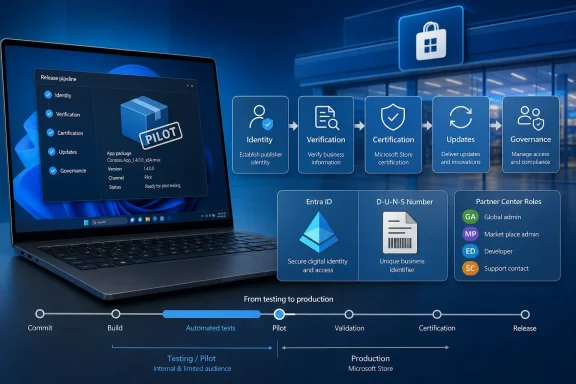 Microsoft Removed the Registration Fee, Not the Verification Work
Microsoft announced on May 7, 2026 that creating a company account for Microsoft Store publishing is free. The same change adds support for signing up with a Microsoft Entra ID work account and introduces a redesigned onboarding flow intended to make verification clearer.That matters because the old barrier was not only the $99 fee. The larger problem for many organizations was uncertainty. Store publishing often looked like a separate Microsoft identity, legal, packaging, and compliance path that had to be justified before the team could even learn whether the channel made sense. Removing the fee lowers the cost of discovery. It does not remove the work required to become a credible publisher.
The new flow does not eliminate business verification. Company accounts still need to pass Microsoft’s checks before publishing. Microsoft still expects a company to prove that it is a real organization and that the person enrolling has a legitimate relationship to it. The useful change is that teams can now begin that process without paying the previous company registration fee and can align sign-up with an Entra ID work account where appropriate.
For IT pros and release managers, this shifts the Store conversation from “should we pay to find out?” to “are we ready to test this as a governed distribution path?” That is a better question. It forces teams to address ownership, security, packaging, release timing, support, and update behavior before a product launch depends on the Store.
WindowsForum’s own Store coverage has been pointing in this direction. Reports from the community have tracked Microsoft’s recent work on a larger Store catalog, Win32 app support, user-experience changes, app discovery improvements, update plumbing, CLI access, and web installer improvements. Those reports do not prove that every app should move into the Store, but they do show why Windows teams should stop treating the Store as frozen in its old reputation.
The First Move Is Identity, Not App Submission
The smartest teams will not begin by uploading an installer. They will begin by deciding who owns the company developer account and which organizational identity should represent the publisher.Microsoft’s current onboarding path starts at the Microsoft Store developer platform. A new publisher selects a company account, signs in with either a personal Microsoft account or a Microsoft Entra ID work account, and proceeds through business and contact verification. Entra ID support is the important enterprise change because it lets Store onboarding align with the work identities many organizations already manage through Microsoft 365 and Azure.
That does not mean every developer should click through the process alone. If an organization signs up with an Entra ID account, account ownership, role assignments, tenant governance, and access recovery all matter. The first person through the door can become the de facto owner of a publishing channel. That is a small administrative shortcut until the person changes jobs, loses access, or leaves the company.
Before onboarding, the team should identify:
- The primary Partner Center account owner.
- A backup owner with authority to recover access.
- The security or identity reviewer.
- The release manager responsible for submissions.
- The support contact who will receive and act on Store-related communications.
- The team responsible for package preparation and update validation.
- The group that decides whether Store distribution is public, limited, or only experimental.
D-U-N-S Is Recommended; Business Documents Are the Fallback
The new company onboarding path is simple enough to begin, but not casual enough to improvise. Microsoft’s wording matters here: a D-U-N-S Number is recommended for company verification. If the company does not have one, official business documents are the fallback.That distinction is important. Teams should not present business documents and a D-U-N-S Number as equally preferred first steps. The cleanest preparation path is to use a D-U-N-S Number when the organization has one and to gather official business documents when it does not. If the company expects manual review, those documents should be current, consistent, and aligned with the legal entity that will publish the app.
A practical onboarding checklist looks like this:
- Confirm the legal entity that will publish the app.
- Confirm the work domain and contact email that represent that entity.
- Decide whether to use an Entra ID work account or a personal Microsoft account before starting.
- Prepare the D-U-N-S Number if the company has one.
- If the company does not have a D-U-N-S Number, gather official business documents before enrollment.
- Make sure the business name, address, domain, and contact details are consistent across records.
- Decide who will receive Microsoft communications during verification.
- Document the Partner Center ownership and recovery model before inviting additional users.
What Actually Changed, and What Teams Should Do Next
The concrete change is not that the Microsoft Store is now effortless. It is that new company developers can start the Store publishing path without the prior registration fee and can use a Microsoft Entra ID work account during onboarding. Microsoft has also described a redesigned verification experience that exposes verification status more clearly.That creates three immediate actions for Windows teams.
First, test the new onboarding path using the legal entity that would actually publish the app. Do not rely on old Partner Center bookmarks, legacy instructions, or third-party walkthroughs. Start from the current Store developer entry point and document what happens.
Second, treat verification as a release-readiness dependency. Record what Microsoft asks for, which contacts receive messages, what information must be corrected, and how long your organization takes to respond. The elapsed time is not only Microsoft’s review time; it is also your internal readiness time.
Third, turn the first Store submission into a pilot rather than a launch promise. The pilot should validate package type, certification behavior, update path, account ownership, and support handling. If those pieces work, Store distribution can move closer to normal release planning for that app. If they do not, the team has learned early, before a launch date depends on it.
That is the right level of ambition. The Store is lower-friction than it was for company onboarding, but it still requires verification, packaging, certification, operational ownership, and release discipline.
The Store Is Becoming More Relevant, but It Still Has to Prove Itself Per App
The reason this deserves attention is not that Microsoft removed a modest fee. For many companies, $99 was never the meaningful cost. The meaningful cost was uncertainty: identity mismatch, unclear verification, package questions, certification risk, support ambiguity, and the concern that the Store would become another channel nobody maintained.WindowsForum readers have already seen the broader pattern. One WindowsForum report described Microsoft’s 2025 Store work as a visible inflection point, with catalog expansion, user-interface changes, update plumbing, Win32 support, and policy shifts drawing attention. Another WindowsForum article on the 2024 Store experience focused on user-facing improvements across Windows 10 and Windows 11. A separate WindowsForum piece on Store evolution highlighted free developer onboarding, AI-era discovery work, and the Store’s attempt to become more than a passive storefront. WindowsForum has also covered personalized and AI-enhanced app discovery, deeper Windows integration, and power-user tooling such as Store CLI and web installer improvements.
Those reports are useful because they show why Store readiness is worth revisiting. They also show why teams should avoid overcorrecting. A Store that is improving is not the same as a Store that is automatically right for every app. A better onboarding path is not the same as predictable release behavior for your installer, your update cadence, your dependencies, your telemetry expectations, or your support model.
The Store should be evaluated as release infrastructure, not as a marketing slogan. For a given app, the question is whether Store distribution improves trust, discoverability, installation, updating, and manageability enough to justify the operational work.
Certification Is the Gate Release Managers Must Measure
For release managers, the immediate question is not “Can we get into Partner Center?” It is “Can we build a release process around Store review?”If an urgent bug fix has to wait on certification, the Store becomes part of incident response. If a feature update is rejected late, the Store becomes a release risk. If review behavior differs by package type, app capability, installer behavior, or dependency, the Store becomes a QA matrix. If support teams do not know how Store-installed versions differ from direct-download versions, the Store becomes a troubleshooting variable.
That is why the first Store submission should be a rehearsal with consequences low enough to absorb delay but real enough to teach the team something. A placeholder exercise is not enough. The pilot should include an actual package, actual account roles, actual submission metadata, actual support routing, and an actual update scenario.
The team should record:
- How long company verification takes from its own start date to completion.
- What documents or identity details Microsoft asks to confirm.
- Whether Partner Center roles work as expected.
- Which package type is used and why.
- Whether the app passes certification on the first attempt.
- If it fails, what category of issue caused the failure.
- How quickly the team can correct and resubmit.
- How an update is submitted and delivered.
- Whether the Store-installed app behaves differently from the direct installer.
- Whether analytics and reporting are useful enough for product or support decisions.
The Pilot Checklist Should Be Concrete
“Have a Store-suitable packaging plan” is too vague. A useful pilot should validate four specific areas: package type, certification behavior, update path, and account ownership.1. Package type
The team should decide which packaging approach it is testing and document why it fits the app. Traditional Win32 apps, MSIX-packaged apps, desktop bridge scenarios, and other distribution models can have different operational consequences. The team should check installer behavior, install location, permissions, dependencies, background processes, file associations, protocol handlers, uninstall behavior, and compatibility with existing deployment methods.The goal is not to prove that every packaging option works. The goal is to prove that the chosen packaging approach works for this app and can be maintained by this team.
2. Certification behavior
The team should treat certification as a measurable release gate. It should submit a low-risk build, record the result, capture any rejection reason, and update internal release documentation based on what happened.Success means certification behavior is understandable, repeatable, and compatible with the team’s release calendar. Failure does not necessarily mean the Store is unusable. It may mean the app needs packaging changes, metadata corrections, clearer privacy declarations, or a different release strategy.
3. Update path
A Store pilot is incomplete unless it tests updates. Initial publishing is only the first step. The team needs to know how updates are submitted, reviewed, delivered, detected by users, and supported.The update test should answer practical questions. Can the team ship a maintenance update without changing the installer model? Does the Store update preserve settings? Does it handle running processes gracefully? How does the app report its version to support? Can support distinguish Store-installed builds from direct-download builds? What happens if the organization continues to offer a non-Store installer in parallel?
4. Account ownership
The pilot should prove that the account model is sustainable. That means no shared credentials, no single-person dependency, no unclear recovery path, and no mystery contact inbox.Success means the right people can access Partner Center with the right roles, receive notifications, respond to verification or certification issues, and recover access if someone leaves. Failure means the team should fix governance before expanding Store distribution.
Who Should Pilot Now
The best candidates for an early Store pilot are not necessarily the largest or most visible products. They are the apps that can test the channel without putting a major launch at risk.Pilot now if your organization:
- Already uses Microsoft Entra ID and can assign clear account ownership.
- Has a D-U-N-S Number or can provide official business documents if it lacks one.
- Has a public or customer-facing Windows app that benefits from trust and easier discovery.
- Can choose a low-risk app, companion utility, or secondary update stream for the first submission.
- Has release engineering capacity to document certification and update behavior.
- Can support users who install through the Store as well as users who install another way.
- Wants evidence before deciding whether to expand Store distribution.
- Cannot identify who should own the Partner Center account.
- Has inconsistent business records, domain ownership questions, or unclear legal-entity ownership.
- Needs guaranteed release timing before measuring certification behavior.
- Has an installer that depends on behaviors likely to conflict with Store expectations.
- Cannot support multiple distribution paths.
- Has an existing publisher account with unresolved owner, role, or contact problems.
- Is trying to add Store distribution to a near-term launch without rehearsal.
Existing Publishers Should Treat This as a Governance Check
For companies that already have Microsoft Store developer accounts, the change is useful context but not necessarily a reset button. The new company onboarding flow is primarily relevant to new company developers creating an account. Existing publishers should not assume they can simply re-register for a cleaner setup or undo earlier account decisions without consequences.The practical work for existing publishers is administrative and operational:
- Audit who owns the Partner Center account.
- Confirm backup ownership and recovery paths.
- Review role assignments against the current release team.
- Remove users who no longer need access.
- Confirm support contacts and notification recipients.
- Check whether app submission steps are documented.
- Verify that package and update responsibilities are assigned.
- Review whether the current account model depends on a personal Microsoft account, stale contacts, or shared credentials.
Product leaders may hear “company registration is free now” and assume Store distribution can be added quickly. Existing publishers know better. Account access, package preparation, certification response, analytics review, and customer support all still need owners.
The Best Candidates Are Apps That Benefit from Trust, Discovery, and Cleaner Installation
Not every Windows app should rush into the Store. Some enterprise tools are better distributed privately through Intune, winget, direct installers, managed portals, or vendor-specific update channels. Some internal utilities have no public audience. Some line-of-business apps are poor fits for public discovery. Some specialized tools may require deployment behaviors that are easier to control outside the Store.The best early candidates are apps that benefit from Microsoft’s trust surface, public discoverability, simplified installation, and clearer update expectations. That can include commercial utilities, developer tools, productivity apps, companion clients, freemium products, subscription-backed software, and apps whose users already search the Store before browsing the web.
For sysadmins, the evaluation is different. Store presence can reduce some user-install friction, but it also requires policy awareness, provenance checks, update planning, and support documentation. An app being available in the Store does not automatically make it approved for a managed fleet. It may, however, make procurement conversations, user guidance, and install instructions cleaner when the publisher is trusted and the package behaves predictably.
For enthusiasts, a healthier Store is mostly positive. It can reduce dependence on sketchy download pages, clarify app identity, and make updates easier for software that would otherwise be scattered across vendor sites. But the value still depends on Microsoft maintaining quality controls without turning certification into an unpredictable bottleneck.
The Availability Question Should Be Tested, Not Assumed
Microsoft’s company onboarding change should not be described as globally available in every market unless Microsoft explicitly supports that claim for the scenario being discussed. Store publishing, developer registration, payments, tax handling, and business verification can depend on country, legal entity, account type, and the entry point used for registration.That means teams should test the onboarding path from the actual country, tenant, domain, and legal entity that will publish the app. Do not assume that a colleague’s experience in another region or business unit maps cleanly to yours. Do not rely on old screenshots or old registration pages. Do not make a launch plan based on a theoretical Store path that the publishing entity has never tested.
The practical advice is simple: validate the path with the real publisher identity before committing public dates. “Registration is free” is the headline. “Your legal entity, business records, domain, account owner, and documents need to line up” is the operational reality.
Success and Failure Signals for Expanding Store Distribution
A good pilot should end with a decision. The team should not simply say, “We tried the Store.” It should decide whether to expand, pause, or limit Store distribution based on evidence.Expand Store distribution if:
- Company verification completed without unresolved identity or ownership problems.
- Partner Center roles and notifications worked for the intended team.
- The selected package type behaved correctly during install, launch, update, and uninstall.
- Certification results were understandable and response actions were manageable.
- The update path fit the team’s release cadence.
- Support could identify and troubleshoot Store-installed builds.
- Store reporting was useful enough for product, release, or support review.
- Users benefited from easier discovery, installation, or trust signals.
- Verification exposed legal-entity or domain inconsistencies.
- Account ownership depends on one person or a personal credential.
- Certification delays or rejections cannot be absorbed by the release calendar.
- The package model creates installer, update, permission, or dependency problems.
- Support cannot distinguish Store builds from other builds.
- The app’s primary audience does not benefit from Store discovery or installation.
- Existing deployment channels already solve the problem with less operational risk.
The Store Pilot Should Start Before the Store Strategy Is Final
The best approach is not a grand migration. It is a controlled pilot with production-grade discipline. Pick one app or update stream that is meaningful enough to test the process but not so critical that a delay would create an emergency.Start with account governance. Assign Partner Center owners and roles. Confirm the company identity and domain path. Prepare a D-U-N-S Number if available, or official business documents if the company does not have one. Decide who receives Store communications and who is responsible for acting on them. Then onboard through the current company flow and document every delay, request, and status change.
Once the account exists, treat the first app submission as a release engineering exercise. Record certification timing, rejection reasons if any, support interactions, reporting availability, and update behavior. Compare the results with your current distribution model. The goal is not to declare the Store a universal winner. The goal is to replace assumptions with data.
This is where Microsoft’s onboarding changes can be useful even for skeptical teams. If the new path reduces sign-up friction and clarifies verification status, the organization learns sooner whether Store distribution is viable. If the process still exposes gaps, that is useful too. It tells the team what must be fixed before a launch depends on the Store.
The Decision Comes Down to Readiness, Not Hype
Microsoft’s changes justify moving Store evaluation earlier for teams that can treat it as a managed release channel rather than a marketing afterthought. The strongest candidates are organizations with Entra ID already in place, clean business records, an app that can be packaged and reviewed, and a team willing to measure certification and update behavior during a pilot.Teams should wait if they cannot identify an account owner, cannot provide reliable business verification material, have no package strategy, or need guaranteed release timing before testing certification. They should also wait if their app depends on installation or update behaviors that may not fit Store expectations. The new onboarding path removes one barrier. It does not remove release engineering.
The real shift is that “we have not bothered to test the Store” is becoming a weaker position. The cost of entry has fallen, the identity story is more enterprise-friendly, and WindowsForum’s recent Store coverage shows a platform receiving renewed attention across catalog, discovery, Win32 support, user experience, and developer tooling. That is enough to move Store readiness up the roadmap, but not enough to skip due diligence.
The Decision Matrix Is Now Concrete
For Windows teams, the Store question is operational rather than philosophical. One controlled pilot can answer more than months of internal debate if the team measures the right things and resists treating free registration as the same thing as frictionless publishing.- Move now if your organization already uses Entra ID and can assign clear Partner Center ownership before onboarding.
- Move now if you have a D-U-N-S Number or can provide official business documents because the company does not have one.
- Move now if you can test Store certification with a low-risk app before tying the channel to a major launch.
- Move now if you can validate package type, certification behavior, update path, and account ownership in one pilot.
- Wait if your release process cannot tolerate unknown certification timing until your team has measured it.
- Wait if your existing publisher account has unresolved ownership, role, or support-contact problems.
- Wait if your app’s installer, update model, or support process is not ready for Store-specific testing.
- Expand only if the pilot proves verification, submission, updating, and support are repeatable.
Frequently Asked Questions
Should every Windows developer team create a Microsoft Store company account now?
No. Teams should start now only if they can verify company identity, assign account ownership, prepare the right business information, and run a controlled pilot. Free company registration makes testing easier, but it does not make Store publishing automatic.What changed for company onboarding?
Microsoft removed the prior company registration fee for Microsoft Store publishing, added support for signing up with a Microsoft Entra ID work account, and introduced a clearer onboarding and verification experience for new company developers.Does the new onboarding flow mean publishing is instant?
No. Company accounts still need verification, and apps still need to pass submission and certification requirements. The change lowers entry friction; it does not eliminate due diligence or app review.Should my company use a D-U-N-S Number?
Use a D-U-N-S Number if your company has one, because Microsoft recommends it for verification. If your company does not have one, prepare official business documents as the fallback.Is Microsoft Store onboarding available for every company in every market?
Do not assume that. The available material does not support a broad global-availability claim for every company scenario. Test the path using the actual country, legal entity, account type, and domain that will publish the app.Should existing publishers create a new account to use the newer onboarding path?
Not automatically. Existing publishers should first audit account ownership, roles, contacts, recovery paths, and submission processes. Do not assume a new account is the right answer without understanding the consequences for existing apps and publisher identity.What should a Store pilot test first?
A useful pilot should validate four things: package type, certification behavior, update path, and account ownership. If those work, the team can consider expanding Store distribution. If they fail, fix the operational issues before adding more apps.Which apps are best for an early Store pilot?
Good candidates include low-risk utilities, companion apps, developer tools, productivity apps, commercial apps, and customer-facing software that benefits from trust, discoverability, and easier installation. Avoid starting with a mission-critical release that cannot tolerate delay.Does Store distribution replace Intune, winget, direct installers, or private deployment?
Usually not by default. The Store may complement existing channels. Many organizations will continue using Intune, winget, direct installers, managed portals, or private deployment depending on audience and control requirements.What is the clearest recommendation?
Start onboarding if your identity, documents, owners, and pilot app are ready. Measure verification, certification, updates, and support before promising production Store availability. Treat the Store as a lower-friction channel to evaluate, not a shortcut around release readiness.References
- Primary source: learn.microsoft.com
Microsoft Entra Verified ID - IDV partner gallery - Microsoft Entra Verified ID | Microsoft Learn
Explore identity verification (IDV) partners for Microsoft Entra Verified ID. Learn how to integrate partner solutions for remote onboarding, secure access, and account recovery.learn.microsoft.com - Independent coverage: blogs.windows.com
Publish to Microsoft Store as a company—now with free registration and faster onboarding
We’re seeing growing demand from companies that want to reach Windows users across both consumer and enterprise devices, and we’ve heard consistent feedback that getting started should be simpler. Today, we’re addressing that with three updatesblogs.windows.com - Independent coverage: developer.microsoft.com
Microsoft Developer
Any platform. Any language. Our tools. Develop solutions, on your terms, using Microsoft products and services.developer.microsoft.com - Independent coverage: windowscentral.com
Microsoft Store drops registration fees for companies as part of onboarding overhaul | Windows Central
Microsoft expands last year’s fee removal to companies and adds Entra ID support to simplify onboarding.www.windowscentral.com - Independent coverage: microsoft.com
Microsoft Entra Verified ID | Microsoft Security
Learn how Microsoft Entra Verified ID, a verifiable credential service, enables organizations to create user-owned solutions to transform identity verification.www.microsoft.com
- Independent coverage: storedeveloper.microsoft.com

Microsoft Store - Developer Platform
Build and distribute apps to millions of users across Windows devices. Microsoft Store Developer Platform provides tools, analytics, and resources for app success.
storedeveloper.microsoft.com
- Independent coverage: techcommunity.microsoft.com
What's New in Microsoft Entra: June 2026 | Microsoft Community Hub
Welcome to the June edition of our monthly newsletter, summarizing the latest news and developments in the exciting, ever-evolving world of Microsoft... techcommunity.microsoft.com
- Independent coverage: adoption.microsoft.com
Microsoft Entra – Microsoft Adoption
Leverage guidance, assistance, and learning options for your organization's adoption and deployment of Microsoft Entra identity and network access solutions.adoption.microsoft.com
