

Zurich, 9 July 2026 – Microsoft’s Swiss AI findings point to a practical takeaway for IT and business leaders this week: do not start with another AI awareness campaign. Start by choosing one or two real workflows, naming an accountable owner, defining where AI output must be reviewed, and checking whether the data those workflows depend on is properly governed.
The headline is that Swiss AI users report stronger gains than the global benchmark: 65% say they can now perform higher-value analytical and creative work that would not have been possible a year ago, compared with 58% globally. Among Swiss “Frontier Professionals” — workers in organizations that systematically embed AI into workflows — that figure rises to 83%. But Microsoft’s Swiss release also contains the warning: only 24% of Swiss AI users say leadership is clearly and consistently aligned on AI.
That gap is the story. Workers are already moving faster. The organizations that benefit most are the ones redesigning work around AI instead of treating AI as a personal productivity add-on. For Windows estates, Microsoft 365 tenants, security teams, and business leaders, the first job is not to “deploy AI” in the abstract. It is to make AI-assisted work repeatable, reviewable, and owned.
Microsoft’s Swiss findings read at first like a national advantage story. In the company’s 2026 Work Trend Index, Microsoft says 65% of Swiss AI users report they can now perform higher-value analytical and creative work that would not have been possible a year ago. The comparable global figure is 58%.
That is a meaningful lead, but it should not be read as “the work is done.” The more operationally important number may be 24%. Only 24% of Swiss AI users say leadership is clearly and consistently aligned on AI. In plain terms: the workforce may be learning what AI can do faster than leadership is deciding how work should change.
That distinction matters because Microsoft is not merely describing faster email drafting or better meeting summaries. The Swiss release frames AI as a way for employees to take on more analytical, creative, and judgment-heavy work. Once AI affects that kind of work, it stops being only a user-adoption issue and becomes a governance and operating-model issue.
Catrin Hinkel, CEO of Microsoft Switzerland, frames the result as momentum rather than arrival. “Switzerland has a strong foundation in AI adoption. The next step is turning that momentum into lasting impact by rethinking how work is organized,” Hinkel says in Microsoft’s release. She adds: “The organizations that will lead in this next phase will be those that connect strategic leadership, responsible experimentation, and practical capability building.”
The phrase “rethinking how work is organized” is the key. It is also where the story becomes directly relevant to WindowsForum readers. If leadership hears “AI productivity” and responds only by enabling more tools, the likely result is scattered individual usage. If leadership responds by changing process ownership, review points, data access, quality standards, and agent oversight, the result can become organizational capability.
The first move for admins and business owners should therefore be concrete: pick a workflow that already has visible AI use, such as proposal drafting, customer-response preparation, internal reporting, knowledge-base maintenance, ticket triage, or policy review. Document where AI enters the process, what data it touches, who reviews the output, and what decision or action the AI-assisted output influences. If the organization cannot answer those questions for one workflow, it is not ready to scale agents across many.
Among Swiss AI users overall, 65% say they can now perform higher-value analytical and creative work that would not have been possible a year ago. Among Frontier Professionals in Switzerland, that figure rises to 83%. That gap is the practical lesson: access to AI is not the same thing as redesigned work.
The table makes Microsoft’s thesis clearer than a generic productivity story. Switzerland is not simply ahead of the global average; the best-organized Swiss AI users are far ahead of the Swiss average. That implies the advantage is concentrated where organizations have gone beyond encouragement and built work systems that absorb AI.
Microsoft describes the leading organizations as Frontier Firms: companies moving beyond experimentation, redesigning how work is allocated between people and AI, and deploying agents to handle specific tasks within workflows while employees retain oversight. That final condition matters. The mature model is not “let AI do everything.” It is “delegate defined tasks while keeping human accountability.”
For enterprise IT, that model is promising but messy. An employee using AI to summarize a document is one class of risk. An agent that retrieves information, drafts a response, updates a record, or triggers a process step is another. The second case requires clearer ownership, permissions, logging, review, and rollback.
That is why Microsoft’s “Frontier Professional” label should not be read as praise for power users alone. It is a signal that some organizations are creating the conditions under which AI use becomes repeatable. The difference between a clever prompt and a governed workflow is the difference between personal productivity and institutional capability.
The test for leaders is simple: if a finance analyst, legal associate, engineer, HR specialist, or operations manager uses AI to produce higher-value work, can the organization say what data was used, what review standard applied, and whether the same process could be repeated by another qualified employee? If not, the gain may be real, but it is fragile.
That commercial context does not make the report useless. It means the report should be read the way IT professionals read vendor architecture diagrams: as a useful view of where the vendor thinks customers should go, not as proof that every customer should follow every route exactly.
The useful diagnostic is Microsoft’s distinction between individual adoption and organization-wide deployment. Most organizations already have individual adoption. Employees use AI to draft, summarize, analyze, translate, brainstorm, prepare, and refine. Some of that use is approved. Some is informal. Some may be happening faster than policy can track.
The harder step is organization-wide deployment. That requires explicit choices. Which workflows should AI touch? Which outputs require human approval? Which data may be used? Which teams can create or configure agents? What happens when AI-generated work is wrong but polished? Who owns the process once AI becomes part of it?
Microsoft’s Swiss data suggests many organizations are stuck between those phases. Nearly half of Swiss AI users — 48% — say it feels safer to focus on current goals than to redesign workflows with AI in mind. That figure is important because it explains why productivity gains do not automatically become transformation. Workers may understand AI’s potential but still avoid workflow redesign if the organization rewards short-term delivery more than process improvement.
This is one of the practical barriers to enterprise AI. Organizations often tell employees to innovate while measuring them against existing output targets. They encourage experimentation but leave no time for redesign. They ask managers to transform work while still holding them to last year’s resourcing model. Under those conditions, “use AI” becomes a personal workaround rather than an operating model.
Microsoft identifies three shifts: from individual use to organization-wide deployment; from tools to shared capability across teams; and from pilots to agents embedded in core workflows. Those shifts are not mainly about better prompts. They are about governance, workflow design, accountability, and incentives.
The old enterprise software playbook was deployment, training, adoption, optimization. AI scrambles that order. Employees may adopt before training is finished. Optimization may begin before governance catches up. Informal workflows may appear before the official pilot has ended. The organization then has to decide whether to ignore that activity, block it, or turn the useful parts into controlled and repeatable processes.
The Swiss results imply that professional caution and AI productivity can coexist. But caution alone is not an operating model. If leadership alignment remains weak, responsible individual use may never become reliable institutional capability.
Those figures are more useful than generic claims about AI fluency. They say Swiss users are not just asking whether AI can produce output. They are asking whether that output is good enough, accurate enough, and appropriate enough to use.
Hinkel’s formulation captures the point: “AI can accelerate execution, but human judgment remains critical in defining priorities and shaping outcomes.” That is not just executive reassurance. It is a design principle.
If AI accelerates execution, bad priorities scale faster too. A weak brief becomes a larger weak deliverable. A flawed assumption becomes a polished analysis. A mistaken interpretation becomes a ticket, policy draft, report, or customer response before anyone notices the foundation is wrong.
That is why quality control cannot remain a vague cultural value. It has to become a workflow artifact. Teams need explicit rules about when AI output can be used directly, when it must be reviewed, when it must be documented, and when it must be avoided. They need examples of acceptable and unacceptable use. They need escalation paths for uncertainty. They need a way to distinguish low-risk drafting assistance from high-impact decision support.
For Windows and Microsoft 365 administrators, the operational version of this problem is familiar. Every new collaboration layer eventually creates a governance surface. File shares created permission sprawl. Email created retention and discovery burdens. Collaboration sites created lifecycle and ownership questions. AI agents can combine those problems with a reasoning layer that can summarize, transform, and act on information.
The Swiss finding that 84% of users treat AI as a starting point is encouraging, but it is not sufficient. Individual caution does not scale automatically. A team may review AI-generated output carefully during a pilot and relax once the workflow becomes routine. A manager may approve AI use without understanding the data dependencies behind the generated answer. A reviewer may become a rubber stamp if volume rises faster than review capacity.
The phrase “human-in-the-loop” is often used as if the presence of a person solves the problem. It does not. The quality of the loop matters. Is the reviewer qualified to judge the output? Do they have time? Do they know what sources, assumptions, or constraints shaped the result? Are they accountable for the final decision? Does the system preserve enough context for audit?
Microsoft’s data points on quality control and critical thinking are therefore not soft-skills trivia. They are the beginning of the enterprise AI control plane. Identity and permissions decide what AI can access. Human judgment decides what AI output is allowed to become.
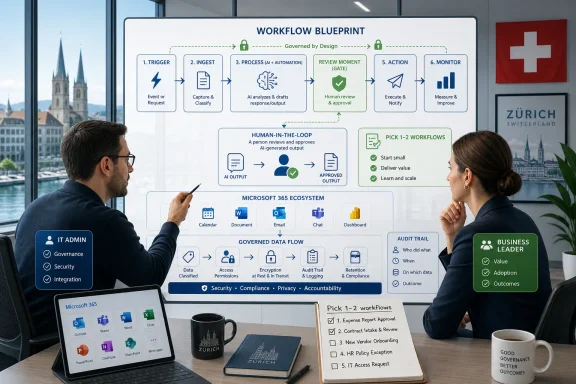
A testable rule for organizations is this: every AI-assisted workflow should identify the “review moment.” That is the point at which a human must accept, correct, reject, or escalate the AI output before it affects a customer, employee, financial figure, legal position, security decision, or operational record. If no one can identify that moment, the workflow is not governed.
Leadership alignment sounds abstract until it fails. In a misaligned organization, the CIO may prioritize secure deployment, the CFO may prioritize cost reduction, HR may prioritize workforce reskilling, legal may prioritize risk containment, business units may prioritize speed, and frontline managers may simply want their teams to hit current targets. Each goal can be rational. Together, they can paralyze AI adoption or push it underground.
Microsoft’s report implicitly argues that leadership alignment is the lever that turns individual AI fluency into organizational impact. That is plausible because workflow redesign cuts across reporting lines. No single employee can safely redesign how work is allocated between people and AI if the metrics, approvals, data access, and accountability model remain unchanged.
This is where the AI conversation starts to resemble earlier waves of digital transformation. Companies did not become cloud-native merely by buying cloud accounts. They changed procurement, security models, architecture patterns, release cycles, cost management, and operational responsibility. Companies did not become remote-capable merely by installing video-conferencing software. They changed meeting norms, documentation practices, device management, identity, and support models. AI will follow the same pattern, but with less time to prepare.
Leadership alignment must therefore be more concrete than a strategy slide. It should answer a few unglamorous questions:
That may produce local productivity gains. It will not produce a Frontier Firm.
A better leadership practice is to publish a short AI workflow charter for each priority process. The charter should name the business owner, technical owner, permitted AI uses, prohibited uses, review requirements, data boundaries, success measures, and escalation route. It does not need to be long. It does need to be specific enough that a team can test whether the workflow is operating as intended.
The Swiss release describes Frontier Firms as deploying agents that handle specific tasks within workflows while employees retain oversight. That wording is deliberately modest: specific tasks, within workflows, with oversight. It avoids the fantasy of a fully autonomous company. But even modest agent deployment raises difficult questions.
An agent that summarizes a meeting is one thing. An agent that retrieves information, drafts a customer response, updates a record, or triggers a process step is another. The moment an AI system can act inside a workflow, administrators need to think about permissions, logging, approval gates, rollback, data classification, and exception handling.
This is why the agent phase favors organizations with mature identity, endpoint, and information-governance practices. If a company already has chaotic permissions, stale groups, unmanaged devices, inconsistent data handling, and unclear ownership, AI will not create the mess. It will make the mess more consequential.
For Windows-heavy enterprises and Microsoft 365 tenants, the practical point is not to assume that any single product setting solves the problem. The source facts support a broader operational conclusion: before expanding agents, organizations should review who can access sensitive data, who can create or modify AI-assisted workflows, what outputs require approval, and what logs or records will be available if something goes wrong.
Central control reduces chaos but can slow innovation. Business-unit control improves relevance but can create fragmentation. Low-code or user-configured automation can democratize improvement but may also produce fragile workflows with unclear ownership. The Frontier Firm ideal assumes the organization can learn quickly from its own work. That requires feedback loops and a governance model that does not collapse under the weight of approvals.
This also creates an employee-trust issue. Workers may welcome AI assistance while worrying about workplace surveillance, performance scoring, or opaque management analytics. A responsible AI rollout should therefore include an employee-facing explanation of what AI usage information is collected, what is used to improve systems or processes, and what is not used for individual discipline. Without that clarity, AI telemetry can undermine the experimentation Microsoft says organizations need.
The Swiss data offers an important hint. Swiss users appear to combine high AI productivity with strong insistence on human responsibility. That could become a powerful model: sophisticated AI use without surrendering professional accountability. But it will require leaders to treat governance as enablement rather than bureaucracy.
The verified figures tell a coherent story. Swiss AI users report stronger higher-value work gains than the global benchmark, 65% versus 58%. Swiss Frontier Professionals are higher still at 83%. Yet only 24% of Swiss AI users see clear and consistent leadership alignment. At the same time, 84% treat AI output as a starting point rather than a final answer, 46% identify quality control as critical, and 42% point to critical thinking. Nearly half, 48%, say it feels safer to focus on current goals than to redesign workflows with AI in mind.
Those numbers support a narrower and more useful conclusion than broad AI strategy talk. The next phase is not about proving that AI can help individuals. It is about deciding which workflows should change, who owns the change, how human review works, and where agents may act.
For IT leaders, the work begins with access, data exposure, workflow ownership, logging, and review design. For business leaders, it begins with incentives, process selection, quality standards, and permission to redesign work instead of merely doing the same work faster. For employees, it means AI should be treated as a powerful starting point, not an accountable colleague.
Microsoft’s three shifts — from individual use to organization-wide deployment, from tools to shared capability, and from pilots to agents embedded in core workflows — are useful because they are testable. If an organization is still counting licenses and celebrating scattered examples, it is in the first phase. If it has named workflow owners, review rules, data boundaries, and agent oversight, it is moving into the second. If agents are acting inside core workflows with defined permissions, logs, human approval, and rollback, it is entering the third.
The forward-looking risk is that organizations mistake AI activity for AI maturity. Usage can rise without governance improving. Output can increase without quality improving. Agents can speed up workflows that should have been redesigned first. The Swiss findings suggest that the winners will not simply be the organizations with the most enthusiastic users. They will be the organizations that make AI-assisted work legible, reviewable, and accountable.
That is the work for this week: pick the workflow, map the data, define the review, set the agent boundary, and assign ownership. Everything else can wait.
The headline is that Swiss AI users report stronger gains than the global benchmark: 65% say they can now perform higher-value analytical and creative work that would not have been possible a year ago, compared with 58% globally. Among Swiss “Frontier Professionals” — workers in organizations that systematically embed AI into workflows — that figure rises to 83%. But Microsoft’s Swiss release also contains the warning: only 24% of Swiss AI users say leadership is clearly and consistently aligned on AI.
That gap is the story. Workers are already moving faster. The organizations that benefit most are the ones redesigning work around AI instead of treating AI as a personal productivity add-on. For Windows estates, Microsoft 365 tenants, security teams, and business leaders, the first job is not to “deploy AI” in the abstract. It is to make AI-assisted work repeatable, reviewable, and owned.
 Switzerland’s AI Advantage Comes With a Management Warning Label
Microsoft’s Swiss findings read at first like a national advantage story. In the company’s 2026 Work Trend Index, Microsoft says 65% of Swiss AI users report they can now perform higher-value analytical and creative work that would not have been possible a year ago. The comparable global figure is 58%.That is a meaningful lead, but it should not be read as “the work is done.” The more operationally important number may be 24%. Only 24% of Swiss AI users say leadership is clearly and consistently aligned on AI. In plain terms: the workforce may be learning what AI can do faster than leadership is deciding how work should change.
That distinction matters because Microsoft is not merely describing faster email drafting or better meeting summaries. The Swiss release frames AI as a way for employees to take on more analytical, creative, and judgment-heavy work. Once AI affects that kind of work, it stops being only a user-adoption issue and becomes a governance and operating-model issue.
Catrin Hinkel, CEO of Microsoft Switzerland, frames the result as momentum rather than arrival. “Switzerland has a strong foundation in AI adoption. The next step is turning that momentum into lasting impact by rethinking how work is organized,” Hinkel says in Microsoft’s release. She adds: “The organizations that will lead in this next phase will be those that connect strategic leadership, responsible experimentation, and practical capability building.”
The phrase “rethinking how work is organized” is the key. It is also where the story becomes directly relevant to WindowsForum readers. If leadership hears “AI productivity” and responds only by enabling more tools, the likely result is scattered individual usage. If leadership responds by changing process ownership, review points, data access, quality standards, and agent oversight, the result can become organizational capability.
The first move for admins and business owners should therefore be concrete: pick a workflow that already has visible AI use, such as proposal drafting, customer-response preparation, internal reporting, knowledge-base maintenance, ticket triage, or policy review. Document where AI enters the process, what data it touches, who reviews the output, and what decision or action the AI-assisted output influences. If the organization cannot answer those questions for one workflow, it is not ready to scale agents across many.
The Real Split Is Not Switzerland Versus the World, but Redesigned Work Versus Tool Use
The headline comparison between Swiss AI users and global AI users is useful, but it is not the most revealing split in Microsoft’s data. The deeper divide is between ordinary AI use and what Microsoft calls Frontier Professionals — people working in organizations that systematically embed AI into workflows and redesign how work gets done.Among Swiss AI users overall, 65% say they can now perform higher-value analytical and creative work that would not have been possible a year ago. Among Frontier Professionals in Switzerland, that figure rises to 83%. That gap is the practical lesson: access to AI is not the same thing as redesigned work.
| Group measured by Microsoft | Reported outcome | What the comparison suggests |
|---|---|---|
| Swiss AI users | 65% say they can now perform higher-value analytical and creative work that would not have been possible a year ago | Switzerland is ahead of the global AI-user benchmark |
| Global AI users | 58% say they can now perform higher-value analytical and creative work | AI productivity gains are visible beyond one market |
| Swiss Frontier Professionals | 83% say they can now perform higher-value analytical and creative work | Workflow redesign appears to matter more than tool access alone |
| Swiss AI users with clearly aligned leadership | 24% say leadership is clearly and consistently aligned on AI | The main bottleneck is managerial and organizational |
| Swiss AI users treating AI as a draft, not an answer | 84% treat AI output as a starting point, not a final answer | Human review remains central to serious AI use |
Microsoft describes the leading organizations as Frontier Firms: companies moving beyond experimentation, redesigning how work is allocated between people and AI, and deploying agents to handle specific tasks within workflows while employees retain oversight. That final condition matters. The mature model is not “let AI do everything.” It is “delegate defined tasks while keeping human accountability.”
For enterprise IT, that model is promising but messy. An employee using AI to summarize a document is one class of risk. An agent that retrieves information, drafts a response, updates a record, or triggers a process step is another. The second case requires clearer ownership, permissions, logging, review, and rollback.
That is why Microsoft’s “Frontier Professional” label should not be read as praise for power users alone. It is a signal that some organizations are creating the conditions under which AI use becomes repeatable. The difference between a clever prompt and a governed workflow is the difference between personal productivity and institutional capability.
The test for leaders is simple: if a finance analyst, legal associate, engineer, HR specialist, or operations manager uses AI to produce higher-value work, can the organization say what data was used, what review standard applied, and whether the same process could be repeated by another qualified employee? If not, the gain may be real, but it is fragile.
Microsoft’s “Frontier Firm” Is a Sales Pitch — and Also a Useful Diagnostic
It would be naïve to read Microsoft’s Work Trend Index as neutral sociology. Microsoft sells workplace software, cloud services, security tools, and AI interfaces. When Microsoft says organizations must move from tools to shared capability and from pilots to agents embedded in workflows, it is also describing a market direction that benefits Microsoft.That commercial context does not make the report useless. It means the report should be read the way IT professionals read vendor architecture diagrams: as a useful view of where the vendor thinks customers should go, not as proof that every customer should follow every route exactly.
The useful diagnostic is Microsoft’s distinction between individual adoption and organization-wide deployment. Most organizations already have individual adoption. Employees use AI to draft, summarize, analyze, translate, brainstorm, prepare, and refine. Some of that use is approved. Some is informal. Some may be happening faster than policy can track.
The harder step is organization-wide deployment. That requires explicit choices. Which workflows should AI touch? Which outputs require human approval? Which data may be used? Which teams can create or configure agents? What happens when AI-generated work is wrong but polished? Who owns the process once AI becomes part of it?
Microsoft’s Swiss data suggests many organizations are stuck between those phases. Nearly half of Swiss AI users — 48% — say it feels safer to focus on current goals than to redesign workflows with AI in mind. That figure is important because it explains why productivity gains do not automatically become transformation. Workers may understand AI’s potential but still avoid workflow redesign if the organization rewards short-term delivery more than process improvement.
This is one of the practical barriers to enterprise AI. Organizations often tell employees to innovate while measuring them against existing output targets. They encourage experimentation but leave no time for redesign. They ask managers to transform work while still holding them to last year’s resourcing model. Under those conditions, “use AI” becomes a personal workaround rather than an operating model.
Microsoft identifies three shifts: from individual use to organization-wide deployment; from tools to shared capability across teams; and from pilots to agents embedded in core workflows. Those shifts are not mainly about better prompts. They are about governance, workflow design, accountability, and incentives.
The old enterprise software playbook was deployment, training, adoption, optimization. AI scrambles that order. Employees may adopt before training is finished. Optimization may begin before governance catches up. Informal workflows may appear before the official pilot has ended. The organization then has to decide whether to ignore that activity, block it, or turn the useful parts into controlled and repeatable processes.
The Swiss results imply that professional caution and AI productivity can coexist. But caution alone is not an operating model. If leadership alignment remains weak, responsible individual use may never become reliable institutional capability.
Human Judgment Is Not the Soft Part of AI Work — It Is the Control Plane
One of the stronger pieces of Microsoft’s Swiss release is its insistence that Swiss workers are not simply accepting AI output as truth. Microsoft says 84% of Swiss AI users treat AI output as a starting point, not a final answer. Another 46% identify quality control of AI output as a critical skill, while 42% point to critical thinking.Those figures are more useful than generic claims about AI fluency. They say Swiss users are not just asking whether AI can produce output. They are asking whether that output is good enough, accurate enough, and appropriate enough to use.
Hinkel’s formulation captures the point: “AI can accelerate execution, but human judgment remains critical in defining priorities and shaping outcomes.” That is not just executive reassurance. It is a design principle.
If AI accelerates execution, bad priorities scale faster too. A weak brief becomes a larger weak deliverable. A flawed assumption becomes a polished analysis. A mistaken interpretation becomes a ticket, policy draft, report, or customer response before anyone notices the foundation is wrong.
That is why quality control cannot remain a vague cultural value. It has to become a workflow artifact. Teams need explicit rules about when AI output can be used directly, when it must be reviewed, when it must be documented, and when it must be avoided. They need examples of acceptable and unacceptable use. They need escalation paths for uncertainty. They need a way to distinguish low-risk drafting assistance from high-impact decision support.
For Windows and Microsoft 365 administrators, the operational version of this problem is familiar. Every new collaboration layer eventually creates a governance surface. File shares created permission sprawl. Email created retention and discovery burdens. Collaboration sites created lifecycle and ownership questions. AI agents can combine those problems with a reasoning layer that can summarize, transform, and act on information.
The Swiss finding that 84% of users treat AI as a starting point is encouraging, but it is not sufficient. Individual caution does not scale automatically. A team may review AI-generated output carefully during a pilot and relax once the workflow becomes routine. A manager may approve AI use without understanding the data dependencies behind the generated answer. A reviewer may become a rubber stamp if volume rises faster than review capacity.
The phrase “human-in-the-loop” is often used as if the presence of a person solves the problem. It does not. The quality of the loop matters. Is the reviewer qualified to judge the output? Do they have time? Do they know what sources, assumptions, or constraints shaped the result? Are they accountable for the final decision? Does the system preserve enough context for audit?
Microsoft’s data points on quality control and critical thinking are therefore not soft-skills trivia. They are the beginning of the enterprise AI control plane. Identity and permissions decide what AI can access. Human judgment decides what AI output is allowed to become.
A testable rule for organizations is this: every AI-assisted workflow should identify the “review moment.” That is the point at which a human must accept, correct, reject, or escalate the AI output before it affects a customer, employee, financial figure, legal position, security decision, or operational record. If no one can identify that moment, the workflow is not governed.
The Leadership Gap Is Where AI Projects Go to Become Shelfware
The most damning Swiss number remains 24%. Only 24% of Swiss AI users say leadership is clearly and consistently aligned on AI. This is not a cosmetic weakness. It is the difference between scattered productivity gains and a redesigned organization.Leadership alignment sounds abstract until it fails. In a misaligned organization, the CIO may prioritize secure deployment, the CFO may prioritize cost reduction, HR may prioritize workforce reskilling, legal may prioritize risk containment, business units may prioritize speed, and frontline managers may simply want their teams to hit current targets. Each goal can be rational. Together, they can paralyze AI adoption or push it underground.
Microsoft’s report implicitly argues that leadership alignment is the lever that turns individual AI fluency into organizational impact. That is plausible because workflow redesign cuts across reporting lines. No single employee can safely redesign how work is allocated between people and AI if the metrics, approvals, data access, and accountability model remain unchanged.
This is where the AI conversation starts to resemble earlier waves of digital transformation. Companies did not become cloud-native merely by buying cloud accounts. They changed procurement, security models, architecture patterns, release cycles, cost management, and operational responsibility. Companies did not become remote-capable merely by installing video-conferencing software. They changed meeting norms, documentation practices, device management, identity, and support models. AI will follow the same pattern, but with less time to prepare.
Leadership alignment must therefore be more concrete than a strategy slide. It should answer a few unglamorous questions:
- Which business processes are being redesigned first?
- What counts as acceptable AI-generated or AI-assisted work?
- Which outputs require human approval?
- Which risks are tolerable, which are not, and who decides?
- How will teams be rewarded for redesigning workflows when the payoff is not immediate?
- How will the organization know whether AI is improving work rather than merely increasing output volume?
That may produce local productivity gains. It will not produce a Frontier Firm.
A better leadership practice is to publish a short AI workflow charter for each priority process. The charter should name the business owner, technical owner, permitted AI uses, prohibited uses, review requirements, data boundaries, success measures, and escalation route. It does not need to be long. It does need to be specific enough that a team can test whether the workflow is operating as intended.
Agents Turn AI Governance From Advice Into Infrastructure
Microsoft’s third shift — from pilots to agents embedded in core workflows — is the point at which this story becomes materially important for IT operations. A pilot can be supervised manually. A chatbot can be governed through policy, training, and access controls. An agent embedded in a workflow demands infrastructure discipline.The Swiss release describes Frontier Firms as deploying agents that handle specific tasks within workflows while employees retain oversight. That wording is deliberately modest: specific tasks, within workflows, with oversight. It avoids the fantasy of a fully autonomous company. But even modest agent deployment raises difficult questions.
An agent that summarizes a meeting is one thing. An agent that retrieves information, drafts a customer response, updates a record, or triggers a process step is another. The moment an AI system can act inside a workflow, administrators need to think about permissions, logging, approval gates, rollback, data classification, and exception handling.
This is why the agent phase favors organizations with mature identity, endpoint, and information-governance practices. If a company already has chaotic permissions, stale groups, unmanaged devices, inconsistent data handling, and unclear ownership, AI will not create the mess. It will make the mess more consequential.
For Windows-heavy enterprises and Microsoft 365 tenants, the practical point is not to assume that any single product setting solves the problem. The source facts support a broader operational conclusion: before expanding agents, organizations should review who can access sensitive data, who can create or modify AI-assisted workflows, what outputs require approval, and what logs or records will be available if something goes wrong.
Central control reduces chaos but can slow innovation. Business-unit control improves relevance but can create fragmentation. Low-code or user-configured automation can democratize improvement but may also produce fragile workflows with unclear ownership. The Frontier Firm ideal assumes the organization can learn quickly from its own work. That requires feedback loops and a governance model that does not collapse under the weight of approvals.
This also creates an employee-trust issue. Workers may welcome AI assistance while worrying about workplace surveillance, performance scoring, or opaque management analytics. A responsible AI rollout should therefore include an employee-facing explanation of what AI usage information is collected, what is used to improve systems or processes, and what is not used for individual discipline. Without that clarity, AI telemetry can undermine the experimentation Microsoft says organizations need.
The Swiss data offers an important hint. Swiss users appear to combine high AI productivity with strong insistence on human responsibility. That could become a powerful model: sophisticated AI use without surrendering professional accountability. But it will require leaders to treat governance as enablement rather than bureaucracy.
Action checklist for admins
- Inventory where employees are already using AI in Microsoft 365, browsers, developer tools, and line-of-business workflows before expanding formal pilots.
- Select one or two high-value workflows for redesign rather than trying to govern every AI use case at once.
- Review identity, group membership, document permissions, and data exposure for the selected workflows before adding agents or broader AI access.
- Define workflow-specific AI review rules: draft-only, human-approved, auditable, or prohibited.
- Name a business owner and a technical owner for every AI-assisted workflow that affects customers, employees, financial reporting, legal positions, security decisions, or operational records.
- Create logging and ownership expectations for any agent that retrieves data, updates records, sends communications, or triggers a business process.
- Work with legal, HR, security, and business leaders on employee-facing guidance that explains what AI usage information is collected and how it will be used.
- Build training around quality control and critical thinking, not just prompt-writing.
- Revisit the workflow after 30 to 60 days and compare actual use against the approved design.
Concrete Microsoft 365 and Windows actions to take now
Start with a scoped review, not a tenant-wide panic. The goal this week is to identify the workflows where AI is already influencing real work and make them safer, clearer, and more repeatable.- Pick the workflow. Choose one workflow where AI use is already likely or visible. Good candidates include customer-response drafting, internal reporting, HR policy summarization, contract review preparation, support-ticket triage, project-status reporting, or knowledge-base updates. Avoid starting with a vague category such as “productivity” or “collaboration.” Name the actual process.
- Map the work as it happens today. Write down the current steps: who requests the work, who gathers information, where the data lives, who drafts the output, who reviews it, who approves it, and where the final record is stored. Then mark where AI is already being used or where the team wants to use it. This should fit on one page.
- Classify the AI role. For each AI touchpoint, label it as one of four types:
- Draft-only: AI helps produce text, summaries, ideas, or structure, but a person owns the final output.
- Decision support: AI helps analyze options, but a person makes and records the decision.
- Workflow action: AI or an agent updates a record, sends information, triggers a process step, or changes system state.
- Prohibited or deferred: AI should not be used until risks, data access, or review requirements are clearer.
- Define the review moment. Identify exactly where a human must review the output before it becomes final. For low-risk drafting, this may be the author’s normal review. For customer, legal, financial, HR, security, or operational output, define a stronger review step. The reviewer should know what they are checking: factual accuracy, completeness, tone, policy compliance, data leakage, customer impact, or decision quality.
- Check data access before expanding AI use. Ask a simple question: if an AI tool or agent can use what the employee can access, is that access still appropriate? Review the key document locations, shared workspaces, groups, and repositories used by the workflow. Remove obvious stale access, confirm ownership of sensitive locations, and make sure external sharing or broad internal access is intentional.
- Set an agent boundary. If the workflow may use agents, define what the agent is allowed to do and what it may not do. A safe first boundary might allow retrieval and summarization but not sending, deleting, approving, updating, or triggering downstream actions without human approval. If an agent can take an action, define how that action is logged and how it can be reversed or corrected.
- Create a short workflow charter. The charter should include the workflow name, owner, AI use cases, prohibited uses, approved data sources, review requirements, logging expectations, escalation contact, and success measure. Keep it short enough that the team will actually use it. The point is not paperwork; the point is shared understanding.
- Train the reviewers, not just the users. Prompt training is not enough. Reviewers need examples of AI failure modes in their own workflow: invented details, missing context, wrong assumptions, overconfident summaries, inappropriate tone, and unsupported conclusions. Give reviewers a checklist they can apply consistently.
- Measure whether the redesign works. Do not measure only usage. Track whether the workflow improves: fewer rework cycles, faster turnaround, better completeness, clearer audit trail, fewer escalations, or higher reviewer confidence. If AI increases output but also increases correction work, the workflow has not been redesigned well enough.
- Run a 30-day review. After the workflow has operated with the new rules, compare intended use with actual use. Ask users where AI helped, where it created risk, where the review step slowed work unnecessarily, and where an agent boundary should be tightened or expanded. Update the workflow charter and repeat.
What This Means for IT and Business Leaders
The most extractable lesson from Microsoft’s Swiss findings is not “Switzerland is good at AI.” It is that AI value depends on the way work is organized around it.The verified figures tell a coherent story. Swiss AI users report stronger higher-value work gains than the global benchmark, 65% versus 58%. Swiss Frontier Professionals are higher still at 83%. Yet only 24% of Swiss AI users see clear and consistent leadership alignment. At the same time, 84% treat AI output as a starting point rather than a final answer, 46% identify quality control as critical, and 42% point to critical thinking. Nearly half, 48%, say it feels safer to focus on current goals than to redesign workflows with AI in mind.
Those numbers support a narrower and more useful conclusion than broad AI strategy talk. The next phase is not about proving that AI can help individuals. It is about deciding which workflows should change, who owns the change, how human review works, and where agents may act.
For IT leaders, the work begins with access, data exposure, workflow ownership, logging, and review design. For business leaders, it begins with incentives, process selection, quality standards, and permission to redesign work instead of merely doing the same work faster. For employees, it means AI should be treated as a powerful starting point, not an accountable colleague.
Microsoft’s three shifts — from individual use to organization-wide deployment, from tools to shared capability, and from pilots to agents embedded in core workflows — are useful because they are testable. If an organization is still counting licenses and celebrating scattered examples, it is in the first phase. If it has named workflow owners, review rules, data boundaries, and agent oversight, it is moving into the second. If agents are acting inside core workflows with defined permissions, logs, human approval, and rollback, it is entering the third.
The forward-looking risk is that organizations mistake AI activity for AI maturity. Usage can rise without governance improving. Output can increase without quality improving. Agents can speed up workflows that should have been redesigned first. The Swiss findings suggest that the winners will not simply be the organizations with the most enthusiastic users. They will be the organizations that make AI-assisted work legible, reviewable, and accountable.
That is the work for this week: pick the workflow, map the data, define the review, set the agent boundary, and assign ownership. Everything else can wait.
References
- Primary source: Microsoft Source
Published: Thu, 09 Jul 2026 05:58:33 GMT
Swiss AI users outperform global peers on productivity - Source EMEA
 news.microsoft.com
- Related coverage: techradar.com
Microsoft is spending $2.5bn on deploying AI engineers to its customers | TechRadar
Microsoft becomes latest tech giant with an AI FDE programwww.techradar.com - Official source: microsoft.com
2026 Work Trend Index report: Agents, human agency, and opportunity
As AI and agents take on execution, our own agency expands. The question is whether organizations are built to capture it.www.microsoft.com - Official source: cdn-dynmedia-1.microsoft.com
- Official source: microsoftpartners.microsoft.com
- Related coverage: quantum.dk
2026 Work Trend Index by Microsoft - Quantum Public Relations
Microsoft’s 2026 Work Trend Index Annual Report examines how A.I. agents are changing work, arguing that as agents take on more execution, human agency shiftsquantum.dk
- Related coverage: pcgamer.com
Using 'trillions of anonymised productivity signals', Microsoft thinks nearly half of people like AI in their work | PC Gamer
There's dozens of us who don't!www.pcgamer.com
