

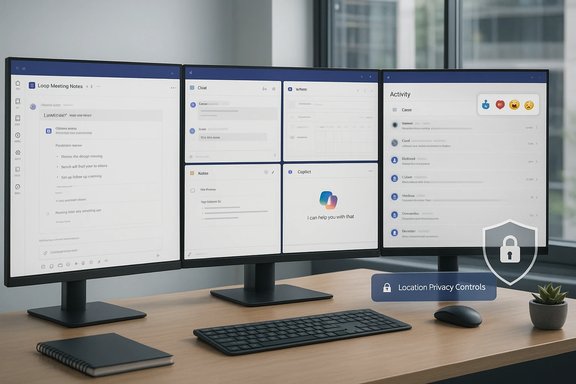
Microsoft Teams is gearing up for one of its most consequential update waves yet, with a slate of user-facing improvements and admin-focused controls slated through early 2026 that promise to smooth everyday friction — and, in some cases, raise fresh governance and privacy questions. The headlines are deceptively small: Loop-powered meeting notes for instant calls, tenant-branded meeting reactions, multi-window workflows, improved multi-tenant notifications and a contentious location‑sharing toggle — but the combined effect is a platform that’s becoming both more productive and more administrable, while also asking IT teams to tighten their playbooks. Coverage of the new features, and the reactions they’ve provoked, have already started to surface in mainstream tech outlets and specialist reporting, and community threads confirm the roadmap momentum behind many of the items users have been clamoring for.
Microsoft Teams is no longer a simple chat-and-meetings tool; it has become the central collaboration hub for huge organizations. Microsoft reported that Teams reached roughly 320 million monthly active users, a milestone that underscores why each interface tweak or policy control matters at scale. This user base fuels a fast-moving Microsoft 365 roadmap and a steady stream of incremental quality‑of‑life changes, many of which are targeted for early 2026. At the same time, the Microsoft 365 Roadmap and Message Center remain the canonical places to verify timelines, feature IDs, and roll‑out windows. Administrators and power users should treat specific dates as provisional and double‑check Message Center notices for tenant‑specific availability, because staged rollouts, licensing gates and targeted preview programs are common. Several recent roadmap summaries list dozens of Teams features as “in development” or “rolling out,” creating a steady stream of small but material improvements over time.
For IT leaders and power users, the practical approach is straightforward: pilot early, adjust governance and retention policies, and maintain tight coordination between Security, HR, Legal and End‑User Training teams. The features arriving in early 2026 will speed up many common tasks if deployed thoughtfully — but rushed, tenant‑wide rollouts without governance could create legal and morale headaches.
Microsoft’s product cadence makes it unlikely a single “killer feature” will change the equation; instead, the value accrues from many carefully executed small fixes. Prepare for the rollouts, protect your users, and start with low‑risk pilots: that’s the recipe to get the benefits while managing the risks.
Conclusion
The early‑2026 Teams update set is pragmatic, operational and at times controversial. It continues Microsoft’s long path of folding AI and collaboration glue into the everyday digital workspace while strengthening admin tooling. Teams will be faster to use and easier to govern in many respects — provided organizations do the preparatory work now. For administrators, the 2026 wave is a prompt to revisit policy, licensing and training; for users, it promises a more fluid, less fiddly Teams experience — with a few privacy tradeoffs to watch carefully.
Source: SlashGear 14 Much-Needed Microsoft Teams Features Are Coming In 2026 - SlashGear
 Background / Overview
Microsoft Teams is no longer a simple chat-and-meetings tool; it has become the central collaboration hub for huge organizations. Microsoft reported that Teams reached roughly 320 million monthly active users, a milestone that underscores why each interface tweak or policy control matters at scale. This user base fuels a fast-moving Microsoft 365 roadmap and a steady stream of incremental quality‑of‑life changes, many of which are targeted for early 2026. At the same time, the Microsoft 365 Roadmap and Message Center remain the canonical places to verify timelines, feature IDs, and roll‑out windows. Administrators and power users should treat specific dates as provisional and double‑check Message Center notices for tenant‑specific availability, because staged rollouts, licensing gates and targeted preview programs are common. Several recent roadmap summaries list dozens of Teams features as “in development” or “rolling out,” creating a steady stream of small but material improvements over time. What’s arriving in early 2026: the practical highlights
The 2026 roadmap entries favor pragmatic, productivity‑centric fixes over headline-grabbing reinventions. Below are the items most likely to change how daily Teams users work.Loop meeting notes for instant calls and improved meeting artifacts
- What’s changing: Loop components (the modular, co-editable pieces that live across Microsoft 365) can be attached to ad‑hoc “Meet now” calls and chat‑started meetings — not just scheduled events. This lets participants create persistent, structured meeting notes, agendas and action items in real time even for spontaneous discussions.
- Why it matters: Meeting artifacts become reusable across Spaces (Teams, Outlook, Loop app). Co‑editing and automatic sync reduce duplication and lost context after a quick call.
- Admin note: Loop components are subject to tenant governance and retention controls; organizations should confirm retention policies and sharing boundaries before heavy adoption.
Tenant‑branded meeting reactions and richer meeting expression
- What’s changing: Tenants will be able to upload custom reaction icons and branded images that meeting participants can use during calls.
- Why it matters: Marketing and events teams value consistent brand presence during webinars and client-facing sessions. For internal meetings, branded reactions reinforce culture or event themes.
- Risks: Branded reactions increase surface area for governance (copyrighted imagery, offensive content) and may introduce moderation overhead. Tenant admins should prepare an approval workflow for uploaded assets.
Multi‑window workflows and pop‑outs
- What’s changing: Core Teams modules — Chat, Calls, Calendar, Notes, and Copilot windows — will be pop‑outable into separate, resizable windows on desktop clients.
- Why it matters: Multi-monitor and multitasking users benefit from reduced context switching. This closes a long‑standing productivity gap relative to other collaboration clients.
- Deployment notes: The experience is desktop-first and may differ across channel and platform; train power users and update screenshots in documentation.
Centralized multi‑tenant activity panel
- What’s changing: For users signed into multiple work or partner tenants, Teams will surface a centralized “Activity in other accounts and orgs” panel that aggregates missed notifications, letting users open items in child windows without switching main tenant context.
- Why it matters: Consultants, contractors and admins who operate across tenants often lose time switching contexts. Centralized visibility reduces missed messages and errors.
- Admin note: Enabled by default but respects messaging policies and tenant-level settings.
Resizable content/video divider and layout improvements during screen sharing
- What’s changing: Users will be able to resize the split between shared content and the gallery or swap positions, prioritizing content or participants as needed.
- Why it matters: Better control over layout is a small but significant win for presenters and educators, especially on ultrawide monitors and meeting room displays. Roadmap items show targeted release windows in late 2025 and early 2026.
Auto‑set “work location” based on corporate Wi‑Fi and device associations (location sharing)
- What’s changing: When a user connects to a corporate Wi‑Fi network or plugs into desk hardware, Teams can set a “work location” state (e.g., “In the Office” or a specific building). Administrators control whether the behavior is enabled tenant-wide or for specific groups.
- Why it matters: The feature can simplify on‑site coordination and desk booking workflows.
- Risks and privacy concerns: The automatic, admin‑controlled nature of the feature has raised immediate privacy debate. Critics argue it provides employers with an overly convenient way to monitor presence, while defenders highlight campus coordination and occupancy analytics benefits. Feature previews and coverage show availability began in late 2025 with broader rollouts into early 2026. Administrators must weigh legal, HR and consent implications before enabling.
Security and admin tooling: inline DLP, malicious URL scanning, and device telemetry
- What’s changing: Teams is getting inline data loss prevention (DLP) controls for GenAI interactions, malicious URL protection for chat and channels, and improved activity logs for Teams phone/device management.
- Why it matters: As Teams becomes a more central platform for business workflows and Copilot interactions, inline controls and telemetry are essential to reduce exfiltration and attacker use of social engineering.
- Rollout and admin work: Many of these are rolling out via the Teams admin center or Microsoft Purview controls; admins should prioritize baseline policies and evaluate the impact on third‑party integrations.
The numbers and timelines: what’s verified today
- Users: Microsoft publicly referenced Teams hitting roughly 320 million monthly active users in late 2023 statements and repeated in later community posts; multiple independent outlets still reference this milestone when discussing Teams scale. This is a useful anchor for understanding the pace and impact of incremental feature rollouts.
- Roadmap scope: Independent trackers and Microsoft‑maintained channels show dozens of Teams items in development and many more rolling out across 2024–2026; specific counts fluctuate as Microsoft iterates the roadmap, but community reporting has referenced figures in the 60–70 items range for Teams alone at several points. These totals are dynamic and should be confirmed via the Microsoft 365 Roadmap or Message Center for exact, tenant‑relevant schedules. Treat any single snapshot number as provisional.
- Release windows: The bulk of the user‑facing items listed above are described in community and roadmap posts as targeted for late 2025 through early 2026, with staged rollouts that often begin in Targeted Release or preview rings before expanding. Admins must watch Message Center notices for tenant-specific GA timing.
Critical analysis: strengths, friction points and real risks
Microsoft’s 2026 Teams roadmap contains several clear strengths, but also non‑trivial tradeoffs. Below is a pragmatic assessment, detailing benefits and risks for IT leaders and power users.Strengths — incremental polish that compounds
- Reduced context switching: Multi‑window workflows, centralized multi‑tenant activity, and resizable meeting layouts address long‑standing productivity user complaints. These aren’t flashy, but they produce measurable day‑to‑day time savings for multitaskers and consultants.
- Better meeting outputs: Loop meeting notes for instant calls and integrated Intelligent Recap (meeting summaries, action extraction) make meetings more reusable and auditable. For knowledge workers, that saves time and reduces the “lost notes” problem.
- Stronger admin controls: Inline DLP, device activity logs, and malicious URL scanning demonstrate Microsoft’s emphasis on governance. For regulated industries, these are essential steps toward safely enabling AI and external collaboration inside Teams.
Friction points and operational costs
- Licensing and feature gating: Many Copilot‑adjacent features remain behind Copilot or Teams Premium licensing, and Microsoft’s layered model (Copilot for enterprise, Copilot Pro, etc. means that IT must navigate cost/benefit tradeoffs when enabling agentic features at scale. Expect procurement friction and careful pilot scoping.
- Admin overhead: Branded reactions, custom Loop templates, and preinstalled apps introduce new governance tasks. Approving images, managing templates and auditing app behavior will add to app security and compliance workflows. Plan for extra man‑hours in the short term.
- Hardware and client parity: Several features debut on desktop first or are constrained to Teams Rooms Pro; parity across platforms (Windows, macOS, web, iOS, Android) comes later. For organizations that support diverse endpoints, mismatched experiences will create support tickets.
Privacy and surveillance concerns — location sharing as a flashpoint
The location auto‑detection feature that toggles a user’s “work location” based on corporate Wi‑Fi or plugged‑in desk hardware is the clearest public example of a convenience feature with serious privacy implications. The feature is marketed as a coordination tool, but critics note it can function as a passive presence tracker if admins enable it tenant‑wide without adequate policy guardrails.- Legal and HR exposure: Depending on jurisdiction, automatic workplace location tracking may trigger employee‑monitoring laws or require consultation with labor unions and privacy officers. Documented consent, clear retention policies and limited admin visibility are essential mitigations.
- Operational mitigation checklist:
- Evaluate legal/regulatory implications in your operating countries.
- Limit rollouts to pilot groups and frontline scenarios where physical presence is operationally necessary.
- Create a documented consent and transparency policy for employees.
- Use tenant segmentation so only required admin roles have access to location telemetry.
What IT teams should do now — prioritized checklist
The upcoming Teams changes reward planning. Below are practical steps to prepare for the early‑2026 wave.- Audit Copilot and Teams Premium licensing exposure.
- Map which features require Copilot or Teams Premium.
- Model costs for pilot groups and production scale.
- Review Message Center and the Microsoft 365 Roadmap weekly.
- Subscribe to tenant Message Center notices and assign an owner to triage upcoming feature toggles.
- Update governance playbooks for:
- Loop components and shared meeting notes (retention, sharing boundaries).
- Branded assets upload and approval workflows.
- Location and presence telemetry policies (consent, roles with access, retention).
- Pilot in controlled groups.
- Start with power users and IT helpdesk to surface issues in multi‑window workflows, meeting notes and resizable layouts.
- Train helpdesk and knowledge bases.
- Prepare simple how‑tos for toggling autocorrect, disabling location auto‑set where allowed, and using the new meeting layouts.
- Security baseline.
- Enable malicious URL protections in preview where appropriate and verify DLP policies work with Copilot/agent use cases.
- Monitor for supply‑chain and installer threats.
- Past incidents where fake Teams installers were used in attacks underline the need for certificate and installer verification in controlled app deployment flows. Expand endpoint detection to look for suspicious installer signatures and educate users about official download channels.
Cross‑checking claims and what’s still tentative
- The user count of ~320 million monthly active users is corroborated by Microsoft communications and multiple independent outlets; that number is a stable reference point for scale. However, Microsoft’s published user numbers are periodically updated; check the latest investor relations and community posts for absolute confirmation.
- Roadmap counts (e.g., “over 60 features in development”) are snapshots that fluctuate as items are launched, reclassified or delayed. Community trackers reported figures in the 60–70 range for Teams‑specific items at various times, but the exact number changes daily as Microsoft iterates. Treat single‑figure claims as provisional and verify against the Microsoft 365 Roadmap when planning.
- Location sharing and other sensitive features have been previewed and reported widely; timelines for broader availability slipped during late 2025 into early 2026 for some clients. Administrators should assume staged availability and rely on Message Center notices for tenant‑specific dates.
The bottom line for WindowsForum readers
Microsoft’s 2026 Teams roadmap is pragmatic: it prioritizes many small, user‑facing fixes that compound into noticeably better daily workflows while simultaneously adding necessary governance and security controls for enterprise adoption. The incremental wins — multi‑window support, Loop meeting notes in instant calls, centralized multi‑tenant activity, and improved screen‑share layouts — are the kind of improvements that make Teams feel more modern and usable. At the same time, features like automatic location detection and the growing breadth of Copilot/agent capabilities require sober planning around privacy, licensing, and admin overhead.For IT leaders and power users, the practical approach is straightforward: pilot early, adjust governance and retention policies, and maintain tight coordination between Security, HR, Legal and End‑User Training teams. The features arriving in early 2026 will speed up many common tasks if deployed thoughtfully — but rushed, tenant‑wide rollouts without governance could create legal and morale headaches.
Microsoft’s product cadence makes it unlikely a single “killer feature” will change the equation; instead, the value accrues from many carefully executed small fixes. Prepare for the rollouts, protect your users, and start with low‑risk pilots: that’s the recipe to get the benefits while managing the risks.
Conclusion
The early‑2026 Teams update set is pragmatic, operational and at times controversial. It continues Microsoft’s long path of folding AI and collaboration glue into the everyday digital workspace while strengthening admin tooling. Teams will be faster to use and easier to govern in many respects — provided organizations do the preparatory work now. For administrators, the 2026 wave is a prompt to revisit policy, licensing and training; for users, it promises a more fluid, less fiddly Teams experience — with a few privacy tradeoffs to watch carefully.
Source: SlashGear 14 Much-Needed Microsoft Teams Features Are Coming In 2026 - SlashGear
