

Microsoft has added Microsoft 365 Roadmap ID 567305 for Microsoft Teams, an in-development Desktop and Mac feature that will let meeting and event organizers specify who has control of production tools, with General Availability for Worldwide standard tenants slated for August 2026. The option is small on paper and consequential in practice: it gives organizers a way to separate “presenter” from “producer.” For anyone who has run a webinar, town hall, executive broadcast, or controlled meeting in Teams, that distinction is the difference between a clean show and a live-event scramble. Microsoft is quietly admitting that modern Teams events need stage management, not just meeting permissions.
This is not another flashy AI button, nor a new audience engagement widget. It is a governance feature for the messy middle of live collaboration: the people who need to operate the broadcast, cue speakers, manage the green room, and decide what the audience sees without accidentally giving every presenter the same level of production control. In a product that has spent years absorbing the jobs of meetings, webinars, live events, town halls, and video production booths, the new option is Microsoft’s clearest sign that Teams events are being treated less like calls and more like managed broadcasts.
The roadmap entry is unusually direct. Microsoft describes a new meeting option for Teams meetings with presenters and events that enables organizers to designate “Who has control of production tools” during the event. Users selected there will have access to the controls in “Manage What Attendees See” and the “Green Room.”
That sentence matters because Teams has long collapsed several jobs into one broad role. A presenter may need to speak, share slides, answer a question, or appear on camera for three minutes. A producer, by contrast, needs to control the audience experience: who is visible, what content is staged, when the event starts, how the backroom operates, and how transitions happen.
In a small team meeting, that difference barely matters. In a 1,000-person town hall with executives, legal observers, external speakers, IT support, comms staff, and a nervous CEO waiting in the green room, it matters a lot. The wrong permission boundary can turn a polished internal broadcast into a screen-sharing free-for-all.
Microsoft’s roadmap item suggests the company is putting a named permission layer around that production function. Instead of treating every presenter as a de facto operator of the event experience, organizers will be able to designate the people who actually control production tools. The feature is marked as in development, applies to Microsoft Teams on Desktop and Mac, targets General Availability, and is listed for the Worldwide standard multi-tenant cloud in August 2026.
The created and last-updated timestamps are identical — July 8, 2026 at 23:10:57.8991775 UTC — which makes this a fresh roadmap addition rather than a long-running item being quietly revised. That timing also explains why the surrounding documentation feels slightly ahead of the public rollout: Microsoft Learn already describes the production-control concept in town hall planning material, while the roadmap marks this specific meeting option as still in development.
The practical reading is straightforward. Microsoft has the conceptual model in its event documentation, and the product team is now moving the control into an explicit organizer-facing meeting option for Teams meetings with presenters and events.
In the current green room experience, Microsoft says organizers and presenters can manage what attendees see, turn on captions, add apps such as Q&A, access meeting notes, see and remove participants, view presenter audio and video, react, and start the meeting under certain client conditions. Attendees, by contrast, wait outside the live experience and cannot see or hear what is happening in the green room.
That boundary is what makes the green room useful. It lets the production team line up speakers, test slides, handle late arrivals, and coordinate privately while attendees see a controlled waiting experience. But the same model creates a problem: if every presenter can access key production controls, the role becomes too broad for complex events.
A guest speaker should not necessarily be able to manage the attendee stage. An executive presenter should not necessarily be able to start or end the event. A subject-matter expert invited to answer two questions should not automatically become part of the production crew. Yet in many collaboration systems, the easiest way to give someone enough access to speak also gives them more control than they need.
That is the gap Roadmap ID 567305 appears designed to close. It does not remove the presenter role; it puts a new selector over production tooling. The people chosen there get access to “Manage What Attendees See” and the green room controls. The people not chosen can still be part of the event, but they are no longer automatically implied to be the production desk.
This is the kind of feature that sounds minor until you have watched a presenter accidentally share the wrong screen, move the wrong person on stage, talk over the producer, or assume the event is live when it is not. Teams has been trying to serve both informal meetings and broadcast-grade events. The production-control option is an admission that those worlds should not share the same permission assumptions.
In a conventional Teams meeting, the audience experience is relatively democratic. Participants can show video, share content if permitted, and arrange their own view. In a managed event, the organizer wants the opposite: the attendee should see the speaker, slide deck, panel, or video feed that the event team has selected. Everyone else should remain off stage.
That shift is why Microsoft’s older Teams Live Events model had distinct production concepts and why town halls have had to absorb more broadcast features over time. Microsoft’s Community Hub material around town halls emphasized features such as manage-what-attendees-see, hiding participant lists, and RTMP-based production paths as part of the move toward more polished presentation experiences. The roadmap item is not isolated from that history; it is a continuation of it.
The stakes are higher than aesthetics. “Manage What Attendees See” governs whether the audience sees a prepared event or the raw mechanics behind it. If the wrong person can alter that state, the event can expose a private feed, leave a speaker off screen, show a pre-read document too early, or create dead air while the event team argues over who has control.
The new option reduces that risk by letting organizers name the production operators. In IT terms, it is a least-privilege model for live-event control. In production terms, it is the difference between giving every speaker access to the control room and assigning a floor director.
That framing also helps explain why the roadmap item applies to Teams meetings with presenters and events. Microsoft is not only solving a town hall problem. It is addressing the broader category of structured Teams sessions where the audience experience is intentionally managed.
That is not necessarily a contradiction. Microsoft’s documentation often lands near active rollout windows, and the roadmap entry may refer to broader availability, a specific meeting-option implementation, or a platform-scoped release for Desktop and Mac. But it does create an important caution for admins: do not assume that because a feature appears in Learn documentation, it is uniformly available across every tenant, event type, client, and cloud.
The roadmap is the safer deployment signal here. It says the feature is in development, targets General Availability, applies to Desktop and Mac, and is planned for Worldwide standard multi-tenant customers in August 2026. Until the control appears consistently in tenant UI and admin-facing behavior, IT teams should treat it as incoming rather than fully dependable.
The Learn documentation is still useful because it clarifies Microsoft’s intent. Production control is not being framed as a cosmetic meeting option. It is tied to starting the event, managing the attendee view, ending the event, and giving production capabilities to selected participants in the event workflow. In other words, Microsoft is building a more explicit control plane for Teams events.
That matters because Teams event operations have become a patchwork of organizer settings, presenter roles, admin policies, Teams Premium capabilities, lobby behavior, external presenter flows, and client limitations. A named production-control option helps make the model legible. It tells organizers: these are the people running the show.
This is not, based on the roadmap language, a new tenant-wide admin policy that centrally assigns production roles across the organization. It is an organizer-level control inside Teams meetings with presenters and events. The users designated there gain access to “Manage What Attendees See” and the green room.
That is narrower than some admins might want. Enterprises often prefer policy-driven guardrails: let only trained communications staff produce town halls, block executives from self-producing large broadcasts, require external speakers to remain off the production surface, or create templates that lock down event behavior. The roadmap entry does not promise all of that.
But the narrowness is also useful. Live events are situational. A quarterly all-hands may need two comms producers, one Teams admin, and a backup moderator. A training webinar may need only the organizer and one facilitator. A board-facing session may need a tightly controlled production group. A departmental meeting may need no production delegation at all.
By making this an organizer-designated option, Microsoft gives event owners flexibility without requiring every organization to redesign its Teams policy model. The trade-off is that admins will need to train organizers, not merely configure tenants. A control that lives in meeting options is only as good as the person setting up the meeting.
That is where the feature becomes a governance story. Microsoft is giving organizers a sharper tool. It is not automatically ensuring they will use it well.
Live digital events fail in predictable ways. The event starts before the presenters are ready. A speaker is brought on screen with camera or microphone in an unintended state. Attendees see the wrong feed. A producer cannot get access because they were invited under the wrong role. A presenter has enough permission to disrupt the stage but not enough understanding of the run-of-show. A last-minute external speaker joins late and gets promoted in a hurry.
Microsoft Support’s green room documentation already carries warnings that expose some of these edge cases. It notes, for example, that when an attendee waiting for a meeting to start is made a presenter, other attendees waiting for the meeting to start may be able to hear them, and Microsoft recommends demoting them to avoid live microphones. It also says compliance recording behavior differs before the meeting starts and once the meeting has started.
Those details show how delicate the pre-live and live boundary can be. The production space is not a neutral holding area. It has microphones, feeds, roles, recording implications, attendee waiting states, and client-specific behavior. A role change at the wrong time can have audience-visible consequences.
The new production-control option cannot eliminate every operational mistake. It will not write a run sheet, train presenters, test microphones, verify external speakers, or prevent human panic five minutes before an all-hands. But it can reduce the blast radius of the presenter role.
That is why the feature is more important than its roadmap blurb suggests. In a managed event, production control is power. Teams has needed a cleaner way to assign that power.
Events are different. They have a backstage, a stage, and an audience. They require sequencing. They require preview. They require a way to separate the people who appear from the people who operate. They also require a permission model that does not crumble under the social pressure of “just make them a presenter so they can get in.”
That phrase — “make them a presenter” — is the root of many Teams event problems. It is a blunt instrument. It often solves an immediate access issue while creating a broader control issue. The presenter can now do more than speak; depending on meeting type and settings, the presenter may be able to interact with event controls that should belong to the production team.
Microsoft’s new option is an attempt to make that escalation less blunt. It lets the organizer say: yes, this person is part of the event, but no, they are not necessarily the operator of the production surface. Or conversely: this person may not be a headline speaker, but they are trusted to run the green room and attendee view.
That is closer to how real events work. The most important person in the control room is often not the person on camera. Teams is finally getting a permission model that acknowledges that.
Event production is still a desktop-class job. A phone can join a meeting, react, monitor chat, or speak in a pinch. A tablet can present slides or check an attendee view. But the production operator usually needs stable window management, reliable screen sharing, participant controls, backchannel communication, and enough visible workspace to monitor the event.
Microsoft Support’s green room documentation already distinguishes client behavior in places, including who can start meetings from the green room and what happens when organizers or presenters join from mobile devices. The roadmap’s Desktop and Mac scope fits that reality. Production tooling belongs on full clients first.
For IT teams, the platform listing should shape rollout guidance. If an organizer expects a producer to run a town hall from a mobile device, that is already a bad plan. If an executive assistant is assigned production control but joins from an unsupported or limited client, the feature may not behave the way the event team expects. If a Mac-heavy communications department runs internal broadcasts, the explicit Mac listing is welcome; it means Microsoft is not treating production control as Windows-only in the roadmap.
The cloud scope is equally specific. The item targets Worldwide standard multi-tenant customers. That means organizations in specialized sovereign or government clouds should not infer availability from the standard roadmap entry alone. For large enterprises, that distinction matters because event production practices often span subsidiaries, regulated units, and regional tenants.
The feature may look like a UI toggle, but its rollout needs the same discipline as any operational capability. Know the platform. Know the cloud. Know the event type. Test before the executive rehearsal, not during it.
The important point is not that Microsoft is inventing event production. Teams already has green room, attendee view control, town hall workflows, Q&A, recording behavior, and production-oriented documentation. The important point is that Microsoft is making production authority more explicit.
That is how mature collaboration platforms evolve. First they add capability. Then they add control. Teams has spent years adding event features; now it is being forced to refine who can touch them.
Every organization that uses Teams for large or high-stakes events should already have a runbook. Who creates the event? Who owns the invite? Who admits presenters? Who controls Q&A? Who records? Who manages slides? Who can stop the event? Who is the backup producer? The new production-control option gives that runbook a stronger implementation point inside Teams.
It also creates a new pre-event question: who gets production tools? That answer should not be improvised. It should be decided before invitations go out, confirmed during rehearsal, and reviewed again before the event starts.
For regulated organizations, the feature also intersects with compliance practices. Microsoft’s green room documentation notes that compliance recording behavior does not cover all pre-start green room and attendee waiting states in the same way it covers the meeting once started. That does not mean the new feature creates a compliance problem, but it does mean production spaces should not be treated as casual off-record rooms without legal review. If sensitive material is discussed backstage, organizations need to understand their recording, retention, and supervision obligations.
For security teams, the principle is simpler: reduce unnecessary privileges. A presenter who only needs to speak should not also be able to manage the attendee stage. An external guest should not receive production control unless there is a deliberate reason. A backup producer should be named, not promoted in panic after the primary producer loses connectivity.
For communications teams, the benefit is clarity. The show caller, not every speaker, should run the show.
Microsoft Learn’s Teams settings and policies reference places “Manage what attendees see” among settings tied to town hall and template behavior, and Microsoft’s broader event documentation distinguishes capabilities across meetings, webinars, and town halls. Some advanced meeting and event experiences sit behind Teams Premium licensing, while others are available in standard event flows or controlled by policy. The new roadmap item says what the option does; it does not, by itself, settle every licensing edge case.
That distinction matters because IT support tickets rarely arrive in roadmap language. They arrive as: “The producer cannot see the option,” “the external presenter can join but not control anything,” “the Mac user sees something different,” or “this worked in a town hall but not in a meeting.” The answer may involve rollout timing, client version, event type, policy, license, or user role.
The production-control feature should therefore be tested in the exact event format an organization uses. A town hall rehearsal is not the same as an ordinary meeting. A webinar is not always a town hall. A desktop client is not a browser. A Mac client should be validated separately from Windows if the production team depends on it.
This is where Microsoft’s “one Teams” branding can obscure operational reality. The product presents meetings, webinars, and town halls as parts of a unified collaboration suite. The admin reality is that each event type has its own combination of controls, policies, attendee behaviors, and licensing dependencies. The new option is welcome precisely because it cuts across some of that complexity with a clearer production authority model, but it will not erase the underlying matrix.
Microsoft has been consolidating that demand inside Teams. Town halls were introduced as a more modern event format, and Microsoft’s own messaging around town halls emphasized polished presentations, controlled attendee views, hidden participant lists, and production features. The new production-tools control belongs to that same strategic arc.
The company wants Teams to be not only where employees talk, but where organizations broadcast to themselves. That requires trust. Executives need to trust that attendees will see the right thing. Legal teams need to trust that the event is controlled. IT needs to trust that permissions are predictable. Communications teams need to trust that Teams can replace a dedicated webcast stack for many internal events.
A vague presenter model undermines that trust. It may be fine for a department sync, but it is not fine for a CEO town hall where an earnings-sensitive question could appear, a confidential slide could be shared early, or an external speaker could accidentally appear backstage. Production control is part of the platform’s credibility.
This is also why the feature matters even to organizations that do not think of themselves as broadcasters. Any Teams meeting with presenters can become a production scenario once the audience is large enough, the content is sensitive enough, or the hierarchy is visible enough. The difference between “meeting” and “event” is often political, not technical.
The first risk is role confusion. Organizers may assume that assigning production tools replaces all other role planning. It does not. Presenters still need the right invitations. External speakers may have separate join and verification flows. Lobby settings still matter. Meeting policies still shape what users can do. The production-control selector is one layer in a larger event model.
The second risk is under-training. The people given production tools need to know what those tools do. “Manage What Attendees See” is powerful because it controls the attendee stage; it is also dangerous in inexperienced hands. A producer should understand how to bring people on and off screen, how the green room behaves, how to recover from a speaker problem, and what attendees can see at each phase.
The third risk is inadequate rehearsal. Teams event features often behave differently before the event starts, while the event is live, and after it ends. Microsoft Support’s green room documentation explicitly distinguishes pre-meeting preparation, attendee waiting behavior, and post-event return to the green room. A five-minute test call is not enough for a high-stakes broadcast.
The fourth risk is over-delegation. Because the option allows organizers to designate users, some may designate too many “just in case.” That recreates the original problem in a new UI. Production control should be given to the smallest group that can reliably run the event, with one backup.
The fifth risk is assuming availability before rollout. The roadmap says August 2026 General Availability for Worldwide standard multi-tenant customers, with the feature currently in development. Until it appears in the tenant and the relevant clients, event teams should not build an imminent production plan around it.
The feature is a control, not a substitute for control discipline. It will help organizations that already think carefully about event production. It will only marginally help organizations that treat every large Teams event as a normal meeting with a bigger invite list.
It also gives communications teams a stronger argument for pre-event access reviews. Before an all-hands, the organizer can ask not only “who is presenting?” but “who controls production?” That question should become part of the event template, along with Q&A ownership, recording settings, slide control, and backup communications.
For Teams Rooms deployments, the broader Microsoft Learn event documentation is also worth watching because it discusses production capabilities in relation to room systems in town hall contexts. The roadmap fact table for ID 567305 is scoped to Microsoft Teams Desktop and Mac, so admins should not overread the roadmap item into every device scenario. But the direction is clear: Microsoft is thinking about production control as something that may involve more than a single organizer’s laptop.
For security and compliance teams, the feature is a reminder to review backstage behavior. The green room feels private because attendees cannot see it, but it is still part of the collaboration environment. Sensitive pre-briefs, executive comments, or incident-response discussions should not be casually mixed into event setup unless the organization understands recording and retention behavior.
For end users, the visible change may be modest. Attendees probably will not know who has production control. Presenters may only notice that they no longer have access to certain controls unless designated. But behind the scenes, the event team gains a more professional operating model.
That is exactly how this kind of feature should work. The best production controls are invisible to the audience.
The UI should make the distinction explicit. Presenter is about appearing and contributing. Production control is about operating the event. If Microsoft buries that explanation, organizers will either ignore the option or misuse it. If Microsoft overcomplicates it, admins will have another training burden in a product already full of meeting toggles.
The best implementation would pair the selector with contextual warnings: production controllers can access green room and manage attendee view; assign only trusted users; test before the event; availability may depend on event type and client. Microsoft does not need to turn Teams into OBS Studio. It needs to make the existing event controls less ambiguous.
The August 2026 General Availability target also puts pressure on documentation consistency. If Microsoft Learn continues to describe capabilities before every tenant sees them, admins will need clear rollout notes. If the roadmap entry covers meetings with presenters and events while Learn examples emphasize town halls, Microsoft should explain the supported scenarios plainly.
The feature’s success will not be measured by how many users click it. It will be measured by how many large Teams events stop relying on over-permissioned presenters and last-minute organizer heroics.
The next phase of Teams will not be defined only by smarter summaries, prettier layouts, or more AI-generated follow-ups. It will be defined by whether Microsoft can make hybrid work’s most visible moments feel controlled, reliable, and professionally run. Roadmap ID 567305 is a modest entry in a long list of Microsoft 365 changes, but for the people responsible for making a live Teams event look effortless, it may become one of the most useful toggles Microsoft ships in 2026.
This is not another flashy AI button, nor a new audience engagement widget. It is a governance feature for the messy middle of live collaboration: the people who need to operate the broadcast, cue speakers, manage the green room, and decide what the audience sees without accidentally giving every presenter the same level of production control. In a product that has spent years absorbing the jobs of meetings, webinars, live events, town halls, and video production booths, the new option is Microsoft’s clearest sign that Teams events are being treated less like calls and more like managed broadcasts.
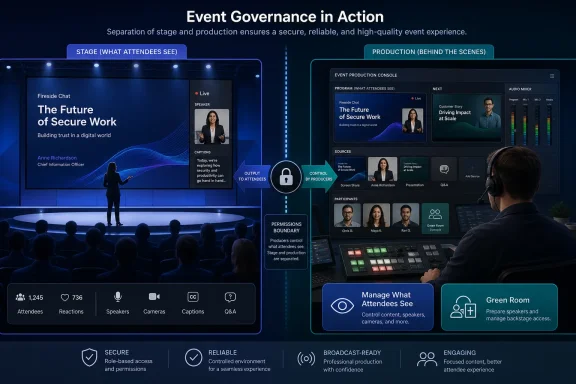 Microsoft Is Splitting the Presenter From the Producer
The roadmap entry is unusually direct. Microsoft describes a new meeting option for Teams meetings with presenters and events that enables organizers to designate “Who has control of production tools” during the event. Users selected there will have access to the controls in “Manage What Attendees See” and the “Green Room.”That sentence matters because Teams has long collapsed several jobs into one broad role. A presenter may need to speak, share slides, answer a question, or appear on camera for three minutes. A producer, by contrast, needs to control the audience experience: who is visible, what content is staged, when the event starts, how the backroom operates, and how transitions happen.
In a small team meeting, that difference barely matters. In a 1,000-person town hall with executives, legal observers, external speakers, IT support, comms staff, and a nervous CEO waiting in the green room, it matters a lot. The wrong permission boundary can turn a polished internal broadcast into a screen-sharing free-for-all.
Microsoft’s roadmap item suggests the company is putting a named permission layer around that production function. Instead of treating every presenter as a de facto operator of the event experience, organizers will be able to designate the people who actually control production tools. The feature is marked as in development, applies to Microsoft Teams on Desktop and Mac, targets General Availability, and is listed for the Worldwide standard multi-tenant cloud in August 2026.
The created and last-updated timestamps are identical — July 8, 2026 at 23:10:57.8991775 UTC — which makes this a fresh roadmap addition rather than a long-running item being quietly revised. That timing also explains why the surrounding documentation feels slightly ahead of the public rollout: Microsoft Learn already describes the production-control concept in town hall planning material, while the roadmap marks this specific meeting option as still in development.
The practical reading is straightforward. Microsoft has the conceptual model in its event documentation, and the product team is now moving the control into an explicit organizer-facing meeting option for Teams meetings with presenters and events.
The Green Room Was Always a Permission Problem
Microsoft Support describes the Teams green room as a space where organizers and presenters can prepare before a meeting or event, test content sharing, check audio and video, and return after the event to debrief. That sounds simple, but the green room is not merely a waiting room. It is a production space, and production spaces need access control.In the current green room experience, Microsoft says organizers and presenters can manage what attendees see, turn on captions, add apps such as Q&A, access meeting notes, see and remove participants, view presenter audio and video, react, and start the meeting under certain client conditions. Attendees, by contrast, wait outside the live experience and cannot see or hear what is happening in the green room.
That boundary is what makes the green room useful. It lets the production team line up speakers, test slides, handle late arrivals, and coordinate privately while attendees see a controlled waiting experience. But the same model creates a problem: if every presenter can access key production controls, the role becomes too broad for complex events.
A guest speaker should not necessarily be able to manage the attendee stage. An executive presenter should not necessarily be able to start or end the event. A subject-matter expert invited to answer two questions should not automatically become part of the production crew. Yet in many collaboration systems, the easiest way to give someone enough access to speak also gives them more control than they need.
That is the gap Roadmap ID 567305 appears designed to close. It does not remove the presenter role; it puts a new selector over production tooling. The people chosen there get access to “Manage What Attendees See” and the green room controls. The people not chosen can still be part of the event, but they are no longer automatically implied to be the production desk.
This is the kind of feature that sounds minor until you have watched a presenter accidentally share the wrong screen, move the wrong person on stage, talk over the producer, or assume the event is live when it is not. Teams has been trying to serve both informal meetings and broadcast-grade events. The production-control option is an admission that those worlds should not share the same permission assumptions.
“Manage What Attendees See” Is the Real Broadcast Layer
The second half of the roadmap description points to the feature’s real center of gravity: “Manage What Attendees See.” Microsoft’s own Teams materials describe this as the capability that lets organizers and presenters control which shared content and people are brought on screen for attendees. That is not just a layout preference. It is the director’s switchboard.In a conventional Teams meeting, the audience experience is relatively democratic. Participants can show video, share content if permitted, and arrange their own view. In a managed event, the organizer wants the opposite: the attendee should see the speaker, slide deck, panel, or video feed that the event team has selected. Everyone else should remain off stage.
That shift is why Microsoft’s older Teams Live Events model had distinct production concepts and why town halls have had to absorb more broadcast features over time. Microsoft’s Community Hub material around town halls emphasized features such as manage-what-attendees-see, hiding participant lists, and RTMP-based production paths as part of the move toward more polished presentation experiences. The roadmap item is not isolated from that history; it is a continuation of it.
The stakes are higher than aesthetics. “Manage What Attendees See” governs whether the audience sees a prepared event or the raw mechanics behind it. If the wrong person can alter that state, the event can expose a private feed, leave a speaker off screen, show a pre-read document too early, or create dead air while the event team argues over who has control.
The new option reduces that risk by letting organizers name the production operators. In IT terms, it is a least-privilege model for live-event control. In production terms, it is the difference between giving every speaker access to the control room and assigning a floor director.
That framing also helps explain why the roadmap item applies to Teams meetings with presenters and events. Microsoft is not only solving a town hall problem. It is addressing the broader category of structured Teams sessions where the audience experience is intentionally managed.
The Documentation Is Already Hinting at the Direction of Travel
There is an interesting tension between Microsoft’s sources. The Microsoft 365 roadmap says the feature is in development and scheduled for General Availability in August 2026. Microsoft Learn’s town hall planning documentation already describes a “Who has control of production tools” capability in the town hall feature matrix, saying organizers can choose specific organizers, co-organizers, or presenters who can control production tools, including starting the event, managing what attendees see, and ending the event.That is not necessarily a contradiction. Microsoft’s documentation often lands near active rollout windows, and the roadmap entry may refer to broader availability, a specific meeting-option implementation, or a platform-scoped release for Desktop and Mac. But it does create an important caution for admins: do not assume that because a feature appears in Learn documentation, it is uniformly available across every tenant, event type, client, and cloud.
The roadmap is the safer deployment signal here. It says the feature is in development, targets General Availability, applies to Desktop and Mac, and is planned for Worldwide standard multi-tenant customers in August 2026. Until the control appears consistently in tenant UI and admin-facing behavior, IT teams should treat it as incoming rather than fully dependable.
The Learn documentation is still useful because it clarifies Microsoft’s intent. Production control is not being framed as a cosmetic meeting option. It is tied to starting the event, managing the attendee view, ending the event, and giving production capabilities to selected participants in the event workflow. In other words, Microsoft is building a more explicit control plane for Teams events.
That matters because Teams event operations have become a patchwork of organizer settings, presenter roles, admin policies, Teams Premium capabilities, lobby behavior, external presenter flows, and client limitations. A named production-control option helps make the model legible. It tells organizers: these are the people running the show.
The New Boundary Is Narrow, but That Is the Point
The fact table for Roadmap ID 567305 does not describe a sweeping policy framework. It describes a meeting option. That distinction is important.This is not, based on the roadmap language, a new tenant-wide admin policy that centrally assigns production roles across the organization. It is an organizer-level control inside Teams meetings with presenters and events. The users designated there gain access to “Manage What Attendees See” and the green room.
That is narrower than some admins might want. Enterprises often prefer policy-driven guardrails: let only trained communications staff produce town halls, block executives from self-producing large broadcasts, require external speakers to remain off the production surface, or create templates that lock down event behavior. The roadmap entry does not promise all of that.
But the narrowness is also useful. Live events are situational. A quarterly all-hands may need two comms producers, one Teams admin, and a backup moderator. A training webinar may need only the organizer and one facilitator. A board-facing session may need a tightly controlled production group. A departmental meeting may need no production delegation at all.
By making this an organizer-designated option, Microsoft gives event owners flexibility without requiring every organization to redesign its Teams policy model. The trade-off is that admins will need to train organizers, not merely configure tenants. A control that lives in meeting options is only as good as the person setting up the meeting.
That is where the feature becomes a governance story. Microsoft is giving organizers a sharper tool. It is not automatically ensuring they will use it well.
A Small Control With Big Failure Modes
The easiest way to underestimate this feature is to think of it as a convenience setting. It is better understood as a failure-prevention setting.Live digital events fail in predictable ways. The event starts before the presenters are ready. A speaker is brought on screen with camera or microphone in an unintended state. Attendees see the wrong feed. A producer cannot get access because they were invited under the wrong role. A presenter has enough permission to disrupt the stage but not enough understanding of the run-of-show. A last-minute external speaker joins late and gets promoted in a hurry.
Microsoft Support’s green room documentation already carries warnings that expose some of these edge cases. It notes, for example, that when an attendee waiting for a meeting to start is made a presenter, other attendees waiting for the meeting to start may be able to hear them, and Microsoft recommends demoting them to avoid live microphones. It also says compliance recording behavior differs before the meeting starts and once the meeting has started.
Those details show how delicate the pre-live and live boundary can be. The production space is not a neutral holding area. It has microphones, feeds, roles, recording implications, attendee waiting states, and client-specific behavior. A role change at the wrong time can have audience-visible consequences.
The new production-control option cannot eliminate every operational mistake. It will not write a run sheet, train presenters, test microphones, verify external speakers, or prevent human panic five minutes before an all-hands. But it can reduce the blast radius of the presenter role.
That is why the feature is more important than its roadmap blurb suggests. In a managed event, production control is power. Teams has needed a cleaner way to assign that power.
The Old Role Model Was Built for Meetings, Not Events
Teams began as a collaboration product, not a broadcast studio. Its meeting model reflects that origin: organizers, co-organizers, presenters, attendees, guests, lobby rules, chat settings, screen sharing permissions, and meeting policies. Those primitives work well enough for everyday calls.Events are different. They have a backstage, a stage, and an audience. They require sequencing. They require preview. They require a way to separate the people who appear from the people who operate. They also require a permission model that does not crumble under the social pressure of “just make them a presenter so they can get in.”
That phrase — “make them a presenter” — is the root of many Teams event problems. It is a blunt instrument. It often solves an immediate access issue while creating a broader control issue. The presenter can now do more than speak; depending on meeting type and settings, the presenter may be able to interact with event controls that should belong to the production team.
Microsoft’s new option is an attempt to make that escalation less blunt. It lets the organizer say: yes, this person is part of the event, but no, they are not necessarily the operator of the production surface. Or conversely: this person may not be a headline speaker, but they are trusted to run the green room and attendee view.
That is closer to how real events work. The most important person in the control room is often not the person on camera. Teams is finally getting a permission model that acknowledges that.
The Platform Scope Sends a Message to Event Teams
The roadmap item lists Desktop and Mac as the platforms. That is a meaningful scope, not trivia.Event production is still a desktop-class job. A phone can join a meeting, react, monitor chat, or speak in a pinch. A tablet can present slides or check an attendee view. But the production operator usually needs stable window management, reliable screen sharing, participant controls, backchannel communication, and enough visible workspace to monitor the event.
Microsoft Support’s green room documentation already distinguishes client behavior in places, including who can start meetings from the green room and what happens when organizers or presenters join from mobile devices. The roadmap’s Desktop and Mac scope fits that reality. Production tooling belongs on full clients first.
For IT teams, the platform listing should shape rollout guidance. If an organizer expects a producer to run a town hall from a mobile device, that is already a bad plan. If an executive assistant is assigned production control but joins from an unsupported or limited client, the feature may not behave the way the event team expects. If a Mac-heavy communications department runs internal broadcasts, the explicit Mac listing is welcome; it means Microsoft is not treating production control as Windows-only in the roadmap.
The cloud scope is equally specific. The item targets Worldwide standard multi-tenant customers. That means organizations in specialized sovereign or government clouds should not infer availability from the standard roadmap entry alone. For large enterprises, that distinction matters because event production practices often span subsidiaries, regulated units, and regional tenants.
The feature may look like a UI toggle, but its rollout needs the same discipline as any operational capability. Know the platform. Know the cloud. Know the event type. Test before the executive rehearsal, not during it.
The Production-Control Model in One View
The current documentation and the roadmap entry together show how Microsoft is trying to separate broad event participation from production authority. The exact UI may still be in development, but the distinction is now clear enough for organizers and admins to plan around.| Teams event function | Current practical role pattern | Roadmap 567305 direction | Why it matters |
|---|---|---|---|
| Presenting content or speaking | Presenters are commonly elevated to support event participation | Presenting and production control become more separable | Speakers do not all need control-room access |
| Green room access | Organizers and presenters can use the green room experience | Designated users get access through the production-tools option | Backstage access can be limited to trusted operators |
| Managing attendee view | Organizers and presenters can manage what attendees see in supported event flows | Designated users gain access to “Manage What Attendees See” | Audience staging becomes a named responsibility |
| Event production authority | Often inferred from organizer, co-organizer, or presenter role | Organizer selects who has production-tool control | Least-privilege event operations become easier |
| Admin oversight | Policies and templates shape some meeting and event behavior | Roadmap item describes an organizer meeting option | Training and process remain essential |
That is how mature collaboration platforms evolve. First they add capability. Then they add control. Teams has spent years adding event features; now it is being forced to refine who can touch them.
Admins Should Treat This as a Process Change, Not a Feature Toggle
The wrong response to Roadmap ID 567305 is to wait for the toggle to appear and send organizers a screenshot. The right response is to update the event operating model.Every organization that uses Teams for large or high-stakes events should already have a runbook. Who creates the event? Who owns the invite? Who admits presenters? Who controls Q&A? Who records? Who manages slides? Who can stop the event? Who is the backup producer? The new production-control option gives that runbook a stronger implementation point inside Teams.
It also creates a new pre-event question: who gets production tools? That answer should not be improvised. It should be decided before invitations go out, confirmed during rehearsal, and reviewed again before the event starts.
For regulated organizations, the feature also intersects with compliance practices. Microsoft’s green room documentation notes that compliance recording behavior does not cover all pre-start green room and attendee waiting states in the same way it covers the meeting once started. That does not mean the new feature creates a compliance problem, but it does mean production spaces should not be treated as casual off-record rooms without legal review. If sensitive material is discussed backstage, organizations need to understand their recording, retention, and supervision obligations.
For security teams, the principle is simpler: reduce unnecessary privileges. A presenter who only needs to speak should not also be able to manage the attendee stage. An external guest should not receive production control unless there is a deliberate reason. A backup producer should be named, not promoted in panic after the primary producer loses connectivity.
For communications teams, the benefit is clarity. The show caller, not every speaker, should run the show.
Action checklist for admins
- Identify which Teams event types in your organization use green room or “Manage What Attendees See.”
- Update producer runbooks to include a named “production tools control” assignment.
- Train organizers to distinguish presenters from production operators before August 2026 rollout planning.
- Test the option on Desktop and Mac clients before using it for executive or public-facing events.
- Create a backup-producer practice so one lost connection does not strand the event.
- Review compliance and recording expectations for green room discussions and pre-start workflows.
This Is Also a Teams Premium Story, Even When the Roadmap Does Not Say So
The roadmap entry itself does not list licensing details. That absence should not be filled with assumptions. But the surrounding Teams event ecosystem is deeply entangled with premium and policy-controlled capabilities, and admins should expect the user experience to depend on what event type and tenant configuration they are using.Microsoft Learn’s Teams settings and policies reference places “Manage what attendees see” among settings tied to town hall and template behavior, and Microsoft’s broader event documentation distinguishes capabilities across meetings, webinars, and town halls. Some advanced meeting and event experiences sit behind Teams Premium licensing, while others are available in standard event flows or controlled by policy. The new roadmap item says what the option does; it does not, by itself, settle every licensing edge case.
That distinction matters because IT support tickets rarely arrive in roadmap language. They arrive as: “The producer cannot see the option,” “the external presenter can join but not control anything,” “the Mac user sees something different,” or “this worked in a town hall but not in a meeting.” The answer may involve rollout timing, client version, event type, policy, license, or user role.
The production-control feature should therefore be tested in the exact event format an organization uses. A town hall rehearsal is not the same as an ordinary meeting. A webinar is not always a town hall. A desktop client is not a browser. A Mac client should be validated separately from Windows if the production team depends on it.
This is where Microsoft’s “one Teams” branding can obscure operational reality. The product presents meetings, webinars, and town halls as parts of a unified collaboration suite. The admin reality is that each event type has its own combination of controls, policies, attendee behaviors, and licensing dependencies. The new option is welcome precisely because it cuts across some of that complexity with a clearer production authority model, but it will not erase the underlying matrix.
The Feature Arrives as Teams Becomes the Default Event Venue
The timing is not accidental. Organizations have moved a remarkable amount of internal communications into Teams: all-hands meetings, sales kickoffs, product briefings, HR sessions, training events, board updates, incident reviews, and customer webinars. The pandemic made video meetings ubiquitous; the post-pandemic workplace made professionally managed hybrid events routine.Microsoft has been consolidating that demand inside Teams. Town halls were introduced as a more modern event format, and Microsoft’s own messaging around town halls emphasized polished presentations, controlled attendee views, hidden participant lists, and production features. The new production-tools control belongs to that same strategic arc.
The company wants Teams to be not only where employees talk, but where organizations broadcast to themselves. That requires trust. Executives need to trust that attendees will see the right thing. Legal teams need to trust that the event is controlled. IT needs to trust that permissions are predictable. Communications teams need to trust that Teams can replace a dedicated webcast stack for many internal events.
A vague presenter model undermines that trust. It may be fine for a department sync, but it is not fine for a CEO town hall where an earnings-sensitive question could appear, a confidential slide could be shared early, or an external speaker could accidentally appear backstage. Production control is part of the platform’s credibility.
This is also why the feature matters even to organizations that do not think of themselves as broadcasters. Any Teams meeting with presenters can become a production scenario once the audience is large enough, the content is sensitive enough, or the hierarchy is visible enough. The difference between “meeting” and “event” is often political, not technical.
The Biggest Risk Is False Confidence
A named production-control option will make Teams events safer, but it could also create false confidence if organizations treat it as a magic boundary.The first risk is role confusion. Organizers may assume that assigning production tools replaces all other role planning. It does not. Presenters still need the right invitations. External speakers may have separate join and verification flows. Lobby settings still matter. Meeting policies still shape what users can do. The production-control selector is one layer in a larger event model.
The second risk is under-training. The people given production tools need to know what those tools do. “Manage What Attendees See” is powerful because it controls the attendee stage; it is also dangerous in inexperienced hands. A producer should understand how to bring people on and off screen, how the green room behaves, how to recover from a speaker problem, and what attendees can see at each phase.
The third risk is inadequate rehearsal. Teams event features often behave differently before the event starts, while the event is live, and after it ends. Microsoft Support’s green room documentation explicitly distinguishes pre-meeting preparation, attendee waiting behavior, and post-event return to the green room. A five-minute test call is not enough for a high-stakes broadcast.
The fourth risk is over-delegation. Because the option allows organizers to designate users, some may designate too many “just in case.” That recreates the original problem in a new UI. Production control should be given to the smallest group that can reliably run the event, with one backup.
The fifth risk is assuming availability before rollout. The roadmap says August 2026 General Availability for Worldwide standard multi-tenant customers, with the feature currently in development. Until it appears in the tenant and the relevant clients, event teams should not build an imminent production plan around it.
The feature is a control, not a substitute for control discipline. It will help organizations that already think carefully about event production. It will only marginally help organizations that treat every large Teams event as a normal meeting with a bigger invite list.
What Changes for WindowsForum Readers Running Real Events
For Windows admins and Microsoft 365 owners, the most concrete implication is supportability. This roadmap item gives help desks and Teams administrators a cleaner concept to teach: production tools are not the same as presenter status. That should reduce the number of ad hoc role escalations during events.It also gives communications teams a stronger argument for pre-event access reviews. Before an all-hands, the organizer can ask not only “who is presenting?” but “who controls production?” That question should become part of the event template, along with Q&A ownership, recording settings, slide control, and backup communications.
For Teams Rooms deployments, the broader Microsoft Learn event documentation is also worth watching because it discusses production capabilities in relation to room systems in town hall contexts. The roadmap fact table for ID 567305 is scoped to Microsoft Teams Desktop and Mac, so admins should not overread the roadmap item into every device scenario. But the direction is clear: Microsoft is thinking about production control as something that may involve more than a single organizer’s laptop.
For security and compliance teams, the feature is a reminder to review backstage behavior. The green room feels private because attendees cannot see it, but it is still part of the collaboration environment. Sensitive pre-briefs, executive comments, or incident-response discussions should not be casually mixed into event setup unless the organization understands recording and retention behavior.
For end users, the visible change may be modest. Attendees probably will not know who has production control. Presenters may only notice that they no longer have access to certain controls unless designated. But behind the scenes, the event team gains a more professional operating model.
That is exactly how this kind of feature should work. The best production controls are invisible to the audience.
The August 2026 Test Will Be Whether Microsoft Keeps It Simple
Microsoft’s challenge now is execution. The company needs to expose the option clearly enough that organizers understand it, but not so broadly that casual meeting creators are confused by broadcast terminology. “Who has control of production tools” is accurate, but it is not a phrase every department manager will immediately understand.The UI should make the distinction explicit. Presenter is about appearing and contributing. Production control is about operating the event. If Microsoft buries that explanation, organizers will either ignore the option or misuse it. If Microsoft overcomplicates it, admins will have another training burden in a product already full of meeting toggles.
The best implementation would pair the selector with contextual warnings: production controllers can access green room and manage attendee view; assign only trusted users; test before the event; availability may depend on event type and client. Microsoft does not need to turn Teams into OBS Studio. It needs to make the existing event controls less ambiguous.
The August 2026 General Availability target also puts pressure on documentation consistency. If Microsoft Learn continues to describe capabilities before every tenant sees them, admins will need clear rollout notes. If the roadmap entry covers meetings with presenters and events while Learn examples emphasize town halls, Microsoft should explain the supported scenarios plainly.
The feature’s success will not be measured by how many users click it. It will be measured by how many large Teams events stop relying on over-permissioned presenters and last-minute organizer heroics.
The Practical Read Before the Toggle Arrives
This roadmap item is small enough to miss and important enough to plan for. The production-control selector is Microsoft’s attempt to bring least-privilege thinking to the live-event layer of Teams, where the cost of a mistake is measured in audience confusion rather than file access.- Roadmap ID 567305 is in development for Microsoft Teams on Desktop and Mac.
- General Availability is listed for August 2026 in Worldwide standard multi-tenant cloud instances.
- Organizers will be able to designate who has control of production tools.
- Designated users will get access to “Manage What Attendees See” and the green room.
- The feature is most important for structured meetings, webinars, town halls, and executive events.
- Admins should prepare runbooks and training now rather than waiting for the UI to appear.
The next phase of Teams will not be defined only by smarter summaries, prettier layouts, or more AI-generated follow-ups. It will be defined by whether Microsoft can make hybrid work’s most visible moments feel controlled, reliable, and professionally run. Roadmap ID 567305 is a modest entry in a long list of Microsoft 365 changes, but for the people responsible for making a live Teams event look effortless, it may become one of the most useful toggles Microsoft ships in 2026.
References
- Primary source: Microsoft 365 Roadmap
Published: 2026-07-08T23:10:57.8991775Z
Microsoft 365 Roadmap | Microsoft 365
The Microsoft 365 Roadmap lists updates that are currently planned for applicable subscribers. Check here for more information on the status of new features and updates.www.microsoft.com
- Official source: support.microsoft.com
Using the green room in Microsoft Teams | Microsoft Support
Take time to prepare before a Teams meeting or webinar with a green room. Test audio and video settings, practice sharing content, and communicate with other organizers and presenters before attendees join.support.microsoft.com - Official source: learn.microsoft.com
Teams settings and policies reference - Microsoft Teams | Microsoft Learn
This reference describes each of the settings and policies available in Microsoft Teams.learn.microsoft.com - Official source: techcommunity.microsoft.com
- Official source: adoption.microsoft.com
Town halls in Microsoft Teams – Microsoft Adoption
Town hall is a new experience to host and deliver large-scale events to create connections across and outside of an organization.adoption.microsoft.com - Official source: enablement.microsoft.com
Virtual Event Playbook: During the event – Microsoft Adoption
Be prepared for your virtual event by understanding the presenter and attendee experiences to enhance the production level of your live event.enablement.microsoft.com
- Related coverage: help.pexip.com
- Related coverage: techradar.com
'Goodbye Together mode, hello simplified meeting layouts': Microsoft Teams is finally ditching its virtual room views in a farewell to a proper relic of the lockdown days | TechRadar
Microsoft is retiring Teams Together Modewww.techradar.com - Related coverage: co.lucas.oh.us
</rdf:Alt> </dc:title> <dc:description> <rdf:Alt> <rdf:li xml:lang="x-default"/> </rdf:Alt> </dc:description> <dc:creator> <rdf:Seq> <rdf:li>Karen S
</rdf:Alt> </dc:description> <dc:creator> <rdf:Seq> <rdf:li>Karen Schnitkeywww.co.lucas.oh.us
- Related coverage: stpaul.gov