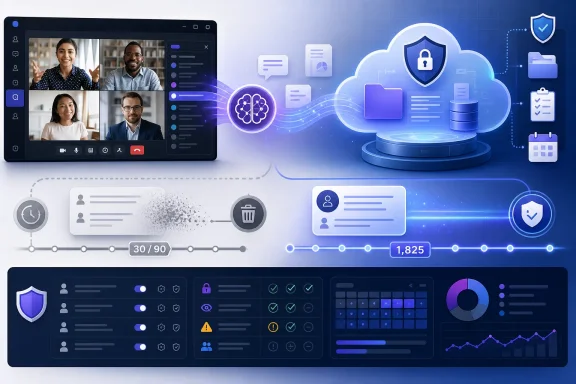
Microsoft Teams is preparing to create AI-generated
As first reported by Windows Latest, Microsoft has told administrators that archives will be enabled by default, with controls arriving before the August rollout. The company’s pitch is continuity: a meeting should become reusable organizational context, allowing Facilitator to reference prior discussions in later sessions and, eventually, allowing Copilot to answer questions about meetings from those archived insights.
The practical consequence is more consequential than the benign word archive suggests. Teams is moving from an app where AI-generated meeting knowledge is an intentional, per-meeting outcome to one where eligible meetings can produce an automatically retained AI artifact unless the organization or meeting owner intervenes. For companies that have spent years building approval processes around recordings, transcripts, retention, and discovery, that is not merely another Copilot enhancement. It is a new default data lifecycle.
Microsoft’s proposed archive is a
According to Windows Latest, the first phase is not expected to cover every Teams meeting. An archive is created only for meetings where AI was turned on or where at least one participant has a Copilot license. That is a narrower scope than “archive everything,” but it may prove broad in tenants with uneven Copilot deployment, where one licensed participant can turn an otherwise routine meeting into an eligible source of retained AI context.
Microsoft says raw transcripts will not be placed in these AI-generated archives. Instead, the
The company has also imposed a deliberately rigid model on the files: they cannot be modified, renamed, or moved. That makes sense if Microsoft wants them to behave as stable grounding material for Copilot and Facilitator rather than as ordinary user-managed documents. It also means the usual end-user instinct—tidy it up, put it in a project folder, rename it to match a matter number—will not apply.
This is a shift from meeting recap as a feature to meeting memory as infrastructure. Microsoft is effectively creating a durable knowledge layer under Teams, one designed for future AI retrieval rather than only for the people who attended the call.
The more consequential control is in the Teams admin center: “Allow AI to archive meetings with .meeting file generation.” Administrators will find it at
That split creates two very different operating philosophies. An organization can leave the feature enabled and rely on meeting organizers to use Meeting AI when needed, treating archive creation as the normal state. Or it can disable tenant-level generation first, then develop an intentional policy for when and where AI meeting memory should be permitted.
The first approach favors convenience and Copilot usefulness. The second recognizes that an archive capable of informing future questions may be subject to the same scrutiny as any other organizational record, even when it is composed of AI-generated summaries rather than raw transcripts.
Microsoft’s choice to store these files in tenant-owned SharePoint makes the administrator’s decision especially important. The data does not evaporate when an employee leaves, and it is not confined to a personal workspace an organization can casually treat as user-owned clutter. It is organizational material by design.
That makes the
Yet the feature’s usefulness is inseparable from its reach. A Copilot that can recall prior discussions is more helpful precisely because the tenant has permitted a larger pool of meeting knowledge to persist. The proper question for administrators is not simply whether summaries contain raw transcripts. It is whether a generated summary of the meeting is appropriate to keep available for later AI reasoning.
Windows Latest framed the change as Microsoft automatically archiving meetings to improve Copilot and Facilitator responses. That is the right frame. This is not primarily a storage feature with an AI add-on; it is an AI-context feature whose storage mechanics determine whether it works.
For users, the immediate test is straightforward: know whether Meeting AI is enabled before discussing material that should remain outside an AI-generated archive. For IT, the harder test is whether that decision can responsibly be delegated to meeting owners at all.
In late 2026, Teams will add channel-notification presets for all new messages, mentions and replies, and mute. Users will also gain controls around tags, channel mentions, team mentions, and banner notifications across channels. This is a welcome shift away from the blunt choice between being overwhelmed by a busy channel and missing the one item that requires action.
Microsoft is also changing event invitations according to participant role. Starting in September 2026, attendees and presenters will receive their own emails; organizers will get an explanatory email describing participant roles; and presenters will receive a separate calendar invite. Broad availability is planned by the end of October 2026.
Neither feature is as strategically weighty as AI meeting archives, but both reflect an important design principle: Teams is increasingly aware that different people inside the same workspace should not necessarily receive the same object, notification, or experience. The archive feature is the uncomfortable exception. It creates a common AI artifact from a meeting, then relies on policy and access controls to determine how it is used.
September 2026: Teams begins rolling out separate event invitations for attendees, presenters, and organizers.
By the end of October 2026: Microsoft expects role-based event invitations to reach broad availability.
Late 2026: Teams is expected to add the three channel-notification presets and related granular controls.
The product logic is defensible. Captions are supposed to represent what was said, and filtering language can obscure meaning in training, legal, safety, support, accessibility, and workplace-conflict contexts. A transcript-like accessibility feature that silently replaces words is not always an accurate record.
But the new default also creates a communications change for organizations where live captions appear in customer calls, public events, training sessions, or shared-screen scenarios. IT and communications teams should not treat the setting as a mere cosmetic preference. It can alter what audiences see in the moment, particularly in meetings where participants are not expecting their language to be rendered verbatim on screen.
The difference is that the archive feature changes what exists after the meeting. That makes it the one Teams update here that should trigger a governance review before rollout, not a help-desk note after employees discover it.
The report also describes eligibility as requiring a Copilot-licensed invited participant and a meeting configuration that permits Copilot and Facilitator use during and after the meeting. That is more restrictive than an assumption that merely having AI enabled or a licensed attendee is independently sufficient.
Microsoft will process the saved transcript and meeting metadata to create the archive, even though the
For administrators, the practical implication is that transcript policy may now directly affect whether this new AI memory layer is created. Organizations reviewing the default-enabled archive setting should assess transcript generation, Copilot licensing, and the “Allow Copilot and Facilitator” meeting setting together—not as separate governance decisions.
.meeting archives for eligible meetings by default in August 2026, giving Copilot and Facilitator a durable record to consult later even when nobody explicitly asks Teams to preserve one. The feature is not a conventional recording or transcript repository: Microsoft says the files will contain AI-generated summaries and meeting insights rather than raw transcripts, and they will live in tenant-owned SharePoint rather than an individual employee’s storage. But it is still a meaningful expansion of what a Teams meeting leaves behind—and of what Microsoft 365 Copilot can subsequently know about it.As first reported by Windows Latest, Microsoft has told administrators that archives will be enabled by default, with controls arriving before the August rollout. The company’s pitch is continuity: a meeting should become reusable organizational context, allowing Facilitator to reference prior discussions in later sessions and, eventually, allowing Copilot to answer questions about meetings from those archived insights.
The practical consequence is more consequential than the benign word archive suggests. Teams is moving from an app where AI-generated meeting knowledge is an intentional, per-meeting outcome to one where eligible meetings can produce an automatically retained AI artifact unless the organization or meeting owner intervenes. For companies that have spent years building approval processes around recordings, transcripts, retention, and discovery, that is not merely another Copilot enhancement. It is a new default data lifecycle.
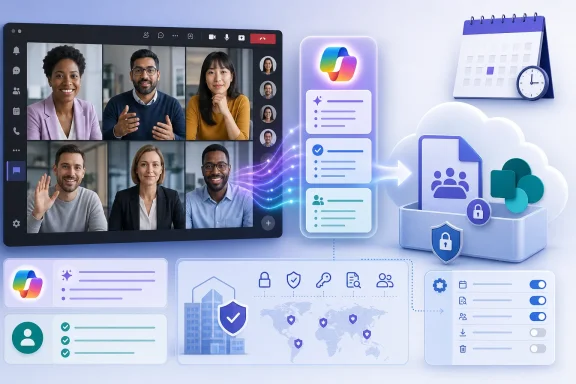 Microsoft Turns Meeting Memory Into a Tenant-Level Default
Microsoft’s proposed archive is a .meeting file, stored in tenant-owned SharePoint regardless of which attendee holds a Copilot license. That storage decision matters because it separates the archive from the familiar personal-file model of Teams recordings and meeting materials. The artifact belongs to the organization’s environment, not to the user who scheduled the call or happened to have the license that made the archive possible.According to Windows Latest, the first phase is not expected to cover every Teams meeting. An archive is created only for meetings where AI was turned on or where at least one participant has a Copilot license. That is a narrower scope than “archive everything,” but it may prove broad in tenants with uneven Copilot deployment, where one licensed participant can turn an otherwise routine meeting into an eligible source of retained AI context.
Microsoft says raw transcripts will not be placed in these AI-generated archives. Instead, the
.meeting file will preserve AI summaries and related insights, intended to give downstream tools useful context without keeping the underlying transcript as the archive itself. That distinction reduces one obvious concern—the creation of a second full-text copy of every spoken word—but it does not make the data operationally trivial. A condensed, searchable account of decisions, participants, issues, and follow-ups can be more useful to an AI system, and potentially more sensitive to an organization, than an unstructured transcript.The company has also imposed a deliberately rigid model on the files: they cannot be modified, renamed, or moved. That makes sense if Microsoft wants them to behave as stable grounding material for Copilot and Facilitator rather than as ordinary user-managed documents. It also means the usual end-user instinct—tidy it up, put it in a project folder, rename it to match a matter number—will not apply.
This is a shift from meeting recap as a feature to meeting memory as infrastructure. Microsoft is effectively creating a durable knowledge layer under Teams, one designed for future AI retrieval rather than only for the people who attended the call.
The Most Important Setting Is Not the One Most Users Will See
Microsoft is providing a user-facing control called “Meeting AI,” which can be used to turn off AI features for future meetings. That is the visible, meeting-level answer for organizers who decide a discussion should not be fed into the new archive workflow. It is useful, but it places a decision with potentially broad compliance implications into the hands of individuals who may not understand the tenant’s broader retention, privacy, or internal-investigation posture.The more consequential control is in the Teams admin center: “Allow AI to archive meetings with .meeting file generation.” Administrators will find it at
Meeting Policies > AI Memory and Archive, where disabling it prevents the archive-generation feature from operating under that policy. Microsoft says the controls will be available before the August 2026 rollout, giving organizations a short but meaningful window to decide whether the new default matches their governance model.That split creates two very different operating philosophies. An organization can leave the feature enabled and rely on meeting organizers to use Meeting AI when needed, treating archive creation as the normal state. Or it can disable tenant-level generation first, then develop an intentional policy for when and where AI meeting memory should be permitted.
The first approach favors convenience and Copilot usefulness. The second recognizes that an archive capable of informing future questions may be subject to the same scrutiny as any other organizational record, even when it is composed of AI-generated summaries rather than raw transcripts.
Microsoft’s choice to store these files in tenant-owned SharePoint makes the administrator’s decision especially important. The data does not evaporate when an employee leaves, and it is not confined to a personal workspace an organization can casually treat as user-owned clutter. It is organizational material by design.
Copilot’s Better Answers Depend on Data Teams Used to Forget
The archive feature is built around a simple commercial and technical premise: Copilot cannot reliably answer questions about a past meeting unless it has a persistent, governed source of context. Microsoft says Facilitator will be able to use the archive to answer future questions and reference it in upcoming meetings. The company also says Copilot will eventually use it to answer questions about meetings.That makes the
.meeting file more than a recap. It becomes an intermediary layer between human conversation and AI response—a machine-oriented record that is intended to preserve the useful substance of a meeting after the live call ends. The value proposition is obvious to teams that repeatedly revisit decisions, project status, customer commitments, or ownership questions.Yet the feature’s usefulness is inseparable from its reach. A Copilot that can recall prior discussions is more helpful precisely because the tenant has permitted a larger pool of meeting knowledge to persist. The proper question for administrators is not simply whether summaries contain raw transcripts. It is whether a generated summary of the meeting is appropriate to keep available for later AI reasoning.
Windows Latest framed the change as Microsoft automatically archiving meetings to improve Copilot and Facilitator responses. That is the right frame. This is not primarily a storage feature with an AI add-on; it is an AI-context feature whose storage mechanics determine whether it works.
For users, the immediate test is straightforward: know whether Meeting AI is enabled before discussing material that should remain outside an AI-generated archive. For IT, the harder test is whether that decision can responsibly be delegated to meeting owners at all.
Action checklist for admins
- Review the default posture before the August 2026 rollout, rather than waiting for archives to appear in production.
- In the Teams admin center, assess
Meeting Policies > AI Memory and Archiveand decide whether to disable Allow AI to archive meetings with .meeting file generation. - Tell meeting organizers what the Meeting AI toggle controls and when they are expected to use it.
- Update internal guidance for sensitive meetings so it addresses AI-generated summaries, not only recordings and transcripts.
- Confirm that legal, compliance, security, and collaboration teams share the same understanding of tenant-owned SharePoint storage.
- Treat Copilot licensing as an archive-eligibility issue, since a Copilot-licensed participant can make a meeting eligible under Microsoft’s initial scope.
The Smaller Teams Changes Reveal a Product Chasing More Explicit Controls
The archive announcement arrives alongside several Teams changes that, on their face, seem unrelated: more granular channel notifications, role-specific event invitations, and a reversal of the default profanity treatment in live captions. Together, however, they show a Teams product trying to make automation more useful while exposing more settings around who sees what, and how.In late 2026, Teams will add channel-notification presets for all new messages, mentions and replies, and mute. Users will also gain controls around tags, channel mentions, team mentions, and banner notifications across channels. This is a welcome shift away from the blunt choice between being overwhelmed by a busy channel and missing the one item that requires action.
Microsoft is also changing event invitations according to participant role. Starting in September 2026, attendees and presenters will receive their own emails; organizers will get an explanatory email describing participant roles; and presenters will receive a separate calendar invite. Broad availability is planned by the end of October 2026.
Neither feature is as strategically weighty as AI meeting archives, but both reflect an important design principle: Teams is increasingly aware that different people inside the same workspace should not necessarily receive the same object, notification, or experience. The archive feature is the uncomfortable exception. It creates a common AI artifact from a meeting, then relies on policy and access controls to determine how it is used.
Timeline
August 2026: Microsoft plans to roll out default-enabled AI meeting archives, with admin controls available beforehand.September 2026: Teams begins rolling out separate event invitations for attendees, presenters, and organizers.
By the end of October 2026: Microsoft expects role-based event invitations to reach broad availability.
Late 2026: Teams is expected to add the three channel-notification presets and related granular controls.
Teams Will Stop Cleaning Up Live Captions for New Users
Microsoft is also changing a quieter but culturally significant default: live captions currently hide profanity by default, but the filter will be off by default in the coming weeks. Existing preferences will not be changed, and users will still be able to enable or disable the setting themselves.The product logic is defensible. Captions are supposed to represent what was said, and filtering language can obscure meaning in training, legal, safety, support, accessibility, and workplace-conflict contexts. A transcript-like accessibility feature that silently replaces words is not always an accurate record.
But the new default also creates a communications change for organizations where live captions appear in customer calls, public events, training sessions, or shared-screen scenarios. IT and communications teams should not treat the setting as a mere cosmetic preference. It can alter what audiences see in the moment, particularly in meetings where participants are not expecting their language to be rendered verbatim on screen.
| Live-caption behavior | Current default | Planned default | Existing user preference |
|---|---|---|---|
| Profanity filter | Profanity is hidden | Filter is turned off | Not affected |
| Caption output | Filtered language appears | Unfiltered language can appear | User can still choose the setting |
The New Default Is Useful—Which Is Why It Needs Governance
Microsoft’s changes are not a random pile of Teams refinements. The notification presets reduce noise. Role-based invitations reduce ambiguity. The live-caption update favors fidelity. And AI archives make Copilot more capable of participating in the actual continuity of work rather than merely summarizing a single call after the fact.The difference is that the archive feature changes what exists after the meeting. That makes it the one Teams update here that should trigger a governance review before rollout, not a help-desk note after employees discover it.
What Teams administrators should remember before August
The core issue is not whether AI summaries are inherently dangerous or whether Copilot is useful. It is whether an organization has deliberately decided which meetings should become durable AI context.- AI-generated
.meetingarchives are planned to be enabled by default. - Eligible meetings initially include those with AI turned on or with a Copilot-licensed participant.
- The files are stored in tenant-owned SharePoint, not individual user storage.
- Raw transcripts are not included in the AI archive, but AI-generated summaries and insights are.
- Facilitator can use the archive for future questions and upcoming meetings; Copilot is planned to use it for meeting questions in the future.
- Administrators can disable generation through the AI Memory and Archive setting before rollout.
Update: Archive eligibility now appears to require a saved transcript (July 17, 2026)
Windows Report, citing Microsoft Message Center advisory MC1429018, adds a material clarification to the planned default archive behavior: Teams will generate a.meeting archive only after a meeting transcript has been generated and saved.The report also describes eligibility as requiring a Copilot-licensed invited participant and a meeting configuration that permits Copilot and Facilitator use during and after the meeting. That is more restrictive than an assumption that merely having AI enabled or a licensed attendee is independently sufficient.
Microsoft will process the saved transcript and meeting metadata to create the archive, even though the
.meeting file itself will not contain raw transcript excerpts. The files will be kept in a tenant-owned SharePoint Embedded container, rather than consuming an individual user’s storage quota.For administrators, the practical implication is that transcript policy may now directly affect whether this new AI memory layer is created. Organizations reviewing the default-enabled archive setting should assess transcript generation, Copilot licensing, and the “Allow Copilot and Facilitator” meeting setting together—not as separate governance decisions.
References
- Primary source: Windows Latest
Published: 2026-07-17T01:35:42+00:00
Microsoft Teams will use AI to archive your meetings for Copilot analysis by default, plus 6 more changes
Microsoft says it'll automatically archive your meetings using AI unless you manually turn off the feature. www.windowslatest.com
- Official source: learn.microsoft.com
AI Archives for Microsoft Teams Meetings - Microsoft Teams | Microsoft Learn
AI Archives for Teams Meetings are AI-generated artifacts that condense the essential knowledge from a meeting’s discussion and metadata.learn.microsoft.com - Official source: support.microsoft.com
What's new in Microsoft Teams | Microsoft Support
Get the latest info on new features for Microsoft Teams with these regularly updated release notes.support.microsoft.com - Related coverage: windowscentral.com
Microsoft Teams just made it easier to shut down Copilot and other AI tools | Windows Central
Microsoft simplified the controls for Copilot, Facilitator, and Intelligent Recap, giving licensed meeting organizers a clear way to turn off meeting AI.www.windowscentral.com - Related coverage: techradar.com
Microsoft makes major AI U-turn following user revolt — will let Teams users turn off Copilot, Facilitator and Recap | TechRadar
Microsoft Teams AI backlash leads to major changeswww.techradar.com - Related coverage: itpro.com
Anthropic's Cowork tool is coming to Microsoft Copilot | IT Pro
The new Copilot Cowork tool will be made available through a new Microsoft 365 tier at the end of March.www.itpro.com
Last edited: