

Microsoft plans to bring Teams shared display mode and peripheral detection to Department of Defense environments in August 2026, according to Microsoft 365 Roadmap item 567465. The entry is marked In development, so the date remains an estimate rather than a deployment confirmation.
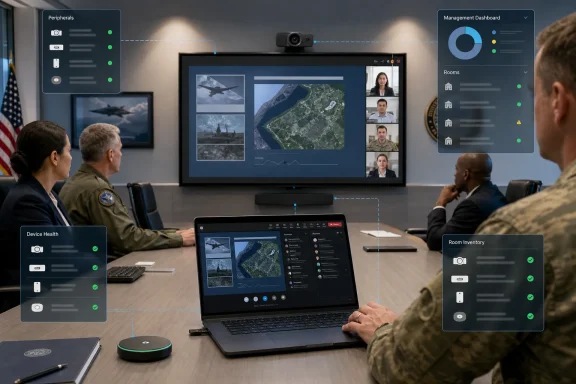
Shared display mode is intended for meetings hosted from a user’s PC in rooms equipped with a shared display. The model lets the PC act as the meeting host while the room display presents shared content, separating the host’s private Teams controls and notifications from what attendees can see on the larger screen. For DoD users, the change extends a room-meeting workflow already aimed at organizations that want lightweight, PC-based collaboration spaces without relying solely on dedicated Teams Rooms hardware.
The same roadmap item adds peripheral detection for bring-your-own-device meeting spaces. Microsoft says the capability will surface connected room peripherals for inventory management and reporting through the Pro Management portal. In practice, that should give Teams administrators more visibility into devices such as cameras, microphones, speakers and displays attached to shared spaces, particularly where users bring laptops to run meetings.
Microsoft lists the feature for Teams on Windows desktop and Mac, with General Availability targeted for August 2026. The roadmap identifies both Worldwide standard multi-tenant and DoD cloud instances, although the announcement specifically highlights availability in DoD environments.
The two capabilities address different parts of the same meeting-room problem:
The management angle is the more consequential piece for administrators. Peripheral detection could help identify rooms with missing, disconnected or inconsistent equipment, but it should not be treated as a replacement for asset-management records until Microsoft documents the scope and reliability of its reporting.
Teams and collaboration admins should review their DoD tenant’s Teams Rooms and Pro Management configuration before August, verify that room peripherals are supported and connected consistently, and watch Microsoft’s rollout communications for final requirements.
Shared display mode is intended for meetings hosted from a user’s PC in rooms equipped with a shared display. The model lets the PC act as the meeting host while the room display presents shared content, separating the host’s private Teams controls and notifications from what attendees can see on the larger screen. For DoD users, the change extends a room-meeting workflow already aimed at organizations that want lightweight, PC-based collaboration spaces without relying solely on dedicated Teams Rooms hardware.
The same roadmap item adds peripheral detection for bring-your-own-device meeting spaces. Microsoft says the capability will surface connected room peripherals for inventory management and reporting through the Pro Management portal. In practice, that should give Teams administrators more visibility into devices such as cameras, microphones, speakers and displays attached to shared spaces, particularly where users bring laptops to run meetings.
 What is changing
Microsoft lists the feature for Teams on Windows desktop and Mac, with General Availability targeted for August 2026. The roadmap identifies both Worldwide standard multi-tenant and DoD cloud instances, although the announcement specifically highlights availability in DoD environments.The two capabilities address different parts of the same meeting-room problem:
- Shared display mode keeps the meeting host’s personal workspace private while using a shared screen for the room.
- Peripheral detection provides an administrative view of BYOD-room equipment through Teams Pro Management reporting.
Why it matters for Windows admins
DoD organizations often run a mix of fixed conference-room systems and ad hoc spaces where an employee connects a Windows laptop to existing AV equipment. The planned features could make the latter arrangement less improvised: users get a clearer shared-screen meeting experience, while IT gets a potentially useful inventory signal for hardware that is otherwise difficult to track.The management angle is the more consequential piece for administrators. Peripheral detection could help identify rooms with missing, disconnected or inconsistent equipment, but it should not be treated as a replacement for asset-management records until Microsoft documents the scope and reliability of its reporting.
Teams and collaboration admins should review their DoD tenant’s Teams Rooms and Pro Management configuration before August, verify that room peripherals are supported and connected consistently, and watch Microsoft’s rollout communications for final requirements.
References
- Primary source: Microsoft 365 Roadmap
Published: 2026-07-15T22:55:27.6639110Z
Loading…
www.microsoft.com