

Microsoft has launched Catch up for Microsoft Teams on Android and iOS, a General Availability mobile feature listed under Microsoft 365 Roadmap ID 558108 that gives users one card-based view of directed and followed conversations across chats, meeting chats, channels, and threads. The feature reached worldwide standard multi-tenant customers in the May 2026 release window and was last updated on Microsoft’s roadmap on July 7, 2026. Microsoft’s own support documentation and Message Center notice describe a swipe-driven triage view, not a new messaging silo. That distinction matters, because Teams’ biggest mobile problem has never been that messages are hard to send; it is that the app has become a pocket-sized command center for too many overlapping obligations.
For years, Microsoft Teams has pretended to be many things at once: a chat app, a meeting room, a file surface, a phone system, a lightweight project hub, and, increasingly, an AI workbench. On desktop, that sprawl is survivable because screen real estate can hide a multitude of product sins. On a phone, every added surface competes with the same tiny rectangle and the same exhausted thumb.
Catch up is Microsoft’s admission that Teams mobile has crossed an important threshold. Users no longer need only a place to find conversations. They need a place that decides which conversations are still demanding attention.
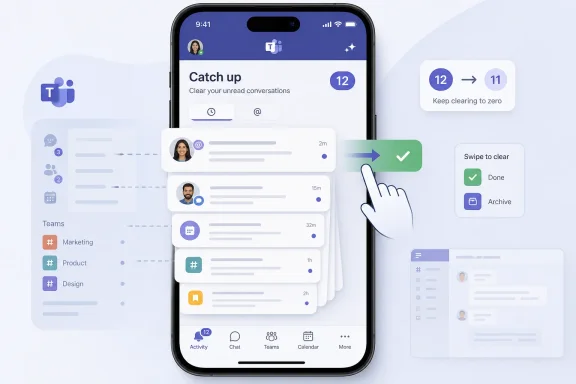
The feature, as described in the Microsoft 365 Roadmap and Microsoft Support, consolidates unread and important conversations into a mobile-optimized card view. It pulls in personal mentions, one-to-one chats, group and meeting chats that have not been muted, and followed threads. Users can swipe cards, mark items read or keep them unread, sort cards by recency or by mentions first, and jump back into the original chat or channel when more context is needed.
That sounds mundane until you consider what Microsoft is really doing. Teams is borrowing the language of consumer mobile triage — cards, swipes, zeroing out a badge count — and applying it to enterprise communication. The company is not merely shipping another view. It is making a claim about what modern work feels like: a stream of small pending decisions, each one waiting to be dismissed, deferred, answered, muted, or escalated.
Badge counts are one of the most psychologically loaded pieces of mobile UI. They look objective, but they are rarely neutral. A red number on an app icon does not say “there is information available”; it says “you are behind.”
Microsoft’s Catch up feature is built around that reality. The number of cards corresponds to the number of conversations that need attention, and reviewing the stack can clear the badge count. In other words, Microsoft is translating Teams’ scattered conversational obligations into a queue.
For some users, that will be genuinely useful. A manager moving between meetings may be able to scan mentions, meeting chat follow-ups, and followed thread replies without spelunking through every channel. A field worker may be able to triage the handful of conversations that matter without opening a desktop client. An on-call engineer may be able to distinguish direct attention from background chatter faster than before.
But queues also have politics. Once Teams converts attention into a visible pile of cards, it subtly defines responsiveness as a measurable behavior. That may be convenient for individuals and dangerous for cultures that already confuse communication velocity with productivity.
The feature does not introduce surveillance by itself, and Microsoft’s Message Center archive says no admin configuration changes are required and no compliance considerations were identified. Still, software rarely needs to be malicious to reshape expectations. If Teams makes it easier to “catch up” everywhere, some organizations will treat being caught up as the normal state.
Catch up fits that strategy more cleanly on mobile than it would on desktop. Phones are not good at browsing enterprise information architecture. They are good at quick, high-confidence actions.
That explains the card model. Each conversation appears as its own unit. Users can read enough context to decide whether to respond, react, mark as read, keep unread, mute, unfollow, or open the full conversation. Microsoft’s support page says read and unread states sync across mobile and desktop, which is crucial; a triage feature that did not respect cross-device state would only create another layer of confusion.
The design borrows from email clients, task apps, social feeds, and dating apps because swiping is now the universal mobile metaphor for low-friction judgment. That does not make it shallow. It makes it legible.
The question is whether enterprise communication should be reduced to a swipe queue. In practice, it already has been. Catch up simply makes the implicit workflow explicit.
That is not unique to Teams. Slack, Google Chat, Discord, email, SMS, and mobile operating systems have all trained users to manage attention through a blend of unread states, badges, muted threads, pinned chats, and algorithmic surfacing. But Teams is different because it sits closer to enterprise power structures. A Teams mention is often not just a social ping; it may be a manager, a ticket, a meeting action item, a compliance-sensitive discussion, or a customer escalation.
Catch up tries to separate directed attention from ambient noise. Personal mentions are first-class citizens. Followed threads matter. Meeting chats matter when they are not muted. The feature’s usefulness depends on that filtering being good enough to avoid becoming yet another inbox.
That is the key risk. If Catch up becomes a well-curated view of obligations, it will be one of the more practical Teams mobile improvements Microsoft has shipped. If it becomes a junk drawer of every semi-relevant unread item, users will learn to ignore it as quickly as they ignore everything else.
The design gives Microsoft a fighting chance. Sorting by mentions first is a sensible recognition that not all unread messages deserve equal priority. The ability to mute or unfollow directly from the card header also matters, because triage is not just about processing messages. It is about teaching the system what not to show again.
That is normal Microsoft 365 cadence: announce, adjust, roll out, mark launched, revise the roadmap metadata. The broader timing is more interesting.
Teams is no longer competing merely on chat features. It is a control plane for Microsoft 365 work, and Microsoft is steadily layering Copilot experiences, meeting intelligence, Loop components, workflow integrations, and cross-app surfaces into that environment. The more Teams becomes the connective tissue of Microsoft 365, the more urgent its attention problem becomes.
Catch up is one answer to that pressure. It does not summarize meetings with AI. It does not draft replies. It does not promise a digital assistant that understands the politics of your workplace. Instead, it offers a more mechanical intervention: here is the stack of conversations that appear to need you; swipe through them.
In the current Microsoft product climate, that restraint is almost refreshing. Not every productivity problem needs a chatbot. Sometimes the fix is a better inbox.
That will be welcome in many organizations. Admins are already juggling Teams policies, meeting configurations, app governance, external access, retention, eDiscovery, device management, and the creeping implications of Copilot deployment. A mobile triage view that does not require a policy migration is a low-drama change.
But “no admin action required” should not be read as “no operational impact.” Help desks may still see tickets from users who notice a new Catch up entry at the top of their chat list. Training materials may need screenshots. Executive assistants and frontline managers may ask why some conversations appear and others do not. Users who live in muted chats or unfollowed channels may misunderstand the filtering logic.
The feature also raises a softer governance issue: communication hygiene. Catch up works best when organizations use Teams intentionally. If every channel is noisy, every meeting chat is treated as mandatory, and every manager uses @mentions as a reflex, then a triage view can only do so much.
Microsoft can surface the mess. It cannot make a company communicate well.
That fits many Teams mobile scenarios. A phone is often where work happens between other work: on a commute, in a hallway, before a meeting starts, after a customer call, or while away from a desk. Catch up acknowledges that reality by avoiding the full density of desktop Teams.
But the same design can encourage shallow processing. A message that deserves careful thought may be surrounded by messages that need only acknowledgment. A followed thread may contain nuance that a card preview cannot capture. Meeting chats can be especially treacherous, because the meaning of a comment often depends on what was said aloud, shared on screen, or implied by the meeting’s political context.
Microsoft’s answer is to let users jump from the card into the full conversation. That is the right design escape hatch. The danger is not that the feature prevents deeper reading; it is that the rhythm of swiping makes deeper reading feel like an interruption.
This is the old productivity software bargain. Tools that reduce friction also reduce hesitation. Sometimes that is exactly what users need. Sometimes hesitation was the useful part.
Desktop Teams is where users attend meetings, share screens, manage files, browse channels, use apps, and perform extended collaboration. Mobile Teams is more often where users maintain presence, react quickly, answer direct pings, and keep from falling behind. A unified Catch up view maps neatly to that mobile reality.
This is a lesson Microsoft has not always absorbed cleanly. Enterprise vendors often treat mobile apps as shrunken desktop clients because feature parity is easier to sell than workflow clarity. Catch up is closer to the opposite philosophy: strip the experience down to a decision queue.
That may also explain why the feature is not positioned as a Copilot-first capability. Microsoft could have wrapped Catch up in AI language and promised intelligent prioritization. Instead, at least in the roadmap and support material, it is described in terms of directed and followed conversations, card views, read states, sorting, and swipe actions.
The restraint matters because trust is fragile in communication tools. Users may accept a clear rule-based view before they accept a model deciding which colleague deserves their attention. There is room for AI here eventually, but Microsoft is right to build the muscle memory first.
This entry is straightforward: Microsoft Teams, Android and iOS, General Availability, worldwide standard multi-tenant, launched, May 2026. It is not marked for GCC, GCC High, DoD, or sovereign cloud environments in the details provided. For regulated customers, that absence matters more than the marketing copy.
The roadmap’s created date and last updated timestamp also tell a useful story. Created on March 5 and updated on July 7, the item moved through the normal Microsoft 365 announcement pipeline in roughly a spring-to-summer window. The Message Center archive fills in the operational timeline: early April for Targeted Release, early May through late June for worldwide General Availability.
That chronology is important because Teams features often appear unevenly across tenants, mobile app versions, and account types. A feature being “launched” on the roadmap does not always mean every user sees it instantly in the same way. Mobile deployments depend on app updates, tenant rollout waves, and sometimes account-specific conditions.
For WindowsForum readers who administer Microsoft 365 environments, the practical advice is simple: treat the roadmap status as a signal that the feature is no longer speculative, but verify behavior on managed devices before rewriting user guidance.
Every collaboration platform eventually faces the same erosion. At first, notifications feel useful because they replace slower channels. Then channels multiply. Then mentions become overused. Then users mute aggressively. Then important messages are missed because the system trained people to defend themselves from it.
Catch up is Microsoft’s attempt to intervene before that defensive posture becomes permanent. By gathering the higher-signal conversations into one view, Teams can give users a reason to check the app deliberately rather than reactively. That is better than relying on push notifications alone.
But this also means the feature’s success will be judged emotionally. Does opening Teams mobile feel less like stepping into traffic? Does the user leave with a clearer sense of what requires action? Does the badge count become meaningful again?
If the answer is yes, Catch up will fade into the background as one of those small features people quickly take for granted. If the answer is no, it will become another tab users scroll past on their way to the same old chaos.
The next Teams era has to be about subtraction. Not fewer capabilities, necessarily, but fewer moments where users must understand the entire product just to answer a colleague. Catch up is a subtraction feature in that sense. It removes navigation, collapses sources, and turns scattered attention into a sequence.
That may sound less ambitious than AI-generated summaries or autonomous agents, but it is arguably more necessary. A collaboration platform that cannot help users decide where to look next will struggle to make more advanced intelligence useful. AI summaries are only helpful if the underlying attention model is trustworthy.
There is also a lesson here for Windows itself. Microsoft’s ecosystem increasingly assumes users move fluidly between PC and phone, desktop and mobile, meeting and chat, notification and document. The operating system matters, but the work graph matters more. Teams mobile Catch up is one small example of Microsoft designing for that graph instead of for a single app surface.
The irony is that the feature is most valuable when it becomes boring. No one wants to think about an attention queue. They want to know what they missed, handle it, and move on.
There are also accessibility and training considerations. Swipe-heavy interfaces can be elegant for some users and frustrating for others. Microsoft’s support documentation mentions buttons for keeping items unread and marking them read, which is important because enterprise mobile features cannot assume every user wants or can use gesture-first navigation.
Organizations with frontline workers should pay particular attention. Teams mobile is often the primary Teams client for employees who do not sit at a Windows desktop all day. For those users, Catch up may be more than a convenience; it may become the main way they discover directed work messages.
That makes clarity essential. Users need to understand that Catch up is not the full universe of Teams activity. It is a filtered view of conversations Microsoft believes require attention based on mentions, unread status, followed threads, meeting chats, and mute states. Confusing that distinction could create missed expectations.
The same is true for executives and high-volume users. A triage view can help them process more messages, but it can also encourage colleagues to expect faster replies. Admins cannot configure culture in the Teams admin center, but they can at least warn business leaders that better mobile processing is not the same as unlimited human attention.
The more important fact is strategic. Microsoft is treating attention as a first-class Teams workload. Not chat, not meetings, not files, but attention itself.
That framing will shape future Teams development. Once a product has a dedicated catch-up layer, it becomes natural to ask what should be prioritized, what should be summarized, what should be deferred, and what should be delegated. Today, the answer is mostly rules and gestures. Tomorrow, it may be Copilot-generated ordering, inferred urgency, or policy-aware triage.
That future will be useful only if Microsoft earns trust in the simpler version first. Users need to believe that Catch up shows the right things, respects their mute and follow choices, syncs correctly, and does not turn every unread item into a miniature guilt trip.
A short internal note is enough. Explain where Catch up appears, what it includes, what swiping does, and how it relates to the badge count. Remind users that muting chats and unfollowing threads changes what demands their attention. Tell help desks that screenshots in older Teams mobile guides may no longer match.
The best deployment communication should emphasize behavior, not novelty. Catch up is not another place to chat. It is a way to review conversations that already exist.
That distinction will prevent some predictable misunderstandings. Users should not assume that clearing Catch up deletes messages, that keeping something unread hides it from others, or that the view captures every piece of channel activity. It is a personal triage layer, not a compliance boundary or organizational task list.
 Microsoft Turns Teams Mobile Into an Inbox Because It Already Was One
For years, Microsoft Teams has pretended to be many things at once: a chat app, a meeting room, a file surface, a phone system, a lightweight project hub, and, increasingly, an AI workbench. On desktop, that sprawl is survivable because screen real estate can hide a multitude of product sins. On a phone, every added surface competes with the same tiny rectangle and the same exhausted thumb.Catch up is Microsoft’s admission that Teams mobile has crossed an important threshold. Users no longer need only a place to find conversations. They need a place that decides which conversations are still demanding attention.
The feature, as described in the Microsoft 365 Roadmap and Microsoft Support, consolidates unread and important conversations into a mobile-optimized card view. It pulls in personal mentions, one-to-one chats, group and meeting chats that have not been muted, and followed threads. Users can swipe cards, mark items read or keep them unread, sort cards by recency or by mentions first, and jump back into the original chat or channel when more context is needed.
That sounds mundane until you consider what Microsoft is really doing. Teams is borrowing the language of consumer mobile triage — cards, swipes, zeroing out a badge count — and applying it to enterprise communication. The company is not merely shipping another view. It is making a claim about what modern work feels like: a stream of small pending decisions, each one waiting to be dismissed, deferred, answered, muted, or escalated.
The Badge Count Became the Boss
The most revealing detail in Microsoft’s support page is not the card interface. It is the emphasis on getting the Teams badge count to zero.Badge counts are one of the most psychologically loaded pieces of mobile UI. They look objective, but they are rarely neutral. A red number on an app icon does not say “there is information available”; it says “you are behind.”
Microsoft’s Catch up feature is built around that reality. The number of cards corresponds to the number of conversations that need attention, and reviewing the stack can clear the badge count. In other words, Microsoft is translating Teams’ scattered conversational obligations into a queue.
For some users, that will be genuinely useful. A manager moving between meetings may be able to scan mentions, meeting chat follow-ups, and followed thread replies without spelunking through every channel. A field worker may be able to triage the handful of conversations that matter without opening a desktop client. An on-call engineer may be able to distinguish direct attention from background chatter faster than before.
But queues also have politics. Once Teams converts attention into a visible pile of cards, it subtly defines responsiveness as a measurable behavior. That may be convenient for individuals and dangerous for cultures that already confuse communication velocity with productivity.
The feature does not introduce surveillance by itself, and Microsoft’s Message Center archive says no admin configuration changes are required and no compliance considerations were identified. Still, software rarely needs to be malicious to reshape expectations. If Teams makes it easier to “catch up” everywhere, some organizations will treat being caught up as the normal state.
The Mobile Interface Is Doing the Work Desktop Teams Could Avoid
Desktop Teams has spent the past several years trying to rationalize its sprawl. Microsoft has merged and reorganized chat and channel concepts, introduced new filters, redesigned navigation, and repeatedly argued that the app is becoming faster and cleaner. The broad direction is clear: Teams is being reworked from a collection of workspaces into a layered attention system.Catch up fits that strategy more cleanly on mobile than it would on desktop. Phones are not good at browsing enterprise information architecture. They are good at quick, high-confidence actions.
That explains the card model. Each conversation appears as its own unit. Users can read enough context to decide whether to respond, react, mark as read, keep unread, mute, unfollow, or open the full conversation. Microsoft’s support page says read and unread states sync across mobile and desktop, which is crucial; a triage feature that did not respect cross-device state would only create another layer of confusion.
The design borrows from email clients, task apps, social feeds, and dating apps because swiping is now the universal mobile metaphor for low-friction judgment. That does not make it shallow. It makes it legible.
The question is whether enterprise communication should be reduced to a swipe queue. In practice, it already has been. Catch up simply makes the implicit workflow explicit.
Microsoft Is Solving Notification Fatigue Without Saying the Phrase Too Loudly
The problem Catch up addresses is notification fatigue, but Microsoft’s language is careful. The company talks about important items, conversations that need attention, staying organized, and acting quickly. It does not dwell on the darker premise: many Teams users now receive more conversational signals than they can process responsibly.That is not unique to Teams. Slack, Google Chat, Discord, email, SMS, and mobile operating systems have all trained users to manage attention through a blend of unread states, badges, muted threads, pinned chats, and algorithmic surfacing. But Teams is different because it sits closer to enterprise power structures. A Teams mention is often not just a social ping; it may be a manager, a ticket, a meeting action item, a compliance-sensitive discussion, or a customer escalation.
Catch up tries to separate directed attention from ambient noise. Personal mentions are first-class citizens. Followed threads matter. Meeting chats matter when they are not muted. The feature’s usefulness depends on that filtering being good enough to avoid becoming yet another inbox.
That is the key risk. If Catch up becomes a well-curated view of obligations, it will be one of the more practical Teams mobile improvements Microsoft has shipped. If it becomes a junk drawer of every semi-relevant unread item, users will learn to ignore it as quickly as they ignore everything else.
The design gives Microsoft a fighting chance. Sorting by mentions first is a sensible recognition that not all unread messages deserve equal priority. The ability to mute or unfollow directly from the card header also matters, because triage is not just about processing messages. It is about teaching the system what not to show again.
The Feature Is Small, but the Timing Is Not
On paper, Roadmap ID 558108 is a modest mobile feature. It was created on March 5, 2026, associated with Teams on Android and iOS, released to General Availability worldwide in May 2026, and marked as launched. The Message Center notice archived by Merill Fernando’s Microsoft 365 Message Center Archive says Targeted Release was expected in early April 2026, while General Availability was expected to begin in early May and complete by late June after a timeline update.That is normal Microsoft 365 cadence: announce, adjust, roll out, mark launched, revise the roadmap metadata. The broader timing is more interesting.
Teams is no longer competing merely on chat features. It is a control plane for Microsoft 365 work, and Microsoft is steadily layering Copilot experiences, meeting intelligence, Loop components, workflow integrations, and cross-app surfaces into that environment. The more Teams becomes the connective tissue of Microsoft 365, the more urgent its attention problem becomes.
Catch up is one answer to that pressure. It does not summarize meetings with AI. It does not draft replies. It does not promise a digital assistant that understands the politics of your workplace. Instead, it offers a more mechanical intervention: here is the stack of conversations that appear to need you; swipe through them.
In the current Microsoft product climate, that restraint is almost refreshing. Not every productivity problem needs a chatbot. Sometimes the fix is a better inbox.
The Admin Story Is Quiet, Which Is the Point
For IT administrators, the most important thing about Catch up may be how little there is to configure. Microsoft’s Message Center notice says the feature is enabled by default for all tenants and requires no admin changes. The company’s preparation advice is similarly modest: inform users and update support documentation if existing guidance references older Teams mobile views.That will be welcome in many organizations. Admins are already juggling Teams policies, meeting configurations, app governance, external access, retention, eDiscovery, device management, and the creeping implications of Copilot deployment. A mobile triage view that does not require a policy migration is a low-drama change.
But “no admin action required” should not be read as “no operational impact.” Help desks may still see tickets from users who notice a new Catch up entry at the top of their chat list. Training materials may need screenshots. Executive assistants and frontline managers may ask why some conversations appear and others do not. Users who live in muted chats or unfollowed channels may misunderstand the filtering logic.
The feature also raises a softer governance issue: communication hygiene. Catch up works best when organizations use Teams intentionally. If every channel is noisy, every meeting chat is treated as mandatory, and every manager uses @mentions as a reflex, then a triage view can only do so much.
Microsoft can surface the mess. It cannot make a company communicate well.
The Swipe Is a User Interface Choice and a Cultural One
Swipe actions carry a particular meaning on mobile. They imply speed, finality, and repetition. You are not carefully curating a knowledge base; you are clearing a queue while standing in an elevator.That fits many Teams mobile scenarios. A phone is often where work happens between other work: on a commute, in a hallway, before a meeting starts, after a customer call, or while away from a desk. Catch up acknowledges that reality by avoiding the full density of desktop Teams.
But the same design can encourage shallow processing. A message that deserves careful thought may be surrounded by messages that need only acknowledgment. A followed thread may contain nuance that a card preview cannot capture. Meeting chats can be especially treacherous, because the meaning of a comment often depends on what was said aloud, shared on screen, or implied by the meeting’s political context.
Microsoft’s answer is to let users jump from the card into the full conversation. That is the right design escape hatch. The danger is not that the feature prevents deeper reading; it is that the rhythm of swiping makes deeper reading feel like an interruption.
This is the old productivity software bargain. Tools that reduce friction also reduce hesitation. Sometimes that is exactly what users need. Sometimes hesitation was the useful part.
Teams Mobile Gets Better by Becoming Less Like Teams
The strongest argument for Catch up is that it does not try to reproduce the full Teams experience on a phone. It accepts that mobile Teams should be a different interface for a different job.Desktop Teams is where users attend meetings, share screens, manage files, browse channels, use apps, and perform extended collaboration. Mobile Teams is more often where users maintain presence, react quickly, answer direct pings, and keep from falling behind. A unified Catch up view maps neatly to that mobile reality.
This is a lesson Microsoft has not always absorbed cleanly. Enterprise vendors often treat mobile apps as shrunken desktop clients because feature parity is easier to sell than workflow clarity. Catch up is closer to the opposite philosophy: strip the experience down to a decision queue.
That may also explain why the feature is not positioned as a Copilot-first capability. Microsoft could have wrapped Catch up in AI language and promised intelligent prioritization. Instead, at least in the roadmap and support material, it is described in terms of directed and followed conversations, card views, read states, sorting, and swipe actions.
The restraint matters because trust is fragile in communication tools. Users may accept a clear rule-based view before they accept a model deciding which colleague deserves their attention. There is room for AI here eventually, but Microsoft is right to build the muscle memory first.
The Roadmap Entry Tells a Familiar Microsoft 365 Story
Microsoft 365 Roadmap entries are not product reviews. They are intent signals. They tell customers what Microsoft believes is worth shipping, when it expects the feature to land, and which platforms and clouds are covered.This entry is straightforward: Microsoft Teams, Android and iOS, General Availability, worldwide standard multi-tenant, launched, May 2026. It is not marked for GCC, GCC High, DoD, or sovereign cloud environments in the details provided. For regulated customers, that absence matters more than the marketing copy.
The roadmap’s created date and last updated timestamp also tell a useful story. Created on March 5 and updated on July 7, the item moved through the normal Microsoft 365 announcement pipeline in roughly a spring-to-summer window. The Message Center archive fills in the operational timeline: early April for Targeted Release, early May through late June for worldwide General Availability.
That chronology is important because Teams features often appear unevenly across tenants, mobile app versions, and account types. A feature being “launched” on the roadmap does not always mean every user sees it instantly in the same way. Mobile deployments depend on app updates, tenant rollout waves, and sometimes account-specific conditions.
For WindowsForum readers who administer Microsoft 365 environments, the practical advice is simple: treat the roadmap status as a signal that the feature is no longer speculative, but verify behavior on managed devices before rewriting user guidance.
The Real Competition Is the User’s Patience
Catch up will inevitably be compared with Slack’s later view, email inbox triage, and mobile notification summaries from Android and iOS. Those comparisons are fair, but they miss the enterprise-specific issue. Teams is not fighting only other apps. It is fighting the user’s willingness to keep caring.Every collaboration platform eventually faces the same erosion. At first, notifications feel useful because they replace slower channels. Then channels multiply. Then mentions become overused. Then users mute aggressively. Then important messages are missed because the system trained people to defend themselves from it.
Catch up is Microsoft’s attempt to intervene before that defensive posture becomes permanent. By gathering the higher-signal conversations into one view, Teams can give users a reason to check the app deliberately rather than reactively. That is better than relying on push notifications alone.
But this also means the feature’s success will be judged emotionally. Does opening Teams mobile feel less like stepping into traffic? Does the user leave with a clearer sense of what requires action? Does the badge count become meaningful again?
If the answer is yes, Catch up will fade into the background as one of those small features people quickly take for granted. If the answer is no, it will become another tab users scroll past on their way to the same old chaos.
Microsoft’s Best Teams Features Are Now About Subtraction
The early Teams era was about addition. Add chat to Office. Add meetings. Add channels. Add apps. Add telephony. Add webinars. Add communities. Add Copilot. Add every possible surface where work might happen.The next Teams era has to be about subtraction. Not fewer capabilities, necessarily, but fewer moments where users must understand the entire product just to answer a colleague. Catch up is a subtraction feature in that sense. It removes navigation, collapses sources, and turns scattered attention into a sequence.
That may sound less ambitious than AI-generated summaries or autonomous agents, but it is arguably more necessary. A collaboration platform that cannot help users decide where to look next will struggle to make more advanced intelligence useful. AI summaries are only helpful if the underlying attention model is trustworthy.
There is also a lesson here for Windows itself. Microsoft’s ecosystem increasingly assumes users move fluidly between PC and phone, desktop and mobile, meeting and chat, notification and document. The operating system matters, but the work graph matters more. Teams mobile Catch up is one small example of Microsoft designing for that graph instead of for a single app surface.
The irony is that the feature is most valuable when it becomes boring. No one wants to think about an attention queue. They want to know what they missed, handle it, and move on.
The Pocket Triage Layer Has Limits IT Should Not Ignore
Catch up is not a substitute for information architecture, retention policy, channel discipline, or management etiquette. It is a user-facing triage layer over whatever communication habits an organization already has. If those habits are poor, the cards will simply make the dysfunction easier to swipe through.There are also accessibility and training considerations. Swipe-heavy interfaces can be elegant for some users and frustrating for others. Microsoft’s support documentation mentions buttons for keeping items unread and marking them read, which is important because enterprise mobile features cannot assume every user wants or can use gesture-first navigation.
Organizations with frontline workers should pay particular attention. Teams mobile is often the primary Teams client for employees who do not sit at a Windows desktop all day. For those users, Catch up may be more than a convenience; it may become the main way they discover directed work messages.
That makes clarity essential. Users need to understand that Catch up is not the full universe of Teams activity. It is a filtered view of conversations Microsoft believes require attention based on mentions, unread status, followed threads, meeting chats, and mute states. Confusing that distinction could create missed expectations.
The same is true for executives and high-volume users. A triage view can help them process more messages, but it can also encourage colleagues to expect faster replies. Admins cannot configure culture in the Teams admin center, but they can at least warn business leaders that better mobile processing is not the same as unlimited human attention.
A Small Card Stack Says Where Teams Is Headed
The concrete facts of this rollout are easy to miss because the feature is not flashy. Microsoft has shipped Catch up in Teams mobile for Android and iOS, tied to Roadmap ID 558108, in worldwide General Availability. It creates a unified card view for directed and followed conversations and supports swipe-based triage.The more important fact is strategic. Microsoft is treating attention as a first-class Teams workload. Not chat, not meetings, not files, but attention itself.
That framing will shape future Teams development. Once a product has a dedicated catch-up layer, it becomes natural to ask what should be prioritized, what should be summarized, what should be deferred, and what should be delegated. Today, the answer is mostly rules and gestures. Tomorrow, it may be Copilot-generated ordering, inferred urgency, or policy-aware triage.
That future will be useful only if Microsoft earns trust in the simpler version first. Users need to believe that Catch up shows the right things, respects their mute and follow choices, syncs correctly, and does not turn every unread item into a miniature guilt trip.
The Teams Mobile Change Admins Should Explain Before Users Discover It
Catch up is simple enough that many organizations will be tempted to let users find it on their own. That is usually fine for consumer apps. In enterprise collaboration software, silence often produces more confusion than the feature deserves.A short internal note is enough. Explain where Catch up appears, what it includes, what swiping does, and how it relates to the badge count. Remind users that muting chats and unfollowing threads changes what demands their attention. Tell help desks that screenshots in older Teams mobile guides may no longer match.
The best deployment communication should emphasize behavior, not novelty. Catch up is not another place to chat. It is a way to review conversations that already exist.
That distinction will prevent some predictable misunderstandings. Users should not assume that clearing Catch up deletes messages, that keeping something unread hides it from others, or that the view captures every piece of channel activity. It is a personal triage layer, not a compliance boundary or organizational task list.
The Useful Facts Hiding in the Swipe Deck
For all the product strategy around Teams, the immediate value of Catch up will come down to a few concrete details that admins and users should know before it becomes part of the daily rhythm.- Microsoft lists Catch up for Teams mobile under Roadmap ID 558108, with Android and iOS support and General Availability in May 2026 for worldwide standard multi-tenant customers.
- The feature gathers directed and followed conversations across one-to-one chats, group chats, meeting chats, channels, and threads rather than creating a separate message store.
- The card interface is designed for mobile triage, including swipe actions, read and unread handling, sorting options, and quick access back to the original conversation.
- Microsoft’s Message Center notice says the feature is enabled by default and requires no admin configuration changes.
- Organizations should still update training and help desk materials because Catch up changes how users encounter unread and important Teams activity on mobile.
- The feature will work best in tenants where users already make disciplined use of mentions, muted chats, followed threads, and channel norms.
References
- Primary source: Microsoft 365 Roadmap
Published: 2026-07-07T23:01:01.6729014Z
Microsoft 365 Roadmap | Microsoft 365
The Microsoft 365 Roadmap lists updates that are currently planned for applicable subscribers. Check here for more information on the status of new features and updates.www.microsoft.com
- Official source: support.microsoft.com
متابعة جميع محادثاتك في مكان واحد | Microsoft Support
يجلب متابعة محادثات Teams غير المقروءة والمهمة عبر الدردشات إلى مكان واحد، حتى تتمكن من مراجعة الرسائل بسرعة والاستجابة بشكل أسرع والبقاء على اطلاع دائم.support.microsoft.com - Related coverage: blog-en.topedia.com
Teams Mobile gets a new "Catch up" experience | Topedia Blog
Microsoft is rolling out a new "Catch up" experience in Teams Mobile that surfaces mentions, replies, and conversations requiring action in a single, consolidated, card-based view.blog-en.topedia.com - Related coverage: windowsreport.com
- Related coverage: supersimple365.com
A new ‘Catch up’ option is coming to Teams mobile - Super Simple 365
DetailsMicrosoft is introducing 'Catch up' in Microsoft Teams on mobile (1). This consolidated view will help you triage conversations (chats, meeting chats, and followed channels or threads) that need your attention. New buttons (2) and swipe actions will then allow you to act on... supersimple365.com
- Related coverage: m365admin.handsontek.net
Microsoft Teams: Catch up on conversations in Microsoft Teams mobile - M365 Admin
Catch up in Teams mobile provides a unified view of all directed and followed conversations across chats, meeting chats, channels and threads. The mobile-optimized card view supports swipe actions, helping you quickly review and triage lists of important items. Product Microsoft Teams Release...m365admin.handsontek.net
- Official source: cdn-dynmedia-1.microsoft.com