

Microsoft began rolling out Express voice enrollment for Microsoft Teams in June 2026 across Worldwide standard Microsoft 365 tenants, letting desktop, Mac, Teams device, and Surface device users opt in from Teams settings and build a voice profile simply by speaking during meetings. That sounds like a convenience update, and in one sense it is. But the more important story is that Microsoft is turning biometric readiness into a prerequisite for the next layer of Teams intelligence. The meeting app is no longer just trying to hear you clearly; it is trying to know who is speaking, where they are speaking from, and how that identity should shape the transcript, recap, and Copilot output that follows.
Voice profiles in Teams have existed as a setup step: go into settings, read a passage, capture enough audio, and hope the experience feels worth the interruption. Express voice enrollment changes the psychology of that process. Instead of asking users to perform a separate ritual, Teams can begin generating the profile from ordinary in-meeting speech after the user opts in.
That is a small interaction-design change with a large adoption consequence. Enterprise features often fail not because the technology is unavailable, but because setup friction keeps the deployment in a half-finished state. Speaker recognition, voice isolation, and richer meeting recaps are only as good as the number of people who have enrolled.
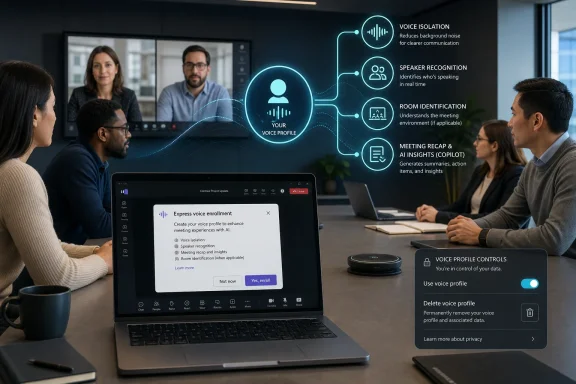
Microsoft’s roadmap entry makes the intended chain clear. A voice profile supports voice isolation, speaker recognition, identification in meeting rooms and transcripts, and enhanced meeting recaps and insights from Microsoft 365 Copilot. In other words, the profile is not a single-purpose accessibility or audio feature. It is a shared identity layer for Teams’ AI meeting stack.
That is why Express enrollment matters more than its name suggests. Microsoft is not merely shaving seconds from an onboarding flow. It is removing one of the major blockers between Teams as a conferencing tool and Teams as a system of record for workplace speech.
That makes speaker identity far more important. A transcript that says “Speaker 1” and “Speaker 2” can still be useful, but it cannot reliably tell a team whether the project owner committed to a date, whether legal objected to a clause, or whether a customer raised a blocker. Copilot’s usefulness rises sharply when the system can attach words to people.
Express enrollment is Microsoft’s attempt to solve the scale problem underneath that promise. The company can ship better recap interfaces and smarter summaries, but if half the room is unidentified, the AI layer remains blurry. Every unenrolled user becomes a weak point in the chain between conversation and usable institutional record.
This is especially visible in hybrid meeting rooms. Remote attendees usually join with individual accounts, cameras, and microphones. People sitting together in a conference room often appear through one room account and one shared audio stream. Voice recognition is the bridge that lets Teams separate the humans inside that shared room from the device representing them.
That use case also softens the biometric conversation. “Create a voice profile so Teams can hear you better” is less alarming than “Create a voice profile so Microsoft 365 Copilot can attribute workplace speech to you.” Both may be true within the product architecture, but they land differently with users.
Microsoft’s documentation says voice profiles are used only for the purposes users permit and are not used to train models. It also says users must opt in, can opt out later, and can delete their profile. Those are important safeguards, and they should not be waved away as mere boilerplate.
Still, the strategic direction is unmistakable. Once a voice profile exists, it becomes useful across multiple Teams experiences. Voice isolation may get users through the door, but speaker attribution and Copilot accuracy are where Microsoft’s productivity story becomes more ambitious.
That distinction matters. An enabled-by-default admin policy does not mean Microsoft is silently enrolling every worker. But it does mean the feature may be available unless IT decides otherwise. In large organizations, availability is policy, and policy is governance.
For administrators, the first task is not technical deployment but classification. Is voice enrollment a standard productivity feature, a biometric processing activity, a regulated-data concern, or all three? The answer will vary by industry, geography, union environment, and internal privacy posture.
The second task is communication. If users see a prompt asking them to enroll their voice during a meeting, they need plain-language context before distrust fills the vacuum. The worst rollout would be one where users discover after the fact that a casual opt-in has consequences for meeting-room identification, transcripts, and Copilot recaps.
Microsoft’s current posture addresses some of those concerns. Users can opt out and remove their profiles. Profiles are removed when users unenroll, deleted after account deletion according to Microsoft’s stated retention timelines, and removed if unused for a year. A local encrypted copy used for voice isolation expires after 14 days and is replaced.
There are also limits on admin access. Microsoft says admins can view enrollment status and delete enrollment data in the Teams Admin Center, but they cannot export end-user voice or face enrollment data. Export remains under the user’s control, which is exactly where it should be for a sensitive personal profile.
The unresolved issue is not whether Microsoft has controls. It is whether organizations will build a culture around those controls. A policy setting can disable enrollment; it cannot by itself explain to employees why enrollment is being encouraged, what benefit they receive, or where the boundary sits between productivity and surveillance.
That is useful for teams drowning in meetings. It can reduce the burden of note-taking, help absent colleagues catch up, and make room discussions less invisible to remote participants. The more accurate the speaker attribution, the more credible the recap.
But the same accuracy can feel uncomfortable. A meeting comment that once disappeared into the air may now become an attributed line in a transcript, a summarized position in a recap, and a retrievable fact in a future Copilot query. That is not inherently bad, but it is different from the older social contract of workplace conversation.
The answer is not to reject the feature outright. The answer is to treat enrollment as part of a broader meeting-data governance program. Recording, transcription, retention, eDiscovery, Copilot access, room recognition, and biometric enrollment are no longer separate policy islands. They are one system.
That is a meaningful improvement for inclusion. Remote workers often lose track of who is speaking in a room, especially when cameras show a wide table shot or no individual video at all. Accurate identification can make hybrid meetings less opaque and transcripts less useless.
It also makes room participation more accountable. If Teams can distinguish and identify room speakers, then in-room comments become part of the same auditable record as remote comments. That levels one playing field while raising another set of compliance questions.
Organizations deploying Teams Rooms should therefore avoid treating Express enrollment as a desktop-only convenience. The feature’s real payoff comes when enough users are enrolled for room recognition to work reliably. Without that adoption, the room remains a black box with better microphones.
Express voice enrollment is governed by the
That granularity is welcome, but it also creates room for accidental inconsistency. An organization may allow manual enrollment but disable Express enrollment. It may allow voice isolation but not want room speaker identification. It may permit executives to enroll while delaying broad rollout for frontline workers or regulated groups.
The right answer is rarely “turn everything on” or “turn everything off.” It is to map the settings to real scenarios: executive meetings, customer calls, classrooms, healthcare consultations, legal discussions, open-plan offices, and shared rooms. Microsoft gives admins switches; IT has to supply the judgment.
The wording matters because “enroll your voice” is not a phrase most workers encounter casually. Users need to know that speaking during meetings can generate the profile, that the profile powers multiple features, and that they can delete it later. They also need to know whether their employer has chosen to make the feature available, and whether there is any expectation to participate.
Microsoft’s documentation emphasizes user control, but enterprise rollouts add social pressure. If a manager says Copilot recaps are better when everyone enrolls, a technically optional choice may not feel optional. That is not a Microsoft-specific problem; it is a workplace governance problem.
The healthiest deployments will treat opt-in as a real choice. That means no shaming unenrolled users, no burying the explanation in a policy portal, and no pretending biometric enrollment is just another checkbox in Teams settings. Trust is an adoption feature.
The supported scope is also telling. Microsoft lists Teams desktop, Mac, Teams devices, and Surface devices, not every possible Teams endpoint. That suggests the first wave is focused on environments where meeting capture, room intelligence, and profile-based audio processing are most mature.
For WindowsForum readers, the Windows angle is less about the OS kernel and more about the Microsoft 365 client ecosystem that rides on top of Windows fleets. Desktop Teams remains a primary workplace application, and its settings increasingly carry identity, AI, and compliance implications that used to live elsewhere.
This is the future Microsoft has been building toward: Windows endpoints, Teams meetings, room devices, Microsoft 365 identity, and Copilot intelligence operating as one fabric. Express voice enrollment is one thread, but it runs through the whole cloth.
Legal and privacy teams should be involved early. That does not mean every organization needs a months-long review before enabling the feature, but biometric processing is not the place for casual drift. The organization should understand retention, deletion, export limits, regional availability, and employee notice obligations.
Security teams should also care because meeting intelligence is data intelligence. The risk is not merely that a voice profile exists. The broader risk is that richer transcripts and recaps become more valuable targets, more discoverable records, and more sensitive internal knowledge stores.
User education should be short, direct, and repeated. A good rollout message should explain what the profile does, what it does not do, how to opt in, how to opt out, and whom to contact with concerns. If users need a privacy lawyer to understand the Teams prompt, the rollout has already failed.
 Microsoft Turns Enrollment From a Chore Into Ambient Infrastructure
Voice profiles in Teams have existed as a setup step: go into settings, read a passage, capture enough audio, and hope the experience feels worth the interruption. Express voice enrollment changes the psychology of that process. Instead of asking users to perform a separate ritual, Teams can begin generating the profile from ordinary in-meeting speech after the user opts in.That is a small interaction-design change with a large adoption consequence. Enterprise features often fail not because the technology is unavailable, but because setup friction keeps the deployment in a half-finished state. Speaker recognition, voice isolation, and richer meeting recaps are only as good as the number of people who have enrolled.
Microsoft’s roadmap entry makes the intended chain clear. A voice profile supports voice isolation, speaker recognition, identification in meeting rooms and transcripts, and enhanced meeting recaps and insights from Microsoft 365 Copilot. In other words, the profile is not a single-purpose accessibility or audio feature. It is a shared identity layer for Teams’ AI meeting stack.
That is why Express enrollment matters more than its name suggests. Microsoft is not merely shaving seconds from an onboarding flow. It is removing one of the major blockers between Teams as a conferencing tool and Teams as a system of record for workplace speech.
The Meeting Transcript Is Becoming a Higher-Stakes Artifact
For years, meeting transcripts were treated as useful but imperfect byproducts. They helped users search for a phrase, catch up on a missed discussion, or provide rough accessibility support. With Copilot layered on top, the transcript becomes something more consequential: the raw material for summaries, action items, decisions, follow-up prompts, and organizational memory.That makes speaker identity far more important. A transcript that says “Speaker 1” and “Speaker 2” can still be useful, but it cannot reliably tell a team whether the project owner committed to a date, whether legal objected to a clause, or whether a customer raised a blocker. Copilot’s usefulness rises sharply when the system can attach words to people.
Express enrollment is Microsoft’s attempt to solve the scale problem underneath that promise. The company can ship better recap interfaces and smarter summaries, but if half the room is unidentified, the AI layer remains blurry. Every unenrolled user becomes a weak point in the chain between conversation and usable institutional record.
This is especially visible in hybrid meeting rooms. Remote attendees usually join with individual accounts, cameras, and microphones. People sitting together in a conference room often appear through one room account and one shared audio stream. Voice recognition is the bridge that lets Teams separate the humans inside that shared room from the device representing them.
Voice Isolation Was the Friendly Front Door
Microsoft’s most user-friendly pitch for voice profiles is voice isolation. It is easy to understand: Teams learns your voice and uses that profile to suppress background noise and secondary voices. Anyone who has taken a call near a keyboard, fan, café, child, dog, or open office can see the value.That use case also softens the biometric conversation. “Create a voice profile so Teams can hear you better” is less alarming than “Create a voice profile so Microsoft 365 Copilot can attribute workplace speech to you.” Both may be true within the product architecture, but they land differently with users.
Microsoft’s documentation says voice profiles are used only for the purposes users permit and are not used to train models. It also says users must opt in, can opt out later, and can delete their profile. Those are important safeguards, and they should not be waved away as mere boilerplate.
Still, the strategic direction is unmistakable. Once a voice profile exists, it becomes useful across multiple Teams experiences. Voice isolation may get users through the door, but speaker attribution and Copilot accuracy are where Microsoft’s productivity story becomes more ambitious.
Admins Get Control, But Defaults Matter
Microsoft says admins can enable or disable Express voice enrollment. In practice, the controls sit in Teams AI policy, with parameters for manual voice enrollment, face enrollment, and passive or Express voice enrollment. Microsoft’s documentation also indicates these settings are enabled by default, though users still must opt in before enrollment begins.That distinction matters. An enabled-by-default admin policy does not mean Microsoft is silently enrolling every worker. But it does mean the feature may be available unless IT decides otherwise. In large organizations, availability is policy, and policy is governance.
For administrators, the first task is not technical deployment but classification. Is voice enrollment a standard productivity feature, a biometric processing activity, a regulated-data concern, or all three? The answer will vary by industry, geography, union environment, and internal privacy posture.
The second task is communication. If users see a prompt asking them to enroll their voice during a meeting, they need plain-language context before distrust fills the vacuum. The worst rollout would be one where users discover after the fact that a casual opt-in has consequences for meeting-room identification, transcripts, and Copilot recaps.
Biometric Convenience Meets Workplace Reality
Voice profiles are not passwords. They are biometric templates tied to a person’s physical characteristics, and that makes the governance bar higher. Even when the system is designed with consent and deletion controls, users will reasonably ask what is stored, who can access it, how long it lasts, and what happens when they leave the company.Microsoft’s current posture addresses some of those concerns. Users can opt out and remove their profiles. Profiles are removed when users unenroll, deleted after account deletion according to Microsoft’s stated retention timelines, and removed if unused for a year. A local encrypted copy used for voice isolation expires after 14 days and is replaced.
There are also limits on admin access. Microsoft says admins can view enrollment status and delete enrollment data in the Teams Admin Center, but they cannot export end-user voice or face enrollment data. Export remains under the user’s control, which is exactly where it should be for a sensitive personal profile.
The unresolved issue is not whether Microsoft has controls. It is whether organizations will build a culture around those controls. A policy setting can disable enrollment; it cannot by itself explain to employees why enrollment is being encouraged, what benefit they receive, or where the boundary sits between productivity and surveillance.
Copilot Makes Speaker Recognition More Valuable and More Sensitive
Microsoft 365 Copilot changes the risk calculation because it increases the value of structured meeting data. When AI can generate recaps, identify decisions, surface commitments, and answer questions about what happened, speaker attribution becomes a multiplier. The system is not just transcribing speech; it is turning speech into a searchable, reusable work product.That is useful for teams drowning in meetings. It can reduce the burden of note-taking, help absent colleagues catch up, and make room discussions less invisible to remote participants. The more accurate the speaker attribution, the more credible the recap.
But the same accuracy can feel uncomfortable. A meeting comment that once disappeared into the air may now become an attributed line in a transcript, a summarized position in a recap, and a retrievable fact in a future Copilot query. That is not inherently bad, but it is different from the older social contract of workplace conversation.
The answer is not to reject the feature outright. The answer is to treat enrollment as part of a broader meeting-data governance program. Recording, transcription, retention, eDiscovery, Copilot access, room recognition, and biometric enrollment are no longer separate policy islands. They are one system.
Teams Rooms Are Where the Feature Stops Being Abstract
Express enrollment will matter most in the messy middle of hybrid work: conference rooms where several people talk through one device. Teams Rooms and supported devices already aim to make physical rooms legible to remote participants. Voice recognition extends that idea from “someone in the room spoke” to “Alex in the room said this.”That is a meaningful improvement for inclusion. Remote workers often lose track of who is speaking in a room, especially when cameras show a wide table shot or no individual video at all. Accurate identification can make hybrid meetings less opaque and transcripts less useless.
It also makes room participation more accountable. If Teams can distinguish and identify room speakers, then in-room comments become part of the same auditable record as remote comments. That levels one playing field while raising another set of compliance questions.
Organizations deploying Teams Rooms should therefore avoid treating Express enrollment as a desktop-only convenience. The feature’s real payoff comes when enough users are enrolled for room recognition to work reliably. Without that adoption, the room remains a black box with better microphones.
The Policy Surface Is Expanding Faster Than Admin Habits
Teams administrators are used to meeting policies, calling policies, app permissions, and compliance controls. The newer Teams AI policy surface adds another layer, and it is becoming the place where Microsoft puts settings that bridge human identity and AI-enabled meeting experiences. That shift deserves attention.Express voice enrollment is governed by the
PassiveVoiceEnrollment setting, while manual voice enrollment uses EnrollVoice. Face enrollment has its own control. Voice isolation also intersects with these settings because it depends on the voice profile to function at full strength.That granularity is welcome, but it also creates room for accidental inconsistency. An organization may allow manual enrollment but disable Express enrollment. It may allow voice isolation but not want room speaker identification. It may permit executives to enroll while delaying broad rollout for frontline workers or regulated groups.
The right answer is rarely “turn everything on” or “turn everything off.” It is to map the settings to real scenarios: executive meetings, customer calls, classrooms, healthcare consultations, legal discussions, open-plan offices, and shared rooms. Microsoft gives admins switches; IT has to supply the judgment.
The Privacy Debate Will Be Won or Lost in the Prompt
A feature like Express enrollment lives or dies in the moment the user is asked to opt in. If the prompt is clear, specific, and reversible, adoption can feel like informed consent. If it is vague or bundled into a productivity nudge, skepticism will be justified.The wording matters because “enroll your voice” is not a phrase most workers encounter casually. Users need to know that speaking during meetings can generate the profile, that the profile powers multiple features, and that they can delete it later. They also need to know whether their employer has chosen to make the feature available, and whether there is any expectation to participate.
Microsoft’s documentation emphasizes user control, but enterprise rollouts add social pressure. If a manager says Copilot recaps are better when everyone enrolls, a technically optional choice may not feel optional. That is not a Microsoft-specific problem; it is a workplace governance problem.
The healthiest deployments will treat opt-in as a real choice. That means no shaming unenrolled users, no burying the explanation in a policy portal, and no pretending biometric enrollment is just another checkbox in Teams settings. Trust is an adoption feature.
The June 2026 Rollout Is a Signal, Not a Finish Line
The roadmap status is “rolling out,” with general availability listed for June 2026. As always with Microsoft 365 roadmap items, timing can vary by tenant, release ring, and client readiness. Targeted Release tenants may see behavior before others, while some organizations may wait on policy review before making it visible.The supported scope is also telling. Microsoft lists Teams desktop, Mac, Teams devices, and Surface devices, not every possible Teams endpoint. That suggests the first wave is focused on environments where meeting capture, room intelligence, and profile-based audio processing are most mature.
For WindowsForum readers, the Windows angle is less about the OS kernel and more about the Microsoft 365 client ecosystem that rides on top of Windows fleets. Desktop Teams remains a primary workplace application, and its settings increasingly carry identity, AI, and compliance implications that used to live elsewhere.
This is the future Microsoft has been building toward: Windows endpoints, Teams meetings, room devices, Microsoft 365 identity, and Copilot intelligence operating as one fabric. Express voice enrollment is one thread, but it runs through the whole cloth.
The Real Admin Work Starts Before Users Click Opt In
The practical advice for IT departments is straightforward: do not wait for user questions to define your policy. Review Teams AI policy settings, decide whether Express enrollment should be available, and document the relationship between voice profiles, transcripts, room recognition, voice isolation, and Copilot-generated meeting artifacts.Legal and privacy teams should be involved early. That does not mean every organization needs a months-long review before enabling the feature, but biometric processing is not the place for casual drift. The organization should understand retention, deletion, export limits, regional availability, and employee notice obligations.
Security teams should also care because meeting intelligence is data intelligence. The risk is not merely that a voice profile exists. The broader risk is that richer transcripts and recaps become more valuable targets, more discoverable records, and more sensitive internal knowledge stores.
User education should be short, direct, and repeated. A good rollout message should explain what the profile does, what it does not do, how to opt in, how to opt out, and whom to contact with concerns. If users need a privacy lawyer to understand the Teams prompt, the rollout has already failed.
The Enrollment Shortcut Carries Five Decisions IT Cannot Duck
Express voice enrollment is easy for users only if the organization does the hard thinking first. The feature’s simplicity at the client layer should not obscure the policy, privacy, and records-management choices underneath it.- Organizations should decide explicitly whether Express voice enrollment is available by default, limited to selected groups, or disabled until governance review is complete.
- Users should be told that a Teams voice profile can support voice isolation, speaker attribution, room identification, transcripts, and Copilot-enhanced meeting recaps.
- Admins should distinguish between manual enrollment, Express enrollment, voice isolation, and room recognition instead of treating them as one undifferentiated Teams feature.
- Privacy teams should review retention, deletion, export, and employee-notice requirements before the feature becomes a meeting-room norm.
- Help desks should be ready for enrollment questions, especially from users who see prompts during meetings and do not understand why Teams is asking for their voice.
References
- Primary source: Microsoft 365 Roadmap
Published: 2026-06-22T23:00:47.0315291Z
Microsoft 365 Roadmap | Microsoft 365
The Microsoft 365 Roadmap lists updates that are currently planned for applicable subscribers. Check here for more information on the status of new features and updates.www.microsoft.com
