

Microsoft Teams is rolling out administrative controls in late June and July 2026 that let organizations detect suspected external meeting bots, hold them in the lobby, and require explicit organizer approval before those automated participants can join company-hosted meetings. The change is not a ban on AI note-takers so much as a recognition that the meeting room has become an identity boundary. Microsoft is trying to turn what used to be a social cue — “Who is that in the call?” — into an enforceable security workflow. That is overdue, because the fastest-growing participant in enterprise meetings is no longer a person.
For years, the Teams lobby was treated as a convenience feature: useful for webinars, sensitive customer meetings, and the occasional executive call, but often relaxed in day-to-day collaboration because friction is the enemy of productivity. The new external bot control changes the meaning of that lobby. It turns the waiting room into a checkpoint for software agents whose purpose may not be obvious to the organizer, the host organization, or the other attendees.
Under the new policy, Teams can identify likely external bots as they attempt to join a meeting hosted by the organization. Those participants are placed into the lobby even when the meeting’s ordinary settings would allow people to bypass it. The organizer then sees a separate indication that the waiting participant is suspected to be a bot and must make a deliberate admission decision.
That sounds small, but it corrects a serious mismatch in modern collaboration security. A human guest joining a Teams call brings an identity, a display name, and at least some social accountability. A meeting assistant may bring a recording pipeline, a transcription engine, a summarization model, a retention policy, and a vendor contract that nobody in the meeting has read.
Microsoft’s bet is that the first fix is not to outlaw these tools. It is to stop them from entering by accident.
That model is attractive because it is simple. The bot behaves like a meeting attendee, so it can observe the conversation without requiring deep platform integration. It also means the bot may appear in meetings where the organizer did not invite it, where participants do not expect it, or where the host organization has not approved the vendor handling the data.
The risk is not theoretical paranoia about AI. It is a basic governance problem. If a third-party bot records a strategy session, captures a customer negotiation, or transcribes a discussion about regulated data, the organization needs to know where that content goes, how long it is retained, who can access it, whether it is used for model training, and whether it can be produced or deleted under legal and compliance obligations.
Microsoft’s native Teams recording and transcription features sit inside the Microsoft 365 compliance universe, where administrators can apply retention, eDiscovery, audit, sensitivity labels, and data loss prevention policies. Third-party assistants may offer their own controls, but they live outside that default governance perimeter. The meeting may happen in Teams, but the content may quickly leave Microsoft 365.
That is why the new control matters. It is not merely about blocking “bad bots.” It is about giving administrators and organizers a chance to distinguish sanctioned automation from software that wandered into the meeting through an employee’s personal productivity workflow.
This is a pragmatic choice. Enterprises are not uniformly anti-bot. Some legal teams rely on approved transcription workflows. Sales teams may use meeting intelligence platforms. Accessibility needs may require captioning or note assistance. Project teams may prefer automated recaps because the alternative is incomplete human notes and forgotten action items.
A blanket block would satisfy the most risk-averse security teams but punish organizations that have already vetted tools and built processes around them. Detection plus approval gives Microsoft a middle path: it raises the visibility of external automation without forcing every customer into the same policy posture.
The weakness is obvious. Detection systems are only as good as the signals they can see. Some services will be easy to identify because they behave like known bots, use recognizable infrastructure, or participate through patterns Microsoft can classify. Others may be harder to distinguish from legitimate external users, especially as vendors adapt.
Microsoft has effectively admitted that this will be an evolving control. That is the right posture, but it means administrators should treat the feature as a new layer, not a final answer. If the business problem is “only approved services may record sensitive meetings,” lobby detection helps, but it does not replace vendor governance, user education, contractual review, and meeting policy design.
It also creates a burden. Organizers are not always security experts. A project manager may not know whether a bot belongs to a vendor approved by procurement. A sales lead may admit a customer’s note-taker because refusing it feels awkward. An executive assistant may allow a familiar-looking automated attendee without realizing the data implications.
This is where Microsoft’s design becomes both useful and incomplete. A clear warning is better than silent admission, but human approval is only as strong as the policy culture around it. If users are trained to click through prompts to keep meetings moving, the control becomes theater.
Administrators will need to decide who is trusted to admit detected bots and under what circumstances. For high-risk departments — legal, finance, M&A, healthcare operations, public sector programs, product strategy — the answer may be “almost never unless preapproved.” For routine vendor calls or internal standups, the organization may tolerate more flexibility.
The old Teams admin problem was configuring meetings. The new one is configuring judgment.
A mature system should let an organization say: these meeting assistants are approved, these are blocked, unknown bots must wait, and sensitive meetings have stricter rules than ordinary collaboration. That is how email security evolved, and it is likely how meeting-agent governance will evolve as well.
The planned Teams Bot Identification Program points in that direction. If independent software vendors can register their meeting bots so Teams can recognize them more reliably, Microsoft can reduce the ambiguity that currently surrounds automated participants. A known bot is not automatically a safe bot, but a known identity is the foundation for policy.
There is a platform politics angle here too. Microsoft has its own AI ambitions in Teams through Copilot and Microsoft 365. External meeting assistants compete with that vision, and any new gatekeeping layer will raise questions about whether Microsoft is improving security, advantaging first-party AI, or both.
The fairest reading is that both things can be true. Microsoft has a legitimate security reason to control automated meeting participants, and it also benefits when customers keep meeting intelligence inside Microsoft 365. Enterprise buyers should not be naïve about the incentive structure, but neither should they dismiss the risk just because the vendor has a strategic interest.
Microsoft’s threat intelligence teams have warned about campaigns where attackers use Teams to impersonate IT support, help desks, or trusted business contacts. The playbook is familiar: create urgency, move the victim into a channel that feels legitimate, persuade them to install remote access software, approve a prompt, disclose a credential, or perform an action that weakens the environment.
That is why Microsoft has been adding protections around external communication, suspicious calls, impersonation warnings, and user reporting. The company is trying to make Teams behave more like a security-controlled enterprise surface and less like a neutral chat pipe.
External bots fit naturally into that threat model. A malicious or compromised bot does not need to exploit a memory corruption bug to cause damage. It can simply listen. In a world where meetings routinely contain credentials spoken aloud, customer names, incident details, roadmap plans, legal strategy, and financial forecasts, passive access can be enough.
The uncomfortable lesson is that collaboration tools have become data stores even when nobody thinks of them that way. A meeting is no longer just a conversation. It is an audio stream, a transcript, a summary, a recording, a chat, a recap, an attendance record, and potentially a training corpus.
Regulated industries have been stuck in a bad position. They cannot simply ban every productivity assistant without inviting workarounds, but they also cannot allow unmanaged recording tools to capture sensitive conversations. The new Teams control gives them a lever they should have had earlier.
The strongest use case is not the ordinary staff meeting. It is the meeting where an employee from outside the host organization arrives with an assistant that the host never approved. In that case, the host tenant’s policies should matter. The company running the meeting should not lose control because another participant connected an AI note service to their calendar.
This is also where auditability becomes essential. A security team does not only need to know that a bot was blocked or admitted in the moment. It needs historical evidence: which bot attempted to join, which meeting it targeted, who admitted it, whether it stayed, and whether similar attempts are recurring across departments.
Without reporting, bot control remains a point-in-time organizer decision. With reporting, it becomes a governance program.
That has real productivity benefits. The employee who missed the call can catch up. The person with accessibility needs can review the transcript. The team can track decisions rather than rely on memory. For distributed work, that is valuable.
But the social contract of a meeting depends on consent and context. A participant may be comfortable with a native Teams transcript visible to everyone and retained under company policy. That same participant may object to a third-party bot exporting the conversation to an unknown service. Those are not equivalent events.
Microsoft’s new lobby behavior helps restore some of that context. A suspected bot is no longer just another tile in the participant list. It is a participant category that demands explicit attention.
That does not solve every privacy concern. A human attendee can still record externally with another device. Screen recording software can still capture content outside Teams’ awareness. But enterprise security has always been about raising barriers and reducing silent failure modes, not achieving perfect control.
The first step is inventory. Many organizations do not know which AI meeting assistants employees are using, which departments rely on them, or which vendors have already accumulated archives of corporate conversations. If the first time the security team notices a tool is when Teams flags it in a lobby, governance is already behind reality.
The second step is classification. Not every meeting deserves the same level of restriction. A public webinar, a vendor demo, a confidential HR discussion, and an incident response bridge should not share identical bot admission rules. Teams policies assigned to users and groups give administrators a way to reflect that difference.
The third step is communication. Users need a simple rule: if Teams says a suspected bot is waiting, admission is a data-sharing decision, not a courtesy click. That framing matters because meeting hosts are conditioned to let waiting participants in quickly, especially when a call is already underway.
Finally, procurement and security teams need a path for legitimate tools. If employees find value in AI meeting assistants, simply blocking them without an approved alternative invites personal accounts, browser extensions, and off-platform workarounds. Governance works best when it offers a sanctioned route.
For WindowsForum readers who manage Microsoft 365 environments, the lesson is practical. The control should be reviewed now, not after the first executive asks why an unknown bot appeared in a confidential call. The default behavior may be sensible for many tenants, but defaults are not governance.
The feature also suggests where Teams is headed. Today’s bot control focuses on lobby handling. Tomorrow’s likely direction is registered agents, tenant-level allow lists, automatic blocking, richer audit logs, and closer integration with Defender and Purview. Microsoft is building the scaffolding for AI-agent governance inside collaboration tools.
That scaffolding will become more important as AI assistants move from passive note-taking to active participation. A bot that summarizes a meeting is one problem. A bot that asks questions, schedules follow-ups, files records, or triggers workflows is another. Once agents act, admission control becomes only the first checkpoint.
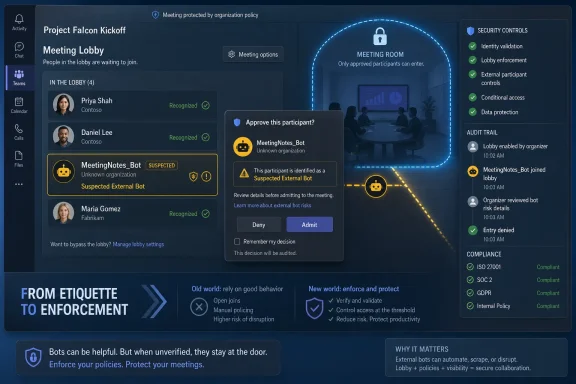 Microsoft Moves the Meeting Lobby From Etiquette to Enforcement
For years, the Teams lobby was treated as a convenience feature: useful for webinars, sensitive customer meetings, and the occasional executive call, but often relaxed in day-to-day collaboration because friction is the enemy of productivity. The new external bot control changes the meaning of that lobby. It turns the waiting room into a checkpoint for software agents whose purpose may not be obvious to the organizer, the host organization, or the other attendees.Under the new policy, Teams can identify likely external bots as they attempt to join a meeting hosted by the organization. Those participants are placed into the lobby even when the meeting’s ordinary settings would allow people to bypass it. The organizer then sees a separate indication that the waiting participant is suspected to be a bot and must make a deliberate admission decision.
That sounds small, but it corrects a serious mismatch in modern collaboration security. A human guest joining a Teams call brings an identity, a display name, and at least some social accountability. A meeting assistant may bring a recording pipeline, a transcription engine, a summarization model, a retention policy, and a vendor contract that nobody in the meeting has read.
Microsoft’s bet is that the first fix is not to outlaw these tools. It is to stop them from entering by accident.
The AI Note-Taker Became an Uninvited Data Processor
The AI meeting assistant boom created a new kind of shadow IT. Employees adopted tools that promise transcripts, summaries, action items, searchable archives, CRM updates, and “never take notes again” convenience. Many of these services work by joining meetings as participants, often after a user connects a calendar or grants access once.That model is attractive because it is simple. The bot behaves like a meeting attendee, so it can observe the conversation without requiring deep platform integration. It also means the bot may appear in meetings where the organizer did not invite it, where participants do not expect it, or where the host organization has not approved the vendor handling the data.
The risk is not theoretical paranoia about AI. It is a basic governance problem. If a third-party bot records a strategy session, captures a customer negotiation, or transcribes a discussion about regulated data, the organization needs to know where that content goes, how long it is retained, who can access it, whether it is used for model training, and whether it can be produced or deleted under legal and compliance obligations.
Microsoft’s native Teams recording and transcription features sit inside the Microsoft 365 compliance universe, where administrators can apply retention, eDiscovery, audit, sensitivity labels, and data loss prevention policies. Third-party assistants may offer their own controls, but they live outside that default governance perimeter. The meeting may happen in Teams, but the content may quickly leave Microsoft 365.
That is why the new control matters. It is not merely about blocking “bad bots.” It is about giving administrators and organizers a chance to distinguish sanctioned automation from software that wandered into the meeting through an employee’s personal productivity workflow.
Detection Is a Compromise, Not a Clean Solution
Microsoft’s first version of this control is detection-led rather than prohibition-led. Teams uses signals from the join process to decide whether a participant appears to be an external bot, then surfaces that assessment to the organizer. The default stance is not “all bots are forbidden,” but “suspected bots require scrutiny.”This is a pragmatic choice. Enterprises are not uniformly anti-bot. Some legal teams rely on approved transcription workflows. Sales teams may use meeting intelligence platforms. Accessibility needs may require captioning or note assistance. Project teams may prefer automated recaps because the alternative is incomplete human notes and forgotten action items.
A blanket block would satisfy the most risk-averse security teams but punish organizations that have already vetted tools and built processes around them. Detection plus approval gives Microsoft a middle path: it raises the visibility of external automation without forcing every customer into the same policy posture.
The weakness is obvious. Detection systems are only as good as the signals they can see. Some services will be easy to identify because they behave like known bots, use recognizable infrastructure, or participate through patterns Microsoft can classify. Others may be harder to distinguish from legitimate external users, especially as vendors adapt.
Microsoft has effectively admitted that this will be an evolving control. That is the right posture, but it means administrators should treat the feature as a new layer, not a final answer. If the business problem is “only approved services may record sensitive meetings,” lobby detection helps, but it does not replace vendor governance, user education, contractual review, and meeting policy design.
The Organizer Is Now Part of the Security Stack
The most interesting part of the rollout is that it deliberately puts the meeting organizer in the decision path. When a suspected bot waits in the lobby, the organizer must approve it separately. That makes sense because the organizer usually understands the meeting context better than a central admin policy does.It also creates a burden. Organizers are not always security experts. A project manager may not know whether a bot belongs to a vendor approved by procurement. A sales lead may admit a customer’s note-taker because refusing it feels awkward. An executive assistant may allow a familiar-looking automated attendee without realizing the data implications.
This is where Microsoft’s design becomes both useful and incomplete. A clear warning is better than silent admission, but human approval is only as strong as the policy culture around it. If users are trained to click through prompts to keep meetings moving, the control becomes theater.
Administrators will need to decide who is trusted to admit detected bots and under what circumstances. For high-risk departments — legal, finance, M&A, healthcare operations, public sector programs, product strategy — the answer may be “almost never unless preapproved.” For routine vendor calls or internal standups, the organization may tolerate more flexibility.
The old Teams admin problem was configuring meetings. The new one is configuring judgment.
The Coming Allow List Is the Real Enterprise Feature
Microsoft has indicated that broader controls are planned, including mechanisms for approved bot identification and more granular administrative handling. That is the part enterprises should watch most closely. Detection and lobby prompts are useful, but allow lists are where governance becomes operational.A mature system should let an organization say: these meeting assistants are approved, these are blocked, unknown bots must wait, and sensitive meetings have stricter rules than ordinary collaboration. That is how email security evolved, and it is likely how meeting-agent governance will evolve as well.
The planned Teams Bot Identification Program points in that direction. If independent software vendors can register their meeting bots so Teams can recognize them more reliably, Microsoft can reduce the ambiguity that currently surrounds automated participants. A known bot is not automatically a safe bot, but a known identity is the foundation for policy.
There is a platform politics angle here too. Microsoft has its own AI ambitions in Teams through Copilot and Microsoft 365. External meeting assistants compete with that vision, and any new gatekeeping layer will raise questions about whether Microsoft is improving security, advantaging first-party AI, or both.
The fairest reading is that both things can be true. Microsoft has a legitimate security reason to control automated meeting participants, and it also benefits when customers keep meeting intelligence inside Microsoft 365. Enterprise buyers should not be naïve about the incentive structure, but neither should they dismiss the risk just because the vendor has a strategic interest.
Teams Has Become a Phishing Surface, Not Just a Chat App
The bot-control rollout sits inside a broader hardening of Teams. Attackers increasingly abuse collaboration platforms because employees trust them more than email. A Teams message or call can feel like internal communication even when it comes from outside the organization.Microsoft’s threat intelligence teams have warned about campaigns where attackers use Teams to impersonate IT support, help desks, or trusted business contacts. The playbook is familiar: create urgency, move the victim into a channel that feels legitimate, persuade them to install remote access software, approve a prompt, disclose a credential, or perform an action that weakens the environment.
That is why Microsoft has been adding protections around external communication, suspicious calls, impersonation warnings, and user reporting. The company is trying to make Teams behave more like a security-controlled enterprise surface and less like a neutral chat pipe.
External bots fit naturally into that threat model. A malicious or compromised bot does not need to exploit a memory corruption bug to cause damage. It can simply listen. In a world where meetings routinely contain credentials spoken aloud, customer names, incident details, roadmap plans, legal strategy, and financial forecasts, passive access can be enough.
The uncomfortable lesson is that collaboration tools have become data stores even when nobody thinks of them that way. A meeting is no longer just a conversation. It is an audio stream, a transcript, a summary, a recording, a chat, a recap, an attendance record, and potentially a training corpus.
Compliance Teams Will Care More Than End Users
Most users will experience the feature as another lobby prompt. Security and compliance teams will see something more consequential: an admission that AI agents need policy boundaries comparable to apps, guests, and devices.Regulated industries have been stuck in a bad position. They cannot simply ban every productivity assistant without inviting workarounds, but they also cannot allow unmanaged recording tools to capture sensitive conversations. The new Teams control gives them a lever they should have had earlier.
The strongest use case is not the ordinary staff meeting. It is the meeting where an employee from outside the host organization arrives with an assistant that the host never approved. In that case, the host tenant’s policies should matter. The company running the meeting should not lose control because another participant connected an AI note service to their calendar.
This is also where auditability becomes essential. A security team does not only need to know that a bot was blocked or admitted in the moment. It needs historical evidence: which bot attempted to join, which meeting it targeted, who admitted it, whether it stayed, and whether similar attempts are recurring across departments.
Without reporting, bot control remains a point-in-time organizer decision. With reporting, it becomes a governance program.
The Privacy Problem Is Also a Social Problem
There is a reason AI note-takers became awkward so quickly. People behave differently when they know they are being recorded, summarized, or analyzed. Meetings that were once informal working sessions now carry the possibility that every aside becomes part of a searchable archive.That has real productivity benefits. The employee who missed the call can catch up. The person with accessibility needs can review the transcript. The team can track decisions rather than rely on memory. For distributed work, that is valuable.
But the social contract of a meeting depends on consent and context. A participant may be comfortable with a native Teams transcript visible to everyone and retained under company policy. That same participant may object to a third-party bot exporting the conversation to an unknown service. Those are not equivalent events.
Microsoft’s new lobby behavior helps restore some of that context. A suspected bot is no longer just another tile in the participant list. It is a participant category that demands explicit attention.
That does not solve every privacy concern. A human attendee can still record externally with another device. Screen recording software can still capture content outside Teams’ awareness. But enterprise security has always been about raising barriers and reducing silent failure modes, not achieving perfect control.
Admins Should Treat This as a Policy Reset
The rollout should prompt IT departments to revisit Teams meeting defaults rather than merely toggle the new setting and move on. External bot detection intersects with lobby configuration, presenter permissions, external access, guest policies, recording controls, transcription settings, sensitivity labels, and user training.The first step is inventory. Many organizations do not know which AI meeting assistants employees are using, which departments rely on them, or which vendors have already accumulated archives of corporate conversations. If the first time the security team notices a tool is when Teams flags it in a lobby, governance is already behind reality.
The second step is classification. Not every meeting deserves the same level of restriction. A public webinar, a vendor demo, a confidential HR discussion, and an incident response bridge should not share identical bot admission rules. Teams policies assigned to users and groups give administrators a way to reflect that difference.
The third step is communication. Users need a simple rule: if Teams says a suspected bot is waiting, admission is a data-sharing decision, not a courtesy click. That framing matters because meeting hosts are conditioned to let waiting participants in quickly, especially when a call is already underway.
Finally, procurement and security teams need a path for legitimate tools. If employees find value in AI meeting assistants, simply blocking them without an approved alternative invites personal accounts, browser extensions, and off-platform workarounds. Governance works best when it offers a sanctioned route.
The Small Lobby Prompt Carries a Bigger Message
This update is part of a broader shift in enterprise software: AI agents are being treated less like features and more like actors. They join meetings, read mail, summarize documents, file tickets, draft responses, and move information between systems. That makes identity, authorization, and audit trails newly important.For WindowsForum readers who manage Microsoft 365 environments, the lesson is practical. The control should be reviewed now, not after the first executive asks why an unknown bot appeared in a confidential call. The default behavior may be sensible for many tenants, but defaults are not governance.
The feature also suggests where Teams is headed. Today’s bot control focuses on lobby handling. Tomorrow’s likely direction is registered agents, tenant-level allow lists, automatic blocking, richer audit logs, and closer integration with Defender and Purview. Microsoft is building the scaffolding for AI-agent governance inside collaboration tools.
That scaffolding will become more important as AI assistants move from passive note-taking to active participation. A bot that summarizes a meeting is one problem. A bot that asks questions, schedules follow-ups, files records, or triggers workflows is another. Once agents act, admission control becomes only the first checkpoint.
The Admin Console Finally Catches Up With the Meeting Room
The practical implications are clearer than the marketing language around them:- Organizations can now require suspected external meeting bots to wait in the Teams lobby even when ordinary attendees would bypass it.
- Meeting organizers must make a separate approval decision before a detected bot can enter the meeting.
- Administrators can apply the policy at organizational, group, or user levels to reflect different sensitivity and compliance needs.
- The feature reduces accidental bot admission, but it does not eliminate the need for approved-vendor policies, user training, and audit review.
- Microsoft’s next challenge is making bot identity reliable enough for allow lists, automatic blocking, and meaningful reporting.
References
- Primary source: LinkedIn
Published: Wed, 01 Jul 2026 10:30:12 GMT
Microsoft Teams Introduces New Controls To Block Unapproved AI Bots From Meetings
Microsoft is expanding its security protections for Microsoft Teams by introducing new administrative controls that give organizations greater authority over third-party bots attempting to join online meetings, marking another step in the company's broader effort to protect enterprise collaborationwww.linkedin.com
- Related coverage: techradar.com
Microsoft Teams is getting wants to block bad bots for good | TechRadar
"Smarter bot protection" is coming to Microsoft Teamswww.techradar.com - Official source: learn.microsoft.com
Manage external bots and their access to meetings hosted in your organization - Microsoft Teams | Microsoft Learn
Learn how to configure the access that external bots get to Teams meetings hosted in your organizationlearn.microsoft.com - Official source: support.microsoft.com
Meeting options in Microsoft Teams | Microsoft Support
Admins set default meeting settings. They try to optimize for most use cases, but if you want to adjust your options for a specific Teams meeting, go to Meeting options.support.microsoft.com - Official source: techcommunity.microsoft.com
- Related coverage: helpnetsecurity.com
Microsoft wants to stop unwanted bots from entering Teams meetings - Help Net Security
Microsoft Teams bot detection adds admin controls to identify external bots, protect meetings, and improve oversight for admins.www.helpnetsecurity.com
- Related coverage: windowscentral.com
Microsoft Teams will block unwanted bots from meetings | Windows Central
That silent "AI Assistant" in the corner isn't always a company tool. Microsoft is finally giving you a way to lock the door on data-scraping hitchhikers.www.windowscentral.com - Related coverage: techriver.com