

On June 8, 2026, Palo Alto Networks Unit 42 warned that attackers are increasingly using Microsoft Teams chats to impersonate IT support staff, trick employees into accepting external conversations, and manipulate them into approving MFA prompts or visiting credential-harvesting pages. The core lesson is uncomfortable for Microsoft 365 shops: the collaboration layer has become an identity attack surface. Teams is not merely where work happens anymore; it is where attackers now borrow the tone, timing, and trust of work itself. The defensive answer is not another reminder to “be careful,” but a harder look at whether external chat belongs open by default.
The most effective social engineering does not feel like an attack. It feels like an interruption.
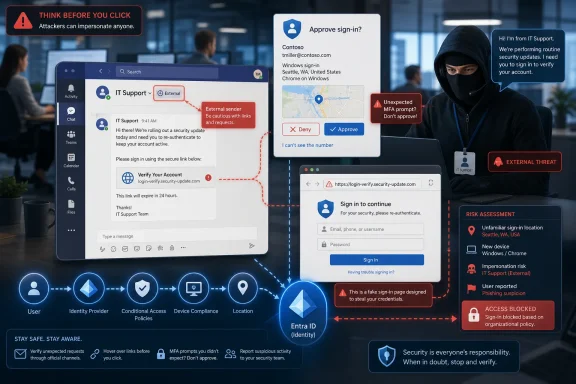
That is why the Teams lure described by Unit 42 lands so neatly. A worker sees a message late in the week from someone claiming to be IT. It is marked external, but the context feels plausible, the channel feels familiar, and the request is wrapped in the language of account safety rather than panic.
This is the strategic shift. Email phishing has spent decades becoming a known category of danger. Users have been trained to distrust attachments, hover over links, and forward suspicious mail to security. Teams, Slack, Zoom chat, Google Chat, and other collaboration systems still live in a softer psychological category: the place colleagues talk.
Attackers are exploiting that gap. They are not necessarily defeating Teams encryption, bypassing Microsoft’s authentication stack, or burning some exotic zero-day. They are using a legitimate communications feature to reach a human being inside the perimeter and then asking that human being to do something security-sensitive.
That distinction matters because it changes the defensive burden. If the compromise begins with a sanctioned external chat feature, then the question is not whether Teams is “secure” in the abstract. The question is whether the organization’s configuration matches the risk it has implicitly accepted.
Unit 42’s scenario is simple: an external sender poses as a service provider or IT department, claims there is an account issue, and asks the user to approve an MFA prompt. By the time the conversation has built enough trust to seem mundane, the attacker may already be attempting a login, registering a device, harvesting credentials, or moving toward the next stage of compromise.
This is the same basic social engineering equation behind MFA fatigue attacks, helpdesk impersonation, and adversary-in-the-middle phishing. What has changed is the delivery vehicle. Teams gives the attacker a conversational environment rather than a static message, and conversation is a powerful weapon.
A phishing email must anticipate the victim’s doubts in advance. A chat lets the attacker respond to them in real time. If the user hesitates, the fake technician can reassure them. If the user asks why the prompt appeared, the attacker can say it is part of the verification. If the user notices the external banner, the attacker can explain that the company uses an outside managed service provider.
The scam succeeds because it borrows from ordinary enterprise reality. Many organizations really do outsource IT. Many users really do interact with vendors through Teams. Many helpdesk workflows really do involve identity verification. The attacker does not need to invent a foreign process; they only need to imitate a familiar one at the right moment.
Those are useful features, but they are not the same as prevention. A warning still asks the user to make the security decision at the moment when the attacker has maximum influence. That is precisely the wrong time to rely on perfect judgment.
The Teams external label has the same weakness as every warning banner that becomes part of the wallpaper. Users see “External” on legitimate vendor messages, partner chats, customer escalations, recruiter pings, consultant communications, and managed service provider threads. Over time, the label stops meaning “danger” and starts meaning “someone outside the tenant.”
Attackers understand this. Unit 42 notes the use of typosquatted domains, tenants named to resemble support functions, and accounts that appear to come from vendors or managed service providers. In more serious cases, attackers do not need a lookalike at all because they have compromised a real partner or service provider account.
That last case is the most damaging because it defeats the user’s intuition. If the domain is familiar and the sender’s organization is already part of the company’s business ecosystem, the chat may not look strange. The attack becomes a supply-chain-flavored identity intrusion, with Teams as the handshake.
This is where security teams should be blunt with themselves. If the policy allows almost anyone on another Microsoft 365 tenant to initiate chats with employees, then the organization has effectively exposed a conversational attack surface to the internet, filtered mainly by Microsoft’s abuse detection and the recipient’s judgment.
But there is a large difference between allowing external collaboration and allowing open-ended federation. Microsoft’s own documentation describes a model in which organizations can allow all external domains, allow only specific domains, block specific domains, or block all external domains. The dangerous default in many environments is not that Teams supports federation; it is that administrators may leave it broadly permissive long after the business case has narrowed.
Open federation is administratively convenient because it avoids tickets. Users can talk to whoever they need to talk to, and IT does not have to maintain a domain allow list. That convenience becomes technical debt when attackers discover that a tenant named something like “IT Support Services” can initiate a conversation with employees who are conditioned to treat Teams as semi-internal space.
Unit 42’s recommended direction is unsurprising but important: if the business allows it, restrict external communication to specific domains and disable unmanaged or personal Teams accounts from initiating conversations. That is not a glamorous control. It will not get a keynote demo. It is the kind of quiet configuration change that prevents the entire first act of an intrusion.
The objection will be operational friction. Sales teams will complain. Support organizations will ask for exceptions. Project groups with external collaborators will surface edge cases that no one documented. But that is the real governance conversation security teams need to force: who actually needs inbound external Teams chat, from which domains, and under what monitoring?
The answer should not be “everyone, from everywhere, because that is how it was set up.”
This should not surprise anyone who has watched enterprise security mature unevenly. Email security has become a heavily defended channel, with filtering, detonation, sender authentication, user reporting workflows, phishing simulations, and mature SOC playbooks. Attackers do not abandon email, but they route around its strongest defenses when another channel offers less resistance.
Teams gives them several advantages. It is immediate. It is interactive. It can carry files and links. It can trigger notifications on desktop and mobile. It is associated with work identity. It can be used to create a sense of synchronous pressure without the overt aggression of a phone call.
The attack also benefits from the culture of IT support. Employees are often told to cooperate with security teams, respond to account alerts, and follow helpdesk instructions. A fake technician asking for an MFA approval is abusing a norm that security itself helped create: when IT says there is an identity issue, take it seriously.
That is why user training must evolve beyond the old inbox model. It is not enough to show workers suspicious emails with misspellings and sketchy domains. Training has to include the collaboration scenarios employees now face: unsolicited Teams messages, external tenant warnings, unexpected MFA prompts, remote support requests, QR codes in chat, and instructions to install “repair” utilities or browser extensions.
Still, training should be the backstop, not the main gate. The more important lesson is architectural: if the user never needed to receive that external chat in the first place, then making them judge it was a design failure.
Once an attacker persuades a user to approve an MFA prompt, enter credentials, install a remote access tool, or follow a link to a fake Microsoft login page, the intrusion shifts from social engineering to identity abuse. From there, the attacker may attempt mailbox access, lateral movement, device registration, OAuth consent abuse, data exfiltration, or privilege escalation.
This is why Teams hardening cannot be isolated from Entra ID, Conditional Access, device compliance, and privileged access management. A stricter external chat policy reduces the number of malicious conversations. Stronger identity controls reduce the blast radius when one succeeds.
Conditional Access should make risky sign-ins harder to convert into durable access. Device compliance rules should prevent a phished credential from being enough to access sensitive resources from an unmanaged endpoint. Privileged Identity Management should ensure that administrative roles are not standing privileges waiting to be abused. Number matching, phishing-resistant MFA, and context-rich prompts can reduce the odds that a user blindly approves an authentication request.
The uncomfortable part is that many organizations adopted MFA as if it were the finish line. These Teams attacks show why it is not. MFA that can be socially approved under pressure is still vulnerable to persuasion. It raises the bar, but it does not remove the human from the chain.
That does not mean MFA has failed. It means the attacker has adapted to the version of MFA most users actually experience: a prompt that appears during a busy day and asks for a quick yes. If the surrounding process teaches users that approving prompts is routine, then the attacker’s job is to make the prompt feel routine.
The sequence matters. A single external chat may be harmless. An external chat followed by repeated MFA prompts, a risky sign-in, new device registration, mailbox rule creation, OAuth grant activity, or remote management tool download is a different story. Security teams need to correlate the conversation layer with the identity layer.
Administrators also need response muscle. Microsoft provides mechanisms for reporting suspicious Teams messages and, in certain scenarios, removing external chats from users’ views. Those are not substitutes for prevention, but they are important once a campaign is underway. A malicious chat that remains visible can keep working on the victim after the SOC has identified the threat.
There is also a visibility challenge in partner ecosystems. If an attacker compromises a legitimate vendor tenant, domain allow lists will not stop every malicious message. That is where anomaly detection and relationship-aware monitoring become important. A message from a known partner may still be suspicious if it comes from a new sender, reaches many employees at once, uses unusual phrasing, or coincides with identity events.
The goal is not to turn every Teams conversation into a compliance investigation. The goal is to recognize that collaboration platforms now carry enough risk to deserve the same defensive seriousness as email. Ten years ago, failing to monitor inbound email for phishing would have been negligent. In 2026, ignoring external collaboration traffic is moving in the same direction.
But product features and secure outcomes are not the same thing. A control that exists in the admin center does not protect an organization that never configures it. A warning that appears in the client does not prevent a user from accepting the chat. A reporting button does not matter if employees do not know when to press it or if the SOC cannot act on the signal quickly.
This is the recurring Microsoft 365 security tension. The platform often provides the knobs, but tenants inherit risk through defaults, legacy assumptions, licensing differences, and configuration drift. Enterprises then discover, usually during an incident, that the boundary they believed existed was actually a set of optional policies no one had revisited.
The best argument for tighter Teams controls is not that Microsoft failed. It is that Microsoft 365 is too flexible to run safely on autopilot. Collaboration settings are business decisions with security consequences, and they need owners who can say no.
For WindowsForum readers managing Microsoft environments, this is familiar territory. The same pattern has played out with macro policies, legacy authentication, OAuth app consent, external sharing in SharePoint and OneDrive, guest access, and mailbox forwarding. The platform enables productivity first; security teams later have to decide which conveniences are still worth their cost.
That reality complicates simplistic advice. Telling users “IT will never contact you externally” may be false. Telling them “never approve an MFA prompt when asked” is closer to right, but still does not address remote support workflows that genuinely require identity verification. Telling them to inspect domains assumes they can distinguish a real provider, a typosquat, a compromised vendor, and a newly created tenant under time pressure.
The better approach is procedural clarity. Organizations should define how IT support initiates contact, what channels are authorized, what identity verification looks like, and what support staff are never allowed to ask users to do. If helpdesk technicians may need to contact users in Teams, that process should be branded, predictable, and backed by a separate verification path.
For example, a user should know that unexpected MFA approval requests are never a valid way to “confirm identity.” A support chat should be verifiable through an internal ticket number, a known helpdesk portal, or a callback path published inside the company. External providers should use domains on an approved list, and employees should not be asked to trust a display name alone.
The important point is consistency. Attackers flourish in ambiguity. If every support interaction looks different, the fake one has a better chance of blending in.
Security policy needs more nuance than that. A binary internal/external label is useful for the user interface, but administrators should think in tiers of trust. A long-term legal vendor with contractual controls is not the same as an unknown tenant. A strategic partner domain is not the same as a personal Teams account. A project-specific guest collaboration space is not the same as open inbound one-to-one chat.
Teams external access policies can support a more deliberate model, but only if organizations do the inventory work. Which external domains are actually used? Which business units depend on them? Which users need broad access because of their roles? Which departments should have no inbound external chat at all? Which partner relationships should move from open chat into guest access, shared channels, or more controlled collaboration spaces?
This is not just security hygiene. It is an opportunity to make collaboration governance match reality. Many tenants have years of accumulated permissiveness because blocking external chat sounded disruptive. The current wave of Teams phishing gives IT leaders the justification to clean it up.
A practical rollout should start with visibility rather than an overnight shutdown. Audit external communication patterns. Identify high-volume legitimate domains. Spot unknown or suspicious tenants. Build an allow list from actual business need, then move toward restriction with a clear exception process. The result will not be perfect, but it will be vastly better than pretending an external banner is a security boundary.
A defensible Microsoft 365 tenant in 2026 should treat external collaboration as a governed privilege, not an ambient default. That does not mean shutting down every partner conversation. It means making inbound chat reflect business relationships rather than attacker creativity.
 The Phishing Inbox Has Moved Into the Workday
The most effective social engineering does not feel like an attack. It feels like an interruption.That is why the Teams lure described by Unit 42 lands so neatly. A worker sees a message late in the week from someone claiming to be IT. It is marked external, but the context feels plausible, the channel feels familiar, and the request is wrapped in the language of account safety rather than panic.
This is the strategic shift. Email phishing has spent decades becoming a known category of danger. Users have been trained to distrust attachments, hover over links, and forward suspicious mail to security. Teams, Slack, Zoom chat, Google Chat, and other collaboration systems still live in a softer psychological category: the place colleagues talk.
Attackers are exploiting that gap. They are not necessarily defeating Teams encryption, bypassing Microsoft’s authentication stack, or burning some exotic zero-day. They are using a legitimate communications feature to reach a human being inside the perimeter and then asking that human being to do something security-sensitive.
That distinction matters because it changes the defensive burden. If the compromise begins with a sanctioned external chat feature, then the question is not whether Teams is “secure” in the abstract. The question is whether the organization’s configuration matches the risk it has implicitly accepted.
Microsoft Teams Became Too Trusted to Ignore
Teams is a natural target because it sits at the intersection of identity, collaboration, and operational urgency. A message from “IT support” in Teams can feel more legitimate than an email because it appears inside the same application where meetings, manager pings, helpdesk escalations, project decisions, and file sharing already happen.Unit 42’s scenario is simple: an external sender poses as a service provider or IT department, claims there is an account issue, and asks the user to approve an MFA prompt. By the time the conversation has built enough trust to seem mundane, the attacker may already be attempting a login, registering a device, harvesting credentials, or moving toward the next stage of compromise.
This is the same basic social engineering equation behind MFA fatigue attacks, helpdesk impersonation, and adversary-in-the-middle phishing. What has changed is the delivery vehicle. Teams gives the attacker a conversational environment rather than a static message, and conversation is a powerful weapon.
A phishing email must anticipate the victim’s doubts in advance. A chat lets the attacker respond to them in real time. If the user hesitates, the fake technician can reassure them. If the user asks why the prompt appeared, the attacker can say it is part of the verification. If the user notices the external banner, the attacker can explain that the company uses an outside managed service provider.
The scam succeeds because it borrows from ordinary enterprise reality. Many organizations really do outsource IT. Many users really do interact with vendors through Teams. Many helpdesk workflows really do involve identity verification. The attacker does not need to invent a foreign process; they only need to imitate a familiar one at the right moment.
The External Banner Is a Warning, Not a Control
Microsoft Teams does present indicators when a sender is outside the organization. It can warn users about potential impersonation. It gives recipients the chance to preview, accept, block, or ignore chats from external parties.Those are useful features, but they are not the same as prevention. A warning still asks the user to make the security decision at the moment when the attacker has maximum influence. That is precisely the wrong time to rely on perfect judgment.
The Teams external label has the same weakness as every warning banner that becomes part of the wallpaper. Users see “External” on legitimate vendor messages, partner chats, customer escalations, recruiter pings, consultant communications, and managed service provider threads. Over time, the label stops meaning “danger” and starts meaning “someone outside the tenant.”
Attackers understand this. Unit 42 notes the use of typosquatted domains, tenants named to resemble support functions, and accounts that appear to come from vendors or managed service providers. In more serious cases, attackers do not need a lookalike at all because they have compromised a real partner or service provider account.
That last case is the most damaging because it defeats the user’s intuition. If the domain is familiar and the sender’s organization is already part of the company’s business ecosystem, the chat may not look strange. The attack becomes a supply-chain-flavored identity intrusion, with Teams as the handshake.
This is where security teams should be blunt with themselves. If the policy allows almost anyone on another Microsoft 365 tenant to initiate chats with employees, then the organization has effectively exposed a conversational attack surface to the internet, filtered mainly by Microsoft’s abuse detection and the recipient’s judgment.
Federation Turned Convenience Into Exposure
Microsoft Teams external access exists for good reasons. Modern work crosses company boundaries. Employees need to chat with customers, vendors, contractors, auditors, agencies, subsidiaries, partners, and support providers. Blocking every external conversation would push users back to email, personal accounts, or unsanctioned tools.But there is a large difference between allowing external collaboration and allowing open-ended federation. Microsoft’s own documentation describes a model in which organizations can allow all external domains, allow only specific domains, block specific domains, or block all external domains. The dangerous default in many environments is not that Teams supports federation; it is that administrators may leave it broadly permissive long after the business case has narrowed.
Open federation is administratively convenient because it avoids tickets. Users can talk to whoever they need to talk to, and IT does not have to maintain a domain allow list. That convenience becomes technical debt when attackers discover that a tenant named something like “IT Support Services” can initiate a conversation with employees who are conditioned to treat Teams as semi-internal space.
Unit 42’s recommended direction is unsurprising but important: if the business allows it, restrict external communication to specific domains and disable unmanaged or personal Teams accounts from initiating conversations. That is not a glamorous control. It will not get a keynote demo. It is the kind of quiet configuration change that prevents the entire first act of an intrusion.
The objection will be operational friction. Sales teams will complain. Support organizations will ask for exceptions. Project groups with external collaborators will surface edge cases that no one documented. But that is the real governance conversation security teams need to force: who actually needs inbound external Teams chat, from which domains, and under what monitoring?
The answer should not be “everyone, from everywhere, because that is how it was set up.”
Attackers Are Chasing the Path of Least Skepticism
The Unit 42 report fits a broader pattern across 2025 and 2026: attackers are moving to the places users trust more than email. Mandiant’s reporting on UNC6692, for example, described a campaign that paired helpdesk impersonation over Teams with broader intrusion activity. Other defenders have reported similar abuse of collaboration platforms, often involving fake IT staff, remote access tooling, malicious links, or credential theft.This should not surprise anyone who has watched enterprise security mature unevenly. Email security has become a heavily defended channel, with filtering, detonation, sender authentication, user reporting workflows, phishing simulations, and mature SOC playbooks. Attackers do not abandon email, but they route around its strongest defenses when another channel offers less resistance.
Teams gives them several advantages. It is immediate. It is interactive. It can carry files and links. It can trigger notifications on desktop and mobile. It is associated with work identity. It can be used to create a sense of synchronous pressure without the overt aggression of a phone call.
The attack also benefits from the culture of IT support. Employees are often told to cooperate with security teams, respond to account alerts, and follow helpdesk instructions. A fake technician asking for an MFA approval is abusing a norm that security itself helped create: when IT says there is an identity issue, take it seriously.
That is why user training must evolve beyond the old inbox model. It is not enough to show workers suspicious emails with misspellings and sketchy domains. Training has to include the collaboration scenarios employees now face: unsolicited Teams messages, external tenant warnings, unexpected MFA prompts, remote support requests, QR codes in chat, and instructions to install “repair” utilities or browser extensions.
Still, training should be the backstop, not the main gate. The more important lesson is architectural: if the user never needed to receive that external chat in the first place, then making them judge it was a design failure.
Identity Is the Prize, Teams Is the Doorbell
The Teams message is only the opening move. The real target is identity.Once an attacker persuades a user to approve an MFA prompt, enter credentials, install a remote access tool, or follow a link to a fake Microsoft login page, the intrusion shifts from social engineering to identity abuse. From there, the attacker may attempt mailbox access, lateral movement, device registration, OAuth consent abuse, data exfiltration, or privilege escalation.
This is why Teams hardening cannot be isolated from Entra ID, Conditional Access, device compliance, and privileged access management. A stricter external chat policy reduces the number of malicious conversations. Stronger identity controls reduce the blast radius when one succeeds.
Conditional Access should make risky sign-ins harder to convert into durable access. Device compliance rules should prevent a phished credential from being enough to access sensitive resources from an unmanaged endpoint. Privileged Identity Management should ensure that administrative roles are not standing privileges waiting to be abused. Number matching, phishing-resistant MFA, and context-rich prompts can reduce the odds that a user blindly approves an authentication request.
The uncomfortable part is that many organizations adopted MFA as if it were the finish line. These Teams attacks show why it is not. MFA that can be socially approved under pressure is still vulnerable to persuasion. It raises the bar, but it does not remove the human from the chain.
That does not mean MFA has failed. It means the attacker has adapted to the version of MFA most users actually experience: a prompt that appears during a busy day and asks for a quick yes. If the surrounding process teaches users that approving prompts is routine, then the attacker’s job is to make the prompt feel routine.
Monitoring Has to Treat Chat as Security Telemetry
For years, many SOC workflows treated collaboration messages as productivity data rather than security telemetry. That boundary is no longer tenable. If attackers are initiating intrusions through Teams, then external chat initiation, suspicious domains, unusual tenant names, mass contact patterns, and post-chat authentication anomalies belong in detection logic.The sequence matters. A single external chat may be harmless. An external chat followed by repeated MFA prompts, a risky sign-in, new device registration, mailbox rule creation, OAuth grant activity, or remote management tool download is a different story. Security teams need to correlate the conversation layer with the identity layer.
Administrators also need response muscle. Microsoft provides mechanisms for reporting suspicious Teams messages and, in certain scenarios, removing external chats from users’ views. Those are not substitutes for prevention, but they are important once a campaign is underway. A malicious chat that remains visible can keep working on the victim after the SOC has identified the threat.
There is also a visibility challenge in partner ecosystems. If an attacker compromises a legitimate vendor tenant, domain allow lists will not stop every malicious message. That is where anomaly detection and relationship-aware monitoring become important. A message from a known partner may still be suspicious if it comes from a new sender, reaches many employees at once, uses unusual phrasing, or coincides with identity events.
The goal is not to turn every Teams conversation into a compliance investigation. The goal is to recognize that collaboration platforms now carry enough risk to deserve the same defensive seriousness as email. Ten years ago, failing to monitor inbound email for phishing would have been negligent. In 2026, ignoring external collaboration traffic is moving in the same direction.
Microsoft’s Warnings Help, but Defaults Still Matter
Microsoft has not ignored this problem. Teams includes external sender indicators, user controls, impersonation warnings, malicious-link protections, administrative settings for external access, and options to manage communication with unmanaged accounts, trial tenants, external organizations, and blocked users.But product features and secure outcomes are not the same thing. A control that exists in the admin center does not protect an organization that never configures it. A warning that appears in the client does not prevent a user from accepting the chat. A reporting button does not matter if employees do not know when to press it or if the SOC cannot act on the signal quickly.
This is the recurring Microsoft 365 security tension. The platform often provides the knobs, but tenants inherit risk through defaults, legacy assumptions, licensing differences, and configuration drift. Enterprises then discover, usually during an incident, that the boundary they believed existed was actually a set of optional policies no one had revisited.
The best argument for tighter Teams controls is not that Microsoft failed. It is that Microsoft 365 is too flexible to run safely on autopilot. Collaboration settings are business decisions with security consequences, and they need owners who can say no.
For WindowsForum readers managing Microsoft environments, this is familiar territory. The same pattern has played out with macro policies, legacy authentication, OAuth app consent, external sharing in SharePoint and OneDrive, guest access, and mailbox forwarding. The platform enables productivity first; security teams later have to decide which conveniences are still worth their cost.
The MSP Problem Makes the Lure More Believable
The fake IT message works especially well in organizations that rely on managed service providers, outside security teams, outsourced helpdesks, and project-based consultants. In those environments, an external “IT” identity is not inherently suspicious. It may be exactly how support normally appears.That reality complicates simplistic advice. Telling users “IT will never contact you externally” may be false. Telling them “never approve an MFA prompt when asked” is closer to right, but still does not address remote support workflows that genuinely require identity verification. Telling them to inspect domains assumes they can distinguish a real provider, a typosquat, a compromised vendor, and a newly created tenant under time pressure.
The better approach is procedural clarity. Organizations should define how IT support initiates contact, what channels are authorized, what identity verification looks like, and what support staff are never allowed to ask users to do. If helpdesk technicians may need to contact users in Teams, that process should be branded, predictable, and backed by a separate verification path.
For example, a user should know that unexpected MFA approval requests are never a valid way to “confirm identity.” A support chat should be verifiable through an internal ticket number, a known helpdesk portal, or a callback path published inside the company. External providers should use domains on an approved list, and employees should not be asked to trust a display name alone.
The important point is consistency. Attackers flourish in ambiguity. If every support interaction looks different, the fake one has a better chance of blending in.
Security Teams Need to Reclaim the Meaning of “External”
One of the quiet failures of modern collaboration software is that “external” has become a weak word. It can mean a trusted vendor, a customer, a contractor, a personal Microsoft account, a trial tenant, a partner organization, or a threat actor with a domain that looks close enough to pass a tired glance.Security policy needs more nuance than that. A binary internal/external label is useful for the user interface, but administrators should think in tiers of trust. A long-term legal vendor with contractual controls is not the same as an unknown tenant. A strategic partner domain is not the same as a personal Teams account. A project-specific guest collaboration space is not the same as open inbound one-to-one chat.
Teams external access policies can support a more deliberate model, but only if organizations do the inventory work. Which external domains are actually used? Which business units depend on them? Which users need broad access because of their roles? Which departments should have no inbound external chat at all? Which partner relationships should move from open chat into guest access, shared channels, or more controlled collaboration spaces?
This is not just security hygiene. It is an opportunity to make collaboration governance match reality. Many tenants have years of accumulated permissiveness because blocking external chat sounded disruptive. The current wave of Teams phishing gives IT leaders the justification to clean it up.
A practical rollout should start with visibility rather than an overnight shutdown. Audit external communication patterns. Identify high-volume legitimate domains. Spot unknown or suspicious tenants. Build an allow list from actual business need, then move toward restriction with a clear exception process. The result will not be perfect, but it will be vastly better than pretending an external banner is a security boundary.
The Friday-Afternoon Chat Is a Governance Test
The most concrete lesson from Unit 42’s warning is that Teams phishing is not a weird edge case anymore. It is a predictable consequence of placing a trusted work interface on top of federated identity and then letting too many outsiders knock on the door.A defensible Microsoft 365 tenant in 2026 should treat external collaboration as a governed privilege, not an ambient default. That does not mean shutting down every partner conversation. It means making inbound chat reflect business relationships rather than attacker creativity.
- Organizations should review whether Microsoft Teams federation is open to all external domains and move toward allow-listed domains wherever the business can tolerate it.
- Administrators should disable unmanaged or personal Teams accounts from initiating chats with employees unless there is a specific and documented need.
- Security teams should train users that Teams messages can be phishing attempts, especially when they involve MFA prompts, credential resets, remote support tools, or urgent account warnings.
- Identity controls should assume that some users will be tricked, using Conditional Access, device compliance, phishing-resistant MFA, and just-in-time privilege to limit damage.
- SOC teams should correlate external Teams chats with authentication anomalies, new device registrations, suspicious downloads, and other post-contact signals.
- Helpdesk and MSP workflows should be standardized so employees have a reliable way to verify support requests outside the chat where the request began.
References
- Primary source: Unit 42
Published: Mon, 08 Jun 2026 23:11:33 GMT
When “Hi, This Is IT” Comes Through Microsoft Teams
Attackers are increasingly targeting collaboration platforms like Microsoft Teams. Learn the risks and key steps to strengthen your organization's security.unit42.paloaltonetworks.com - Official source: support.microsoft.com
Prevent spam or phishing attempts from external chats in Microsoft Teams | Microsoft Support
Ensure your security from spam, phishing, or impersonation attempts from external chats in Microsoft Teams.support.microsoft.com - Related coverage: helpnetsecurity.com
Attackers use MS Teams, fake mailbox repair utility to breach organizations - Help Net Security
A threat group is impersonating IT helpdesk staff on Microsoft Teams, tricking employees with a fake "Mailbox Repair Utility".www.helpnetsecurity.com - Official source: learn.microsoft.com
Security guide for Microsoft Teams overview - Microsoft Teams | Microsoft Learn
Security advice and learnings for IT admins in installing, configuring, and maintaining Microsoft Teams.learn.microsoft.com - Related coverage: expertinsights.com
Scammers Flood Inboxes With Junk Then Offer Fake Microsoft Teams Support, Google Warns
GTIG and Mandiant identified the previously unseen actor deploying a three-part custom malware suite dubbed SNOW after impersonating IT support on Teams. expertinsights.com
- Related coverage: techradar.com
Microsoft Teams will soon warn you about possible brand spoof calls | TechRadar
Teams continues to add cyberattack prevention toolswww.techradar.com
- Related coverage: clear-guidance.com
Microsoft Teams Phishing: How External Chats Enable Ransomware Attacks<br/>Discover how cybercriminals exploit Microsoft Teams' external chat feature to deliver ransomware via malicious file attachments. Learn why disabling this default setting a
With every new technology comes new cyber attacks and threats. The latest is hackers using Microsoft’s Teams chat to send malicious files such as ransomware. These attacks can come from both spoofed (i.e. fake) domains and users, and also real users that have been hacked. An attacker will send a fiwww.clear-guidance.com
- Related coverage: scworld.com
UNC6692 impersonates help desk employees to drop SNOW malware via Teams | news | SC Media
Attackers abuse Teams chat to deliver malware after help desk phishing scam.www.scworld.com - Related coverage: windowscentral.com
Microsoft Teams will add new protections as attackers target external calls with brand impersonation tactics | Windows Central
Microsoft Teams will soon warn you about brand impersonators who call you.www.windowscentral.com - Related coverage: rapid7.com
Rapid7 Guidance on Observed Microsoft Teams Phishing Campaigns
The Rapid7 MDR team is currently monitoring an increase in phishing campaigns where threat actors (TAs) impersonate internal IT departments via Microsoft Teams. The primary objective is to persuade users to launch Quick Assist, granting the TA remote access to deploy malware, exfiltrate data, or...www.rapid7.com - Related coverage: cybersecsentinel.com
- Related coverage: reach.security
The Configuration Drift Behind the Teams Helpdesk Breach
On April 22, 2026, Google's Threat Intelligence Group and Mandiant disclosed a campaign by a threat actor they're tracking as UNC6692. The group breached enterprise networks by impersonating IT helpdesk staff over Microsoft Teams, ultimately exfiltrating Active Directory databases and... www.reach.security
- Related coverage: shimonifrah.com
Teams External Access: Stop Helpdesk Impersonation Attacks
Microsoft Teams external access is the new helpdesk impersonation vector. Learn the one setting to flip tonight to block Storm-1811 style attacks.www.shimonifrah.com - Related coverage: itpro.com
Thousands of Microsoft Teams users are being targeted in a new phishing campaign | IT Pro
Microsoft Teams users should be on the alert, according to researchers at Check Pointwww.itpro.com - Related coverage: labs.cloudsecurityalliance.org
Microsoft Teams as Phishing Infrastructure: The A0Backdoor Campaign and the Industrialization of Collaboration-Platform Attacks
PDF documentlabs.cloudsecurityalliance.org
- Official source: cdn-dynmedia-1.microsoft.com
Microsoft Incident Response - Cyberattack Series Part 3
</rdf:Alt> </dc:description> <pdf:Producer>Microsoft® PowerPoint® for Microsoft 365</pdf:Producer> <pdfx:Created>11/26/2023 4:00:00 PM</pdfx:Created> <pdfx:LastSaved>7/22/2025 5:00:00 PM</pdfx:LastSaved>...cdn-dynmedia-1.microsoft.com
- Related coverage: tlta.com
