

Microsoft is adding a Teams web presence setting that can detect activity on a worker’s device outside the active Teams browser tab and use that signal to keep office availability status more accurate when the user is working elsewhere on the same machine. That is the clean product answer. The messier workplace answer is that Microsoft is again asking users and administrators to trust that a collaboration signal will not quietly become a management signal. Presence began as a convenience layer; in hybrid work, it has become a proxy for attention, location, and sometimes suspicion.
The practical problem Microsoft is trying to solve is real enough. Teams on the web can misrepresent someone as “Away” when they are not ignoring work at all, but merely writing in Word, reviewing a spreadsheet, answering email, or working in another browser tab. For a product that has become the digital hallway of many offices, inaccurate presence is not a minor annoyance; it can make people look unavailable when they are simply doing their jobs.
The new detection setting attempts to close that gap by watching for activity beyond the Teams tab. In plain terms, Teams wants permission to infer that the user is active on the device, even if the Teams interface is not currently front and center. That makes presence less dependent on a single web page and more aligned with the broader reality of computer use.
But that change also shifts the meaning of the signal. A green dot is no longer just a sign that Teams is open and being used. It becomes a derived workplace status based on device-level behavior, and that makes the feature more consequential than a routine quality-of-life improvement.
Microsoft’s framing is collaboration: fewer false “Away” states, better availability cues, fewer wasted messages. The worry is governance: who can see the signal, who can configure it, how much choice workers really have, and whether the data remains bounded by its original purpose once it enters the workplace.
That ambiguity is why users are so sensitive to presence changes. Microsoft may describe status as an availability feature, but in many organizations it is treated as a thin behavioral dashboard. The same signal that helps a colleague decide whether to start a chat can also be used by a supervisor to make assumptions about responsiveness, work ethic, or time at desk.
The web version of Teams makes this tension sharper because browser tabs do not map neatly to work. A user may be fully productive while Teams sits in the background. If the old model punished people for not staring at the collaboration app, the new model risks rewarding them for any detectable activity on the device.
That is an improvement in accuracy, but not necessarily an improvement in trust. When a tool moves from app activity to device activity, the boundary expands. The user is no longer asking, “Does Teams know I am using Teams?” The user is asking, “What else does Teams know I am doing enough to change my status?”
That distinction matters under privacy law and under workplace norms. A company may reasonably want coworkers to know whether someone is reachable. It is a different matter if the same signal becomes evidence in performance reviews, attendance disputes, disciplinary conversations, or productivity scoring.
Baird’s point about purpose limitation is the center of the story. If device activity is collected to improve availability, then the organization should treat it as an availability aid. If managers begin using it as a proxy for effort, the purpose has changed, even if the underlying feature has not.
This is where enterprise software often creates trouble without intending to. A vendor ships a configurable capability for coordination. A business turns it on broadly. A manager discovers that the signal is useful for something more coercive. By the time employees object, the practice has already become normal.
In practice, opt-in and opt-out models behave very differently depending on the social environment. If a feature is presented to a whole organization as the new default way to show availability, declining it may feel like sending a message. Workers may wonder whether turning it off makes them look uncooperative, evasive, or less engaged.
Baird’s concern about broad rollout is therefore not theoretical. A one-to-one choice is easy to understand: two colleagues agree to share a helpful status cue. A companywide deployment changes the pressure. Every employee must notice the setting, understand the implications, and be confident enough to disable it if they object.
That is a lot to ask in a workplace where most people click through prompts to get back to their actual job. Consent buried in settings is not the same as meaningful agency, especially when the people collecting the signal also control pay, promotion, and performance assessment.
Presence tools often flatten context. A teammate, a direct manager, a project lead, an executive assistant, and a random employee in another department may all see the same dot. That is convenient for software design, but it is not necessarily appropriate for organizational privacy.
Baird’s line between a line manager and the wider company is the right one. A manager may need to know whether someone is reachable for coordination. A nearby teammate may need to know whether it is worth walking over or starting a call. The entire corporate directory does not automatically need the same signal, especially when that signal is powered by device activity rather than an explicitly chosen status.
Microsoft has spent years making Microsoft 365 feel like an integrated workplace graph. Calendar, chat, meetings, files, location, and now richer activity signals all improve collaboration when handled carefully. They also make it easier for organizations to confuse visibility with accountability.
Teams sits directly in the middle of that conflict. It is where meetings happen, where chat happens, where status appears, and increasingly where work location is expressed. When Microsoft adds a new signal to that environment, users do not evaluate it in isolation. They evaluate it against return-to-office mandates, productivity anxiety, and years of managerial obsession with “visibility.”
That is why even well-intentioned features can trigger backlash. Microsoft can say the tool is for collaboration and still be met with skepticism, because employees have seen collaboration tools repurposed before. The software may not be designed as surveillance, but the workplace decides how surveillance-like it feels.
The difference between “I can find you when I need you” and “I can monitor whether you are active” is not a technical boundary. It is a governance boundary. Without clear policy, training, and limits, the more cynical interpretation tends to win.
But accuracy depends on what the signal claims to represent. Device activity may show that someone is using a machine. It does not show whether they are thinking, reading printed material, taking a necessary break, speaking with a colleague, handling a phone call, or doing work away from the keyboard. A more accurate activity detector can still produce a shallow picture of labor.
This is especially relevant for knowledge work. Some of the most valuable work happens during periods of low visible input: planning, reading, debugging, sketching, listening, or simply not typing for five minutes. Presence systems reward the kinds of work that leave digital exhaust and undercount the kinds that do not.
So the feature may improve Teams’ status logic while worsening the temptation to overinterpret status. The green dot becomes more reliable as an activity indicator, but it remains unreliable as a productivity indicator. That distinction should be written into policy before the setting is rolled out, not after a dispute.
Admins should also resist the urge to treat this as merely another Teams setting. Presence touches HR, legal, security, works councils in some jurisdictions, and employee relations. The technically easiest deployment may be the politically worst one.
Good administration here means asking dull but necessary questions. Is the feature enabled by default or offered as a choice? Who receives notice? What exactly is collected? Is the signal stored, audited, exported, or surfaced in reports? Are managers told what they cannot infer from it?
The best rollout may be boring: a pilot group, plain-language disclosure, a visible user setting, and a written statement that presence is not a performance metric. That will not satisfy everyone, but it draws a line before habits form around the data.
The company has already faced scrutiny over workplace analytics, productivity scoring, meeting data, and location-adjacent collaboration features. Each time, the same pattern emerges: Microsoft emphasizes administrative control and collaboration value, while users worry about how the feature will be interpreted by managers. Both sides can be telling the truth.
That is the uncomfortable reality of enterprise software. Microsoft does not need to build a “surveillance tool” for surveillance concerns to be valid. It only needs to build a flexible tool that exposes behavioral signals in a workplace where incentives are uneven.
The vendor can reduce risk with defaults, documentation, and privacy-preserving design. It cannot fully control organizational culture. Once a signal is available, some employers will use it carefully and others will use it badly.
Microsoft’s challenge is that Teams is no longer just an app; it is part of the operating environment of modern office work. Every new presence signal therefore carries a cultural payload, whether Redmond intends it or not. The next phase of collaboration software will not be judged only by what it can detect, but by whether users believe the detection serves them as well as their employers.
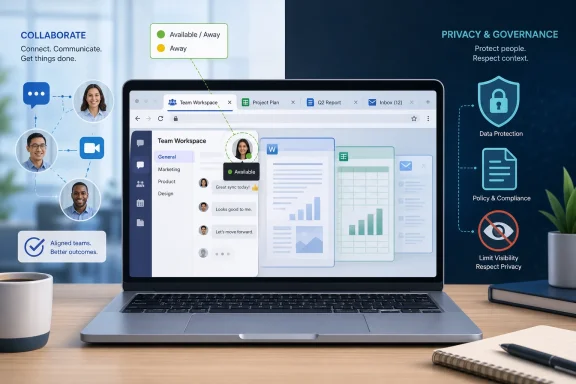 Microsoft Turns a Browser Tab Into a Workplace Sensor
The practical problem Microsoft is trying to solve is real enough. Teams on the web can misrepresent someone as “Away” when they are not ignoring work at all, but merely writing in Word, reviewing a spreadsheet, answering email, or working in another browser tab. For a product that has become the digital hallway of many offices, inaccurate presence is not a minor annoyance; it can make people look unavailable when they are simply doing their jobs.The new detection setting attempts to close that gap by watching for activity beyond the Teams tab. In plain terms, Teams wants permission to infer that the user is active on the device, even if the Teams interface is not currently front and center. That makes presence less dependent on a single web page and more aligned with the broader reality of computer use.
But that change also shifts the meaning of the signal. A green dot is no longer just a sign that Teams is open and being used. It becomes a derived workplace status based on device-level behavior, and that makes the feature more consequential than a routine quality-of-life improvement.
Microsoft’s framing is collaboration: fewer false “Away” states, better availability cues, fewer wasted messages. The worry is governance: who can see the signal, who can configure it, how much choice workers really have, and whether the data remains bounded by its original purpose once it enters the workplace.
Presence Was Never Just a Dot
Teams presence has always carried more social weight than its technical design can bear. The interface presents it as a simple status indicator — Available, Busy, Away, Do not disturb — but employees know those labels are read through the politics of the workplace. A yellow dot can mean lunch, deep focus, a locked screen, a flaky client, or a manager’s next passive-aggressive message.That ambiguity is why users are so sensitive to presence changes. Microsoft may describe status as an availability feature, but in many organizations it is treated as a thin behavioral dashboard. The same signal that helps a colleague decide whether to start a chat can also be used by a supervisor to make assumptions about responsiveness, work ethic, or time at desk.
The web version of Teams makes this tension sharper because browser tabs do not map neatly to work. A user may be fully productive while Teams sits in the background. If the old model punished people for not staring at the collaboration app, the new model risks rewarding them for any detectable activity on the device.
That is an improvement in accuracy, but not necessarily an improvement in trust. When a tool moves from app activity to device activity, the boundary expands. The user is no longer asking, “Does Teams know I am using Teams?” The user is asking, “What else does Teams know I am doing enough to change my status?”
The Privacy Question Is About Purpose, Not Just Permission
Alex Baird’s warning lands because it avoids the lazy version of the privacy debate. The issue is not that every activity signal is inherently abusive. The issue is whether the reason for collecting the signal is narrow, disclosed, and respected after deployment.That distinction matters under privacy law and under workplace norms. A company may reasonably want coworkers to know whether someone is reachable. It is a different matter if the same signal becomes evidence in performance reviews, attendance disputes, disciplinary conversations, or productivity scoring.
Baird’s point about purpose limitation is the center of the story. If device activity is collected to improve availability, then the organization should treat it as an availability aid. If managers begin using it as a proxy for effort, the purpose has changed, even if the underlying feature has not.
This is where enterprise software often creates trouble without intending to. A vendor ships a configurable capability for coordination. A business turns it on broadly. A manager discovers that the signal is useful for something more coercive. By the time employees object, the practice has already become normal.
Opt-In Sounds Simple Until the Whole Company Is Involved
Microsoft’s privacy defense rests heavily on configuration. Organizations can decide whether the feature is enabled, and users can reportedly switch it off individually. On paper, that is the correct answer: admin control for enterprise governance, user control for personal boundaries.In practice, opt-in and opt-out models behave very differently depending on the social environment. If a feature is presented to a whole organization as the new default way to show availability, declining it may feel like sending a message. Workers may wonder whether turning it off makes them look uncooperative, evasive, or less engaged.
Baird’s concern about broad rollout is therefore not theoretical. A one-to-one choice is easy to understand: two colleagues agree to share a helpful status cue. A companywide deployment changes the pressure. Every employee must notice the setting, understand the implications, and be confident enough to disable it if they object.
That is a lot to ask in a workplace where most people click through prompts to get back to their actual job. Consent buried in settings is not the same as meaningful agency, especially when the people collecting the signal also control pay, promotion, and performance assessment.
The Real Risk Is Visibility Creep
The most important question is not whether a manager can see that a worker is available. In many roles, that is ordinary and useful. The harder question is whether everyone in the organization needs the same level of visibility.Presence tools often flatten context. A teammate, a direct manager, a project lead, an executive assistant, and a random employee in another department may all see the same dot. That is convenient for software design, but it is not necessarily appropriate for organizational privacy.
Baird’s line between a line manager and the wider company is the right one. A manager may need to know whether someone is reachable for coordination. A nearby teammate may need to know whether it is worth walking over or starting a call. The entire corporate directory does not automatically need the same signal, especially when that signal is powered by device activity rather than an explicitly chosen status.
Microsoft has spent years making Microsoft 365 feel like an integrated workplace graph. Calendar, chat, meetings, files, location, and now richer activity signals all improve collaboration when handled carefully. They also make it easier for organizations to confuse visibility with accountability.
Hybrid Work Made Availability Political
This feature would have been less controversial in an era when most office workers sat at assigned desks five days a week. Hybrid work changed the meaning of presence because the office is no longer just a place; it is a policy battlefield. Employers want coordination, employees want flexibility, and software vendors are selling systems that promise to make distributed work legible.Teams sits directly in the middle of that conflict. It is where meetings happen, where chat happens, where status appears, and increasingly where work location is expressed. When Microsoft adds a new signal to that environment, users do not evaluate it in isolation. They evaluate it against return-to-office mandates, productivity anxiety, and years of managerial obsession with “visibility.”
That is why even well-intentioned features can trigger backlash. Microsoft can say the tool is for collaboration and still be met with skepticism, because employees have seen collaboration tools repurposed before. The software may not be designed as surveillance, but the workplace decides how surveillance-like it feels.
The difference between “I can find you when I need you” and “I can monitor whether you are active” is not a technical boundary. It is a governance boundary. Without clear policy, training, and limits, the more cynical interpretation tends to win.
Accuracy Is Not the Same as Fairness
There is a tempting argument that better presence detection is automatically fairer because it reduces false “Away” states. That is partly true. If Teams currently makes active workers look absent, then broader device activity can correct a misleading signal.But accuracy depends on what the signal claims to represent. Device activity may show that someone is using a machine. It does not show whether they are thinking, reading printed material, taking a necessary break, speaking with a colleague, handling a phone call, or doing work away from the keyboard. A more accurate activity detector can still produce a shallow picture of labor.
This is especially relevant for knowledge work. Some of the most valuable work happens during periods of low visible input: planning, reading, debugging, sketching, listening, or simply not typing for five minutes. Presence systems reward the kinds of work that leave digital exhaust and undercount the kinds that do not.
So the feature may improve Teams’ status logic while worsening the temptation to overinterpret status. The green dot becomes more reliable as an activity indicator, but it remains unreliable as a productivity indicator. That distinction should be written into policy before the setting is rolled out, not after a dispute.
Administrators Inherit the Hard Part
For IT administrators, the immediate job is not to decide whether Microsoft is good or bad. It is to decide what the organization is actually trying to accomplish. If the goal is fewer inaccurate presence states for Teams web users, the deployment should be narrow, documented, and reversible.Admins should also resist the urge to treat this as merely another Teams setting. Presence touches HR, legal, security, works councils in some jurisdictions, and employee relations. The technically easiest deployment may be the politically worst one.
Good administration here means asking dull but necessary questions. Is the feature enabled by default or offered as a choice? Who receives notice? What exactly is collected? Is the signal stored, audited, exported, or surfaced in reports? Are managers told what they cannot infer from it?
The best rollout may be boring: a pilot group, plain-language disclosure, a visible user setting, and a written statement that presence is not a performance metric. That will not satisfy everyone, but it draws a line before habits form around the data.
Microsoft Keeps Learning the Same Lesson in Public
Teams has become one of Microsoft’s most important workplace products, but its size creates a recurring problem. Features that look incremental on a roadmap can feel intimate when they land on an employee’s desktop. A small signal inside Microsoft 365 can become a big argument inside a company.The company has already faced scrutiny over workplace analytics, productivity scoring, meeting data, and location-adjacent collaboration features. Each time, the same pattern emerges: Microsoft emphasizes administrative control and collaboration value, while users worry about how the feature will be interpreted by managers. Both sides can be telling the truth.
That is the uncomfortable reality of enterprise software. Microsoft does not need to build a “surveillance tool” for surveillance concerns to be valid. It only needs to build a flexible tool that exposes behavioral signals in a workplace where incentives are uneven.
The vendor can reduce risk with defaults, documentation, and privacy-preserving design. It cannot fully control organizational culture. Once a signal is available, some employers will use it carefully and others will use it badly.
The Green Dot Needs a Governance Policy
The concrete lesson for WindowsForum readers is that this is not a panic story, but it is also not a nothing story. Teams presence is becoming more capable because the old model was often wrong. The price of that capability is a larger trust surface.- Organizations should define Teams presence as an availability signal, not a productivity or performance measurement.
- Administrators should disclose whether device activity outside the Teams tab is used to update presence.
- Users should be given a clear setting and a plain explanation of what disabling it changes.
- Managers should not treat Available, Away, or Offline as a complete account of whether someone is working.
- Companies should limit visibility where possible, because a useful signal for a close teammate is not automatically appropriate for the entire organization.
- Any rollout should involve privacy, legal, HR, and IT stakeholders before the feature becomes workplace habit.
Microsoft’s challenge is that Teams is no longer just an app; it is part of the operating environment of modern office work. Every new presence signal therefore carries a cultural payload, whether Redmond intends it or not. The next phase of collaboration software will not be judged only by what it can detect, but by whether users believe the detection serves them as well as their employers.
References
- Primary source: el-balad.com
Published: 2026-06-17T10:42:08.108198
Microsoft Adds Teams Issues Device Tracking for Office Presence - El-Balad.com
Microsoft is introducing a teams issues feature in Teams that can detect device activity and update a worker’s office presence even when the Teams tab is not open. The change gives managers a sharper view of availability, but it also widens the amount of workplace data Teams can collect.When the...www.el-balad.com - Related coverage: windowscentral.com
Microsoft’s controversial Wi‑Fi tracking in Teams is back — but this time with better privacy controls | Windows Central
After multiple delays, Microsoft finally launched its controversial Teams Wi‑Fi tracking feature, promising more transparency and better user control.www.windowscentral.com - Official source: learn.microsoft.com
The correct presence status isn't reflected in Teams - Microsoft Teams | Microsoft Learn
Fixes an issue in which your actual presence status isn't displayed in Teams.learn.microsoft.com - Related coverage: kb.connecttoteams.com

Presence Sync with PBX
kb.connecttoteams.com
- Official source: techcommunity.microsoft.com
Teams Registration presence not displaying 'Offline' | Microsoft Community Hub
We're using the Microsoft Graph API for some Teams presence checks and alerting for registrations going 'Offline'.This works fine is doing a planned reboot... techcommunity.microsoft.com
- Official source: answers.microsoft.com
- Official source: support.microsoft.com
Get notified when someone's status changes in Microsoft Teams | Microsoft Support
Stay in the loop with Microsoft Teams' status notifications. This article shows you how to get notified when someone's status changes, so you know when your colleagues are available, busy, or away. Learn how to customize your notification settings to suit your needs and never miss an important...support.microsoft.com - Related coverage: help.vccs.edu
Teams: Presence and Statuses in the Teams App
Setting your Status in Teams, and information about how your Presence is automatically determined.help.vccs.edu
- Official source: microsoft.com
Microsoft 365 Roadmap | Microsoft 365
The Microsoft 365 Roadmap lists updates that are currently planned for applicable subscribers. Check here for more information on the status of new features and updates.www.microsoft.com
- Related coverage: manageengine.com
User Presence In Teams | Teams Activities
User presence of a user in Microsoft Teams indicates their availability and status to other users.M365 Manager Plus helps effortlessly manage Microsoft Teams from a single console.www.manageengine.com - Related coverage: staygreenonteams.com
When Does Microsoft Teams Show You as Away? Every Trigger Explained
Every trigger that makes Microsoft Teams flip you to Away or Inactive — inactivity timer, screen lock, sleep, mobile backgrounding, Outlook calendar, manual selection. staygreenonteams.com
- Related coverage: storemultisites.blob.core.windows.net
- Related coverage: aldridge.com
MICROSOFT TEAMS: BEYOND THE BASICS
</rdf:Alt> </dc:description> <dc:creator> <rdf:Seq> <rdf:li>Mason Conealdridge.com
