

Microsoft Teams users in the United States reported a spike in problems on Tuesday morning, June 16, 2026, with AOL republishing an Asbury Park Press item that cited 226 Downdetector reports as of 9:08 a.m. Eastern time. That number is not, by itself, proof of a confirmed Microsoft outage. It is a signal: small enough to demand caution, large enough to remind every Microsoft 365 shop how fragile “just send a Teams message” has become as an operational assumption.
The AOL item is brief, but its timing matters. A workday-morning burst of Microsoft Teams complaints is exactly the kind of incident that can feel larger inside offices than it looks on a public outage graph. Teams is not merely a chat client for many organizations; it is the front door to meetings, phone calls, file collaboration, approvals, support escalations, and sometimes the informal nervous system of the company.
That is why the phrase “Teams is down” is often imprecise. One user may mean the desktop app will not load. Another may mean messages are delayed. A third may mean meetings connect but audio fails. A fourth may be blocked by authentication, Conditional Access, an ISP route, a local DNS issue, or a stale client cache.
Downdetector-style reports are useful because they capture pain before a vendor’s status page catches up. They are also messy because they capture everything users experience as pain, whether or not the root cause belongs to Microsoft. A few hundred reports can reflect a real regional degradation, a transient client-side bug, a corporate network problem hitting several large tenants, or simple herd behavior after users begin searching “is Teams down?”
For IT administrators, the right reading is neither panic nor dismissal. A spike like this is an early-warning instrument. It says: check your own telemetry, check Microsoft’s admin-center service health, and treat public reports as corroborating evidence rather than a verdict.
But official dashboards have a built-in latency problem. Microsoft must detect, validate, scope, and phrase an incident before posting it. That delay is understandable; premature incident declarations can create their own confusion. Yet users do not experience outages according to communications policy. They experience them when a meeting fails to start at 9:00 a.m.
This gap is where Downdetector, Reddit, social media, help-desk tickets, and internal monitoring fill the silence. They are noisy, but they move fast. In a modern SaaS environment, fast and noisy often beats precise and late during the first 15 minutes of an incident.
The danger is turning that noise into certainty. The AOL report’s 226 Downdetector complaints should be understood as a user-report spike, not a confirmed global outage. In practical terms, that means organizations should respond as if there may be a degradation, while communicating internally with careful language: “We are investigating reports of Teams issues,” not “Microsoft is down.”
That dependency chain means Teams can fail in slices. Chat may work while meetings fail. Meetings may work on mobile but not desktop. Calls may connect for internal users but fail for guests. Presence may be wrong even though messages deliver. Files may not open because SharePoint is degraded, while the Teams shell itself appears healthy.
This is why user reports often disagree. One employee says everything is broken; another says Teams is fine. Both can be correct. In large Microsoft 365 tenants, impact can vary by geography, client version, network path, feature, authentication state, and even meeting type.
For Windows users, this fragmentation creates a familiar support problem: the first troubleshooting instinct is local. Restart Teams. Clear cache. Reboot Windows. Try the web app. Switch networks. Those steps may help if the issue is client-side, but they waste time if the service is degraded upstream.
For sysadmins, the better sequence is to separate local symptoms from shared symptoms. If multiple users across devices and networks report similar Teams behavior at the same time, the incident has already moved beyond ordinary desktop support.
The 226-report figure cited in the AOL item is modest compared with major Microsoft 365 incidents that have generated thousands or tens of thousands of reports. That matters. A small spike can still hurt affected users, but it does not automatically imply a widespread platform failure.
There is also a newsroom effect to outage reporting. A short article based on Downdetector data can help users understand that they are not alone. It can also amplify uncertainty if it outruns official confirmation. The best version of this reporting says what is known, what is not known, and what users should check next.
In this case, what is known is narrow: users reported problems with Microsoft Teams on Tuesday morning, and AOL’s republished item cited 226 reports at 9:08 a.m. Eastern. What is not established from that item alone is the scope, root cause, duration, or whether Microsoft classified it as a service incident.
This is not unique to Microsoft. Slack, Zoom, Google Workspace, and other collaboration platforms create similar concentration risk. The difference is that Teams is deeply bundled into Microsoft 365, Windows workflows, identity systems, and enterprise licensing. For many organizations, it is not one app among many; it is the collaboration layer that everything else assumes will be available.
That concentration changes how incidents should be planned. A Teams degradation is not merely an inconvenience if an organization has moved telephony, incident response, executive briefings, shift handoffs, and file collaboration into the platform. At that point, Teams becomes part of business continuity planning.
The uncomfortable lesson is that convenience often masquerades as resilience. A single integrated suite reduces friction during normal operations. During an outage, the same integration can remove alternatives. If the backup plan for Teams is “send a Teams message,” there is no backup plan.
But organizations should be careful not to push all responsibility onto end users. If the help desk receives multiple similar reports in a short window, the incident should be triaged centrally. Otherwise, support teams risk running the same cache-clearing script across dozens of machines while the actual issue sits upstream.
The most useful internal question is not “Is Teams down?” It is “Which Teams functions are failing, for whom, from where, and on which clients?” That framing produces actionable evidence. It also helps administrators compare their environment against Microsoft’s service health notices if an advisory appears.
The distinction matters because Microsoft Teams problems often resolve before a full postmortem arrives. If IT has not captured the pattern during the event, it is left with anecdotes afterward. That makes it harder to decide whether to adjust monitoring, network routing, client update rings, or continuity plans.
This is a success problem for Microsoft. Teams won because it became ubiquitous. It is installed by default in many environments, promoted inside Microsoft 365, and increasingly integrated with Windows and Copilot-branded workflows. Its growth turned it into infrastructure, whether or not every organization formally treats it that way.
Infrastructure is judged differently from software. Users forgive an app for being occasionally buggy. They are less forgiving when the app has become the assumed medium for doing the day’s work. The more Microsoft positions Teams as the center of productivity, the more every hiccup becomes a test of Microsoft’s cloud operations and communication discipline.
That test is not only technical. During outages, users want candor, administrators want specificity, and executives want an estimate. Microsoft’s challenge is to provide all three without overpromising. A vague “we’re investigating” buys time, but it does not help a school district decide whether to move classes, a call center decide whether to reroute traffic, or an incident commander decide whether to switch platforms.
That blurs old support boundaries. Desktop engineering, network engineering, identity administration, and SaaS operations all have a piece of the experience. When Teams fails, the fix might be a Microsoft service mitigation, a client rollback, a firewall rule change, an authentication-policy adjustment, or a user profile cleanup.
This is why administrators should be wary of easy explanations. If only Windows desktop users are affected, the web and mobile clients become important comparison points. If only external meetings fail, guest access and federation deserve attention. If chat works but files do not, SharePoint and OneDrive health matter. If everything Microsoft 365-related is slow, the problem may sit closer to identity, routing, or a broader regional service event.
The cloud did not eliminate endpoint troubleshooting. It made endpoint troubleshooting dependent on cloud telemetry.
There is nothing inherently wrong with that. Service journalism has value when it tells users they are not alone. The problem is that the format encourages a binary answer before the evidence supports one. “Is Teams down?” is a yes-or-no headline attached to a situation that may be regional, partial, transient, or unconfirmed.
A better public vocabulary would distinguish between user reports, confirmed degradation, confirmed outage, and resolved incident. That language is not pedantry. It helps users decide what to do. It also avoids turning every small report spike into a platform-wide emergency.
In this case, the responsible answer is conditional: users were reporting Teams problems Tuesday morning, but the AOL item’s cited Downdetector count does not establish a confirmed broad Microsoft outage. For anyone affected, that distinction may not reduce frustration, but it does point toward the right next steps.
That does not require building a miniature Downdetector. It requires disciplined instrumentation. Monitor sign-in failures. Watch Teams call quality data. Track help-desk ticket spikes by category. Keep synthetic checks for critical collaboration paths. Subscribe the right people to Microsoft 365 service health alerts. Make sure incident channels do not depend solely on Teams.
The goal is not perfect diagnosis in the first five minutes. The goal is faster confidence. If public reports spike and internal telemetry is clean, IT can communicate cautiously. If internal telemetry lights up at the same time, the organization can shift into incident mode before the official advisory arrives.
There is also a governance angle. Many organizations adopted Teams quickly during the remote-work surge and then kept layering workflows onto it. A periodic review of “what breaks if Teams is unavailable for two hours” is no longer optional hygiene. It is basic operational risk management.
This is especially true for communications software. If Word has a bad afternoon, a user may keep drafting locally. If Teams fails during a live meeting, work stops in public. The failure is visible, social, and often embarrassing.
That visibility changes the stakes for Microsoft. Teams is a trust surface. Every unexplained delay or failed join chips away at confidence, especially among administrators who must defend standardization decisions to skeptical users. When the answer to “why did we move everything into Teams?” becomes “because it is included in the license,” reliability incidents become harder to excuse.
To be fair, no collaboration platform is immune. The internet is a stack of dependencies pretending to be a utility. But Microsoft’s market position means its failures have wider blast radius, and its explanations are expected to be correspondingly better.
For WindowsForum readers, the practical posture is straightforward. If you are an end user, test another client and another network before assuming your machine is broken. If you are an administrator, look for clustering: same time, same region, same client, same feature, same tenant. If you are responsible for business continuity, ask whether your organization can coordinate without Teams for an hour.
The more interesting story is not whether 226 reports became 2,260. It is that a few hundred reports are now enough to trigger national attention because Teams has become a default workplace dependency. That is Microsoft’s achievement and Microsoft’s burden.
A decade ago, a chat outage might have been an annoyance. In 2026, a Teams disruption can be a productivity event, a support event, a communications event, and a leadership event all at once. The software has moved from the edge of the workday to the center of it.
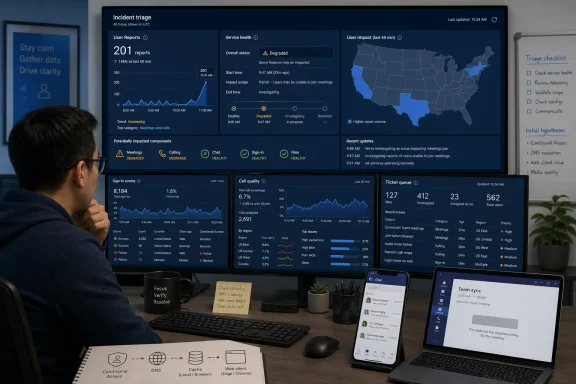 A Small Spike Can Still Be a Big Problem
The AOL item is brief, but its timing matters. A workday-morning burst of Microsoft Teams complaints is exactly the kind of incident that can feel larger inside offices than it looks on a public outage graph. Teams is not merely a chat client for many organizations; it is the front door to meetings, phone calls, file collaboration, approvals, support escalations, and sometimes the informal nervous system of the company.That is why the phrase “Teams is down” is often imprecise. One user may mean the desktop app will not load. Another may mean messages are delayed. A third may mean meetings connect but audio fails. A fourth may be blocked by authentication, Conditional Access, an ISP route, a local DNS issue, or a stale client cache.
Downdetector-style reports are useful because they capture pain before a vendor’s status page catches up. They are also messy because they capture everything users experience as pain, whether or not the root cause belongs to Microsoft. A few hundred reports can reflect a real regional degradation, a transient client-side bug, a corporate network problem hitting several large tenants, or simple herd behavior after users begin searching “is Teams down?”
For IT administrators, the right reading is neither panic nor dismissal. A spike like this is an early-warning instrument. It says: check your own telemetry, check Microsoft’s admin-center service health, and treat public reports as corroborating evidence rather than a verdict.
Microsoft’s Status Page Is the Court of Record, but Not the First Witness
Microsoft 365’s Service health dashboard remains the authoritative place for tenant-specific incident notices. It is where Microsoft posts advisories, incident IDs, affected workloads, mitigation steps, and eventual root-cause summaries. For administrators, it carries more operational value than a consumer outage tracker because it can reflect the services and regions relevant to a specific tenant.But official dashboards have a built-in latency problem. Microsoft must detect, validate, scope, and phrase an incident before posting it. That delay is understandable; premature incident declarations can create their own confusion. Yet users do not experience outages according to communications policy. They experience them when a meeting fails to start at 9:00 a.m.
This gap is where Downdetector, Reddit, social media, help-desk tickets, and internal monitoring fill the silence. They are noisy, but they move fast. In a modern SaaS environment, fast and noisy often beats precise and late during the first 15 minutes of an incident.
The danger is turning that noise into certainty. The AOL report’s 226 Downdetector complaints should be understood as a user-report spike, not a confirmed global outage. In practical terms, that means organizations should respond as if there may be a degradation, while communicating internally with careful language: “We are investigating reports of Teams issues,” not “Microsoft is down.”
Teams Has Become Too Central for Binary Outage Thinking
The old mental model of an outage was simple: a service was up or down. Teams breaks that model. Its user experience depends on identity, Exchange calendars, SharePoint and OneDrive files, meeting services, presence, chat, media relay, push notifications, client updates, and increasingly Copilot-era integrations that sit across Microsoft 365.That dependency chain means Teams can fail in slices. Chat may work while meetings fail. Meetings may work on mobile but not desktop. Calls may connect for internal users but fail for guests. Presence may be wrong even though messages deliver. Files may not open because SharePoint is degraded, while the Teams shell itself appears healthy.
This is why user reports often disagree. One employee says everything is broken; another says Teams is fine. Both can be correct. In large Microsoft 365 tenants, impact can vary by geography, client version, network path, feature, authentication state, and even meeting type.
For Windows users, this fragmentation creates a familiar support problem: the first troubleshooting instinct is local. Restart Teams. Clear cache. Reboot Windows. Try the web app. Switch networks. Those steps may help if the issue is client-side, but they waste time if the service is degraded upstream.
For sysadmins, the better sequence is to separate local symptoms from shared symptoms. If multiple users across devices and networks report similar Teams behavior at the same time, the incident has already moved beyond ordinary desktop support.
Downdetector Is a Smoke Alarm, Not a Fire Report
Downdetector’s value is that it detects user frustration at scale. Its limitation is that it is not a diagnostic instrument. A report count tells us that people are having trouble; it does not tell us whether the problem is Microsoft’s service, a third-party network, a regional ISP issue, a client regression, or a tenant-specific configuration problem.The 226-report figure cited in the AOL item is modest compared with major Microsoft 365 incidents that have generated thousands or tens of thousands of reports. That matters. A small spike can still hurt affected users, but it does not automatically imply a widespread platform failure.
There is also a newsroom effect to outage reporting. A short article based on Downdetector data can help users understand that they are not alone. It can also amplify uncertainty if it outruns official confirmation. The best version of this reporting says what is known, what is not known, and what users should check next.
In this case, what is known is narrow: users reported problems with Microsoft Teams on Tuesday morning, and AOL’s republished item cited 226 reports at 9:08 a.m. Eastern. What is not established from that item alone is the scope, root cause, duration, or whether Microsoft classified it as a service incident.
The Real Operational Risk Is Dependency Without a Fallback
Teams has become the default workplace reflex. Need a quick answer? Teams. Need a meeting? Teams. Need to reach the help desk? Teams. Need to coordinate an outage? Also Teams, which becomes awkward when Teams is the outage.This is not unique to Microsoft. Slack, Zoom, Google Workspace, and other collaboration platforms create similar concentration risk. The difference is that Teams is deeply bundled into Microsoft 365, Windows workflows, identity systems, and enterprise licensing. For many organizations, it is not one app among many; it is the collaboration layer that everything else assumes will be available.
That concentration changes how incidents should be planned. A Teams degradation is not merely an inconvenience if an organization has moved telephony, incident response, executive briefings, shift handoffs, and file collaboration into the platform. At that point, Teams becomes part of business continuity planning.
The uncomfortable lesson is that convenience often masquerades as resilience. A single integrated suite reduces friction during normal operations. During an outage, the same integration can remove alternatives. If the backup plan for Teams is “send a Teams message,” there is no backup plan.
Users Should Troubleshoot, but IT Should Triage
For individual users, there are reasonable first steps when Teams misbehaves. Try the web version, switch from Wi-Fi to wired or mobile hotspot, restart the client, check whether Outlook and other Microsoft 365 apps are also affected, and ask a colleague on a different network whether they see the same behavior. Those steps help distinguish a local client issue from a broader service problem.But organizations should be careful not to push all responsibility onto end users. If the help desk receives multiple similar reports in a short window, the incident should be triaged centrally. Otherwise, support teams risk running the same cache-clearing script across dozens of machines while the actual issue sits upstream.
The most useful internal question is not “Is Teams down?” It is “Which Teams functions are failing, for whom, from where, and on which clients?” That framing produces actionable evidence. It also helps administrators compare their environment against Microsoft’s service health notices if an advisory appears.
The distinction matters because Microsoft Teams problems often resolve before a full postmortem arrives. If IT has not captured the pattern during the event, it is left with anecdotes afterward. That makes it harder to decide whether to adjust monitoring, network routing, client update rings, or continuity plans.
Microsoft’s Cloud Reliability Story Is Now a Workplace Story
Microsoft 365 outages no longer feel like back-office IT events. They interrupt the ordinary rhythm of work: the morning standup, the sales call, the classroom session, the legal review, the hospital shift handoff, the support bridge. Teams sits where human coordination happens, which makes even partial degradation feel personal and immediate.This is a success problem for Microsoft. Teams won because it became ubiquitous. It is installed by default in many environments, promoted inside Microsoft 365, and increasingly integrated with Windows and Copilot-branded workflows. Its growth turned it into infrastructure, whether or not every organization formally treats it that way.
Infrastructure is judged differently from software. Users forgive an app for being occasionally buggy. They are less forgiving when the app has become the assumed medium for doing the day’s work. The more Microsoft positions Teams as the center of productivity, the more every hiccup becomes a test of Microsoft’s cloud operations and communication discipline.
That test is not only technical. During outages, users want candor, administrators want specificity, and executives want an estimate. Microsoft’s challenge is to provide all three without overpromising. A vague “we’re investigating” buys time, but it does not help a school district decide whether to move classes, a call center decide whether to reroute traffic, or an incident commander decide whether to switch platforms.
The Client Is Part of the Cloud Now
One reason Teams incidents are hard to interpret is that the client has become a moving target. The “new Teams” transition, WebView dependencies, Windows updates, identity prompts, cached data, and enterprise policy controls all shape whether the service feels healthy. A cloud service can be operational while a client build misbehaves badly enough that users call it an outage.That blurs old support boundaries. Desktop engineering, network engineering, identity administration, and SaaS operations all have a piece of the experience. When Teams fails, the fix might be a Microsoft service mitigation, a client rollback, a firewall rule change, an authentication-policy adjustment, or a user profile cleanup.
This is why administrators should be wary of easy explanations. If only Windows desktop users are affected, the web and mobile clients become important comparison points. If only external meetings fail, guest access and federation deserve attention. If chat works but files do not, SharePoint and OneDrive health matter. If everything Microsoft 365-related is slow, the problem may sit closer to identity, routing, or a broader regional service event.
The cloud did not eliminate endpoint troubleshooting. It made endpoint troubleshooting dependent on cloud telemetry.
The News Cycle Rewards Certainty Before Certainty Exists
Outage stories move quickly because they are highly searchable. When a popular service sputters, users type the same question into search engines at once. Publishers see the spike, Downdetector charts supply a number, and a short article can be written in minutes.There is nothing inherently wrong with that. Service journalism has value when it tells users they are not alone. The problem is that the format encourages a binary answer before the evidence supports one. “Is Teams down?” is a yes-or-no headline attached to a situation that may be regional, partial, transient, or unconfirmed.
A better public vocabulary would distinguish between user reports, confirmed degradation, confirmed outage, and resolved incident. That language is not pedantry. It helps users decide what to do. It also avoids turning every small report spike into a platform-wide emergency.
In this case, the responsible answer is conditional: users were reporting Teams problems Tuesday morning, but the AOL item’s cited Downdetector count does not establish a confirmed broad Microsoft outage. For anyone affected, that distinction may not reduce frustration, but it does point toward the right next steps.
Administrators Need Their Own Outage Radar
Relying on public outage sites alone is not enough for enterprise IT. They are useful external signals, but they do not know your tenant, your network, your client versions, your conditional access rules, or your executive meeting schedule. Serious Microsoft 365 shops need internal visibility that can answer whether the problem is theirs, Microsoft’s, or somewhere in between.That does not require building a miniature Downdetector. It requires disciplined instrumentation. Monitor sign-in failures. Watch Teams call quality data. Track help-desk ticket spikes by category. Keep synthetic checks for critical collaboration paths. Subscribe the right people to Microsoft 365 service health alerts. Make sure incident channels do not depend solely on Teams.
The goal is not perfect diagnosis in the first five minutes. The goal is faster confidence. If public reports spike and internal telemetry is clean, IT can communicate cautiously. If internal telemetry lights up at the same time, the organization can shift into incident mode before the official advisory arrives.
There is also a governance angle. Many organizations adopted Teams quickly during the remote-work surge and then kept layering workflows onto it. A periodic review of “what breaks if Teams is unavailable for two hours” is no longer optional hygiene. It is basic operational risk management.
The User Experience Is the SLA People Actually Remember
Microsoft can meet a formal service-level agreement and still leave users angry. That is because employees do not experience monthly uptime percentages. They experience the failed board meeting, the missed client call, the frozen interview, the delayed incident response. SaaS reliability is measured emotionally at the moment of need.This is especially true for communications software. If Word has a bad afternoon, a user may keep drafting locally. If Teams fails during a live meeting, work stops in public. The failure is visible, social, and often embarrassing.
That visibility changes the stakes for Microsoft. Teams is a trust surface. Every unexplained delay or failed join chips away at confidence, especially among administrators who must defend standardization decisions to skeptical users. When the answer to “why did we move everything into Teams?” becomes “because it is included in the license,” reliability incidents become harder to excuse.
To be fair, no collaboration platform is immune. The internet is a stack of dependencies pretending to be a utility. But Microsoft’s market position means its failures have wider blast radius, and its explanations are expected to be correspondingly better.
The Practical Read on Tuesday’s Teams Reports
The Tuesday morning reports should be treated as a possible localized or partial degradation unless Microsoft’s own service communications establish broader impact. The count cited by AOL is notable but not massive. It is enough to justify checking status channels and internal telemetry; it is not enough to declare a platform-wide outage.For WindowsForum readers, the practical posture is straightforward. If you are an end user, test another client and another network before assuming your machine is broken. If you are an administrator, look for clustering: same time, same region, same client, same feature, same tenant. If you are responsible for business continuity, ask whether your organization can coordinate without Teams for an hour.
The more interesting story is not whether 226 reports became 2,260. It is that a few hundred reports are now enough to trigger national attention because Teams has become a default workplace dependency. That is Microsoft’s achievement and Microsoft’s burden.
A decade ago, a chat outage might have been an annoyance. In 2026, a Teams disruption can be a productivity event, a support event, a communications event, and a leadership event all at once. The software has moved from the edge of the workday to the center of it.
The Teams Outage Drill Every Microsoft 365 Shop Should Run
Tuesday’s report spike is a reminder to turn vague concern into a concrete playbook. The organizations that handle SaaS disruptions well are not the ones that correctly guess every vendor incident in real time. They are the ones that already know how to communicate, verify, and route around the failure.- Public outage reports should be treated as early warnings, not official confirmation of a Microsoft service incident.
- Microsoft 365 administrators should check tenant-specific Service health messages before declaring an organization-wide outage.
- Help desks should look for clustered symptoms across users, networks, devices, and Teams features before prescribing local fixes.
- Organizations that use Teams for incident response should maintain at least one non-Teams coordination channel.
- Users should try the Teams web app, mobile app, and an alternate network to help distinguish client trouble from service degradation.
- Leaders should assume that collaboration platforms are operational infrastructure, not just productivity software.
References
- Primary source: aol.com
Published: Tue, 16 Jun 2026 13:26:35 GMT
Is Microsoft Teams down? Users reporting issues with MS Teams - AOL
Users are reporting issues with the Microsoft Teams app, according to Downdetector.com.www.aol.com - Related coverage: techradar.com
Google Gemini recovering after outage that lasted for hours — here's what we know about the 'error 1076' outage | TechRadar
Tired of 'error 1076' and 'error 1099' messages yet?www.techradar.com - Related coverage: tomsguide.com
Facebook and Instagram were down — live updates on outage hitting Meta services | Tom's Guide
This isn't good for Meta userswww.tomsguide.com - Related coverage: windowscentral.com
"We’ve confirmed service health has returned to normal": Microsoft 365 and Outlook are back up and running | Windows Central
If you're just sitting down to your desk, you may not be able to use Outlook or Microsoft 365.www.windowscentral.com - Related coverage: moneycontrol.com
Microsoft Teams down: Users report issues with audio, meetings and chat messages
Microsoft Teams users reported widespread disruptions affecting audio calls, meetings and chats, with Downdetector showing a spike in complaints as organisations struggled to connect during work hours.www.moneycontrol.com - Official source: learn.microsoft.com
How to check Microsoft 365 service health - Microsoft 365 Enterprise | Microsoft Learn
View the health status of Microsoft 365 services before you call support to see if there's an active service interruption.learn.microsoft.com
- Related coverage: livemint.com
Microsoft 365 down: Several users report outages with Outlook and Teams | Mint
Microsoft 365 experienced a significant outage on Wednesday, affecting thousands of users across major cities like Minneapolis, Chicago, and Los Angeles. Issues with Teams and Outlook were reported, with over 4,000 disruptions noted on Downdetector.www.livemint.com - Related coverage: isdown.app
Is Microsoft Teams Down? Check current status and user reports | IsDown
Check if Microsoft Teams is down right now. Live Microsoft Teams status, real-time outage detection, and instant alerts when Microsoft Teams has issues. Free 14-day trial. isdown.app
