

Microsoft has temporarily rolled back a Microsoft Teams feature designed to automatically separate muted conversations and meeting chats into dedicated sections, interrupting a broader effort to make the increasingly crowded Teams conversation list easier to manage. The change, tracked under Microsoft 365 Roadmap ID 559605, remains listed as in development with general availability targeted for August 2026, but Microsoft’s July 20 rollback notice introduces fresh uncertainty around the final behavior, timing, and cross-platform consistency of the redesigned chat organization system.
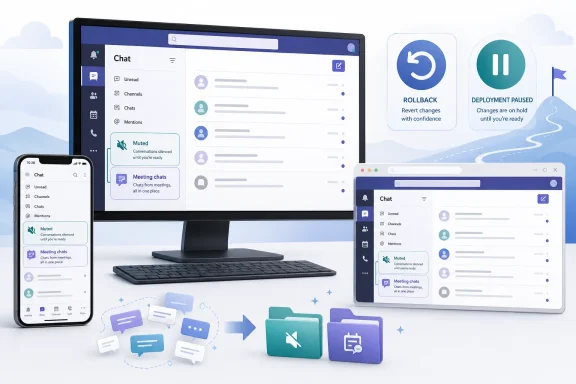
The proposed Teams update adds two built-in organizational sections to the chat and channel list. A Muted section, enabled by default, collects conversations that users have muted, while an optional Meeting chats section groups conversations associated with Teams meetings.
Users can enable or disable either section according to their preferences. Microsoft intends the Meeting chats section to replace the Meeting chats filter previously displayed near the top of the chat and channel list, shifting the capability from a temporary filtered view to a persistent location within the navigation structure.
The feature is planned for Teams on:
Instead, the redesign changes where users find muted conversations. Moving them into a dedicated section makes muting an information-management action as well as a notification preference.
Meeting chats receive a similar treatment. Rather than asking users to invoke a filter whenever they want to isolate meeting-related conversations, Teams would maintain a dedicated section that can remain visible, collapsed, expanded, enabled, or disabled according to the user’s working style.
A temporary rollback does not necessarily mean cancellation. It more commonly indicates that Microsoft found a reliability, usability, performance, accessibility, or deployment issue serious enough to justify withdrawing the experience while engineering work continues.
The lack of a detailed public explanation means administrators should treat the August target as provisional rather than guaranteed.
For users who spend much of the day in Teams, this creates a familiar problem. A conversation list ordered primarily by recent activity allows noisy or low-priority threads to displace strategically important discussions, while meeting chats can remain visible long after the associated event has ended.
Microsoft’s newer chat and channels experience introduced broader organizational tools, including Favorites, custom sections, combined and separate layouts, sorting controls, and quick views. Users can group individual chats and channels by project, department, customer, priority, or another personally meaningful category.
The Muted and Meeting chats sections extend that model through automatic classification. Instead of requiring people to manually drag every low-priority or meeting-related conversation into a custom section, Teams can identify those categories from existing metadata.
This persistence is useful, but it also produces a long tail of conversations. A user attending several meetings per day can accumulate hundreds of meeting chats over time, many with similar names such as weekly sync, project update, review meeting, or stand-up.
Meeting chat titles are not always descriptive enough to make scanning easy. Recurring meetings can also blur the distinction between a durable collaboration space and a disposable event thread.
Previously, muting reduced interruption without necessarily reducing visual clutter. The conversation could continue moving through the recent list as new messages arrived, even though the user had deliberately indicated that it should demand less attention.
A dedicated Muted section attempts to align the navigation hierarchy with the user’s notification decision. That is a sensible design principle, although it can introduce unexpected behavior if users do not understand why a conversation suddenly moved.
That exception matters. Microsoft appears to be preserving explicit user organization over automatic placement, preventing Teams from pulling a deliberately categorized chat out of a project, customer, or priority section merely because it was muted.
Muted conversations can still show bold text when unread messages arrive. However, unread activity in muted chats does not contribute in the same way to the main chat badge count, reducing the impression that the user has an urgent backlog.
Users who do not want automatic grouping can disable the section, returning muted conversations to the normal recent list. In principle, this makes the feature reversible without changing the notification state of the underlying chats.
Once enabled, it should gather meeting-associated chats in one location for faster access. This can help users who frequently revisit meeting notes, shared files, decisions, links, transcripts, recordings, or action items.
The off-by-default setting reflects a more subjective use case. Some people rely heavily on meeting chats as durable workspaces, while others see them as temporary artifacts that should not occupy a prominent place in Teams.
The hierarchy appears to follow this general logic:
Filters can also create state confusion. A user may activate a filtered view, forget it is enabled, and then wonder why ordinary conversations have disappeared.
A persistent Meeting chats section is more visible. It communicates that meeting threads form a recognized class of content rather than a temporary search result.
That pattern can be especially effective on desktop clients, where users may keep Teams open throughout the day. The section header becomes a stable landmark in the interface.
On mobile devices, however, every additional section adds navigation overhead. Microsoft must therefore balance organization against vertical scrolling, touch target density, and the limited space available on smaller displays.
Microsoft should clearly communicate that the old filter is being replaced rather than merely disappearing. Otherwise, users may assume that meeting-chat discovery has been removed.
Automatically moving chats can therefore produce a serious trust problem even when no data is lost. A missing conversation may simply reside in another section, but that distinction is not reassuring to someone trying to locate an urgent message.
Rolling back the feature gives Microsoft an opportunity to resolve the issue before the behavior becomes entrenched across a larger population. It also prevents support desks from having to diagnose different list structures for users in the same organization.
Microsoft could still meet the August target if the underlying problem is limited and the rollback occurred early in a controlled release. A broader architectural or cross-platform issue would make a delay more likely.
Administrators should avoid promising employees that the sections will appear on a specific August date. The safer position is that Microsoft still targets August, subject to successful revalidation.
That makes the mute command more powerful, but potentially less predictable. Teams will need clear visual feedback explaining where the conversation went and how to retrieve it.
A brief confirmation such as “Moved to Muted” could reduce confusion. Without such feedback, users may repeatedly search for a chat they just muted.
This use case becomes more valuable when meeting chats contain links to recordings, recaps, shared documents, collaborative notes, and AI-generated summaries. As Microsoft continues linking Teams meetings with Microsoft 365 Copilot and intelligent recap features, the meeting chat increasingly acts as an index to the meeting’s digital record.
Organizations should avoid treating muting as equivalent to opting out. Teams may continue surfacing direct mentions, and workplace expectations may still require periodic review.
The design therefore improves focus only when users apply it deliberately. Muting every noisy conversation can simply create a second backlog in a less visible location.
These clients are also where drag-and-drop organization and detailed section settings are most likely to feel natural. Keyboard navigation, context menus, hover actions, and persistent section states can make the system efficient for experienced users.
However, a user who works in both the web and desktop clients will expect settings and section membership to synchronize. If one client shows a conversation in Muted while another leaves it in Recent, confidence in the organizational model will fall quickly.
Touch interfaces also lack hover states, so Teams must expose section management through clear menus or long-press actions. Any relocation caused by muting needs immediate confirmation because the affected chat may disappear from the visible portion of the screen.
Mobile synchronization is particularly important for field workers, frontline employees, and executives who may perform much of their Teams activity on phones. The feature cannot be treated as a desktop-first convenience if Microsoft is advertising broad platform availability.
Support documentation should include screenshots for both combined and separate chat-and-channel views. It should also explain how custom sections interact with automatic placement.
A simple troubleshooting sequence can reduce unnecessary escalation:
Likewise, placing meeting chats in their own section does not alter the underlying compliance model. Messages remain subject to the tenant’s retention, legal hold, auditing, information protection, and eDiscovery configuration.
This distinction should be emphasized in regulated organizations. Users may mistakenly interpret a separate section as an archive or a lower-compliance area.
Government administrators should verify actual Message Center communications for their tenants rather than relying solely on the worldwide roadmap date. The July rollback makes tenant-specific confirmation even more important.
Microsoft’s broader Teams experience already supports keyboard and screen-reader interaction with custom sections, sorting options, and list controls. The built-in sections should follow the same patterns rather than creating a separate interaction model.
Consistency is especially important for the Meeting chats change because it replaces a filter. A user who previously invoked a named filtering control must learn a new navigation path and understand where the same category now resides.
If automatic sections substantially increase the number of tab stops, Microsoft may need shortcuts or navigation commands that jump between categories. Otherwise, an organizational improvement for mouse users could impose additional work on keyboard users.
A section that appears to contain only some meeting conversations will be harder to trust than a filter with clearly documented scope.
Automatic sections are an attempt to manage that complexity without requiring every user to design a personal filing system. The challenge is to automate enough to reduce effort without making the interface feel unpredictable.
Microsoft’s advantage is the amount of contextual metadata available across Microsoft 365. Teams knows whether a conversation belongs to a meeting, who attended, how the user responded to the invitation, and whether related artifacts exist.
The risk is that Microsoft may expose too many overlapping organizational models. Favorites, custom sections, filters, quick views, search, activity, meeting recaps, and automatic sections can each be useful, but together they may create a complicated system that requires training.
It could also support future automation, such as grouping meetings with unread follow-ups or highlighting chats containing assigned tasks. No such extension is confirmed in the roadmap item, but the new information architecture creates opportunities for it.
A concise internal notice should explain:
A resumed rollout may begin with a limited population before expanding across regions, platforms, and cloud environments. Mobile clients may also depend on app-store release and approval schedules.
Microsoft should align roadmap text, support articles, in-product settings, accessibility guidance, and Message Center notices before restarting broad deployment.
If the August target remains and rollout resumes promptly, the incident may ultimately represent a short stabilization pause. Either way, organizations should base readiness decisions on observed tenant behavior rather than the roadmap date alone.
Microsoft Teams needs better ways to separate active work from conversational residue, and dedicated Muted and Meeting chats sections are a credible response to that growing information burden. The temporary rollback does not invalidate the design, but it highlights the central requirement for any automatic organizer: users must always understand where their conversations went and why. If Microsoft resolves the underlying problem, preserves custom organization, maintains accessibility, and delivers consistent behavior across devices, Roadmap ID 559605 could become a quietly valuable Teams improvement; until deployment resumes, however, the August 2026 release remains a target to monitor rather than a date enterprises should treat as settled.
 Overview
The proposed Teams update adds two built-in organizational sections to the chat and channel list. A Muted section, enabled by default, collects conversations that users have muted, while an optional Meeting chats section groups conversations associated with Teams meetings.Users can enable or disable either section according to their preferences. Microsoft intends the Meeting chats section to replace the Meeting chats filter previously displayed near the top of the chat and channel list, shifting the capability from a temporary filtered view to a persistent location within the navigation structure.
The feature is planned for Teams on:
- Android
- Windows desktop
- iOS
- Mac
- Web
The important change is organizational, not functional
The update does not fundamentally change what muting a chat means. A muted conversation remains available, retains its history, and can still display unread activity, but it generally stops generating ordinary message notifications.Instead, the redesign changes where users find muted conversations. Moving them into a dedicated section makes muting an information-management action as well as a notification preference.
Meeting chats receive a similar treatment. Rather than asking users to invoke a filter whenever they want to isolate meeting-related conversations, Teams would maintain a dedicated section that can remain visible, collapsed, expanded, enabled, or disabled according to the user’s working style.
Microsoft has paused the transition
Microsoft added a significant update on July 20, 2026, stating that it had temporarily rolled back the feature and apologizing for the inconvenience. The roadmap entry was subsequently updated on July 21, while retaining an August 2026 general availability target and an in-development status.A temporary rollback does not necessarily mean cancellation. It more commonly indicates that Microsoft found a reliability, usability, performance, accessibility, or deployment issue serious enough to justify withdrawing the experience while engineering work continues.
The lack of a detailed public explanation means administrators should treat the August target as provisional rather than guaranteed.
Background
Teams has accumulated multiple kinds of conversations since its introduction: one-to-one chats, group chats, meeting chats, channel posts, shared channels, self-chat, bot conversations, app-generated threads, and communications with external participants. As Teams became a central workplace hub, the left-hand navigation area had to support far more than a simple chronological list.For users who spend much of the day in Teams, this creates a familiar problem. A conversation list ordered primarily by recent activity allows noisy or low-priority threads to displace strategically important discussions, while meeting chats can remain visible long after the associated event has ended.
From pinned chats to custom sections
Earlier versions of Teams relied heavily on recent and pinned lists. Pinning helped keep a small number of important conversations visible, but it did not provide enough structure for users managing dozens of active projects, recurring meetings, clients, and internal groups.Microsoft’s newer chat and channels experience introduced broader organizational tools, including Favorites, custom sections, combined and separate layouts, sorting controls, and quick views. Users can group individual chats and channels by project, department, customer, priority, or another personally meaningful category.
The Muted and Meeting chats sections extend that model through automatic classification. Instead of requiring people to manually drag every low-priority or meeting-related conversation into a custom section, Teams can identify those categories from existing metadata.
Why meeting chats create persistent clutter
Every scheduled Teams meeting can produce a chat thread. That thread may contain preparation notes before the meeting, live discussion during it, and follow-up messages afterward.This persistence is useful, but it also produces a long tail of conversations. A user attending several meetings per day can accumulate hundreds of meeting chats over time, many with similar names such as weekly sync, project update, review meeting, or stand-up.
Meeting chat titles are not always descriptive enough to make scanning easy. Recurring meetings can also blur the distinction between a durable collaboration space and a disposable event thread.
Why muted chats need special treatment
Muting is often used for conversations that remain relevant but generate too much activity. Examples include large social groups, incident bridges, broad project rooms, event coordination threads, and recurring meeting chats with excessive post-meeting discussion.Previously, muting reduced interruption without necessarily reducing visual clutter. The conversation could continue moving through the recent list as new messages arrived, even though the user had deliberately indicated that it should demand less attention.
A dedicated Muted section attempts to align the navigation hierarchy with the user’s notification decision. That is a sensible design principle, although it can introduce unexpected behavior if users do not understand why a conversation suddenly moved.
How the New Sections Are Intended to Work
The feature depends on two related but distinct built-in sections. Each automates a category that users previously managed through filters, manual organization, or repeated scanning.The Muted section
The Muted section is intended to be enabled by default. When a user mutes an eligible conversation, Teams automatically moves it into that section unless the chat is already assigned to a custom section.That exception matters. Microsoft appears to be preserving explicit user organization over automatic placement, preventing Teams from pulling a deliberately categorized chat out of a project, customer, or priority section merely because it was muted.
Muted conversations can still show bold text when unread messages arrive. However, unread activity in muted chats does not contribute in the same way to the main chat badge count, reducing the impression that the user has an urgent backlog.
Users who do not want automatic grouping can disable the section, returning muted conversations to the normal recent list. In principle, this makes the feature reversible without changing the notification state of the underlying chats.
The Meeting chats section
The Meeting chats section is planned to be disabled by default. Users who want it must turn it on in their Teams preferences.Once enabled, it should gather meeting-associated chats in one location for faster access. This can help users who frequently revisit meeting notes, shared files, decisions, links, transcripts, recordings, or action items.
The off-by-default setting reflects a more subjective use case. Some people rely heavily on meeting chats as durable workspaces, while others see them as temporary artifacts that should not occupy a prominent place in Teams.
Built-in sections versus custom sections
Built-in sections differ from manually created sections because Teams controls the membership rules. A custom section reflects an explicit choice by the user, while a built-in section derives membership from chat type or status.The hierarchy appears to follow this general logic:
- A user can place an important conversation in Favorites or a custom section.
- A muted conversation that is not manually categorized can move to the Muted section.
- A meeting conversation can appear in the Meeting chats section when that feature is enabled.
- Disabling a built-in section returns affected chats to the ordinary list without unmuting, deleting, or otherwise changing them.
Why Microsoft Is Replacing the Meeting Chats Filter
A filter and a section may appear to accomplish the same task, but they support different working patterns. Filters create a temporary perspective, while sections establish a persistent information architecture.Filters are useful but easy to overlook
The earlier Meeting chats filter allowed users to narrow the list to meeting-related conversations. That was useful for a targeted search, but it required users to remember that the filter existed and activate it each time.Filters can also create state confusion. A user may activate a filtered view, forget it is enabled, and then wonder why ordinary conversations have disappeared.
A persistent Meeting chats section is more visible. It communicates that meeting threads form a recognized class of content rather than a temporary search result.
Sections support scanning and progressive disclosure
A section can be collapsed when it is not needed and expanded when the user wants to review its contents. This gives Teams a form of progressive disclosure: the information remains available without occupying maximum screen space at all times.That pattern can be especially effective on desktop clients, where users may keep Teams open throughout the day. The section header becomes a stable landmark in the interface.
On mobile devices, however, every additional section adds navigation overhead. Microsoft must therefore balance organization against vertical scrolling, touch target density, and the limited space available on smaller displays.
The transition may disrupt established habits
Users who rely on the Meeting chats filter may initially perceive the new section as a regression, particularly if they prefer a single-purpose filtered list over a subsection embedded among other conversations. The section may also behave differently in combined and separate chat-and-channel layouts.Microsoft should clearly communicate that the old filter is being replaced rather than merely disappearing. Otherwise, users may assume that meeting-chat discovery has been removed.
The Significance of the Temporary Rollback
The rollback is the most important development in the roadmap update because it shows that Microsoft is not simply proceeding with an uninterrupted staged deployment. Something about the initial implementation or release process was significant enough to pause availability.What a temporary rollback can indicate
Microsoft has not publicly specified the reason in the supplied roadmap notice. Several categories of issue could plausibly trigger this kind of action:- The sections may have appeared inconsistently across desktop, web, or mobile clients.
- Chats may have moved unexpectedly or failed to return when a section was disabled.
- Existing custom-section assignments may have conflicted with automatic placement.
- Unread indicators or notification badges may not have matched users’ expectations.
- Accessibility navigation may have become less predictable.
- Tenant deployment controls may not have behaved consistently.
- Client performance may have degraded for accounts with very large chat histories.
- The replacement of the Meeting chats filter may have occurred before the new section was reliably available.
Why rollback is preferable to leaving a flawed organizer in place
Conversation organization is deceptively sensitive. If a formatting option fails, the result is usually obvious; if a navigation rule fails, users may incorrectly believe that content has been deleted or that they have lost access.Automatically moving chats can therefore produce a serious trust problem even when no data is lost. A missing conversation may simply reside in another section, but that distinction is not reassuring to someone trying to locate an urgent message.
Rolling back the feature gives Microsoft an opportunity to resolve the issue before the behavior becomes entrenched across a larger population. It also prevents support desks from having to diagnose different list structures for users in the same organization.
The August 2026 target is now less certain
The roadmap still points to general availability in August 2026, but roadmap dates represent planning targets rather than contractual guarantees. A rollback announced on July 20 leaves a relatively narrow window for remediation, validation, staged deployment, and support-document alignment.Microsoft could still meet the August target if the underlying problem is limited and the rollback occurred early in a controlled release. A broader architectural or cross-platform issue would make a delay more likely.
Administrators should avoid promising employees that the sections will appear on a specific August date. The safer position is that Microsoft still targets August, subject to successful revalidation.
User Experience and Daily Workflow Impact
The most immediate benefit is reduced list clutter, but the feature also changes how people interpret muting, meeting participation, and unread activity.Muting becomes a filing decision
Under the proposed design, muting a chat can change both notifications and placement. Users accustomed to seeing muted chats remain in the recent list may be surprised when those conversations move elsewhere.That makes the mute command more powerful, but potentially less predictable. Teams will need clear visual feedback explaining where the conversation went and how to retrieve it.
A brief confirmation such as “Moved to Muted” could reduce confusion. Without such feedback, users may repeatedly search for a chat they just muted.
Meeting follow-up becomes easier to isolate
For workers who attend many meetings, the Meeting chats section could become a practical follow-up queue. They could expand it after a block of calls, revisit the relevant threads, capture action items, and then return to ordinary conversations.This use case becomes more valuable when meeting chats contain links to recordings, recaps, shared documents, collaborative notes, and AI-generated summaries. As Microsoft continues linking Teams meetings with Microsoft 365 Copilot and intelligent recap features, the meeting chat increasingly acts as an index to the meeting’s digital record.
Reduced interruption does not mean reduced responsibility
A muted chat can still contain important information. The section may lower notification pressure, but it does not determine whether the user is accountable for reading the conversation.Organizations should avoid treating muting as equivalent to opting out. Teams may continue surfacing direct mentions, and workplace expectations may still require periodic review.
The design therefore improves focus only when users apply it deliberately. Muting every noisy conversation can simply create a second backlog in a less visible location.
Desktop, Web, and Mobile Considerations
Microsoft lists Android, Windows desktop, iOS, Mac, and web as supported platforms. Achieving behavioral consistency across all five is essential because many Teams users move between them throughout the day.Desktop and web clients
The desktop and web experiences provide enough space for multiple expandable sections. Users can scan Favorites, recent conversations, custom categories, muted chats, and meeting chats within a relatively stable navigation column.These clients are also where drag-and-drop organization and detailed section settings are most likely to feel natural. Keyboard navigation, context menus, hover actions, and persistent section states can make the system efficient for experienced users.
However, a user who works in both the web and desktop clients will expect settings and section membership to synchronize. If one client shows a conversation in Muted while another leaves it in Recent, confidence in the organizational model will fall quickly.
Android and iOS
Mobile clients face a more difficult design problem. Additional sections can make the chat list longer and require more expansion, collapsing, and scrolling.Touch interfaces also lack hover states, so Teams must expose section management through clear menus or long-press actions. Any relocation caused by muting needs immediate confirmation because the affected chat may disappear from the visible portion of the screen.
Mobile synchronization is particularly important for field workers, frontline employees, and executives who may perform much of their Teams activity on phones. The feature cannot be treated as a desktop-first convenience if Microsoft is advertising broad platform availability.
Cross-device state must be predictable
At minimum, users will expect the following properties to remain consistent:- Whether the Muted section is enabled.
- Whether the Meeting chats section is enabled.
- Which conversations are muted.
- Which chats belong to custom sections.
- Whether built-in sections are expanded or collapsed.
- How unread state and badge counts appear.
- Whether a meeting chat remains discoverable after the related event ends.
Enterprise and Government Impact
The roadmap’s inclusion of Worldwide, GCC, GCC High, and DoD environments signals an unusually broad target. Government deployments often follow different validation and release schedules, even when the same roadmap item lists all cloud instances.Enterprise support implications
Help desks should expect questions framed as missing-chat incidents. In many cases, the conversation may have moved to Muted or Meeting chats rather than being deleted.Support documentation should include screenshots for both combined and separate chat-and-channel views. It should also explain how custom sections interact with automatic placement.
A simple troubleshooting sequence can reduce unnecessary escalation:
- Search for the conversation by participant or meeting name.
- Expand the Muted and Meeting chats sections if they are visible.
- Check whether a list filter or quick view is active.
- Review Favorites and custom sections.
- Confirm whether the chat was hidden rather than muted.
- Compare the behavior in Teams on the web and the desktop client.
- Record the client version and tenant environment before escalating.
Compliance and retention remain unchanged
The new sections are presentation features, not retention controls. Moving a conversation to Muted does not archive it, remove it from discovery, change its ownership, or exempt it from organizational policies.Likewise, placing meeting chats in their own section does not alter the underlying compliance model. Messages remain subject to the tenant’s retention, legal hold, auditing, information protection, and eDiscovery configuration.
This distinction should be emphasized in regulated organizations. Users may mistakenly interpret a separate section as an archive or a lower-compliance area.
Government rollout requires particular caution
GCC High and DoD environments have stricter operational expectations and may receive changes on different practical timelines. Even when roadmap language names all clouds, feature parity can depend on client approval, service readiness, and security validation.Government administrators should verify actual Message Center communications for their tenants rather than relying solely on the worldwide roadmap date. The July rollback makes tenant-specific confirmation even more important.
Accessibility and Discoverability
A successful organizational feature must help users who navigate Teams with keyboards, screen readers, magnification, voice control, or other assistive technologies. Adding sections changes the number and order of landmarks in one of the application’s most frequently used areas.Screen-reader navigation
Section headers should expose meaningful names, expanded or collapsed state, item counts where appropriate, and available actions. A screen-reader user must be able to determine that a chat moved into Muted without navigating through every section manually.Microsoft’s broader Teams experience already supports keyboard and screen-reader interaction with custom sections, sorting options, and list controls. The built-in sections should follow the same patterns rather than creating a separate interaction model.
Consistency is especially important for the Meeting chats change because it replaces a filter. A user who previously invoked a named filtering control must learn a new navigation path and understand where the same category now resides.
Keyboard efficiency
Power users often navigate Teams without reaching for the mouse. Expanding sections, moving between headers, opening context menus, and searching within the list should therefore remain efficient.If automatic sections substantially increase the number of tab stops, Microsoft may need shortcuts or navigation commands that jump between categories. Otherwise, an organizational improvement for mouse users could impose additional work on keyboard users.
Clear terminology matters
The label “Muted” is straightforward, but “Meeting chats” can encompass several scenarios: scheduled meetings, recurring events, channel meetings, webinars, town halls, or calls promoted into meetings. Microsoft should apply the category consistently and explain any exclusions.A section that appears to contain only some meeting conversations will be harder to trust than a filter with clearly documented scope.
Competitive and Strategic Implications
The feature is small compared with Teams’ calling, meetings, or Copilot investments, but it reflects a larger competitive priority. Collaboration platforms increasingly compete on attention management as much as on message delivery.Teams must manage the complexity it created
Microsoft has expanded Teams into a unified workspace for chat, channels, meetings, telephony, files, apps, automation, and AI assistance. That breadth creates value, but it also concentrates a large volume of activity into a constrained interface.Automatic sections are an attempt to manage that complexity without requiring every user to design a personal filing system. The challenge is to automate enough to reduce effort without making the interface feel unpredictable.
Slack and other rivals emphasize conversation triage
Competing collaboration products offer variations of sections, saved items, threads, unread views, activity feeds, and notification controls. The details differ, but the strategic goal is the same: help users distinguish urgent communication from persistent background traffic.Microsoft’s advantage is the amount of contextual metadata available across Microsoft 365. Teams knows whether a conversation belongs to a meeting, who attended, how the user responded to the invitation, and whether related artifacts exist.
The risk is that Microsoft may expose too many overlapping organizational models. Favorites, custom sections, filters, quick views, search, activity, meeting recaps, and automatic sections can each be useful, but together they may create a complicated system that requires training.
Copilot raises the value of clean organization
As AI-generated recaps and conversational assistance become more prominent, the structure of the underlying conversation space matters. A dedicated Meeting chats section could provide a natural entry point for reviewing summaries and unresolved actions.It could also support future automation, such as grouping meetings with unread follow-ups or highlighting chats containing assigned tasks. No such extension is confirmed in the roadmap item, but the new information architecture creates opportunities for it.
Administrative Preparation
The feature is primarily user-controlled, and the supplied roadmap details do not describe a new administrator policy. Nevertheless, administrators can prepare for its return by reviewing communications, documentation, and support procedures.Recommended preparation steps
- Monitor tenant-specific release messages. The Microsoft 365 roadmap provides broad planning information, while Message Center notices typically offer more precise deployment guidance.
- Do not anchor training to the current August target. The rollback means screenshots, timing, and behavior may still change.
- Update support scripts for relocated chats. First-line support should check sections, filters, custom categories, and search before treating a missing chat as data loss.
- Test combined and separate layouts. The same feature may look and behave differently depending on how the organization has taught users to configure Teams.
- Validate accessibility workflows. Keyboard and screen-reader users should be included in any pilot or targeted-release evaluation.
- Compare clients. Test Windows, web, macOS, Android, and iOS behavior where those platforms are important to the organization.
- Clarify the difference between mute, hide, and delete. These commands have different consequences and should not be used interchangeably in documentation.
Communication should focus on behavior
Employees do not need the roadmap ID or internal deployment terminology. They need to know that muted conversations may move, meeting chats can be grouped, and both sections are configurable.A concise internal notice should explain:
- Muting a chat may move it to a dedicated section.
- The conversation has not been deleted.
- Meeting chats can be grouped in an optional section.
- The Meeting chats filter is being replaced.
- Search remains available if a conversation cannot be found.
- The experience may appear at different times on different devices.
Strengths and Opportunities
The automatic sections address real usability problems in an application that can become overwhelming for highly connected workers.Key strengths
- Muted chats gain a logical home. The navigation structure better reflects the user’s decision to reduce a conversation’s priority.
- Meeting conversations become easier to revisit. Users can review follow-up material without repeatedly activating a filter.
- Both sections remain optional. Users can disable organization that does not match their preferences.
- Custom categorization receives priority. Chats already placed in custom sections are expected to remain there rather than being automatically relocated.
- The design supports progressive disclosure. Sections can reduce clutter while preserving access to conversation history.
- Cross-platform plans are comprehensive. Microsoft is targeting desktop, web, Mac, Android, and iOS rather than restricting the improvement to one client.
- Government cloud inclusion broadens relevance. GCC, GCC High, and DoD tenants are listed alongside worldwide commercial environments.
- The structure may support future intelligence. Meeting recaps, tasks, summaries, and AI-assisted follow-up could eventually become easier to surface within a dedicated category.
Risks and Concerns
The rollback demonstrates that even a modest navigation change can create significant complications when applied to millions of users and multiple client platforms.Principal risks
- Users may believe chats have vanished. Automatic movement without clear feedback can resemble data loss.
- The interaction with custom sections may be confusing. A muted chat may remain in one location while another muted chat moves, depending on prior organization.
- Cross-client inconsistencies could undermine trust. Different placement on desktop and mobile would make the system difficult to learn.
- Replacing the filter may frustrate established users. A persistent section is not an exact substitute for an isolated filtered view.
- Unread activity may become easier to miss. Muted chats can still contain information that users are expected to review.
- More sections can create new clutter. Automatic categories solve one organizational problem while adding more headers and navigation choices.
- The August 2026 schedule may slip. Microsoft has not explained the rollback or confirmed when deployment will resume.
- Documentation may get ahead of availability. Support pages and client behavior can temporarily describe different states during a staged or reversed rollout.
- Accessibility regressions are possible. Additional landmarks and changed navigation paths must be carefully validated.
- Meeting classification may have edge cases. Recurring meetings, channel meetings, external events, and large event formats may not all behave identically.
What to Watch Next
The next meaningful signal will be a confirmation that deployment has resumed. Microsoft may update the roadmap, issue tenant communications, revise support documentation, or adjust the August general availability target.Resumption timing
Administrators should watch for a concrete restart date rather than assuming the feature will simply reappear at the beginning of August. Microsoft often deploys Teams changes gradually, meaning general availability can span several weeks.A resumed rollout may begin with a limited population before expanding across regions, platforms, and cloud environments. Mobile clients may also depend on app-store release and approval schedules.
Changes to the final design
The rollback may lead Microsoft to alter:- Whether the Muted section remains enabled by default.
- Where the settings toggles appear.
- How Teams notifies users that a chat has moved.
- Which location wins when a chat qualifies for multiple sections.
- Whether the old Meeting chats filter remains available during a transition.
- How section state synchronizes between devices.
- Whether users can sort the built-in sections.
- How unread indicators and badge counts are calculated.
Documentation corrections
One current support description appears to associate disabling the Muted section with a setting label referring to meeting chats, suggesting that documentation may still be evolving. That type of inconsistency is common during a rapidly changing rollout, but it reinforces the need to verify the final client interface rather than rely on early wording.Microsoft should align roadmap text, support articles, in-product settings, accessibility guidance, and Message Center notices before restarting broad deployment.
Final August status
The roadmap currently retains an August 2026 general availability target. If that date changes, the delay will offer the clearest indication that the rollback required more than a narrow correction.If the August target remains and rollout resumes promptly, the incident may ultimately represent a short stabilization pause. Either way, organizations should base readiness decisions on observed tenant behavior rather than the roadmap date alone.
Microsoft Teams needs better ways to separate active work from conversational residue, and dedicated Muted and Meeting chats sections are a credible response to that growing information burden. The temporary rollback does not invalidate the design, but it highlights the central requirement for any automatic organizer: users must always understand where their conversations went and why. If Microsoft resolves the underlying problem, preserves custom organization, maintains accessibility, and delivers consistent behavior across devices, Roadmap ID 559605 could become a quietly valuable Teams improvement; until deployment resumes, however, the August 2026 release remains a target to monitor rather than a date enterprises should treat as settled.