

Microsoft’s latest play at Ignite formalizes a shift that has been quietly building for two years: Copilot is no longer just a personal productivity assistant — Microsoft is positioning AI agents as team members, able to join chats, run workflows, and act on behalf of teams inside Microsoft Teams and the broader Microsoft 365 ecosystem. The company introduced a set of agent-first capabilities — notably Teams Mode (also described in previews as Copilot Groups), role-based agents such as the Facilitator, and a platform stack (Copilot Studio, Agent Store, Azure AI Foundry, Entra Agent ID, and Agent 365) designed to make agents discoverable, governable and operable at scale — and backed those features with integration plumbing (the Model Context Protocol, MCP) that links agents to external tools like Jira, Asana and GitHub.
Microsoft’s agent strategy reframes the AI conversation: from “help me write an email” to “add the AI to my team so it can help run the work.” That framing defines two collaborative modes the company is promoting: human-agent teams (agents are added to existing human teams and act as participants) and human-led, agent-operated teams (humans set goals and agents operate most of the workflow, escalating only on exceptions). This staged path—from personal assistant to multi-agent orchestration—appears across Microsoft messaging (Work Trend/Frontier Firm narratives) and Ignite previews, and it explains the product decisions behind Teams Mode, Agent Mode inside Office apps, and the new tenant control surfaces.
That said, the transition raises real operational, security and cultural risks. The most important near-term success factor won’t be the novelty of the agents themselves, but how organizations design controls, telemetry, and human oversight. Firms that implement measured AgentOps, strict connector governance, and phased pilots will capture real value. Organizations that rush to enable agents without those guardrails risk incidents, data leakage and user backlash.
For IT leaders, the practical roadmap is clear: pilot role-limited agents, instrument everything, build AgentOps, and require human approval for consequential actions. When those steps are in place, human-agent teams can deliver significant efficiency gains — but only if organizations treat agents as first-class, auditable production services rather than charming but uncontrolled productivity toys.
Microsoft’s vision of Copilot as a team member is now an actionable platform. The work for IT is to make that team safe, accountable and reliable. The technical tools are arriving; the governance and organizational changes are the hard part — and they will determine whether agents become trusted digital colleagues or expensive, fragile experiments.
Source: TechTarget Microsoft bets on human-agent team collaboration | TechTarget
 Background
Microsoft’s agent strategy reframes the AI conversation: from “help me write an email” to “add the AI to my team so it can help run the work.” That framing defines two collaborative modes the company is promoting: human-agent teams (agents are added to existing human teams and act as participants) and human-led, agent-operated teams (humans set goals and agents operate most of the workflow, escalating only on exceptions). This staged path—from personal assistant to multi-agent orchestration—appears across Microsoft messaging (Work Trend/Frontier Firm narratives) and Ignite previews, and it explains the product decisions behind Teams Mode, Agent Mode inside Office apps, and the new tenant control surfaces. What Microsoft announced (the essentials)
Teams Mode / Copilot Groups: AI as a chat participant
- Add Copilot to group chats using an @mention or convert a 1:1 Copilot conversation into a group thread; Copilot then participates like a teammate — summarizing, proposing agendas, drafting outputs and extracting actions for the group. This shared-session model (often branded Copilot Groups) supports collaborative drafting and decision-making, and preview notes indicate session-based context and caps on participant numbers in early rollouts.
Role agents: facilitator, project manager, interpreter, more
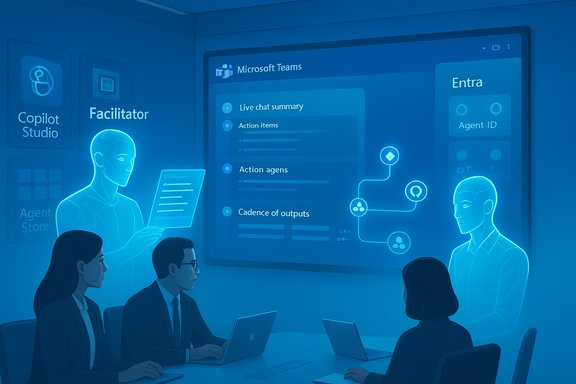
- Microsoft surfaced role-specific agents with distinct skills: the Facilitator (meeting agendas, action items, meeting recaps, Loop and Word exports), Interpreter (real-time translation), Project Manager (Planner automation), and various admin and sales agents. These are intended to be dropped into meetings, channels and flows as “digital teammates.”
Platform & governance: Copilot Studio, Agent Store, Agent 365, Entra Agent ID
- Copilot Studio provides low-code authoring; the Agent Store is the in-product catalog for discovering and publishing agents; Agent 365 (the governance/control plane) treats agents like managed directory objects; Entra Agent ID gives agents identities so they can be included in access reviews and conditional access; Azure AI Foundry provides a production runtime and model routing. These components are designed to make agents auditable, lifecycle-managed and safer to operate in regulated contexts.
MCP: the integration fabric for agentic workflows
- Microsoft uses the Model Context Protocol (MCP) as the standard-ish bridge that lets agents request and receive context, and call functions on third-party systems securely. Teams channel agents can query third‑party services (Atlassian/Jira, Asana, GitHub) via MCP servers, which changes agents from passive summarizers to workflow actors that can read or act against real tools (subject to tenant policy and connector approvals).
Why this matters: from convenience to orchestration
Microsoft’s strategy moves AI from peripheral assistance to the center of how teams operate. The key shifts are:- Shared context as the primary artifact. Instead of each user separately asking an assistant, Copilot becomes the room’s memory — summarizing, tallying votes, exporting deliverables, and producing artifacts that belong to the team workflow.
- Actionable agents, not just answers. Agents can now create tasks, edit Office documents via Agent Mode, and call tools via MCP, which shortens the loop from idea to execution.
- Governed agent lifecycle. Treating agents as directory-backed identities and publishing them through an Agent Store introduces lifecycle controls IT teams need to operate agents at scale.
Strengths and practical benefits
- Fewer context switches. Teams Mode keeps ideation, drafting and action generation in one place, reducing the friction of copying threads into documents or switching apps. That translates to saved time and fewer lost decisions.
- Role-tailored automation. Facilitator and Project Manager agents handle recurring meeting and planning tasks that often consume most knowledge workers’ time. Early previews show these agents can produce Loop components, Word drafts and action lists directly from conversations.
- Extensibility for IT and builders. Copilot Studio and the Teams SDK let organizations build tenant-scoped agents that know company context and respect permissions — enabling bespoke agents for HR, Sales, Support and frontline teams.
- Enterprise controls are central, not optional. Entra Agent ID, Agent 365 and Purview integration are explicitly designed so IT can treat agents like managed services — with identity, telemetry and the ability to quarantine or revoke agent privileges. That design choice addresses the operational reality of deploying autonomous software in an enterprise.
Risks and hard limits — what IT needs to worry about
The promise is large, but the risk surface expands dramatically. The main hazards to plan for are:- MCP and agent-to-agent attack vectors. Agents call MCP servers to access tools and data; a compromised MCP endpoint or insecure tool registration can let an agent be given unauthorized context or actions. This is a genuine attack surface that needs hardened server design, mutual authentication and rigorous tool vetting.
- Agent mistakes and hallucinations. Agents may summarize incorrectly, misassign owners, or perform a misunderstood action. Because agents can now act (create tasks, edit docs, call APIs), errors can have real operational consequences unless actions are scoped, authorized and auditable.
- Data leakage and over-broad permissions. Agents with excessive connector privileges risk exposing data to the wrong context — especially in multi‑tenant scenarios or when agents are allowed to fetch external web material. Least privilege and per-agent data scoping are essential.
- User acceptance and cultural divide. Even with training, organizations should expect a split: some employees will embrace agents as teammates; others will be reluctant or distrustful. Adoption depends on training, clear change management and demonstrable reliability.
- Operational complexity and cost. Running fleets of agents introduces new teams, tooling and budgets — AgentOps, telemetry pipelines, incident playbooks, model hosting and consumption costs (especially when using multi‑model routing) must be planned and funded.
Practical guidance for IT leaders (a checklist to pilot agents safely)
- Map high-value, low-risk use cases first.
- Start with Facilitator for meetings, Project Manager for Planner workflows, and site-scoped SharePoint agents that answer non-sensitive FAQs. These produce tangible wins with bounded data access.
- Define an AgentOps team and lifecycle processes.
- Create a cross-functional group (security, IT, product, legal) to manage agent approval, telemetry, incident response, SLOs and runbooks. Treat agents as production services.
- Adopt least-privilege and connector governance.
- Use per-agent connector approval, enforce OBO (on-behalf-of) authentication patterns, and ensure MCP endpoints are hardened and logged. Avoid broad tenant-level connectors unless required and audited.
- Require human-in-the-loop for high-risk actions.
- For any action that affects finance, customer commitments or personnel, require explicit human approval and surface the agent’s plan before execution. Use approval gates in workflows.
- Instrument telemetry and traces.
- Capture agent interactions, model invocations and MCP tool calls into your SIEM/observability platform. Use OpenTelemetry conventions for multi-agent tracing to enable root-cause investigations.
- Pilot, measure, and iterate.
- Track KPIs (time saved, tasks closed, ticket volume reduction, error rate) and validate vendor claims internally before broad rollouts. Use small domain pilots to test model routing and connector behaviors.
- Train end users and build a community of practice.
- Provide role-based training, build an internal catalog of working agent templates, and encourage sharing of prompts and guardrails that worked in real scenarios. Expect a cultural learning curve.
Developer and architecture considerations
- Model choice and routing. Microsoft’s platform allows multiple model backends (OpenAI, Anthropic, Microsoft’s own models). Model selection should be driven by task requirements (reasoning, privacy, cost) and residency/compliance needs. Map model routing into your cost and compliance plans.
- Durable workflows and state. For long-running processes, use the Agent Framework or Azure AI Foundry orchestration primitives that support durable checkpoints, retries and human approval loops. This avoids lost state and opaque behavior in long workflows.
- Testing and verification. Build test harnesses to validate agent outputs against ground truth, and include synthetic failure modes to understand how agents degrade and recover. Validate any automated action with shadow runs before enabling live execution.
- MCP server hardening. Ensure MCP endpoints enforce mutual TLS, strict auth and allowlist tool registrations. Monitor and audit every tool discovery and invocation. Consider separate MCP servers per trust boundary.
Legal, compliance and privacy implications
- Agents that read or act on tenant data touch retention, eDiscovery and regulatory requirements. Map agent identities to lifecycle processes (Entra Agent ID) and ensure Purview labels and retention policies apply to agent-generated artifacts. Configure audit trails for legal holds and investigations.
- Consider data residency: if model routing sends data to third-party models or to model instances in another region, ensure contracts and controls meet your jurisdictional requirements. Use tenant model control surfaces to restrict routing where needed.
Real-world patterns and early results
Microsoft and early adopters have posted pilot results and customer stories that illustrate both value and caveats. Examples include agent-driven customer self-service pilots, academic assistants for students, and a sales development agent internally reported to increase lead-to-opportunity conversion in early Microsoft tests — promising signals but typically vendor-sourced and best validated by independent pilots. Independent reporting and community threads consistently emphasize that ROI is real when the scope is clear and governance is mature.What to expect next
- Expanded agent catalog and third‑party integrations. Expect more prebuilt agents and partner agents in the Agent Store, plus richer MCP connectors for popular SaaS tools.
- Agent-centric OS and end-user experiences. Microsoft is exploring tighter OS-level integration (taskbar agents, wake-word Copilot experiences), which will increase convenience but also the need for endpoint hardening and policies.
- More enterprise governance features. The early emphasis on Agent 365 signals more admin tooling for lifecycle, telemetry, and quarantine — features IT teams will require to move from pilots to production scale.
Verdict: a necessary but careful leap
Microsoft’s bet on human-agent collaboration is logical and well-resourced: it addresses real productivity frictions and pairs deep platform integration (Graph, Office, Teams) with governance controls designed for enterprises. The approach — agents as directory-backed, discoverable, auditable team members — is a sensible way to industrialize agent deployments rather than leave them as one-off bots.That said, the transition raises real operational, security and cultural risks. The most important near-term success factor won’t be the novelty of the agents themselves, but how organizations design controls, telemetry, and human oversight. Firms that implement measured AgentOps, strict connector governance, and phased pilots will capture real value. Organizations that rush to enable agents without those guardrails risk incidents, data leakage and user backlash.
For IT leaders, the practical roadmap is clear: pilot role-limited agents, instrument everything, build AgentOps, and require human approval for consequential actions. When those steps are in place, human-agent teams can deliver significant efficiency gains — but only if organizations treat agents as first-class, auditable production services rather than charming but uncontrolled productivity toys.
Microsoft’s vision of Copilot as a team member is now an actionable platform. The work for IT is to make that team safe, accountable and reliable. The technical tools are arriving; the governance and organizational changes are the hard part — and they will determine whether agents become trusted digital colleagues or expensive, fragile experiments.
Source: TechTarget Microsoft bets on human-agent team collaboration | TechTarget
