

Microsoft is urging organizations to shorten broad Windows update delays because AI is helping attackers analyze known vulnerabilities, find likely targets, and assemble exploit paths faster than the old enterprise patch calendar was designed to withstand. The message is not “patch recklessly.” It is more uncomfortable than that: the classic security compromise of waiting days or weeks before deployment may now be giving adversaries the same breathing room administrators thought they were buying for themselves.
For years, Windows patching has lived inside a grudging truce. IT teams know they need the fixes, but they also know Windows 11 and Windows 10 updates have often created problems for users and administrators, from compatibility surprises to reboot disruption and business-app regressions. Microsoft’s new argument, amplified by Windows Report and grounded in Microsoft’s own update-management guidance, is that AI changes the timing math. A delay that once looked like prudence can now look like exposure at fleet scale.
The phrase that matters in Microsoft’s warning is “wait and see.” That is the informal doctrine many organizations have adopted after years of Windows update pain: do not be first, do not be last, and absolutely do not push a fresh update to every production device before someone else has discovered the worst bug.
That doctrine was not irrational. Windows updates have broken things often enough that cautious administrators developed an institutional memory around them. A few days of observation could reveal whether a patch caused boot issues, application failures, profile problems, printer disruption, VPN breakage, or some other operational mess that would turn a security fix into a help-desk incident.
But Microsoft is arguing that the risk model behind that behavior is aging out. The company says AI is changing the speed of cybersecurity threats because attackers can now analyze vulnerabilities, identify targets, and build exploit paths faster than before. That does not mean every disclosed flaw becomes a working attack instantly, and Microsoft is not saying every Windows update should be installed blindly on every device at once. It is saying the old delay window has become much more expensive.
The key distinction is between testing and stalling. Testing is targeted, observable, and designed to answer a question: does this update break something important in my environment? Stalling is broad, passive, and often justified by habit: let’s wait days or weeks and see what happens. Microsoft’s warning is aimed at the second behavior, especially when administrators delay updates across every device at once.
That “every device at once” part is where the enterprise risk becomes obvious. A staged rollout leaves a portion of the fleet protected early while admins watch for trouble. A blanket delay leaves the whole estate exposed for the full delay period. If attackers are compressing the time between public vulnerability knowledge and practical exploitation, then the organization has not created a safety buffer; it has created a synchronized attack surface.
Microsoft’s claim is that AI helps attackers move faster through that interpretive work. In plain terms, the advantage is not magic. AI can assist with reading advisories, comparing changed components, summarizing technical detail, generating hypotheses, and speeding the repetitive work that used to slow down exploitation research. Even when humans remain in the loop, the human is no longer doing the first pass alone.
That matters because enterprise patching often assumes attackers need time. Many organizations delay patches for days or weeks before broad deployment because they believe the chance of update-related disruption is more immediate than the chance of exploitation during the test window. That judgment can still be true for some vulnerabilities, some environments, and some systems. Microsoft’s point is that it is becoming less safe as a default assumption.
Windows Report summarized the implication neatly: long delays can leave companies exposed for too long. Microsoft’s own framing goes further by treating AI as a forcing function for operational change. If offensive analysis accelerates, defensive deployment cannot remain bound to a calendar built around manual triage, periodic change boards, and broad deferral policies.
This is where the story becomes bigger than Windows. Every major platform vendor wants customers to patch faster, and every administrator has heard that sermon before. The difference here is that Microsoft is attaching the recommendation to a specific change in adversary capability. “Patch faster” is old. “Patch differently because attackers are using AI to shorten the safe waiting period” is the updated argument.
That second risk is why the “wait and see” culture exists. Windows 11 and Windows 10 updates have often created problems for users and IT admins, and those incidents leave scars. A security team may want rapid deployment, but a desktop engineering team remembers the last update that caused a flood of tickets. A CIO may agree with the need for speed, but the operations manager knows what happens when a restart interrupts a frontline workflow.
Microsoft is effectively asking organizations to stop treating those experiences as a reason for broad inaction. The company is not pretending that update quality concerns vanished. Instead, it is trying to move customers toward mechanisms that preserve testing while reducing full-fleet exposure.
That is a subtle but important shift. The old defensive posture was: “We delay because updates can break things.” The new posture Microsoft wants is: “We expose a small, representative set of devices first, learn quickly, and expand if no major issues appear.” In both models, admins are watching for problems. Only one model leaves every machine unpatched for weeks.
The credibility of Microsoft’s advice will depend heavily on whether its update tools make that transition realistic. Telling administrators to shorten delays is easy. Giving them enough confidence to do it across messy, heterogeneous Windows estates is harder. A modern enterprise fleet may contain different hardware generations, VPN clients, endpoint detection tools, regional business applications, privileged workstations, kiosks, shared devices, remote users, and machines that rarely sit on a corporate network. “Patch faster” becomes meaningful only when administrators can see which devices are ready, which are failing, and which are too important to gamble with.
A ring model gives administrators a way to test without making the entire organization wait. The earliest ring should be small, observable, and technically useful. It should include IT-owned devices, willing pilot users, and hardware or app combinations that are likely to reveal problems early. Later rings should expand gradually into broader populations, with the final ring covering the bulk of standard users.
The crucial part is that a ring is not just a group label. It is an operational contract. Each ring needs monitoring, failure criteria, support escalation, and a decision point. If the early ring shows no major issues, the update should move. If it does show issues, admins should know whether to pause, remediate, exclude a narrow device class, or change sequencing.
That is much different from a vague “wait a week.” A week can disappear into inertia. A ring forces a question: what did we learn, and what happens next?
Microsoft’s own Windows Autopatch documentation reinforces this model by describing update rings as a way to configure deployment behavior, deferrals, deadlines, grace periods, and automatic restart behavior. In other words, the company is not merely recommending a security principle; it is steering customers toward a managed update pipeline.
The table is the heart of Microsoft’s case. It is not saying every organization should replace judgment with automation. It is saying the riskiest posture is the one that combines slow deployment with broad exposure. Anything that breaks that symmetry — early rings, automation, rebootless fixes where available — is an improvement.
That automation matters because many patch delays are not deliberate security decisions. They are process drag. Someone has to create the deployment, target the pilot group, watch the reports, approve the next group, respond to exceptions, communicate reboot expectations, and reconcile noncompliant machines. In a small environment, that may be manageable. In a large Windows estate, it becomes a monthly operational tax.
Autopatch is Microsoft’s attempt to make the secure path the easier path. Instead of asking administrators to invent a ring strategy every month, the service builds update deployment around predefined rings. That does not eliminate the need for oversight. It does reduce the chance that a patch sits idle simply because the team is busy, short-staffed, or waiting for a meeting.
The strategic logic is obvious. If attackers are using AI to reduce their time-to-exploit, defenders need to remove avoidable human delay from their own pipeline. The goal is not autonomous recklessness. It is controlled automation: define the rings, define the rules, monitor the outcome, and keep the rollout moving unless evidence says to stop.
The challenge is organizational trust. Administrators who have spent years cleaning up update failures do not automatically welcome a Microsoft service that moves patches for them. They will want proof that the rings are representative, that reporting is accurate, that pause controls work, and that exceptions are manageable. Autopatch has to compete not only with other management tools, but with the deeply human preference to delay anything that might break Monday morning.
Still, Microsoft’s broader argument makes manual-only patching look increasingly fragile. If every month requires the same sequence of human coordination, then every month is vulnerable to vacation schedules, change freezes, ticket backlogs, unclear ownership, and risk committees that meet slower than attackers move. Autopatch is not just a convenience feature in this framing. It is part of a defensive speed strategy.
Reboots are operationally expensive. They interrupt user work, break long-running sessions, complicate overnight jobs, and create awkward timing problems for devices outside normal office patterns. In some organizations, restart coordination is more politically difficult than patch approval. Everyone agrees security updates matter; no one wants to be the person who forces a restart during a critical workflow.
Hotpatching changes that conversation for eligible fixes by separating protection from the immediate reboot event. Microsoft’s Windows Server documentation describes Hotpatching as a way to install operating-system security updates without restarting the machine by patching in-memory code of running processes. Microsoft’s Windows Autopatch hotpatch guidance similarly frames hotpatch updates as security updates that do not require a restart, while baseline updates still do.
The caveat is important: Hotpatching is not a universal escape hatch from reboots. It applies to some security fixes, and the broader servicing model still includes updates that require restarts. Administrators should not hear “Hotpatching” and assume the reboot problem is solved forever. They should hear “one of the biggest sources of delay can be reduced for some classes of security update.”
That is enough to matter. If reboot friction is the reason a security update sits for days, then any mechanism that activates protection sooner reduces exposure. It also changes user communications. Instead of treating every patch cycle as an interruption negotiation, IT can reserve the hardest reboot conversations for updates that truly require them.
Microsoft’s interest here is obvious. Windows update adoption is not only a technical problem; it is a social one. Users hate interruptions, managers hate productivity loss, and admins hate being blamed for both. Hotpatching gives Microsoft a way to say that faster patching does not always have to mean more immediate disruption.
Attackers love uniformity. A fleet with the same missing update, the same delayed policy, and the same broad exposure gives them scale. If they can identify the vulnerable population quickly, the organization’s own standardization becomes leverage against it. Standardization is good for management, but only if the fix pipeline is as standardized as the vulnerability.
Deployment rings deliberately break that symmetry. Some devices move first. Some users become early indicators. Some systems get protection while others are still under observation. That is not perfect security, but it is better than synchronized delay.
The point is not that every device should be treated the same. It is that every delay should be justified. A domain controller, a specialized workstation, a clinical device, a manufacturing endpoint, and a salesperson’s laptop may not share the same operational risk. They also may not share the same exposure risk. A mature patch strategy sorts that complexity into policy. A blanket delay flattens it into one vulnerable mass.
This is where Microsoft’s AI warning should push administrators beyond update tooling and into asset discipline. You cannot stage intelligently if you do not know what you have. You cannot measure exposure if update compliance reporting is unreliable. You cannot prioritize if all devices are treated as equally critical, equally fragile, and equally unknown.
The irony is that AI does not have to be present on the defender’s side for AI to change the defender’s job. If attackers can move faster, then basic hygiene becomes less forgiving. Inventory, ring design, update telemetry, exception handling, and restart planning become security controls, not just endpoint-management chores.
That does not make one platform “safe” and the other “unsafe.” It means patch strategy has to respect the actual estate. A Windows 11 laptop population managed through modern policies may be easier to move through rings quickly. A Windows 10-heavy environment with legacy dependencies may need more careful pilot selection, clearer exception handling, and stronger compensating controls for devices that cannot move quickly.
The mistake is using complexity as an excuse for universal delay. Complex environments need better staging, not broader paralysis. If a subset of devices is genuinely risky to patch quickly, isolate that subset as a known exception. Do not allow the exception to define the entire fleet’s exposure window.
This is especially important for organizations that have mixed management maturity. Some devices may be enrolled in modern management and ready for automated rings. Others may still depend on older processes, manual maintenance windows, or local business-unit control. Microsoft’s advice is easiest to follow in the first group, but the second group is where broad delays can become most entrenched.
The practical consequence for Windows administrators is that update policy should become more granular. “All Windows devices delay for X days” is increasingly hard to defend. “Pilot devices install first, standard devices follow if no major issues appear, sensitive devices follow a separate monitored path, and exceptions are documented” is closer to the model Microsoft is pushing.
That context matters. Administrators are not resisting updates because they enjoy risk. They are operating in an ecosystem where Microsoft is simultaneously shipping AI features, patching defects, hardening identity, fighting phishing, and changing management guidance. Every new advisory competes for attention with every help-desk incident.
The Outlook crash example is particularly telling because it touches Copilot, the same broad AI wave that Microsoft is embedding across its products. AI is now both a productivity feature and a security accelerant in Microsoft’s narrative. That creates a communication challenge. Customers are being told that AI makes attackers faster, that AI features are arriving in user-facing applications, and that update practices must tighten to keep up.
The passkey-enrollment phishing campaign points to another pressure point: attackers do not need to break Windows itself if they can trick users into weakening identity controls. Update velocity is one part of defense, not the whole story. But it is foundational because endpoint compromise often turns identity attacks into persistence, lateral movement, and data access.
The lesson is not that Microsoft’s ecosystem is uniquely chaotic. It is that modern IT operations are layered. A patch delay is not an isolated choice; it interacts with phishing, identity posture, browser exposure, Office apps, endpoint security tools, and user behavior. AI compresses that whole stack by helping attackers move from discovery to targeting more quickly.
What should change is the tolerance for unexamined, fleet-wide waiting. A delay should be tied to a reason, a population, and a decision point. If the only reason is “that is how we always do Patch Tuesday,” Microsoft is arguing that the reason is no longer good enough.
Admins should start by separating devices into categories. Which endpoints can move quickly through rings? Which systems require special validation? Which devices are exposed to higher risk because of user role, network location, or application footprint? Which machines routinely miss updates because they are offline, unmanaged, or misconfigured?
Then they should convert that knowledge into deployment policy. Early rings should be meaningful, not symbolic. They should include enough diversity to catch real problems. Later rings should not wait indefinitely for perfect certainty. If no major issues appear, the rollout should expand to more users and systems.
Finally, organizations should treat reboot reduction as a security enabler. Hotpatching is not just a convenience feature; it is a way to remove one of the most common excuses for delay where supported and applicable. If users do not have to restart immediately for some security fixes, then administrators have less reason to hold those fixes back.
The more durable model has three traits: faster movement, smaller blast radius, and better observability. Faster movement reduces the exposure window. Smaller blast radius means early problems affect a pilot population rather than the whole company. Better observability tells administrators whether the rollout is working, failing, or merely invisible.
The concrete conclusions are straightforward:
Microsoft’s message is ultimately a warning about time. AI does not make every vulnerability catastrophic, and it does not make every Windows update safe, but it does make the old habit of broad delay less defensible. The next phase of Windows patch management will be judged not by how long administrators can postpone risk, but by how quickly they can narrow it without breaking the business they are trying to protect.
For years, Windows patching has lived inside a grudging truce. IT teams know they need the fixes, but they also know Windows 11 and Windows 10 updates have often created problems for users and administrators, from compatibility surprises to reboot disruption and business-app regressions. Microsoft’s new argument, amplified by Windows Report and grounded in Microsoft’s own update-management guidance, is that AI changes the timing math. A delay that once looked like prudence can now look like exposure at fleet scale.
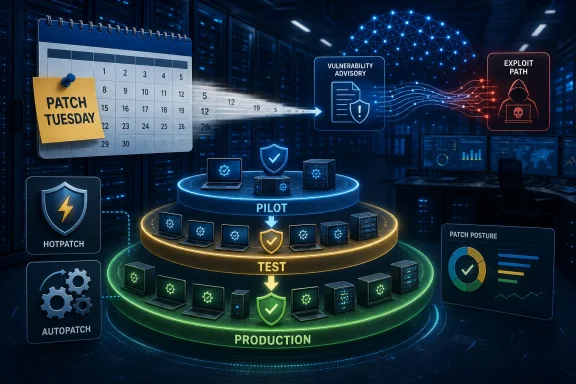 Microsoft Is Attacking the Culture of the Blanket Delay
The phrase that matters in Microsoft’s warning is “wait and see.” That is the informal doctrine many organizations have adopted after years of Windows update pain: do not be first, do not be last, and absolutely do not push a fresh update to every production device before someone else has discovered the worst bug.That doctrine was not irrational. Windows updates have broken things often enough that cautious administrators developed an institutional memory around them. A few days of observation could reveal whether a patch caused boot issues, application failures, profile problems, printer disruption, VPN breakage, or some other operational mess that would turn a security fix into a help-desk incident.
But Microsoft is arguing that the risk model behind that behavior is aging out. The company says AI is changing the speed of cybersecurity threats because attackers can now analyze vulnerabilities, identify targets, and build exploit paths faster than before. That does not mean every disclosed flaw becomes a working attack instantly, and Microsoft is not saying every Windows update should be installed blindly on every device at once. It is saying the old delay window has become much more expensive.
The key distinction is between testing and stalling. Testing is targeted, observable, and designed to answer a question: does this update break something important in my environment? Stalling is broad, passive, and often justified by habit: let’s wait days or weeks and see what happens. Microsoft’s warning is aimed at the second behavior, especially when administrators delay updates across every device at once.
That “every device at once” part is where the enterprise risk becomes obvious. A staged rollout leaves a portion of the fleet protected early while admins watch for trouble. A blanket delay leaves the whole estate exposed for the full delay period. If attackers are compressing the time between public vulnerability knowledge and practical exploitation, then the organization has not created a safety buffer; it has created a synchronized attack surface.
AI Turns Patch Tuesday Into a Race Against Interpretation
The patching race has never been only about installing bits. It is also about interpretation. Once a vulnerability becomes known, defenders try to understand whether they are affected, whether the fix is safe, and how urgently they must move. Attackers perform the same analysis in reverse: what changed, what was vulnerable, who is likely still exposed, and what path turns that weakness into access.Microsoft’s claim is that AI helps attackers move faster through that interpretive work. In plain terms, the advantage is not magic. AI can assist with reading advisories, comparing changed components, summarizing technical detail, generating hypotheses, and speeding the repetitive work that used to slow down exploitation research. Even when humans remain in the loop, the human is no longer doing the first pass alone.
That matters because enterprise patching often assumes attackers need time. Many organizations delay patches for days or weeks before broad deployment because they believe the chance of update-related disruption is more immediate than the chance of exploitation during the test window. That judgment can still be true for some vulnerabilities, some environments, and some systems. Microsoft’s point is that it is becoming less safe as a default assumption.
Windows Report summarized the implication neatly: long delays can leave companies exposed for too long. Microsoft’s own framing goes further by treating AI as a forcing function for operational change. If offensive analysis accelerates, defensive deployment cannot remain bound to a calendar built around manual triage, periodic change boards, and broad deferral policies.
This is where the story becomes bigger than Windows. Every major platform vendor wants customers to patch faster, and every administrator has heard that sermon before. The difference here is that Microsoft is attaching the recommendation to a specific change in adversary capability. “Patch faster” is old. “Patch differently because attackers are using AI to shorten the safe waiting period” is the updated argument.
The Windows Update Trust Deficit Is the Real Obstacle
Microsoft’s problem is not that administrators fail to understand risk. It is that they understand two kinds of risk at once. One risk is getting breached because a known vulnerability remains unpatched. The other is taking down a business process because a patch behaves badly on a particular hardware model, driver stack, line-of-business application, security agent, or remote-access configuration.That second risk is why the “wait and see” culture exists. Windows 11 and Windows 10 updates have often created problems for users and IT admins, and those incidents leave scars. A security team may want rapid deployment, but a desktop engineering team remembers the last update that caused a flood of tickets. A CIO may agree with the need for speed, but the operations manager knows what happens when a restart interrupts a frontline workflow.
Microsoft is effectively asking organizations to stop treating those experiences as a reason for broad inaction. The company is not pretending that update quality concerns vanished. Instead, it is trying to move customers toward mechanisms that preserve testing while reducing full-fleet exposure.
That is a subtle but important shift. The old defensive posture was: “We delay because updates can break things.” The new posture Microsoft wants is: “We expose a small, representative set of devices first, learn quickly, and expand if no major issues appear.” In both models, admins are watching for problems. Only one model leaves every machine unpatched for weeks.
The credibility of Microsoft’s advice will depend heavily on whether its update tools make that transition realistic. Telling administrators to shorten delays is easy. Giving them enough confidence to do it across messy, heterogeneous Windows estates is harder. A modern enterprise fleet may contain different hardware generations, VPN clients, endpoint detection tools, regional business applications, privileged workstations, kiosks, shared devices, remote users, and machines that rarely sit on a corporate network. “Patch faster” becomes meaningful only when administrators can see which devices are ready, which are failing, and which are too important to gamble with.
Deployment Rings Are the Compromise Microsoft Wants to Normalize
Microsoft’s recommended alternative is staged deployment through rings. The basic idea is familiar: install updates on a small group of devices first, monitor for issues, then expand the rollout to more users and systems if no major problems appear. The practice is common in mature IT environments, but Microsoft’s warning suggests it should become the default replacement for broad delay policies.A ring model gives administrators a way to test without making the entire organization wait. The earliest ring should be small, observable, and technically useful. It should include IT-owned devices, willing pilot users, and hardware or app combinations that are likely to reveal problems early. Later rings should expand gradually into broader populations, with the final ring covering the bulk of standard users.
The crucial part is that a ring is not just a group label. It is an operational contract. Each ring needs monitoring, failure criteria, support escalation, and a decision point. If the early ring shows no major issues, the update should move. If it does show issues, admins should know whether to pause, remediate, exclude a narrow device class, or change sequencing.
That is much different from a vague “wait a week.” A week can disappear into inertia. A ring forces a question: what did we learn, and what happens next?
Microsoft’s own Windows Autopatch documentation reinforces this model by describing update rings as a way to configure deployment behavior, deferrals, deadlines, grace periods, and automatic restart behavior. In other words, the company is not merely recommending a security principle; it is steering customers toward a managed update pipeline.
| Approach | What it does | Security exposure | Operational risk | Best fit |
|---|---|---|---|---|
| Broad “wait and see” delay | Holds updates across much or all of the fleet for days or weeks | Highest, because every device can remain unpatched together | Lower short-term disruption, but no early protection | Legacy environments without mature rollout controls |
| Manual staged deployment | Starts with a small group, then expands if no major issues appear | Lower than blanket delay, because some devices patch early | Depends on admin discipline and monitoring | Organizations with hands-on endpoint teams |
| Windows Autopatch | Automates deployment through predefined rollout rings | Lower when rings move promptly | Reduced manual burden, but requires trust in policy design | Managed Microsoft-centric environments |
| Hotpatching | Applies some security fixes without requiring an immediate reboot | Lower for eligible fixes because protection can activate sooner | Less restart disruption, but not a replacement for all updates | Environments where reboot timing blocks patch speed |
Autopatch Is Microsoft’s Answer to Human Bottlenecks
Windows Autopatch sits in this story as Microsoft’s preferred mechanism for making staged deployment less dependent on heroics. According to Microsoft and Windows Report, Autopatch can automate update deployment through predefined rollout rings, giving administrators a structured way to test, monitor, and expand updates without relying on manual delays.That automation matters because many patch delays are not deliberate security decisions. They are process drag. Someone has to create the deployment, target the pilot group, watch the reports, approve the next group, respond to exceptions, communicate reboot expectations, and reconcile noncompliant machines. In a small environment, that may be manageable. In a large Windows estate, it becomes a monthly operational tax.
Autopatch is Microsoft’s attempt to make the secure path the easier path. Instead of asking administrators to invent a ring strategy every month, the service builds update deployment around predefined rings. That does not eliminate the need for oversight. It does reduce the chance that a patch sits idle simply because the team is busy, short-staffed, or waiting for a meeting.
The strategic logic is obvious. If attackers are using AI to reduce their time-to-exploit, defenders need to remove avoidable human delay from their own pipeline. The goal is not autonomous recklessness. It is controlled automation: define the rings, define the rules, monitor the outcome, and keep the rollout moving unless evidence says to stop.
The challenge is organizational trust. Administrators who have spent years cleaning up update failures do not automatically welcome a Microsoft service that moves patches for them. They will want proof that the rings are representative, that reporting is accurate, that pause controls work, and that exceptions are manageable. Autopatch has to compete not only with other management tools, but with the deeply human preference to delay anything that might break Monday morning.
Still, Microsoft’s broader argument makes manual-only patching look increasingly fragile. If every month requires the same sequence of human coordination, then every month is vulnerable to vacation schedules, change freezes, ticket backlogs, unclear ownership, and risk committees that meet slower than attackers move. Autopatch is not just a convenience feature in this framing. It is part of a defensive speed strategy.
Hotpatching Targets the Reboot Tax That Slows Security
If Autopatch is about deployment orchestration, Hotpatching is about one of the oldest sources of patch resistance: restarts. Microsoft pointed to Hotpatching because it can apply some security fixes without requiring an immediate reboot. For business environments, that is not a small quality-of-life improvement. It attacks a major reason updates get deferred.Reboots are operationally expensive. They interrupt user work, break long-running sessions, complicate overnight jobs, and create awkward timing problems for devices outside normal office patterns. In some organizations, restart coordination is more politically difficult than patch approval. Everyone agrees security updates matter; no one wants to be the person who forces a restart during a critical workflow.
Hotpatching changes that conversation for eligible fixes by separating protection from the immediate reboot event. Microsoft’s Windows Server documentation describes Hotpatching as a way to install operating-system security updates without restarting the machine by patching in-memory code of running processes. Microsoft’s Windows Autopatch hotpatch guidance similarly frames hotpatch updates as security updates that do not require a restart, while baseline updates still do.
The caveat is important: Hotpatching is not a universal escape hatch from reboots. It applies to some security fixes, and the broader servicing model still includes updates that require restarts. Administrators should not hear “Hotpatching” and assume the reboot problem is solved forever. They should hear “one of the biggest sources of delay can be reduced for some classes of security update.”
That is enough to matter. If reboot friction is the reason a security update sits for days, then any mechanism that activates protection sooner reduces exposure. It also changes user communications. Instead of treating every patch cycle as an interruption negotiation, IT can reserve the hardest reboot conversations for updates that truly require them.
Microsoft’s interest here is obvious. Windows update adoption is not only a technical problem; it is a social one. Users hate interruptions, managers hate productivity loss, and admins hate being blamed for both. Hotpatching gives Microsoft a way to say that faster patching does not always have to mean more immediate disruption.
The Worst Patch Policy Is Symmetry
The most dangerous pattern in Microsoft’s warning is symmetry: every device waits, every device remains exposed, every device becomes eligible for the same attack path. In a large Windows environment, that symmetry is administratively tidy but strategically brittle.Attackers love uniformity. A fleet with the same missing update, the same delayed policy, and the same broad exposure gives them scale. If they can identify the vulnerable population quickly, the organization’s own standardization becomes leverage against it. Standardization is good for management, but only if the fix pipeline is as standardized as the vulnerability.
Deployment rings deliberately break that symmetry. Some devices move first. Some users become early indicators. Some systems get protection while others are still under observation. That is not perfect security, but it is better than synchronized delay.
The point is not that every device should be treated the same. It is that every delay should be justified. A domain controller, a specialized workstation, a clinical device, a manufacturing endpoint, and a salesperson’s laptop may not share the same operational risk. They also may not share the same exposure risk. A mature patch strategy sorts that complexity into policy. A blanket delay flattens it into one vulnerable mass.
This is where Microsoft’s AI warning should push administrators beyond update tooling and into asset discipline. You cannot stage intelligently if you do not know what you have. You cannot measure exposure if update compliance reporting is unreliable. You cannot prioritize if all devices are treated as equally critical, equally fragile, and equally unknown.
The irony is that AI does not have to be present on the defender’s side for AI to change the defender’s job. If attackers can move faster, then basic hygiene becomes less forgiving. Inventory, ring design, update telemetry, exception handling, and restart planning become security controls, not just endpoint-management chores.
Windows 10 and Windows 11 Admins Face Different Versions of the Same Problem
Microsoft’s warning applies across Windows 11 and Windows 10 environments, but the operational context can differ. Windows 11 fleets are more likely to be attached to modern management assumptions, especially in organizations that have already invested in Intune, Autopatch, and cloud-based policy. Windows 10 fleets may include older hardware, older application dependencies, and more conservative update practices built up over years.That does not make one platform “safe” and the other “unsafe.” It means patch strategy has to respect the actual estate. A Windows 11 laptop population managed through modern policies may be easier to move through rings quickly. A Windows 10-heavy environment with legacy dependencies may need more careful pilot selection, clearer exception handling, and stronger compensating controls for devices that cannot move quickly.
The mistake is using complexity as an excuse for universal delay. Complex environments need better staging, not broader paralysis. If a subset of devices is genuinely risky to patch quickly, isolate that subset as a known exception. Do not allow the exception to define the entire fleet’s exposure window.
This is especially important for organizations that have mixed management maturity. Some devices may be enrolled in modern management and ready for automated rings. Others may still depend on older processes, manual maintenance windows, or local business-unit control. Microsoft’s advice is easiest to follow in the first group, but the second group is where broad delays can become most entrenched.
The practical consequence for Windows administrators is that update policy should become more granular. “All Windows devices delay for X days” is increasingly hard to defend. “Pilot devices install first, standard devices follow if no major issues appear, sensitive devices follow a separate monitored path, and exceptions are documented” is closer to the model Microsoft is pushing.
The Wider Microsoft Ecosystem Shows Why Speed and Quality Keep Colliding
The timing of Microsoft’s warning is awkward because it comes while the company continues to address other issues across its ecosystem. Windows Report noted that Microsoft recently fixed an Outlook crash triggered by Copilot email drafts, while Microsoft 365 users are also facing a new phishing campaign that targets passkey enrollment. Those are separate issues, but they reinforce the same operational reality: Microsoft customers are managing security, reliability, identity, and AI-driven product change at the same time.That context matters. Administrators are not resisting updates because they enjoy risk. They are operating in an ecosystem where Microsoft is simultaneously shipping AI features, patching defects, hardening identity, fighting phishing, and changing management guidance. Every new advisory competes for attention with every help-desk incident.
The Outlook crash example is particularly telling because it touches Copilot, the same broad AI wave that Microsoft is embedding across its products. AI is now both a productivity feature and a security accelerant in Microsoft’s narrative. That creates a communication challenge. Customers are being told that AI makes attackers faster, that AI features are arriving in user-facing applications, and that update practices must tighten to keep up.
The passkey-enrollment phishing campaign points to another pressure point: attackers do not need to break Windows itself if they can trick users into weakening identity controls. Update velocity is one part of defense, not the whole story. But it is foundational because endpoint compromise often turns identity attacks into persistence, lateral movement, and data access.
The lesson is not that Microsoft’s ecosystem is uniquely chaotic. It is that modern IT operations are layered. A patch delay is not an isolated choice; it interacts with phishing, identity posture, browser exposure, Office apps, endpoint security tools, and user behavior. AI compresses that whole stack by helping attackers move from discovery to targeting more quickly.
Where Enterprise IT Should Draw the New Line
The right response to Microsoft’s warning is not panic patching. It is a stricter definition of acceptable delay. Organizations should still test updates, especially in complex environments. They should still watch for compatibility problems. They should still maintain rollback plans, help-desk readiness, and exception paths.What should change is the tolerance for unexamined, fleet-wide waiting. A delay should be tied to a reason, a population, and a decision point. If the only reason is “that is how we always do Patch Tuesday,” Microsoft is arguing that the reason is no longer good enough.
Admins should start by separating devices into categories. Which endpoints can move quickly through rings? Which systems require special validation? Which devices are exposed to higher risk because of user role, network location, or application footprint? Which machines routinely miss updates because they are offline, unmanaged, or misconfigured?
Then they should convert that knowledge into deployment policy. Early rings should be meaningful, not symbolic. They should include enough diversity to catch real problems. Later rings should not wait indefinitely for perfect certainty. If no major issues appear, the rollout should expand to more users and systems.
Finally, organizations should treat reboot reduction as a security enabler. Hotpatching is not just a convenience feature; it is a way to remove one of the most common excuses for delay where supported and applicable. If users do not have to restart immediately for some security fixes, then administrators have less reason to hold those fixes back.
Action checklist for admins
- Audit current Windows update deferral policies and identify any broad delays that apply to every device at once.
- Replace blanket delays with staged deployment rings that start with a small, representative pilot group.
- Define clear promotion criteria so updates expand to more users and systems if no major issues appear.
- Evaluate Windows Autopatch for environments that need predefined rollout rings and less manual patch orchestration.
- Review where Hotpatching can reduce restart friction for eligible security fixes.
- Document exceptions separately instead of letting a small set of fragile systems slow the entire Windows fleet.
The New Patch Discipline Is Faster, Smaller, and More Observable
Microsoft’s warning should land hardest in organizations where “patch management” still means delaying everything, watching news feeds, and then pushing broadly once the anxiety fades. That process may feel safe because it avoids being first. But it is increasingly weak against attackers who can use AI to understand vulnerabilities and targets faster than before.The more durable model has three traits: faster movement, smaller blast radius, and better observability. Faster movement reduces the exposure window. Smaller blast radius means early problems affect a pilot population rather than the whole company. Better observability tells administrators whether the rollout is working, failing, or merely invisible.
The concrete conclusions are straightforward:
- Broad Windows update delays are becoming harder to justify as a default policy.
- Microsoft is not asking admins to abandon testing; it is asking them to stop testing by leaving every device exposed.
- Deployment rings are the central compromise between update safety and security speed.
- Windows Autopatch matters because it can turn ring-based rollout from a manual ritual into a repeatable pipeline.
- Hotpatching matters because some security fixes can be applied without an immediate reboot, reducing a major source of resistance.
- Exceptions should be narrow, documented, and monitored rather than allowed to slow the whole estate.
Microsoft’s message is ultimately a warning about time. AI does not make every vulnerability catastrophic, and it does not make every Windows update safe, but it does make the old habit of broad delay less defensible. The next phase of Windows patch management will be judged not by how long administrators can postpone risk, but by how quickly they can narrow it without breaking the business they are trying to protect.
References
- Primary source: Windows Report
Published: 2026-07-09T07:20:08.108959
Microsoft Says AI Makes Windows Update Delays More Dangerous
Microsoft warns that delaying Windows updates can expose organizations as AI helps attackers exploit vulnerabilities faster. windowsreport.com
- Official source: microsoft.com
security-update-guide-improvement-representing-hotpatch-updates
www.microsoft.com
- Official source: learn.microsoft.com
Autopatch group policies | Microsoft Learn
This article describes Autopatch group policieslearn.microsoft.com - Official source: techcommunity.microsoft.com
- Related coverage: help.hcl-software.com
- Official source: cdn-dynmedia-1.microsoft.com
- Related coverage: elevenforum.com
Deploy Windows 11 updates to counter AI-discovered threats | Windows 11 Forum
Microsoft Mechanics Blog: The speed that AI can now discover and exploit vulnerabilities means that our defenses also need to adjust. For the devices that...www.elevenforum.com - Related coverage: trio.so
Windows Application Management: Tools & Best Practices
Windows Application Management centralizes deployment, and patching, across enterprise devices, reducing security risks and workload for IT teams.www.trio.so - Related coverage: paloaltonetworks.com
2026 Unit 42 Global Incident Response Report - Palo Alto Networks
Read the 2026 Unit 42 Global Incident Response report to discover attacker tactics and get real-world insights and expert recommendations to safeguard your business.www.paloaltonetworks.com