

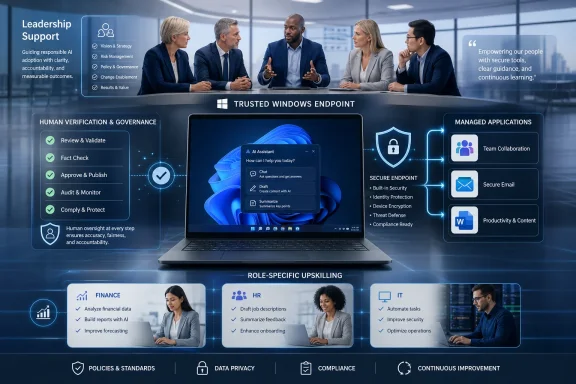
Microsoft published a Windows for business guide on June 26, 2026, arguing that companies need visible leadership support, baseline AI literacy, role-specific upskilling, secure endpoints, and an “augmentation” message to make workplace AI adoption responsible and durable. The article is not merely another Copilot-era productivity pitch. It is Microsoft’s clearest version of a more uncomfortable thesis: AI adoption has already outrun management, and the companies that treat training as optional are building risk into the operating system of work. For Windows shops, the message lands squarely in IT’s lap, because the AI workforce is not just a human-resources problem — it is now an endpoint, data governance, security, and change-management problem.
For the last two years, the enterprise AI conversation has been dominated by access. Who gets Copilot? Which departments can use ChatGPT? Should legal approve the vendor? Can the help desk survive another wave of licensing questions?
Microsoft’s new guide quietly shifts the frame. The point is no longer whether employees can touch AI, because in many organizations they already do. The point is whether they understand what kind of machine they are touching, what it is good at, where it fails, and which business rules still apply when a chatbot makes a sentence sound confident.
That is the heart of Microsoft’s distinction between AI literacy and AI upskilling. Literacy is the baseline: knowing that generative AI can summarize, draft, brainstorm, and classify, but can also hallucinate, omit context, and produce plausible nonsense. Upskilling is the next layer: teaching finance, HR, marketing, engineering, and IT teams how to fold AI into real workflows without turning quality control into a ritual performed after the damage is done.
This distinction matters because enterprises have a habit of mistaking tool access for capability. Giving every employee an AI assistant does not make the organization AI-ready any more than deploying Excel made every employee a financial analyst. The productivity gain arrives only when people understand the tool well enough to use it repeatedly, safely, and skeptically.
Microsoft’s argument is also self-serving, of course. The company sells Windows 11 Pro, Microsoft 365 Copilot, Copilot+ PCs, endpoint management, identity controls, and security tooling. But the commercial motive does not make the operational point wrong. If anything, it explains why Microsoft is pressing so hard on the language of readiness: the next phase of AI revenue depends less on demo magic and more on whether businesses can normalize AI use without triggering security incidents, compliance failures, or employee backlash.
Employees are good at detecting performative mandates. If leaders say AI is strategic but never use it in their own work, never explain the business purpose, and never clarify acceptable use, employees will fill the vacuum themselves. Some will avoid AI entirely because they fear making a mistake. Others will use whatever consumer tool is fastest because the approved process feels theoretical.
Microsoft is effectively arguing that leadership must become the policy layer between AI hype and daily work. Executives need to explain why AI matters to the business, but they also need to model responsible use in ways employees can imitate. That means showing how outputs are checked, where human judgment enters, and when an AI-generated answer is not good enough.
This is a more demanding ask than the usual “leaders should champion change” language. It requires managers to become visibly literate themselves. A department head who cannot explain when not to use AI is poorly equipped to demand that employees use it responsibly.
For IT leaders, this creates an awkward but useful opening. Security and governance teams often struggle to get attention until after something breaks. AI gives them a stronger argument: if leadership wants productivity gains, leadership must also fund the guardrails, approve the training time, and accept that responsible use may slow some workflows before it speeds them up.
The distinction is not sentimental. AI systems are currently uneven performers. They can accelerate drafting, research triage, summarization, and coding assistance, but they still require verification, context, and domain judgment. In regulated or customer-facing work, the human in the loop is not a decorative safety feature. It is the difference between a useful assistant and an unaccountable source of error.
This is where Microsoft’s guide has the flavor of hard-earned enterprise realism. The company has spent years selling automation and low-code platforms, but generative AI does not behave like a deterministic macro. It produces language and recommendations that may be right, wrong, incomplete, biased, or simply misaligned with the task. Treating that as pure automation is an invitation to scale mistakes.
Augmentation, by contrast, gives organizations a workable doctrine. AI can produce a first draft, but a person owns the final answer. AI can summarize a meeting, but a team confirms the decisions. AI can suggest a PowerShell script, but an admin tests it before it touches production. AI can speed the boring parts of work, but it cannot inherit accountability from the employee who clicked “generate.”
That is the message leaders should be repeating. Not because it avoids hard questions about jobs, but because it reflects the actual state of the technology.
Shadow AI is the natural successor to shadow IT. The difference is that the old shadow-IT problem often involved unsanctioned SaaS apps storing files, while shadow AI can involve employees pasting confidential strategy documents, customer data, source code, legal language, HR records, or incident details into tools the organization neither controls nor audits. The risk is not abstract. It is sitting in the browser tab next to Outlook.
Microsoft’s own workplace research has repeatedly pointed to the same tension: employees are already using AI, often faster than their organizations can build formal programs around it. That means the old enterprise move — ban first, evaluate later — is unlikely to work at scale. Blocking a few domains may reduce obvious leakage, but AI is increasingly embedded inside the productivity, CRM, design, support, and developer tools employees already use.
The Windows endpoint therefore becomes a governance surface again. Device management, browser controls, data loss prevention, identity, application control, logging, and approved AI experiences all matter because AI use increases the number of moments when data can move from a managed business context into an unmanaged inference context. The endpoint is not the whole answer, but it is where many of the risky actions begin.
For Windows administrators, this means AI readiness should be treated like any other security posture project. Inventory the tools. Classify the data. Decide which roles need which capabilities. Make approved tools easier to use than unapproved ones. Then train employees on the reasons behind the restrictions, because unexplained controls become obstacles to route around.
That is why Microsoft emphasizes verification, quality controls, and awareness of limitations. AI literacy is not merely learning to write better prompts. It is learning to recognize that a well-written answer is not necessarily a correct answer, and that the burden of verification remains with the human and the organization.
This is especially important in Windows and Microsoft 365 environments, where AI features increasingly sit inside familiar workflows. When AI appears inside Word, Teams, Outlook, Edge, Windows, or a line-of-business application, users may treat it as part of the trusted workspace. The interface can make generated content feel more official than it is.
A mature AI literacy program should therefore teach skepticism as a workflow habit. Employees should know when to ask for sources, when to compare against authoritative internal documentation, when to escalate to a subject-matter expert, and when to avoid AI altogether. They should also know that some data should never enter an unapproved tool, regardless of how useful the output might be.
This is not anti-AI training. It is pro-quality training. The organizations that get the most value from AI will not be the ones that tell workers to trust the machine. They will be the ones that teach workers how to challenge it efficiently.
For marketing, AI upskilling might mean campaign drafting, audience adaptation, SEO research, brand-voice checks, and content review processes. For finance, it might mean variance analysis, spreadsheet assistance, report summarization, and stricter controls on source data and approvals. For HR, it might mean policy drafting, job description review, employee communications, and careful bias checks. For IT, it might mean script generation, incident summarization, documentation cleanup, log analysis, and change-management discipline.
The workflow matters more than the slogan. Employees need templates, examples, review steps, and success measures. A sales team needs to know whether AI is reducing prep time without inventing customer facts. A support team needs to know whether AI is improving resolution quality without producing unsafe troubleshooting steps. A sysadmin needs to know whether AI-generated code is useful scaffolding or a future outage in disguise.
This is where many AI programs stall. They begin with inspiration and end before operational design. Microsoft’s framing pushes companies toward the more boring but more valuable work: build repeatable practices, measure impact, and maintain quality controls.
In the Windows ecosystem, that also means training should be tied to the tools employees are actually allowed to use. If the approved AI experience is Copilot inside Microsoft 365, teach that. If developers are approved for GitHub Copilot under specific repository rules, teach those boundaries. If certain data classes are off-limits, show concrete examples. Vague policy is where shadow AI grows.
The company’s guide connects AI readiness to Windows 11 Pro and Copilot+ PCs, positioning secure modern endpoints as part of the foundation for AI-powered productivity. That is marketing, but it is also a signal about where Microsoft wants business buyers to look next. AI is not just a cloud service in this framing; it is a reason to revisit endpoint capability, device security, management posture, and hardware refresh timing.
Copilot+ PCs add another layer to the pitch. Local AI features depend on neural processing units and newer silicon, while enterprise AI workflows still rely heavily on cloud services and Microsoft 365 integration. The result is a hybrid story: some AI experiences run locally, some run in the cloud, and all of them create management questions.
For IT pros, the practical issue is not whether every employee needs a Copilot+ PC tomorrow. Most do not. The issue is whether the organization has a roadmap for matching device capability to AI use cases. A knowledge worker who spends the day in Teams, Outlook, Excel, and browser-based systems has different needs from a developer, analyst, designer, field worker, or executive.
The security baseline matters too. Windows 11’s hardware-backed security requirements, endpoint management integrations, and modern identity posture give Microsoft a natural way to argue that AI adoption should coincide with modernization. Skeptics will see an upgrade funnel. Administrators may see something more useful: a chance to align AI rollout with device refresh, conditional access, data protection, and application governance.
The first wave of generative AI adoption often relied on anecdotes. An employee saved an hour drafting a memo. A manager summarized a long thread. A developer generated a test scaffold. These stories are real, but they do not automatically add up to organizational productivity. Time saved in one step can reappear as review burden, rework, compliance overhead, or coordination friction elsewhere.
That is why upskilling needs measurement. Teams should identify specific workflows, establish a baseline, introduce AI with review steps, and compare outcomes. Did the weekly report take less time? Were there fewer errors? Did customer response quality improve? Did developers ship faster without increasing defects? Did analysts spend more time interpreting data and less time formatting it?
This is not bureaucracy for its own sake. It protects AI programs from both hype and backlash. If a tool is genuinely useful, measurement helps defend investment. If a workflow is producing faster but worse output, measurement catches the problem before it becomes culture.
There is also a morale dimension. Employees are more likely to accept AI when they can see a concrete benefit in their own work. “Use AI because leadership says so” is a weak message. “Use AI because it removes this recurring manual task and gives you back three hours a week” is a much stronger one.
That clarity is harder than it sounds. AI use cases do not fall neatly into approved and forbidden categories. A prompt that is safe with public marketing copy may be unsafe with customer records. Summarizing a public article is not the same as summarizing privileged legal advice. Asking for Excel help is not the same as uploading a confidential workbook to an unapproved service.
The best policies will be scenario-based. They will tell employees what they can do with approved tools, what requires review, what data is restricted, and what uses are prohibited. They will include examples from the actual business, not generic warnings about “sensitive information.” They will also explain why the rules exist, because employees who understand the threat model make better decisions when the policy does not cover a new situation.
This is an area where Windows and Microsoft 365 administrators can partner with legal, compliance, and HR instead of waiting for a mandate. IT knows where data lives, which apps are in use, which devices are managed, and where users are likely to bypass friction. That operational knowledge is essential if AI policy is going to survive contact with the workday.
The goal should be a policy short enough to remember and specific enough to act on. If employees need a lawyer to interpret every AI interaction, they will either stop using AI or stop asking permission.
Organizations are trying to introduce a technology that changes how people write, research, decide, communicate, and evaluate their own competence. That touches identity and status, not just workflow. A senior employee may resist AI because it makes hard-won expertise feel less exclusive. A junior employee may overuse AI because it gives them confidence they have not yet earned. A manager may demand AI productivity without understanding the review burden they are creating.
Leadership has to make space for those tensions. Microsoft’s guide recommends open dialogue, and that advice is more important than it sounds. Employees need forums where they can ask whether a use case is acceptable, share prompts that worked, admit when AI produced a bad answer, and compare practices across teams. Silence does not prevent misuse. It hides it.
The most successful organizations will likely treat AI upskilling as an ongoing practice rather than an annual compliance module. Models change. Product features change. Legal expectations change. Attackers adapt. Employees discover new shortcuts. A static training deck will age faster than almost any enterprise learning material created in the last decade.
For WindowsForum’s audience, the lesson is familiar. Every major platform shift eventually becomes an operations problem. The cloud did. Mobile did. Remote work did. AI is now following the same path from executive fascination to administrative reality.
That does not mean every organization should rush into maximal deployment. It means every organization needs an explicit stance. Which tools are approved? Which data can be used? Which roles get deeper training? Which workflows are worth redesigning? Which outputs require verification? Which devices and identities are trusted enough for the work?
The uncomfortable truth is that “wait and see” often means “let employees decide individually.” That may produce pockets of innovation, but it also produces inconsistent quality, hidden data flows, and a governance mess that IT will eventually be asked to clean up. Microsoft is selling a managed path because Microsoft benefits from the managed path. But for most enterprises, managed adoption is still better than accidental adoption.
The strongest version of AI readiness looks less like a launch event and more like a governance loop. Leaders explain the purpose. IT secures the environment. Teams identify workflows. Employees learn safe habits. Managers measure outcomes. Policies evolve as real use exposes new risks and opportunities.
That is slower than the demo reel, but it is how durable technology adoption usually works.
 Microsoft Moves the AI Debate From Tools to Habits
For the last two years, the enterprise AI conversation has been dominated by access. Who gets Copilot? Which departments can use ChatGPT? Should legal approve the vendor? Can the help desk survive another wave of licensing questions?Microsoft’s new guide quietly shifts the frame. The point is no longer whether employees can touch AI, because in many organizations they already do. The point is whether they understand what kind of machine they are touching, what it is good at, where it fails, and which business rules still apply when a chatbot makes a sentence sound confident.
That is the heart of Microsoft’s distinction between AI literacy and AI upskilling. Literacy is the baseline: knowing that generative AI can summarize, draft, brainstorm, and classify, but can also hallucinate, omit context, and produce plausible nonsense. Upskilling is the next layer: teaching finance, HR, marketing, engineering, and IT teams how to fold AI into real workflows without turning quality control into a ritual performed after the damage is done.
This distinction matters because enterprises have a habit of mistaking tool access for capability. Giving every employee an AI assistant does not make the organization AI-ready any more than deploying Excel made every employee a financial analyst. The productivity gain arrives only when people understand the tool well enough to use it repeatedly, safely, and skeptically.
Microsoft’s argument is also self-serving, of course. The company sells Windows 11 Pro, Microsoft 365 Copilot, Copilot+ PCs, endpoint management, identity controls, and security tooling. But the commercial motive does not make the operational point wrong. If anything, it explains why Microsoft is pressing so hard on the language of readiness: the next phase of AI revenue depends less on demo magic and more on whether businesses can normalize AI use without triggering security incidents, compliance failures, or employee backlash.
Leadership Is the Missing Middleware
The most striking part of Microsoft’s guidance is not its definition of AI literacy. It is the insistence that AI upskilling “doesn’t stick” without visible leadership support. That sentence should make every CIO wince a little, because it describes the failure mode of countless digital-transformation programs: executive enthusiasm at launch, operational ambiguity afterward.Employees are good at detecting performative mandates. If leaders say AI is strategic but never use it in their own work, never explain the business purpose, and never clarify acceptable use, employees will fill the vacuum themselves. Some will avoid AI entirely because they fear making a mistake. Others will use whatever consumer tool is fastest because the approved process feels theoretical.
Microsoft is effectively arguing that leadership must become the policy layer between AI hype and daily work. Executives need to explain why AI matters to the business, but they also need to model responsible use in ways employees can imitate. That means showing how outputs are checked, where human judgment enters, and when an AI-generated answer is not good enough.
This is a more demanding ask than the usual “leaders should champion change” language. It requires managers to become visibly literate themselves. A department head who cannot explain when not to use AI is poorly equipped to demand that employees use it responsibly.
For IT leaders, this creates an awkward but useful opening. Security and governance teams often struggle to get attention until after something breaks. AI gives them a stronger argument: if leadership wants productivity gains, leadership must also fund the guardrails, approve the training time, and accept that responsible use may slow some workflows before it speeds them up.
Augmentation Is the Safer Story, and the More Honest One
Microsoft’s guide urges companies to communicate augmentation, not just automation. That may sound like polished corporate reassurance, but it is also a practical adoption strategy. Workers who hear only “automation” reasonably infer that management is shopping for ways to reduce headcount; workers who hear “augmentation” are at least given a model in which AI improves the job before it threatens the job.The distinction is not sentimental. AI systems are currently uneven performers. They can accelerate drafting, research triage, summarization, and coding assistance, but they still require verification, context, and domain judgment. In regulated or customer-facing work, the human in the loop is not a decorative safety feature. It is the difference between a useful assistant and an unaccountable source of error.
This is where Microsoft’s guide has the flavor of hard-earned enterprise realism. The company has spent years selling automation and low-code platforms, but generative AI does not behave like a deterministic macro. It produces language and recommendations that may be right, wrong, incomplete, biased, or simply misaligned with the task. Treating that as pure automation is an invitation to scale mistakes.
Augmentation, by contrast, gives organizations a workable doctrine. AI can produce a first draft, but a person owns the final answer. AI can summarize a meeting, but a team confirms the decisions. AI can suggest a PowerShell script, but an admin tests it before it touches production. AI can speed the boring parts of work, but it cannot inherit accountability from the employee who clicked “generate.”
That is the message leaders should be repeating. Not because it avoids hard questions about jobs, but because it reflects the actual state of the technology.
Shadow AI Is What Happens When Policy Arrives Late
The security section of Microsoft’s guide is brief, but it may be the most important part for WindowsForum readers. Microsoft warns that employees should use AI tools running on secured, managed, and approved endpoints to reduce the risk of shadow AI. That is the polite version of a blunt reality: if the company does not provide a usable path, employees will improvise.Shadow AI is the natural successor to shadow IT. The difference is that the old shadow-IT problem often involved unsanctioned SaaS apps storing files, while shadow AI can involve employees pasting confidential strategy documents, customer data, source code, legal language, HR records, or incident details into tools the organization neither controls nor audits. The risk is not abstract. It is sitting in the browser tab next to Outlook.
Microsoft’s own workplace research has repeatedly pointed to the same tension: employees are already using AI, often faster than their organizations can build formal programs around it. That means the old enterprise move — ban first, evaluate later — is unlikely to work at scale. Blocking a few domains may reduce obvious leakage, but AI is increasingly embedded inside the productivity, CRM, design, support, and developer tools employees already use.
The Windows endpoint therefore becomes a governance surface again. Device management, browser controls, data loss prevention, identity, application control, logging, and approved AI experiences all matter because AI use increases the number of moments when data can move from a managed business context into an unmanaged inference context. The endpoint is not the whole answer, but it is where many of the risky actions begin.
For Windows administrators, this means AI readiness should be treated like any other security posture project. Inventory the tools. Classify the data. Decide which roles need which capabilities. Make approved tools easier to use than unapproved ones. Then train employees on the reasons behind the restrictions, because unexplained controls become obstacles to route around.
Literacy Means Teaching People to Distrust Fluency
The hardest part of AI literacy is that generative AI often fails beautifully. A bad spreadsheet formula looks broken. A failed login produces an error. A hallucinated AI answer may arrive in polished prose with confident structure and just enough truth to pass a quick glance.That is why Microsoft emphasizes verification, quality controls, and awareness of limitations. AI literacy is not merely learning to write better prompts. It is learning to recognize that a well-written answer is not necessarily a correct answer, and that the burden of verification remains with the human and the organization.
This is especially important in Windows and Microsoft 365 environments, where AI features increasingly sit inside familiar workflows. When AI appears inside Word, Teams, Outlook, Edge, Windows, or a line-of-business application, users may treat it as part of the trusted workspace. The interface can make generated content feel more official than it is.
A mature AI literacy program should therefore teach skepticism as a workflow habit. Employees should know when to ask for sources, when to compare against authoritative internal documentation, when to escalate to a subject-matter expert, and when to avoid AI altogether. They should also know that some data should never enter an unapproved tool, regardless of how useful the output might be.
This is not anti-AI training. It is pro-quality training. The organizations that get the most value from AI will not be the ones that tell workers to trust the machine. They will be the ones that teach workers how to challenge it efficiently.
Role-Specific Training Beats One-Size-Fits-All Evangelism
Microsoft’s guide is right to say that upskilling looks different across roles and industries. A generic “how to use AI” webinar may create awareness, but it rarely changes behavior. Employees adopt tools when the training maps to the work they actually do on Tuesday afternoon.For marketing, AI upskilling might mean campaign drafting, audience adaptation, SEO research, brand-voice checks, and content review processes. For finance, it might mean variance analysis, spreadsheet assistance, report summarization, and stricter controls on source data and approvals. For HR, it might mean policy drafting, job description review, employee communications, and careful bias checks. For IT, it might mean script generation, incident summarization, documentation cleanup, log analysis, and change-management discipline.
The workflow matters more than the slogan. Employees need templates, examples, review steps, and success measures. A sales team needs to know whether AI is reducing prep time without inventing customer facts. A support team needs to know whether AI is improving resolution quality without producing unsafe troubleshooting steps. A sysadmin needs to know whether AI-generated code is useful scaffolding or a future outage in disguise.
This is where many AI programs stall. They begin with inspiration and end before operational design. Microsoft’s framing pushes companies toward the more boring but more valuable work: build repeatable practices, measure impact, and maintain quality controls.
In the Windows ecosystem, that also means training should be tied to the tools employees are actually allowed to use. If the approved AI experience is Copilot inside Microsoft 365, teach that. If developers are approved for GitHub Copilot under specific repository rules, teach those boundaries. If certain data classes are off-limits, show concrete examples. Vague policy is where shadow AI grows.
The PC Is Back in the Strategy Deck
For years, enterprise endpoint strategy was often treated as a cost-control exercise. Standardize the fleet, keep devices patched, manage identity, reduce support tickets, and stretch refresh cycles where possible. AI is changing that conversation, and Microsoft knows it.The company’s guide connects AI readiness to Windows 11 Pro and Copilot+ PCs, positioning secure modern endpoints as part of the foundation for AI-powered productivity. That is marketing, but it is also a signal about where Microsoft wants business buyers to look next. AI is not just a cloud service in this framing; it is a reason to revisit endpoint capability, device security, management posture, and hardware refresh timing.
Copilot+ PCs add another layer to the pitch. Local AI features depend on neural processing units and newer silicon, while enterprise AI workflows still rely heavily on cloud services and Microsoft 365 integration. The result is a hybrid story: some AI experiences run locally, some run in the cloud, and all of them create management questions.
For IT pros, the practical issue is not whether every employee needs a Copilot+ PC tomorrow. Most do not. The issue is whether the organization has a roadmap for matching device capability to AI use cases. A knowledge worker who spends the day in Teams, Outlook, Excel, and browser-based systems has different needs from a developer, analyst, designer, field worker, or executive.
The security baseline matters too. Windows 11’s hardware-backed security requirements, endpoint management integrations, and modern identity posture give Microsoft a natural way to argue that AI adoption should coincide with modernization. Skeptics will see an upgrade funnel. Administrators may see something more useful: a chance to align AI rollout with device refresh, conditional access, data protection, and application governance.
The Productivity Promise Needs an Audit Trail
Microsoft’s guide repeatedly connects AI adoption to tangible benefits: saving time, reducing manual work, improving output quality, and accelerating time to market. Those are exactly the benefits vendors promise and boards want. They are also benefits that can become mushy unless someone measures them.The first wave of generative AI adoption often relied on anecdotes. An employee saved an hour drafting a memo. A manager summarized a long thread. A developer generated a test scaffold. These stories are real, but they do not automatically add up to organizational productivity. Time saved in one step can reappear as review burden, rework, compliance overhead, or coordination friction elsewhere.
That is why upskilling needs measurement. Teams should identify specific workflows, establish a baseline, introduce AI with review steps, and compare outcomes. Did the weekly report take less time? Were there fewer errors? Did customer response quality improve? Did developers ship faster without increasing defects? Did analysts spend more time interpreting data and less time formatting it?
This is not bureaucracy for its own sake. It protects AI programs from both hype and backlash. If a tool is genuinely useful, measurement helps defend investment. If a workflow is producing faster but worse output, measurement catches the problem before it becomes culture.
There is also a morale dimension. Employees are more likely to accept AI when they can see a concrete benefit in their own work. “Use AI because leadership says so” is a weak message. “Use AI because it removes this recurring manual task and gives you back three hours a week” is a much stronger one.
The Real AI Policy Is the One Employees Can Remember
A responsible-use policy that nobody understands is not a policy. It is a PDF-shaped liability shield. Microsoft’s guide gestures at the right principle: leaders should set clear guidance on when and how AI should be used, reinforce verification and quality expectations, and connect practices to benefits employees can feel.That clarity is harder than it sounds. AI use cases do not fall neatly into approved and forbidden categories. A prompt that is safe with public marketing copy may be unsafe with customer records. Summarizing a public article is not the same as summarizing privileged legal advice. Asking for Excel help is not the same as uploading a confidential workbook to an unapproved service.
The best policies will be scenario-based. They will tell employees what they can do with approved tools, what requires review, what data is restricted, and what uses are prohibited. They will include examples from the actual business, not generic warnings about “sensitive information.” They will also explain why the rules exist, because employees who understand the threat model make better decisions when the policy does not cover a new situation.
This is an area where Windows and Microsoft 365 administrators can partner with legal, compliance, and HR instead of waiting for a mandate. IT knows where data lives, which apps are in use, which devices are managed, and where users are likely to bypass friction. That operational knowledge is essential if AI policy is going to survive contact with the workday.
The goal should be a policy short enough to remember and specific enough to act on. If employees need a lawyer to interpret every AI interaction, they will either stop using AI or stop asking permission.
AI Readiness Is a Culture Change Wearing an Endpoint Badge
The deepest implication of Microsoft’s guide is that AI readiness cannot be purchased as a SKU. Licenses matter. Hardware matters. Secure endpoints matter. But the adoption problem is cultural before it is technical.Organizations are trying to introduce a technology that changes how people write, research, decide, communicate, and evaluate their own competence. That touches identity and status, not just workflow. A senior employee may resist AI because it makes hard-won expertise feel less exclusive. A junior employee may overuse AI because it gives them confidence they have not yet earned. A manager may demand AI productivity without understanding the review burden they are creating.
Leadership has to make space for those tensions. Microsoft’s guide recommends open dialogue, and that advice is more important than it sounds. Employees need forums where they can ask whether a use case is acceptable, share prompts that worked, admit when AI produced a bad answer, and compare practices across teams. Silence does not prevent misuse. It hides it.
The most successful organizations will likely treat AI upskilling as an ongoing practice rather than an annual compliance module. Models change. Product features change. Legal expectations change. Attackers adapt. Employees discover new shortcuts. A static training deck will age faster than almost any enterprise learning material created in the last decade.
For WindowsForum’s audience, the lesson is familiar. Every major platform shift eventually becomes an operations problem. The cloud did. Mobile did. Remote work did. AI is now following the same path from executive fascination to administrative reality.
The Microsoft Playbook Leaves Little Room for Passive Adoption
The practical reading of Microsoft’s guide is straightforward: companies should stop treating AI as a voluntary experiment happening at the edge of the business. AI is already part of the workplace, and unmanaged adoption is itself a decision.That does not mean every organization should rush into maximal deployment. It means every organization needs an explicit stance. Which tools are approved? Which data can be used? Which roles get deeper training? Which workflows are worth redesigning? Which outputs require verification? Which devices and identities are trusted enough for the work?
The uncomfortable truth is that “wait and see” often means “let employees decide individually.” That may produce pockets of innovation, but it also produces inconsistent quality, hidden data flows, and a governance mess that IT will eventually be asked to clean up. Microsoft is selling a managed path because Microsoft benefits from the managed path. But for most enterprises, managed adoption is still better than accidental adoption.
The strongest version of AI readiness looks less like a launch event and more like a governance loop. Leaders explain the purpose. IT secures the environment. Teams identify workflows. Employees learn safe habits. Managers measure outcomes. Policies evolve as real use exposes new risks and opportunities.
That is slower than the demo reel, but it is how durable technology adoption usually works.
The Workforce Lesson Hidden Inside Microsoft’s Windows Pitch
Microsoft’s AI-readiness argument boils down to a few concrete moves that Windows-heavy organizations can act on now. The details will vary by industry, but the pattern is increasingly difficult to avoid.- Companies should treat AI literacy as a baseline workplace skill, not a perk for early adopters or a specialty reserved for technical teams.
- Leaders should model responsible AI use in public, because employees will not take governance seriously if executives behave as though the rules are for someone else.
- Training should be organized around real workflows, because generic prompt classes rarely survive the first collision with department-specific data, deadlines, and quality standards.
- Security teams should assume employees will use AI and focus on approved tools, managed endpoints, data controls, and monitoring rather than relying on blanket prohibitions.
- AI programs should measure whether speed, quality, and employee experience actually improve, because anecdotal productivity gains are not the same as business value.
- Organizations should describe AI as augmentation where human judgment remains accountable, because pure automation rhetoric creates fear and overpromises what the technology can reliably deliver.
References
- Primary source: Microsoft
Published: 2026-06-26T11:10:19.290197
Build an AI-Ready Workforce with AI Literacy and Upskilling | Microsoft
Foster AI readiness with AI literacy and AI upskilling. Grow your employees’ generative AI skills with guidance on how to upskill in AI for more secure and responsible productivity practices.www.microsoft.com
- Official source: blogs.microsoft.com
Microsoft and LinkedIn release the 2024 Work Trend Index on the state of AI at work - The Official Microsoft Blog
One year ago, generative AI burst onto the scene and for the first time since the smartphone, people began to change the way they interact with technology. People are bringing AI to work at an unexpected scale — and now the big question is, how’s it going? As AI becomes ubiquitous in the...blogs.microsoft.com - Official source: news.microsoft.com
Microsoft’s 2025 Work Trend Index Report reveals the rise of the Frontier Firm, marking a new era of workforce dynamics - CEE Multi-Country News Center
The report underscores how intelligence on demand, hybrid human-AI agent teams, and evolving workplace structures are reshaping business operations and talent strategies. As organizations worldwide navigate the next wave of workplace transformation, Microsoft’s fifth annual Work Trend Index...news.microsoft.com - Related coverage: dir.md
- Related coverage: elements.visualcapitalist.com
- Official source: cdn-dynmedia-1.microsoft.com
- Related coverage: techradar.com
'Every business leader knows the world is changing, but far fewer have a clear picture of what to do about it': Microsoft flags the changing world of AI at work, and why "Frontier Firms" are leading the way | TechRadar
Microsoft digs deep into how businesses are using AIwww.techradar.com - Related coverage: axios.com
Report: LinkedIn and Microsoft data says employees are bringing their own AI to work
A report from Microsoft and LinkedIn shows the gulf between employees and their managers.www.axios.com
- Related coverage: tomshardware.com
Microsoft says 'Transformation Paradox' holding back AI adoption in the workplace — 45% of respondents say it's safer to focus on current goals, rather than AI innovation | Tom's Hardware
“Employees are ready to reinvent how they work, but the system around them continues to reinforce the old way.”www.tomshardware.com - Related coverage: pcgamer.com
Using 'trillions of anonymised productivity signals', Microsoft thinks nearly half of people like AI in their work | PC Gamer
There's dozens of us who don't!www.pcgamer.com - Related coverage: windowscentral.com
Microsoft warns future AI could cost a fortune | Windows Central
Meanwhile, CEO Satya Nadella has made it clear that AI isn't optional, persuading high-profile executives to get on board.www.windowscentral.com
