

Microsoft’s Exchange Online team is deprecating the long-standing -Credential parameter in Exchange Online PowerShell — a change that administrators must treat as urgent rather than optional. The company’s guidance (and the wider MFA/ROPC narrative) makes clear that the legacy Resource Owner Password Credentials (ROPC) style of authentication cannot meet modern Multi‑Factor Authentication (MFA) and Conditional Access requirements; as a result, the Exchange Online PowerShell modules released after June 2026 will no longer include support for the -Credential parameter. This article verifies the technical facts you need to plan and execute a safe migration, weighs alternatives, gives a practical migration playbook with command-line examples, and highlights the most common pitfalls and mitigations for enterprise environments.
Microsoft is progressively enforcing modern authentication and mandatory MFA across Microsoft cloud services. The Microsoft Entra (Azure AD) mandatory MFA rollout and its Phase 2 enforcement windows are the immediate backdrop for the -Credential deprecation: Microsoft’s published MFA enforcement plan explains that ROPC-style flows are incompatible with MFA and will surface errors once MFA is enforced for a tenant or application.
At the same time, the Exchange Online PowerShell modules have matured to support multiple modern auth paths — interactive system‑browser SSO, device code flow, app‑only (certificate) authentication, managed identities, and token-based injection — all of which are compatible with MFA and Conditional Access when configured correctly. The official Exchange Online app‑only / certificate guidance documents these options and is the authoritative how‑to for unattended automation.
Separately, Microsoft’s broader deprecation of legacy Exchange surfaces (for example, Exchange Web Services and older token models) reinforces that the platform is moving to a REST/OAuth-first model. That strategic trajectory makes reliance on any flow that requires a usehanded to a client increasingly risky and likely to break as Microsoft tightens the service security posture. Community and service‑timeline analyses published for Exchange transitions underscore the same shift to Graph/app roles and explicit app permissions.
Conclusion
This deprecation is part of a broad, intentional move by Microsoft to remove legacy authentication surfaces and enforce strong, modern authentication everywhere. For Exchange administrators the practical message is straightforward: treat the -Credential parameter as legacy and migrate urgently to app‑only certificate, managed identities, or interactive modern auth (device/system browser) depending on whether the workload is unattended or interactive. Start with an inventory, prioritize mission‑critical automation, and use the documented app‑only and managed identity patterns to reduce operational risk and comply with mandatory MFA enforcement. Doing this will not only avoid future outages after Exchange Online module updates but will also substantively improve your organization’s security posture and auditability.
Source: Microsoft Exchange Team Blog Deprecation of the -Credential Parameter in Exchange Online PowerShell | Microsoft Community Hub
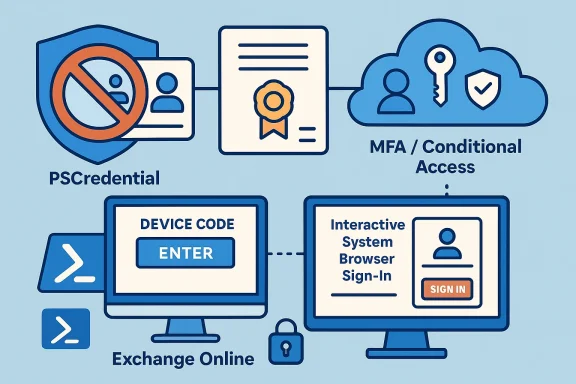 Background / Overview
Microsoft is progressively enforcing modern authentication and mandatory MFA across Microsoft cloud services. The Microsoft Entra (Azure AD) mandatory MFA rollout and its Phase 2 enforcement windows are the immediate backdrop for the -Credential deprecation: Microsoft’s published MFA enforcement plan explains that ROPC-style flows are incompatible with MFA and will surface errors once MFA is enforced for a tenant or application. At the same time, the Exchange Online PowerShell modules have matured to support multiple modern auth paths — interactive system‑browser SSO, device code flow, app‑only (certificate) authentication, managed identities, and token-based injection — all of which are compatible with MFA and Conditional Access when configured correctly. The official Exchange Online app‑only / certificate guidance documents these options and is the authoritative how‑to for unattended automation.
Separately, Microsoft’s broader deprecation of legacy Exchange surfaces (for example, Exchange Web Services and older token models) reinforces that the platform is moving to a REST/OAuth-first model. That strategic trajectory makes reliance on any flow that requires a usehanded to a client increasingly risky and likely to break as Microsoft tightens the service security posture. Community and service‑timeline analyses published for Exchange transitions underscore the same shift to Graph/app roles and explicit app permissions.
What’s changing, in plain terms
- Microsoft will remove support for the -Credential parameter from new Exchange Online PowerShell module releases published after June 2026 (administrators should treat the posted timeline as the operative deadline and migrate earlier if possible).
- The technical reason: -Credential relies on the ROPC-style pattern (client obtains tokens by directly submitting username and password), which cannot satisfy MFA or Conditional Access challenge flows. Microsoft’s mandatory MFA program explicitly states that ROPC is incompatible with MFA-enforced tenants.
- Practical impact: any scripts or automation that call Connect-ExchangeOnline with a PSCredential object (Get-Credential / -Credential) will run normally today, but future module updates may fail to accept that parameter; organizations relying on it must update before they move to newer ExchangeOnlineManagement module versions published after the cutoff.
Why Microsoft is removing -Credential (technical rationale)
- ROPC cannot deliver MFA. The ROPC grant type (username + password exchange for tokens) does not support challenge-response or interactive second-factor flows. Once MFA enforcement is turned on for a tenant or application, ROPC requests fail with errors because there is no way to present an MFA challenge. Microsoft explicitly calls out ROPC as incompatible with mandatory MFA.
- Broader security posture and tooling changes. Microsoft is consolidating around OAuth2/OIDC flows (authorization code, device code, client credentials) and workload identities (managed identities, service principals) so that telemetry, conditional access, and phishing‑resistant methods can be enforced consistently across endpoints. The Exchange Online module itself embeds authentication libraries consistent with modern flows. Evidence from the module packaging shows Microsoft Identity components are part of the module surface, signaling the direction toward MSAL-like flows and the REST token model.
- Operational reliability and compliance. Username/password‑based automation is fragile and a compliance risk: passwords expire, secrets are rotated manually, and audit trails are weaker than app‑based or certificate‑based flows. Moving automation to managed identities or app‑only certificates improves auditability and reduces credential exposure.
Who will be affected (typical patterns)
- Scripts that call:
- Connect-ExchangeOnline -Credential (PSCredential)
- Any custom automation that stores cleartext passwords for Exchange Online access
- Legacy tools or third‑party connectors that rely on user credentials for unattended mailbox operations instead of app/service identities
- Service accounts that are actually user accounts (these will require migration to workload identities or app‑only principals to avoid MFA interruptions)
Supported alternatives (what to migrate to)
Below are the supported, modern authentication patterns you should adopt — choose the method that best matches whether interaction is possible and whether the connection must be unattended.1) Interactive browser SSO (default / admin use)
- Use: Connect‑ExchangeOnline -UserPrincipalName admin@domain
- Behavior: Opens system browser; supports MFA and Conditional Access; best for interactive admin sessions and when you can complete MFA. This is the simplest immediate replacement for manual sign‑ins.
- When to use: daily administration, troubleshooting, adhoc tasks.
- Verification: modern authentication flow; compatible with tenant MFA policies.
2) Device code flow (headless machines, non‑GUI environments)
- Use: Connect‑ExchangeOnline -Device -UserPrincipalName admin@domain
- Behavior: Prints a device code and URL; complete the code on another machine to sign in and pass MFA.
- When to use: Cloud Shell, Linux servers, environments without a system browser.
- Caveat: still requires manual device code completion for initial interactive sign‑in (but supports MFA).
3) App‑only certificate authentication (recommended for unattended automation)
- Use: Connect‑ExchangeOnline -AppId <client-id> -CertificateThumbprint <thumbprint> -Organization <tenant.onmicrosoft.com>
- Behavior: Uses a service principal (app registration) plus an X.509 certificate to perform app‑only (client credentials) flows. This enables unattended scripts to operate without user accounts, and it is compatible with MFA/Conditional Access because it is a workload identity not subject to user MFA.
- When to use: server jobs, scheduled runbooks, CI/CD, automation that must run unattended.
- Important configuration steps:
- Register an Azure AD application and upload certificate (or use Key Vault + just‑in‑time retrieval).
- Assign Exchange.ManageAsApp app permission and grant admin consent (or configure Exchange role group membership for the service principal).
- Add the service principal to the Exchange role group or assign built‑in Entra roles as required by your tasks.
- References & how‑to: Microsoft’s app‑only Exchange guidance details the step‑by‑step process.
4) Managed identity (Azure VMs, Azure Automation, Function Apps)
- Use: Connect‑ExchangeOnline -ManagedIdentity -Organization <tenant.onmicrosoft.com> (system-assigned or with -ManagedIdentityAccountId for user-assigned)
- Behavior: When running in Azure (VM, VMSS, Function App, Automation Account) you can use the host’s managed identity as a workload identity for the Exchange connection. This avoids certificate file management entirely.
- When to use: Azure-hosted automation scenarios where the host can be given the proper Entra/Exchange permissions.
- Caveats: you must assign the appropriate Entra roles and/or Exchange role group membership to the managed identity. Also, note timing: role assignment propagation may take several minutes.
5) Access token injection (advanced / intermediary scenarios)
- Use: Connect‑ExchangeOnline -AccessToken <OAuth2_access_token> -Organization <tenant.onmicrosoft.com>
- Behavior: If you obtain a valid access token via another library or flow (for example, you have a custom authentication pipeline that gets a token via MSAL and handles Conditional Access challenges), you can pass the token directly into Connect‑ExchangeOnline.
- When to use: complex automation where token acquisition is centralized or when integrating with non‑PowerShell token providers.
- Caveat: You remain responsible for token acquisition, refresh, and adherence to tenant MFA/Conditional Access policies. Rakhesh and other community docs show practical examples for token-based connection patterns.
6) InlineCredential / interactive password entry (short-term stop-gap)
- Use: Connect‑ExchangeOnline -InlineCredential -UserPrincipalName <user>
- Behavior: Allows entering credentials interactively in the console; less recommended because it bypasses the browser SSO and cannot satisfy user MFA.
- When to use: very short-term fallback when interactive MFA is unavailable.
- Caveat: Inline credential does not bypass MFA for accounts that have MFA enforced; it’s primarily for environments without GUI support where device code might not be viable. Use sparingly.
Quick command examples
- Interactive admin:
- Connect-ExchangeOnline -UserPrincipalName [email protected]
- Device code:
- Connect-ExchangeOnline -UserPrincipalName [email protected] -Device
- App-only certificate (certificate in store):
- Connect-ExchangeOnline -AppId 11111111-2222-3333-4444-555555555555 -CertificateThumbprint "ABCDEF..." -Organization contoso.onmicrosoft.com
- App-only with certificate file (less secure — prefer thumbprint with a cert installed):
- Connect-ExchangeOnline -AppId <AppId> -CertificateFilePath "C:\certs\exoapp.pfx" -CertificatePassword (ConvertTo-SecureString -String "<pwd>" -AsPlainText -Force) -Organization <tenant>
- Managed identity:
- Connect-ExchangeOnline -ManagedIdentity -Organization contoso.onmicrosoft.com
Migration playbook — step‑by‑step
Follow a structured approach. The steps below are practical and prioritized; use them as a checklist for migration projects.- Inventory and categorization (week 0–1)
- Run automated scans for scripts and scheduled jobs that call Connect‑ExchangeOnline with -Credential or that embed passwords.
- Identify third‑party tools or connectors that rely on user credentials.
- Rank by business criticality (high, medium, low).
- Decide authentication strategy per workload (week 1–2)
- Admin tasks: convert to interactive SSO or device code where interactivity is acceptable.
- Unattended automation: prefer app‑only certificate or managed identity.
- Custom connectors: evaluate access token injection or convert to Graph-based API where feasible.
- Build the app/service principals and certs (week 2–4)
- Register Azure AD application; prefer certificate credentials over client secrets.
- Assign Exchange.ManageAsApp and Entra roles or create service principal role group members in Exchange to grant least privilege.
- Store certificates securely (Azure Key Vault recommended) and implement just‑in‑time retrieval.
- Document revocation and rotation procedures.
- Update scripts and deployments (week 3–6)
- Replace -Credential usage with recommended Connect‑ExchangeOnline parameters.
- Use parameterized secrets and retrieval from secure stores — do not hardcode certificate passwords.
- Update CI/CD or runbook definitions to reference Key Vault or managed identity.
- Test thoroughly (parallel)
- Functional test: run each updated script in a staging tenant and confirm identical outputs.
- Error handling & retries: validate errors raised by Conditional Access or expired certs and implement robust retry/backoff.
- Monitoring: ensure sign‑ins and actions are visible in audit logs; create alerts for failed automated sign‑ins.
- Rollout and retire (week 6+)
- Gradual production rollout by workload group.
- Maintain a short, reversible fallback plan only as an emergency measure — do not rely on -Credential as a long‑term escape hatch.
- Post‑migration hardening
- Rotate certificates per policy, retire any leftover service accounts that are user‑based sign‑ins, and update runbooks.
- Ensure telemetry and logging (Azure AD sign‑in logs, Exchange audit logs) are collected into SIEM.
Testing matrix and verification
- Validate each connection method in your tenant with MFA enforced (use a test tenant with Conditional Access rules matching production).
- Confirm that app‑only principals can perform the exact Exchange cmdlets required — you may need to add the service principal as a member of an Exchange role group or assign specific RBAC privileges.
- For Managed Identity: confirm role assignment propagation time and re‑test after a 10–15 minute window.
- Document token lifetimes and refresh behavior for token-based flows.
Common pitfalls and troubleshooting
- Certificates not yet trusted or not installed in the correct certificate store — use thumbprint+installed cert pattern to avoid exposing .pfx files.
- Role assignment delays — Azure AD role and Exchange role group assignments can take minutes to propagate.
- Conditional Access policies blocking app registration consent — ensure admin consent and Conditional Access exceptions (if absolutely required) are handled by policy.
- Incorrect Organization parameter — Connect‑ExchangeOnline expects the primary .onmicrosoft.com domain for app-based scenarios in many examples; using tenant GUIDs can help avoid ambiguity.
- ManagedIdentity use only works from supported Azure hosts (VMs, Function Apps, Automation Accounts); local machines cannot use user-assigned managed identities.
Risks and mitigations
- Risk: rushed migration leads to automation outages.
- Mitigation: adopt a staged rollout with canary scripts and robust alerting; keep a documented rollback plan.
- Risk: misconfigured app permissions grant excessive privileges.
- Mitigation: use least privilege principles; assign service principals to narrowly scoped Exchange role groups where supported.
- Risk: certificate exposure or weak storage.
- Mitigation: use Azure Key Vault or a secret store with strict access policies; rotate certificates and audit key usage.
- Risk: assuming vendor tools will instantly support app-only authentication.
- Mitigation: engage vendors early; open support tickets for any blockers and track them in your migration project plan.
Timeline, urgency, and final recommendations
- Deadline: Microsoft stated that support for the -Credential parameter will be removed from new Exchange Online PowerShell versions released after June 2026. Organizations should not wait for the deadline — begin migration immediately. Tras a hard operational signal to remove all username/password automation for Exchange Online. (Confirm tenant-specific Message Center notices and the Exchange Team blog posts for precise dates for your tenant.)
- MFA enforcement context: Microsoft’s mandatory MFA Phase 2 enforcement windows overlap with this deprecation, and tenants that enable Phase 2 earlier may encounter ROPC failures sooner. You can request tenant‑specific postponements for Phase 2 (Microsoft provides administrative controls), but postponement is not a long‑term strategy.
- Practical priority: convert critical unattended automation to app‑only certificate or managed identity first (this eliminates the single biggest failure mode), then migrate interactive admin workflows to device or system browser SSO.
Final notes and verification caveat
- Microsoft Learn’s mandatory MFA guidance and the Exchange Online app‑only/certificate documentation are the most reliable references for migration design and examples; use them to validate implementation specifics in your tenant.
- The broader platform movement away from legacy token models and ROPC has been reflected across multiple Microsoft docs and community analyses; Exchange‑specific retirements (including EWS and legacy tokens) show the same product-level strategy to consolidate on OAuth/Graph and workload identities. For context on similar deprecations and the operational timeline for Exchange API transitions, see the compiled forum and transition analysis.
- One specific claim in the Exchange announcement text links the deprecation timing to MSAL changes (that MSAL deprecated ROPC starting with MSAL version 4.74.0). I attempted to corroborate a direct, explicit MSAL release note that marks ROPC as formally deprecated in 4.74.0; public release logs show MSAL evolution and security hardening across versions, but a single release note explicitly stating “ROPC deprecated in 4.74.0” was not found during verification. That means the MSAL‑version attribution should be treated with caution until Microsoft’s MSAL release notes or the MSAL team provide a clear, direct statement. Administrators should prioritize the Exchange and Entra/MFA guidance rather than a single MSAL version line-item and should reach out to Microsoft support for clarification if MSAL versioning is a blocker for your environment. (github.com)
Conclusion
This deprecation is part of a broad, intentional move by Microsoft to remove legacy authentication surfaces and enforce strong, modern authentication everywhere. For Exchange administrators the practical message is straightforward: treat the -Credential parameter as legacy and migrate urgently to app‑only certificate, managed identities, or interactive modern auth (device/system browser) depending on whether the workload is unattended or interactive. Start with an inventory, prioritize mission‑critical automation, and use the documented app‑only and managed identity patterns to reduce operational risk and comply with mandatory MFA enforcement. Doing this will not only avoid future outages after Exchange Online module updates but will also substantively improve your organization’s security posture and auditability.
Source: Microsoft Exchange Team Blog Deprecation of the -Credential Parameter in Exchange Online PowerShell | Microsoft Community Hub
