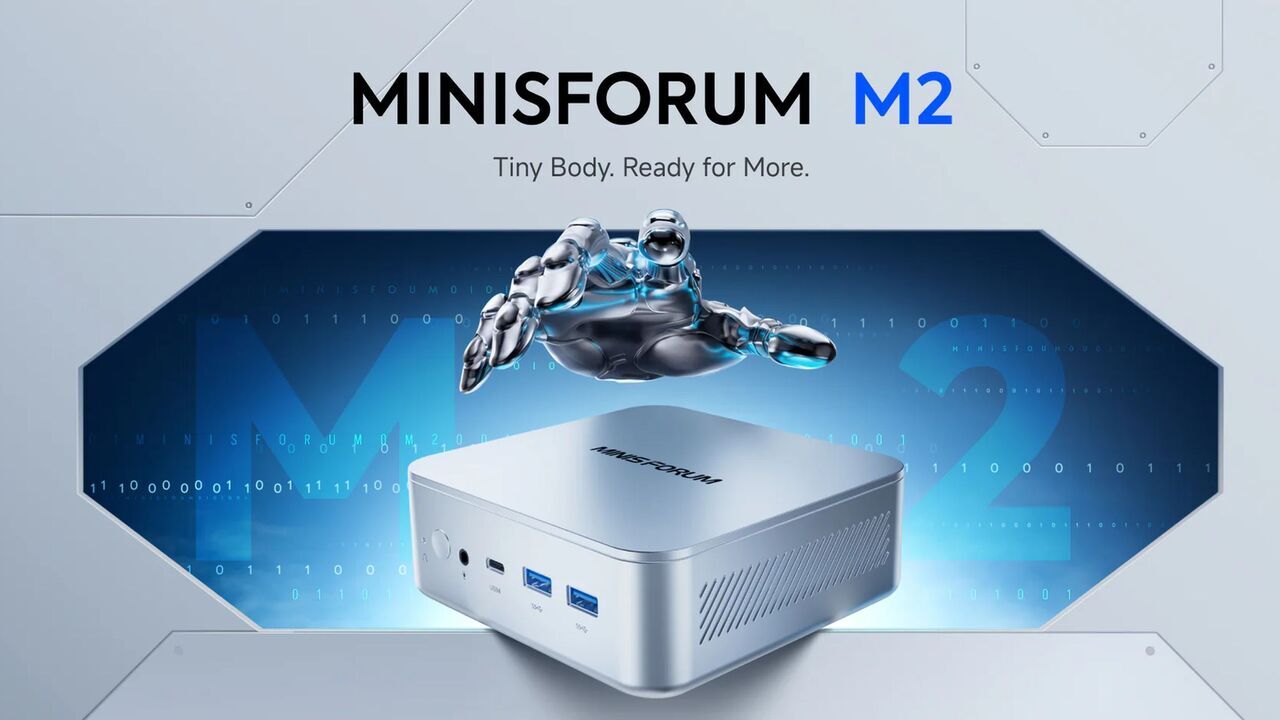
Minisforum announced the M2 Pro and MS-03 mini PCs in early June 2026, positioning both systems around Intel’s Panther Lake platform, local AI acceleration, and unusually dense desktop-class I/O for machines small enough to disappear behind a monitor. The pitch is not merely “faster mini PC.” It is that the compact Windows box is being redesigned around the same pressures reshaping laptops, workstations, NAS hardware, and edge servers: private AI, faster networking, and fewer compromises at the desk.
For years, the mini PC lived in a narrow lane. It was the machine you bought for a kiosk, a conference room, a media cabinet, a light office desk, or a homelab shelf where power draw mattered more than expansion. The best ones were useful, but they were still usually understood as compromises: smaller, quieter, tidier, but not quite a real workstation.
The M2 Pro and MS-03 are part of a broader attempt to break that assumption. Minisforum is not presenting these boxes as NUC-like conveniences for people who cannot fit a tower. It is presenting them as compact compute nodes that happen to run Windows, sit on a desk, and now have enough local AI horsepower to be marketed as something more ambitious.
That is why the headline number is 180 TOPS on the M2 Pro rather than a clock speed or a Cinebench score. TOPS, or trillions of operations per second, has become the consumer PC industry’s bluntest AI marketing instrument. It is not useless, but it is not the same as saying a machine will comfortably run every large model a user cares about.
Still, the shift matters. Minisforum is reading the room correctly: local AI is becoming one of the few remaining reasons to care about PC hardware differentiation in a world where most office work, messaging, browsing, and productivity software already runs well on nearly anything.
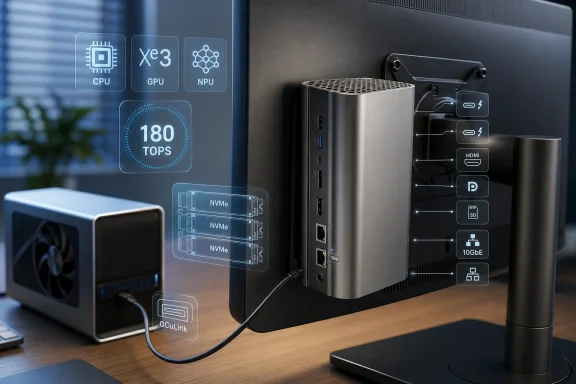
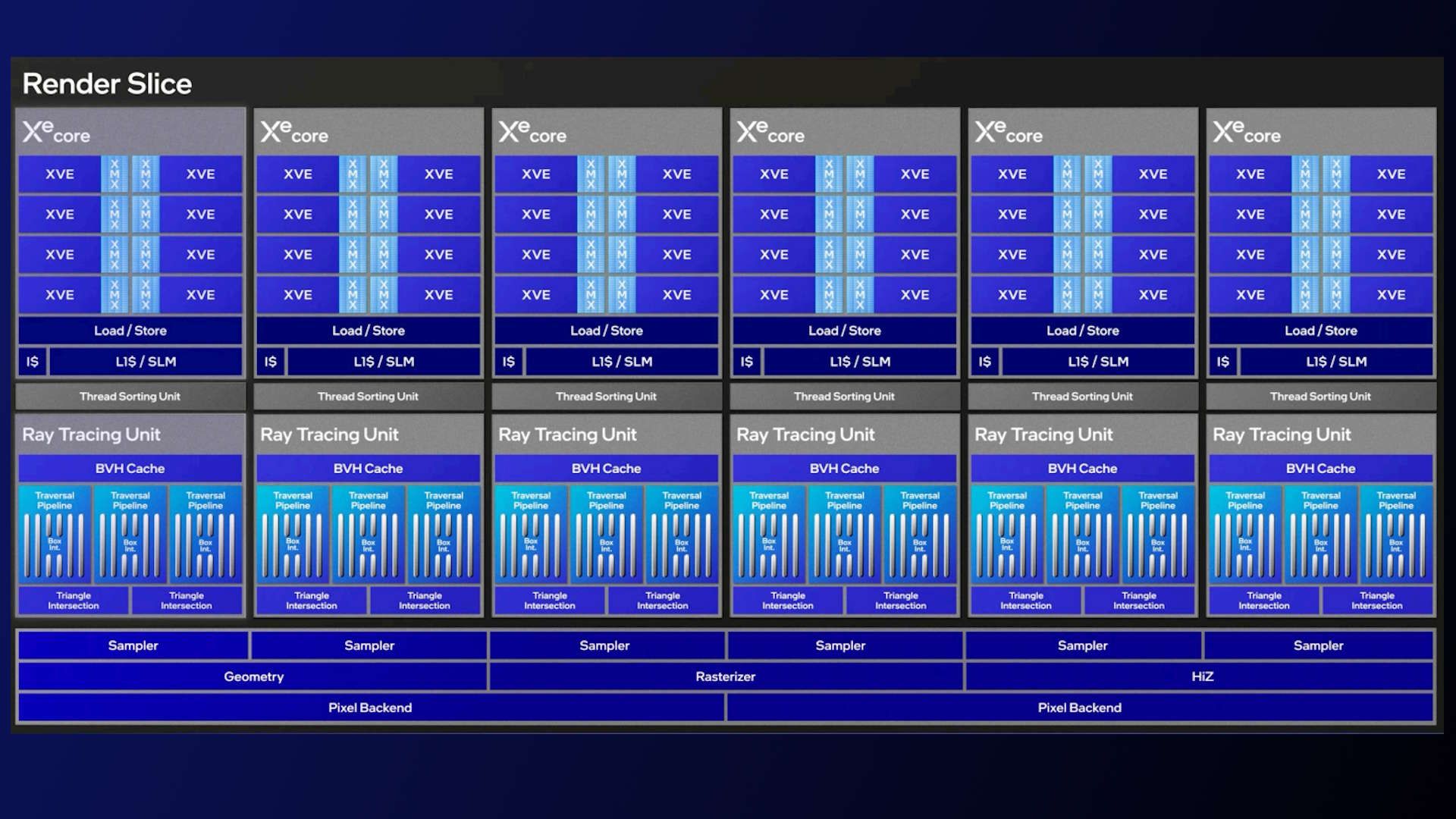
The M2 Pro reportedly uses Panther Lake-H with integrated Xe3 graphics and an updated NPU5. Minisforum is claiming up to 180 TOPS of combined compute across the CPU, GPU, and NPU, which is the kind of aggregate number vendors love because it lets them talk about a whole system rather than a single accelerator.
That distinction is important. A dedicated NPU is useful for certain sustained, efficient AI workloads, especially those supported by Windows and application frameworks. But many local AI tasks still lean heavily on GPU memory bandwidth, GPU compute, CPU scheduling, and software support. The number on the box is only one part of the story.
For Windows users, the interesting development is that Panther Lake mini PCs may make AI acceleration feel less like a laptop-only story. Microsoft’s Copilot+ PC campaign initially trained users to think of local AI in terms of premium notebooks. Minisforum is now pushing the same idea into the compact desktop: put the AI-capable PC in the room, on the desk, behind the screen, or in the rack.
The internal power supply is not a glamorous feature, but it may be one of the most practical ones. External power bricks are the tax mini PC buyers have quietly paid for years. They clutter floors, complicate mounting, and make the machine feel less integrated than its size suggests. Bringing the PSU inside the chassis makes the M2 Pro feel more like a real desktop replacement and less like a laptop motherboard in a decorative box.
That matters if Minisforum wants these systems in ordinary offices. A VESA-mounted mini PC behind a monitor with no dangling brick is a much easier sell for clean-desk deployments, shared workspaces, reception desks, small studios, and education labs. The more invisible the machine becomes, the more persuasive the mini PC category gets.
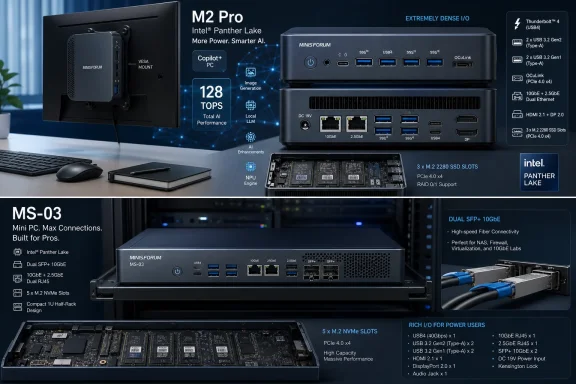
The rest of the M2 Pro spec sheet leans enthusiast. OCuLink gives users a path to external graphics, three M.2 PCIe 4.0 slots provide serious storage flexibility, and the combination of 10GbE and 2.5GbE puts the machine beyond the networking baseline of most mainstream desktops. This is not just a little Windows box for Word and Chrome.
The microphone array is more interesting because it suggests Minisforum is imagining the M2 Pro as a voice-addressable desktop appliance. That is a subtle but meaningful change. A mini PC mounted behind a display, always powered, attached to local files and local models, starts to resemble a private assistant terminal rather than a conventional desktop.
Of course, that is also where the skepticism should begin. Voice control on Windows has a long history of sounding better in demos than in daily life. Users who care about privacy may also be cautious about always-available microphones, even if the machine is pitched around local processing.
The key question is whether the local AI stack becomes good enough to justify the hardware affordances. A Copilot button alone will not sell a desktop. A reliable local assistant that can summarize documents, search internal files, transcribe meetings, and interact with productivity software without constantly sending sensitive data to remote servers would be different.
The catch is that local AI is not a single capability. Running a small quantized model for chat is one thing. Running larger reasoning models quickly, handling long context windows, performing retrieval over a document library, generating images, or using agentic workflows reliably are different workloads with different constraints.
This is where the industry’s TOPS fixation can mislead buyers. A system may have a strong NPU, a respectable integrated GPU, and plenty of total compute on paper, yet still be limited by memory bandwidth, model support, software frameworks, or the amount of RAM actually available to the workload. “Up to 180 TOPS” sounds decisive, but real-world local AI performance will depend on the model, quantization, runtime, drivers, thermals, and whether the workload can use the right accelerator.
That does not make the M2 Pro’s AI claim empty. It means buyers should treat it as a platform promise, not a guaranteed experience. Minisforum is building hardware for a software wave that is still arriving unevenly.
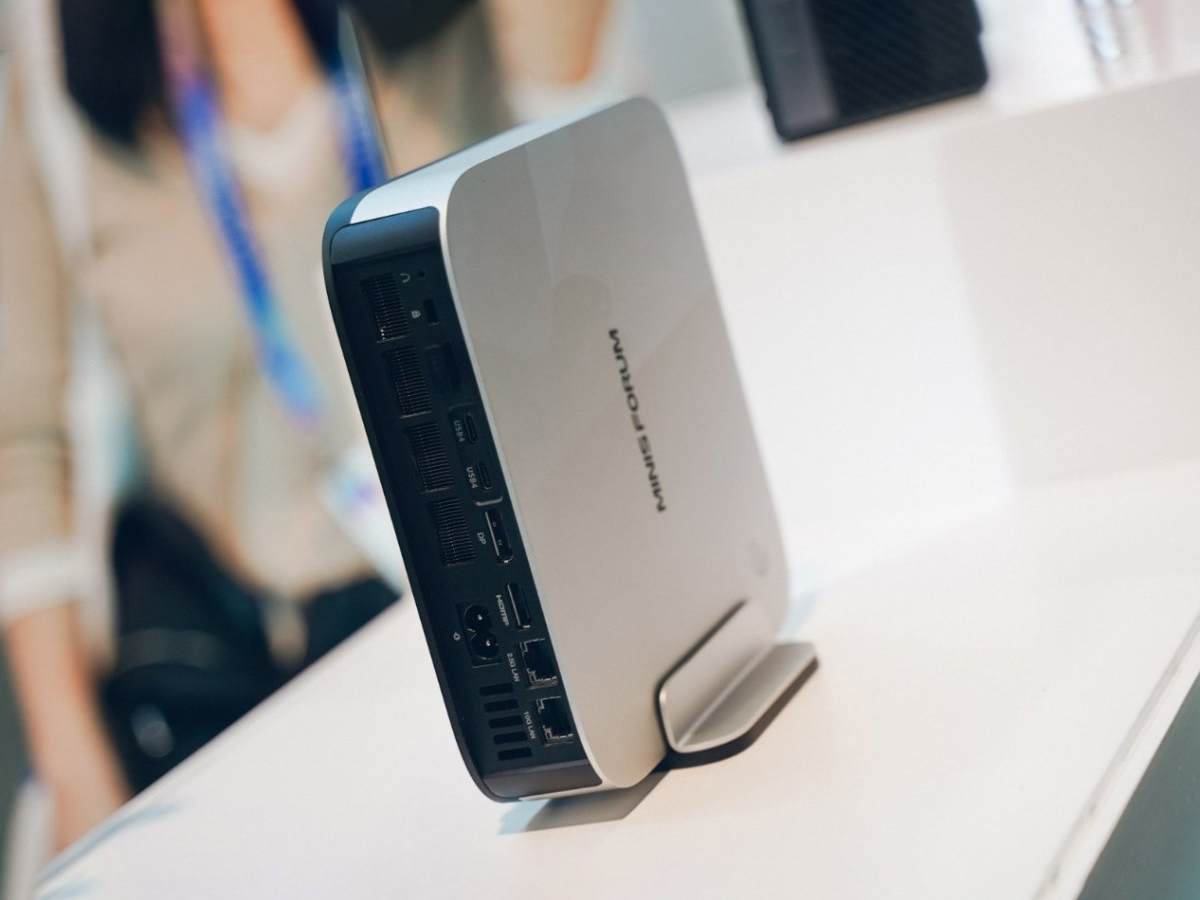
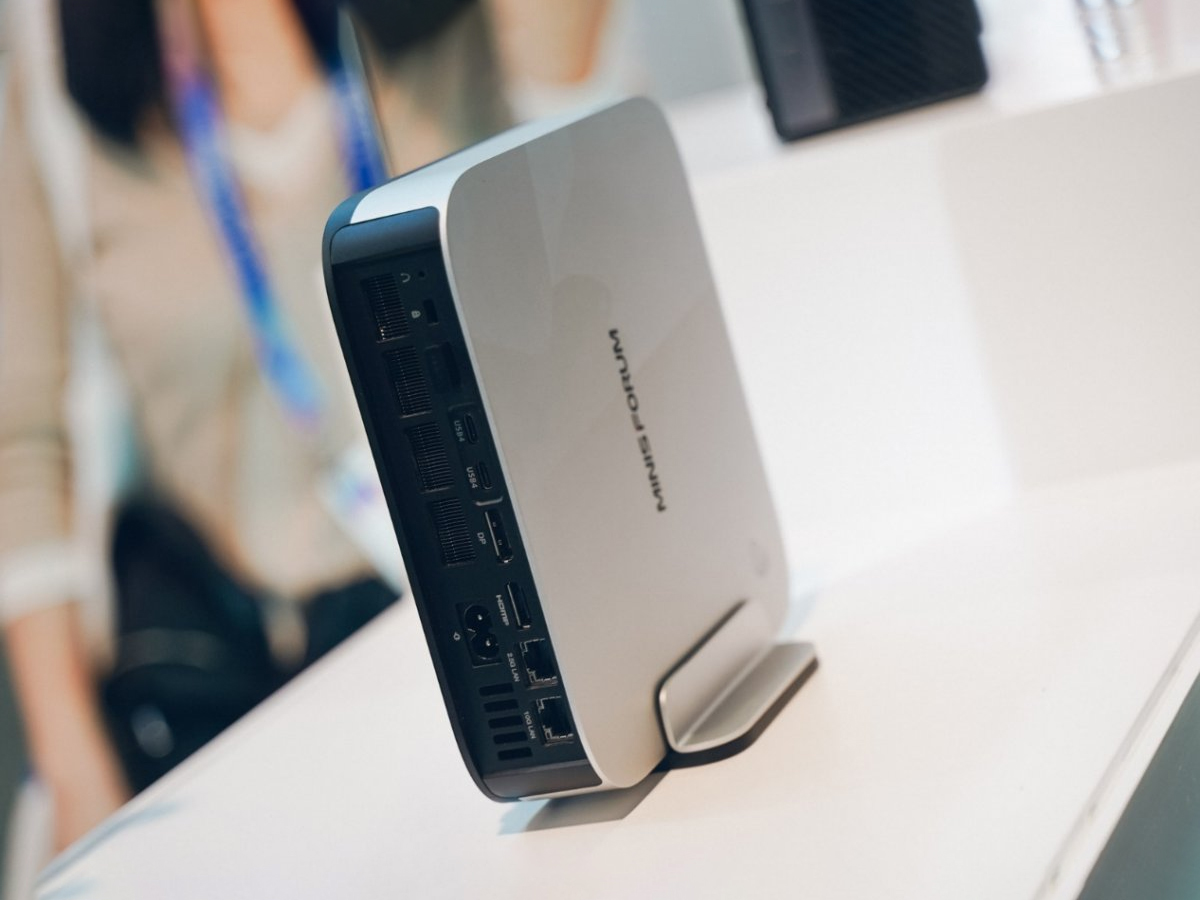
The MS-03 appears to push further in that direction. A 70W TDP gives Panther Lake more room to breathe than thin-and-light laptop designs, while DDR5 support up to 7200MHz, dual PCIe 5.0 SSD slots, Wi-Fi 7, 10GbE, 2.5GbE, and dual SFP+ ports make it look less like a conventional desktop and more like a small network appliance with a Windows-friendly soul.
That port mix is the story. SFP+ is not there for the average home-office user with a cable modem and a printer. It is there for people with switches, VLANs, NAS boxes, virtualization hosts, high-speed storage networks, or ambitions to build all of the above.
In other words, the MS-03 is not chasing the same buyer as a generic office mini PC. It is chasing the person who previously had to choose between a louder used enterprise server, a larger workstation, a DIY Mini-ITX box, or a collection of single-purpose devices.
The M2 Pro’s three USB-A ports, three USB4 ports, HDMI, DisplayPort, SD card slot, headphone jack, 10GbE, 2.5GbE, OCuLink, and triple M.2 storage layout make it unusually flexible for a mainstream-facing system. The MS-03’s dual SFP+ ports and PCIe 5.0 storage support push that even further into infrastructure territory.
This is where mini PCs can beat laptops and many prebuilt desktops. Laptops increasingly need docks to become useful workstations. Budget desktops often skimp on fast networking and modern external connectivity. Mini PCs like these can be designed around exactly the ports enthusiasts and IT buyers want, because the box is small but not constrained by a clamshell form factor.
That also explains why Minisforum’s machines have become popular in homelab circles. They offer enough CPU, enough RAM, enough storage, and enough networking to run hypervisors, containers, firewalls, media services, and development environments without the noise and power appetite of retired rackmount hardware.
For many expansion cards, x4 is fine. Network adapters, capture cards, storage controllers, and many specialized cards do not need a full x8 link to be useful. But users hoping to squeeze serious graphics expansion into the MS-03 may need to moderate expectations, especially if they are comparing it directly to the MS-01.
This is the recurring tension in high-end mini PCs. Vendors can make the chassis clever, the cooling better, and the port layout denser, but they cannot invent PCIe lanes. A mobile platform used in a compact desktop will always carry platform constraints.
The downgrade also illustrates why the MS-03 is best understood as a compact infrastructure machine rather than a shrunken gaming tower. It can do a lot, but its design priorities are storage, networking, and compute density, not feeding a high-end GPU inside a tiny box.
For IT administrators, the calculation is more complicated. Mini PCs are attractive because they save space, ship easily, mount cleanly, and reduce power consumption. But dense, enthusiast-oriented hardware can create support questions that traditional business desktops avoid.
Thermals matter. Firmware support matters. Driver quality matters. Long-term BIOS updates matter. Replacement parts matter. If a machine is going to sit in a branch office, run a local model, handle network duties, or act as an edge compute node, the spec sheet is only the beginning of the conversation.
Minisforum has built a strong reputation among enthusiasts for aggressive hardware configurations, but enterprise buyers tend to care less about novelty and more about predictability. The MS-03 in particular could be an excellent small-business or lab machine, but it will need stable firmware, clear component compatibility, and reliable availability to become more than a forum favorite.
A local AI desktop can serve one user. A local AI node with fast Ethernet, SFP+, multiple SSDs, and enough RAM can serve workflows. It can sit near the data, index documents, summarize media, process camera feeds, run assistants, or support small teams without sending everything to a cloud API.
That is where the MS-03 becomes especially suggestive. With fast networking and storage, a compact Panther Lake machine could act as an AI-adjacent NAS controller, inference node, developer workstation, or edge server. It may not replace a GPU server, but it could replace the assumption that local AI requires either a giant tower or a cloud bill.
This is also why privacy keeps appearing in vendor messaging. Privacy is not only a consumer concern; it is a deployment argument. If a law office, clinic, school, or small manufacturer wants AI-assisted search and summarization over sensitive internal material, local processing is not just a nice-to-have. It may be the difference between using the tool and rejecting it.
That crowding is good for buyers, but it also makes the category harder to parse. A “mini PC” can now mean a $250 office box, a palm-sized media system, a gaming cube, a NAS controller, a firewall appliance, an AI workstation, or a quasi-server with SFP+ networking. The category label is becoming less useful as the devices become more capable.
Minisforum’s advantage is that it seems comfortable living in the messy middle. It is not only chasing corporate desktops or gaming rigs. It is building machines for the kind of buyer who reads lane diagrams, cares about M.2 slot counts, knows why SFP+ matters, and still wants something that can sit quietly beside a monitor.
That buyer is not the entire market. But it is a valuable market because it influences others. Homelab users, sysadmins, developers, and power users often become the unofficial procurement advisors for families, small offices, and teams. If the MS-03 becomes the machine those users recommend, Minisforum wins attention well beyond its size.
Cooling will be particularly important. Panther Lake may be efficient, but a compact chassis running sustained AI workloads, fast storage, high-speed networking, and possibly external GPU connectivity is a more demanding thermal environment than a short benchmark run. Noise levels will matter too, especially if the M2 Pro is meant to live on a desk or behind a monitor.
Memory configuration also deserves scrutiny. The submitted material mentions up to 128GB of LPDDR5X RAM for the M2 Pro, while earlier Minisforum material around the platform has referenced different high-speed memory configurations. That may reflect changing SKUs, regional differences, or evolving pre-release information. Buyers should verify the exact model page and configuration before assuming upgradeability or maximum capacity.
The same caution applies to AI claims. A local AI machine is only as good as the runtimes and models it supports well. Windows is improving here, but the ecosystem remains fragmented between NPUs, integrated GPUs, discrete GPUs, vendor SDKs, ONNX workflows, DirectML, OpenVINO, and application-specific support.
That future is not guaranteed. Mini PCs still have to prove themselves under sustained load. Vendors still need to provide firmware maturity and long-term support. AI software still needs to become more useful, less fragmented, and less dependent on marketing terms that conceal as much as they reveal.
But the direction is clear. The small Windows box is no longer just a space-saving compromise. It is becoming a place where storage, networking, acceleration, and local intelligence converge.
The caveat is that local AI has to become something users actually rely on. If Copilot buttons remain shortcuts to cloud services and NPUs remain underused silicon, the M2 Pro’s AI identity will age like a sticker. If local models become everyday tools for search, summarization, coding, transcription, and private automation, Minisforum will look early rather than opportunistic.
The strongest case for these machines is not that every buyer needs 180 TOPS. It is that compact PCs are finally being designed for a world where the desktop may be asked to do more than launch apps and render browser tabs.
 Minisforum Is Selling the Mini PC as an AI Appliance, Not a Cute Desktop
For years, the mini PC lived in a narrow lane. It was the machine you bought for a kiosk, a conference room, a media cabinet, a light office desk, or a homelab shelf where power draw mattered more than expansion. The best ones were useful, but they were still usually understood as compromises: smaller, quieter, tidier, but not quite a real workstation.The M2 Pro and MS-03 are part of a broader attempt to break that assumption. Minisforum is not presenting these boxes as NUC-like conveniences for people who cannot fit a tower. It is presenting them as compact compute nodes that happen to run Windows, sit on a desk, and now have enough local AI horsepower to be marketed as something more ambitious.
That is why the headline number is 180 TOPS on the M2 Pro rather than a clock speed or a Cinebench score. TOPS, or trillions of operations per second, has become the consumer PC industry’s bluntest AI marketing instrument. It is not useless, but it is not the same as saying a machine will comfortably run every large model a user cares about.
Still, the shift matters. Minisforum is reading the room correctly: local AI is becoming one of the few remaining reasons to care about PC hardware differentiation in a world where most office work, messaging, browsing, and productivity software already runs well on nearly anything.
Panther Lake Gives the Small Box a New Center of Gravity
Intel’s Panther Lake generation is doing a lot of work in this story. Minisforum’s pitch depends on Panther Lake not only as a CPU refresh, but as a platform that combines CPU cores, Xe3 graphics, and a newer NPU into a package that can plausibly anchor small-form-factor AI machines.The M2 Pro reportedly uses Panther Lake-H with integrated Xe3 graphics and an updated NPU5. Minisforum is claiming up to 180 TOPS of combined compute across the CPU, GPU, and NPU, which is the kind of aggregate number vendors love because it lets them talk about a whole system rather than a single accelerator.
That distinction is important. A dedicated NPU is useful for certain sustained, efficient AI workloads, especially those supported by Windows and application frameworks. But many local AI tasks still lean heavily on GPU memory bandwidth, GPU compute, CPU scheduling, and software support. The number on the box is only one part of the story.
For Windows users, the interesting development is that Panther Lake mini PCs may make AI acceleration feel less like a laptop-only story. Microsoft’s Copilot+ PC campaign initially trained users to think of local AI in terms of premium notebooks. Minisforum is now pushing the same idea into the compact desktop: put the AI-capable PC in the room, on the desk, behind the screen, or in the rack.
The M2 Pro Is the Mainstream Box With Enthusiast Habits
The M2 Pro is the friendlier of the two machines. It has the recognizable shape of a high-end mini PC: metal chassis, compact footprint, multiple display outputs, fast USB, and enough storage expansion to avoid the feeling that the buyer has purchased a sealed appliance.The internal power supply is not a glamorous feature, but it may be one of the most practical ones. External power bricks are the tax mini PC buyers have quietly paid for years. They clutter floors, complicate mounting, and make the machine feel less integrated than its size suggests. Bringing the PSU inside the chassis makes the M2 Pro feel more like a real desktop replacement and less like a laptop motherboard in a decorative box.
That matters if Minisforum wants these systems in ordinary offices. A VESA-mounted mini PC behind a monitor with no dangling brick is a much easier sell for clean-desk deployments, shared workspaces, reception desks, small studios, and education labs. The more invisible the machine becomes, the more persuasive the mini PC category gets.
The rest of the M2 Pro spec sheet leans enthusiast. OCuLink gives users a path to external graphics, three M.2 PCIe 4.0 slots provide serious storage flexibility, and the combination of 10GbE and 2.5GbE puts the machine beyond the networking baseline of most mainstream desktops. This is not just a little Windows box for Word and Chrome.
The Built-In Copilot Button Is Less Important Than the Microphone Array
Minisforum has also given the M2 Pro a physical Microsoft Copilot button and a built-in microphone array. The button is the more visible feature, but it may be the less consequential one. Dedicated AI keys and buttons are becoming the new “Internet buttons” of the PC industry: useful if the software becomes indispensable, faintly silly if it does not.The microphone array is more interesting because it suggests Minisforum is imagining the M2 Pro as a voice-addressable desktop appliance. That is a subtle but meaningful change. A mini PC mounted behind a display, always powered, attached to local files and local models, starts to resemble a private assistant terminal rather than a conventional desktop.
Of course, that is also where the skepticism should begin. Voice control on Windows has a long history of sounding better in demos than in daily life. Users who care about privacy may also be cautious about always-available microphones, even if the machine is pitched around local processing.
The key question is whether the local AI stack becomes good enough to justify the hardware affordances. A Copilot button alone will not sell a desktop. A reliable local assistant that can summarize documents, search internal files, transcribe meetings, and interact with productivity software without constantly sending sensitive data to remote servers would be different.
Local AI Is the Right Pitch, but the Software Still Has to Earn It
Minisforum’s local AI argument is straightforward: run models such as DeepSeek-R1 offline, reduce dependence on cloud services, improve privacy, and avoid recurring token costs. That pitch will resonate with WindowsForum readers because it speaks to something real. Plenty of users want AI tools but do not want every file, prompt, or business process routed through someone else’s datacenter.The catch is that local AI is not a single capability. Running a small quantized model for chat is one thing. Running larger reasoning models quickly, handling long context windows, performing retrieval over a document library, generating images, or using agentic workflows reliably are different workloads with different constraints.
This is where the industry’s TOPS fixation can mislead buyers. A system may have a strong NPU, a respectable integrated GPU, and plenty of total compute on paper, yet still be limited by memory bandwidth, model support, software frameworks, or the amount of RAM actually available to the workload. “Up to 180 TOPS” sounds decisive, but real-world local AI performance will depend on the model, quantization, runtime, drivers, thermals, and whether the workload can use the right accelerator.
That does not make the M2 Pro’s AI claim empty. It means buyers should treat it as a platform promise, not a guaranteed experience. Minisforum is building hardware for a software wave that is still arriving unevenly.
The MS-03 Is Where the Mini PC Starts Acting Like Infrastructure
If the M2 Pro is the compact AI desktop, the MS-03 is the more interesting machine for homelab users, small businesses, and workstation-minded buyers. It follows the MS-01, a machine that earned attention because it blurred the line between mini PC, edge server, router, NAS controller, and compact workstation.The MS-03 appears to push further in that direction. A 70W TDP gives Panther Lake more room to breathe than thin-and-light laptop designs, while DDR5 support up to 7200MHz, dual PCIe 5.0 SSD slots, Wi-Fi 7, 10GbE, 2.5GbE, and dual SFP+ ports make it look less like a conventional desktop and more like a small network appliance with a Windows-friendly soul.
That port mix is the story. SFP+ is not there for the average home-office user with a cable modem and a printer. It is there for people with switches, VLANs, NAS boxes, virtualization hosts, high-speed storage networks, or ambitions to build all of the above.
In other words, the MS-03 is not chasing the same buyer as a generic office mini PC. It is chasing the person who previously had to choose between a louder used enterprise server, a larger workstation, a DIY Mini-ITX box, or a collection of single-purpose devices.
Minisforum’s Real Innovation Is I/O Density
Modern PC launches often over-index on processors because processors are easy to market. But with machines like these, the more important differentiator is I/O density. A fast chip is expected. The surprising part is how much connectivity Minisforum is willing to pack into a small chassis.The M2 Pro’s three USB-A ports, three USB4 ports, HDMI, DisplayPort, SD card slot, headphone jack, 10GbE, 2.5GbE, OCuLink, and triple M.2 storage layout make it unusually flexible for a mainstream-facing system. The MS-03’s dual SFP+ ports and PCIe 5.0 storage support push that even further into infrastructure territory.
This is where mini PCs can beat laptops and many prebuilt desktops. Laptops increasingly need docks to become useful workstations. Budget desktops often skimp on fast networking and modern external connectivity. Mini PCs like these can be designed around exactly the ports enthusiasts and IT buyers want, because the box is small but not constrained by a clamshell form factor.
That also explains why Minisforum’s machines have become popular in homelab circles. They offer enough CPU, enough RAM, enough storage, and enough networking to run hypervisors, containers, firewalls, media services, and development environments without the noise and power appetite of retired rackmount hardware.
The PCIe Downgrade Is a Reminder That Physics Still Wins
The MS-03 does come with a trade-off: the PCIe expansion slot has reportedly been reduced from x8 to x4, which Minisforum attributes to Panther Lake-H lane limitations. That is not a fatal flaw, but it is the kind of detail that separates marketing from deployment reality.For many expansion cards, x4 is fine. Network adapters, capture cards, storage controllers, and many specialized cards do not need a full x8 link to be useful. But users hoping to squeeze serious graphics expansion into the MS-03 may need to moderate expectations, especially if they are comparing it directly to the MS-01.
This is the recurring tension in high-end mini PCs. Vendors can make the chassis clever, the cooling better, and the port layout denser, but they cannot invent PCIe lanes. A mobile platform used in a compact desktop will always carry platform constraints.
The downgrade also illustrates why the MS-03 is best understood as a compact infrastructure machine rather than a shrunken gaming tower. It can do a lot, but its design priorities are storage, networking, and compute density, not feeding a high-end GPU inside a tiny box.
Windows Users Get a Better Desktop, but IT Pros Get a More Complicated Fleet
For ordinary Windows users, the appeal is easy to describe. The M2 Pro promises a cleaner desk, strong integrated graphics, fast networking, abundant storage, and local AI features without the footprint of a tower. If pricing lands sensibly, it could be a persuasive alternative to a conventional small desktop.For IT administrators, the calculation is more complicated. Mini PCs are attractive because they save space, ship easily, mount cleanly, and reduce power consumption. But dense, enthusiast-oriented hardware can create support questions that traditional business desktops avoid.
Thermals matter. Firmware support matters. Driver quality matters. Long-term BIOS updates matter. Replacement parts matter. If a machine is going to sit in a branch office, run a local model, handle network duties, or act as an edge compute node, the spec sheet is only the beginning of the conversation.
Minisforum has built a strong reputation among enthusiasts for aggressive hardware configurations, but enterprise buyers tend to care less about novelty and more about predictability. The MS-03 in particular could be an excellent small-business or lab machine, but it will need stable firmware, clear component compatibility, and reliable availability to become more than a forum favorite.
The AI PC Is Becoming a Local Network Device
The most interesting thing about the M2 Pro and MS-03 is not that they can run AI workloads. It is that they suggest the AI PC may become a local network device. That is a different mental model from Microsoft’s consumer-facing Copilot narrative.A local AI desktop can serve one user. A local AI node with fast Ethernet, SFP+, multiple SSDs, and enough RAM can serve workflows. It can sit near the data, index documents, summarize media, process camera feeds, run assistants, or support small teams without sending everything to a cloud API.
That is where the MS-03 becomes especially suggestive. With fast networking and storage, a compact Panther Lake machine could act as an AI-adjacent NAS controller, inference node, developer workstation, or edge server. It may not replace a GPU server, but it could replace the assumption that local AI requires either a giant tower or a cloud bill.
This is also why privacy keeps appearing in vendor messaging. Privacy is not only a consumer concern; it is a deployment argument. If a law office, clinic, school, or small manufacturer wants AI-assisted search and summarization over sensitive internal material, local processing is not just a nice-to-have. It may be the difference between using the tool and rejecting it.
The Market Around Minisforum Is Getting Crowded and Stranger
Minisforum is not launching into an empty field. Compact PCs are getting more varied, more powerful, and more specialized. Asus is pushing compact gaming machines with high-end Nvidia graphics. Other vendors are building AI NAS systems, workstation-style mini PCs, and hybrid devices that combine storage, compute, and accelerator features.That crowding is good for buyers, but it also makes the category harder to parse. A “mini PC” can now mean a $250 office box, a palm-sized media system, a gaming cube, a NAS controller, a firewall appliance, an AI workstation, or a quasi-server with SFP+ networking. The category label is becoming less useful as the devices become more capable.
Minisforum’s advantage is that it seems comfortable living in the messy middle. It is not only chasing corporate desktops or gaming rigs. It is building machines for the kind of buyer who reads lane diagrams, cares about M.2 slot counts, knows why SFP+ matters, and still wants something that can sit quietly beside a monitor.
That buyer is not the entire market. But it is a valuable market because it influences others. Homelab users, sysadmins, developers, and power users often become the unofficial procurement advisors for families, small offices, and teams. If the MS-03 becomes the machine those users recommend, Minisforum wins attention well beyond its size.
The Spec Sheet Still Leaves Important Questions Open
The obvious missing pieces are price, final configurations, thermals, and real-world performance. Minisforum can announce a compelling platform, but buyers should wait for shipping units before treating the M2 Pro or MS-03 as known quantities.Cooling will be particularly important. Panther Lake may be efficient, but a compact chassis running sustained AI workloads, fast storage, high-speed networking, and possibly external GPU connectivity is a more demanding thermal environment than a short benchmark run. Noise levels will matter too, especially if the M2 Pro is meant to live on a desk or behind a monitor.
Memory configuration also deserves scrutiny. The submitted material mentions up to 128GB of LPDDR5X RAM for the M2 Pro, while earlier Minisforum material around the platform has referenced different high-speed memory configurations. That may reflect changing SKUs, regional differences, or evolving pre-release information. Buyers should verify the exact model page and configuration before assuming upgradeability or maximum capacity.
The same caution applies to AI claims. A local AI machine is only as good as the runtimes and models it supports well. Windows is improving here, but the ecosystem remains fragmented between NPUs, integrated GPUs, discrete GPUs, vendor SDKs, ONNX workflows, DirectML, OpenVINO, and application-specific support.
The Desk PC Is Becoming a Private Cloud in Miniature
For Windows enthusiasts, the M2 Pro is the more immediately relatable device. It is a compact, capable desktop with fast ports, built-in power, and enough AI branding to feel current. For IT pros, the MS-03 may be the more consequential machine because it points to a future where edge compute does not require a rack, a tower, or a cloud subscription.That future is not guaranteed. Mini PCs still have to prove themselves under sustained load. Vendors still need to provide firmware maturity and long-term support. AI software still needs to become more useful, less fragmented, and less dependent on marketing terms that conceal as much as they reveal.
But the direction is clear. The small Windows box is no longer just a space-saving compromise. It is becoming a place where storage, networking, acceleration, and local intelligence converge.
Minisforum’s Panther Lake Bet Comes Down to the Workloads Users Actually Keep Local
The practical reading of this launch is neither hype nor dismissal. The M2 Pro and MS-03 are promising because they match current PC anxieties with concrete hardware: more local compute, better networking, cleaner deployment, and enough expansion to make the machines adaptable.The caveat is that local AI has to become something users actually rely on. If Copilot buttons remain shortcuts to cloud services and NPUs remain underused silicon, the M2 Pro’s AI identity will age like a sticker. If local models become everyday tools for search, summarization, coding, transcription, and private automation, Minisforum will look early rather than opportunistic.
The strongest case for these machines is not that every buyer needs 180 TOPS. It is that compact PCs are finally being designed for a world where the desktop may be asked to do more than launch apps and render browser tabs.
The Panther Lake Mini PC Buyer’s Map Is Already Visible
The early lesson from the M2 Pro and MS-03 is that Minisforum is segmenting the mini PC market more intelligently than many larger vendors. One machine is for the power user who wants a compact Windows desktop with AI acceleration and modern ports. The other is for the person who sees a mini PC as infrastructure.- The M2 Pro is the cleaner fit for desks, creators, developers, and users who want local AI experimentation without building a tower.
- The MS-03 is the more natural fit for homelabs, edge deployments, compact virtualization hosts, and small offices that can use fast networking.
- The 180 TOPS figure is useful as a platform signal, but buyers should judge local AI performance by specific models, memory, thermals, and software support.
- The MS-03’s move from PCIe x8 to x4 is unlikely to matter for many network and storage cards, but it does limit the machine’s appeal as a tiny GPU workstation.
- The internal power supply on the M2 Pro may matter more in daily deployment than flashier AI branding because it makes the mini PC easier to mount, cable, and live with.
- The biggest unknowns remain pricing, sustained performance, firmware quality, and whether Minisforum can keep configurations stable from announcement to retail.
References
- Primary source: Gizmochina
Published: 2026-06-06T12:50:50.860677

Minisforum launches Panther Lake-powered M2 Pro and MS-03 mini PCs with up to 180 TOPS for local AI - Gizmochina
Minisforum launches Panther Lake-powered M2 Pro and MS-03 mini PCs with 10GbE, built-in PSUs, WiFi 7, and up to 180 TOPS for local AI workloads. www.gizmochina.com
- Related coverage: tomshardware.com
Computex 2026 Day Zero Wrap-Up: Nvidia launches RTX Spark Superchip assault on laptop and desktop markets, Intel readies Xeon 6+
Computex 2026 is off to a strong startwww.tomshardware.com
- Related coverage: notebookcheck.net

Minisforum introduces MS-03 and M2 Pro AI mini PCs, and S5 and N5 Max NAS devices with powerful AI NPU performance
Minisforum has announced four new products capable of running AI locally. The MS-03 and M2 Pro mini PCs are powered by Intel Panther Lake CPUs, which provide up to 50 TOPS and 180 TOPS of AI compute power respectively, while the fanless S5 and N5 Max NASs provide up to 33 TOPS and 126 TOPS... www.notebookcheck.net
- Related coverage: technetbooks.com

Minisforum MS 03 Intel Panther Lake AI Workstation Specifications and Next Generation Performance Features
Minisforum MS 03 Intel Panther Lake AI Workstation Specifications and Next Generation Performance Features www.technetbooks.com
- Related coverage: techradar.com

Minisforum’s affordable M2 mini PC arrives carrying serious AI ambitions
The Minisforum M2 shrinks powerful AI hardware into a tiny box, while the flagship Pro model is still missing in actionwww.techradar.com
- Related coverage: minisforum.com

MINISFORUM、上海で開催されたIntel Core Ultraシリーズ3の発表イベントでOpenClaw対応の次世代AI PCモデルを展示
 www.minisforum.com
- Related coverage: frandroid.com

Station de travail IA ou simple mini PC ? Le cas du Minisforum MS-03 — Frandroid
Minisforum ressort sa boîte à outils et colle une étiquette « IA » sur son nouveau mini PC. Derrière le badge, le MS-03 est surtout un MS-01 www.frandroid.com
- Related coverage: pausehardware.com

MINISFORUM Dévoile M2 Pro (180 TOPS) Et MS-03 à Panther Lake Lors De L’événement Intel Shanghai
MINISFORUM M2 Pro et MS-03 sous Panther Lake (Core Ultra 300) présentés le 12 mars : jusqu’à 180 TOPS, X9 388H ou Ultra 7 356H, OpenClaw et GPU low-profile. pausehardware.com
- Related coverage: notebookcheck.org

Minisforum presenta EliteMini M2 Pro como nuevo mini PC Panther Lake con iGPU Arc B390 capaz
El Minisforum EliteMini M2 Pro se presentó discretamente en el CES 2026, ya finalizado, y es uno de los primeros mini PC alimentados por la serie Panther Lake SoC. Puede equiparse con hasta un Intel Core Ultra X9 388H, que trae la capaz iGPU Arc B390. www.notebookcheck.org
- Related coverage: notebookcheck-cn.com

Minisforum 推出 MS-03 和 M2 Pro AI mini PC,以及具有强大 AI NPU 性能的 S5 和 N5 Max NAS 设备
Minisforum 发布了四款能够在本地运行人工智能的新产品。MS-03 和 M2 Pro mini PC 采用英特尔 Panther Lake CPU,可分别提供高达 50 TOPS 和 180 TOPS 的 AI 计算能力,而无风扇 S5 和 N5 Max NAS 则可分别提供高达 33 TOPS 和 126 TOPS 的 AI 计算能力。 www.notebookcheck-cn.com
- Related coverage: videocardz.com
- Related coverage: wire.expertini.com
Minisforum Next-Gen Mini PCs: The UM890 Pro and MS-01 — Expertini Wire
Minisforum Next-Gen Mini PCs: The UM890 Pro and MS-01. Read the full press release on Expertini Wire.wire.expertini.com - Related coverage: store.minisforum.com

MINISFORUM M2
The MINISFORUM M2 356 is an ultra-small mini PC packing 90 TOPS of hybrid AI power (NPU 50 + GPU 40). It supports dual DDR5 memory up to 128GB and features Wi-Fi 7 + Bluetooth 5.4. Big performance, tiny footprint. store.minisforum.com