

MSYS2 is a Windows software distribution and build environment that gives users a Bash shell, GNU-style tools, the pacman package manager, and native Windows toolchains without requiring a full Linux VM or WSL instance. That makes it less a novelty for Unix nostalgists than a practical answer to a persistent Windows problem: Microsoft has never quite made the command line feel culturally neutral. For developers and power users who live across Windows, Linux, BSD, and macOS, MSYS2 matters because it reduces the penalty for staying on Windows while keeping Unix-shaped habits intact. The real story is not that Windows can run another shell; it is that MSYS2 quietly makes Windows feel less like an island.
The Windows desktop has spent decades becoming more polished, more secure, and more coherent for mainstream users, but its command-line story has always carried an asterisk.
That difference is not merely aesthetic. A command line is not just a place to type commands; it is a culture, a workflow, and a portability contract. If a build script, debugging habit, or automation snippet works across Linux, FreeBSD, Haiku, and macOS but needs translation on Windows, the translation cost eventually becomes part of the platform cost.
Microsoft has tried to close that gap in several ways. PowerShell gave Windows administrators a serious automation language. Windows Terminal gave shells a modern front end. Windows Subsystem for Linux gave developers a real Linux userspace. More recently, Microsoft’s own CoreUtils work has acknowledged that GNU-style tools still have gravitational pull even on Windows.
But each of those moves answers a slightly different question. PowerShell asks Windows users to adopt a Windows-first automation philosophy. WSL asks Windows to host Linux alongside it. CoreUtils supplies familiar tools, but not necessarily a whole development environment. MSYS2 occupies the more interesting middle ground: it makes Windows more Unix-like without asking the user to leave Windows.
A full Linux VM is the most complete answer if the goal is to run Linux. It is also the heaviest. Filesystem boundaries, networking quirks, resource allocation, desktop integration, and duplicated toolchains are all tolerable in exchange for fidelity, but they are not invisible. A VM is a second machine wearing a window.
WSL is vastly more convenient, and WSL 2 in particular has become a serious part of the Windows developer landscape. But WSL’s strength is also its dividing line: it is Linux. That is ideal when the target is Linux, or when a team’s development stack assumes Linux semantics, Linux packages, Linux filesystems, and Linux containers. It is less ideal when the goal is to build native Windows programs while keeping a Bash-shaped workflow.
Cygwin has long offered a POSIX compatibility layer and a broad Unix-like environment, and MSYS2 still owes much to that lineage. The distinction is that MSYS2 is not trying to be the universal Unix-on-Windows answer. Its project identity is narrower and, for many developers, more useful: provide a practical distribution and build platform for Windows, with package management, shells, libraries, and MinGW-w64-based toolchains that can produce native Windows software.
That refusal to pretend Windows is Linux is what makes MSYS2 feel less cumbersome than its more ambitious rivals. It does not make Windows disappear. It gives Windows a better workbench.
Unix-style environments are only as pleasant as their package story. A shell without a coherent repository quickly decays into a folder of random binaries downloaded from old project pages, each with its own update cadence, PATH assumptions, and dependency gaps. Windows users know this pain well: install one tool from an MSI, another from a zip archive, another through Chocolatey or winget, another bundled inside Git, and then spend an afternoon discovering which
MSYS2’s use of a pacman-derived package manager changes that texture. It makes the environment feel like a small distribution rather than a toolbox dumped onto
That matters for developers because modern software work is dependency work. A Makefile is rarely just a Makefile. It may assume
MSYS2’s repository model also gives Windows something it has historically lacked in this niche: a sense of distribution coherence. The pieces are built with assumptions about each other. The shell, package manager, toolchains, prefixes, and runtime libraries have a shared map. That does not eliminate every Windows-specific oddity, but it changes the default from improvisation to maintenance.
For most current x86-64 Windows users, the practical advice is simple: start with UCRT64. MSYS2’s own documentation points unsure users in that direction, and the project changed its default environment from MINGW64 to UCRT64 in 2022. The shift reflects a broader Windows reality: the Universal C Runtime is the modern baseline, while the older MSVCRT environment exists largely for compatibility with historical assumptions.
The naming still looks hostile to normal people, but the concept is straightforward. The MSYS environment supplies Unix-like tools built around the MSYS2/Cygwin-derived runtime. The MinGW-style environments sit on top of that base and provide toolchains and packages for native Windows software. UCRT64 uses GCC with the Universal C Runtime. CLANG64 uses LLVM/Clang with UCRT and libc++. CLANGARM64 targets Arm64 Windows.
This is not trivia. Choosing the wrong environment can lead to the classic MSYS2 frustration: installing the right-sounding package into the wrong prefix, then wondering why the compiler, library, or executable cannot be found. MSYS2’s package naming tries to encode the answer, but it still requires users to learn that
That learning curve is real, but it is also finite. Once the user understands that UCRT64 is the modern default for native x86-64 Windows development, MSYS2 stops looking like a maze and starts looking like a distribution with profiles.
If a developer compiles a program inside WSL using the Linux toolchain, the result is a Linux binary. That may be exactly what they want. But if the job is to produce a Windows executable while keeping GNU-style tooling and scripts, WSL is no longer the direct path. The developer has either crossed into cross-compilation or introduced another boundary to manage.
MSYS2’s MinGW-w64 environments instead aim at native Windows software. That makes it valuable for open-source projects whose build systems were born in Unix-land but whose users expect
This is where MSYS2 becomes especially appealing to cross-platform developers. It lets Windows participate in the same build grammar used elsewhere. A project can keep Makefiles, shell scripts, and Unix-style test harnesses without turning every Windows build into a bespoke Visual Studio project. That is not an argument against Visual Studio or MSVC; for many Windows-native codebases, they remain the right tools. It is an argument against assuming that Windows development must always be Windows-shaped.
The distinction matters for smaller projects, embedded work, and hobbyist tooling. A developer targeting STM32 or another microcontroller may want the same GCC-based workflow on Windows that they use on Linux. A maintainer building a command-line utility may want
MSYS2 does not make those workflows glamorous. It makes them ordinary, which is more useful.
This is not a scandal; it is the normal cost of dynamic linking on Windows when a program depends on non-system libraries. But it is a point where MSYS2’s “just like Linux, but on Windows” feeling can mislead users. On a Linux distribution, package-managed shared libraries are part of the system’s expected runtime fabric. On Windows, an application folder, installer, or PATH entry often has to carry that responsibility.
For personal tools and development builds, this is manageable. Developers can run programs from within the MSYS2 environment, copy required DLLs alongside the executable, adjust PATH, or use packaging tools. For public distribution, it is a stronger reason to think carefully about the target audience. If the user expects a normal Windows app, they should not have to understand MSYS2 prefixes to launch it.
This is why some developers still choose MSVC and Microsoft’s native tooling for release builds even if they prefer MSYS2 for day-to-day work. The ergonomics of writing, compiling, and debugging are not the same as the ergonomics of shipping. MSYS2 is excellent at making Windows a more comfortable development host. It does not automatically solve Windows application distribution.
That boundary is healthy to admit. MSYS2 is not magic glue. It is a powerful development environment whose assumptions are clearest when the user stays inside it or packages outputs deliberately.
Yet those improvements do not make MSYS2 obsolete. They clarify its niche.
Windows Terminal is a front end, not a Unix-like distribution. PowerShell is powerful, but it is its own world. WSL is real Linux, with all the benefits and boundary issues that implies. CoreUtils-style packages help at the edges, but a few familiar commands do not constitute a development platform. MSYS2’s value is that it packages the middle: a coherent Unix-like userspace and native Windows build system that can live comfortably on a Windows desktop.
This middle is where a surprising amount of actual work happens. Not every developer wants a container stack. Not every automation task needs Linux. Not every C or C++ project belongs in Visual Studio. Not every Windows power user wants to relearn decades of shell idioms just to rename files, batch-process media, or run project scripts.
The Windows ecosystem has often treated such users as edge cases, but they are not rare. They are the people who bounce between operating systems, maintain open-source projects, build firmware, script repetitive work, and debug toolchains. For them, MSYS2 is not a philosophical statement. It is the path of least resistance.
That does not mean the environment is invisible. Paths still have to be translated mentally. Windows drive letters appear under Unix-like mount paths. Some tools behave differently because the underlying OS is still Windows. Low-level Linux-specific tools such as Valgrind are outside MSYS2’s reach, because they depend on kernel behavior that a userland distribution cannot fake. File permissions, process semantics, terminals, signals, and pseudo-terminals remain areas where Windows and Unix history do not line up cleanly.
But this is precisely why MSYS2’s modesty is attractive. It does not promise that Windows has become Linux. It promises that many everyday Unix-like workflows can happen on Windows with less ceremony. The promise is not total compatibility; it is reduced friction.
For many users, reduced friction is enough. If the shell script runs, the Makefile works, the package installs, the compiler produces a Windows binary, and the terminal does not get in the way, the environment has done its job. The remaining incompatibilities become special cases rather than daily irritants.
That is the difference between a tool you admire and a tool you keep using.
On developer workstations, MSYS2 can reduce the temptation to install random standalone binaries from unvetted sources. A maintained package repository and repeatable install commands are easier to document than a wiki page full of download links. Teams can standardize on UCRT64, pin workflows, and provide onboarding scripts that resemble Linux setup instructions.
At the same time, MSYS2 is not a substitute for enterprise software governance. Package updates can change behavior. PATH changes can create ambiguity between Windows-native and MSYS2-provided tools. Compilers and scripting environments may run afoul of endpoint control policies. If the organization has strict rules around executable provenance, developer privileges, or software inventory, MSYS2 belongs inside those rules, not outside them.
There is also a support boundary to communicate. An application built with MSYS2 dependencies is not automatically enterprise-ready just because it runs. Teams distributing internal tools need to know which DLLs are required, how updates are handled, and whether the runtime environment is assumed or bundled. The worst outcome is not using MSYS2; it is using it informally until a critical script or binary becomes infrastructure by accident.
For IT pros, the sane position is pragmatic. MSYS2 is a strong fit for developer enablement, reproducible local toolchains, Unix-like automation on Windows, and cross-platform project work. It is a poor fit for pretending every Windows endpoint should become a partially managed rolling Unix distribution.
PowerShell enthusiasts are right that Windows has its own native automation model. Linux users are right that Bash and GNU tools remain a lingua franca of software development. Microsoft is right that WSL is often the best way to run Linux workloads on Windows. MSYS2 is right that sometimes the most useful answer is neither ideological nor totalizing.
This is why the Hackaday argument lands. The author is not asking for Windows to become Linux, and not arguing that MSYS2 replaces every other option. The claim is more grounded: for a certain kind of developer, Windows feels better when a familiar GNU-style shell, package manager, and toolchain are one Start-menu entry away. That is a modest claim with large practical consequences.
The command line has always been about leverage. The best shell environment is the one that turns one user’s habits into repeatable work. MSYS2 gives Windows users access to a large body of existing habits without forcing them into a VM, a Linux subsystem, or a PowerShell rewrite. In a platform war, that might look impure. On a Tuesday afternoon with code to build, it looks like sanity.
 Windows Still Has a Shell Identity Problem
The Windows desktop has spent decades becoming more polished, more secure, and more coherent for mainstream users, but its command-line story has always carried an asterisk. cmd.exe was never meant to be a modern Unix competitor, and PowerShell, for all its power, made a deliberate break from the idioms that many developers had already internalized elsewhere. It is object-oriented, deeply Windows-aware, and often elegant in its own terms, but it is not the same mental model as Bash, pipes of text, grep, sed, awk, Makefiles, and decades of POSIX-adjacent muscle memory.That difference is not merely aesthetic. A command line is not just a place to type commands; it is a culture, a workflow, and a portability contract. If a build script, debugging habit, or automation snippet works across Linux, FreeBSD, Haiku, and macOS but needs translation on Windows, the translation cost eventually becomes part of the platform cost.
Microsoft has tried to close that gap in several ways. PowerShell gave Windows administrators a serious automation language. Windows Terminal gave shells a modern front end. Windows Subsystem for Linux gave developers a real Linux userspace. More recently, Microsoft’s own CoreUtils work has acknowledged that GNU-style tools still have gravitational pull even on Windows.
But each of those moves answers a slightly different question. PowerShell asks Windows users to adopt a Windows-first automation philosophy. WSL asks Windows to host Linux alongside it. CoreUtils supplies familiar tools, but not necessarily a whole development environment. MSYS2 occupies the more interesting middle ground: it makes Windows more Unix-like without asking the user to leave Windows.
MSYS2 Wins by Refusing to Pretend Windows Is Linux
The temptation with any “Linux on Windows” discussion is to rank solutions as though they are interchangeable. They are not. WSL, Cygwin, MSYS2, Git Bash, native ports, and virtual machines all solve different problems, and the differences matter most when work stops being a demo and becomes daily routine.A full Linux VM is the most complete answer if the goal is to run Linux. It is also the heaviest. Filesystem boundaries, networking quirks, resource allocation, desktop integration, and duplicated toolchains are all tolerable in exchange for fidelity, but they are not invisible. A VM is a second machine wearing a window.
WSL is vastly more convenient, and WSL 2 in particular has become a serious part of the Windows developer landscape. But WSL’s strength is also its dividing line: it is Linux. That is ideal when the target is Linux, or when a team’s development stack assumes Linux semantics, Linux packages, Linux filesystems, and Linux containers. It is less ideal when the goal is to build native Windows programs while keeping a Bash-shaped workflow.
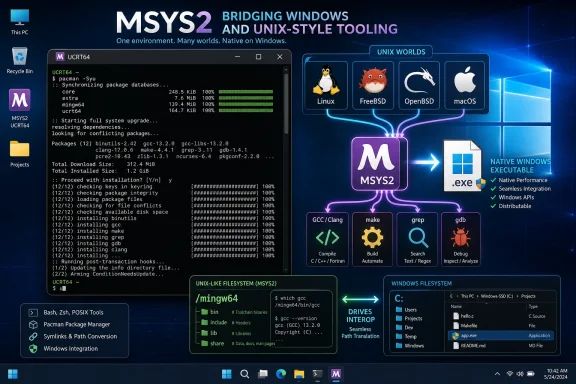
Cygwin has long offered a POSIX compatibility layer and a broad Unix-like environment, and MSYS2 still owes much to that lineage. The distinction is that MSYS2 is not trying to be the universal Unix-on-Windows answer. Its project identity is narrower and, for many developers, more useful: provide a practical distribution and build platform for Windows, with package management, shells, libraries, and MinGW-w64-based toolchains that can produce native Windows software.
That refusal to pretend Windows is Linux is what makes MSYS2 feel less cumbersome than its more ambitious rivals. It does not make Windows disappear. It gives Windows a better workbench.
Pacman Is the Unreasonable Advantage
The most underrated feature of MSYS2 is not Bash. It ispacman.Unix-style environments are only as pleasant as their package story. A shell without a coherent repository quickly decays into a folder of random binaries downloaded from old project pages, each with its own update cadence, PATH assumptions, and dependency gaps. Windows users know this pain well: install one tool from an MSI, another from a zip archive, another through Chocolatey or winget, another bundled inside Git, and then spend an afternoon discovering which
make.exe or ssh.exe actually ran.MSYS2’s use of a pacman-derived package manager changes that texture. It makes the environment feel like a small distribution rather than a toolbox dumped onto
C:\. Installing compilers, build systems, libraries, Git-adjacent utilities, compression tools, media tools, Python packages, and debugging aids becomes a familiar transaction instead of a scavenger hunt.That matters for developers because modern software work is dependency work. A Makefile is rarely just a Makefile. It may assume
pkg-config, CMake, Ninja, Perl, Python, grep, tar, OpenSSL headers, zlib, SDL, Qt, FFmpeg, or cross-compilers. The difference between “I can install that in one command” and “I found a Windows build from 2021 on a mirror” is the difference between an environment that invites experimentation and one that punishes it.MSYS2’s repository model also gives Windows something it has historically lacked in this niche: a sense of distribution coherence. The pieces are built with assumptions about each other. The shell, package manager, toolchains, prefixes, and runtime libraries have a shared map. That does not eliminate every Windows-specific oddity, but it changes the default from improvisation to maintenance.
The UCRT Era Makes the Choice Less Mysterious
MSYS2 can initially confuse new users because it presents multiple environments: MSYS, UCRT64, MINGW64, CLANG64, CLANGARM64, and legacy variants that have faded as Windows and compiler ecosystems have moved on. This is the point where a newcomer expecting “install Bash” discovers that MSYS2 is not merely a shell launcher. It is a set of build environments with different runtime and toolchain assumptions.For most current x86-64 Windows users, the practical advice is simple: start with UCRT64. MSYS2’s own documentation points unsure users in that direction, and the project changed its default environment from MINGW64 to UCRT64 in 2022. The shift reflects a broader Windows reality: the Universal C Runtime is the modern baseline, while the older MSVCRT environment exists largely for compatibility with historical assumptions.
The naming still looks hostile to normal people, but the concept is straightforward. The MSYS environment supplies Unix-like tools built around the MSYS2/Cygwin-derived runtime. The MinGW-style environments sit on top of that base and provide toolchains and packages for native Windows software. UCRT64 uses GCC with the Universal C Runtime. CLANG64 uses LLVM/Clang with UCRT and libc++. CLANGARM64 targets Arm64 Windows.
This is not trivia. Choosing the wrong environment can lead to the classic MSYS2 frustration: installing the right-sounding package into the wrong prefix, then wondering why the compiler, library, or executable cannot be found. MSYS2’s package naming tries to encode the answer, but it still requires users to learn that
mingw-w64-ucrt-x86_64-gcc and plain gcc are not equivalent in intent.That learning curve is real, but it is also finite. Once the user understands that UCRT64 is the modern default for native x86-64 Windows development, MSYS2 stops looking like a maze and starts looking like a distribution with profiles.
Native Windows Builds Are the Point, Not a Side Effect
The sharpest distinction between MSYS2 and WSL is not whether one has a better shell. It is what the output is supposed to be.If a developer compiles a program inside WSL using the Linux toolchain, the result is a Linux binary. That may be exactly what they want. But if the job is to produce a Windows executable while keeping GNU-style tooling and scripts, WSL is no longer the direct path. The developer has either crossed into cross-compilation or introduced another boundary to manage.
MSYS2’s MinGW-w64 environments instead aim at native Windows software. That makes it valuable for open-source projects whose build systems were born in Unix-land but whose users expect
.exe files. Autotools, CMake, Meson, Ninja, Make, GCC, Clang, and pkg-config all become part of a Windows build workflow rather than artifacts smuggled in from another operating system.This is where MSYS2 becomes especially appealing to cross-platform developers. It lets Windows participate in the same build grammar used elsewhere. A project can keep Makefiles, shell scripts, and Unix-style test harnesses without turning every Windows build into a bespoke Visual Studio project. That is not an argument against Visual Studio or MSVC; for many Windows-native codebases, they remain the right tools. It is an argument against assuming that Windows development must always be Windows-shaped.
The distinction matters for smaller projects, embedded work, and hobbyist tooling. A developer targeting STM32 or another microcontroller may want the same GCC-based workflow on Windows that they use on Linux. A maintainer building a command-line utility may want
make, gdb, and a predictable library repository. A sysadmin may simply want the same Bash scripts and text tools on a Windows workstation that they already trust on servers.MSYS2 does not make those workflows glamorous. It makes them ordinary, which is more useful.
The DLL Problem Is Where the Abstraction Leaks
MSYS2’s greatest practical weakness is that it cannot fully hide Windows from the user, and the most visible leak is dependency handling. Programs built within an MSYS2 environment may depend on DLLs that live inside MSYS2’s directory tree, not on the system PATH. Run the binary from the right shell and everything works. Copy it elsewhere and the missing-runtime dance begins.This is not a scandal; it is the normal cost of dynamic linking on Windows when a program depends on non-system libraries. But it is a point where MSYS2’s “just like Linux, but on Windows” feeling can mislead users. On a Linux distribution, package-managed shared libraries are part of the system’s expected runtime fabric. On Windows, an application folder, installer, or PATH entry often has to carry that responsibility.
For personal tools and development builds, this is manageable. Developers can run programs from within the MSYS2 environment, copy required DLLs alongside the executable, adjust PATH, or use packaging tools. For public distribution, it is a stronger reason to think carefully about the target audience. If the user expects a normal Windows app, they should not have to understand MSYS2 prefixes to launch it.
This is why some developers still choose MSVC and Microsoft’s native tooling for release builds even if they prefer MSYS2 for day-to-day work. The ergonomics of writing, compiling, and debugging are not the same as the ergonomics of shipping. MSYS2 is excellent at making Windows a more comfortable development host. It does not automatically solve Windows application distribution.
That boundary is healthy to admit. MSYS2 is not magic glue. It is a powerful development environment whose assumptions are clearest when the user stays inside it or packages outputs deliberately.
Microsoft’s Own Tools Make the Case for MSYS2 Stronger
It may seem odd to praise MSYS2 at a moment when Microsoft has done more than ever to improve the Windows command line. Windows Terminal is excellent. PowerShell is mature and cross-platform. WSL has transformed Linux development on Windows from a compromise into a mainstream workflow. Winget has improved software installation. Microsoft’s flirtation with GNU-style CoreUtils shows that the company understands the appeal of familiar Unix commands.Yet those improvements do not make MSYS2 obsolete. They clarify its niche.
Windows Terminal is a front end, not a Unix-like distribution. PowerShell is powerful, but it is its own world. WSL is real Linux, with all the benefits and boundary issues that implies. CoreUtils-style packages help at the edges, but a few familiar commands do not constitute a development platform. MSYS2’s value is that it packages the middle: a coherent Unix-like userspace and native Windows build system that can live comfortably on a Windows desktop.
This middle is where a surprising amount of actual work happens. Not every developer wants a container stack. Not every automation task needs Linux. Not every C or C++ project belongs in Visual Studio. Not every Windows power user wants to relearn decades of shell idioms just to rename files, batch-process media, or run project scripts.
The Windows ecosystem has often treated such users as edge cases, but they are not rare. They are the people who bounce between operating systems, maintain open-source projects, build firmware, script repetitive work, and debug toolchains. For them, MSYS2 is not a philosophical statement. It is the path of least resistance.
The Best Windows Unix Layer Is the One You Forget About
A good compatibility environment has a strange success condition: the user should stop thinking about it. MSYS2 gets close to that for common development and automation tasks. Open the UCRT64 shell, install packages with pacman, runmake, use grep, debug with gdb, call ffmpeg, run yt-dlp, and move on.That does not mean the environment is invisible. Paths still have to be translated mentally. Windows drive letters appear under Unix-like mount paths. Some tools behave differently because the underlying OS is still Windows. Low-level Linux-specific tools such as Valgrind are outside MSYS2’s reach, because they depend on kernel behavior that a userland distribution cannot fake. File permissions, process semantics, terminals, signals, and pseudo-terminals remain areas where Windows and Unix history do not line up cleanly.
But this is precisely why MSYS2’s modesty is attractive. It does not promise that Windows has become Linux. It promises that many everyday Unix-like workflows can happen on Windows with less ceremony. The promise is not total compatibility; it is reduced friction.
For many users, reduced friction is enough. If the shell script runs, the Makefile works, the package installs, the compiler produces a Windows binary, and the terminal does not get in the way, the environment has done its job. The remaining incompatibilities become special cases rather than daily irritants.
That is the difference between a tool you admire and a tool you keep using.
Where Administrators Should Draw the Line
For sysadmins and IT departments, MSYS2 should be treated neither as a toy nor as a universal answer. It is software distribution machinery with compilers, interpreters, package repositories, shells, and a large executable surface. That makes it useful, but it also makes it something to manage deliberately.On developer workstations, MSYS2 can reduce the temptation to install random standalone binaries from unvetted sources. A maintained package repository and repeatable install commands are easier to document than a wiki page full of download links. Teams can standardize on UCRT64, pin workflows, and provide onboarding scripts that resemble Linux setup instructions.
At the same time, MSYS2 is not a substitute for enterprise software governance. Package updates can change behavior. PATH changes can create ambiguity between Windows-native and MSYS2-provided tools. Compilers and scripting environments may run afoul of endpoint control policies. If the organization has strict rules around executable provenance, developer privileges, or software inventory, MSYS2 belongs inside those rules, not outside them.
There is also a support boundary to communicate. An application built with MSYS2 dependencies is not automatically enterprise-ready just because it runs. Teams distributing internal tools need to know which DLLs are required, how updates are handled, and whether the runtime environment is assumed or bundled. The worst outcome is not using MSYS2; it is using it informally until a critical script or binary becomes infrastructure by accident.
For IT pros, the sane position is pragmatic. MSYS2 is a strong fit for developer enablement, reproducible local toolchains, Unix-like automation on Windows, and cross-platform project work. It is a poor fit for pretending every Windows endpoint should become a partially managed rolling Unix distribution.
MSYS2 Is the Quiet Rebuke to Platform Purity
The deeper appeal of MSYS2 is that it rejects a tedious argument the industry keeps trying to restart: whether Windows users should do things the Windows way or the Unix way. Real work has already answered. Developers use the tools that reduce friction, preserve habits, and let projects cross platform lines without rewriting their lives.PowerShell enthusiasts are right that Windows has its own native automation model. Linux users are right that Bash and GNU tools remain a lingua franca of software development. Microsoft is right that WSL is often the best way to run Linux workloads on Windows. MSYS2 is right that sometimes the most useful answer is neither ideological nor totalizing.
This is why the Hackaday argument lands. The author is not asking for Windows to become Linux, and not arguing that MSYS2 replaces every other option. The claim is more grounded: for a certain kind of developer, Windows feels better when a familiar GNU-style shell, package manager, and toolchain are one Start-menu entry away. That is a modest claim with large practical consequences.
The command line has always been about leverage. The best shell environment is the one that turns one user’s habits into repeatable work. MSYS2 gives Windows users access to a large body of existing habits without forcing them into a VM, a Linux subsystem, or a PowerShell rewrite. In a platform war, that might look impure. On a Tuesday afternoon with code to build, it looks like sanity.
The UCRT64 Shortcut Is the Part Windows Developers Should Remember
The lesson from MSYS2 is not that every Windows user needs a Unix-like shell. It is that Windows becomes a better development platform when it can host multiple command-line cultures without making one of them feel like an afterthought. MSYS2 succeeds because it focuses on the unglamorous middle: package-managed tools, native Windows builds, and enough POSIX familiarity to make cross-platform work feel routine.- MSYS2 is best understood as a Windows software distribution and build platform, not merely as a Bash installer.
- UCRT64 is the sensible default environment for most modern x86-64 Windows users starting fresh with MSYS2.
- Pacman is central to the experience because it turns Unix-like Windows tooling from a pile of downloads into a maintained ecosystem.
- MSYS2 is most compelling when the goal is to build or use native Windows software with GNU-style tools, rather than to run Linux itself.
- The main practical caveat is distribution: binaries built in MSYS2 may need DLLs or PATH handling when moved outside the environment.
- WSL, PowerShell, Visual Studio, and MSYS2 solve different problems, and the best Windows setups often use more than one of them.
References
- Primary source: Hackaday
Published: 2026-06-22T14:20:09.151929
MSYS2 And The No-Fuss Way To Get More GNU Into Your Windows | Hackaday
As great and streamlined as the Windows desktop experience is, one area where it’s at best disappointing and at worst rage-inducing is when it comes to its command line interface (CLI) offeri…hackaday.com
- Related coverage: msys2.org
- Related coverage: mingw-w64.org

Windows / MSYS2 (GCC) - mingw-w64
A complete runtime environment for GCC & LLVM for 32-bit (x86), 64-bit (x64), and ARM64 Windows
www.mingw-w64.org
- Related coverage: stackoverflow.com
mingw - What are MSYS2 environments? How do I pick one? - Stack Overflow
MSYS2 is said to have different environments. What are they? How do I choose which one to use? What's the difference between MINGW64 and UCRT64? (This Q&A is intended as a canonical duplicate onstackoverflow.com
- Related coverage: packages.msys2.org
Package: mingw-w64-ucrt-x86_64-clang - MSYS2 Packages
packages.msys2.org
- Related coverage: terostechnology.github.io
