

MultiOS-USB 0.12.1 is now available, adding a notable improvement for Windows deployment media: the project says Windows can now be installed from its multiboot USB drives without first disabling Secure Boot.
The open-source utility turns a USB stick, SSD, or other supported removable storage into a boot menu for ISO and WIM images. That makes it useful for technicians and enthusiasts who want Windows installers, WinPE recovery environments, Linux live media, and diagnostics on one device rather than maintaining several boot drives.
According to the project’s GitHub release notes, version 0.12.1 includes a change labelled “Install Windows without disabling Secure Boot.” Previous project documentation explicitly warned that Secure Boot had to be turned off during Windows 10 or Windows 11 setup.
That matters because switching off Secure Boot is an awkward and sometimes risky detour on modern PCs. Microsoft describes Secure Boot as a firmware feature intended to ensure that a machine starts only with software trusted by the manufacturer, and notes that changing the setting can require firmware-menu work that varies by vendor.
MultiOS-USB does not avoid Secure Boot administration entirely. Per the project’s documentation, a new PC booting the drive with Secure Boot enabled may require the user to enroll the MultiOS-USB certificate from the drive’s EFI partition. In practical terms, this is still a tool for people comfortable with UEFI firmware settings—not a drop-in replacement for Microsoft’s Media Creation Tool.
The trade-off is Linux compatibility. The developer’s own changelog adds a tongue-in-cheek “sorry Ubuntu” to the change, reflecting that older or minimal Linux boot environments may not include the pieces needed to read exFAT. Admins building recovery media for older hardware should test the actual target systems before replacing existing FAT32-based media.
MultiOS-USB supports BIOS and UEFI booting, ISO-based Linux startup, WinPE WIM images, Windows 10 and 11 installer ISOs, configurable boot entries, and locally installed operating systems. Its GitHub documentation recommends an image-based installation method for Windows, after which ISO files are copied to the drive’s
Version 0.12.1 was released on July 12, 2026; existing users should test the new Secure Boot Windows-install path and exFAT default on representative hardware before relying on it for recovery or deployment work.
The open-source utility turns a USB stick, SSD, or other supported removable storage into a boot menu for ISO and WIM images. That makes it useful for technicians and enthusiasts who want Windows installers, WinPE recovery environments, Linux live media, and diagnostics on one device rather than maintaining several boot drives.
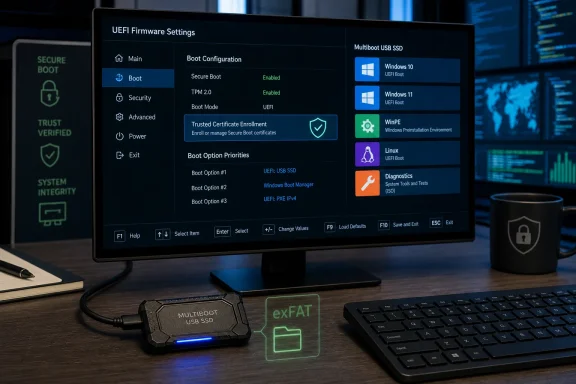 Secure Boot is the headline change
According to the project’s GitHub release notes, version 0.12.1 includes a change labelled “Install Windows without disabling Secure Boot.” Previous project documentation explicitly warned that Secure Boot had to be turned off during Windows 10 or Windows 11 setup.That matters because switching off Secure Boot is an awkward and sometimes risky detour on modern PCs. Microsoft describes Secure Boot as a firmware feature intended to ensure that a machine starts only with software trusted by the manufacturer, and notes that changing the setting can require firmware-menu work that varies by vendor.
MultiOS-USB does not avoid Secure Boot administration entirely. Per the project’s documentation, a new PC booting the drive with Secure Boot enabled may require the user to enroll the MultiOS-USB certificate from the drive’s EFI partition. In practical terms, this is still a tool for people comfortable with UEFI firmware settings—not a drop-in replacement for Microsoft’s Media Creation Tool.
exFAT becomes the default
The release also makes exFAT the default filesystem. That is a sensible fit for a multiboot drive carrying several large images, particularly Windows ISOs that can exceed FAT32’s 4GB per-file limit.The trade-off is Linux compatibility. The developer’s own changelog adds a tongue-in-cheek “sorry Ubuntu” to the change, reflecting that older or minimal Linux boot environments may not include the pieces needed to read exFAT. Admins building recovery media for older hardware should test the actual target systems before replacing existing FAT32-based media.
A nod to Windows 11 setup
The third listed change adds information about bypassing the Microsoft account requirement during Windows setup. The release notes do not describe a new automated bypass feature, so users should treat this as documentation rather than an assurance that every Windows image or setup path will offer the same behavior.MultiOS-USB supports BIOS and UEFI booting, ISO-based Linux startup, WinPE WIM images, Windows 10 and 11 installer ISOs, configurable boot entries, and locally installed operating systems. Its GitHub documentation recommends an image-based installation method for Windows, after which ISO files are copied to the drive’s
ISOs directory.Version 0.12.1 was released on July 12, 2026; existing users should test the new Secure Boot Windows-install path and exFAT default on representative hardware before relying on it for recovery or deployment work.
References
- Primary source: Neowin
Published: 2026-07-13T09:04:01+00:00
MultiOS-USB 0.12.1 | Neowin
Open-source tool for creating multiboot USB drives, supporting various operating systems with persistence and ISO booting, simplifying OS installations and testing. www.neowin.net
