

Logitech’s MX Master 4 gained native Windows 11 haptic feedback through a firmware update released in May 2026, letting the mouse vibrate during supported system actions such as snapping windows, resizing panes, and aligning objects in Microsoft apps. The update sounds small because it arrives as a peripheral feature, not a Windows redesign. But it points to a larger shift: Microsoft is beginning to treat touch, pointer movement, and physical feedback as one continuous interaction layer rather than separate hardware tricks.
For years, Windows has been oddly good at supporting exotic input devices while remaining conservative about how the desktop itself feels. Precision touchpads improved the situation, pen input matured, and gaming controllers became first-class citizens, but the mouse — the central instrument of desktop Windows — remained stubbornly mechanical. Logitech’s new integration with Windows 11 suggests that era may be ending, not with a revolution, but with a small buzz under the palm.
The MX Master line has always been aimed at people who live inside desktops: spreadsheet wranglers, developers, designers, editors, project managers, and anyone else with enough windows open to make Alt-Tab feel like a workout. The MX Master 4 already added haptic feedback as a hardware feature, giving Logitech a way to make clicks, gestures, and shortcut interactions feel more deliberate. What changes now is that Windows itself can send certain haptic cues to the mouse.
That distinction matters. A mouse vibrating because Logitech’s own software says it should is one thing; a mouse responding to operating-system events is another. The former is a vendor flourish. The latter is platform behavior.
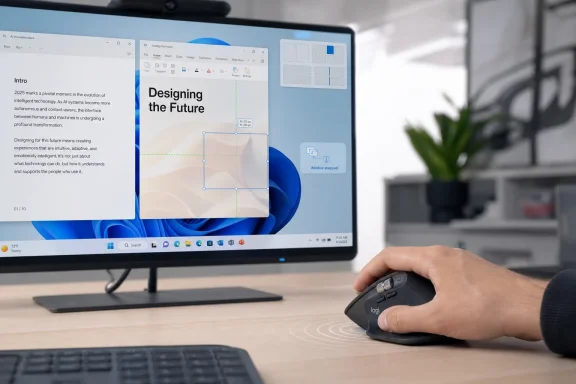
The early examples are deliberately mundane. You snap a window into place. You resize something. You align objects in PowerPoint. The mouse gives a subtle vibration, confirming that the interface recognized the action. This is not the kind of feature that sells a laptop on a billboard, but it is exactly the kind of feature that changes how an interface feels after thousands of repetitions.
Windows has long depended on visual confirmation. A rectangle appears, a guide line flashes, a cursor changes shape, a window outline snaps into place. Haptics add another channel, one that works without requiring the user to visually re-check every small action. Done well, it can make the desktop feel more confident. Done badly, it becomes notification spam for the hand.
The question, then, is not whether a vibrating mouse is clever. It is whether Windows can make physical feedback feel like part of the interface rather than another layer of gadget theater.
But the more interesting beneficiary may be Microsoft. Windows has spent years trying to modernize without alienating the enormous base of users who still expect a desktop to behave like a desktop. Haptics offer a rare kind of interface upgrade: one that can feel new without forcing a visible redesign.
That is a valuable trick. Microsoft can add feedback to snapping, alignment, window management, and creative workflows without moving buttons around or asking users to relearn muscle memory. The interface stays familiar, but the interaction becomes more legible.
This is especially important because Windows 11 has been at its best when it tightens old workflows rather than inventing new ones. Snap Layouts, improved window management, better docking behavior, and more consistent touchpad gestures all work because they refine things people already do. Haptic feedback fits that pattern. It does not ask the user to adopt a new metaphor; it reinforces an existing action.
Logitech, meanwhile, gets to occupy the premium end of that story. If Microsoft’s haptic layer expands, other manufacturers will follow. But the MX Master 4 gets to be remembered as the mouse that made the idea visible to the productivity crowd.
Windows has been slower to absorb that lesson across the desktop. Some premium Windows laptops have good haptic touchpads, but the experience remains uneven. The typical Windows mouse is still a world of switches, wheels, and LEDs, with feedback mostly limited to the audible click and whatever resistance the hardware provides.
The MX Master 4 update points toward a more layered model. Visual feedback remains primary, but it is no longer alone. The system can acknowledge an action physically, giving users a low-friction way to know that a snap point, guide, edge, or control has been reached.
That could matter more than it sounds. A power user arranging windows across multiple displays may not need dramatic animation; they need certainty. A designer aligning two objects may not want another pop-up; they want to know the alignment has landed. An editor dragging clips on a timeline may benefit from a tactile tick when media snaps to a marker.
This is where haptics can become practical rather than ornamental. The best haptic interactions are not little rewards for using the computer. They are tiny confirmations that reduce doubt.
Microsoft and Logitech therefore have to be restrained. A haptic bump when a window snaps makes sense. A vibration every time the cursor grazes an interface element would be maddening. The line between tactile clarity and tactile noise is thin.
The early implementation appears cautious, and that is the right instinct. Window snapping, resizing, alignment, and specific supported interactions are bounded events. They have a beginning and an end. They are actions where confirmation has value.
The long-term challenge will be third-party app support. Creative software, CAD tools, video editors, audio workstations, and design apps are obvious candidates. They also contain dense interfaces where careless haptic mapping could create a constant buzzing mess. If every guide, ruler, layer boundary, timeline marker, and panel edge vibrates the mouse, the feature will become something users hunt down in settings just to make it stop.
The better future is contextual. Haptics should reinforce precision moments, not decorate every interaction. They should help users feel when they have crossed a meaningful threshold. If developers treat the haptic motor as another notification channel, they will ruin the very subtlety that makes the feature promising.
This is the part Microsoft must get right if it wants hardware makers and developers to follow. A platform-level haptics API is only as good as the conventions around it. Users should not have to learn that PowerPoint alignment feels one way, a video editor timeline snap feels another unrelated way, and a third-party window manager does something entirely different.
The best precedent is not RGB lighting or gaming rumble. It is the evolution of system sounds and visual affordances. Windows users understand that certain sounds, animations, and cursor changes carry meaning because the platform repeats them consistently. Haptics need that same discipline.
There is also an accessibility angle, though it should not be overstated. Tactile feedback can help some users by providing an additional confirmation channel, especially when visual cues are missed or when fine alignment is difficult. But accessibility benefits depend on configurability. Strength, frequency, supported events, and the ability to disable specific behaviors will matter.
A haptics system that assumes one ideal user will fail. A haptics system that lets users and administrators tune the experience could become a quiet but meaningful improvement.
The MX Master 4 integration depends on a recent Windows 11 update, current mouse firmware, and in many cases updated Logitech receiver firmware or Logitech’s management software path. That is not outrageous, but it is still a chain. If any link is missing, the experience may not appear, or it may appear only for some users.
That kind of partial rollout is where help desks suffer. One employee feels haptic feedback when snapping windows; another with the same-looking mouse does not. One device shipped with newer firmware; another needs an update. One machine is on a managed Windows release cadence; another has already received the relevant Windows 11 update.
The feature itself is low risk in the security sense. A vibrating mouse is not a new scripting engine or an exposed remote service. But firmware update paths and peripheral management still matter, especially in organizations that standardize devices or restrict user-installed utilities.
Administrators will want clear documentation, silent update options, and policy controls. They will also want the ability to disable haptics if users complain, if the feature interferes with specialized workflows, or if accessibility needs vary across teams. A feature does not have to be dangerous to become operationally annoying.
But the Mac comparison cuts two ways. Apple can build haptics deeply because it controls the hardware, operating system, drivers, and design conventions. Microsoft operates in a messier ecosystem where the mouse, receiver, firmware, OEM image, Windows build, and app support may all come from different parties.
That makes Logitech’s Windows integration more impressive, not less. It is harder to make a coherent haptic experience in the PC world because the PC world is modular by design. The same openness that gives users endless hardware choice also makes subtle sensory experiences difficult to standardize.
Still, Windows cannot simply shrug and say fragmentation is the price of freedom. If haptics are to matter, Microsoft will need to make them boringly reliable. Users should not have to think about whether a given app is talking to Logitech software, Windows APIs, a receiver firmware layer, or a device-specific plugin.
The interface should just feel right. That is the standard Apple has trained users to expect, and it is the standard premium Windows hardware increasingly has to meet.
That has benefits. A device can adapt to Photoshop, Excel, Teams, a browser, or a code editor. It can surface shortcuts, change wheel behavior, and provide contextual feedback. For power users, that is exactly why premium mice are attractive.
It also creates dependency. The more intelligence moves into software, the more the experience depends on update quality, vendor support, and compatibility with OS changes. A great mouse can be diminished by bad configuration software. A clever hardware feature can vanish if firmware lags behind. A peripheral can start to feel like another app subscription to maintain, even when no subscription is involved.
Logitech has generally been better than most at building a productivity ecosystem around its hardware, but it is not immune to the usual complaints about companion software, background services, and update friction. The more central haptics become, the more users will expect them to work without babysitting.
That expectation is fair. If a mouse costs premium money, its advanced features should feel native, not experimental. This Windows 11 integration is promising precisely because it moves part of the experience closer to the OS. The less the user has to think about plumbing, the more successful the feature will be.
But haptic design requires taste. Developers should not ask, “Where can we add vibration?” They should ask, “Where does the user currently need confirmation but not interruption?” That is a much narrower and more useful question.
A video editor might use a tactile tick when a clip snaps exactly to the playhead or another clip edge. A design app might signal alignment, distribution, or canvas boundaries. A spreadsheet tool might use subtle feedback when dragging a fill handle across a meaningful range. A window manager might distinguish between halves, thirds, quadrants, and display boundaries.
The trick is hierarchy. Not every event deserves the same physical emphasis. A small alignment cue should not feel like an error. A boundary should not feel like a success. Haptics can make software feel more precise, but only if the patterns are consistent enough for users to internalize.
This is where Microsoft’s role is larger than Logitech’s. Logitech can provide hardware. Microsoft can provide conventions. Developers can provide judgment. The feature only becomes useful when all three line up.
That pattern makes sense. Most users will not buy a new mouse just to feel window snapping. But users who already buy MX Master-class hardware are exactly the group likely to notice whether tactile feedback improves daily work. They are also the users who spend enough time in window management, creative apps, and productivity suites for tiny efficiency gains to matter.
If the feedback is good, it will become invisible in the best possible way. Users will stop thinking, “My mouse buzzed,” and start trusting that the snap landed, the guide aligned, or the resize reached its edge. That is when interface technology succeeds: not when it calls attention to itself, but when it reduces hesitation.
The risk is that Microsoft and its partners overplay the moment. Haptics should not become another checkbox in the great feature race, advertised everywhere and refined nowhere. The desktop does not need more stimulation. It needs better signals.
The MX Master 4’s Windows 11 haptic update is a small event with a large lesson: the next phase of desktop computing may not be about more pixels, more AI panels, or more animated surfaces, but about making existing interactions feel more certain. If Microsoft can turn that certainty into a consistent platform language, today’s subtle vibration could become one of the first signs that the Windows desktop is finally learning to speak through the hand as well as the screen.
For years, Windows has been oddly good at supporting exotic input devices while remaining conservative about how the desktop itself feels. Precision touchpads improved the situation, pen input matured, and gaming controllers became first-class citizens, but the mouse — the central instrument of desktop Windows — remained stubbornly mechanical. Logitech’s new integration with Windows 11 suggests that era may be ending, not with a revolution, but with a small buzz under the palm.
 Microsoft Finally Gives the Mouse a Sense of Touch
The MX Master line has always been aimed at people who live inside desktops: spreadsheet wranglers, developers, designers, editors, project managers, and anyone else with enough windows open to make Alt-Tab feel like a workout. The MX Master 4 already added haptic feedback as a hardware feature, giving Logitech a way to make clicks, gestures, and shortcut interactions feel more deliberate. What changes now is that Windows itself can send certain haptic cues to the mouse.That distinction matters. A mouse vibrating because Logitech’s own software says it should is one thing; a mouse responding to operating-system events is another. The former is a vendor flourish. The latter is platform behavior.
The early examples are deliberately mundane. You snap a window into place. You resize something. You align objects in PowerPoint. The mouse gives a subtle vibration, confirming that the interface recognized the action. This is not the kind of feature that sells a laptop on a billboard, but it is exactly the kind of feature that changes how an interface feels after thousands of repetitions.
Windows has long depended on visual confirmation. A rectangle appears, a guide line flashes, a cursor changes shape, a window outline snaps into place. Haptics add another channel, one that works without requiring the user to visually re-check every small action. Done well, it can make the desktop feel more confident. Done badly, it becomes notification spam for the hand.
The question, then, is not whether a vibrating mouse is clever. It is whether Windows can make physical feedback feel like part of the interface rather than another layer of gadget theater.
Logitech Gets the First-Mover Advantage, but Windows Gets the Bigger Prize
Logitech has an obvious commercial reason to celebrate this update. The MX Master 4 becomes one of the first mainstream productivity mice to take advantage of native Windows haptic signals, giving the company a useful differentiator in a category where high-end mice already compete on ergonomics, battery life, wheels, sensors, and software overlays.But the more interesting beneficiary may be Microsoft. Windows has spent years trying to modernize without alienating the enormous base of users who still expect a desktop to behave like a desktop. Haptics offer a rare kind of interface upgrade: one that can feel new without forcing a visible redesign.
That is a valuable trick. Microsoft can add feedback to snapping, alignment, window management, and creative workflows without moving buttons around or asking users to relearn muscle memory. The interface stays familiar, but the interaction becomes more legible.
This is especially important because Windows 11 has been at its best when it tightens old workflows rather than inventing new ones. Snap Layouts, improved window management, better docking behavior, and more consistent touchpad gestures all work because they refine things people already do. Haptic feedback fits that pattern. It does not ask the user to adopt a new metaphor; it reinforces an existing action.
Logitech, meanwhile, gets to occupy the premium end of that story. If Microsoft’s haptic layer expands, other manufacturers will follow. But the MX Master 4 gets to be remembered as the mouse that made the idea visible to the productivity crowd.
The Desktop Is Becoming Less Visual, Not More Flashy
The obvious comparison is the smartphone. Modern phones use haptics constantly: confirming a long press, simulating a shutter, adding texture to scrolling wheels, or making a keyboard feel less like tapping glass. Apple’s trackpads and laptop haptics normalized the idea that a surface does not need to physically move much to feel responsive.Windows has been slower to absorb that lesson across the desktop. Some premium Windows laptops have good haptic touchpads, but the experience remains uneven. The typical Windows mouse is still a world of switches, wheels, and LEDs, with feedback mostly limited to the audible click and whatever resistance the hardware provides.
The MX Master 4 update points toward a more layered model. Visual feedback remains primary, but it is no longer alone. The system can acknowledge an action physically, giving users a low-friction way to know that a snap point, guide, edge, or control has been reached.
That could matter more than it sounds. A power user arranging windows across multiple displays may not need dramatic animation; they need certainty. A designer aligning two objects may not want another pop-up; they want to know the alignment has landed. An editor dragging clips on a timeline may benefit from a tactile tick when media snaps to a marker.
This is where haptics can become practical rather than ornamental. The best haptic interactions are not little rewards for using the computer. They are tiny confirmations that reduce doubt.
The Danger Is Turning Every Nudge Into a Notification
There is a reason many people disable vibration on phones, controllers, and wearables. Haptics can become tiresome quickly when every tiny event competes for attention. A productivity mouse is particularly risky because the user’s hand is in constant contact with it for hours at a time.Microsoft and Logitech therefore have to be restrained. A haptic bump when a window snaps makes sense. A vibration every time the cursor grazes an interface element would be maddening. The line between tactile clarity and tactile noise is thin.
The early implementation appears cautious, and that is the right instinct. Window snapping, resizing, alignment, and specific supported interactions are bounded events. They have a beginning and an end. They are actions where confirmation has value.
The long-term challenge will be third-party app support. Creative software, CAD tools, video editors, audio workstations, and design apps are obvious candidates. They also contain dense interfaces where careless haptic mapping could create a constant buzzing mess. If every guide, ruler, layer boundary, timeline marker, and panel edge vibrates the mouse, the feature will become something users hunt down in settings just to make it stop.
The better future is contextual. Haptics should reinforce precision moments, not decorate every interaction. They should help users feel when they have crossed a meaningful threshold. If developers treat the haptic motor as another notification channel, they will ruin the very subtlety that makes the feature promising.
Windows Needs a Real Haptics Vocabulary
For haptics to become more than a peripheral gimmick, Windows needs a consistent vocabulary. A snap should feel different from an error. Alignment should feel different from a boundary. A confirmation should feel different from a warning. If every event is just “small buzz,” the system has no language, only punctuation.This is the part Microsoft must get right if it wants hardware makers and developers to follow. A platform-level haptics API is only as good as the conventions around it. Users should not have to learn that PowerPoint alignment feels one way, a video editor timeline snap feels another unrelated way, and a third-party window manager does something entirely different.
The best precedent is not RGB lighting or gaming rumble. It is the evolution of system sounds and visual affordances. Windows users understand that certain sounds, animations, and cursor changes carry meaning because the platform repeats them consistently. Haptics need that same discipline.
There is also an accessibility angle, though it should not be overstated. Tactile feedback can help some users by providing an additional confirmation channel, especially when visual cues are missed or when fine alignment is difficult. But accessibility benefits depend on configurability. Strength, frequency, supported events, and the ability to disable specific behaviors will matter.
A haptics system that assumes one ideal user will fail. A haptics system that lets users and administrators tune the experience could become a quiet but meaningful improvement.
Enterprise IT Will Ask the Boring Questions First
For enthusiasts, the story is simple: update the firmware, update Windows, feel the desktop. For IT departments, the story is more complicated. New device capabilities always raise questions about drivers, firmware management, fleet consistency, support tickets, and whether a feature behaves predictably across hardware revisions.The MX Master 4 integration depends on a recent Windows 11 update, current mouse firmware, and in many cases updated Logitech receiver firmware or Logitech’s management software path. That is not outrageous, but it is still a chain. If any link is missing, the experience may not appear, or it may appear only for some users.
That kind of partial rollout is where help desks suffer. One employee feels haptic feedback when snapping windows; another with the same-looking mouse does not. One device shipped with newer firmware; another needs an update. One machine is on a managed Windows release cadence; another has already received the relevant Windows 11 update.
The feature itself is low risk in the security sense. A vibrating mouse is not a new scripting engine or an exposed remote service. But firmware update paths and peripheral management still matter, especially in organizations that standardize devices or restrict user-installed utilities.
Administrators will want clear documentation, silent update options, and policy controls. They will also want the ability to disable haptics if users complain, if the feature interferes with specialized workflows, or if accessibility needs vary across teams. A feature does not have to be dangerous to become operationally annoying.
The Mac Comparison Is Inevitable and Uncomfortable
The GadgetGuy piece notes the obvious wish: if this works on Windows, why not bring similar functionality to macOS? That comparison is unavoidable because Apple has spent years making haptics feel central to its hardware experience. The MacBook trackpad remains the benchmark for convincing tactile illusion in everyday computing.But the Mac comparison cuts two ways. Apple can build haptics deeply because it controls the hardware, operating system, drivers, and design conventions. Microsoft operates in a messier ecosystem where the mouse, receiver, firmware, OEM image, Windows build, and app support may all come from different parties.
That makes Logitech’s Windows integration more impressive, not less. It is harder to make a coherent haptic experience in the PC world because the PC world is modular by design. The same openness that gives users endless hardware choice also makes subtle sensory experiences difficult to standardize.
Still, Windows cannot simply shrug and say fragmentation is the price of freedom. If haptics are to matter, Microsoft will need to make them boringly reliable. Users should not have to think about whether a given app is talking to Logitech software, Windows APIs, a receiver firmware layer, or a device-specific plugin.
The interface should just feel right. That is the standard Apple has trained users to expect, and it is the standard premium Windows hardware increasingly has to meet.
The Mouse Is Becoming Software Again
The modern productivity mouse is no longer just a pointing device. It is a software endpoint with firmware, profiles, app-specific mappings, gestures, cloud-adjacent configuration tools, wireless receivers, and now haptic interpretation. The MX Master 4’s Windows update is a reminder that the mouse has become a platform participant.That has benefits. A device can adapt to Photoshop, Excel, Teams, a browser, or a code editor. It can surface shortcuts, change wheel behavior, and provide contextual feedback. For power users, that is exactly why premium mice are attractive.
It also creates dependency. The more intelligence moves into software, the more the experience depends on update quality, vendor support, and compatibility with OS changes. A great mouse can be diminished by bad configuration software. A clever hardware feature can vanish if firmware lags behind. A peripheral can start to feel like another app subscription to maintain, even when no subscription is involved.
Logitech has generally been better than most at building a productivity ecosystem around its hardware, but it is not immune to the usual complaints about companion software, background services, and update friction. The more central haptics become, the more users will expect them to work without babysitting.
That expectation is fair. If a mouse costs premium money, its advanced features should feel native, not experimental. This Windows 11 integration is promising precisely because it moves part of the experience closer to the OS. The less the user has to think about plumbing, the more successful the feature will be.
Developers Should Treat Haptics Like Typography, Not Confetti
The next phase will depend on software developers. Logitech says broader support across Windows and third-party apps is expected over time, and the natural targets are easy to name: video editing, audio editing, vector design, presentation software, 3D modeling, and project planning tools.But haptic design requires taste. Developers should not ask, “Where can we add vibration?” They should ask, “Where does the user currently need confirmation but not interruption?” That is a much narrower and more useful question.
A video editor might use a tactile tick when a clip snaps exactly to the playhead or another clip edge. A design app might signal alignment, distribution, or canvas boundaries. A spreadsheet tool might use subtle feedback when dragging a fill handle across a meaningful range. A window manager might distinguish between halves, thirds, quadrants, and display boundaries.
The trick is hierarchy. Not every event deserves the same physical emphasis. A small alignment cue should not feel like an error. A boundary should not feel like a success. Haptics can make software feel more precise, but only if the patterns are consistent enough for users to internalize.
This is where Microsoft’s role is larger than Logitech’s. Logitech can provide hardware. Microsoft can provide conventions. Developers can provide judgment. The feature only becomes useful when all three line up.
The Quiet Upgrade Hiding Inside a Premium Mouse
The concrete story is easy to summarize, but the implications are broader than the release note.- The MX Master 4 can now respond to native Windows 11 haptic signals after the required firmware and Windows updates are installed.
- The first supported actions focus on practical desktop moments, including window snapping, resizing, and object alignment in Microsoft apps.
- The feature is most useful when it confirms precision actions without demanding visual attention.
- The rollout will depend on firmware, receiver updates, Windows 11 versioning, and app support, which may create uneven early experiences.
- Third-party developers will determine whether Windows haptics become a real workflow aid or just another novelty setting.
- The best version of this idea is subtle, configurable, and standardized enough that users stop noticing the technology and simply trust the interaction.
Premium Peripherals Are Becoming the Test Bed for Windows’ Next Interface
Windows features often arrive first as broad platform changes and only later become refined by hardware. Haptics may move in the opposite direction. Premium peripherals and high-end touchpads can prove the value before the capability becomes ordinary.That pattern makes sense. Most users will not buy a new mouse just to feel window snapping. But users who already buy MX Master-class hardware are exactly the group likely to notice whether tactile feedback improves daily work. They are also the users who spend enough time in window management, creative apps, and productivity suites for tiny efficiency gains to matter.
If the feedback is good, it will become invisible in the best possible way. Users will stop thinking, “My mouse buzzed,” and start trusting that the snap landed, the guide aligned, or the resize reached its edge. That is when interface technology succeeds: not when it calls attention to itself, but when it reduces hesitation.
The risk is that Microsoft and its partners overplay the moment. Haptics should not become another checkbox in the great feature race, advertised everywhere and refined nowhere. The desktop does not need more stimulation. It needs better signals.
The MX Master 4’s Windows 11 haptic update is a small event with a large lesson: the next phase of desktop computing may not be about more pixels, more AI panels, or more animated surfaces, but about making existing interactions feel more certain. If Microsoft can turn that certainty into a consistent platform language, today’s subtle vibration could become one of the first signs that the Windows desktop is finally learning to speak through the hand as well as the screen.
References
- Primary source: GadgetGuy
Published: Thu, 21 May 2026 02:06:49 GMT
Logitech MX Master 4 gets good vibrations with Windows 11 update
Haptic feedback is now built into the Windows 11 experience as part of an integration with the Logitech MX Master 4 mouse.www.gadgetguy.com.au - Related coverage: logitech.com
MX Master 4 + Windows 11: The First Productivity Mouse with Native Haptic Feedback – logi BLOG
Logitech’s flagship mouse delivers sensory precision on Windows 11 with minimal setup and highly responsive physical response. Native integration with advanced haptics on Windows 11 has arrived, and the Logitech MX Master 4 is ready. As the first productivity mouse featuring native haptic...www.logitech.com - Related coverage: windowscentral.com
Logitech MX Master 4 update lets you feel Windows 11 through haptics | Windows Central
A new firmware update integrates the MX Master 4 with Windows 11's new Advanced Haptics.www.windowscentral.com - Related coverage: support.logi.com
Notas de la versión del firmware de MX Master 4 – Logitech Asistencia + descarga
Versión Fecha de lanzamiento 27.3.19 30 de marzo de 2026 27.1.16 30 de septiembre de 2025 Versión 27.3.19Publicación: 30 de marzo de...support.logi.com - Related coverage: macrumors.com
Logitech's New MX Master 4 Mouse Features Haptic Feedback
Logitech today announced an updated version of its MX Master series mouse, the MX Master 4, which features haptic feedback and introduces a few other changes while remaining largely faithful to the original design. Apart from cleaner-looking frosted buttons and a more minimalist bottom, the MX...www.macrumors.com - Related coverage: ir.logitech.com
Logitech International - Remastering an Icon: Introducing Logitech MX Master 4
The First MX Mouse with Haptics that Transforms Productivity Through Tactile Feedback Logitech’s only mouse with customizable haptics for professionals seeking ultimate control and efficiency. Streamlined workflows with Actions Ring enabled by Logi Options+, a digital overlay, reducing...ir.logitech.com
- Related coverage: ebisuda.net
Windows 11 5月更新でLogitech MX Master 4など対応マウスにハプティクスフィードバック機能が追加 | ebisuda.net
Windows 11の2025年5月累積更新でLogitech MX Master 4等の対応マウス・スタイラスに触覚フィードバック機能が追加され、ウィンドウ操作時の操作感が向上した。www.ebisuda.net
- Related coverage: tomshardware.com
Logitech launches MX Master 4 flagship productivity mouse – the best mouse we've tested adds haptic feedback, circular Action Ring shortcuts | Tom's Hardware
A rumble pack for productivity?www.tomshardware.com - Related coverage: techradar.com
Windows 11 laptops could get advanced haptic feedback for trackpads – and it's about time, MacBooks have had this for ages | TechRadar
Moving beyond basic haptics, finallywww.techradar.com - Related coverage: logitech-mexico.com
