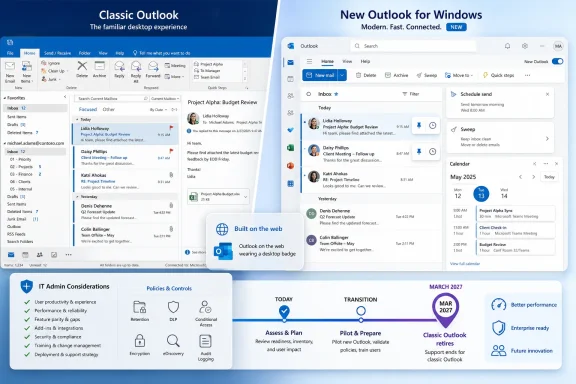
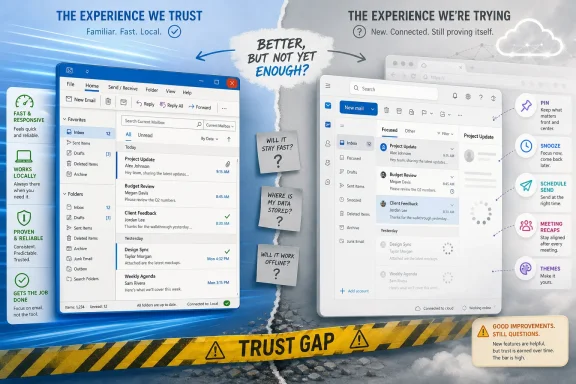
Microsoft has highlighted 15 recent improvements to the new Outlook for Windows as it continues moving users away from Windows Mail and Calendar, but the reaction from many Windows users in June 2026 remains blunt: feature additions are welcome, yet trust has not caught up. That gap is now the real Outlook story. Microsoft can ship pinning, snoozing, schedule send, meeting recaps, themes, and better meeting tracking, but users are judging the app less like a roadmap and more like a replacement for something they already depended on. On that test, the new Outlook still feels to many people like a product being pushed before it has earned the right to be default.
Microsoft’s latest pitch is straightforward: the new Outlook is no longer the thin, awkward web-flavored client many early adopters bounced off. The company points to a batch of visible improvements that make the app feel more like a modern mail client and less like a placeholder for Outlook on the web. Pinning important emails, snoozing messages until they matter, sending mail later, and improving meeting workflows are all practical features.
The trouble is that Microsoft is not introducing these features into a vacuum. It is introducing them into a migration campaign that has already asked users to give up Windows Mail and Calendar, reconsider classic Outlook, accept a different performance profile, and trust that missing workflows will be rebuilt later. That makes every improvement land with two meanings at once: yes, the app is better; no, that does not prove it was ready to be pushed this hard.
For casual users, some of the additions really do address daily annoyances. Pinning mail to the top of the inbox is easier than inventing flagging rituals or hunting through search. Snooze is useful for the modern inbox, where half of all messages are not urgent but also cannot be forgotten. Schedule send is table stakes for anyone coordinating across time zones or pretending not to work at midnight.
But Windows users are not wrong to ask why these features are being treated like reasons to switch rather than evidence that the replacement is still catching up. When a new default app needs a running list of recent repairs to justify its existence, the marketing message can start to sound inverted. The pitch becomes less “look what Outlook can do” and more “look how many holes we have filled since you last complained.”
From the user’s chair, however, “rational platform goal” often translates into “my desktop app feels less like a desktop app.” That is why the “web wrapper” complaint has stuck so hard, even when it is imprecise or unfair in the details. People are not merely objecting to web technology; they are objecting to the sensation that a fast, local, familiar Windows utility has been replaced by something heavier, cloudier, and more beholden to Microsoft’s service strategy than to their muscle memory.
Performance sits at the center of that frustration. Mail clients are supposed to disappear into the background until needed. If launching the app, switching folders, searching, or composing messages feels slower than the old workflow, the user does not care that the product team is converging code paths or preparing future AI features.
This is where Microsoft’s feature list has limited persuasive power. A sluggish mail client with snooze is still a sluggish mail client. A more beautiful theme does not compensate for a workflow that feels delayed by half a beat every time a user clicks. Mail is one of the least glamorous apps on a PC, but it is also one of the most habit-driven; small frictions are felt dozens of times a day.
But “feature parity” is too sterile a phrase for what users are actually saying. They are talking about confidence. They want to know whether the app will behave when the network is poor, whether search will find the message they know exists, whether multiple accounts will remain sane, whether notifications will be timely, whether calendar handling will match old expectations, and whether a workflow they use once a month will vanish at the worst possible time.
That is why a list of new features can fail to move the room. Microsoft sees shipped capabilities; users see the absence of guarantees. The former can be measured in release notes. The latter is earned by months of boring reliability.
There is also a hierarchy of needs that product marketing tends to flatten. A new theme is nice, but it does not matter like dependable offline behavior. Pinning is useful, but it does not matter like trusted search. Meeting recaps are attractive to Microsoft 365 subscribers, but they do not matter to the person who just wants a fast local client for IMAP, Gmail, Outlook.com, and a small business mailbox.
If the new Outlook were simply ready, the migration pressure would be easier to defend. Instead, Microsoft is walking a careful line: consumers are being nudged and, in some cases, dragged more aggressively, while organizations get a longer runway. That distinction makes commercial sense, but it also validates the underlying concern. Enterprises are not sentimental about old UI; they are cautious because email clients are operational infrastructure.
The extension of the opt-out phase for enterprise customers into 2027 is especially telling. Microsoft can frame it as customer care, and to some extent it is. Large organizations need time to test add-ins, train users, update support scripts, document differences, and determine whether regulatory or archival workflows are affected.
But the delay also signals that Microsoft knows the migration is not just a software update. It is a behavioral and administrative migration away from a deeply embedded Windows and Office pattern. Outlook is not a toy app. It is where legal holds, executive assistants, shared mailboxes, delegated calendars, transport rules, retention policies, and business rituals collide every workday.
Replacing that role with the new Outlook changes the social contract. A built-in utility is expected to be lean and unobtrusive. Outlook, even the free new Outlook, belongs to Microsoft’s broader account, cloud, advertising, and subscription ecosystem. That makes the replacement feel less like modernization and more like annexation.
This is why user backlash can sound disproportionate if judged only by the feature list. People are not merely upset about one missing button. They are reacting to a pattern across modern software: remove a familiar local app, replace it with a service-connected client, declare the future inevitable, and ask users to wait while the basics return in waves.
That is also why the Reddit-style “enshittification” complaint resonates, even if it is more slogan than diagnosis. Users feel they are being moved from a product that served them to a funnel that serves a roadmap. Whether that is Microsoft’s intent is less important than whether the experience reinforces the suspicion.
That history cuts both ways. Classic Outlook is heavy, complex, and often bewildering to new users. It carries old design decisions and a sprawling surface area that Microsoft understandably wants to rationalize. If a product team were designing a 2026 mail client from scratch, it would not recreate classic Outlook exactly.
But enterprise software does not get replaced on theoretical cleanliness. It gets replaced when the new thing can survive the old thing’s worst Tuesday. That means weird mailboxes, overloaded calendars, intermittent hotel Wi-Fi, executives who refuse training, line-of-business add-ins last updated in 2018, and admins who do not want to explain why an assistant’s delegated calendar flow changed overnight.
Microsoft’s challenge is that the new Outlook may be improving fastest in the areas Microsoft most wants to emphasize — Microsoft 365 integration, Copilot-adjacent workflows, web consistency — while skeptical users care most about the messy residue of decades. The shiny future and the ugly present are not evenly distributed.
The improved meeting features also make sense in Microsoft’s ecosystem. Outlook is not just mail; it is the calendar front end for Teams-era work. Better RSVP flows, meeting tracking, and recaps can save time for users living inside Microsoft 365 tenants, especially where meetings generate recordings, transcripts, notes, and follow-up tasks.
Yet the desktop app question remains separate. A good service feature does not prove a good Windows client. Users notice whether notifications work when the app is closed, whether offline operations behave naturally, whether account switching is painless, whether the UI respects Windows conventions, and whether the app feels responsive on midrange hardware rather than only on pristine corporate laptops.
This is the subtle mistake in much of Microsoft’s argument. The company tends to point at capability. Users are judging fit. They want an app that fits Windows, fits their workflow, fits their hardware, and fits the trust level required for mail and calendar. New features help, but they do not settle the fit question.
This matters because email clients are intimate software. They sit between personal identity, work obligation, bills, travel, health appointments, school notices, and family logistics. People are more sensitive to monetization and product nudges in that space than they might be in a news widget or app store tile.
Microsoft is hardly alone here. The entire software industry has pushed local utilities toward cloud-backed, account-aware, subscription-adjacent experiences. But Windows users have particular memories of this pattern, from Teams integration to OneDrive prompts to Edge defaults. Outlook arrives carrying that baggage.
The result is that even useful features can be interpreted through suspicion. A user who believes the app exists mainly to consolidate Microsoft’s cloud control will not be easily persuaded by dark mode. A user who sees ads in a mail client will not describe the product as “free” in the same way Microsoft does.
Microsoft has provided controls for administrators, including ways to manage visibility of the “Try the new Outlook” toggle and govern adoption timing. That is necessary, but it also underlines the seriousness of the transition. Nobody needs a deployment strategy for a trivial cosmetic update.
The hardest enterprise problem is not whether the new Outlook can perform common tasks in a demo. It is whether enough uncommon tasks work well enough that the migration does not become a thousand-paper-cut incident. Shared mailboxes, delegated access, PST handling, offline expectations, and add-ins are not edge cases to the people who rely on them; they are the job.
That is why the enterprise delay should not be read as mere generosity. It is a tacit recognition that Outlook’s installed base is too important to move at consumer-app speed. Microsoft can modernize the client, but it cannot wish away the organizational gravity classic Outlook has accumulated.
Those goals overlap, but they are not identical. A lightweight native-feeling consumer app may conflict with a cloud-first architecture. A simplified user experience may frustrate classic Outlook power users. A service-integrated client may delight Microsoft 365 strategy teams while irritating people who just want local-feeling mail.
This is the fundamental product tension behind the backlash. Microsoft is not merely replacing an app; it is collapsing multiple mail identities into one Outlook-branded future. The company wants users to see that as simplification. Many users experience it as a loss of choice.
The irony is that Outlook became dominant partly because it adapted to different levels of need. It could be a personal mail client, a corporate calendar, a task manager, an archive, a rules engine, and a platform for add-ins. The new Outlook has to prove that unification does not mean flattening.
But roadmaps are promises, and mail clients are judged by what happens today. Users who tried the new Outlook early and left with a bad impression may not return every month to reassess it. In software migrations, first impressions have a long half-life, especially when the first impression is “this is slower and missing things.”
That creates a difficult communications problem for Microsoft. If it pushes too aggressively, it confirms the suspicion that users are beta testers for a predetermined transition. If it moves too slowly, it prolongs the split between classic Outlook, new Outlook, and the ghosts of Mail and Calendar. If it emphasizes AI and Microsoft 365 intelligence too loudly, it risks sounding disconnected from users asking for speed and reliability.
The right answer is probably less glamorous than Microsoft would like. The company needs months of dull, measurable improvements: faster launch, better responsiveness, fewer sync surprises, stronger offline behavior, clearer admin controls, fuller compatibility, and fewer moments where the app feels like a website wearing a Windows badge.
Windows enthusiasts are especially sensitive to this because they have seen it in Settings versus Control Panel, Teams variants, Edge integration, media apps, Photos, OneNote confusion, Skype’s decline, and other half-migrations. The issue is not that Microsoft modernizes. It is that Microsoft often modernizes by splitting the difference between old and new long enough for everyone to be annoyed.
New Outlook is now living inside that institutional memory. Every missing feature becomes evidence in a larger case. Every prompt to switch feels less like advice and more like pressure. Every delay for enterprise customers becomes a quiet admission that the product is not universally ready.
This is why Microsoft’s 15-feature victory lap lands awkwardly. The company wants credit for progress, and it deserves some. But users want accountability for the migration strategy, and they deserve that too.
Still, the right standard is not whether the new Outlook is better than it was. The standard is whether it is good enough to replace the apps Microsoft is displacing. That is a much higher bar, and it includes performance, trust, continuity, and user consent.
The most important facts are therefore practical rather than promotional.
 Microsoft Is Selling Progress While Users Are Measuring Loss
Microsoft’s latest pitch is straightforward: the new Outlook is no longer the thin, awkward web-flavored client many early adopters bounced off. The company points to a batch of visible improvements that make the app feel more like a modern mail client and less like a placeholder for Outlook on the web. Pinning important emails, snoozing messages until they matter, sending mail later, and improving meeting workflows are all practical features.The trouble is that Microsoft is not introducing these features into a vacuum. It is introducing them into a migration campaign that has already asked users to give up Windows Mail and Calendar, reconsider classic Outlook, accept a different performance profile, and trust that missing workflows will be rebuilt later. That makes every improvement land with two meanings at once: yes, the app is better; no, that does not prove it was ready to be pushed this hard.
For casual users, some of the additions really do address daily annoyances. Pinning mail to the top of the inbox is easier than inventing flagging rituals or hunting through search. Snooze is useful for the modern inbox, where half of all messages are not urgent but also cannot be forgotten. Schedule send is table stakes for anyone coordinating across time zones or pretending not to work at midnight.
But Windows users are not wrong to ask why these features are being treated like reasons to switch rather than evidence that the replacement is still catching up. When a new default app needs a running list of recent repairs to justify its existence, the marketing message can start to sound inverted. The pitch becomes less “look what Outlook can do” and more “look how many holes we have filled since you last complained.”
The New Outlook Has Improved, But It Has Not Escaped Its Origin Story
The new Outlook’s central problem has always been architectural as much as emotional. Microsoft wants one Outlook experience that spans Windows, the web, and the Microsoft 365 cloud, which makes obvious sense from Redmond’s point of view. A single codebase, faster service-side feature delivery, consistent UI patterns, and tighter integration with Teams, Loop, Copilot, and Microsoft 365 are all rational platform goals.From the user’s chair, however, “rational platform goal” often translates into “my desktop app feels less like a desktop app.” That is why the “web wrapper” complaint has stuck so hard, even when it is imprecise or unfair in the details. People are not merely objecting to web technology; they are objecting to the sensation that a fast, local, familiar Windows utility has been replaced by something heavier, cloudier, and more beholden to Microsoft’s service strategy than to their muscle memory.
Performance sits at the center of that frustration. Mail clients are supposed to disappear into the background until needed. If launching the app, switching folders, searching, or composing messages feels slower than the old workflow, the user does not care that the product team is converging code paths or preparing future AI features.
This is where Microsoft’s feature list has limited persuasive power. A sluggish mail client with snooze is still a sluggish mail client. A more beautiful theme does not compensate for a workflow that feels delayed by half a beat every time a user clicks. Mail is one of the least glamorous apps on a PC, but it is also one of the most habit-driven; small frictions are felt dozens of times a day.
Feature Parity Is the Wrong Phrase for the Right Complaint
Microsoft and its critics often frame the dispute as one of feature parity, and that is partly right. Classic Outlook has decades of accumulated capabilities, administrative hooks, add-in assumptions, file workflows, offline expectations, and enterprise edge cases. Windows Mail and Calendar, while simpler, had the advantage of being lightweight and native-feeling for many users who did not want the full Outlook universe.But “feature parity” is too sterile a phrase for what users are actually saying. They are talking about confidence. They want to know whether the app will behave when the network is poor, whether search will find the message they know exists, whether multiple accounts will remain sane, whether notifications will be timely, whether calendar handling will match old expectations, and whether a workflow they use once a month will vanish at the worst possible time.
That is why a list of new features can fail to move the room. Microsoft sees shipped capabilities; users see the absence of guarantees. The former can be measured in release notes. The latter is earned by months of boring reliability.
There is also a hierarchy of needs that product marketing tends to flatten. A new theme is nice, but it does not matter like dependable offline behavior. Pinning is useful, but it does not matter like trusted search. Meeting recaps are attractive to Microsoft 365 subscribers, but they do not matter to the person who just wants a fast local client for IMAP, Gmail, Outlook.com, and a small business mailbox.
Microsoft’s Calendar Says More Than Its Marketing Copy
The most revealing part of Microsoft’s Outlook strategy is not the list of 15 features. It is the calendar. The company has pushed users away from Windows Mail and Calendar, but it has also given organizations more time before the new Outlook becomes unavoidable in enterprise settings. That delay tells a more complicated story than any product blog can.If the new Outlook were simply ready, the migration pressure would be easier to defend. Instead, Microsoft is walking a careful line: consumers are being nudged and, in some cases, dragged more aggressively, while organizations get a longer runway. That distinction makes commercial sense, but it also validates the underlying concern. Enterprises are not sentimental about old UI; they are cautious because email clients are operational infrastructure.
The extension of the opt-out phase for enterprise customers into 2027 is especially telling. Microsoft can frame it as customer care, and to some extent it is. Large organizations need time to test add-ins, train users, update support scripts, document differences, and determine whether regulatory or archival workflows are affected.
But the delay also signals that Microsoft knows the migration is not just a software update. It is a behavioral and administrative migration away from a deeply embedded Windows and Office pattern. Outlook is not a toy app. It is where legal holds, executive assistants, shared mailboxes, delegated calendars, transport rules, retention policies, and business rituals collide every workday.
The Mail and Calendar Replacement Was Always Going to Be Politically Ugly
The old Windows Mail and Calendar apps were not perfect. They were limited, sometimes odd, and clearly not the center of Microsoft’s productivity ambitions. But they occupied a useful place in Windows: quick, built in, understandable, and good enough for many people who did not want Outlook proper.Replacing that role with the new Outlook changes the social contract. A built-in utility is expected to be lean and unobtrusive. Outlook, even the free new Outlook, belongs to Microsoft’s broader account, cloud, advertising, and subscription ecosystem. That makes the replacement feel less like modernization and more like annexation.
This is why user backlash can sound disproportionate if judged only by the feature list. People are not merely upset about one missing button. They are reacting to a pattern across modern software: remove a familiar local app, replace it with a service-connected client, declare the future inevitable, and ask users to wait while the basics return in waves.
That is also why the Reddit-style “enshittification” complaint resonates, even if it is more slogan than diagnosis. Users feel they are being moved from a product that served them to a funnel that serves a roadmap. Whether that is Microsoft’s intent is less important than whether the experience reinforces the suspicion.
Classic Outlook Is Not Just an App, It Is Institutional Memory
The comparison with classic Outlook is even harder for Microsoft because classic Outlook is not merely another mail client. It is one of the most entrenched business applications in Windows history. Entire office cultures have grown around its quirks: PST archives, shared calendars, rules, categories, delegated access, add-ins, mail merge habits, and keyboard shortcuts learned years ago and never consciously remembered.That history cuts both ways. Classic Outlook is heavy, complex, and often bewildering to new users. It carries old design decisions and a sprawling surface area that Microsoft understandably wants to rationalize. If a product team were designing a 2026 mail client from scratch, it would not recreate classic Outlook exactly.
But enterprise software does not get replaced on theoretical cleanliness. It gets replaced when the new thing can survive the old thing’s worst Tuesday. That means weird mailboxes, overloaded calendars, intermittent hotel Wi-Fi, executives who refuse training, line-of-business add-ins last updated in 2018, and admins who do not want to explain why an assistant’s delegated calendar flow changed overnight.
Microsoft’s challenge is that the new Outlook may be improving fastest in the areas Microsoft most wants to emphasize — Microsoft 365 integration, Copilot-adjacent workflows, web consistency — while skeptical users care most about the messy residue of decades. The shiny future and the ugly present are not evenly distributed.
A Better Inbox Does Not Automatically Make a Better Windows App
Some of the new Outlook improvements are genuinely good inbox design. Pinning messages at the top of the inbox is a simple, user-comprehensible tool for attention management. Snooze accepts the reality that email is often a task system pretending to be a communications system. Schedule send belongs in every serious mail client.The improved meeting features also make sense in Microsoft’s ecosystem. Outlook is not just mail; it is the calendar front end for Teams-era work. Better RSVP flows, meeting tracking, and recaps can save time for users living inside Microsoft 365 tenants, especially where meetings generate recordings, transcripts, notes, and follow-up tasks.
Yet the desktop app question remains separate. A good service feature does not prove a good Windows client. Users notice whether notifications work when the app is closed, whether offline operations behave naturally, whether account switching is painless, whether the UI respects Windows conventions, and whether the app feels responsive on midrange hardware rather than only on pristine corporate laptops.
This is the subtle mistake in much of Microsoft’s argument. The company tends to point at capability. Users are judging fit. They want an app that fits Windows, fits their workflow, fits their hardware, and fits the trust level required for mail and calendar. New features help, but they do not settle the fit question.
The Free Outlook Bargain Comes With New Friction
The new Outlook for Windows is also part of a broader Microsoft bargain: Outlook email and calendar functionality is now positioned as a free built-in Windows experience, but the experience is tied more tightly to Microsoft’s service model. For users with Microsoft 365 subscriptions and work accounts, that can mean useful integrations. For free consumer users, it can also mean ads, account prompts, and the sense that a basic utility has become a storefront.This matters because email clients are intimate software. They sit between personal identity, work obligation, bills, travel, health appointments, school notices, and family logistics. People are more sensitive to monetization and product nudges in that space than they might be in a news widget or app store tile.
Microsoft is hardly alone here. The entire software industry has pushed local utilities toward cloud-backed, account-aware, subscription-adjacent experiences. But Windows users have particular memories of this pattern, from Teams integration to OneDrive prompts to Edge defaults. Outlook arrives carrying that baggage.
The result is that even useful features can be interpreted through suspicion. A user who believes the app exists mainly to consolidate Microsoft’s cloud control will not be easily persuaded by dark mode. A user who sees ads in a mail client will not describe the product as “free” in the same way Microsoft does.
Admins See a Migration Project Where Microsoft Sees a Product Upgrade
For IT departments, the new Outlook is less a matter of taste than risk management. A consumer can switch back after a bad afternoon if the option remains available. An organization has to account for help desk volume, executive support, compliance, training materials, device policy, add-in compatibility, and the politics of changing a familiar work tool.Microsoft has provided controls for administrators, including ways to manage visibility of the “Try the new Outlook” toggle and govern adoption timing. That is necessary, but it also underlines the seriousness of the transition. Nobody needs a deployment strategy for a trivial cosmetic update.
The hardest enterprise problem is not whether the new Outlook can perform common tasks in a demo. It is whether enough uncommon tasks work well enough that the migration does not become a thousand-paper-cut incident. Shared mailboxes, delegated access, PST handling, offline expectations, and add-ins are not edge cases to the people who rely on them; they are the job.
That is why the enterprise delay should not be read as mere generosity. It is a tacit recognition that Outlook’s installed base is too important to move at consumer-app speed. Microsoft can modernize the client, but it cannot wish away the organizational gravity classic Outlook has accumulated.
The Product Is Caught Between Three Different Customers
The new Outlook is trying to serve three audiences that do not want the same thing. Consumers coming from Mail and Calendar want something light, free, and simple. Classic Outlook users want depth, compatibility, and power. Microsoft wants a unified client that advances the Microsoft 365 platform, reduces legacy maintenance, and creates a better surface for cloud intelligence.Those goals overlap, but they are not identical. A lightweight native-feeling consumer app may conflict with a cloud-first architecture. A simplified user experience may frustrate classic Outlook power users. A service-integrated client may delight Microsoft 365 strategy teams while irritating people who just want local-feeling mail.
This is the fundamental product tension behind the backlash. Microsoft is not merely replacing an app; it is collapsing multiple mail identities into one Outlook-branded future. The company wants users to see that as simplification. Many users experience it as a loss of choice.
The irony is that Outlook became dominant partly because it adapted to different levels of need. It could be a personal mail client, a corporate calendar, a task manager, an archive, a rules engine, and a platform for add-ins. The new Outlook has to prove that unification does not mean flattening.
The Roadmap Cannot Substitute for Trust
Microsoft’s public feature comparison pages and release notes show steady motion. PST support has begun arriving in phases. Offline-related improvements have been added. Accessibility, meeting, notification, and mail-management features continue to appear. The product is clearly not abandoned or stagnant.But roadmaps are promises, and mail clients are judged by what happens today. Users who tried the new Outlook early and left with a bad impression may not return every month to reassess it. In software migrations, first impressions have a long half-life, especially when the first impression is “this is slower and missing things.”
That creates a difficult communications problem for Microsoft. If it pushes too aggressively, it confirms the suspicion that users are beta testers for a predetermined transition. If it moves too slowly, it prolongs the split between classic Outlook, new Outlook, and the ghosts of Mail and Calendar. If it emphasizes AI and Microsoft 365 intelligence too loudly, it risks sounding disconnected from users asking for speed and reliability.
The right answer is probably less glamorous than Microsoft would like. The company needs months of dull, measurable improvements: faster launch, better responsiveness, fewer sync surprises, stronger offline behavior, clearer admin controls, fuller compatibility, and fewer moments where the app feels like a website wearing a Windows badge.
Windows Users Have Learned to Distrust Forced Modernization
The new Outlook dispute fits a larger Windows pattern. Microsoft introduces a modern replacement, argues that it is the future, pushes users toward it through defaults or deprecations, then spends years rebuilding the trust that the migration spent in a week. Sometimes the replacement becomes genuinely good. Sometimes users simply exhaust their ability to resist.Windows enthusiasts are especially sensitive to this because they have seen it in Settings versus Control Panel, Teams variants, Edge integration, media apps, Photos, OneNote confusion, Skype’s decline, and other half-migrations. The issue is not that Microsoft modernizes. It is that Microsoft often modernizes by splitting the difference between old and new long enough for everyone to be annoyed.
New Outlook is now living inside that institutional memory. Every missing feature becomes evidence in a larger case. Every prompt to switch feels less like advice and more like pressure. Every delay for enterprise customers becomes a quiet admission that the product is not universally ready.
This is why Microsoft’s 15-feature victory lap lands awkwardly. The company wants credit for progress, and it deserves some. But users want accountability for the migration strategy, and they deserve that too.
The Fifteen Fixes Do Not Yet Add Up to Permission
The concrete improvements matter, and dismissing them would be unfair. A user who has not tried the new Outlook in a year may find a noticeably more capable app. The inbox tools are better, the calendar experience is more modern in places, and the Microsoft 365 tie-ins are increasingly central to how Microsoft expects work to happen.Still, the right standard is not whether the new Outlook is better than it was. The standard is whether it is good enough to replace the apps Microsoft is displacing. That is a much higher bar, and it includes performance, trust, continuity, and user consent.
The most important facts are therefore practical rather than promotional.
- Microsoft has added useful everyday features to the new Outlook, including pinning, snoozing, schedule send, modern themes, meeting recaps, and improved meeting workflows.
- Many users remain unconvinced because they are comparing the app against Mail and Calendar’s simplicity and classic Outlook’s depth, not against an earlier preview build.
- Enterprise migration timing has become part of the story because Microsoft’s longer runway for organizations suggests the transition still carries operational risk.
- The strongest objections are about responsiveness, missing workflows, offline confidence, account behavior, and the feeling that a web-first client is replacing a Windows-native habit.
- The new Outlook is likely to keep improving, but Microsoft still has to earn trust through reliability rather than merely advertise feature velocity.
References
- Primary source: Windows Central
Published: Fri, 05 Jun 2026 14:05:47 GMT
Microsoft lists 15 new reasons to switch to the New Outlook but many users say it still isn’t ready | Windows Central
Microsoft lists 15 new features shipping to the New Outlook, potentially making the jump from the Classic client sweeter.www.windowscentral.com - Official source: support.microsoft.com
Getting started with the new Outlook for Windows | Microsoft Support
Get started with the new Outlook for Windows by joining Office Insiders. You'll get a first look at the newest version of Outlook and you can give feedback to help improve it.support.microsoft.com - Official source: microsoft.com
Your request has been blocked. This could be due to several reasons.
www.microsoft.com
- Related coverage: windowslatest.com
Windows 11's new Outlook still isn’t ready for prime time, as Microsoft says it won't force web app on enterprises until 2027
Microsoft has confirmed that it won't force enterprises to use the new Outlook in April 2026, as the deadline has now shifted to March 2027. www.windowslatest.com
- Official source: learn.microsoft.com
Control Installing and Using New Outlook | Microsoft Learn
Discusses how to control installing and using new Outlook in an organizationlearn.microsoft.com - Related coverage: techradar.com
Microsoft delays enterprise Outlook switchover to 2027, says move will 'ensure organizations have the time they need to prepare' | TechRadar
Microsoft pushes back new Outlook in Enterprisewww.techradar.com
- Related coverage: howtogeek.com
New Outlook for Windows: Everything You Need to Know
What's new in Windows' latest Outlook? www.howtogeek.com
- Official source: download.microsoft.com
- Related coverage: tech-talk.com